The Model Context Protocol (MCP) transforms how developers connect AI applications to external tools, data sources, and workflows. At its core, the MCP Client enables secure, standardized communication between host applications and MCP servers. Developers use the MCP Client to instantiate connections, negotiate features, and handle advanced interactions like elicitation, roots, and sampling.
This comprehensive guide explains MCP, breaks down the MCP Client role, explores its architecture and features, and demonstrates practical usage with Apidog's MCP Client.
What Is MCP? The Foundation of Model Context Protocol
MCP (Model Context Protocol) is an open JSON-RPC-based standard introduced by Anthropic in November 2024 and now maintained openly on GitHub. MCP standardizes how large language model (LLM) applications discover and invoke tools, reusable prompts, resources, and other context from external MCP servers.

Before MCP, developers built custom integrations for every data source or tool, leading to fragmented, hard-to-maintain code. MCP replaces these ad-hoc approaches with a consistent protocol that supports stateful sessions. MCP enables AI applications to access real-time context securely, reducing hallucinations and improving response quality.
MCP operates on a client-server model. An MCP host application (such as Claude Desktop, an AI-powered IDE, or a custom agent) creates MCP Clients to connect to MCP servers. Each MCP Client maintains a dedicated connection to one server, allowing modular and focused interactions.
The protocol uses JSON-RPC 2.0 with bidirectional communication. Hosts request context or actions; servers respond while respecting security rules defined by the MCP Client. As of 2025–2026 updates, MCP continues evolving with better version negotiation and transport options.
MCP Architecture: Host, MCP Client, and MCP Server Explained
MCP follows a clear three-part architecture.
- MCP Host: The user-facing AI application coordinates everything. The host manages the interface, user experience, and multiple MCP Clients simultaneously.
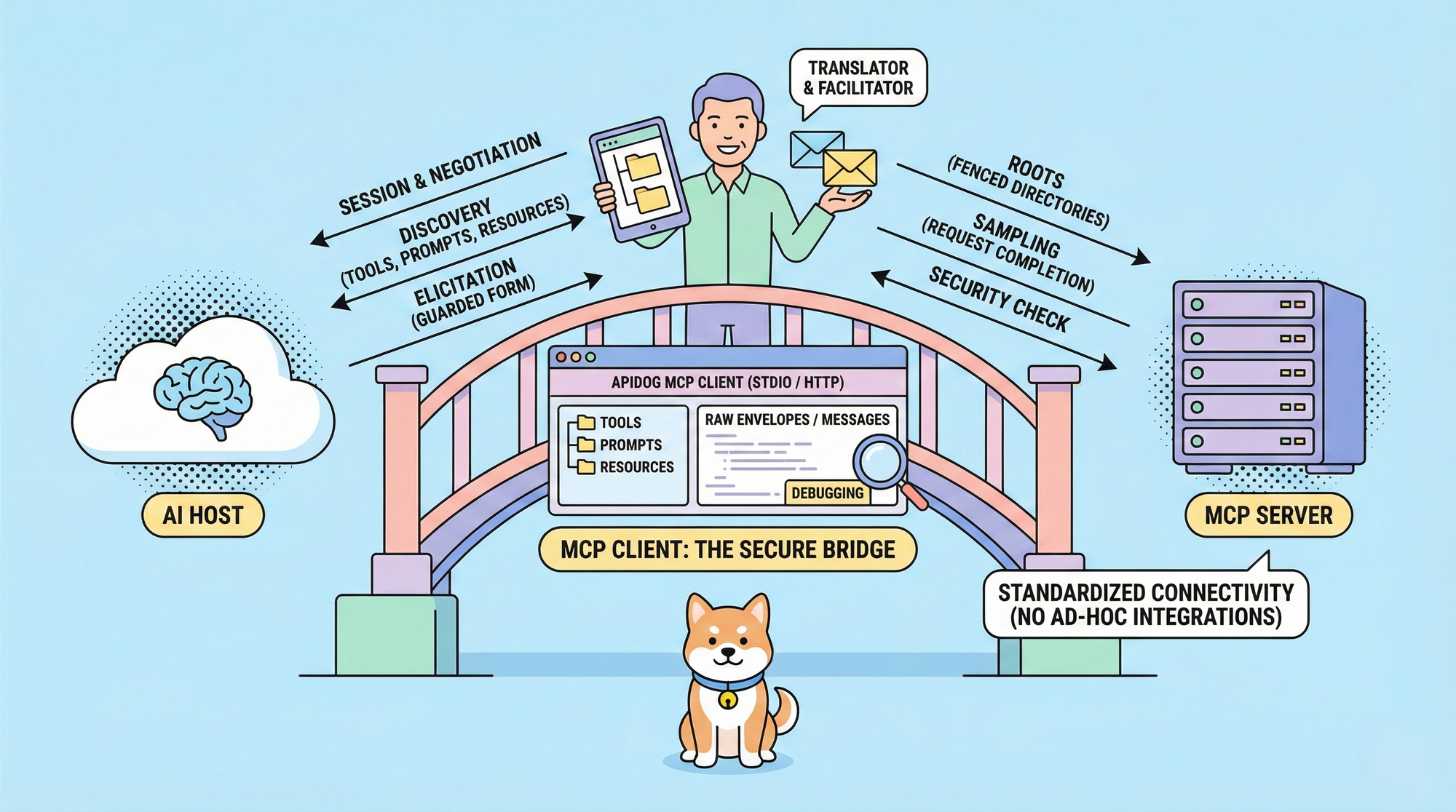
- MCP Client: The protocol-level component. The host instantiates an MCP Client for each MCP server connection. The MCP Client handles direct communication, feature negotiation, request forwarding, and core security features.
- MCP Server: Exposes capabilities such as tools (executable functions), prompts (reusable templates), and resources (data). Servers run locally via STDIO or remotely via Streamable HTTP.
The MCP Client acts as the intermediary. It establishes connections, discovers server capabilities, and enforces user control. This separation keeps the host focused on UX while the MCP Client manages protocol details.
Transports include STDIO for local processes (ideal for development) and HTTP for remote servers (suitable for production with authentication). Protocol version negotiation ensures compatibility during initialization.
What is the MCP Client? Detailed Role and Responsibilities
An MCP Client serves as the critical bridge in MCP. The MCP Client connects the host application to a single MCP server, implementing the full protocol logic.
The MCP Client performs these key responsibilities:
- Establishes and maintains stateful sessions.
- Negotiates protocol versions and capabilities.
- Discovers available tools, prompts, and resources.
- Forwards requests and processes responses.
- Implements elicitation, roots, and sampling for enriched interactions.
- Enforces security boundaries and user approvals.
Without a robust MCP Client, hosts cannot reliably interact with MCP servers. The MCP Client ensures transparency, validation, and control throughout every exchange.
Core Features of MCP Client: Elicitation, Roots, and Sampling
The MCP Client provides advanced features that empower servers to create dynamic, adaptive workflows.
Elicitation lets servers request user input on demand. Servers send structured requests with schemas; the MCP Client renders forms, validates responses, and returns data only after user approval. Users see a clear context of who asks, why, and how data gets used. The MCP Client prevents suspicious requests (like passwords) and allows declines or cancellations.
Roots define filesystem scope. The MCP Client communicates accessible directories via file:// URIs. Servers respect these boundaries to avoid accidental access. While roots coordinate rather than strictly enforce security (OS-level protections handle enforcement), the MCP Client notifies servers of changes and promotes safe practices.
Sampling enables servers to request LLM completions through the MCP Client. Servers provide messages, system prompts, and model preferences; the MCP Client executes the call, applies priorities (cost, speed, intelligence), and presents results for review. Users approve, modify, or deny outputs. The MCP Client supports redaction and rate limiting for sensitive data.
These MCP Client features create human-in-the-loop safeguards, transparency, and flexibility.
MCP Client vs MCP Host: Clearing Up the Confusion
Many confuse the MCP Client with the host. The MCP Host is the full application, such as Claude.ai, Cursor, or a custom chatbot that users interact with. The host coordinates UI, workflows, and multiple MCP Clients.
The MCP Client operates lower at the protocol layer. Each MCP Client focuses on one server connection and implements elicitation, roots, sampling, and transport handling. Developers implement or use MCP Clients to add MCP support to hosts.
This distinction helps when building integrations: focus on MCP Client logic for protocol compliance.
Apidog's Built-in MCP Client: A Practical Tool for Developers
Apidog provides a native MCP Client that streamlines MCP server testing. This MCP Client eliminates the need for separate tools and offers deep protocol visibility.
Key advantages of Apidog's MCP Client:
- Supports tools, prompts, and resources fully.
- Connects via STDIO (local) or HTTP (remote).
- Handles authentication (API Key, Bearer, OAuth 2.0, etc.).
- Displays folder trees of server capabilities.
- Shows Messages, Notifications, and raw JSON-RPC Envelopes.
Developers debug interactions visually and save configurations for teams.
Step-by-Step Guide: Using Apidog's MCP Client
Follow these steps to use Apidog's MCP Client.
- Open an HTTP project in Apidog.
- Create a new endpoint and select MCP type.
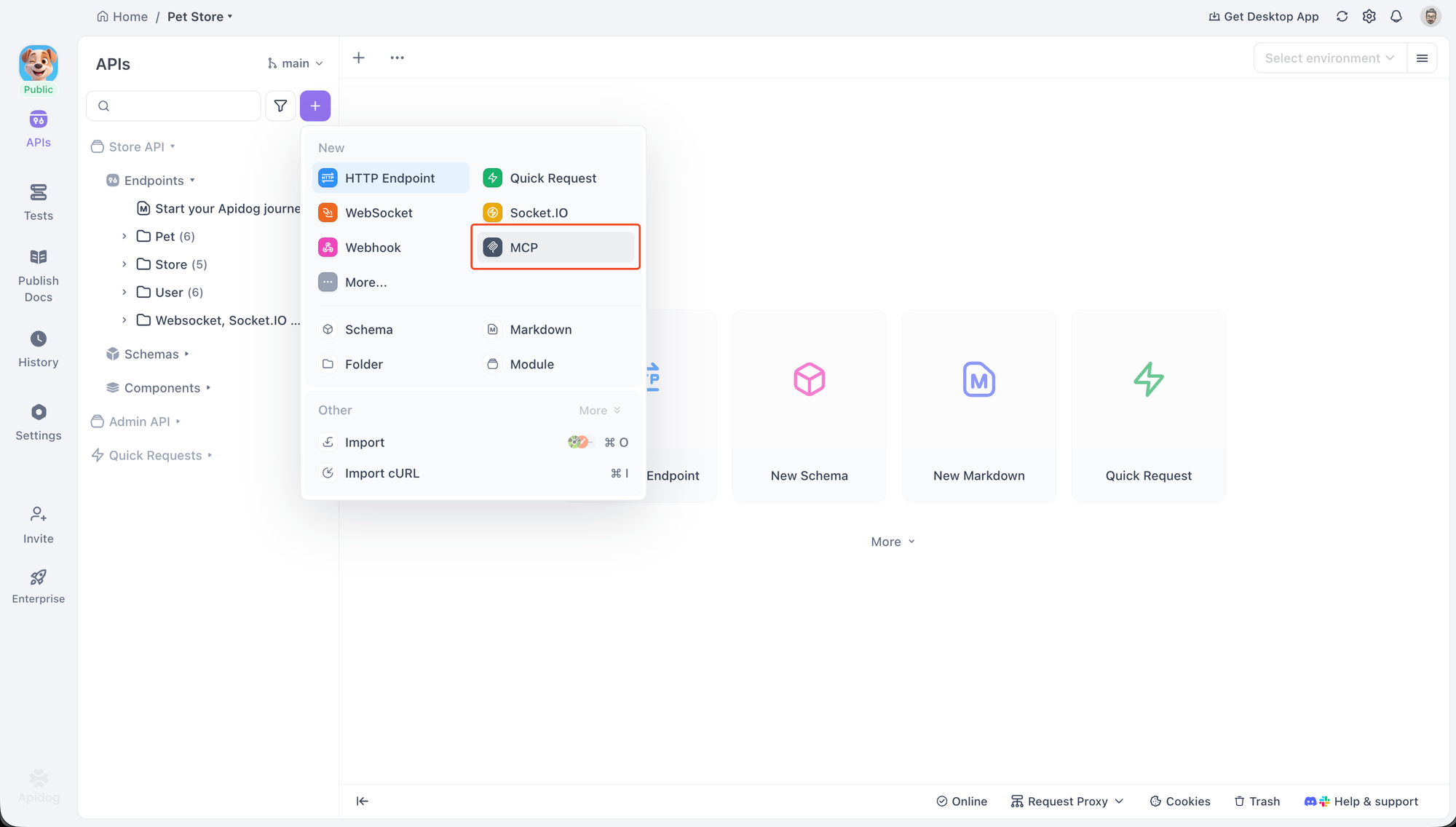
3. Enter connection details: paste a command (STDIO), a URL (HTTP), or a JSON config file.
npx -y @modelcontextprotocol/server-everything4. Click Connect. Approve security prompts for local commands; configure auth for remote.
5. Browse the folder tree for tools, prompts, resources.
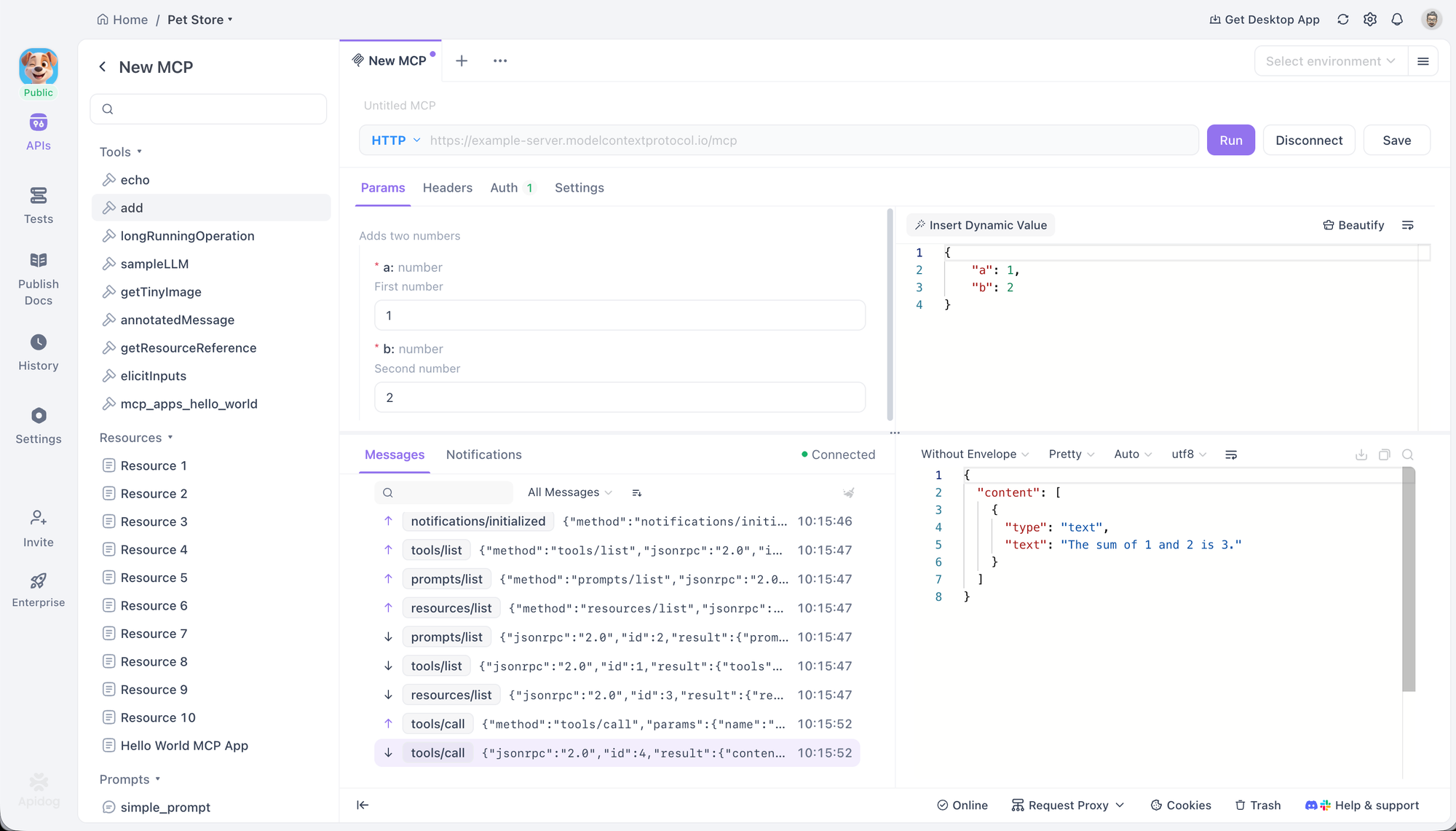
6. Select an item, configure parameters (form or JSON), and click Run.
7. View results in Messages/Notifications tabs; toggle Envelopes for raw protocol.
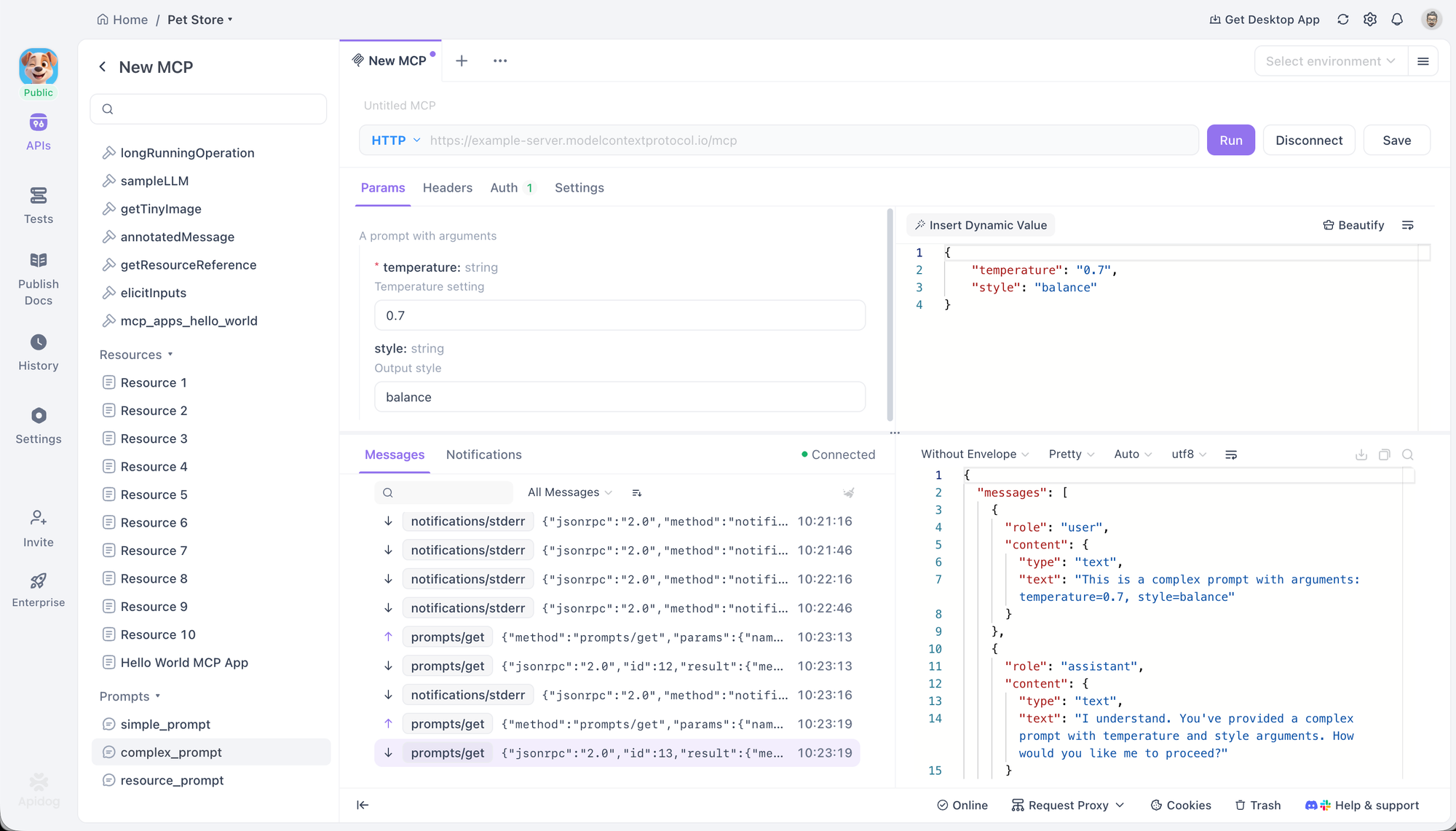
8. Use variables {{var}} in addresses, headers, params.
9. Save the endpoint for reuse.
Apidog's MCP Client auto-refreshes capabilities and supports environment variables in STDIO mode.
Advanced Debugging with Apidog MCP Client Features
Apidog's MCP Client excels at troubleshooting.
- Monitor Notifications for server-initiated updates.
- Inspect full JSON-RPC envelopes to trace issues.
- Handle OAuth flows automatically or manually.
- Set custom headers in HTTP mode.
- Validate schemas during elicitation simulations.
Best practices include verifying runtimes for STDIO, checking auth on 401 errors, and monitoring tabs for empty trees.
Real-World Benefits of Combining MCP Client with Apidog
Using Apidog's MCP Client speeds up iteration. Developers test MCP servers instantly, catch protocol errors early, and collaborate via shared projects.
The MCP Client unifies API and MCP workflows in one platform. Free access lowers entry barriers for experimenting with MCP.
Why MCP Client Matters for Modern AI Development in 2026
In 2026, MCP adoption accelerates across industries. The MCP Client enables context-aware AI that accesses real-time data, executes tools securely, and reduces custom coding overhead.
Developers benefit from standardized interfaces via MCP Client. Security improves with built-in user controls. Scalability increases as hosts manage multiple MCP Clients for diverse servers.
As enterprises integrate MCP into IDEs, chatbots, and agents, reliable MCP Clients become essential for production-grade solutions.
Conclusion: Master MCP Client and Build Better AI Integrations
MCP revolutionizes AI connectivity, and the MCP Client powers it all. Understanding MCP Client responsibilities from connection management to security features enables robust implementations.
Apidog's built-in MCP Client makes working with MCP practical and efficient. Download Apidog for free now. Connect to MCP servers, test tools and prompts, and build context-rich AI applications faster.