TL;DR
CodeSpeak is a formal specification language created by Kotlin’s creator for communicating with Large Language Models (LLMs). Instead of using ambiguous natural language prompts, CodeSpeak provides structured syntax that reduces misinterpretation, improves consistency, and makes LLM interactions more predictable for software development tasks.
Introduction
“Generate a REST API for user management.” You send this prompt to an LLM and get back code. But is it what you wanted? Does it include authentication? What about rate limiting? Input validation? The LLM made assumptions, and now you’re debugging AI-generated code instead of shipping features.
This ambiguity problem has plagued LLM-based development since ChatGPT launched. Natural language is flexible, but that flexibility creates inconsistency. The same prompt can produce different results across runs, models, or even temperature settings.
Enter CodeSpeak, a formal specification language from the creator of Kotlin. Instead of hoping the LLM interprets your English correctly, you write structured specifications that remove ambiguity. Think of it as TypeScript for prompts—adding type safety and structure to LLM communication.
In this guide, you’ll learn what CodeSpeak is, how it compares to natural language prompts, and how to use it for API development workflows. You’ll see real syntax examples, understand when to use formal specs vs natural language, and discover how to integrate CodeSpeak with your existing API testing tools.
What Is CodeSpeak?
CodeSpeak is a domain-specific language (DSL) designed for writing formal specifications that LLMs can interpret with high accuracy. Created by Dmitry Jemerov, the lead designer of Kotlin at JetBrains, CodeSpeak addresses a fundamental problem: natural language is too ambiguous for precise software specifications.

The Core Problem
When you tell an LLM “create a user authentication system,” the model must infer:
- Authentication method (JWT, session, OAuth)
- Password requirements
- Token expiration rules
- Error handling behavior
- Database schema
- API endpoint structure
Each inference point is a chance for misalignment between what you meant and what the LLM generates. CodeSpeak eliminates these inference points by making specifications explicit.
How CodeSpeak Differs from Prompts
Traditional prompting:
Create a REST API endpoint for user login that accepts email and password,
returns a JWT token, and handles invalid credentials gracefully.
CodeSpeak specification:
endpoint POST /auth/login {
  request {
    body {
      email: string @format(email) @required
      password: string @minLength(8) @required
    }
  }

  response 200 {
    body {
      token: string @format(jwt)
      expiresIn: number @unit(seconds)
    }
  }

  response 401 {
    body {
      error: string @enum("invalid_credentials", "account_locked")
    }
  }
}
The CodeSpeak version is longer, but it’s unambiguous. The LLM knows exactly what to generate.
Key Features
- Type Safety: Variables have explicit types (string, number, boolean, object, array)
- Constraints: Built-in validators (@required, @minLength, @format, @range)
- Structure: Clear hierarchy for requests, responses, and data models
- Composability: Reusable components and type definitions
- Determinism: Same spec produces consistent output across runs
Why CodeSpeak Matters for API Development
API development demands precision. A missing validation rule, incorrect status code, or ambiguous error message can break client integrations. When you’re using LLMs to generate API code, that precision becomes even more critical.
The Cost of Ambiguity
Consider this real scenario: A developer prompts an LLM to “add pagination to the users endpoint.” The LLM generates code using page and limit parameters. But the existing API uses offset and count. Now there’s inconsistency across endpoints, breaking client expectations.
With CodeSpeak, you specify the pagination pattern once:
pagination {
  style: offset-based
  parameters {
    offset: number @default(0) @min(0)
    count: number @default(20) @min(1) @max(100)
  }
}
Every endpoint using this pagination spec will be consistent.
Benefits for API Teams
Consistency Across Endpoints: When multiple developers use LLMs to generate API code, CodeSpeak ensures all endpoints follow the same patterns for error handling, authentication, and data formats.
Faster Code Review: Reviewers can check the CodeSpeak spec instead of reading generated code. If the spec is correct, the implementation should be too.
Better Testing: CodeSpeak specs can be converted directly into API test cases. Apidog can import OpenAPI specs and generate test suites, CodeSpeak makes those specs more accurate from the start.
Reduced Debugging: When the LLM generates code from a precise spec, there are fewer “wait, why did it do that?” moments. The spec documents the intent.
Version Control: CodeSpeak specs are text files. You can diff them, review changes, and track how API requirements evolve over time.
CodeSpeak vs Natural Language Prompts
When should you use CodeSpeak instead of natural language? The answer depends on precision requirements and iteration cost.
When to Use Natural Language
Natural language prompts work well for:
- Exploratory tasks: “Show me different ways to implement rate limiting”
- High-level architecture: “Design a microservices architecture for an e-commerce platform”
- Code explanation: “Explain how this authentication middleware works”
- Brainstorming: “What are the security risks in this API design?”
Natural language is fast to write and good for open-ended questions where you want the LLM to explore possibilities.
When to Use CodeSpeak
CodeSpeak is better for:
- Production code generation: When the output will be deployed
- API contracts: Defining endpoints, request/response formats, and error codes
- Data models: Specifying database schemas or data structures
- Validation rules: Defining input constraints and business logic
- Consistent patterns: When multiple endpoints need the same behavior
If you’re generating code that other systems depend on, use CodeSpeak.
Comparison Table
| Aspect | Natural Language | CodeSpeak |
|---|---|---|
| Precision | Low - requires interpretation | High - explicit specifications |
| Consistency | Varies across runs | Deterministic output |
| Learning Curve | None - just write English | Moderate - learn syntax |
| Verbosity | Concise | More verbose |
| Best For | Exploration, explanation | Production code, APIs |
| Error Rate | Higher - ambiguity issues | Lower - spec validation |
| Iteration Speed | Fast initial draft | Slower to write, faster to refine |
| Documentation | Implicit in prompt | Spec serves as documentation |
Hybrid Approach
You don’t have to choose one or the other. Many teams use both:
- Natural language for design: “Design a user authentication system with JWT tokens”
- CodeSpeak for implementation: Write formal specs for each endpoint
- Natural language for refinement: “Add rate limiting to the login endpoint”
- CodeSpeak to lock it in: Update the spec with rate limit rules
This hybrid approach gets you the speed of natural language with the precision of formal specs.
How CodeSpeak Works
CodeSpeak sits between you and the LLM. You write a CodeSpeak specification, the LLM interprets it, and generates code that matches the spec.
The Compilation Model
CodeSpeak isn’t compiled in the traditional sense. Instead, it’s a structured format that LLMs are trained to understand. Think of it as a contract:
- You write the spec: Define what you want in CodeSpeak syntax
- LLM parses the spec: The model understands the structure and constraints
- LLM generates code: Output matches the specification
- You validate: Check that generated code meets the spec
Type System
CodeSpeak uses a simple but powerful type system:
Primitive Types:
string: Text datanumber: Numeric values (integers or floats)boolean: True/false valuesnull: Absence of value
Complex Types:
object: Key-value structuresarray: Ordered collectionsenum: Fixed set of valuesunion: One of several types
Type Modifiers:
@required: Field must be present@optional: Field can be omitted@nullable: Field can be null@default(value): Default value if omitted
Constraint System
Constraints add validation rules to types:
String Constraints:
@minLength(n): Minimum character count@maxLength(n): Maximum character count@pattern(regex): Must match regex@format(type): Predefined formats (email, url, uuid, jwt)
Number Constraints:
@min(n): Minimum value@max(n): Maximum value@multipleOf(n): Must be divisible by n@integer: Must be whole number
Array Constraints:
@minItems(n): Minimum array length@maxItems(n): Maximum array length@uniqueItems: No duplicate values
Composition and Reuse
CodeSpeak supports defining reusable components:
type User {
  id: string @format(uuid) @required
  email: string @format(email) @required
  name: string @minLength(1) @maxLength(100) @required
  createdAt: string @format(iso8601) @required
}

type PaginatedResponse<T> {
  data: array<T> @required
  pagination: object {
    offset: number @required
    count: number @required
    total: number @required
  } @required
}

endpoint GET /users {
  response 200 {
    body: PaginatedResponse<User>
  }
}
This composition model keeps specs DRY (Don’t Repeat Yourself) and maintainable.
Using CodeSpeak for API Testing with Apidog
CodeSpeak generates precise API specifications. Apidog turns those specifications into automated tests. Here’s how they work together.
Workflow Overview
- Write CodeSpeak spec: Define your API endpoints formally
- Generate code: Use LLM to create implementation from spec
- Import to Apidog: Convert CodeSpeak spec to OpenAPI format
- Generate tests: Apidog creates test cases from the spec
- Run validation: Verify implementation matches specification
Converting CodeSpeak to OpenAPI
CodeSpeak specs map cleanly to OpenAPI 3.0:
CodeSpeak:
endpoint POST /users {
  request {
    body {
      email: string @format(email) @required
      name: string @minLength(1) @required
    }
  }
  response 201 {
    body {
      id: string @format(uuid)
      email: string
      name: string
    }
  }
}
OpenAPI Equivalent:
paths:
  /users:
    post:
      requestBody:
        required: true
        content:
          application/json:
            schema:
              type: object
              required: [email, name]
              properties:
                email:
                  type: string
                  format: email
                name:
                  type: string
                  minLength: 1
      responses:
        '201':
          content:
            application/json:
              schema:
                type: object
                properties:
                  id:
                    type: string
                    format: uuid
                  email:
                    type: string
                  name:
                    type: string
You can write a simple converter script or use an LLM to transform CodeSpeak to OpenAPI.
Testing in Apidog
Once you have the OpenAPI spec in Apidog:
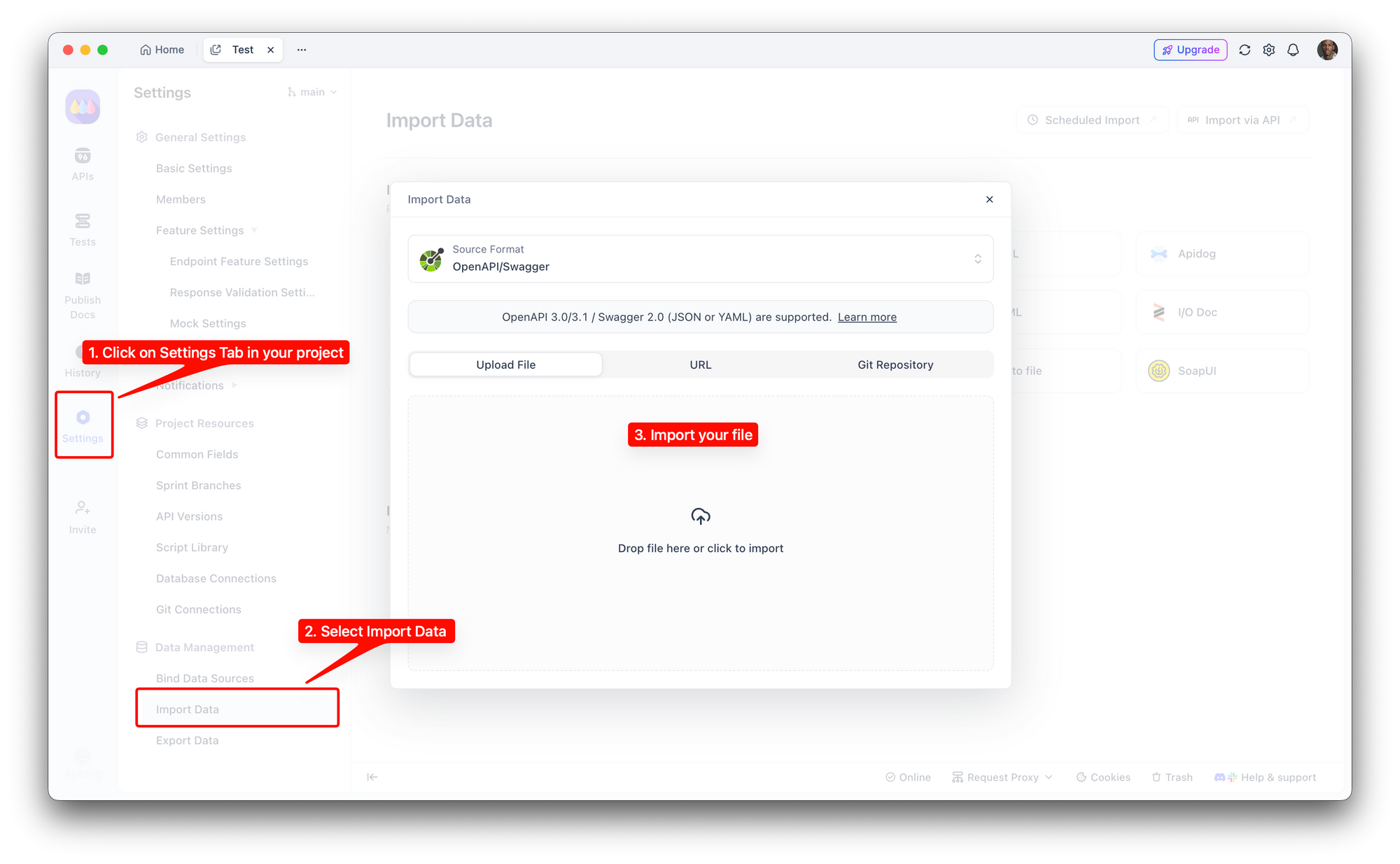
Import the spec: Settings → Import → OpenAPI 3.0
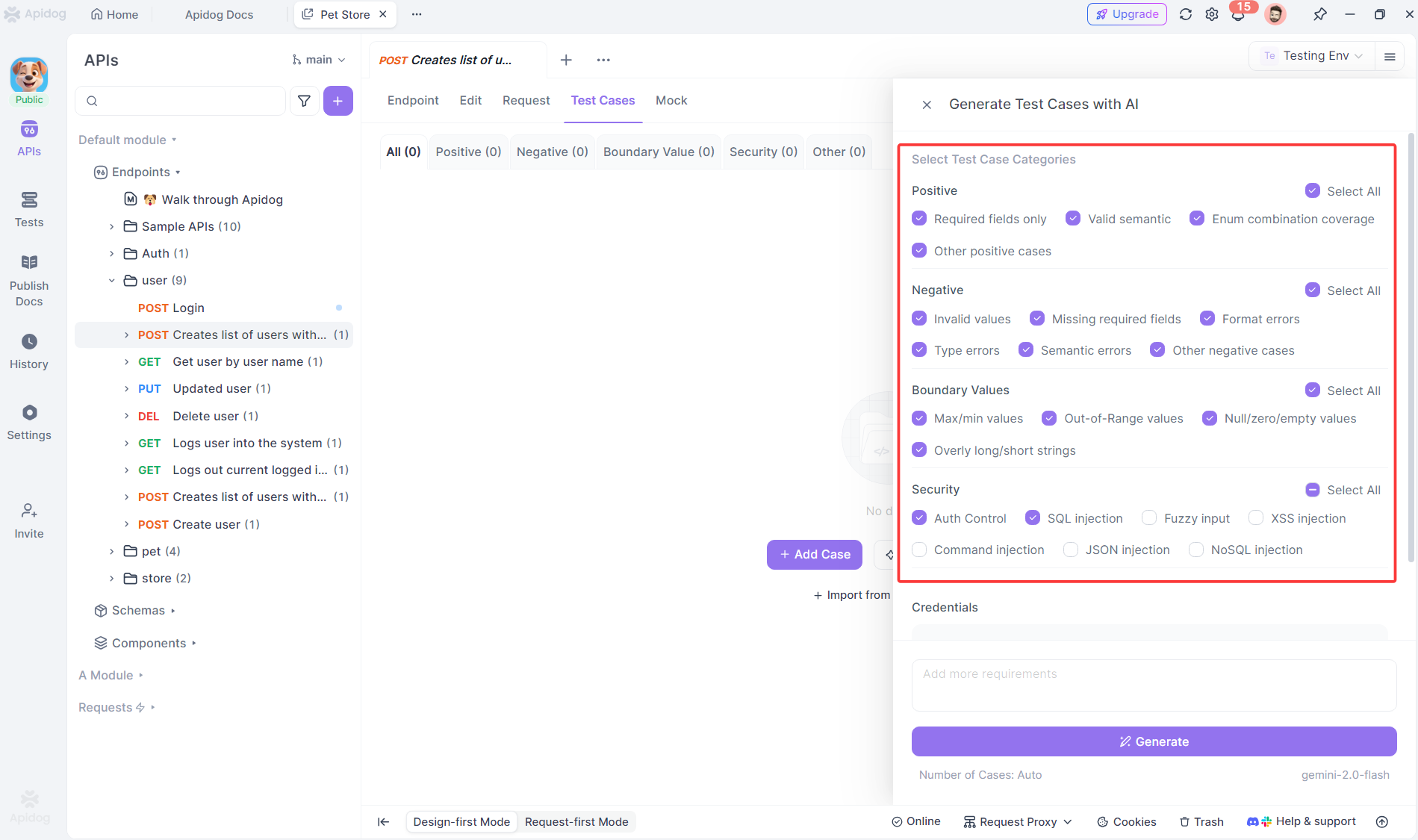
Generate test cases: Apidog auto-creates tests for each endpoint
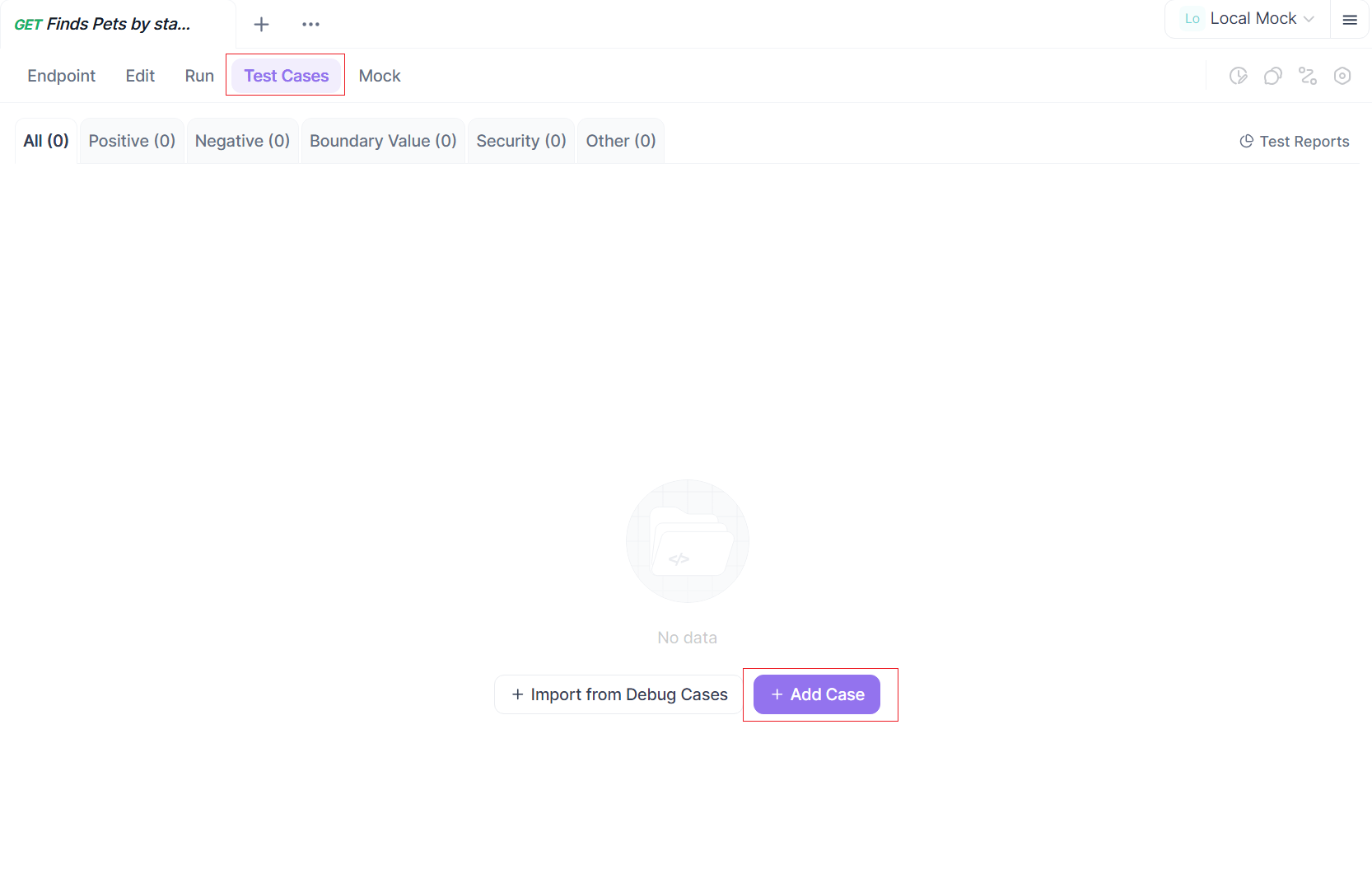
Add test data: Define valid and invalid inputs based on constraints
Run tests and Validate responses: Execute against your API implementation and Check that responses match the spec
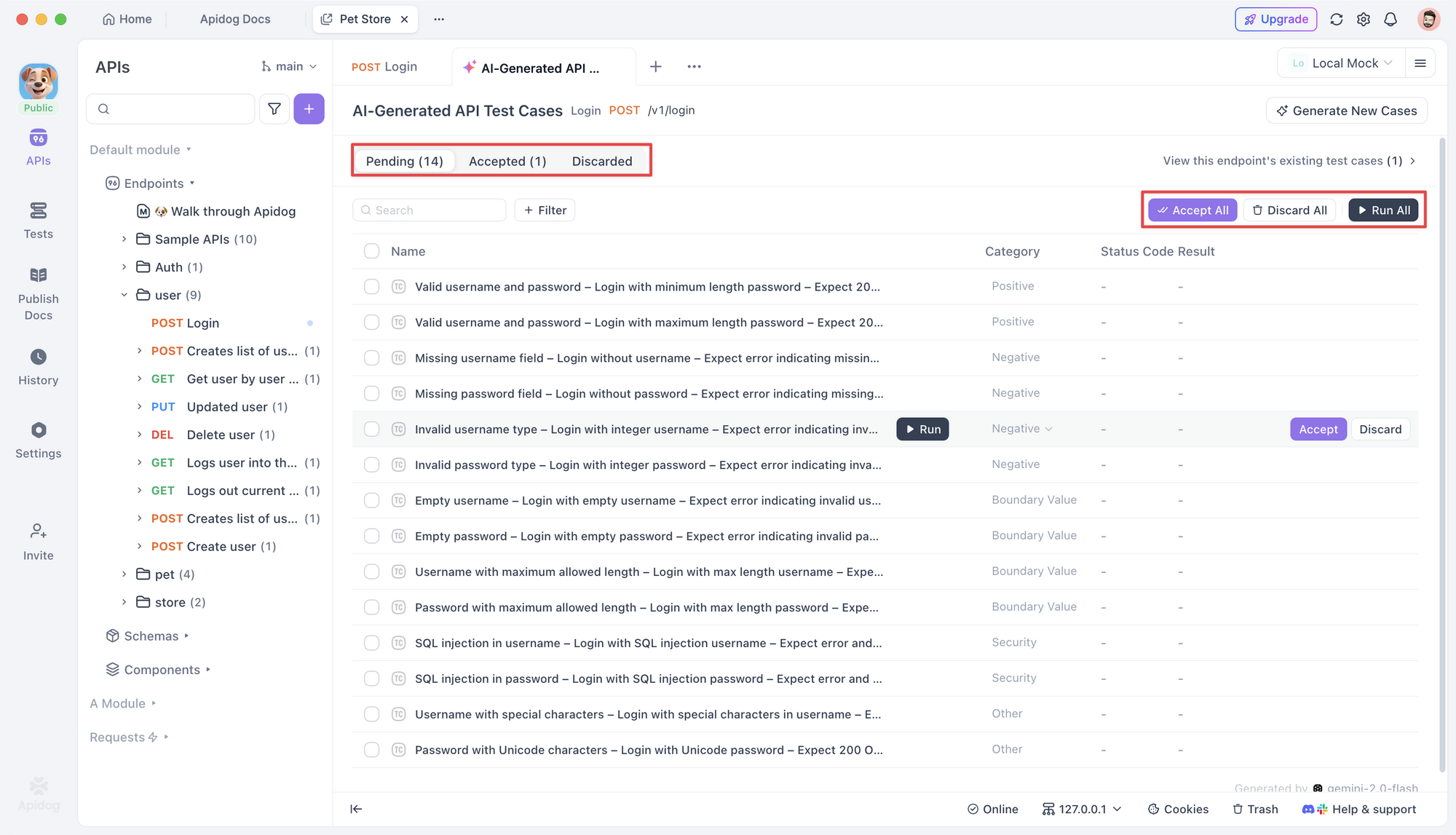
Apidog’s strength is validating that your API implementation matches the specification. CodeSpeak ensures the specification is precise.
Example: Testing a Login Endpoint
CodeSpeak Spec:
endpoint POST /auth/login {
  request {
    body {
      email: string @format(email) @required
      password: string @minLength(8) @required
    }
  }

  response 200 {
    body {
      token: string @format(jwt) @required
      expiresIn: number @min(1) @required
    }
  }

  response 401 {
    body {
      error: string @enum("invalid_credentials") @required
    }
  }

  response 422 {
    body {
      error: string @enum("validation_error") @required
      fields: array<string> @required
    }
  }
}
Apidog Test Cases:
- Valid login: Send correct email/password, expect 200 with JWT
- Invalid email format: Send malformed email, expect 422
- Short password: Send 7-character password, expect 422
- Wrong credentials: Send valid format but wrong password, expect 401
- Missing fields: Send empty body, expect 422
Apidog generates these test cases automatically from the spec. You just need to provide test data.
CodeSpeak Syntax and Examples
Let’s look at real CodeSpeak syntax for common API patterns.
Basic Endpoint Definition
endpoint GET /health {
  response 200 {
    body {
      status: string @enum("ok", "degraded", "down") @required
      timestamp: string @format(iso8601) @required
    }
  }
}
This defines a health check endpoint that returns a status and timestamp.
CRUD Operations
Create:
endpoint POST /products {
  request {
    headers {
      Authorization: string @pattern("^Bearer .+") @required
    }
    body {
      name: string @minLength(1) @maxLength(200) @required
      price: number @min(0) @required
      category: string @enum("electronics", "clothing", "food") @required
      inStock: boolean @default(true)
    }
  }

  response 201 {
    body {
      id: string @format(uuid) @required
      name: string @required
      price: number @required
      category: string @required
      inStock: boolean @required
      createdAt: string @format(iso8601) @required
    }
  }

  response 401 {
    body {
      error: string @enum("unauthorized") @required
    }
  }
}
Read:
endpoint GET /products/:id {
  parameters {
    id: string @format(uuid) @required
  }

  response 200 {
    body {
      id: string @format(uuid) @required
      name: string @required
      price: number @required
      category: string @required
      inStock: boolean @required
      createdAt: string @format(iso8601) @required
      updatedAt: string @format(iso8601) @required
    }
  }

  response 404 {
    body {
      error: string @enum("not_found") @required
    }
  }
}
Update:
endpoint PATCH /products/:id {
  parameters {
    id: string @format(uuid) @required
  }

  request {
    headers {
      Authorization: string @pattern("^Bearer .+") @required
    }
    body {
      name: string @minLength(1) @maxLength(200) @optional
      price: number @min(0) @optional
      inStock: boolean @optional
    }
  }

  response 200 {
    body {
      id: string @format(uuid) @required
      name: string @required
      price: number @required
      inStock: boolean @required
      updatedAt: string @format(iso8601) @required
    }
  }

  response 404 {
    body {
      error: string @enum("not_found") @required
    }
  }
}
Delete:
endpoint DELETE /products/:id {
  parameters {
    id: string @format(uuid) @required
  }

  request {
    headers {
      Authorization: string @pattern("^Bearer .+") @required
    }
  }

  response 204 {}

  response 404 {
    body {
      error: string @enum("not_found") @required
    }
  }
}
Pagination and Filtering
endpoint GET /products {
  query {
    offset: number @default(0) @min(0) @optional
    limit: number @default(20) @min(1) @max(100) @optional
    category: string @enum("electronics", "clothing", "food") @optional
    minPrice: number @min(0) @optional
    maxPrice: number @min(0) @optional
    inStock: boolean @optional
  }

  response 200 {
    body {
      data: array<object {
        id: string @format(uuid) @required
        name: string @required
        price: number @required
        category: string @required
        inStock: boolean @required
      }> @required
      pagination: object {
        offset: number @required
        limit: number @required
        total: number @required
      } @required
    }
  }
}
Nested Resources
endpoint GET /users/:userId/orders {
  parameters {
    userId: string @format(uuid) @required
  }

  query {
    status: string @enum("pending", "shipped", "delivered", "cancelled") @optional
  }

  response 200 {
    body {
      data: array<object {
        id: string @format(uuid) @required
        userId: string @format(uuid) @required
        status: string @enum("pending", "shipped", "delivered", "cancelled") @required
        items: array<object {
          productId: string @format(uuid) @required
          quantity: number @min(1) @required
          price: number @min(0) @required
        }> @required
        total: number @min(0) @required
        createdAt: string @format(iso8601) @required
      }> @required
    }
  }
}
File Upload
endpoint POST /products/:id/image {
  parameters {
    id: string @format(uuid) @required
  }

  request {
    headers {
      Authorization: string @pattern("^Bearer .+") @required
      Content-Type: string @enum("multipart/form-data") @required
    }
    body {
      image: file @mimeType("image/jpeg", "image/png") @maxSize(5242880) @required
    }
  }

  response 200 {
    body {
      imageUrl: string @format(url) @required
    }
  }

  response 413 {
    body {
      error: string @enum("file_too_large") @required
    }
  }
}
Best Practices for CodeSpeak
Start with Types
Define your data models before writing endpoints:
type Product {
  id: string @format(uuid) @required
  name: string @minLength(1) @maxLength(200) @required
  price: number @min(0) @required
  category: string @enum("electronics", "clothing", "food") @required
  inStock: boolean @required
  createdAt: string @format(iso8601) @required
  updatedAt: string @format(iso8601) @required
}

endpoint GET /products/:id {
  response 200 {
    body: Product
  }
}
This keeps your specs DRY and makes changes easier.
Use Enums for Fixed Values
Don’t use free-form strings when values are constrained:
Bad:
status: string @required
Good:
status: string @enum("pending", "approved", "rejected") @required
Enums catch typos and make valid values explicit.
Document with Comments
CodeSpeak supports comments:
// User authentication endpoint
// Rate limit: 5 requests per minute per IP
endpoint POST /auth/login {
  request {
    body {
      // Must be a valid email format
      email: string @format(email) @required

      // Minimum 8 characters, must include number and special char
      password: string @minLength(8) @required
    }
  }

  response 200 {
    body {
      // JWT token valid for 24 hours
      token: string @format(jwt) @required
      expiresIn: number @default(86400) @required
    }
  }
}
Comments help other developers understand the spec.
Version Your Specs
Store CodeSpeak specs in version control alongside your code:
/api-specs
  /v1
    auth.codespeak
    users.codespeak
    products.codespeak
  /v2
    auth.codespeak
    users.codespeak
This tracks how your API evolves over time.
Validate Before Generating
Use an LLM to validate your CodeSpeak spec before generating code:
Prompt: “Review this CodeSpeak spec for errors, inconsistencies, or missing constraints: [paste spec]”
The LLM can catch issues like:
- Missing required fields
- Inconsistent naming
- Invalid constraint combinations
- Missing error responses
Test the Spec, Not Just the Code
Write tests that validate the CodeSpeak spec itself:
- Are all required fields marked @required?
- Do all endpoints have error responses?
- Are constraints realistic (e.g., @maxLength not too small)?
- Do response types match request types where appropriate?
Limitations and Considerations
CodeSpeak isn’t perfect. Here are the tradeoffs.
Learning Curve
CodeSpeak requires learning new syntax. Your team needs time to:
- Understand the type system
- Learn constraint syntax
- Know when to use CodeSpeak vs natural language
Budget 1-2 weeks for developers to become comfortable with CodeSpeak.
Verbosity
CodeSpeak specs are longer than natural language prompts. A simple endpoint might take 20 lines of CodeSpeak vs 2 lines of English.
This verbosity is the point—it forces you to be explicit. But it does slow down initial drafting.
LLM Support
Not all LLMs understand CodeSpeak equally well. Models trained on code (like GPT-4, Claude, or Codex) handle it better than general-purpose models.
Test your LLM with CodeSpeak before committing to it.
Maintenance Overhead
Every time your API changes, you need to update the CodeSpeak spec. This is extra work compared to just changing code.
The benefit is that the spec serves as documentation and can regenerate code if needed.
Not a Silver Bullet
CodeSpeak reduces ambiguity, but it doesn’t eliminate all LLM errors. The model can still:
- Generate inefficient code
- Miss edge cases
- Introduce security vulnerabilities
- Produce bugs in business logic
You still need code review, testing, and validation. CodeSpeak just makes the specification clearer.
Real-World Use Cases
Use Case 1: API Consistency Across Teams
Problem: A fintech company has 5 teams building microservices. Each team uses LLMs to generate API code, but endpoints are inconsistent. One team uses page/size for pagination, another uses offset/limit, and a third uses cursor.
Solution: The platform team creates CodeSpeak templates for common patterns:
// Standard pagination pattern
type Pagination {
  offset: number @default(0) @min(0)
  limit: number @default(20) @min(1) @max(100)
}

// Standard error response
type ErrorResponse {
  error: string @required
  message: string @required
  requestId: string @format(uuid) @required
}
All teams use these templates in their CodeSpeak specs. Now every API endpoint follows the same patterns.
Result: Client integration time drops by 40% because developers know what to expect from any endpoint.
Use Case 2: Rapid Prototyping with Validation
Problem: An e-commerce startup needs to prototype 20 API endpoints in 2 weeks. They use LLMs to generate code quickly, but bugs slip through because specs are vague.
Solution: The team writes CodeSpeak specs for all 20 endpoints first. They review the specs in a 2-hour meeting, catching issues like:
- Missing authentication on sensitive endpoints
- Inconsistent product ID formats (some UUID, some integer)
- No rate limiting on expensive operations
After fixing the specs, they generate code from CodeSpeak. They import the specs into Apidog and generate test suites automatically.
Result: They ship all 20 endpoints on time with 60% fewer bugs than their previous LLM-generated code.
Use Case 3: API Documentation from Specs
Problem: A SaaS company’s API documentation is always out of date. Developers change code but forget to update docs.
Solution: They write CodeSpeak specs as the source of truth. When they need to change an API:
- Update the CodeSpeak spec
- Regenerate code from the spec
- Auto-generate documentation from the spec
The documentation is always accurate because it’s derived from the same spec that generates the code.
Result: Customer support tickets about API confusion drop by 50%.
Conclusion
CodeSpeak brings type safety and structure to LLM interactions. For API development, this means:
- Consistency: All endpoints follow the same patterns
- Precision: No ambiguity about what the API should do
- Testability: Specs convert directly to test cases
- Documentation: The spec is the documentation
- Maintainability: Changes are explicit and trackable
You don’t need to use CodeSpeak for everything. Natural language is still great for exploration and high-level design. But when you’re generating production API code, CodeSpeak reduces errors and speeds up iteration.
Key Takeaways:
- CodeSpeak is a formal specification language for LLM communication
- It eliminates ambiguity in API specifications
- Use it for production code, natural language for exploration
- Specs integrate with tools like Apidog for automated testing
- The verbosity is a feature, not a bug—it forces explicit design decisions
FAQ
Is CodeSpeak a programming language?
No, CodeSpeak is a specification language, not a programming language. You don’t compile or execute CodeSpeak directly. Instead, you use it to describe what you want, and an LLM generates actual code (Python, JavaScript, Go, etc.) from the specification.
Do I need to learn CodeSpeak to use LLMs for coding?
No, you can continue using natural language prompts. CodeSpeak is optional and most useful when you need precise, consistent results for production code. For exploration, prototyping, or one-off scripts, natural language works fine.
Which LLMs support CodeSpeak?
CodeSpeak works best with code-focused models like GPT-4, Claude Opus, and GitHub Copilot. These models are trained on structured code and understand formal syntax better than general-purpose models. Test your specific LLM with CodeSpeak examples to verify compatibility.
Can I convert existing OpenAPI specs to CodeSpeak?
Yes, OpenAPI and CodeSpeak map closely. You can write a converter script or use an LLM to transform OpenAPI YAML to CodeSpeak syntax. The conversion is mostly mechanical—types, constraints, and endpoints translate directly.
How does CodeSpeak compare to OpenAPI?
OpenAPI is a specification format for documenting existing APIs. CodeSpeak is a language for telling LLMs what to generate. They serve different purposes but are complementary. You can generate OpenAPI specs from CodeSpeak, then use tools like Apidog to test the implementation.
Is CodeSpeak open source?
As of March 2026, CodeSpeak is a newly announced project. Check the official CodeSpeak website for licensing information and community resources. The language design is public, and you can start using it with any LLM that understands structured specifications.
Can CodeSpeak prevent all LLM errors?
No, CodeSpeak reduces ambiguity in specifications, but LLMs can still generate buggy code, miss edge cases, or introduce security issues. You still need code review, testing, and validation. CodeSpeak makes the “what” clearer; it doesn’t guarantee the “how” is perfect.
How long does it take to write a CodeSpeak spec?
A simple endpoint takes 5-10 minutes. A complex endpoint with nested objects, multiple error cases, and validation rules might take 20-30 minutes. This is slower than a natural language prompt but faster than debugging ambiguous LLM output.