Developers and AI enthusiasts increasingly turn to powerful generative models like Wan 2.2 to create cinematic videos from simple inputs. This model stands out for its Mixture-of-Experts architecture, which boosts capacity without sacrificing speed. When you combine the wan 2.2 api (with lora), you gain the ability to fine-tune outputs for specific styles or motions, making it ideal for customized video generation.
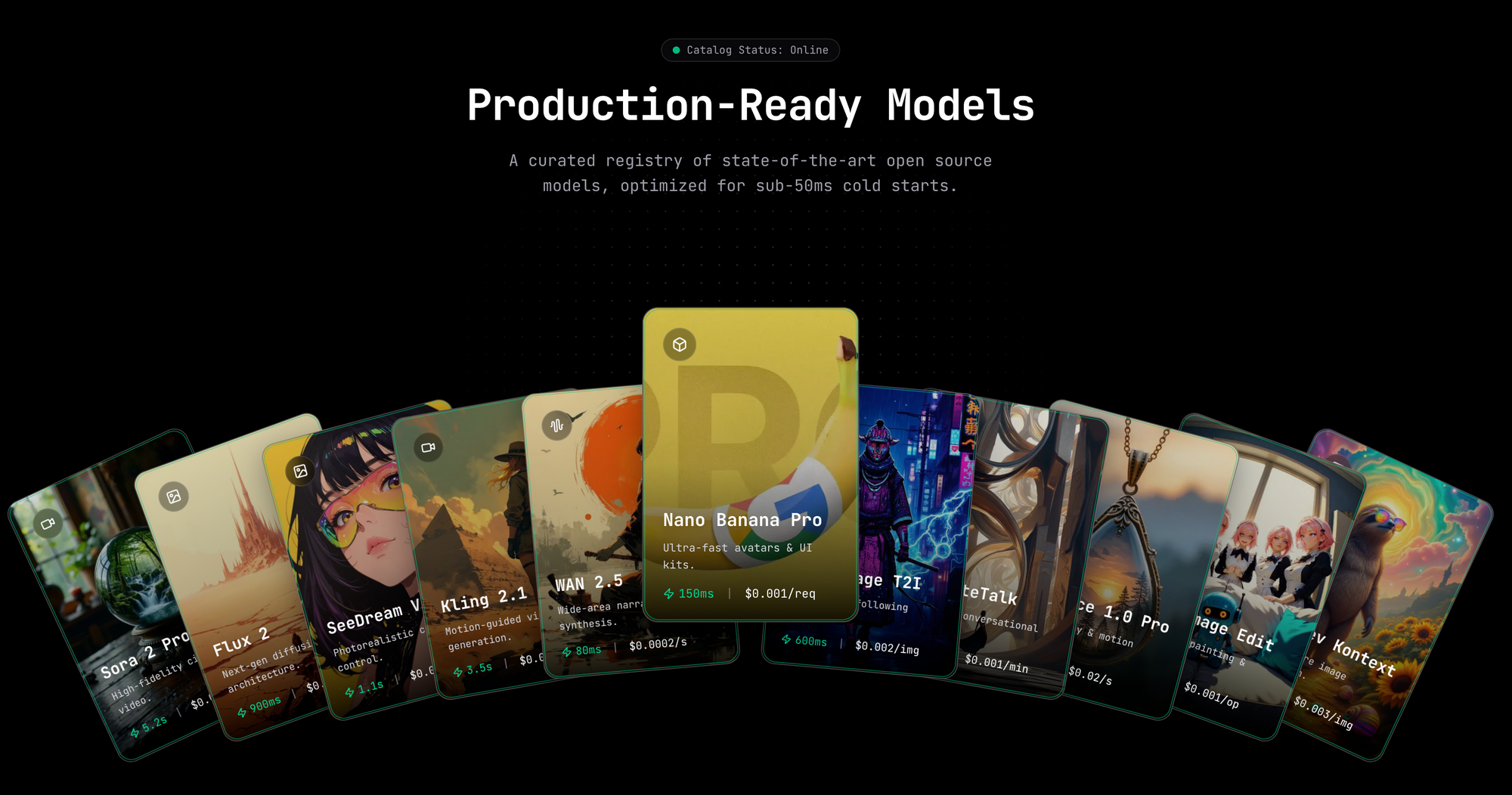
Want to Build AI Apps at lightening fast speed? There is an awesome AI Infra start that provides Wan 2.2 API at fast speed at the lowest cost, and you need to know of: Hypereal AI.


What Is Wan 2.2?
Wan 2.2 represents an advanced open-source large-scale video generative model developed by the Wan team. Engineers design it to handle complex tasks such as text-to-video (T2V), image-to-video (I2V), and speech-to-video (S2V) generation. The model employs a Mixture-of-Experts (MoE) framework, which divides the denoising process in diffusion models across specialized experts. For instance, high-noise experts manage early timesteps, while low-noise ones refine later stages. This approach results in a total of 27 billion parameters, with only 14 billion active per inference step, ensuring efficiency.
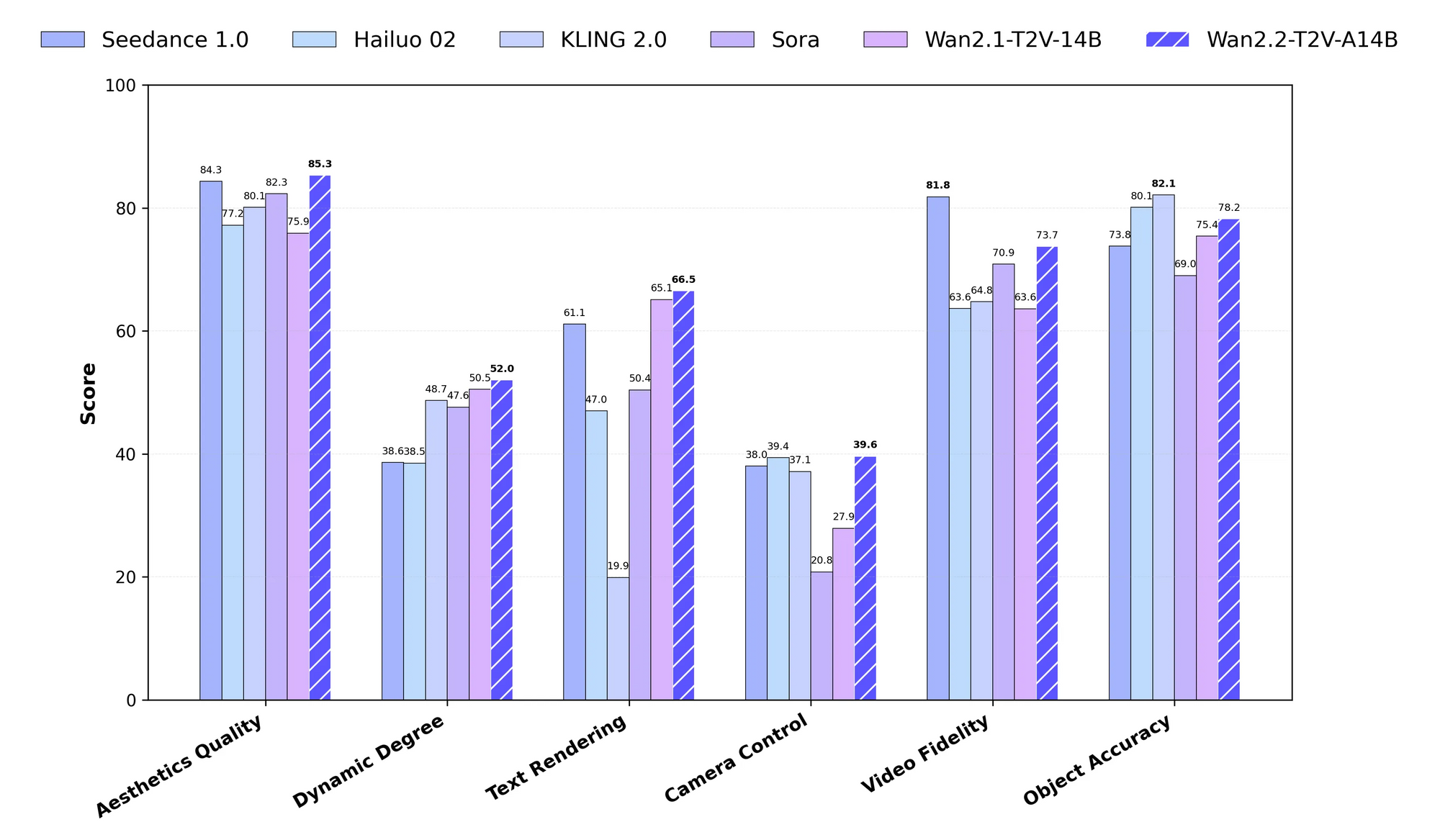
Moreover, Wan 2.2 incorporates cinematic aesthetics through curated datasets that emphasize lighting, composition, and color tones. The training data expands significantly from previous versions, including 65.6% more images and 83.2% more videos, which enhances motion complexity and semantic understanding. You access variants like the 5B parameter TI2V model, which generates 720P videos at 24 FPS on consumer hardware like an RTX 4090.
The API aspect primarily manifests through scripts like generate.py in the official repository, but hosted platforms extend it to web-based endpoints. Therefore, you choose between local execution for full control or cloud services for scalability when working with wan 2.2 api (with lora).
What Is LoRA in the Context of Wan 2.2?
LoRA, or Low-Rank Adaptation, serves as a parameter-efficient fine-tuning method for large models like Wan 2.2. Developers apply LoRA to adapt the base model to specific datasets without retraining the entire architecture. In Wan 2.2, LoRA targets the transformer's weights, allowing you to inject custom styles, characters, or motions into video generations.
For example, you train a LoRA on a dataset of orbital shots to specialize the I2V variant in creating rotating camera movements. The official documentation cautions against using LoRA trained on Wan 2.2 for certain tasks like animation due to potential instability, but community tools overcome this. Platforms like fal.ai integrate LoRA directly into their API, where you specify paths to LoRA weights and scaling factors.
Consequently, incorporating LoRA into the wan 2.2 api (with lora) reduces training costs and enables rapid customization. You merge LoRA adapters at inference time, preserving the base model's efficiency while achieving targeted outputs.
Why Use Wan 2.2 API with LoRA?
You opt for the wan 2.2 api (with lora) to balance power and flexibility in video AI applications. Traditional fine-tuning demands massive resources, but LoRA minimizes this by updating only low-rank matrices. This method cuts memory usage and training time, making it accessible for individual developers.
Additionally, Wan 2.2's MoE structure complements LoRA by allowing expert-specific adaptations. You generate videos with enhanced aesthetics or motions that vanilla models struggle to produce. For instance, in content creation, you use LoRA to maintain consistent character styles across scenes.
Hosted APIs amplify these benefits by offloading computation to the cloud. Services like fal.ai handle the heavy lifting, so you focus on prompts and parameters. Therefore, this combination suits prototyping, production, and experimentation, especially when you integrate tools like Apidog for seamless API management.
How to Set Up Your Environment for Local Usage of Wan 2.2 API?
You begin by cloning the Wan 2.2 repository from GitHub. Execute the command git clone https://github.com/Wan-Video/Wan2.2.git in your terminal, then navigate into the directory with cd Wan2.2. Next, install dependencies using pip install -r requirements.txt. For S2V tasks, add pip install -r requirements_s2v.txt.
Ensure your system runs PyTorch version 2.4.0 or higher. You also install the Hugging Face CLI with pip install "huggingface_hub[cli]" for model downloads. Set environment variables if you plan to use prompt extension, such as export DASH_API_KEY=your_key for Dashscope integration.
For multi-GPU setups, configure Fully Sharded Data Parallel (FSDP) and DeepSpeed Ulysses. You enable these with flags like --dit_fsdp and --ulysses_size 8. Single-GPU users activate memory optimizations via --offload_model and --convert_model_dtype. This setup prepares you to run the generate.py script, the core of the local wan 2.2 api (with lora).
How to Download and Install Wan 2.2 Models?
You download models from Hugging Face or ModelScope. For the T2V-A14B variant, use huggingface-cli download Wan-AI/Wan2.2-T2V-A14B --local-dir ./Wan2.2-T2V-A14B. Repeat this for other variants like I2V-A14B or TI2V-5B.
Place the checkpoints in appropriate directories. The 14B models require substantial VRAM—around 80GB for multi-GPU inference—while the 5B TI2V fits on a 24GB card. After downloading, verify the files to avoid corruption.
If you encounter issues, switch to ModelScope mirrors for regions with access restrictions. This step ensures you have the base models ready before applying LoRA adapters in the wan 2.2 api (with lora).
How to Use the Generate.py Script for Basic Tasks in Wan 2.2?
You invoke the generate.py script to perform generations. For a simple T2V task on a single GPU, run python generate.py --task t2v-A14B --size 1280x720 --ckpt_dir ./Wan2.2-T2V-A14B --offload_model True --convert_model_dtype --prompt "Two anthropomorphic cats in comfy boxing gear fight intensely on a spotlighted stage.".
Adjust parameters for other modes. In I2V, add --image examples/i2v_input.JPG. For S2V, include --audio examples/audio_input.wav and enable TTS with --enable_tts. Multi-GPU execution uses torchrun --nproc_per_node=8 generate.py with FSDP flags.
These commands form the backbone of the local wan 2.2 api (with lora). You experiment with prompts and sizes to refine outputs, transitioning smoothly to LoRA integration for advanced customizations.
How to Train a LoRA for Wan 2.2?
You train LoRA using community tools like AI Toolkit or Trooper.AI trainers. First, prepare your dataset—curate videos or images aligned with your target style. For an I2V LoRA, focus on motion-specific clips like orbital shots.
Set up the trainer environment on platforms like RunPod for GPU access. Load the Wan 2.2 base weights into the expected directories. Configure hyperparameters: set learning rate to 1e-5, batch size to 1, and epochs to 10-20 depending on dataset size.
Run the training script, monitoring loss metrics. Tools like Hugging Face's PEFT library facilitate this, allowing you to save the LoRA as a .safetensors file. Once trained, you apply this adapter in generations, enhancing the wan 2.2 api (with lora) for specialized tasks.
How to Apply LoRA in Local Wan 2.2 Generation?
You integrate LoRA in local setups via ComfyUI or custom scripts. In ComfyUI, use the LoadLoRAModelOnly node between the model loader and sampler. Specify the LoRA path and strength (e.g., 0.8).
For generate.py, community forks or extensions add LoRA support, as the official version lacks direct integration. Alternatively, use Diffusers pipeline for animation modes, loading LoRA with pipe.load_lora_weights("path/to/lora").
This application transforms standard outputs into tailored videos. Therefore, you achieve consistency in styles or motions, making the wan 2.2 api (with lora) more versatile for production use.
What Are the Best Hosted Services for Wan 2.2 API with LoRA?
You access hosted wan 2.2 api (with lora) through platforms like fal.ai. Their endpoint at https://api.fal.ai/v1/fal-ai/wan/v2.2-a14b/text-to-video/lora supports LoRA natively. Sign up for an API key and configure it in your client.
Other services include WaveSpeed.ai for I2V LoRA and Trooper.AI for training. These eliminate local hardware needs, scaling to high-resolutions effortlessly. Consequently, you prototype faster, integrating with tools like Apidog for request management.
How to Authenticate and Send Requests to fal.ai Wan 2.2 API?
You authenticate by setting the FAL_KEY environment variable. Install the fal-ai client with npm install --save @fal-ai/client for JavaScript, or use Python equivalents.
Send a POST request with JSON payload including prompt and loras array. For example: {"prompt": "A cyberpunk cityscape at night", "loras": [{"path": "https://example.com/loras/cyberpunk.safetensors", "scale": 0.8}]}.
Monitor responses for video URLs. This process leverages the wan 2.2 api (with lora) in cloud environments, ensuring reliable performance.
How to Use Apidog to Test the Wan 2.2 API with LoRA?
You start by installing Apidog and creating a new API project. Import the fal.ai endpoint details, setting the method to POST and URL to the text-to-video LoRA path.
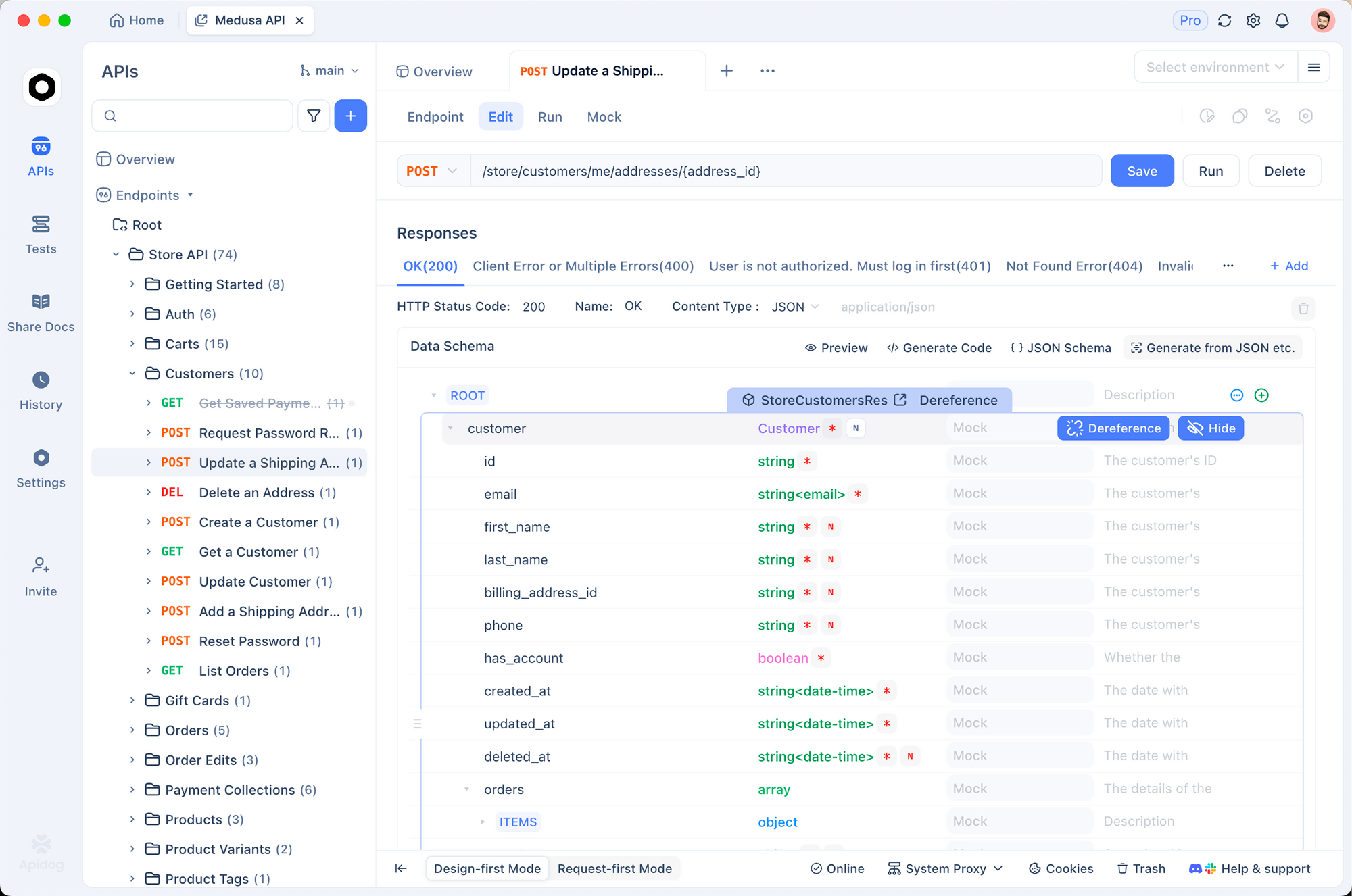
Add headers for authentication, such as Authorization: Key your_fal_key. In the body tab, construct JSON with prompt and LoRA parameters. Send the request and inspect the response, which includes the generated video link.
Apidog's features like environment variables and response validation streamline debugging. For instance, you save common LoRA configurations as collections. Thus, Apidog enhances your workflow when testing the wan 2.2 api (with lora), allowing quick iterations.
What Parameters Should You Tune in Wan 2.2 API with LoRA?
You adjust key parameters to optimize outputs. Set num_inference_steps to 27 for balance, or higher for quality. Guidance scales like 3.5 influence adherence to prompts.
For LoRA, tune scale between 0.5-1.0 to control adapter strength. Resolution options include 720p, while FPS ranges from 4-60. Enable acceleration for faster generations, though it may reduce fidelity.
Additionally, use negative prompts to avoid unwanted elements. These tunings refine the wan 2.2 api (with lora), adapting to specific project needs.
How to Handle Multi-Modal Inputs in Wan 2.2 with LoRA?
You incorporate images or audio by specifying --image or --audio in local scripts, or equivalent fields in hosted APIs. Apply LoRA to enhance these, such as styling I2V outputs.
In fal.ai, add image_url for TI2V modes. LoRA adapts the fusion, ensuring coherent videos. Therefore, you create dynamic content like animated characters, leveraging the full potential of wan 2.2 api (with lora).
What Are Advanced Optimization Techniques for Wan 2.2 Inference?
You employ memory optimizations like model offloading and dtype conversion to run on limited hardware. For multi-GPU, FSDP distributes shards efficiently.
In hosted setups, queue asynchronous requests to handle batches. Use prompt expansion with LLMs to enrich inputs. These techniques accelerate the wan 2.2 api (with lora), making it suitable for real-time applications.
How to Integrate Wan 2.2 API with LoRA into Applications?
You build applications by wrapping API calls in backend services. For example, create a Node.js server that proxies fal.ai requests, adding LoRA based on user inputs.
Handle webhooks for long-running jobs, notifying users upon completion. Integrate with frontends for interactive video generation. This integration embeds the wan 2.2 api (with lora) into tools like content platforms.
What Examples Demonstrate Wan 2.2 with LoRA in Action?
Consider generating a cyberpunk scene: Use prompt "Neon-lit streets with flying cars" and a LoRA trained on dystopian art. The output yields stylized videos with enhanced details.
Another example: Train LoRA on dance motions for S2V, syncing audio to choreography. These cases illustrate practical uses of wan 2.2 api (with lora).
How to Troubleshoot Common Issues with Wan 2.2 API and LoRA?
You address out-of-memory errors by enabling offload flags or reducing resolution. If LoRA causes instability, lower scales or retrain with stable datasets.
For API failures, check authentication and parameter validity in Apidog. Network issues require retry logic. Thus, you resolve problems efficiently, maintaining smooth operations with wan 2.2 api (with lora).
What Future Developments Might Impact Wan 2.2 with LoRA?
Researchers continue advancing diffusion models, potentially integrating more efficient LoRA variants. Community contributions may add native LoRA support to official scripts.
Hosted services could expand modalities. Staying updated ensures you leverage evolutions in wan 2.2 api (with lora).
Conclusion
You now possess a thorough understanding of accessing and using the wan 2.2 api (with lora). From local setups to hosted APIs, and with tools like Apidog, you generate impressive videos. Apply these techniques to innovate in AI-driven content creation.