TL;DR
Elasticsearch APIs power search and analytics at scale. You index documents as JSON, query with a powerful DSL, and aggregate results for analytics. Authentication uses API keys or basic auth. For testing, use Apidog to validate index mappings, test search queries, and debug aggregations before deploying to production clusters.
Introduction
Elasticsearch is a distributed search and analytics engine. It handles structured text, logs, metrics, and more. Companies use it for full-text search in apps, log analysis for debugging, and real-time analytics dashboards.
Elasticsearch sits at the heart of the ELK stack (Elasticsearch, Logstash, Kibana). But you can use it directly via APIs without Logstash.
Test Elasticsearch APIs with Apidog - free
By the end of this guide, you’ll be able to:
- Index and manage documents
- Write search queries with Elasticsearch DSL
- Use aggregations for analytics
- Configure mappings and analyzers
- Monitor cluster health
Getting started
Run Elasticsearch locally
# Docker
docker run -p 9200:9200 \
  -e "discovery.type=single-node" \
  elasticsearch:8.11.0

# Or download from elastic.co
Verify installation
curl -X GET "http://localhost:9200"
Response:
{
  "name": "elasticsearch-1",
  "cluster_name": "elasticsearch",
  "cluster_uuid": "abc123",
  "version": {
    "number": "8.11.0",
    "build_flavor": "default"
  },
  "tagline": "You know, for search"
}
Authentication
Elasticsearch 8.x requires authentication by default:
curl -X GET "http://localhost:9200/_cluster/health" \
  -u elastic:your_password
Or use API keys (created in Kibana or via API).
Indices and documents
Create an index
curl -X PUT "http://localhost:9200/products" \
  -u elastic:your_password \
  -H "Content-Type: application/json" \
  -d '{
    "settings": {
      "number_of_shards": 1,
      "number_of_replicas": 0
    },
    "mappings": {
      "properties": {
        "name": { "type": "text" },
        "price": { "type": "float" },
        "category": { "type": "keyword" },
        "in_stock": { "type": "boolean" },
        "created_at": { "type": "date" }
      }
    }
  }'
Index a document
curl -X POST "http://localhost:9200/products/_doc" \
  -u elastic:your_password \
  -H "Content-Type: application/json" \
  -d '{
    "name": "Wireless Headphones",
    "price": 79.99,
    "category": "electronics",
    "in_stock": true,
    "created_at": "2026-03-24T10:00:00Z"
  }'
Response:
{
  "_index": "products",
  "_id": "abc123",
  "_version": 1,
  "result": "created",
  "_seq_no": 0,
  "_primary_term": 1
}
Get a document
curl -X GET "http://localhost:9200/products/_doc/abc123" \
  -u elastic:your_password
Update a document
curl -X PUT "http://localhost:9200/products/_doc/abc123" \
  -u elastic:your_password \
  -H "Content-Type: application/json" \
  -d '{
    "name": "Wireless Headphones Pro",
    "price": 99.99,
    "category": "electronics",
    "in_stock": true,
    "created_at": "2026-03-24T10:00:00Z"
  }'
Delete a document
curl -X DELETE "http://localhost:9200/products/_doc/abc123" \
  -u elastic:your_password
Bulk operations
Index multiple documents efficiently:
curl -X POST "http://localhost:9200/products/_bulk" \
  -u elastic:your_password \
  -H "Content-Type: application/x-ndjson" \
  -d '{"index":{"_id":"1"}}
{"name":"Product A","price":10.99,"category":"books","in_stock":true}
{"index":{"_id":"2"}}
{"name":"Product B","price":20.99,"category":"electronics","in_stock":false}
'
Search queries
Basic search
curl -X GET "http://localhost:9200/products/_search" \
  -u elastic:your_password \
  -H "Content-Type: application/json" \
  -d '{
    "query": {
      "match": {
        "name": "headphones"
      }
    }
  }'
Bool queries
Combine multiple conditions:
{
  "query": {
    "bool": {
      "must": [
        { "match": { "name": "headphones" } }
      ],
      "filter": [
        { "term": { "category": "electronics" } },
        { "range": { "price": { "lte": 100 } } },
        { "term": { "in_stock": true } }
      ]
    }
  }
}
Full-text search with scoring
{
  "query": {
    "multi_match": {
      "query": "wireless audio headphones",
      "fields": ["name^2", "description"],
      "type": "best_fields",
      "fuzziness": "AUTO"
    }
  }
}
Field names with ^2 get double weight in scoring.
Phrase search
Find exact phrases:
{
  "query": {
    "match_phrase": {
      "description": "noise canceling"
    }
  }
}
Wildcard and regex
{
  "query": {
    "wildcard": {
      "name": "*headphone*"
    }
  }
}
Sorting
{
  "query": { "match_all": {} },
  "sort": [
    { "price": "asc" },
    { "_score": "desc" }
  ]
}
Pagination
{
  "from": 20,
  "size": 10,
  "query": { "match_all": {} }
}
Aggregations
Aggregations compute summary statistics over your data.
Average price by category
curl -X GET "http://localhost:9200/products/_search" \
  -u elastic:your_password \
  -H "Content-Type: application/json" \
  -d '{
    "size": 0,
    "aggs": {
      "by_category": {
        "terms": { "field": "category" },
        "aggs": {
          "avg_price": { "avg": { "field": "price" } },
          "min_price": { "min": { "field": "price" } },
          "max_price": { "max": { "field": "price" } }
        }
      }
    }
  }'
Histogram of prices
{
  "size": 0,
  "aggs": {
    "price_histogram": {
      "histogram": {
        "field": "price",
        "interval": 25
      }
    }
  }
}
Date histograms
{
  "size": 0,
  "aggs": {
    "sales_over_time": {
      "date_histogram": {
        "field": "created_at",
        "calendar_interval": "month"
      }
    }
  }
}
Cardinality (unique counts)
{
  "size": 0,
  "aggs": {
    "unique_categories": {
      "cardinality": { "field": "category" }
    }
  }
}
Mappings and analyzers
Field types
| Type | Use for |
|---|---|
text |
Full-text search, analyzed |
keyword |
Exact values, filtering, sorting |
integer, float |
Numbers |
boolean |
True/false |
date |
Dates and times |
object |
Nested JSON objects |
nested |
Arrays of objects (maintains relationships) |
geo_point |
Lat/lon coordinates |
Custom analyzers
For specialized text processing:
{
  "settings": {
    "analysis": {
      "analyzer": {
        "autocomplete": {
          "type": "custom",
          "tokenizer": "standard",
          "filter": ["lowercase", "autocomplete_filter"]
        }
      },
      "filter": {
        "autocomplete_filter": {
          "type": "edge_ngram",
          "min_gram": 2,
          "max_gram": 20
        }
      }
    }
  },
  "mappings": {
    "properties": {
      "name": {
        "type": "text",
        "analyzer": "autocomplete",
        "search_analyzer": "standard"
      }
    }
  }
}
Cluster management
Cluster health
curl -X GET "http://localhost:9200/_cluster/health"
Response:
{
  "cluster_name": "elasticsearch",
  "status": "green",
  "number_of_nodes": 3,
  "active_primary_shards": 25
}
Statuses:
- green: All shards allocated
- yellow: Replicas not allocated (single node)
- red: Primary shards missing
Index statistics
curl -X GET "http://localhost:9200/_cat/indices?v"
Node statistics
curl -X GET "http://localhost:9200/_nodes/stats"
Clear cache
curl -X POST "http://localhost:9200/_cache/clear"
Testing with Apidog
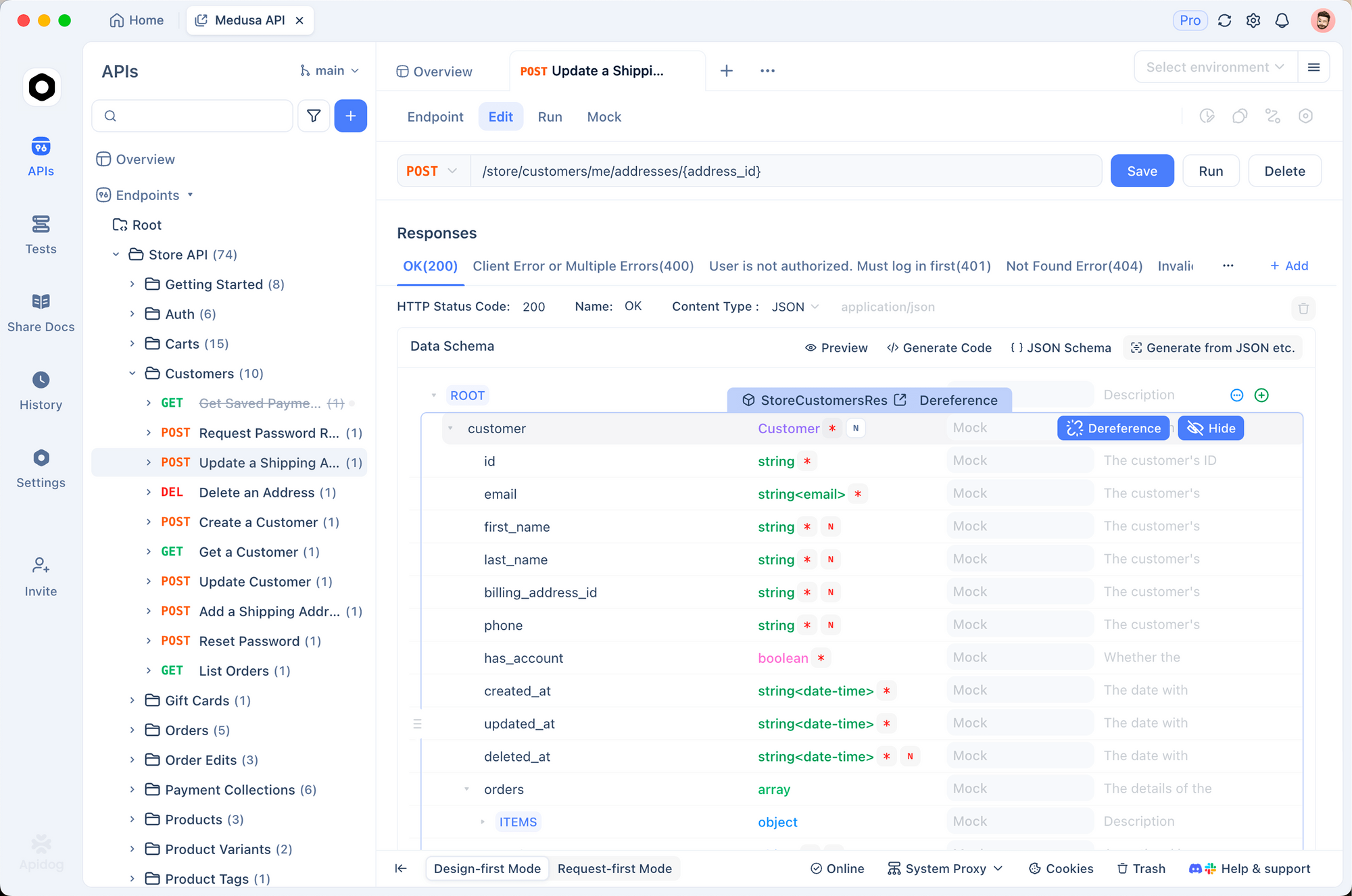
Elasticsearch queries can be complex. Test thoroughly.
1. Save common queries
Store search templates in Apidog:
{
  "query": {
    "bool": {
      "must": [
        { "match": { "{{search_field}}": "{{search_term}}" } }
      ],
      "filter": [
        { "range": { "{{price_field}}": { "lte": "{{max_price}}" } } }
      ]
    }
  }
}
2. Validate responses
pm.test('Search returns results', () => {
  const response = pm.response.json()
  pm.expect(response.hits.total.value).to.be.above(0)
})

pm.test('Aggregations present', () => {
  const response = pm.response.json()
  pm.expect(response.aggregations).to.exist
})
3. Environment separation
# Local
ES_HOST: http://localhost:9200
ES_USER: elastic
ES_PASSWORD: your_password

# Production
ES_HOST: https://search.yourcompany.com
ES_API_KEY: prod_api_key
Test Elasticsearch APIs with Apidog - free
Common errors and fixes
403 Forbidden
Cause: Authentication failed or insufficient permissions.
Fix: Verify credentials. Check API key has correct index permissions.
404 index_not_found_exception
Cause: Index doesn’t exist.
Fix: Create index first, or use auto-creation (enabled by default but not recommended for production).
circuit_breaking_exception
Cause: Query uses too much memory.
Fix: Reduce size parameter, simplify queries, add filters to reduce result set.
search_phase_execution_exception
Cause: Query syntax error.
Fix: Check your JSON. Common issues: missing quotes, incorrect field paths.
Alternatives and comparisons
| Feature | Elasticsearch | OpenSearch | Meilisearch | Typesense |
|---|---|---|---|---|
| Setup | Self-hosted | Self-hosted | Single binary | Single binary |
| Search quality | Excellent | Good | Excellent | Good |
| Learning curve | Steep | Steep | Easy | Easy |
| Scalability | Excellent | Excellent | Good | Good |
| Cloud offering | Elastic Cloud | OpenSearch Serverless | Meilisearch Cloud | Typesense Cloud |
Elasticsearch has the most features and community. Meilisearch and Typesense are simpler for basic search.
Real-world use cases
E-commerce search. A retail site indexes 100,000 products. Users search by name, description, category, and price range. Autocomplete suggests products as they type. Filters narrow results by category and availability.
Application logs. A DevOps team ships logs to Elasticsearch via Filebeat. Engineers search logs by service, severity, and time range. Dashboards show error rates and response times.
Security analytics. A security team indexes network logs. They search for suspicious IP addresses, visualize traffic patterns, and alert on anomalies detected through aggregations.
Wrapping up
Here’s what you’ve learned:
- Index documents as JSON
- Query with Elasticsearch DSL
- Use aggregations for analytics
- Configure mappings for optimal search
- Monitor cluster health
Your next steps:
- Run Elasticsearch locally
- Create an index with mappings
- Index some test documents
- Write search queries
- Try aggregations
Test Elasticsearch APIs with Apidog - free
FAQ
What’s the difference between Elasticsearch and Solr?Both are Lucene-based search engines. Elasticsearch has better distributed design and APIs. Solr has more enterprise features. Most new projects choose Elasticsearch.
How do I handle special characters in search?Escape special characters: ()[]{}:^\"\\+-!~*?| with backslash. Or use a simple_query_string which is more forgiving.
What’s a shard?Shards are pieces of an index. Each shard is a Lucene index. Primary shards are for writing, replica shards are copies for read scaling and fault tolerance.
How many shards should I create?Rule of thumb: 20-50GB per shard. Start with 1 primary shard, add replicas. Only increase primary shards when needed (can’t decrease).
Can I change mappings after indexing?Partially. Add new fields freely. To change existing field types, reindex the data. Use index templates to manage mappings consistently.
What’s the _routing parameter?Routes documents to specific shards based on a field value. Default is _id. Use routing when queries always filter by a specific field (like user_id) for better performance.
How do I handle time-based data?Use date-based indices: logs-2026.03.24. This lets you delete old data by dropping indices and improves query performance by searching fewer indices.