TL;DR
EHR APIs access patient health records stored in systems like Epic, Cerner, and Athenahealth. Most modern EHRs support FHIR (Fast Healthcare Interoperability Resources), a standard format for healthcare data. Authentication uses OAuth 2.0 with SMART on FHIR extensions. For testing, use Apidog to validate FHIR resources, test against sandboxes, and ensure your integration handles patient data correctly before connecting to production systems.
Introduction
Electronic Health Records contain everything about patient care: diagnoses, medications, lab results, allergies, and treatment plans. Hospitals, clinics, and health systems store this data in EHR platforms like Epic, Cerner, and Athenahealth.
Building healthcare applications means connecting to these systems. You can’t ask hospitals to export CSV files. You need APIs. But healthcare APIs are different from typical web APIs. They handle protected health information (PHI) and must comply with regulations like HIPAA in the US.
The good news: most EHR vendors now support FHIR, a standard API format. The challenging news: authentication, authorization, and data mapping remain complex.
If you’re building healthcare integrations, Apidog helps you test FHIR resources, validate data structures, and ensure your application handles patient data correctly. You can test against public sandboxes before working with real hospital systems.
Test FHIR APIs with Apidog - free
By the end of this guide, you’ll be able to:
- Understand FHIR resource types and structure
- Authenticate with SMART on FHIR
- Query patient demographics and clinical data
- Create and update patient resources
- Test with EHR sandboxes
Understanding FHIR
FHIR (Fast Healthcare Interoperability Resources) is the modern standard for healthcare APIs. It defines:
- Resources: Data types for healthcare concepts (Patient, Observation, Medication)
- REST API: Standard operations on resources
- Formats: JSON and XML representations
Base URL structure
https://ehr.example.com/fhir/r4/{resource-type}/{id}
Example:
GET https://ehr.example.com/fhir/r4/Patient/123
FHIR version
Most EHRs use FHIR R4 (Release 4). Some older systems use DSTU2. This guide covers R4.
Resource types
| Resource | Purpose |
|---|---|
| Patient | Demographics and administrative data |
| Practitioner | Healthcare providers |
| Organization | Hospitals, clinics |
| Observation | Lab results, vital signs |
| MedicationRequest | Prescriptions |
| Condition | Diagnoses, problems |
| Encounter | Visits, admissions |
| DocumentReference | Clinical documents |
| AllergyIntolerance | Allergies and adverse reactions |
FHIR resource structure
Patient resource example
{
  "resourceType": "Patient",
  "id": "123",
  "active": true,
  "name": [
    {
      "use": "official",
      "family": "Smith",
      "given": ["John", "Michael"]
    }
  ],
  "gender": "male",
  "birthDate": "1985-03-15",
  "address": [
    {
      "use": "home",
      "line": ["123 Main St"],
      "city": "Boston",
      "state": "MA",
      "postalCode": "02101",
      "country": "USA"
    }
  ],
  "telecom": [
    {
      "system": "phone",
      "value": "555-123-4567",
      "use": "home"
    },
    {
      "system": "email",
      "value": "john.smith@example.com"
    }
  ],
  "identifier": [
    {
      "system": "http://hospital.example.org/mrn",
      "value": "MRN-123456"
    }
  ]
}
Observation resource example
{
  "resourceType": "Observation",
  "id": "obs-123",
  "status": "final",
  "category": [
    {
      "coding": [
        {
          "system": "http://terminology.hl7.org/CodeSystem/observation-category",
          "code": "vital-signs",
          "display": "Vital Signs"
        }
      ]
    }
  ],
  "code": {
    "coding": [
      {
        "system": "http://loinc.org",
        "code": "8480-6",
        "display": "Systolic blood pressure"
      }
    ]
  },
  "subject": {
    "reference": "Patient/123"
  },
  "effectiveDateTime": "2026-03-24T09:30:00Z",
  "valueQuantity": {
    "value": 120,
    "unit": "mmHg",
    "system": "http://unitsofmeasure.org",
    "code": "mm[Hg]"
  }
}
Authentication with SMART on FHIR
SMART on FHIR extends OAuth 2.0 for healthcare. It handles patient context and EHR-specific scopes.
OAuth flow for patient access
Step 1: Get authorization URL
GET https://ehr.example.com/fhir/r4/.well-known/smart-configuration
Response includes:
{
  "authorization_endpoint": "https://ehr.example.com/oauth2/authorize",
  "token_endpoint": "https://ehr.example.com/oauth2/token",
  "scopes_supported": [
    "patient/*.read",
    "patient/*.write",
    "user/*.read",
    "launch/patient"
  ]
}
Step 2: Redirect user to authorize
https://ehr.example.com/oauth2/authorize?
  response_type=code&
  client_id=YOUR_CLIENT_ID&
  redirect_uri=https://yourapp.com/callback&
  scope=patient/*.read&
  state=random_state_value
Step 3: Exchange code for token
curl -X POST "https://ehr.example.com/oauth2/token" \
  -H "Content-Type: application/x-www-form-urlencoded" \
  -d "grant_type=authorization_code" \
  -d "code=AUTHORIZATION_CODE" \
  -d "redirect_uri=https://yourapp.com/callback" \
  -d "client_id=YOUR_CLIENT_ID" \
  -d "client_secret=YOUR_CLIENT_SECRET"
Response:
{
  "access_token": "eyJhbGciOiJSUzI1NiIs...",
  "token_type": "Bearer",
  "expires_in": 3600,
  "scope": "patient/*.read",
  "patient": "123"
}
The patient field gives you the patient ID context.
SMART scopes
| Scope | Access |
|---|---|
patient/*.read |
Read all patient data |
patient/Patient.read |
Read patient demographics only |
patient/Observation.read |
Read observations only |
user/*.read |
Read all data for authorized user |
launch/patient |
EHR launches your app with patient context |
Querying patient data
Get patient demographics
curl -X GET "https://ehr.example.com/fhir/r4/Patient/123" \
  -H "Authorization: Bearer ACCESS_TOKEN"
Search for observations
curl -X GET "https://ehr.example.com/fhir/r4/Observation?patient=123&category=vital-signs" \
  -H "Authorization: Bearer ACCESS_TOKEN"
Response is a Bundle:
{
  "resourceType": "Bundle",
  "type": "searchset",
  "total": 5,
  "entry": [
    {
      "resource": { ... Observation resource ... }
    }
  ]
}
Common search parameters
# Lab results by date range
GET /Observation?patient=123&category=laboratory&date=gt2026-01-01

# Specific LOINC code
GET /Observation?patient=123&code=http://loinc.org|8480-6

# Medications
GET /MedicationRequest?patient=123&status=active

# Conditions (diagnoses)
GET /Condition?patient=123&clinical-status=active

# Encounters
GET /Encounter?patient=123&type=AMB
Pagination
Large result sets paginate:
GET /Observation?patient=123&_count=20
Response includes links:
{
  "link": [
    {
      "relation": "next",
      "url": "https://ehr.example.com/fhir/r4/Observation?patient=123&_count=20&page=2"
    }
  ]
}
Creating and updating resources
Create an observation
curl -X POST "https://ehr.example.com/fhir/r4/Observation" \
  -H "Authorization: Bearer ACCESS_TOKEN" \
  -H "Content-Type: application/fhir+json" \
  -d '{
    "resourceType": "Observation",
    "status": "final",
    "code": {
      "coding": [{
        "system": "http://loinc.org",
        "code": "8480-6",
        "display": "Systolic blood pressure"
      }]
    },
    "subject": {
      "reference": "Patient/123"
    },
    "effectiveDateTime": "2026-03-24T09:30:00Z",
    "valueQuantity": {
      "value": 118,
      "unit": "mmHg",
      "system": "http://unitsofmeasure.org",
      "code": "mm[Hg]"
    }
  }'
Update a patient
curl -X PUT "https://ehr.example.com/fhir/r4/Patient/123" \
  -H "Authorization: Bearer ACCESS_TOKEN" \
  -H "Content-Type: application/fhir+json" \
  -d '{
    "resourceType": "Patient",
    "id": "123",
    "name": [{
      "family": "Smith",
      "given": ["John", "Michael"]
    }],
    "telecom": [{
      "system": "phone",
      "value": "555-999-8888",
      "use": "home"
    }]
  }'
EHR vendor specifics
Epic
Epic’s FHIR API is available at most large hospitals.
- Base URL:
https://fhir.epic.com/interconnect-fhir-oauth/api/FHIR/R4/ - Sandbox:
https://fhir.epic.com/test/api/FHIR/R4/ - Documentation: https://fhir.epic.com
Epic requires app registration in their app marketplace for production access.
Cerner
Cerner (Oracle Health) uses standard FHIR with some extensions.
- Base URL:
https://fhir-myrecord.cerner.com/r4/{tenant-id} - Sandbox:
https://fhir-deprecated.cerner.com/r4/ec2458f2-1e24-41c8-b71b-0e701af7583d - Documentation: https://docs.oracle.com/en/health/health-cerner/
Athenahealth
Athenahealth provides FHIR and legacy APIs.
- Base URL:
https://api.platform.athenahealth.com/fhir/r4/{practice-id} - Sandbox: Available through developer program
- Documentation: https://docs.athenahealth.com
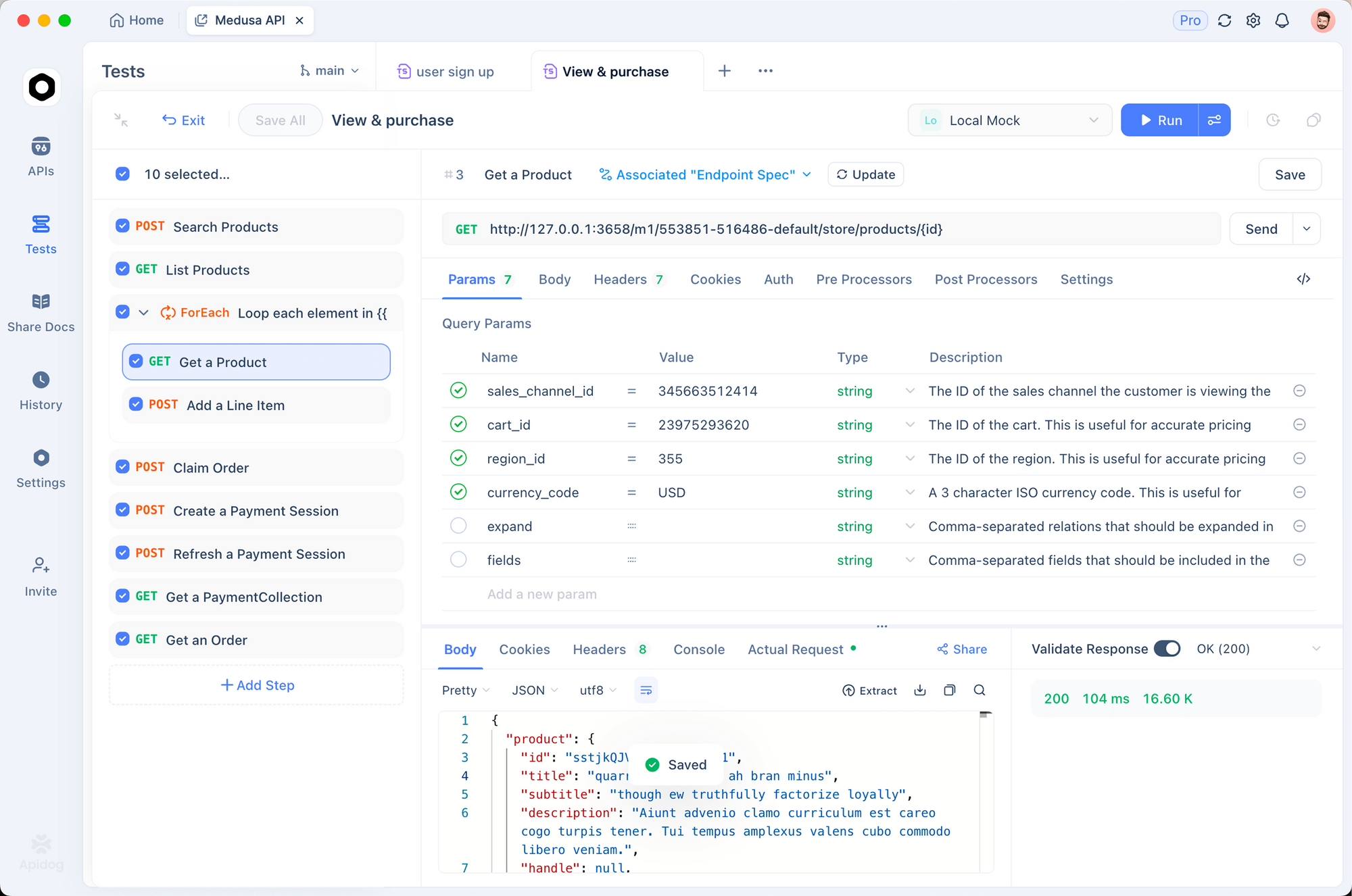
Testing with Apidog
Healthcare APIs require careful testing. Patient data is sensitive.
1. Use public sandboxes
Test against public FHIR sandboxes:
# HAPI FHIR (open source)
https://hapi.fhir.org/baseR4

# SMART Health IT sandbox
https://launch.smarthealthit.org
2. Validate FHIR resources
pm.test('Resource is valid Patient', () => {
  const response = pm.response.json()
  pm.expect(response.resourceType).to.eql('Patient')
  pm.expect(response.id).to.exist
  pm.expect(response.name).to.be.an('array')
})

pm.test('Observation has required fields', () => {
  const resource = pm.response.json()
  pm.expect(resource.status).to.exist
  pm.expect(resource.code).to.exist
  pm.expect(resource.subject).to.exist
})
3. Test authentication flow
Save SMART configuration as environment:
AUTHORIZATION_ENDPOINT: https://ehr.example.com/oauth2/authorize
TOKEN_ENDPOINT: https://ehr.example.com/oauth2/token
CLIENT_ID: your_client_id
CLIENT_SECRET: your_client_secret
SCOPE: patient/*.read
Test FHIR APIs with Apidog - free
Compliance considerations
HIPAA
In the US, healthcare applications must comply with HIPAA. This affects:
- Data transmission: Use TLS 1.2+
- Data storage: Encrypt at rest
- Access control: Audit logging, minimum necessary access
- Business Associate Agreement: Required with EHR vendors
SMART on FHIR security
- Tokens expire (typically 1 hour)
- Refresh tokens available for extended sessions
- Patient context is bound to token scope
- Logout requires token revocation
Data minimization
Only request scopes you need:
- Good:
patient/Observation.read - Avoid:
patient/*.readunless necessary
Common errors and fixes
401 Unauthorized
Cause: Token expired or invalid.
Fix: Refresh the token using the refresh token from initial authorization.
403 Forbidden
Cause: Scope doesn’t include requested resource.
Fix: Check your scopes. If you need more access, request additional scopes during authorization.
404 Not Found
Cause: Patient or resource doesn’t exist.
Fix: Verify the resource ID. Check that the patient is accessible with your current token’s patient context.
422 Unprocessable Entity
Cause: FHIR resource validation failed.
Fix: Check required fields and terminologies:
{
  "resourceType": "OperationOutcome",
  "issue": [{
    "severity": "error",
    "code": "required",
    "details": {
      "text": "Observation.status is required"
    }
  }]
}
Alternatives and comparisons
| Feature | Epic | Cerner | Athenahealth | OpenEMR |
|---|---|---|---|---|
| FHIR R4 | ✓ | ✓ | ✓ | Partial |
| SMART on FHIR | ✓ | ✓ | ✓ | No |
| Sandbox access | ✓ | ✓ | Limited | Self-host |
| API documentation | Excellent | Good | Good | Basic |
| Market share | Large hospitals | Health systems | Small practices | Open source |
Epic and Cerner dominate large healthcare systems. Athenahealth serves smaller practices. OpenEMR is open source but has limited API support.
Real-world use cases
Patient portal. A health system builds a patient portal that pulls data from Epic. Patients view lab results, medications, and upcoming appointments. The portal uses FHIR APIs with SMART on FHIR authentication.
Clinical research. A pharmaceutical company needs to identify eligible patients for clinical trials. They query FHIR APIs across multiple hospital systems to find patients matching criteria, with proper consent management.
Remote monitoring. A telehealth company integrates patient-reported vitals with EHR systems. Observations are created via FHIR API and immediately visible to clinicians in Epic.
Wrapping up
Here’s what you’ve learned:
- FHIR is the standard for healthcare APIs
- Resources represent healthcare concepts like patients and observations
- SMART on FHIR handles OAuth with patient context
- Each EHR vendor has specific implementation details
- Test with sandboxes before production
Your next steps:
- Explore the HAPI FHIR public sandbox
- Understand FHIR resource types for your use case
- Register for EHR developer programs
- Test with Apidog using mock patient data
- Implement HIPAA-compliant data handling
Test FHIR APIs with Apidog - free
FAQ
What’s the difference between FHIR and HL7 v2?HL7 v2 is an older messaging standard used in hospital interfaces. FHIR is a modern REST API standard. Most new integrations use FHIR, but HL7 v2 is still common in legacy systems.
Do I need a BAA to use EHR APIs?Yes, if you’re handling PHI. Business Associate Agreements are required between covered entities and business associates. Check with the EHR vendor’s compliance team.
How do I get access to Epic’s FHIR API?Register in Epic’s App Orchard marketplace. For sandbox testing, use their public sandbox. Production access requires hospital approval.
What’s a patient context?SMART on FHIR tokens include a patient ID. Your API calls are limited to that patient’s data. This ensures apps can only access data the patient authorized.
Can I write data to EHRs?Yes, but with limitations. Most EHRs allow creating observations and updating patient demographics. Writing diagnoses or medications usually requires clinical decision support approval.
How do I handle terminology codes?FHIR uses standard terminologies:
- LOINC for lab tests and observations
- SNOMED CT for clinical concepts
- ICD-10 for diagnoses
- RxNorm for medications
Use these systems when creating resources.
What about international healthcare?FHIR is global. Each country may have implementation guides. The US uses US Core profiles. Check your region’s specifications.