TL;DR
eBay APIs let you manage inventory, listings, orders, and payments on the world’s largest marketplace. You authenticate with OAuth 2.0, call api.ebay.com/sell endpoints, and handle rate limits carefully. For testing, use Apidog to validate listing payloads, test order processing, and ensure your integration handles API limits gracefully.
Introduction
eBay connects buyers and sellers globally. The API lets sellers automate inventory management, create listings in bulk, process orders, handle shipping, and manage returns. Whether you’re a small seller or an enterprise, the API scales.
The main API areas:
- Inventory API - Manage product inventory
- Listing API - Create and manage item listings
- Order API - Process orders and shipments
- Fulfillment API - Handle shipping and tracking
- Analytics API - Pull sales reports
Test eBay APIs with Apidog - free
By the end of this guide, you’ll be able to:
- Authenticate with eBay OAuth 2.0
- Create and manage inventory
- Publish listings
- Process orders and shipments
- Handle returns and refunds
- Test with Apidog
Authentication with OAuth 2.0
eBay uses OAuth 2.0 for API authentication. You’ll need to create an application in the eBay Developers Program.

Create an application
- Go to developers.ebay.com
- Sign up for a developer account
- Create an application in the Developer Console
- Get your App ID (client ID) and Cert ID (client secret)
OAuth flow
Step 1: User authorization
https://auth.ebay.com/oauth2/authorize?
  client_id=YOUR_APP_ID&
  response_type=code&
  redirect_uri=YOUR_SIGNIN_REDIRECT_URI&
  scope=https://api.ebay.com/oauth/api_scope/sell.inventory
Step 2: Get authorization code
User authorizes, you get a code at your redirect URI.
Step 3: Exchange for tokens
const response = await fetch('https://api.ebay.com/identity/v1/oauth2/token', {
  method: 'POST',
  headers: {
    'Content-Type': 'application/x-www-form-urlencoded',
    'Authorization': 'Basic ' + Buffer.from(APP_ID + ':' + CERT_ID).toString('base64')
  },
  body: new URLSearchParams({
    grant_type: 'authorization_code',
    code: AUTHORIZATION_CODE,
    redirect_uri: 'YOUR_SIGNIN_REDIRECT_URI'
  })
})

const { access_token, refresh_token, expires_in } = await response.json()
Required scopes
https://api.ebay.com/oauth/api_scope/sell.inventory- Inventory managementhttps://api.ebay.com/oauth/api_scope/sell.listings- Listingshttps://api.ebay.com/oauth/api_scope/sell.orders- Ordershttps://api.ebay.com/oauth/api_scope/sell.fulfillment- Fulfillmenthttps://api.ebay.com/oauth/api_scope/sell.account- Account management
Inventory management
Inventory represents the products you sell.
Create inventory location
curl -X POST "https://api.ebay.com/sell/inventory/v1/location_inventory_location" \
  -H "Authorization: Bearer ACCESS_TOKEN" \
  -H "Content-Type: application/json" \
  -d '{
    "locationId": "WAREHOUSE_1",
    "name": "Main Warehouse",
    "address": {
      "addressLine1": "123 Main St",
      "city": "San Jose",
      "stateOrProvince": "CA",
      "postalCode": "95101",
      "countryCode": "US"
    }
  }'
Create an inventory item
curl -X POST "https://api.ebay.com/sell/inventory/v1/inventory_item" \
  -H "Authorization: Bearer ACCESS_TOKEN" \
  -H "Content-Type: application/json" \
  -d '{
    "product": {
      "title": "Vintage Leather Messenger Bag",
      "description": "Genuine leather messenger bag, perfect for work or school.",
      "aspects": {
        "Brand": ["Vintage"],
        "Material": ["Leather"],
        "Color": ["Brown"]
      },
      "imageUrls": [
        "https://example.com/images/bag1.jpg",
        "https://example.com/images/bag2.jpg"
      ]
    },
    "condition": "USED_GOOD",
    "conditionNotes": "Minor wear on corners",
    "availability": {
      "shipToLocationAvailability": {
        "quantity": 25
      }
    }
  }'
Update inventory
curl -X PUT "https://api.ebay.com/sell/inventory/v1/inventory_item/SKU123" \
  -H "Authorization: Bearer ACCESS_TOKEN" \
  -H "Content-Type: application/json" \
  -d '{
    "availability": {
      "shipToLocationAvailability": {
        "quantity": 30
      }
    }
  }'
Get inventory item
curl -X GET "https://api.ebay.com/sell/inventory/v1/inventory_item/SKU123" \
  -H "Authorization: Bearer ACCESS_TOKEN"
Listing items
Create an offer
curl -X POST "https://api.ebay.com/sell/inventory/v1/offer" \
  -H "Authorization: Bearer ACCESS_TOKEN" \
  -H "Content-Type: application/json" \
  -d '{
    "sku": "SKU123",
    "marketplaceId": "EBAY_US",
    "format": "FIXED_PRICE",
    "product": {
      "title": "Vintage Leather Messenger Bag"
    },
    "pricingSummary": {
      "price": {
        "currency": "USD",
        "value": "89.99"
      }
    },
    "listing": {
      "listingDuration": "GTC",
      "listingType": "CLASSIC"
    },
    " fulfillment": {
      "shippingProfileId": "SHIPPING_PROFILE_ID",
      " fulfillmentPolicyId": "FULFILLMENT_POLICY_ID",
      "paymentPolicyId": "PAYMENT_POLICY_ID"
    }
  }'
Key fields:
sku- Your inventory SKUmarketplaceId- EBAY_US, EBAY_UK, EBAY_DE, etc.format- FIXED_PRICE or AUCTIONlistingDuration- How long (GTC = good til canceled)price- Your asking price
Publish the offer
curl -X POST "https://api.ebay.com/sell/inventory/v1/offer/OFFER_ID/publish" \
  -H "Authorization: Bearer ACCESS_TOKEN"
Withdraw a listing
curl -X POST "https://api.ebay.com/sell/inventory/v1/offer/OFFER_ID/withdraw" \
  -H "Authorization: Bearer ACCESS_TOKEN"
Order management
Get orders
curl -X GET "https://api.ebay.com/sell/fulfillment/v1/order?orderIds=ORDER_ID_1,ORDER_ID_2" \
  -H "Authorization: Bearer ACCESS_TOKEN"
Filter by date:
curl -X GET "https://api.ebay.com/sell/fulfillment/v1/order?filter=creation_date_range:from:2026-01-01T00:00:00Z,to:2026-03-24T00:00:00Z" \
  -H "Authorization: Bearer ACCESS_TOKEN"
Get order details
curl -X GET "https://api.ebay.com/sell/fulfillment/v1/order/ORDER_ID" \
  -H "Authorization: Bearer ACCESS_TOKEN"
Order response:
{
  "orderId": "12-34567-89012",
  "orderPaymentStatus": "PAID",
  "pricingSummary": {
    "total": {
      "currency": "USD",
      "value": "94.99"
    }
  },
  "fulfillmentStartInstructions": [
    {
      "shippingStep": {
        "shipTo": {
          "fullName": "John Doe",
          "contactAddress": {
            "addressLine1": "123 Main St",
            "city": "Anytown",
            "stateOrProvince": "CA",
            "postalCode": "12345",
            "countryCode": "US"
          }
        }
      }
    }
  ],
  "lineItems": [
    {
      "lineItemId": "LINE_ITEM_ID",
      "sku": "SKU123",
      "quantity": 1,
      "title": "Vintage Leather Messenger Bag",
      "lineItemCost": {
        "currency": "USD",
        "value": "89.99"
      }
    }
  ]
}
Shipping and fulfillment
Create shipping label
curl -X POST "https://api.ebay.com/sell/fulfillment/v1/order/ORDER_ID/shipping_fulfillment" \
  -H "Authorization: Bearer ACCESS_TOKEN" \
  -H "Content-Type: application/json" \
  -d '{
    "lineItems": [
      {
        "lineItemId": "LINE_ITEM_ID",
        "quantity": 1
      }
    ],
    "shippingStep": {
      "shipFrom": {
        "fullName": "Your Name",
        "companyName": "Your Company",
        "contactAddress": {
          "addressLine1": "456 Warehouse Rd",
          "city": "San Jose",
          "stateOrProvince": "CA",
          "postalCode": "95101",
          "countryCode": "US"
        }
      }
    },
    "shippingCarrierCode": "USPS",
    "shippingMethodCode": "PRIORITY_MAIL",
    "trackingNumber": "9400111899223056789012"
  }'
Carriers:
- USPS
- UPS
- FedEx
- DHL
Returns management
Get return details
curl -X GET "https://api.ebay.com/sell/fulfillment/v1/return/RETURN_ID" \
  -H "Authorization: Bearer ACCESS_TOKEN"
Process a return
curl -X POST "https://api.ebay.com/sell/fulfillment/v1/return/RETURN_ID/decide" \
  -H "Authorization: Bearer ACCESS_TOKEN" \
  -H "Content-Type: application/json" \
  -d '{
    "decision": "ACCEPT",
    "shipment": {
      "carrierId": "CARRIER_ID",
      "trackingNumber": "TRACKING_NUMBER"
    }
  }'
Rate limits and handling
eBay limits API calls to prevent abuse. Check headers:
X-RateLimit-Limit- Maximum requests allowedX-RateLimit-Remaining- Requests left in windowX-RateLimit-Reset- Unix timestamp when limit resets
async function makeEbayRequest(url, options, retries = 3) {
  for (let i = 0; i < retries; i++) {
    const response = await fetch(url, options)

    const remaining = response.headers.get('X-RateLimit-Remaining')
    if (remaining && parseInt(remaining) < 10) {
      console.warn('Rate limit low:', remaining)
    }

    if (response.status === 429) {
      const resetTime = response.headers.get('X-RateLimit-Reset')
      const waitTime = (parseInt(resetTime) - Date.now() / 1000) * 1000
      await sleep(waitTime)
      continue
    }

    return response
  }
  throw new Error('Rate limited')
}
Testing with Apidog
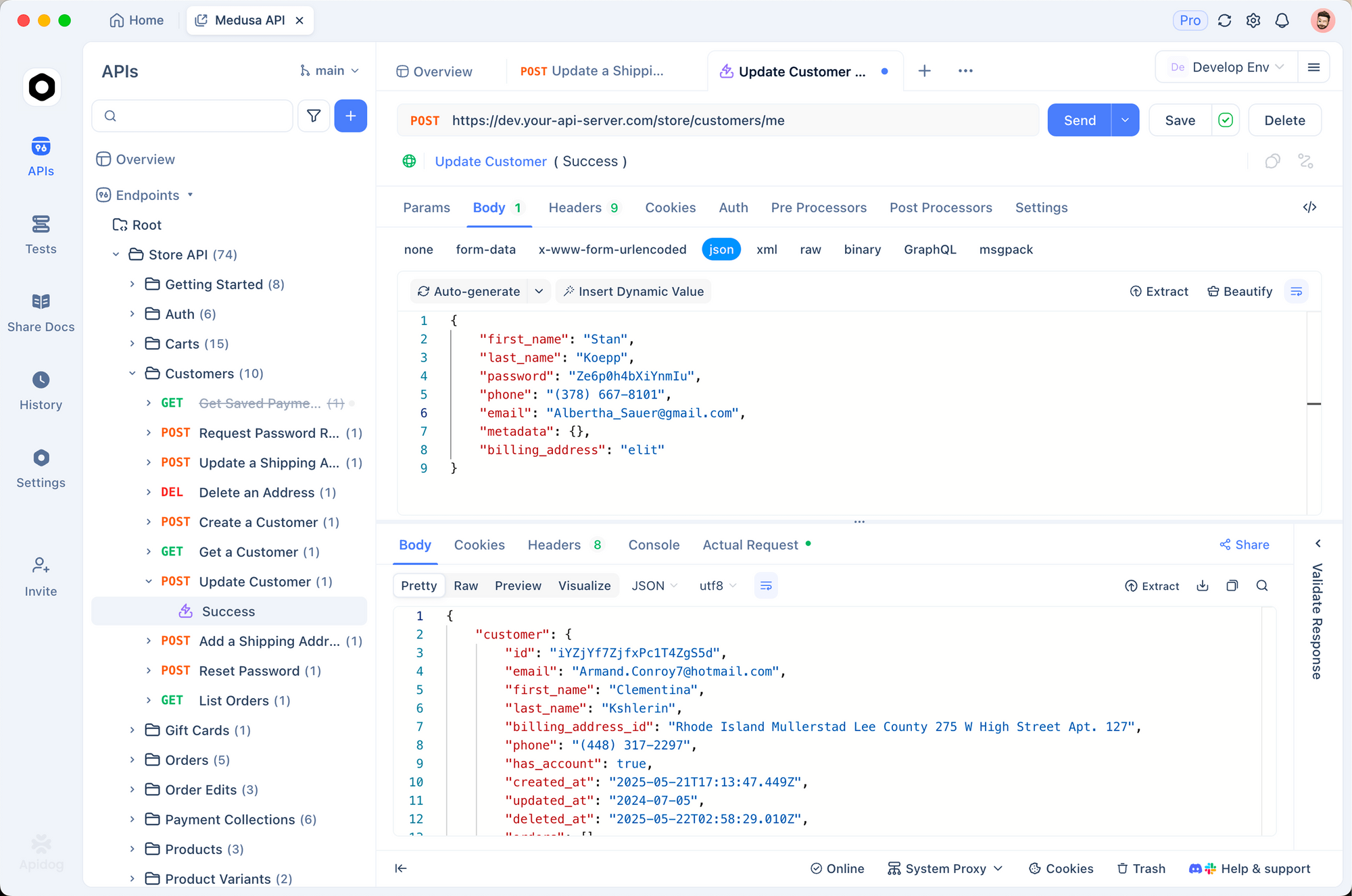
eBay APIs are production-critical. Test thoroughly before making live changes.
1. Environment setup
EBAY_APP_ID: your_app_id
EBAY_CERT_ID: your_cert_id
EBAY_ACCESS_TOKEN: stored_token
EBAY_REFRESH_TOKEN: stored_refresh
EBAY_MARKETPLACE_ID: EBAY_US
BASE_URL: https://api.ebay.com
2. Validate listing payloads
pm.test('Listing has required fields', () => {
  const requestBody = JSON.parse(pm.request.body.raw)
  pm.expect(requestBody).to.have.property('sku')
  pm.expect(requestBody).to.have.property('marketplaceId')
  pm.expect(requestBody.pricingSummary).to.have.property('price')
})

pm.test('Price is valid', () => {
  const requestBody = JSON.parse(pm.request.body.raw)
  const price = parseFloat(requestBody.pricingSummary.price.value)
  pm.expect(price).to.be.above(0)
})
3. Test order processing
pm.test('Order response is valid', () => {
  const response = pm.response.json()
  pm.expect(response).to.have.property('orderId')
  pm.expect(response.orderPaymentStatus).to.eql('PAID')
  pm.expect(response.lineItems).to.be.an('array')
})
Test eBay APIs with Apidog - free
Common errors and fixes
401 Unauthorized
Cause: Token expired or invalid.
Fix: Use the refresh token to get a new access token:
const response = await fetch('https://api.ebay.com/identity/v1/oauth2/token', {
  method: 'POST',
  headers: {
    'Content-Type': 'application/x-www-form-urlencoded',
    'Authorization': 'Basic ' + Buffer.from(APP_ID + ':' + CERT_ID).toString('base64')
  },
  body: new URLSearchParams({
    grant_type: 'refresh_token',
    refresh_token: storedRefreshToken
  })
})
10002: Api error - Invalid access token
Cause: Access token expired.
Fix: Refresh the token immediately.
21916684: Item does not exist
Cause: Trying to update a SKU that wasn’t created.
Fix: Create the inventory item first, then create the offer.
10003: Invalid sku
Cause: SKU format invalid.
Fix: SKUs must be unique within your inventory and can contain alphanumeric characters, hyphens, and underscores only.
Rate limit (429)
Cause: Too many requests.
Fix: Implement backoff. eBay limits vary by API and endpoint.
Alternatives and comparisons
| Feature | eBay | Amazon SP-API | Etsy |
|---|---|---|---|
| Inventory API | ✓ | ✓ | Limited |
| Listing API | ✓ | ✓ | ✓ |
| Order API | ✓ | ✓ | ✓ |
| Fulfillment API | ✓ | ✓ | Limited |
| Free tier | Developer program | Limited | Limited |
| API complexity | Medium | High | Low |
eBay’s API is more approachable than Amazon’s but less feature-rich. Etsy is simplest but limited for larger sellers.
Real-world use cases
Multi-channel selling. A seller lists on eBay, Amazon, and their own site. Inventory syncs across platforms. When sold on one channel, quantity decrements everywhere.
Automated repricing. A seller monitors competitors and adjusts prices via API. When a competitor lowers prices, the seller’s prices adjust automatically to stay competitive.
Bulk listing. A seller with 10,000 items creates listings in bulk. The API accepts CSV uploads, creating thousands of listings automatically.
Conclusion
Here’s what you’ve learned:
- Authenticate with OAuth 2.0 using app credentials
- Manage inventory with SKUs
- Create and publish listings
- Process orders and shipments
- Handle returns
- Test with Apidog before going live
Your next steps:
- Apply for eBay Developers Program
- Create an application and get credentials
- Implement OAuth flow
- Create your first inventory item
- Publish a test listing
Test eBay APIs with Apidog - free
FAQ
Do I need a business account to use APIs?Yes. eBay APIs are for verified sellers. Sign up for a seller account and complete verification.
What’s the difference between inventory and offers?Inventory stores product information (title, description, images). Offers link inventory to a marketplace with pricing and fulfillment info. Multiple offers can reference the same inventory.
How long do listings stay active?Listings with GTC (good til canceled) stay active until you withdraw them or the item sells out.
Can I sell internationally via API?Yes. Set marketplaceId to different values (EBAY_US, EBAY_UK, EBAY_DE, etc.). You’ll need to comply with each marketplace’s requirements.
What’s the API rate limit?Limits vary by endpoint and your account level. Check response headers for your current limits.
How do I get shipping labels?eBay provides discounted shipping labels through the Fulfillment API. You create the shipment and eBay generates a label.