TL;DR
BigCommerce APIs let you manage products, orders, customers, and store operations programmatically. You authenticate with API tokens (for server-side) or OAuth (for apps), call REST endpoints at api.bigcommerce.com, and handle webhooks for real-time updates. For testing, use Apidog to save your API calls, validate responses, and share collections with your team.
Introduction
BigCommerce powers over 60,000 online stores. Each one needs custom integrations - inventory sync, order processing, customer management, payment handling. That’s where the APIs come in.
The platform offers three API types: Storefront API (headless commerce), Management API (backend operations), and Payments API (transactions). Most developers work with the Management API. It handles products, orders, customers, and everything that happens behind the scenes.
The learning curve isn’t steep, but the documentation can feel overwhelming. You’ll find yourself jumping between authentication docs, API references, and webhook guides just to complete a simple task.
This guide focuses on what you’ll actually use. Products, orders, customers, and webhooks. You’ll learn authentication, common patterns, and how to test your integrations before they touch a live store.
Test your BigCommerce APIs with Apidog - free
By the end of this guide, you’ll be able to:
- Set up BigCommerce authentication correctly
- Manage products, variants, and inventory
- Process orders and handle customer data
- Set up webhooks for real-time updates
- Test and document your integrations with Apidog
Authentication: getting access to your store
BigCommerce offers two authentication methods depending on what you’re building.
Method 1: API Tokens (for custom integrations)
If you’re building a script or service that works with one store, use API tokens.
Create an API account:
- Go to your store’s admin panel
- Settings → API Accounts → Create API Account
- Choose “V3/V2 API Token”
- Select the scopes you need (Products, Orders, Customers, etc.)
- Save the credentials
You’ll get:
- Store URL:
mystore.mybigcommerce.com - Access Token:
abc123def456... - Client ID:
abc123... - Client Secret:
xyz789...
Make your first call:
curl -X GET "https://api.bigcommerce.com/stores/{store-hash}/v3/catalog/products" \
  -H "X-Auth-Token: {access-token}" \
  -H "Content-Type: application/json" \
  -H "Accept: application/json"
The store-hash is the part after /stores/ in your API path. It’s also visible in your store admin URL.
Method 2: OAuth (for marketplace apps)
If you’re building an app for the BigCommerce marketplace, use OAuth.
The OAuth flow:
- User clicks “Install” on your app in the marketplace
- BigCommerce redirects to your callback URL with an auth code
- Your server exchanges the code for an access token
- Store the token for future API calls
Exchange code for token:
const response = await fetch('https://login.bigcommerce.com/oauth2/token', {
  method: 'POST',
  headers: { 'Content-Type': 'application/x-www-form-urlencoded' },
  body: new URLSearchParams({
    client_id: process.env.BC_CLIENT_ID,
    client_secret: process.env.BC_CLIENT_SECRET,
    redirect_uri: 'https://yourapp.com/auth/callback',
    grant_type: 'authorization_code',
    code: authCode,
    scope: 'store_v2_default store_v3_products'
  })
})

const { access_token, context } = await response.json()
// access_token is what you use for API calls
// context contains store_hash
Use the token:
curl -X GET "https://api.bigcommerce.com/stores/{store-hash}/v3/catalog/products" \
  -H "X-Auth-Token: {access-token}" \
  -H "Content-Type: application/json"
Products and catalog management
Products are the heart of any BigCommerce store. The V3 Catalog API handles products, variants, categories, and brands.
List products
GET https://api.bigcommerce.com/stores/{store-hash}/v3/catalog/products
X-Auth-Token: {token}
Accept: application/json
Response:
{
  "data": [
    {
      "id": 174,
      "name": "Plain T-Shirt",
      "type": "physical",
      "sku": "PLAIN-T",
      "price": 29.99,
      "sale_price": 24.99,
      "inventory_level": 150,
      "inventory_tracking": "product",
      "is_visible": true,
      "categories": [23, 45],
      "brand_id": 12
    }
  ],
  "meta": {
    "pagination": {
      "total": 500,
      "count": 50,
      "page": 1,
      "per_page": 50
    }
  }
}
Create a product
POST https://api.bigcommerce.com/stores/{store-hash}/v3/catalog/products
X-Auth-Token: {token}
Content-Type: application/json

{
  "name": "Premium Hoodie",
  "type": "physical",
  "sku": "HOODIE-PREM",
  "price": 79.99,
  "description": "Premium cotton blend hoodie",
  "weight": 1.5,
  "width": 20,
  "height": 28,
  "depth": 2,
  "inventory_level": 100,
  "inventory_tracking": "product",
  "is_visible": true,
  "categories": [23]
}
Update product variants
Products with options (size, color) have variants. Each variant can have its own SKU, price, and inventory.
PUT https://api.bigcommerce.com/stores/{store-hash}/v3/catalog/products/{product-id}/variants/{variant-id}
X-Auth-Token: {token}
Content-Type: application/json

{
  "sku": "HOODIE-PREM-BLK-M",
  "price": 79.99,
  "inventory_level": 50,
  "option_values": [
    {
      "option_display_name": "Color",
      "label": "Black"
    },
    {
      "option_display_name": "Size",
      "label": "Medium"
    }
  ]
}
Manage inventory
PUT https://api.bigcommerce.com/stores/{store-hash}/v3/catalog/products/{product-id}
X-Auth-Token: {token}
Content-Type: application/json

{
  "inventory_level": 75
}
Or update variant inventory:
PUT https://api.bigcommerce.com/stores/{store-hash}/v3/catalog/products/{product-id}/variants/{variant-id}
Content-Type: application/json

{
  "inventory_level": 25
}
Orders and fulfillment
Orders are where business happens. The Orders V2 API handles order creation, updates, and fulfillment.
List orders
GET https://api.bigcommerce.com/stores/{store-hash}/v2/orders
X-Auth-Token: {token}
Accept: application/json
Response:
[
  {
    "id": 115,
    "status": "Awaiting Fulfillment",
    "status_id": 11,
    "customer_id": 45,
    "date_created": "2026-03-24T10:30:00+00:00",
    "subtotal_ex_tax": 149.99,
    "total_inc_tax": 162.49,
    "items_total": 2,
    "items_shipped": 0,
    "shipping_address": {
      "first_name": "John",
      "last_name": "Doe",
      "street_1": "123 Main St",
      "city": "Austin",
      "state": "Texas",
      "zip": "78701",
      "country": "United States"
    }
  }
]
Get order details
GET https://api.bigcommerce.com/stores/{store-hash}/v2/orders/{order-id}
X-Auth-Token: {token}
Get order products
GET https://api.bigcommerce.com/stores/{store-hash}/v2/orders/{order-id}/products
X-Auth-Token: {token}
Update order status
PUT https://api.bigcommerce.com/stores/{store-hash}/v2/orders/{order-id}
X-Auth-Token: {token}
Content-Type: application/json

{
  "status_id": 12
}
Common status IDs:
- 0: Incomplete
- 11: Awaiting Fulfillment
- 12: Completed
- 5: Cancelled
- 4: Refunded
Create a shipment (fulfillment)
POST https://api.bigcommerce.com/stores/{store-hash}/v2/orders/{order-id}/shipments
X-Auth-Token: {token}
Content-Type: application/json

{
  "tracking_number": "1Z999AA10123456784",
  "carrier": "UPS",
  "shipping_method": "UPS Ground",
  "items": [
    {
      "order_product_id": 234,
      "quantity": 1
    }
  ]
}
Customers and segmentation
The Customers V3 API handles customer data, addresses, and customer groups.
List customers
GET https://api.bigcommerce.com/stores/{store-hash}/v3/customers
X-Auth-Token: {token}
Accept: application/json
Response:
{
  "data": [
    {
      "id": 45,
      "email": "john.doe@example.com",
      "first_name": "John",
      "last_name": "Doe",
      "company": "Acme Corp",
      "phone": "512-555-1234",
      "customer_group_id": 1,
      "notes": "VIP customer",
      "tax_exempt_category": "",
      "date_created": "2025-11-15T09:30:00+00:00",
      "date_modified": "2026-03-20T14:22:00+00:00"
    }
  ]
}
Create a customer
POST https://api.bigcommerce.com/stores/{store-hash}/v3/customers
X-Auth-Token: {token}
Content-Type: application/json

{
  "email": "jane.smith@example.com",
  "first_name": "Jane",
  "last_name": "Smith",
  "phone": "512-555-5678",
  "customer_group_id": 2
}
Update customer
PUT https://api.bigcommerce.com/stores/{store-hash}/v3/customers/{customer-id}
X-Auth-Token: {token}
Content-Type: application/json

{
  "notes": "Repeat customer - priority support",
  "customer_group_id": 3
}
Webhooks for real-time updates
Webhooks notify your app when events happen in a store. Instead of polling, BigCommerce pushes data to your endpoints.
Create a webhook
POST https://api.bigcommerce.com/stores/{store-hash}/v3/hooks
X-Auth-Token: {token}
Content-Type: application/json

{
  "scope": "store/order/created",
  "destination": "https://yourapp.com/webhooks/orders",
  "is_active": true
}
Available scopes:
store/order/created- New order placedstore/order/updated- Order status changedstore/order/archived- Order archivedstore/product/created- Product addedstore/product/updated- Product modifiedstore/product/deleted- Product removedstore/customer/created- New customerstore/inventory/updated- Stock changed
Verify webhook signatures
BigCommerce signs webhooks so you can verify they’re legitimate:
import crypto from 'crypto'

function verifyWebhook(payload, signature, secret) {
  const expectedSignature = crypto
    .createHmac('sha256', secret)
    .update(payload)
    .digest('hex')

  return crypto.timingSafeEqual(
    Buffer.from(signature),
    Buffer.from(expectedSignature)
  )
}

app.post('/webhooks/orders', (req, res) => {
  const signature = req.headers['x-bc-webhook-signature']
  const payload = JSON.stringify(req.body)

  if (!verifyWebhook(payload, signature, process.env.BC_CLIENT_SECRET)) {
    return res.status(401).send('Invalid signature')
  }

  // Process the webhook
  console.log('Order created:', req.body.data.id)
  res.status(200).send('OK')
})
Testing BigCommerce APIs with Apidog
BigCommerce APIs require consistent headers and proper authentication. Testing manually with curl gets tedious. Apidog streamlines this.
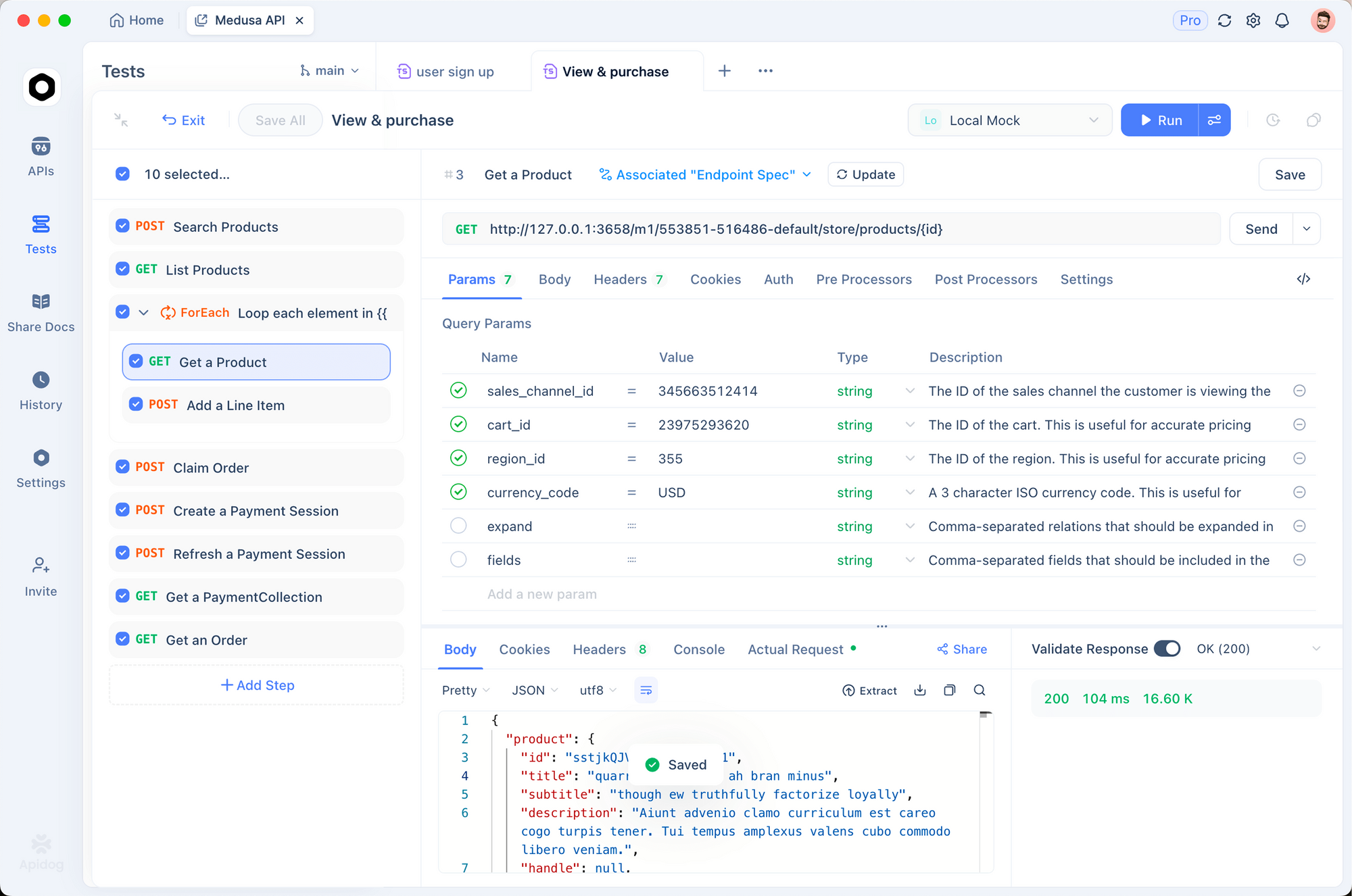
1. Environment setup
Create environments for each store:
# Production Store
STORE_HASH: abc123
ACCESS_TOKEN: xyz789
BASE_URL: https://api.bigcommerce.com/stores/abc123

# Staging Store
STORE_HASH: staging456
ACCESS_TOKEN: staging_token
BASE_URL: https://api.bigcommerce.com/stores/staging456
2. Pre-request scripts
Add the auth headers automatically:
pm.request.headers.add({
  key: 'X-Auth-Token',
  value: pm.environment.get('ACCESS_TOKEN')
})
pm.request.headers.add({
  key: 'Accept',
  value: 'application/json'
})
3. Validate responses
Test that products have required fields:
pm.test('Products have required fields', () => {
  const response = pm.response.json()
  response.data.forEach(product => {
    pm.expect(product).to.have.property('id')
    pm.expect(product).to.have.property('name')
    pm.expect(product).to.have.property('price')
    pm.expect(product.price).to.be.above(0)
  })
})

pm.test('Pagination works', () => {
  const response = pm.response.json()
  pm.expect(response.meta.pagination).to.have.property('total')
  pm.expect(response.meta.pagination.page).to.eql(1)
})
Test BigCommerce APIs with Apidog - free
Common errors and fixes
401 Unauthorized
Cause: Invalid or missing access token.
Fix:
- Check your
X-Auth-Tokenheader is set - Verify the token hasn’t been revoked
- Ensure the API account has the right scopes
403 Forbidden
Cause: Token is valid but lacks required scope.
Fix:
- Check your API account permissions
- Add the missing scope (Products, Orders, etc.)
- Generate a new token with expanded permissions
404 Not Found
Cause: Wrong endpoint or resource doesn’t exist.
Fix:
- Verify the store hash is correct
- Check the API version in the URL (v2 vs v3)
- Ensure the resource ID exists
429 Too Many Requests
Cause: Rate limit exceeded.
Fix: BigCommerce allows different limits per endpoint. Products: 10,000 requests/hour. Orders: 30,000 requests/hour. Check the X-Rate-Limit-Remaining header and implement backoff.
async function callWithBackoff(fn, maxRetries = 3) {
  for (let i = 0; i < maxRetries; i++) {
    const response = await fn()
    if (response.status === 429) {
      const retryAfter = response.headers.get('X-Rate-Limit-Reset')
      await new Promise(r => setTimeout(r, retryAfter * 1000))
    } else {
      return response
    }
  }
}
422 Unprocessable Entity
Cause: Validation error in request body.
Fix: Check the response for details. BigCommerce returns specific validation errors:
{
  "errors": {
    "price": "Price must be greater than zero",
    "sku": "SKU already exists"
  }
}
Alternatives and comparisons
| Feature | BigCommerce | Shopify | WooCommerce |
|---|---|---|---|
| API versioning | V2 and V3 | REST and GraphQL | REST |
| Rate limits | 10K-30K/hour | 2/min (leaky bucket) | Depends on hosting |
| Webhooks | Yes | Yes | Yes (plugin) |
| GraphQL | No | Yes | No |
| SDK quality | Good | Excellent | PHP only |
| Multi-store | Yes | No | No |
BigCommerce’s V3 API is more consistent than Shopify’s fragmented approach, but Shopify’s GraphQL API offers more flexibility for complex queries.
Real-world use cases
Multi-channel inventory sync. A brand sells on BigCommerce, Amazon, and physical stores. They use the Products API to sync inventory levels across channels, preventing overselling. Apidog tests the sync endpoints before each deployment.
Order automation. A subscription box company uses webhooks to trigger fulfillment when orders are created. The Orders API updates tracking numbers. Their warehouse receives pick lists automatically via webhook handlers.
Customer segmentation. An e-commerce site uses the Customers API to segment buyers based on purchase history. VIP customers get added to a special group with exclusive pricing. The integration runs weekly via scheduled job.
Conclusion
Here’s what you’ve learned:
- Authentication uses API tokens (simple integrations) or OAuth (marketplace apps)
- V3 Catalog API handles products and variants
- V2 Orders API handles order processing and fulfillment
- V3 Customers API handles customer data
- Webhooks push real-time updates to your endpoints
- Test and document with Apidog for reliable integrations
Your next steps:
- Create an API account in your BigCommerce store
- Make your first API call to list products
- Set up a webhook for order creation
- Save your API calls in Apidog
- Build your integration
Test BigCommerce APIs with Apidog - free
FAQ
What’s the difference between V2 and V3 APIs?V3 is the newer, more consistent API. Use it for products, categories, brands, and customers. V2 handles orders, which haven’t been migrated yet. You’ll use both in most integrations.
How do I get my store hash?It’s in your BigCommerce admin URL: https://store-abc123.mybigcommerce.com/manage. The abc123 part is your store hash. It’s also visible in API account settings.
Can I use the API on a trial store?Yes. BigCommerce trial stores have full API access. This is perfect for development and testing before going live.
What’s the rate limit for API calls?Depends on the endpoint. Products: 10,000 requests/hour. Orders: 30,000 requests/hour. Check X-Rate-Limit-Remaining in response headers to see your current limit.
How do I handle pagination?Use page and limit query parameters. Default limit is 50. Check meta.pagination in responses for total pages. Loop until you’ve fetched all records.
let allProducts = []
let page = 1

while (true) {
  const response = await fetch(
    `${baseUrl}/v3/catalog/products?page=${page}&limit=100`,
    { headers: { 'X-Auth-Token': token } }
  )
  const data = await response.json()
  allProducts.push(...data.data)

  if (page >= data.meta.pagination.total_pages) break
  page++
}
Can I upload product images via API?Yes. Use the product images endpoint:
POST https://api.bigcommerce.com/stores/{store-hash}/v3/catalog/products/{product-id}/images
Content-Type: application/json

{
  "image_url": "https://example.com/image.jpg",
  "is_thumbnail": true
}
How do I handle currency and multi-store?BigCommerce stores have a base currency. Multi-currency is handled at the storefront level, not API. For multiple stores, create separate API accounts and use different environments in Apidog.
What happens if my webhook endpoint is down?BigCommerce retries failed webhooks with exponential backoff. After 5 failures over 24 hours, the webhook is disabled. Monitor your endpoints and alert on failures.