TL;DR / Quick Answer
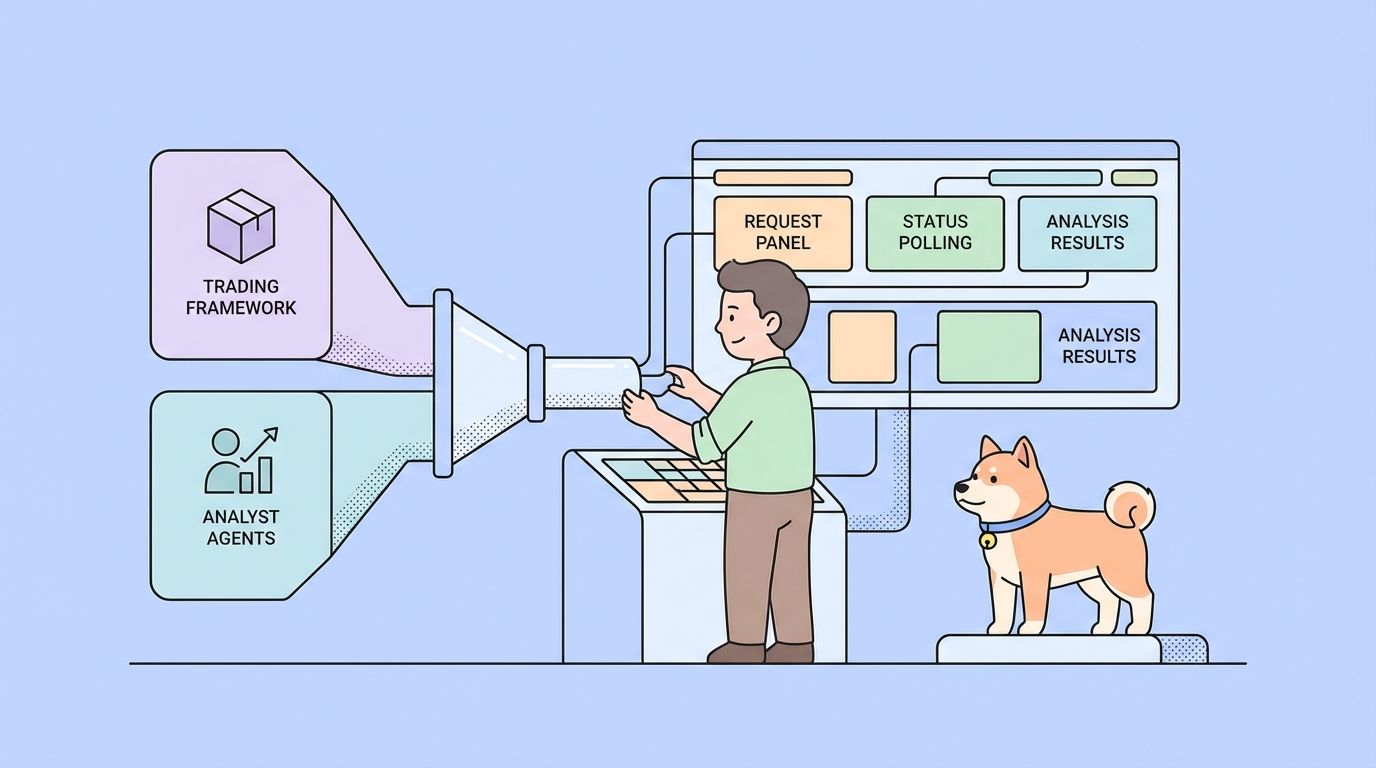
The fastest practical way to use TradingAgents is to run it as a Python package, wrap it in a small FastAPI service, and then test that service in Apidog. That gives you a repeatable workflow for triggering analysis, polling for results, documenting the request contract, and sharing the setup with your team.
Introduction
TradingAgents is easy to admire from the outside. The GitHub repository shows a multi-agent trading workflow, a polished CLI, support for multiple model providers, and a research paper that explains the framework design. The harder part starts when you try to use it in a real engineering workflow.
Most teams do not want a repo that only one developer can run locally. They want a repeatable way to trigger analysis, pass in a ticker and date, return a job ID, inspect the result later, and hand that workflow to frontend, QA, or platform teammates without turning every question into a Python debugging session. And because any trading research system will eventually be used to inform real-money decisions, it is even more important to wrap TradingAgents in a controlled, documented API instead of leaving it as a one-off script on someone’s laptop.
What TradingAgents Is and Is Not
Before you start coding, it helps to define the tool accurately.
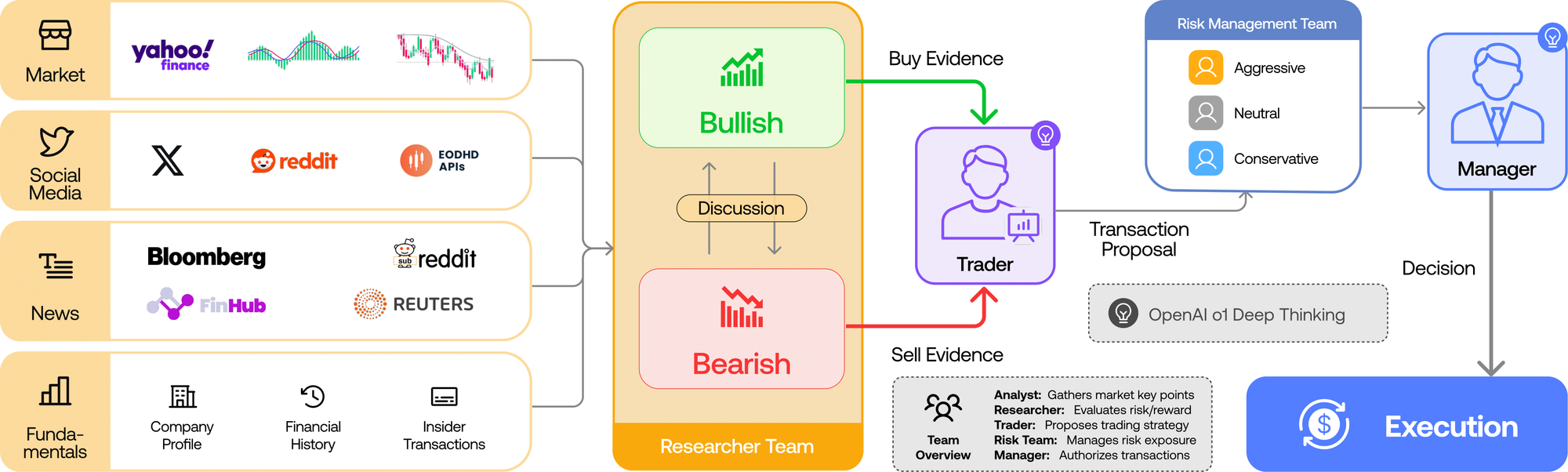
TradingAgents is an open-source multi-agent trading framework. The repository describes a set of specialized roles that mirror the structure of a trading firm:
- analysts for fundamentals, sentiment, news, and technical signals
- bullish and bearish researchers for debate
- a trader agent
- risk management roles
- a portfolio manager for the final decision
The repo also states that the framework is built with LangGraph and supports multiple model providers, including OpenAI, Google, Anthropic, xAI, OpenRouter, and Ollama. In the public default config, the project currently uses values like:
llm_provider = "openai"deep_think_llm = "gpt-5.2"quick_think_llm = "gpt-5-mini"backend_url = "https://api.openai.com/v1"max_debate_rounds = 1
That matters because it tells you what you are really working with: a configurable Python framework, not a drop-in SaaS API.
The repo is also careful about scope. TradingAgents is presented as a research framework, not financial advice. If you use it internally or build software around it, keep that framing visible in your docs and user experience.
Step 1: Install TradingAgents
Start with the setup from the repository itself:
git clone https://github.com/TauricResearch/TradingAgents.git
cd TradingAgents
conda create -n tradingagents python=3.13
conda activate tradingagents
pip install .
If you want to build the API wrapper from this tutorial too, add FastAPI and Uvicorn:
pip install fastapi uvicornThe TradingAgents repo also includes an .env.example with provider variables such as:
OPENAI_API_KEY=
GOOGLE_API_KEY=
ANTHROPIC_API_KEY=
XAI_API_KEY=
OPENROUTER_API_KEY=
Depending on your model and data choices, you may also need other vendor credentials, such as Alpha Vantage.
Two practical rules matter here:
- Keep credentials in environment variables or a secrets manager.
- Do not pass provider secrets through your public API request body later.
That separation will make your Apidog environments cleaner and your security model much safer.
Step 2: Run TradingAgents in Python First
Before you build any API wrapper, prove that the core framework runs in your environment.
The README shows a minimal Python usage pattern:
from tradingagents.graph.trading_graph import TradingAgentsGraph
from tradingagents.default_config import DEFAULT_CONFIG

ta = TradingAgentsGraph(debug=True, config=DEFAULT_CONFIG.copy())
_, decision = ta.propagate("NVDA", "2026-01-15")
print(decision)
This is the right first checkpoint because it answers the only question that matters early on: can your machine, model setup, and dependencies actually execute a TradingAgents run?
If that works, then you can move on to controlled configuration. The repo also shows that you can override the default config:
from tradingagents.graph.trading_graph import TradingAgentsGraph
from tradingagents.default_config import DEFAULT_CONFIG

config = DEFAULT_CONFIG.copy()
config["llm_provider"] = "openai"
config["deep_think_llm"] = "gpt-5.2"
config["quick_think_llm"] = "gpt-5-mini"
config["max_debate_rounds"] = 2

ta = TradingAgentsGraph(debug=True, config=config)
_, decision = ta.propagate("NVDA", "2026-01-15")
print(decision)
That second example is more important than it looks. It tells you which parameters are worth exposing in an API later:
tickeranalysis_datellm_providerdeep_think_llmquick_think_llm- research depth or debate rounds
If you skip this local Python phase and jump directly to HTTP, you make debugging harder than it needs to be.
Step 3: Decide How You Want to Use TradingAgents
At this point, you have three common ways to use the framework.
Option 1: CLI only
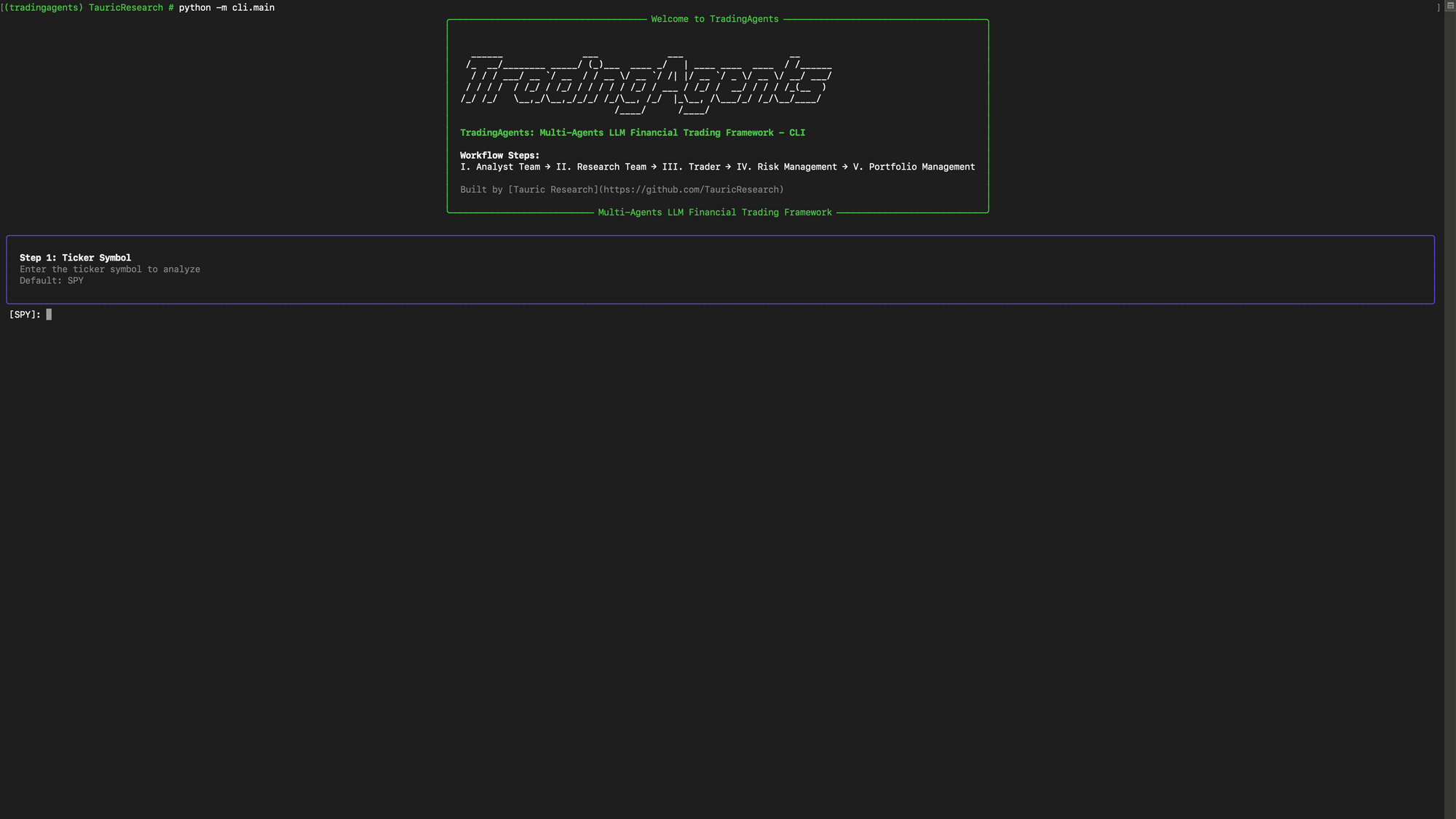
The repository includes an interactive CLI where you can choose ticker, date, provider, and research depth. This is a good way to explore the project quickly.
Use this when:
- you are learning the tool
- you are running solo experiments
- you do not need a stable contract for another app
Do not stop here if your next step is a frontend, admin tool, shared service, or QA workflow.
Option 2: Python only
Calling TradingAgentsGraph directly from Python is better than the CLI when you need custom orchestration or local scripts.
Use this when:
- you want notebooks or local automation
- you need programmatic control
- one developer owns the workflow end to end
This still falls short when multiple teams need to consume the workflow.
Option 3: API wrapper plus Apidog
This is the most useful team setup. You keep TradingAgents as the execution engine, expose it through a small FastAPI service, and use Apidog to test and document the contract.
Use this when:
- a frontend needs to trigger analysis
- QA needs a repeatable request flow
- you want environments, assertions, and docs in one place
- the workflow may run long enough that polling makes more sense than one synchronous request
For most teams, this is the point where "how to use TradingAgents" becomes a real implementation answer instead of just a local demo.
Step 4: Wrap TradingAgents in a FastAPI Service
The cleanest pattern for a first wrapper is a job-based API.
Why job-based? Because a multi-agent analysis can take long enough that holding one request open is awkward for clients. A better pattern is:
POST /analyses -> returns analysis_id
GET /analyses/{id} -> returns queued, running, completed, or failed
That structure is easier for browsers, easier for QA, and easier to document in Apidog.
Create the API contract
A minimal contract looks like this:
| Endpoint | Purpose |
|---|---|
GET /health | basic health check |
POST /analyses | trigger a TradingAgents run |
GET /analyses/{analysis_id} | fetch job status and final result |
Build the wrapper
Here is a compact FastAPI example:
from concurrent.futures import ThreadPoolExecutor
from datetime import date, datetime
from uuid import uuid4

from fastapi import FastAPI, HTTPException
from pydantic import BaseModel, Field

from tradingagents.default_config import DEFAULT_CONFIG
from tradingagents.graph.trading_graph import TradingAgentsGraph

app = FastAPI(title="TradingAgents API", version="0.1.0")
executor = ThreadPoolExecutor(max_workers=2)
jobs: dict[str, dict] = {}

class AnalysisRequest(BaseModel):
 ticker: str = Field(..., min_length=1, examples=["NVDA"])
 analysis_date: date
 llm_provider: str = Field(default="openai")
 deep_think_llm: str = Field(default="gpt-5.2")
 quick_think_llm: str = Field(default="gpt-5-mini")
 research_depth: int = Field(default=1, ge=1, le=5)

def run_analysis(job_id: str, payload: AnalysisRequest) -> None:
 jobs[job_id]["status"] = "running"
 jobs[job_id]["started_at"] = datetime.utcnow().isoformat()

 config = DEFAULT_CONFIG.copy()
 config["llm_provider"] = payload.llm_provider
 config["deep_think_llm"] = payload.deep_think_llm
 config["quick_think_llm"] = payload.quick_think_llm
 config["max_debate_rounds"] = payload.research_depth
 config["max_risk_discuss_rounds"] = payload.research_depth

 try:
 graph = TradingAgentsGraph(debug=False, config=config)
 _, decision = graph.propagate(
 payload.ticker,
 payload.analysis_date.isoformat(),
 )
 jobs[job_id].update(
 {
 "status": "completed",
 "finished_at": datetime.utcnow().isoformat(),
 "result": decision,
 }
 )
 except Exception as exc:
 jobs[job_id].update(
 {
 "status": "failed",
 "finished_at": datetime.utcnow().isoformat(),
 "error": str(exc),
 }
 )

@app.get("/health")
def health() -> dict:
 return {"status": "ok"}

@app.post("/analyses", status_code=202)
def create_analysis(payload: AnalysisRequest) -> dict:
 analysis_id = str(uuid4())
 jobs[analysis_id] = {
 "status": "queued",
 "ticker": payload.ticker,
 "analysis_date": payload.analysis_date.isoformat(),
 "created_at": datetime.utcnow().isoformat(),
 }
 executor.submit(run_analysis, analysis_id, payload)
 return {"analysis_id": analysis_id, "status": "queued"}

@app.get("/analyses/{analysis_id}")
def get_analysis(analysis_id: str) -> dict:
 job = jobs.get(analysis_id)
 if not job:
 raise HTTPException(status_code=404, detail="Analysis not found")
 return job
Start the service:
uvicorn app:app --reloadOnce the server is up, FastAPI will expose:
http://localhost:8000/docshttp://localhost:8000/openapi.json
That second URL is especially useful because Apidog can import it directly.
Step 5: Use TradingAgents Through the API
Now you are ready to use TradingAgents in a way that feels stable and repeatable.
Trigger an analysis
Send a POST /analyses request with a body like this:
{
 "ticker": "NVDA",
 "analysis_date": "2026-03-26",
 "llm_provider": "openai",
 "deep_think_llm": "gpt-5.2",
 "quick_think_llm": "gpt-5-mini",
 "research_depth": 2
}
The response should be quick and small:
{
 "analysis_id": "88f9f0f5-7315-4c73-8ed5-d0a71f613d31",
 "status": "queued"
}
That is exactly what you want. Your client does not need the final report immediately. It needs a stable handle for the run.
Poll for the result
Use GET /analyses/{analysis_id} to check progress:
{
 "status": "running",
 "ticker": "NVDA",
 "analysis_date": "2026-03-26",
 "created_at": "2026-03-26T06:00:00.000000",
 "started_at": "2026-03-26T06:00:01.000000"
}
When the workflow finishes, the response can include the final decision:
{
 "status": "completed",
 "ticker": "NVDA",
 "analysis_date": "2026-03-26",
 "result": {
 "decision": "hold"
 }
}
If something breaks, return a clear failed state and an error message instead of leaving clients guessing.
Step 6: Import the API into Apidog
This is where the workflow becomes much easier to maintain.
In Apidog, import the OpenAPI schema from:
http://localhost:8000/openapi.jsonAfter import, you should see your endpoints with their request and response structure already in place.
That gives you a few immediate wins:
- the docs match the implementation
- path parameters are generated correctly
- request bodies stay aligned with your code
- teammates do not need to rebuild the collection by hand
If you are moving from ad hoc cURL testing, this is a meaningful upgrade. If you are moving from a request-only tool, this is where Apidog starts to matter more because you can keep design, testing, environments, and documentation in one place.
Step 7: Create an Apidog Environment
Once the API is imported, create an environment for your local service.
Example variables:
base_url = http://localhost:8000
analysis_id =
If your API uses authentication, include that too:
internal_api_key = your-local-dev-keyThis step looks small, but it prevents a lot of friction:
- you can switch between local, staging, and production faster
- your requests stay reusable
- your teammates do not have to rewrite URLs and headers every time
This is one of the simplest reasons Apidog is a strong companion for TradingAgents. The framework itself handles the analysis logic. Apidog handles the shared workflow around it.
Step 8: Test the Full Workflow in Apidog
Now you can use Apidog to test TradingAgents the way a real client would.
Request 1: Create the analysis
Configure:
- method:
POST - URL:
{{base_url}}/analyses - body:
{
 "ticker": "NVDA",
 "analysis_date": "2026-03-26",
 "llm_provider": "openai",
 "deep_think_llm": "gpt-5.2",
 "quick_think_llm": "gpt-5-mini",
 "research_depth": 2
}
Add a test script that validates the status and stores the ID:
pm.test("Status is 202", function () {
 pm.response.to.have.status(202);
});

const data = pm.response.json();
pm.expect(data.analysis_id).to.exist;
pm.environment.set("analysis_id", data.analysis_id);
Request 2: Poll the analysis
Configure:
- method:
GET - URL:
{{base_url}}/analyses/{{analysis_id}}
Then add an assertion like:
pm.test("Analysis has a valid status", function () {
 const data = pm.response.json();
 pm.expect(["queued", "running", "completed", "failed"]).to.include(data.status);
});
If you want a success-path check too:
pm.test("Completed jobs include a result", function () {
 const data = pm.response.json();
 if (data.status === "completed") {
 pm.expect(data.result).to.exist;
 }
});
Chain both requests into a scenario
This is where Apidog becomes more than an API client. Build a scenario that:
- sends
POST /analyses - stores
analysis_id - waits a few seconds
- runs
GET /analyses/{{analysis_id}}
That gives your QA and engineering teams a reproducible way to validate the lifecycle instead of just checking whether one endpoint happens to return a 200.
Step 9: Publish Internal Docs for Your Team
Once the requests work, do not stop at testing.
Use Apidog to publish internal documentation that explains:
- which providers are allowed
- what
research_depthmeans in your deployment - what status values clients should expect
- how long runs typically take
- which errors are retryable
- where the research-only disclaimer applies
This is one of the most important parts of using TradingAgents well. The core framework is clever, but clever frameworks become team bottlenecks when the contract lives only in one developer's head.
Download Apidog free to turn TradingAgents into a documented API workflow with environments, assertions, and reusable team-ready scenarios.
Common Mistakes When Using TradingAgents This Way
Treating the framework like a hosted API
TradingAgents is not a ready-made public service. It is a Python framework. Build the contract you want your team to use instead of expecting the repo to provide it for you.
Passing secrets through request bodies
Keep provider keys in environment management. Do not leak them into examples, frontend calls, or shared screenshots.
Returning one long synchronous response
For a multi-step agent workflow, a job-based API is usually easier to manage than a long blocking request.
Exposing too many config knobs
The repo has useful configuration options, but your API does not need to expose every internal setting on day one. Start with a small, stable contract.
Keeping results only in memory
The tutorial code uses an in-memory dictionary because it is easy to understand. In production, store job state in Redis, Postgres, or another durable backend.
Hiding the research disclaimer
If your service wraps TradingAgents, keep the same warning the project uses. The framework is for research and experimentation, not financial advice.
Conclusion
The best way to use TradingAgents depends on what you are trying to do. If you are exploring the framework alone, the CLI and Python package are enough. If you want a stable, repeatable team workflow, wrap TradingAgents in a small API and use Apidog to test and document it.
If you want to go from GitHub repo to usable team workflow quickly, install TradingAgents, confirm TradingAgentsGraph works locally, add POST /analyses and GET /analyses/{id}, then import the schema into Apidog and build one end-to-end scenario. That path is much easier to maintain than a collection of terminal commands and tribal knowledge.
FAQ
How do you use TradingAgents for the first time?
Start by installing the repo, setting the model provider environment variables, and running the Python example with TradingAgentsGraph. Once that works, decide whether you only need the CLI or whether you should wrap it in an API.
Does TradingAgents come with an official REST API?
Not from the public repository materials reviewed on March 26, 2026. The project is presented as a CLI and Python package, which is why many teams will want to add a thin FastAPI layer.
What is the easiest way to use TradingAgents in a frontend app?
Do not call the Python framework directly from the frontend. Expose it through a backend API that returns an analysis_id, then let the frontend poll for results.
Why use Apidog with TradingAgents?
Apidog gives you a clean place to import the OpenAPI schema, save environment values, store example requests, add assertions, and share the workflow with teammates who should not have to reverse-engineer the Python code.
Which TradingAgents settings are worth exposing in an API?
The safest starting set is ticker, analysis date, provider, model choices, and research depth. You can always expand later if the use case is real.
Can I keep the example job state in memory?
Only for learning or prototyping. In production, store job state and results in a durable backend so a service restart does not wipe active analyses.
Is TradingAgents suitable for live financial decisions?
The public project materials describe it as a research framework and explicitly say it is not financial or investment advice. Treat it as a research and experimentation system unless you add your own controls, validation, and governance.