Agent2Agent (A2A) is moving from spec to shipping fast, and the moment you run a second agent, you need to see what crosses the wire between them. The tooling is young, so the list of real A2A debuggers is short, and the gap between them is wide. This roundup covers the tools that actually exist today, what each is good at, and which to reach for first.
If A2A itself is new to you, read what Agent2Agent (A2A) is and what an A2A debugger is before this list. They explain the Agent Card, the task lifecycle, and why agent-to-agent traffic is hard to inspect.
How to judge an A2A debugger
A debugger earns a spot on this list by doing four things well:
- Discovery. Fetch and validate an Agent Card, then show the agent’s capabilities and skills clearly.
- Message testing. Send text, files, and metadata without hand-rolling JSON-RPC.
- Response inspection. Render the reply in a readable form and expose the raw payload.
- Auth and headers. Handle Bearer, Basic, API key, and custom headers without scripting.
Bonus points for streaming support, session history, and running as a local client rather than routing your traffic through a third party.
1. Apidog A2A Debugger
Apidog ships a dedicated A2A Debugger inside its standard client, and it is the most complete option for most teams.
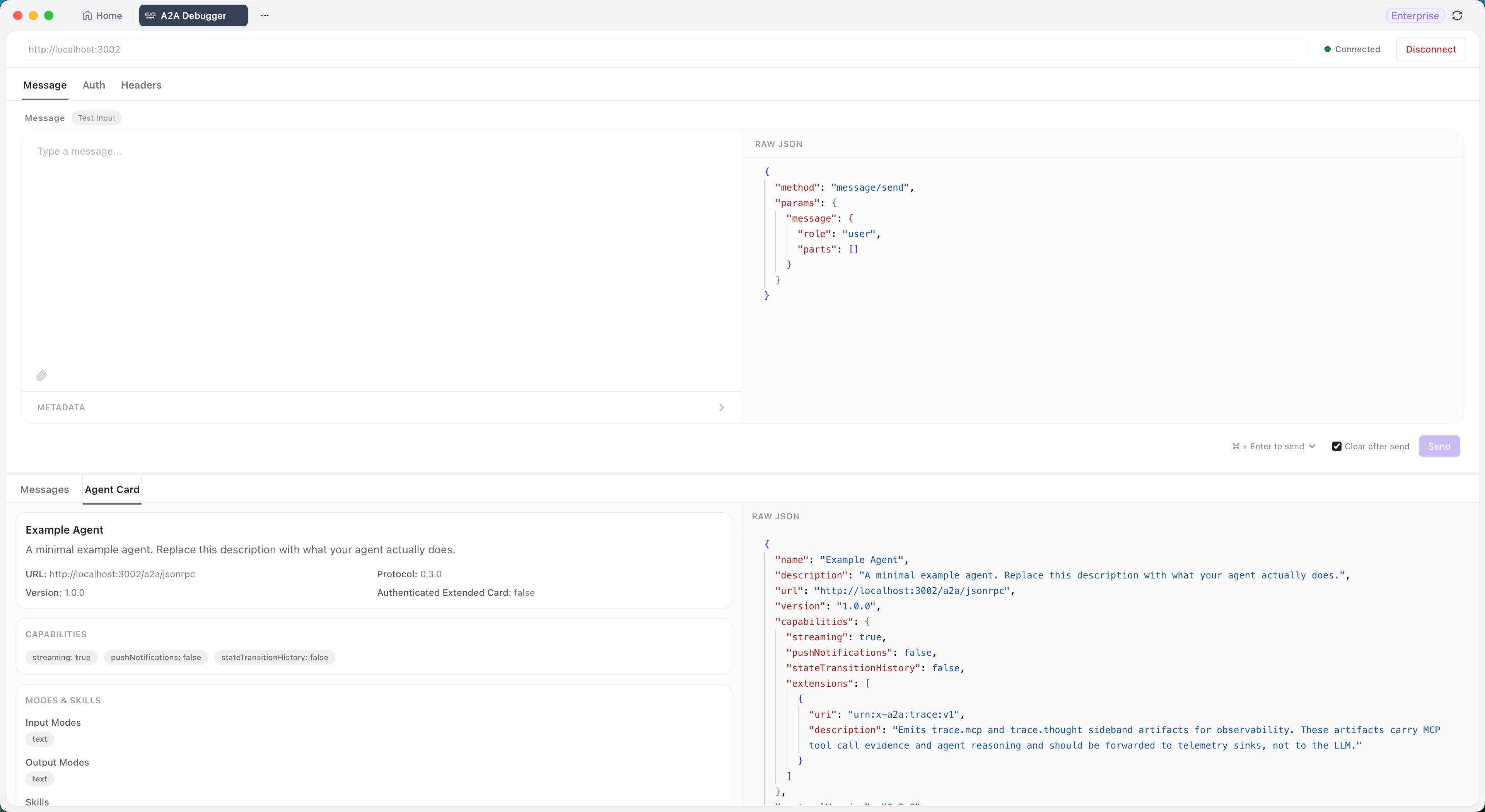
You paste an Agent Card URL, click Connect, and Apidog validates the card and shows the agent’s name, description, capabilities, declared skills, and protocol version. The Messages tab lets you send plain text, attach files (the debugger checks the agent’s declared input types and rejects unsupported ones up front), and add custom metadata key-value pairs. Replies come back in three views; Preview for a readable tree, Content for the human-readable body, and Raw Data for the full JSON-RPC payload.
Authentication covers None, Bearer Token, Basic Auth, and API key via a custom header, all in the UI. Custom headers handle gateways and tenant routing. Session history keeps every message in a run. It handles server-sent-event streaming where the agent supports it, and it runs as a local client, so traffic goes straight between your machine and the agent.
Strengths: the broadest feature coverage, no scripting, three response views, and it lives in the same tool you already use for REST, GraphQL, and MCP work. One surface for every protocol an agent system runs on.
Trade-off: it is part of the full Apidog client rather than a standalone single-purpose binary. If you want a tiny CLI and nothing else, that is more than you need.
Best for: teams building or consuming A2A agents who want a visual, no-code workbench. Start with the Apidog A2A Debugger guide. Download Apidog to follow along.
2. A2A Inspector
The A2A project maintains an open-source A2A Inspector; a web-based tool for connecting to an agent, viewing its Agent Card, and exercising messages. It is published alongside the spec at the A2A GitHub organization.

Because it comes from the same project that owns the protocol, it tracks the spec closely and is a good reference for “what a compliant card and exchange should look like.” It validates the Agent Card and lets you send messages and read responses in the browser.
Strengths: spec-accurate, open source, free, and a useful conformance reference.
Trade-off: it is a developer tool you typically run yourself, and its UX and feature depth lag a dedicated product. Auth handling and file-attachment ergonomics are thinner.
Best for: developers who want a reference implementation and don’t mind running it locally.
3. A2A CLI and SDK tooling
The official A2A SDKs (Python and JavaScript/TypeScript among them) ship with command-line helpers and sample clients you can point at any A2A agent. With a few commands you can fetch an Agent Card, send a message, and print the response.
This is the scriptable path. It fits naturally into CI, smoke tests, and automated checks where a GUI cannot run.
Strengths: scriptable, automatable, and zero extra installs if you already depend on the SDK.
Trade-off: no visual response views, no diffing, and you read raw JSON in the terminal. Fine for pass/fail checks, painful for exploratory debugging.
Best for: automated conformance checks and CI pipelines, not interactive debugging.
4. A2A sample agents and demo UI
The A2A project publishes sample agents and a multi-agent demo UI in its samples repository, reachable from the A2A protocol site. The demo UI lets you watch several agents coordinate and inspect the messages between them.
It is built to teach the protocol rather than to debug your own agent, but it is genuinely useful for seeing a healthy A2A exchange end to end before you suspect your own code.
Strengths: great for learning, shows real multi-agent flows, free and open source.
Trade-off: it is a demo, not a debugging product. You don’t drive arbitrary agents through it the way you do with Apidog or the Inspector.
Best for: learning the protocol and getting a known-good reference exchange.
5. General API clients (curl, custom scripts)
Before any of the above, every team’s first “debugger” is curl or a throwaway script. An A2A request is JSON-RPC over HTTP, so a raw HTTP client can send it.
It works for one exchange. Then you maintain it: hand-build the JSON-RPC envelope, base64 your own Basic Auth, parse nested artifacts by eye, and rewrite the script every time the Agent Card changes. This is the baseline the dedicated tools exist to replace.
Strengths: already installed, no learning curve for a single shot.
Trade-off: no Agent Card validation, no response rendering, no streaming support, and it rots fast.
Best for: a one-time sanity check, nothing ongoing.
Quick comparison
| Tool | Type | Visual response views | Auth in UI | Streaming | Best for |
|---|---|---|---|---|---|
| Apidog A2A Debugger | Visual client | Three views | Yes | Yes | Day-to-day A2A debugging |
| A2A Inspector | Web tool (self-run) | Basic | Limited | Partial | Spec reference |
| A2A CLI / SDK | Command line | None (raw JSON) | Via flags | Limited | CI and automation |
| A2A demo UI | Sample app | Built-in | N/A | Yes | Learning the protocol |
| curl / scripts | Raw HTTP | None | Manual | No | One-off checks |
Which one should you use?
For interactive, day-to-day debugging, the Apidog A2A Debugger is the practical default. It validates Agent Cards, sends messages with files and metadata, renders responses three ways, and handles auth without scripting; and it sits next to your REST, GraphQL, and MCP tooling, so you are not juggling separate apps. The MCP server vs A2A guide explains why having both protocols under one roof matters as agent systems grow.
For automated conformance in CI, pair it with the A2A SDK CLI. Use the visual debugger to find and fix bugs, then lock the fixed behavior into a scripted check. The same confirm-the-wire-first discipline from how to test AI agents that call your APIs applies here.
For learning the protocol, run the A2A demo UI once to see a healthy multi-agent exchange, then move to a real debugger for your own agents. And once your agents need credentials, the secure AI agent API credentials guide covers what to rotate and scope.
The honest summary: the A2A tooling space is still small. Apidog is the most complete visual debugger today, the official project tools are the best spec reference, and raw HTTP clients are the floor you are trying to climb off. Pick the visual debugger for finding bugs and the CLI for guarding against them.
Common questions
What is the best A2A debugger right now?
For interactive debugging, the Apidog A2A Debugger is the most complete: Agent Card validation, message testing with files and metadata, three response views, full auth, and streaming support, all without scripting.
Are there free A2A debuggers?
Yes. The Apidog A2A Debugger ships free with the standard client, and the official A2A Inspector, SDK CLI, and demo UI are open source and free.
Can I debug A2A agents with Postman?
Postman has no native A2A support. You can send the raw JSON-RPC HTTP request by hand, but you lose Agent Card validation, response rendering, and streaming. A dedicated A2A debugger handles the protocol layer for you.
Do A2A debuggers work with any agent framework?
Yes, as long as the agent publishes a valid A2A Agent Card. A2A is framework-agnostic, so LangGraph, CrewAI, AutoGen, and custom agents all work. See what Agent2Agent (A2A) is for the protocol basics.
Should I use a CLI or a visual A2A debugger?
Use both for different jobs. A visual debugger like Apidog is faster for finding and isolating bugs. A CLI is better for automated conformance checks in CI. Most teams debug visually, then script the fixed behavior.
How do I get started debugging an A2A agent?
Download Apidog, open the A2A Debugger, paste your agent’s Agent Card URL, click Connect, and send a plain-text test message. The Apidog A2A Debugger guide walks through the full loop.