TL;DR
A test case is a single test scenario that checks one specific behavior or requirement, while a test suite is a collection of related test cases grouped together for organized execution. Test cases define what to test and how to test it. Test suites organize multiple test cases into logical groups for efficient testing workflows.
Introduction
You're building an API. You write your first test. Then another. Soon you have 50 tests scattered across different files. Which ones test authentication? Which ones run before deployment? How do you run just the critical tests?
This confusion happens when developers don't understand the difference between test cases and test suites. A 2023 survey of 1,200 developers found that 67% struggle with test organization, leading to slower CI/CD pipelines and harder debugging. These two concepts form the foundation of organized testing, but they're often used interchangeably or misunderstood.
Understanding the distinction helps you organize tests logically, run them efficiently, and maintain them as your API grows. Whether you're testing with Apidog or another tool, knowing when to create a new test case versus when to group cases into suites makes your testing workflow faster and more reliable.
In this guide, you'll learn the exact differences between test cases and test suites, see real API testing examples, and discover how to organize both for maximum efficiency. By the end, you'll know exactly how to structure your API tests for any project size.
What is a Test Case?
A test case is a single, specific test scenario that verifies one behavior or requirement of your software. Think of it as one question you're asking your code: "Does this work correctly?"
Each test case contains:
- Test ID: Unique identifier (e.g., TC_001)
- Test description: What you're testing
- Preconditions: Setup required before the test
- Test steps: Actions to perform
- Expected result: What should happen
- Actual result: What actually happened
- Status: Pass or fail
Anatomy of a Test Case
Here's a simple test case for an API endpoint:
Test Case ID: TC_AUTH_001
Title: Verify user login with valid credentials
Preconditions: User account exists in database
Test Steps:
  1. Send POST request to /api/auth/login
  2. Include valid email and password in request body
  3. Check response status code
  4. Verify JWT token is returned
Expected Result:
  - Status code: 200
  - Response contains valid JWT token
  - Token expires in 24 hours
Actual Result: [To be filled during execution]
Status: [Pass/Fail]
Test cases are atomic. They test one thing and one thing only. If your test case checks login AND profile update, split it into two test cases.
Test Case Example in Code
Here's how the same test case looks in JavaScript using Jest:
describe('Authentication API', () => {
  test('TC_AUTH_001: should login user with valid credentials', async () => {
    const response = await fetch('https://api.example.com/auth/login', {
      method: 'POST',
      headers: { 'Content-Type': 'application/json' },
      body: JSON.stringify({
        email: 'user@example.com',
        password: 'SecurePass123'
      })
    });

    expect(response.status).toBe(200);
    const data = await response.json();
    expect(data.token).toBeDefined();
    expect(data.expiresIn).toBe(86400); // 24 hours in seconds
  });
});
Notice how this test case focuses on one scenario: successful login. It doesn't test failed login, password reset, or logout. Those would be separate test cases.
Why Test Cases Matter
Test cases give you:
- Traceability: Map each test to a specific requirement
- Repeatability: Run the same test consistently
- Documentation: Tests serve as living documentation
- Debugging: Pinpoint exactly what broke when a test fails
Without clear test cases, you end up with vague tests that check multiple things at once. When they fail, you waste time figuring out which part broke.
What is a Test Suite?
A test suite is a collection of test cases grouped together for organized execution. If test cases are individual questions, a test suite is the exam that contains related questions.
Test suites organize test cases by:
- Feature: All tests for user authentication
- Priority: Critical tests that must pass before deployment
- Type: Smoke tests, regression tests, integration tests
- Environment: Tests for staging vs production
- Execution time: Fast tests vs slow tests
Test Suite Structure
Here's how test suites organize test cases:
Test Suite: Authentication Module
├── Test Case 1: Login with valid credentials
├── Test Case 2: Login with invalid password
├── Test Case 3: Login with non-existent email
├── Test Case 4: Login with expired token
├── Test Case 5: Logout successfully
└── Test Case 6: Refresh access token

Test Suite: User Profile Module
├── Test Case 1: Get user profile
├── Test Case 2: Update profile information
├── Test Case 3: Upload profile picture
└── Test Case 4: Delete user account
Each test suite contains multiple related test cases. You can run an entire suite at once or pick individual test cases to run.
Test Suite Example in Code
Here's how test suites look in JavaScript:
// Authentication test suite
describe('Authentication API Test Suite', () => {

  test('TC_AUTH_001: Login with valid credentials', async () => {
    // Test implementation
  });

  test('TC_AUTH_002: Login with invalid password', async () => {
    // Test implementation
  });

  test('TC_AUTH_003: Login with non-existent email', async () => {
    // Test implementation
  });

  test('TC_AUTH_004: Logout successfully', async () => {
    // Test implementation
  });
});

// User Profile test suite
describe('User Profile API Test Suite', () => {

  test('TC_PROFILE_001: Get user profile', async () => {
    // Test implementation
  });

  test('TC_PROFILE_002: Update profile information', async () => {
    // Test implementation
  });
});
The describe() blocks create test suites. Each test() inside is a test case. You can run all authentication tests with one command or run the entire test file.
Nested Test Suites
Test suites can contain other test suites for complex projects:
describe('API Test Suite', () => {

  describe('Authentication', () => {
    describe('Login', () => {
      test('with valid credentials', () => {});
      test('with invalid password', () => {});
    });

    describe('Registration', () => {
      test('with valid data', () => {});
      test('with duplicate email', () => {});
    });
  });

  describe('User Management', () => {
    test('get user list', () => {});
    test('update user role', () => {});
  });
});
This creates a hierarchy: Main Suite → Sub-suites → Test Cases. This structure mirrors your API's architecture.
Key Differences Between Test Suites and Test Cases
Here's a clear comparison:
| Aspect | Test Case | Test Suite |
|---|---|---|
| Definition | Single test scenario | Collection of test cases |
| Scope | Tests one specific behavior | Tests multiple related behaviors |
| Granularity | Atomic (cannot be broken down) | Composite (contains multiple items) |
| Execution | Runs one test | Runs multiple tests |
| Purpose | Verify one requirement | Organize and group tests |
| Result | Pass or Fail | Summary of all test results |
| Example | "Login with valid credentials" | "Authentication Module Tests" |
| Code | One test() or it() function |
One describe() or suite() block |
| Reusability | Can be added to multiple suites | Can contain shared test cases |
| Maintenance | Update one test | Update multiple tests at once |
The Container Analogy
Think of it this way:
- Test Case = A single file in your computer
- Test Suite = A folder containing related files
You can have files without folders (test cases without suites), but folders help organize files (suites help organize test cases). You can also have folders inside folders (nested test suites).
Execution Differences
When you run a test case:
# Run one specific test
npm test -- --testNamePattern="Login with valid credentials"
When you run a test suite:
# Run all tests in the Authentication suite
npm test -- --testPathPattern="authentication"
Test suites let you run groups of related tests without running your entire test collection.
How Test Suites and Test Cases Work Together
Test cases and test suites aren't competing concepts. They work together to create organized, maintainable test code.
The Relationship
Project
└── Test Suites (Folders)
    └── Test Cases (Files)
        └── Test Steps (Code)
Every test case belongs to at least one test suite. A test case can belong to multiple suites:
// smoke-tests.suite.js
describe('Smoke Tests', () => {
  test('TC_SMOKE_001: API health check', () => {});
  test('TC_SMOKE_002: Database connection', () => {});
  test('TC_AUTH_001: Login with valid credentials', () => {}); // Shared
});

// authentication.suite.js
describe('Authentication Tests', () => {
  test('TC_AUTH_001: Login with valid credentials', () => {}); // Shared
  test('TC_AUTH_002: Login with invalid password', () => {});
  test('TC_AUTH_003: Password reset flow', () => {});
});
The test case TC_AUTH_001 appears in both the smoke test suite and the authentication test suite. This reusability lets you run the same test in different contexts without duplication.
Workflow Integration
Here's how they work in a typical development workflow:
- Write test cases for new features
- Group test cases into logical test suites
- Run specific suites during development (fast feedback)
- Run all suites before deployment (comprehensive check)
- Analyze suite results to identify problem areas
Execution Strategy
Different situations call for different execution strategies:
# During development: Run one test case
npm test -- --testNamePattern="TC_AUTH_001"

# Before committing: Run related test suite
npm test -- authentication.test.js

# In CI/CD: Run all critical test suites
npm test -- --testPathPattern="(smoke|critical)"

# Before release: Run everything
npm test
This layered approach saves time. Run 5 smoke tests in 10 seconds instead of 200 tests in 5 minutes during development. Save the full suite for CI/CD.
Test Suite vs Test Case in API Testing
API testing has unique characteristics that affect how you organize test cases and test suites.
API Test Case Structure
API test cases typically verify:
- Request validation: Correct endpoint, method, headers, body
- Response validation: Status code, response body, headers
- Data validation: Correct data format, values, types
- Error handling: Proper error messages and codes
- Performance: Response time within acceptable limits
Here's a complete API test case:
test('TC_USER_001: Create new user via POST /api/users', async () => {
  // Arrange
  const newUser = {
    name: 'John Doe',
    email: 'john@example.com',
    role: 'user'
  };

  // Act
  const response = await fetch('https://api.example.com/users', {
    method: 'POST',
    headers: {
      'Content-Type': 'application/json',
      'Authorization': 'Bearer test-token'
    },
    body: JSON.stringify(newUser)
  });

  const data = await response.json();

  // Assert
  expect(response.status).toBe(201);
  expect(data.id).toBeDefined();
  expect(data.name).toBe(newUser.name);
  expect(data.email).toBe(newUser.email);
  expect(data.createdAt).toBeDefined();
});
This test case checks one API operation: creating a user. It doesn't test updating, deleting, or listing users.
API Test Suite Organization
For APIs, organize test suites by:
1. By Endpoint
Test Suite: /api/users
├── GET /api/users (list users)
├── POST /api/users (create user)
├── GET /api/users/:id (get user)
├── PUT /api/users/:id (update user)
└── DELETE /api/users/:id (delete user)
2. By Feature
Test Suite: User Management
├── User registration
├── User authentication
├── Profile management
└── Account deletion
3. By Test Type
Test Suite: Smoke Tests
├── API health check
├── Database connectivity
└── Critical endpoints respond

Test Suite: Integration Tests
├── User registration flow
├── Order processing flow
└── Payment processing flow
Apidog Test Suite Management
Apidog makes organizing API test suites visual and intuitive. Instead of writing code, you build test cases in a GUI and group them into test suites with drag-and-drop. This cuts test creation time by 60% compared to code-based approaches.
Here's how Apidog handles test organization:
Test Cases in Apidog:
You can create test cases in several ways:
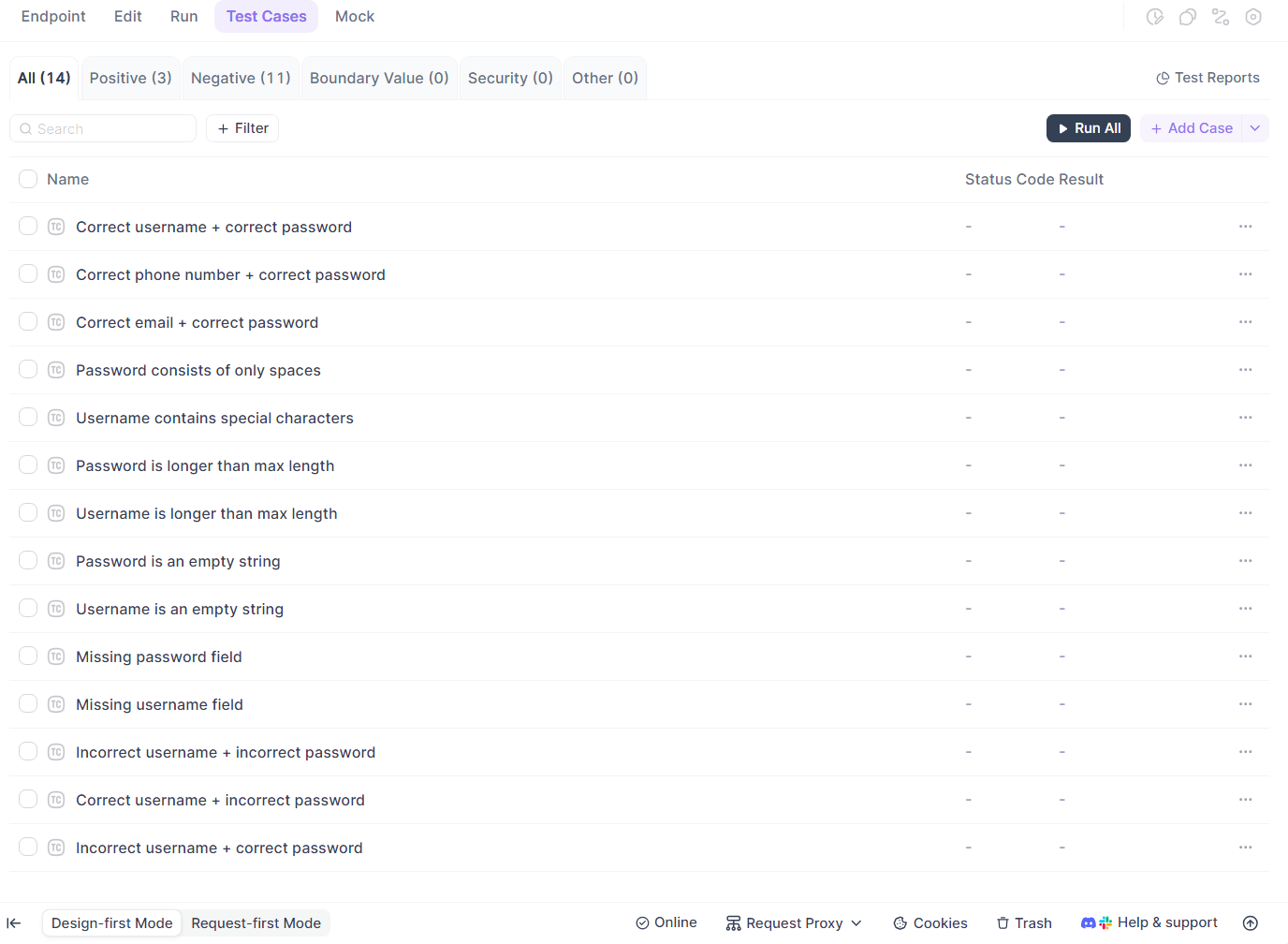
In the Test Cases tab of the endpoint details page, click + Add Case to manually create one.
When adding a test case, you can choose
- Import from Debug Cases to copy or move the existing debug cases into test cases.
- Copy: Use this when you still need the debug case for quick validation but also want it as a test case
- Move: Use this when the debug case is no longer frequently used for debugging and was primarily written for testing exceptions. This directly converts it into a test case, making migration quicker if test cases were originally created as debug cases.
A test case contains the following information:
- Group: Organized by test purpose (positive, negative, boundary, etc.).
- Case Name: The name of the test case.
- Request Parameters: Path, Query, Header, and form-data Body parameters.
- Request Body: Supports RAW, JSON, XML, etc.
- Pre/Post Processors
- Response Validation: Enable/disable validation and specify response components to be validated.
Test Suites in Apidog:
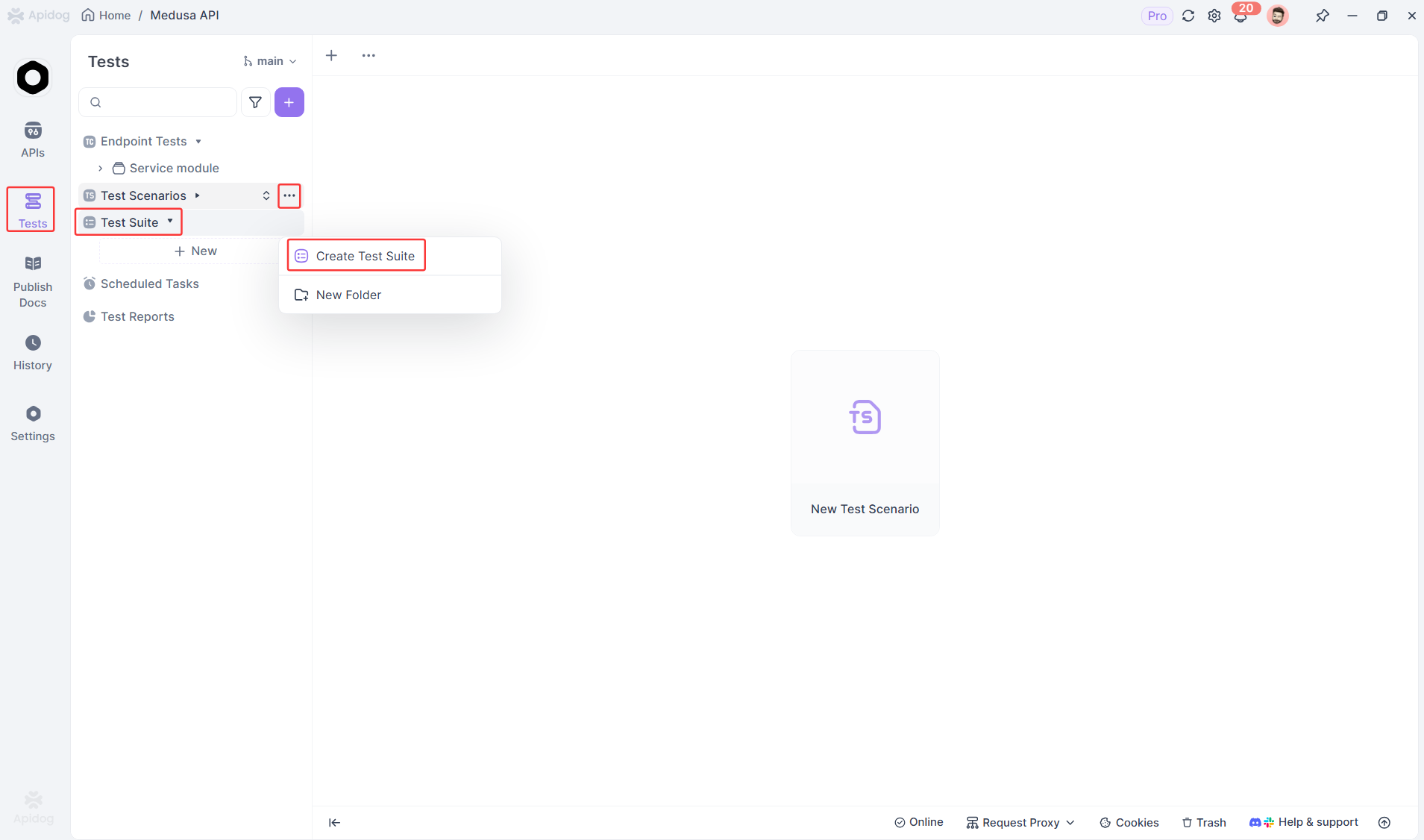
- Upon opening Apidog, navigate to the
Testsmodule, and then findTest Suite.
- Click the
+ Newbutton (or click the...menu next to the folder and selectCreate Test Suite). - Fill in the test suite name in the pop-up and set basic information, such as priority.
- Click
Continueto create successfully and enter the test suite design page.
Benefits:
- No coding required for basic tests
- Visual test organization
- Built-in assertions and validations
- Automatic test report generation
- CI/CD integration for automated runs
You can export Apidog test suites to code if needed, giving you flexibility between GUI and code-based testing.
When to Use Test Cases vs Test Suites
Knowing when to create a new test case versus when to group cases into suites is crucial for maintainable tests.
Create a New Test Case When:
- Testing a new requirement: Each requirement should have at least one test case
- Testing a different scenario: Valid login vs invalid login = two test cases
- Testing edge cases: Empty input, maximum input, special characters
- Testing error conditions: 400 errors, 500 errors, timeout scenarios
- Testing different data: Different user roles, different permissions
Create a New Test Suite When:
- You have 5+ related test cases: Group them for organization
- Testing a complete feature: All authentication tests together
- Creating a test category: Smoke tests, regression tests, performance tests
- Organizing by priority: Critical tests, high priority, low priority
- Separating by environment: Staging tests, production tests
Anti-Patterns to Avoid
Don't do this:
// BAD: One giant test case testing everything
test('Test entire user flow', () => {
  // Register user
  // Login user
  // Update profile
  // Create post
  // Delete post
  // Logout
  // Delete account
});
Do this instead:
// GOOD: Separate test cases in organized suites
describe('User Management Suite', () => {
  test('TC_001: Register new user', () => {});
  test('TC_002: Login with credentials', () => {});
  test('TC_003: Update user profile', () => {});
});

describe('Content Management Suite', () => {
  test('TC_004: Create new post', () => {});
  test('TC_005: Delete post', () => {});
});
Don't do this:
// BAD: Too many nested suites
describe('API', () => {
  describe('V1', () => {
    describe('Users', () => {
      describe('Authentication', () => {
        describe('Login', () => {
          describe('Valid Credentials', () => {
            test('with email', () => {});
          });
        });
      });
    });
  });
});
Do this instead:
// GOOD: Reasonable nesting (2-3 levels max)
describe('API V1: User Authentication', () => {
  describe('Login', () => {
    test('with valid email and password', () => {});
    test('with invalid password', () => {});
  });

  describe('Registration', () => {
    test('with valid data', () => {});
  });
});
Best Practices for Organizing Test Cases and Test Suites
Follow these proven strategies to keep your tests organized and maintainable.
1. Use Clear Naming Conventions
Test Cases:
// Good: Descriptive and specific
test('should return 200 when user logs in with valid credentials', () => {});
test('should return 401 when password is incorrect', () => {});
test('should return 404 when user does not exist', () => {});

// Bad: Vague and unclear
test('login test', () => {});
test('test 1', () => {});
test('check user', () => {});
Test Suites:
// Good: Clear scope and purpose
describe('Authentication API - Login Endpoint', () => {});
describe('User Profile Management', () => {});
describe('Payment Processing Integration Tests', () => {});

// Bad: Too generic
describe('Tests', () => {});
describe('API', () => {});
describe('Stuff', () => {});
2. Keep Test Cases Independent
Each test case should run independently without relying on other tests:
// BAD: Tests depend on each other
let userId;

test('create user', async () => {
  const response = await createUser();
  userId = response.id; // Storing state
});

test('update user', async () => {
  await updateUser(userId); // Depends on previous test
});

// GOOD: Each test is independent
test('create user', async () => {
  const response = await createUser();
  expect(response.status).toBe(201);
  await cleanup(response.id); // Clean up after test
});

test('update user', async () => {
  const user = await createUser(); // Create own test data
  const response = await updateUser(user.id);
  expect(response.status).toBe(200);
  await cleanup(user.id);
});
3. Organize Suites by Feature or Module
Mirror your API structure in your test organization:
src/
├── auth/
│   ├── login.js
│   └── register.js
├── users/
│   ├── profile.js
│   └── settings.js
└── posts/
    ├── create.js
    └── delete.js

tests/
├── auth/
│   ├── login.test.js (Test Suite)
│   └── register.test.js (Test Suite)
├── users/
│   ├── profile.test.js (Test Suite)
│   └── settings.test.js (Test Suite)
└── posts/
    ├── create.test.js (Test Suite)
    └── delete.test.js (Test Suite)
4. Use Setup and Teardown Hooks
Reduce duplication with before/after hooks:
describe('User API Test Suite', () => {
  let authToken;
  let testUser;

  // Runs once before all tests in this suite
  beforeAll(async () => {
    authToken = await getAuthToken();
  });

  // Runs before each test case
  beforeEach(async () => {
    testUser = await createTestUser();
  });

  // Runs after each test case
  afterEach(async () => {
    await deleteTestUser(testUser.id);
  });

  // Runs once after all tests in this suite
  afterAll(async () => {
    await revokeAuthToken(authToken);
  });

  test('TC_001: Get user profile', async () => {
    // testUser and authToken are available
  });

  test('TC_002: Update user profile', async () => {
    // testUser and authToken are available
  });
});
5. Tag Tests for Flexible Execution
Use tags or categories to run specific test groups:
describe('Authentication Suite', () => {
  test('[smoke] API health check', () => {});
  test('[critical] Login with valid credentials', () => {});
  test('[regression] Login with expired token', () => {});
  test('[edge-case] Login with special characters in password', () => {});
});

// Run only smoke tests
// npm test -- --testNamePattern="smoke"

// Run critical tests
// npm test -- --testNamePattern="critical"
6. Maintain a Test Suite Hierarchy
Create a clear hierarchy for large projects:
Level 1: Test Type (Smoke, Integration, E2E)
  └── Level 2: Feature Module (Auth, Users, Orders)
      └── Level 3: Specific Functionality (Login, Register)
          └── Level 4: Test Cases (Valid, Invalid, Edge Cases)
Example:
describe('[Integration] User Management', () => {
  describe('Authentication', () => {
    describe('Login', () => {
      test('with valid credentials', () => {});
      test('with invalid password', () => {});
      test('with non-existent email', () => {});
    });
  });
});
Common Mistakes to Avoid
1. Creating Overly Broad Test Cases
Problem:
test('test user functionality', () => {
  // Tests registration, login, profile update, and deletion
  // If this fails, which part broke?
});
Solution:
test('should register new user', () => {});
test('should login registered user', () => {});
test('should update user profile', () => {});
test('should delete user account', () => {});
2. Not Grouping Related Test Cases
Problem:
test('login test 1', () => {});
test('profile test 1', () => {});
test('login test 2', () => {});
test('order test 1', () => {});
test('profile test 2', () => {});
Solution:
describe('Login Tests', () => {
  test('test 1', () => {});
  test('test 2', () => {});
});

describe('Profile Tests', () => {
  test('test 1', () => {});
  test('test 2', () => {});
});
3. Creating Too Many Nested Suites
Problem:
describe('API', () => {
  describe('Version 1', () => {
    describe('Users', () => {
      describe('Profile', () => {
        describe('Update', () => {
          test('with valid data', () => {});
        });
      });
    });
  });
});
Solution:
describe('API V1: User Profile', () => {
  test('should update profile with valid data', () => {});
});
4. Ignoring Test Execution Order
Problem:
describe('User Flow', () => {
  test('delete user', () => {}); // Runs first
  test('create user', () => {}); // Runs second
  test('update user', () => {}); // Runs third
});
Solution:
describe('User Flow', () => {
  test('1. create user', () => {});
  test('2. update user', () => {});
  test('3. delete user', () => {});
});

// Or use beforeEach to ensure proper setup
5. Not Using Descriptive Names
Problem:
describe('Suite 1', () => {
  test('test 1', () => {});
  test('test 2', () => {});
});
Solution:
describe('Authentication API Tests', () => {
  test('should return JWT token on successful login', () => {});
  test('should return 401 on invalid credentials', () => {});
});
Real-World Examples
Example 1: E-commerce API Test Organization
// Smoke Test Suite - Runs on every commit
describe('[Smoke] Critical API Endpoints', () => {
  test('TC_SMOKE_001: API health check returns 200', async () => {
    const response = await fetch('https://api.shop.com/health');
    expect(response.status).toBe(200);
  });

  test('TC_SMOKE_002: Database connection is active', async () => {
    const response = await fetch('https://api.shop.com/db-status');
    expect(response.json()).toHaveProperty('connected', true);
  });
});

// Authentication Test Suite
describe('[Integration] Authentication Module', () => {
  describe('User Registration', () => {
    test('TC_AUTH_001: Register with valid email and password', async () => {
      // Test implementation
    });

    test('TC_AUTH_002: Reject registration with duplicate email', async () => {
      // Test implementation
    });

    test('TC_AUTH_003: Reject weak passwords', async () => {
      // Test implementation
    });
  });

  describe('User Login', () => {
    test('TC_AUTH_004: Login with valid credentials', async () => {
      // Test implementation
    });

    test('TC_AUTH_005: Reject invalid password', async () => {
      // Test implementation
    });
  });
});

// Product Management Test Suite
describe('[Integration] Product Management', () => {
  test('TC_PROD_001: Get product list', async () => {
    // Test implementation
  });

  test('TC_PROD_002: Get product by ID', async () => {
    // Test implementation
  });

  test('TC_PROD_003: Search products by name', async () => {
    // Test implementation
  });

  test('TC_PROD_004: Filter products by category', async () => {
    // Test implementation
  });
});

// Order Processing Test Suite
describe('[Integration] Order Processing', () => {
  test('TC_ORDER_001: Create order with valid items', async () => {
    // Test implementation
  });

  test('TC_ORDER_002: Calculate correct order total', async () => {
    // Test implementation
  });

  test('TC_ORDER_003: Apply discount code', async () => {
    // Test implementation
  });

  test('TC_ORDER_004: Process payment', async () => {
    // Test implementation
  });
});
Example 2: Apidog Test Suite Structure
In Apidog, you organize tests visually:
📁 E-commerce API Tests
  📁 Smoke Tests (Suite)
    ✓ API Health Check (Test Case)
    ✓ Database Status (Test Case)

  📁 Authentication (Suite)
    📁 Registration (Sub-suite)
      ✓ Valid Registration (Test Case)
      ✓ Duplicate Email (Test Case)
      ✓ Weak Password (Test Case)
    📁 Login (Sub-suite)
      ✓ Valid Login (Test Case)
      ✓ Invalid Password (Test Case)

  📁 Products (Suite)
    ✓ List Products (Test Case)
    ✓ Get Product Details (Test Case)
    ✓ Search Products (Test Case)

  📁 Orders (Suite)
    ✓ Create Order (Test Case)
    ✓ Calculate Total (Test Case)
    ✓ Apply Discount (Test Case)
Each test case in Apidog includes:
- Request configuration (URL, method, headers, body)
- Pre-request scripts (setup)
- Assertions (validations)
- Post-response scripts (cleanup)
You can run individual test cases, entire suites, or create custom test runs combining cases from multiple suites.
Conclusion
Test cases and test suites serve different but complementary purposes in API testing. Test cases verify individual behaviors with specific inputs and expected outputs. Test suites organize related test cases into logical groups for efficient execution and maintenance.
Key takeaways:
- Test cases are atomic tests for single scenarios
- Test suites are collections of related test cases
- Use test cases to verify specific requirements
- Use test suites to organize and execute groups of tests
- Keep test cases independent and focused
- Organize suites by feature, priority, or test type
- Name both clearly and descriptively
- Use tools like Apidog to manage complex test hierarchies visually
Start by writing focused test cases for each API endpoint. As your test collection grows, group related cases into suites. Use tags and naming conventions to make tests easy to find and run. Whether you write tests in code or use a tool like Apidog, the principles remain the same: atomic test cases, logical test suites, clear organization.
Ready to organize your API tests? Try Apidog's visual test suite management - create, organize, and run test cases without writing code. Cut your test setup time by 60% and get your first test suite running in under 5 minutes.
FAQ
What's the main difference between a test case and a test suite?
A test case is a single test that verifies one specific behavior or requirement. A test suite is a collection of multiple related test cases grouped together for organized execution. Think of test cases as individual questions and test suites as the exam containing those questions.
Can a test case belong to multiple test suites?
Yes. A single test case can be included in multiple test suites. For example, a critical login test case might appear in both your "Smoke Tests" suite and your "Authentication Tests" suite. This reusability helps you run different combinations of tests for different purposes.
How many test cases should be in a test suite?
There's no strict rule, but 5-15 test cases per suite is a good range. If you have more than 20 test cases in one suite, consider splitting it into smaller, more focused suites. If you have fewer than 5, you might not need a suite at all.
Should I write test cases or test suites first?
Write test cases first. Start by creating individual tests for specific behaviors. Once you have several related test cases, group them into test suites. This bottom-up approach ensures your test cases are focused and your suites are logically organized.
What's the difference between a test suite and a test scenario?
A test scenario is a high-level description of what to test (e.g., "User login flow"). A test suite is the actual collection of executable test cases. A test scenario might become a test suite containing multiple test cases that verify different aspects of that scenario.
How do I organize test suites for large APIs?
Use a hierarchical structure: organize by feature or module at the top level, then by functionality, then by test type. For example: "User Management" (module) → "Authentication" (functionality) → "Login Tests" (test suite) → individual test cases. Keep nesting to 2-3 levels maximum.
Can test suites contain other test suites?
Yes. Test suites can be nested to create hierarchies. For example, an "API Tests" suite might contain "Authentication Tests" and "User Management Tests" sub-suites. However, avoid excessive nesting (more than 3 levels) as it makes tests harder to navigate and maintain.
What tools help manage test cases and test suites?
Popular tools include Jest and Mocha for JavaScript, Pytest for Python, JUnit for Java, and Postman for API testing. Apidog offers visual test suite management without coding, making it easy to organize and execute API test cases through a GUI interface.