TL;DR / Quick Answer
Supermemory gives you a memory and context layer for AI apps, but memory systems are harder to debug than normal CRUD APIs. The reliable workflow is to test Supermemory’s ingestion, profile, and search paths directly, keep containerTag values isolated per user or project, and verify async behavior before you trust what an MCP client or agent shows in chat.
Introduction
AI memory bugs are annoying because they rarely look like normal API bugs. Your request succeeds, but the agent recalls the wrong fact. The profile is empty for one user and overloaded for another. Search results look good in a notebook, then noisy in production. By the time someone notices, the issue is sitting behind an SDK wrapper, an MCP client, and a prompt.
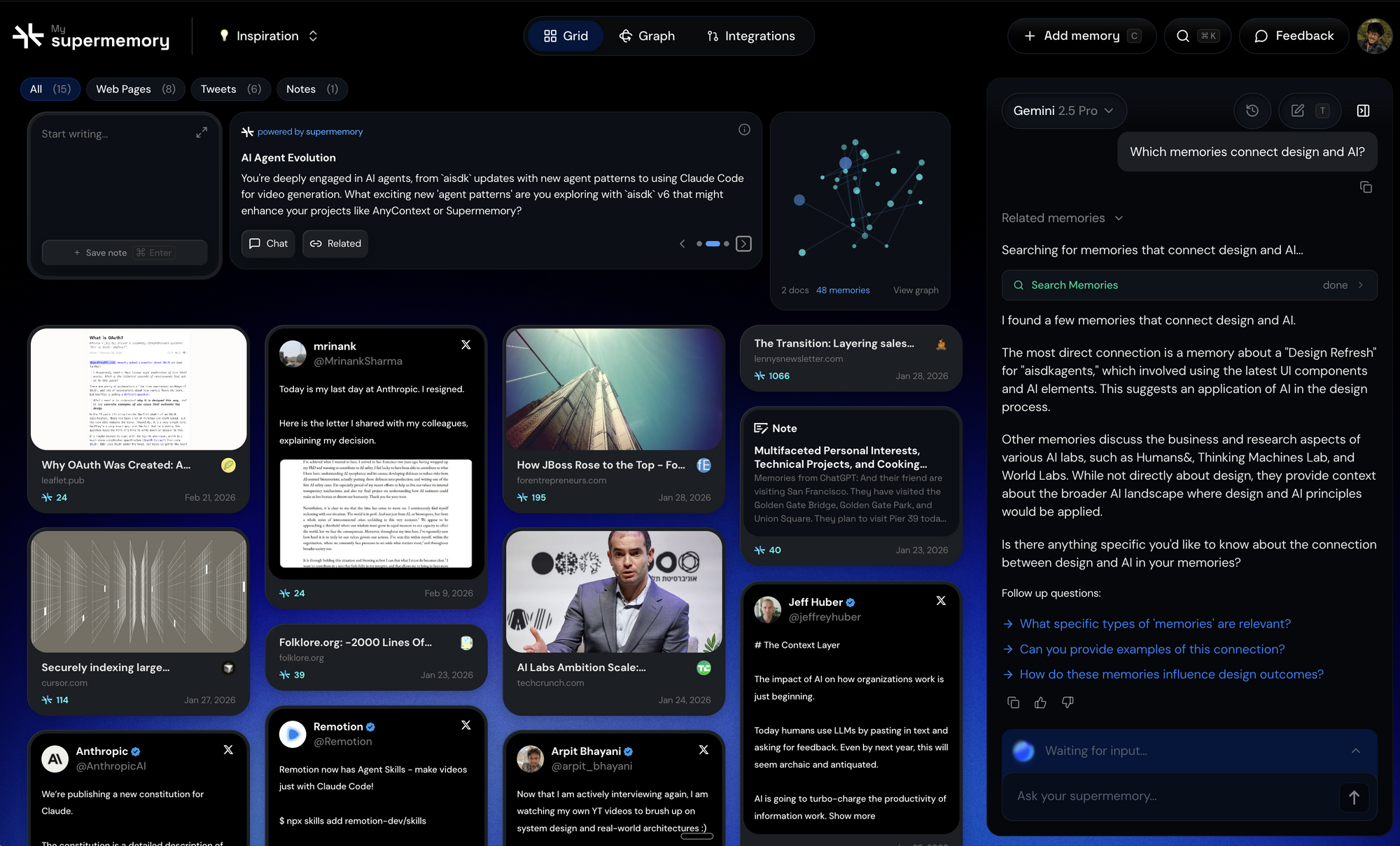
That is why supermemory is worth looking at closely. Supermemory positions itself as a memory and context layer for AI with memory extraction, user profiles, hybrid search, connectors, file processing, and an MCP server for clients like Cursor, Claude Code, VS Code, Windsurf, and Claude Desktop. The repo also shows quickstart methods like client.add(), client.profile(), and client.search.memories(), while the hosted API docs expose endpoints such as POST /v3/documents, POST /v3/search, and POST /v4/profile.
That split matters. Your app team does not just need “memory.” You need a way to inspect what was ingested, how it was grouped, what a profile call returns, and whether a hybrid search query is pulling the right mix of document context and personal context.
containerTag values in environments, save exact requests, add assertions, and turn a fragile memory experiment into a documented workflow your whole team can repeat. Apidog is one practical way to do that without building your own test harness from scratch.Why AI Memory APIs Are Harder to Debug Than Standard APIs
A normal API bug is visible fast. The response is wrong, the status code is wrong, or the request never reaches the service.
Memory systems are different. You can get a 200 back and still have the wrong product behavior because the real question is not “did the request succeed?” It is:
- Did the right content get ingested?
- Was it attached to the correct user or project scope?
- Did profile extraction finish before the next request?
- Did the search query use the right mode and threshold?
- Did a newer fact override an older one?
- Did the MCP client pass the same context boundary you used in your API tests?
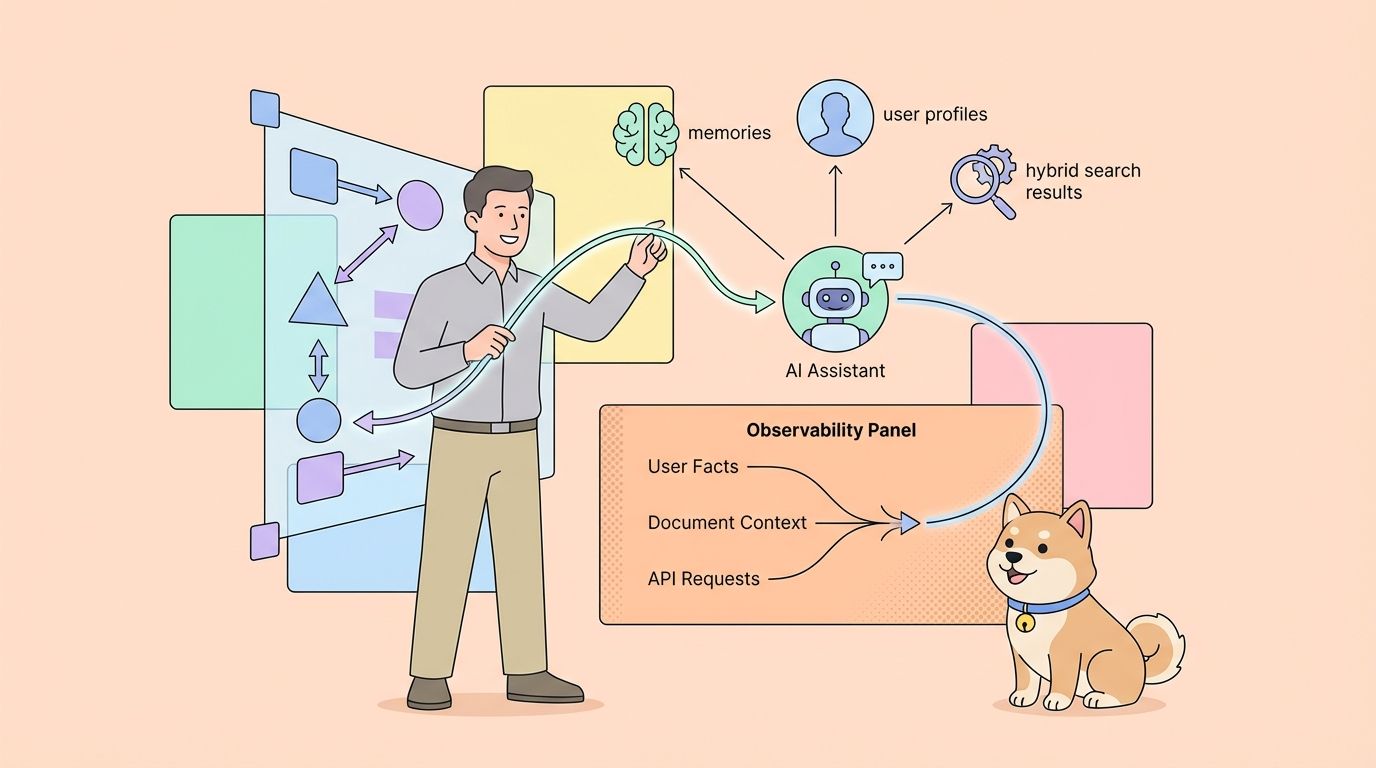
Supermemory is built around exactly those moving parts. The repository describes:
- memory extraction from conversations and documents
- user profiles with static and dynamic context
- hybrid search across memories and documents
- connectors such as Google Drive, Gmail, Notion, OneDrive, GitHub, and web crawling
- file processing for PDFs, images, videos, and code
- an MCP server for AI clients
That is powerful, but it also means you are debugging state, timing, and retrieval quality at the same time.
Here is the shape of the problem:
App or MCP client -> Supermemory ingest -> extraction/profile update -> search/profile call -> agent prompt -> user-visible answer
If you only test from the chat layer, you cannot tell which stage is wrong. If you test the underlying API flow in a shared request workspace, you can isolate each stage.
What Supermemory Gives You Out of the Box
The supermemory repo does a nice job showing the product shape before you touch the hosted API.
From the README, the main developer-facing primitives are:
client.add()to store contentclient.profile()to fetch a user profile and optional search resultsclient.search.memories()for hybrid search- document upload support
- framework integrations for tools like Vercel AI SDK, LangChain, LangGraph, OpenAI Agents SDK, Mastra, Agno, and n8n
- an MCP endpoint for assistants such as Claude, Cursor, and VS Code
The docs add a useful detail: the REST surface is versioned and split by capability. Examples in the public docs show:
POST /v3/documentsfor ingesting contentPOST /v3/searchfor searchPOST /v4/profilefor profile retrievalPOST /v3/documents/filefor file uploads
That means your first debugging task is not “learn every feature.” It is “lock the exact flow your app uses.”
For most teams, that flow is:
- Send content into Supermemory
- Query profile or search with a stable user or project scope
- Confirm what the app or agent should see next
If you cannot repeat those three steps with the same inputs and outputs, your AI product is still in prototype mode.
Build a Reliable Supermemory Test Workflow
The best first move is to test Supermemory directly before you add your own wrappers, chat interfaces, or agent orchestration.
Step 1: Define your scope strategy first
Supermemory’s docs and README both emphasize containerTag or containerTags. Treat that as a primary design decision, not a minor parameter.
A clean scope plan looks like this:
- one tag for the user, such as
user_123 - one tag for the active project, such as
project_alpha - separate staging and production values
If you skip this, your search and profile results get muddy fast.
Step 2: Ingest one known fact set
Use a small, obvious payload first. Do not begin with a giant PDF dump or a full connector sync.
Here is a direct API example based on the public docs:
curl https://api.supermemory.ai/v3/documents \
 --request POST \
 --header "Authorization: Bearer $SUPERMEMORY_API_KEY" \
 --header "Content-Type: application/json" \
 --data '{
 "content": "User prefers TypeScript, ships API backends, and is debugging rate limits this week.",
 "containerTags": ["user_123", "project_alpha"],
 "customId": "session-001",
 "metadata": {
 "source": "support_chat",
 "team": "platform"
 }
 }'
The key detail is not the content itself. It is that every field is deliberate. You know the exact fact, exact scope, and exact metadata.
Step 3: Query profile after ingestion
The profile endpoint is where memory behavior becomes more useful than raw search because it returns a condensed view of the user.
curl https://api.supermemory.ai/v4/profile \
 --request POST \
 --header "Authorization: Bearer $SUPERMEMORY_API_KEY" \
 --header "Content-Type: application/json" \
 --data '{
 "containerTag": "user_123",
 "q": "What stack does this user prefer?"
 }'
The public docs show a response with:
profile.staticprofile.dynamicsearchResults
That is the response shape you want your team to inspect before you ever say “the agent remembers correctly.”
Step 4: Test search separately
Search is not identical to profile retrieval. If your app uses retrieval for grounding or answer generation, test it independently.
curl https://api.supermemory.ai/v3/search \
 --request POST \
 --header "Authorization: Bearer $SUPERMEMORY_API_KEY" \
 --header "Content-Type: application/json" \
 --data '{
 "q": "What is the user working on?",
 "containerTag": "user_123",
 "searchMode": "hybrid",
 "limit": 5
 }'
Supermemory’s docs recommend searchMode: "hybrid" when you want both memory and document context in one query. That is a good default for product teams because it matches how real AI assistants work: personal context plus knowledge-base context, not one or the other.
Step 5: Check async assumptions
Supermemory does asynchronous processing for document and file flows. The docs show queued processing and status-based behavior for uploads. That means your second request can be “too early” even when the first one worked.
This is one of the easiest memory bugs to miss:
- Ingest content
- Query profile immediately
- Get a thin or incomplete result
- Blame the memory engine instead of the timing
That is why your test workflow should include short waits or polling where the endpoint behavior is async.
Turn Supermemory into a Repeatable Test Workflow
This is where a shared API workflow becomes useful in a way that raw cURL is not. Memory APIs are not just about request syntax. They are about repeatability.
Step 1: Create a Supermemory environment
Create environment variables like:
base_url = https://api.supermemory.ai
supermemory_api_key = sm_your_api_key
user_tag = user_123
project_tag = project_alpha
custom_id = session-001
This gives you a safe way to swap between test users, projects, and workspaces without editing requests by hand.
Step 2: Build the ingest request
Create a request:
- Method:
POST - URL:
{{base_url}}/v3/documents - Header:
Authorization: Bearer {{supermemory_api_key}} - Header:
Content-Type: application/json - Body:
{
 "content": "User prefers TypeScript, ships API backends, and is debugging rate limits this week.",
 "containerTags": ["{{user_tag}}", "{{project_tag}}"],
 "customId": "{{custom_id}}",
 "metadata": {
 "source": "api_workflow_test"
 }
}
Then add assertions like:
pm.test("Status is success", function () {
 pm.expect(pm.response.code).to.be.oneOf([200, 201, 202]);
});

pm.test("Response contains memory id", function () {
 const json = pm.response.json();
 pm.expect(json.id).to.exist;
});
If the service returns queued, that is useful information, not a failure. It tells you the next request needs to account for processing time.
Step 3: Build the profile request
Create a second request:
- Method:
POST - URL:
{{base_url}}/v4/profile - Body:
{
 "containerTag": "{{user_tag}}",
 "q": "What stack does this user prefer?"
}
Helpful assertions:
pm.test("Profile payload exists", function () {
 const json = pm.response.json();
 pm.expect(json.profile).to.exist;
});

pm.test("Static or dynamic profile content returned", function () {
 const json = pm.response.json();
 const staticItems = json.profile?.static || [];
 const dynamicItems = json.profile?.dynamic || [];
 pm.expect(staticItems.length + dynamicItems.length).to.be.above(0);
});
This lets you separate three cases fast:
- ingestion did not happen
- ingestion happened but processing is incomplete
- profile exists but your query or scope is wrong
Step 4: Build the search request
Add a third request for retrieval quality:
{
 "q": "What is the user debugging?",
 "containerTag": "{{user_tag}}",
 "searchMode": "hybrid",
 "limit": 5
}
Good checks include:
- response timing is within your team’s target
- at least one result is returned
- the top result includes the expected topic
- the right scope appears without leaking another user’s context
A shared API workflow tool is especially useful here because you can clone the same request and compare:
searchMode: "hybrid"versus memory-only behavior- one
containerTagversus another - lower threshold versus higher threshold
- a short query versus a noisy natural-language query
That kind of side-by-side comparison is much harder to maintain with one-off shell commands.
Step 5: Turn the requests into a scenario
This is the highest-value workflow upgrade for Supermemory.
Create a test scenario that does this:
- Add content
- Wait briefly if your flow is async
- Query profile
- Query search
- Assert that the profile and search results both reflect the new fact set
That gives you a reusable regression test for memory behavior, not just endpoint availability.
Step 6: Document the workflow for the team
Memory bugs waste time because they cross team boundaries. Backend thinks retrieval works. QA thinks search is noisy. Product thinks the assistant is making things up.
If you publish the workflow in Apidog, everyone can inspect:
- the exact request used to ingest memory
- the scope boundary for a user or project
- the profile response shape
- the search result shape
- the assertions your team expects to pass
Download Apidog free
Where MCP Fits in the Debugging Loop
The Supermemory includes a quick MCP install path and shows the hosted MCP server URL. That is useful for getting Claude, Cursor, Windsurf, or VS Code connected fast, but MCP is not the place to start debugging.
If your assistant remembers the wrong thing, work in this order:
- Check the direct API requests in your API workspace
- Verify the exact
containerTagor project boundary - Confirm the content was ingested and processed
- Verify profile and search results directly
- Only then move up to the MCP client configuration
Why? Because MCP adds one more abstraction layer. A bad recall result could come from:
- wrong API key or auth mode
- wrong scope boundary
- stale or incomplete ingestion
- client-specific tool-calling behavior
- prompt instructions that misuse memory output
Supermemory’s README also shows a manual MCP config pattern like this:
{
 "mcpServers": {
 "supermemory": {
 "url": "https://mcp.supermemory.ai/mcp"
 }
 }
}
If that client path behaves strangely, your fastest isolation strategy is to reproduce the underlying memory behavior through the HTTP API first.
Advanced Techniques and Common Mistakes
Here are the mistakes that matter most in production.
1. Mixing scopes
If you reuse the same containerTag across unrelated users, the memory system looks noisy even when the engine is doing exactly what you asked.
2. Testing only the happy path
You should also test:
- a profile query before ingestion
- a profile query immediately after ingestion
- searches with a weak query
- searches with the wrong project tag
- uploads that are still processing
3. Treating profile and search as interchangeable
They solve different problems. Profile is condensed user context. Search is retrieval. Your app may need one, the other, or both.
4. Ignoring version differences
The repo README centers on SDK methods, while the docs show versioned HTTP endpoints like /v3 and /v4. Lock the exact version your team is shipping against, then mirror that in your API test workflow.
5. Skipping update and contradiction tests
Memory systems are valuable because they handle change over time. If a user changes their preference, your tests should check whether newer facts outrank older ones.
Alternatives and Comparison
There are three common ways to work with Supermemory during development.
| Approach | Good for | Weak point |
|---|---|---|
| SDK only | Fast local prototyping | Harder to inspect exact HTTP behavior |
| cURL and scripts | Low-friction endpoint checks | Hard to reuse, share, and compare over time |
| Shared API workflow | Team-ready debugging, assertions, docs, scenarios | Requires a little setup up front |
This is why a tool like Apidog fits well beside Supermemory instead of replacing it. Supermemory gives you the memory engine. The workflow layer gives you a repeatable way to validate the engine’s API behavior before that behavior becomes part of a larger AI product.
Real-World Use Cases
A support copilot needs to remember a user’s preferred stack, active incident, and recent account context. Supermemory can hold that memory, while a shared API workflow validates that profile and search queries return the right facts for the right user.
A product team using Cursor or Claude Code with MCP wants assistant memory across long projects. Before trusting the chat experience, the team should verify ingestion, scope boundaries, and retrieval quality directly against the API.
A platform team syncing docs from GitHub or Notion needs to confirm hybrid search behavior before enabling it for internal agents. A structured test workflow helps compare document-heavy queries against memory-heavy queries in the same suite.
Conclusion
Supermemory is compelling because it treats memory as infrastructure, not a thin vector-search demo. The repo and docs show a broad platform: ingestion, profiles, search, connectors, file handling, framework integrations, and MCP support. The catch is that memory behavior is easy to misread if you only test from the chat surface.
If you do that before shipping an agent or MCP-powered workflow, you catch the bugs that are hardest to explain later. If you want a faster way to save requests, add assertions, and share the whole memory workflow with your team, Apidog is a good fit for that layer without taking over the article itself.
FAQ
What is Supermemory used for?
Supermemory is used to add memory, profiles, search, connectors, and context retrieval to AI apps and agents. The public repo and docs position it as a memory and context layer rather than just a vector search tool.
Does Supermemory have a REST API?
Yes. The public docs show versioned HTTP endpoints for documents, search, profile retrieval, and file uploads, while the README also exposes SDK methods that map to those capabilities.
Why is an AI memory API harder to debug than a normal API?
Because a successful response does not guarantee the right user-facing behavior. You also need to validate scope, timing, profile extraction, retrieval quality, and how those outputs are consumed by the agent.
What should I test first in Supermemory?
Start with one known ingest request, one profile request, and one search request for a single user or project scope. That gives you a baseline before you add connectors, files, or MCP clients.
Can an API workflow tool help if my app uses MCP?
Yes. It helps you validate the underlying HTTP API behavior before you debug the assistant client. That makes it easier to tell whether the problem is in memory retrieval or the MCP layer above it.
What is the most important Supermemory parameter to get right?
containerTag or containerTags is one of the most important because it controls how memories are grouped and retrieved. A weak tagging strategy creates noisy results even if ingestion and search both succeed.