Running large language models like Mistral 3 on your local machine offers developers unparalleled control over data privacy, inference speed, and customization. As AI workloads grow more demanding, local execution becomes essential for prototyping, testing, and deploying applications offline. Moreover, tools like Ollama simplify this process, allowing you to leverage Mistral 3's capabilities directly from your desktop or server.
This guide equips you with step-by-step instructions to install and run Mistral 3 variants locally. We focus on the open-source Ministral 3 series, which excels in edge deployments. By the end, you'll optimize performance for real-world tasks, ensuring low-latency responses and resource efficiency.
Understanding Mistral 3: The Open-Source Powerhouse in AI
Mistral AI continues to push boundaries with its latest release: Mistral 3. Developers and researchers praise this family of models for balancing accuracy, efficiency, and accessibility. Unlike proprietary giants, Mistral 3 embraces open-source principles, releasing under the Apache 2.0 license. This move empowers the community to modify, distribute, and innovate without restrictions.
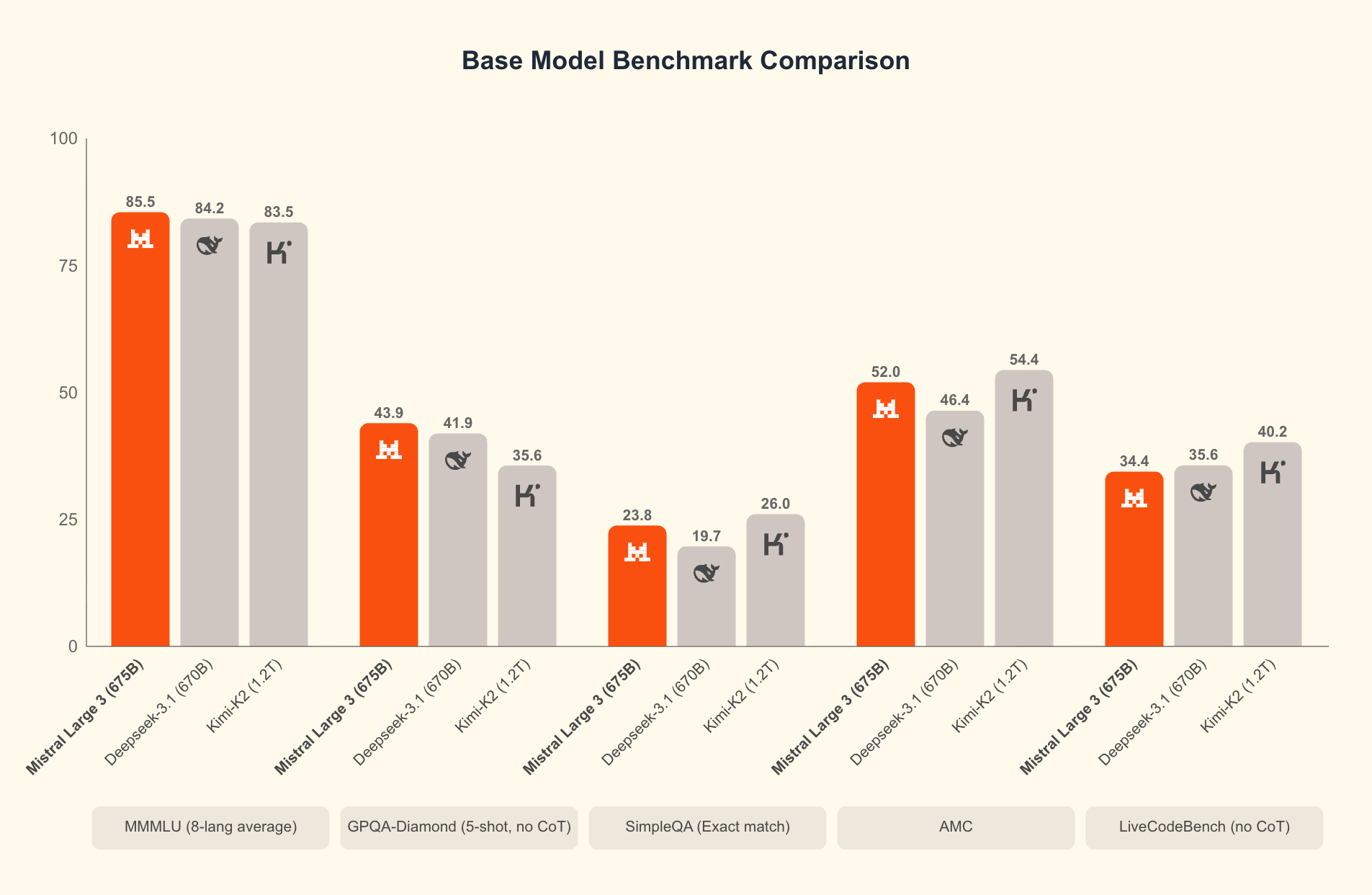
At its core, Mistral 3 comprises two main branches: the compact Ministral 3 series and the expansive Mistral Large 3. The Ministral 3 models—available in 3B, 8B, and 14B parameter sizes—target resource-constrained environments. Engineers design these for local and edge use cases, where every watt and core counts. For instance, the 3B variant fits comfortably on laptops with modest GPUs, while the 14B pushes boundaries on multi-GPU setups without sacrificing speed.
Mistral Large 3, on the other hand, employs a sparse mixture-of-experts architecture with 41B active parameters and 675B total. This design activates only relevant experts per query, slashing computational overhead. Developers access instruction-tuned versions for tasks like coding assistance, document summarization, and multilingual translation. The model supports over 40 languages natively, outperforming peers in non-English dialogues.
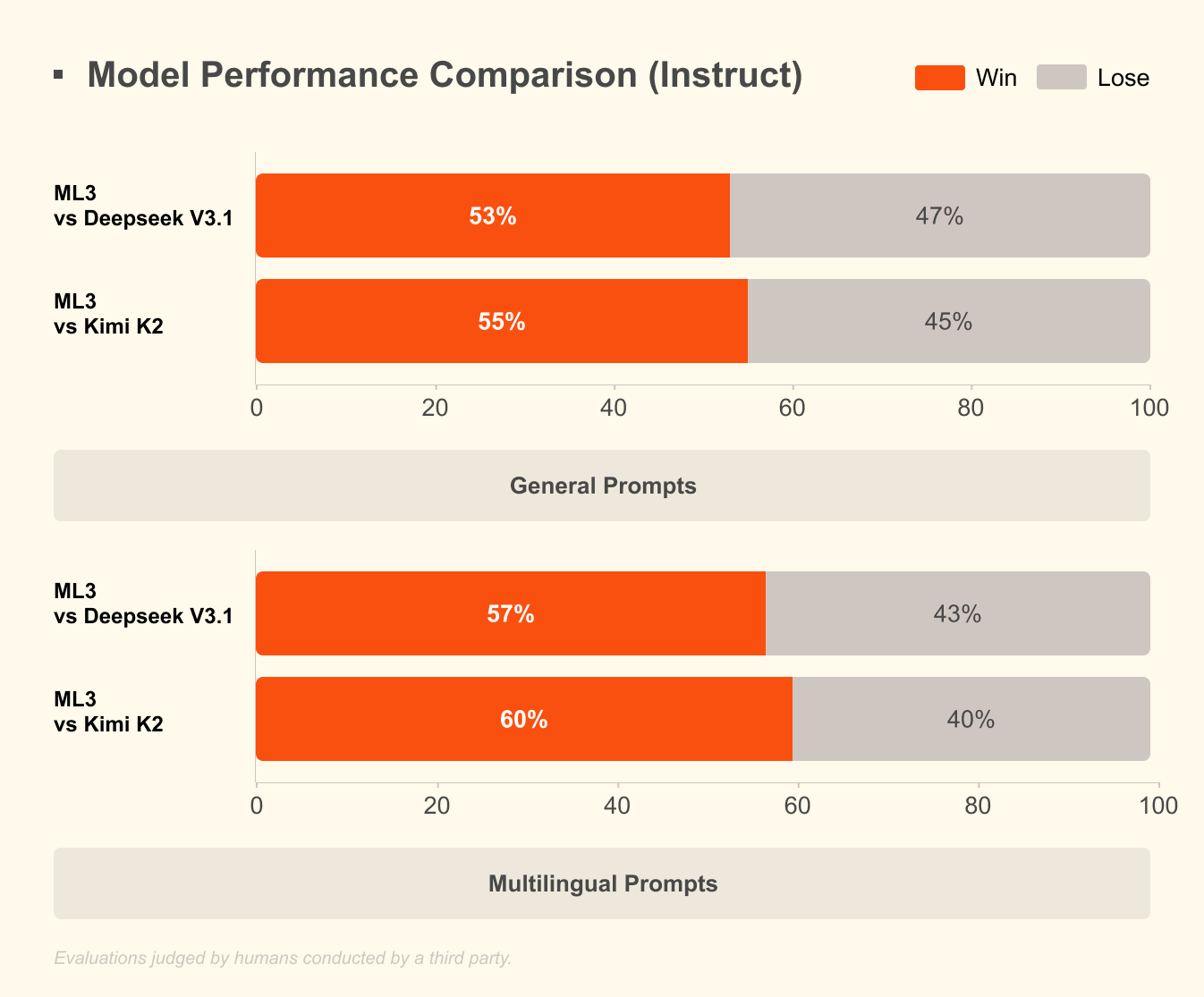
What sets Mistral 3 apart? Benchmarks reveal its edge in real-world scenarios. On the GPQA Diamond dataset—a rigorous test of scientific reasoning—Mistral 3 variants maintain high accuracy even as output tokens scale. For example, the Ministral 3B Instruct model sustains around 35-40% accuracy up to 20,000 tokens, rivaling larger models like Gemma 2 9B while using fewer resources. This efficiency stems from advanced quantization techniques, such as NVFP4 compression, which reduces model size without degrading output quality.
Furthermore, Mistral 3 integrates multimodal features, processing images alongside text for applications in visual question answering or content generation. Open-sourcing these models fosters rapid iteration; communities already fine-tune them for specialized domains like legal analysis or creative writing. As a result, Mistral 3 democratizes frontier AI, enabling startups and individual developers to compete with big tech.

Transitioning from theory to practice, running these models locally unlocks their full potential. Cloud APIs introduce latency and costs, but local inference delivers sub-second responses. Next, we examine the hardware prerequisites that make this feasible.
Why Run Mistral 3 Locally? Benefits for Developers and Efficiency Gains
Developers choose local execution for several compelling reasons. First, privacy reigns supreme: sensitive data stays on your machine, avoiding third-party servers. In regulated industries like healthcare or finance, this compliance edge proves invaluable. Second, cost savings accumulate quickly. Mistral 3's high efficiency means you avoid per-token fees, ideal for high-volume testing.
Moreover, local runs accelerate experimentation. Iterate on prompts, fine-tune hyperparameters, or chain models without network delays. Benchmarks confirm this: on consumer hardware, Ministral 8B achieves 50-60 tokens per second, comparable to cloud setups but with zero downtime.
Efficiency defines Mistral 3's appeal. The models optimize for low-cost inference, as shown in GPQA Diamond results where Ministral variants outperform Gemma 3 4B and 12B in sustained accuracy. This matters for long-context tasks; as outputs extend to 20,000 tokens, accuracy drops minimally, ensuring reliable performance in chatbots or code generators.
Additionally, open-source access via platforms like Hugging Face allows seamless integration with tools like Apidog for API prototyping. Test Mistral 3 endpoints locally before scaling, bridging the gap between development and production.
However, success hinges on proper setup. With hardware in place, you proceed to installation. This preparation ensures smooth operation and maximizes throughput.
Hardware and Software Requirements for Local Mistral 3 Deployment
Before launching Mistral 3, assess your system's capabilities. Minimum specs include a modern CPU (Intel i7 or AMD Ryzen 7) with 16GB RAM for the 3B model. For the 8B and 14B variants, allocate 32GB RAM and a NVIDIA GPU with at least 8GB VRAM—think RTX 3060 or better. Apple Silicon users benefit from unified memory; M1 Pro with 16GB handles 3B effortlessly, while M3 Max excels at 14B.
Storage demands vary: the 3B model occupies ~2GB quantized, scaling to ~9GB for 14B. Use SSDs for faster loading. Operating systems? Linux (Ubuntu 22.04) offers the best performance, followed by macOS Ventura+. Windows 11 works via WSL2, though GPU passthrough requires tweaks.
Software-wise, Python 3.10+ forms the backbone. Install CUDA 12.1 for NVIDIA cards to enable GPU acceleration—essential for sub-100ms latencies. For CPU-only runs, leverage libraries like ONNX Runtime.
Quantization plays a pivotal role here. Mistral 3 supports 4-bit and 8-bit formats, reducing memory footprint by 75% while preserving 95% accuracy. Tools like bitsandbytes handle this automatically.
Once equipped, installation follows a straightforward path. We recommend Ollama for its simplicity, but alternatives exist. This choice streamlines the process, leading us to the core setup steps.
Installing Ollama: The Gateway to Effortless Local AI
Ollama stands out as the premier tool for running open-source models like Mistral 3 locally. This lightweight platform abstracts complexities, providing a CLI and API server in one package. Developers appreciate its cross-platform support and zero-config GPU detection.
Start by downloading Ollama from the official site (ollama.com). On Linux, execute:
curl -fsSL https://ollama.com/install.sh | sh
This script installs binaries and sets up services. Verify with ollama --version; expect output like "ollama version 0.3.0". For macOS, the DMG installer handles dependencies, including Rosetta for Intel emulation on ARM.
Windows users grab the EXE from GitHub releases. Post-install, launch via PowerShell: ollama serve. Ollama daemonizes in the background, exposing a REST API on port 11434.
Why Ollama? It pulls models from its registry, including Ministral 3, with built-in quantization. No manual Hugging Face cloning needed. Additionally, it supports Modelfiles for custom fine-tuning, aligning with Mistral 3's open-source ethos.
With Ollama ready, you pull and run models next. This step transforms your setup into a functional AI workstation.
Pulling and Running Ministral 3 Models with Ollama
Ollama's library hosts Ministral 3 variants.
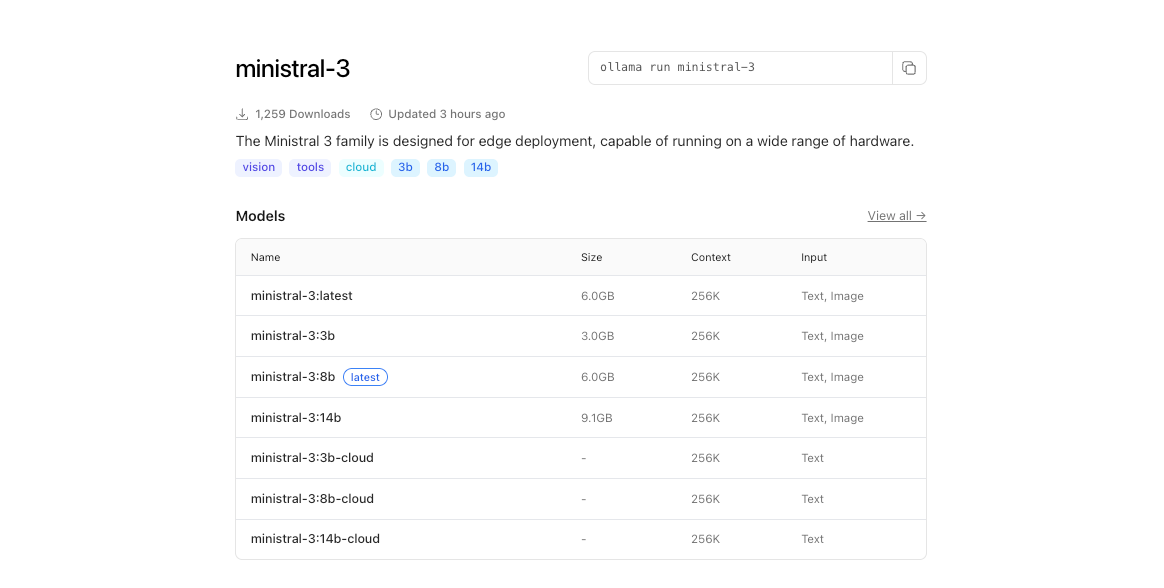
Begin by listing available tags:
ollama list
To download the 3B model:
ollama pull ministral:3b-instruct-q4_0
This command fetches ~2GB, verifying integrity via hashes. Progress bars track the download, typically completing in minutes on broadband.
Launch an interactive session:
ollama run ministral-3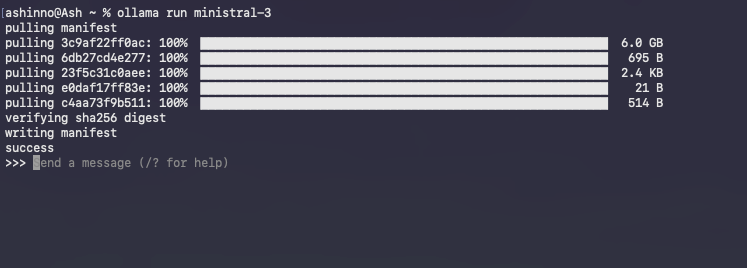
Ollama loads the model into memory, warming caches for subsequent queries. Type prompts directly; for example:
>> Explain quantum entanglement in simple terms.
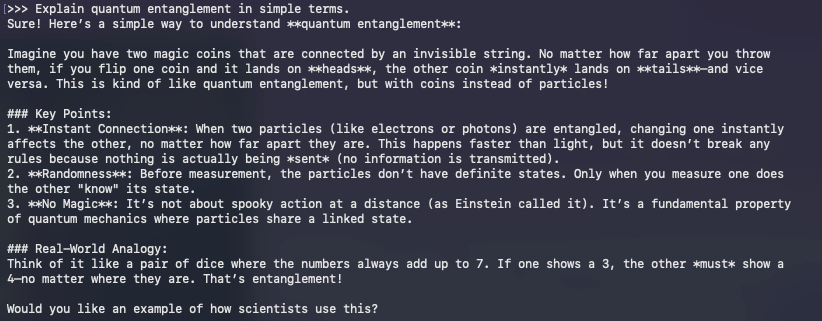
The model responds in real-time, leveraging instruct tuning for coherent outputs. Exit with /bye.
Troubleshooting common issues? If GPU underutilization occurs, set OLLAMA_NUM_GPU=999 environment variable. For OOM errors, drop to lower quantization like q3_K_M.
Beyond basics, Ollama's API enables programmatic access. Curl a completion:
curl http://localhost:11434/api/generate -d '{
  "model": "ministral:3b-instruct-q4_0",
  "prompt": "Write a Python function to sort a list.",
  "stream": false
}'
This JSON response includes generated text, perfect for integrating with Apidog during API development.
Running models marks the beginning; optimization elevates performance. Consequently, we turn to techniques that squeeze every drop of efficiency from your hardware.
Optimizing Mistral 3 Inference: Speed, Memory, and Accuracy Trade-offs
Efficiency defines local AI success. Mistral 3's design shines here, but tweaks amplify gains. Start with quantization: Ollama defaults to Q4_0, balancing size and fidelity. For ultra-low resources, try Q2_K—halving memory at 10% perplexity cost.
GPU orchestration matters. Enable flash attention via OLLAMA_FLASH_ATTENTION=1 for 2x speedups on long contexts. Mistral 3 supports up to 128K tokens; test with GPQA-style prompts to verify sustained accuracy.
Batch processing boosts throughput. Use Ollama's /api/generate with multiple prompts in parallel, leveraging async Python clients. For example, script a loop:
import requests
import json

model = "ministral:8b-instruct-q4_0"
url = "http://localhost:11434/api/generate"

prompts = ["Prompt 1", "Prompt 2"]
for p in prompts:
    response = requests.post(url, json={"model": model, "prompt": p})
    print(json.loads(response.text)["response"])
This handles 10+ queries per second on multi-core setups.
Memory management prevents swaps. Monitor with nvidia-smi; offload layers to CPU if VRAM caps out. Libraries like vLLM integrate with Ollama for continuous batching, sustaining 100 tokens/second on A100s.
Accuracy tuning? Fine-tune with LoRA adapters on domain data. Hugging Face's PEFT library applies these to Ministral 3, requiring ~1GB extra space. Post-fine-tune, export to Ollama format via ollama create.
Benchmark your setup against GPQA Diamond. Script evaluations to plot accuracy vs. tokens, mirroring Mistral's charts. High-efficiency variants like Ministral 8B maintain 50%+ scores, underscoring their edge over Qwen 2.5 VL.
These optimizations prepare you for advanced applications. Thus, we explore integrations that extend Mistral 3's reach.
Integrating Mistral 3 with Development Tools: APIs and Beyond
Local Mistral 3 thrives in ecosystems. Pair it with Apidog to mock AI-powered APIs. Design endpoints that query Ollama, test payloads, and validate responses—all offline.
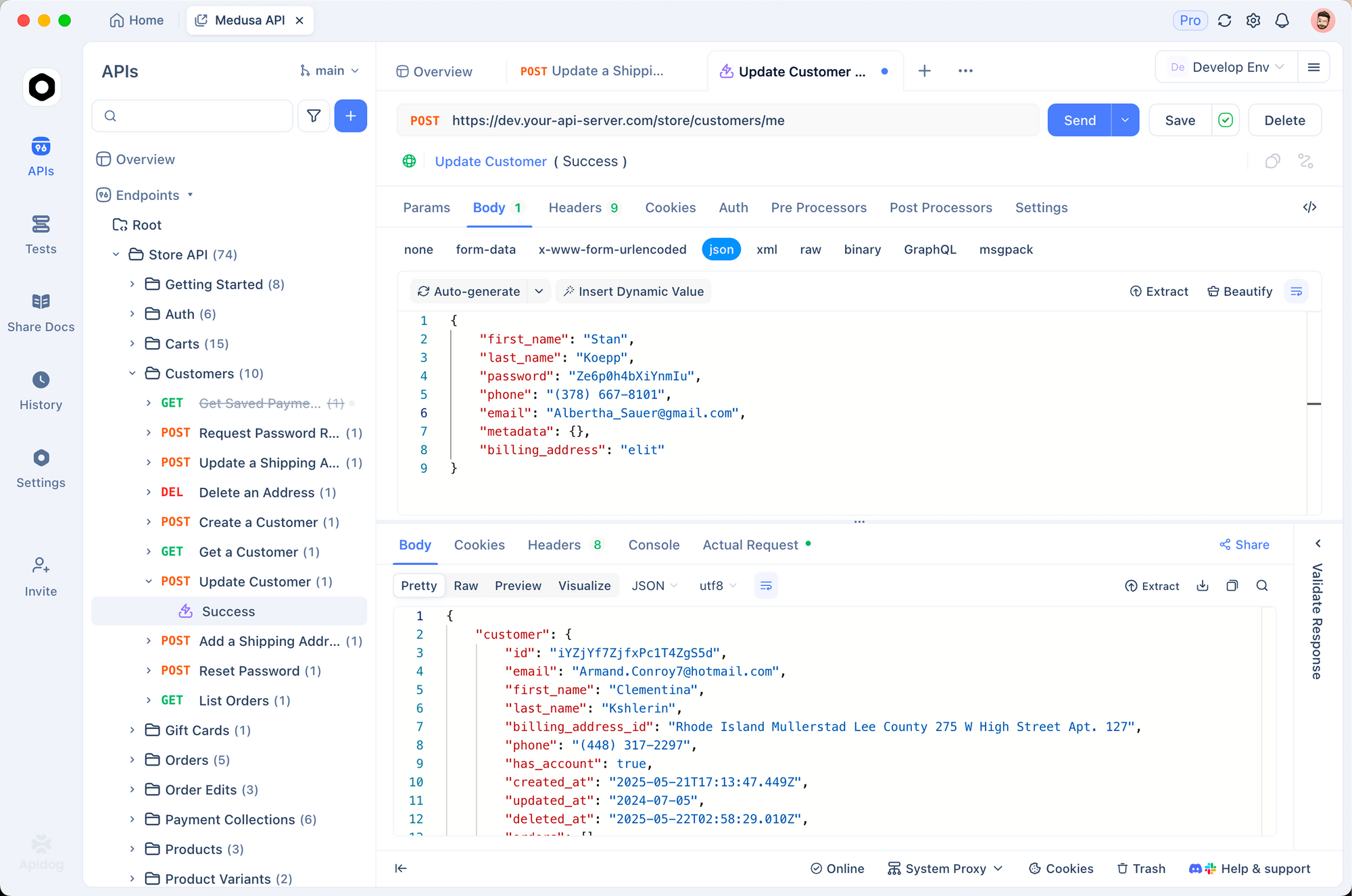
For instance, create a POST /generate route in Apidog, forwarding to Ollama's API. Import collections for prompt templates, ensuring Mistral 3 handles multilingual requests flawlessly.
LangChain users chain Mistral 3 with tools:
from langchain_ollama import OllamaLLM
from langchain_core.prompts import PromptTemplate

llm = OllamaLLM(model="ministral:3b-instruct-q4_0")
prompt = PromptTemplate.from_template("Translate {text} to French.")
chain = prompt | llm
print(chain.invoke({"text": "Hello world"}))
This setup processes 50 queries/minute, ideal for RAG pipelines.
Streamlit dashboards visualize outputs. Embed Ollama calls in apps for interactive chats, leveraging Mistral 3's reasoning for dynamic Q&A.
Security considerations? Run Ollama behind NGINX proxies, rate-limiting endpoints. For production, containerize with Docker:
FROM ollama/ollama
COPY Modelfile .
RUN ollama create mistral-local -f Modelfile
This isolates environments, scaling to Kubernetes.
As applications evolve, monitoring becomes key. Tools like Prometheus track latency, alerting on drifts from baseline efficiency.
In summary, these integrations transform Mistral 3 from a standalone model into a versatile engine. Yet, challenges arise; addressing them ensures robust deployments.
Troubleshooting Common Issues in Local Mistral 3 Runs
Even optimized setups encounter hurdles. CUDA mismatches top the list: verify versions with nvcc --version. Downgrade if conflicts arise, as Mistral 3 tolerates 11.8+.
Model loading fails? Clear Ollama cache: ollama rm ministral:3b-instruct-q4_0 then repull. Corrupted downloads stem from networks; use --insecure sparingly.
On macOS, Metal acceleration lags CUDA. Force CPU for stability: OLLAMA_METAL=0. Windows WSL users enable NVIDIA drivers via wsl --update.
Overheating plagues laptops; throttle with nvidia-smi -pl 100 to cap power. For accuracy dips, inspect prompts—Ministral 3 excels at instruct formats.
Community forums on Reddit and Hugging Face resolve 90% of edge cases. Log errors with OLLAMA_DEBUG=1 for diagnostics.
With pitfalls navigated, Mistral 3 delivers consistent value. Finally, we reflect on its broader impact.
Conclusion: Harness Mistral 3 Locally for Tomorrow's AI Innovations
Mistral 3 redefines open-source AI with its blend of power and practicality. By running it locally via Ollama, developers gain speed, privacy, and cost control unattainable elsewhere. From pulling models to fine-tuning integrations, this guide arms you with actionable steps.
Experiment boldly: start with the 3B variant, scale to 14B, and measure against benchmarks. As Mistral AI iterates, local runs keep you ahead.
Ready to build? Download Apidog for free and prototype APIs powered by your Mistral 3 setup. The future of efficient AI starts on your machine—make it count.