TL;DR
Qwen3.6-Plus launched officially . It scores 78.8% on SWE-bench Verified and 61.6% on Terminal-Bench 2.0, where it beats Claude Opus 4.5. It has a 1M token context window, a new preserve_thinking parameter for agent loops, and works directly with Claude Code, OpenClaw, and Qwen Code via an OpenAI-compatible API.
From preview to release
If you caught our earlier guide on Qwen 3.6 Plus Preview on OpenRouter, you already know what this model is capable of. The preview dropped quietly on March 30 with no waitlist and free access via OpenRouter. In its first two days, it processed over 400 million completion tokens across roughly 400,000 requests.
The official release brings the full production version. It's no longer preview-only. The model is now available through Alibaba Cloud Model Studio with a stable API, SLA-backed uptime, and a new API parameter that makes it significantly more capable for multi-step agent tasks.
This guide covers what changed, how to call the API correctly, and how to test your integration with Apidog before deploying.
What Qwen3.6-Plus is
Qwen3.6-Plus is a hosted mixture-of-experts model from Alibaba's Qwen team. Like the Qwen3.5 series, it uses sparse activation, meaning only a fraction of parameters fire per token. The result is strong performance at lower compute cost than a dense model of similar capability.
Key specs at launch:
- 1 million token context window by default
- Mandatory chain-of-thought reasoning (same as the preview)
- New
preserve_thinkingparameter for agentic tasks - Native multimodal support (vision, video, document understanding)
- OpenAI-compatible API, Anthropic-compatible API, and OpenAI Responses API
Open-source smaller variants are coming within days. If you need weights to self-host, they're on the way.
Benchmark results
Coding agents
Qwen3.6-Plus sits narrowly behind Claude Opus 4.5 on most SWE-bench tasks, while beating every model in the comparison on terminal operations.
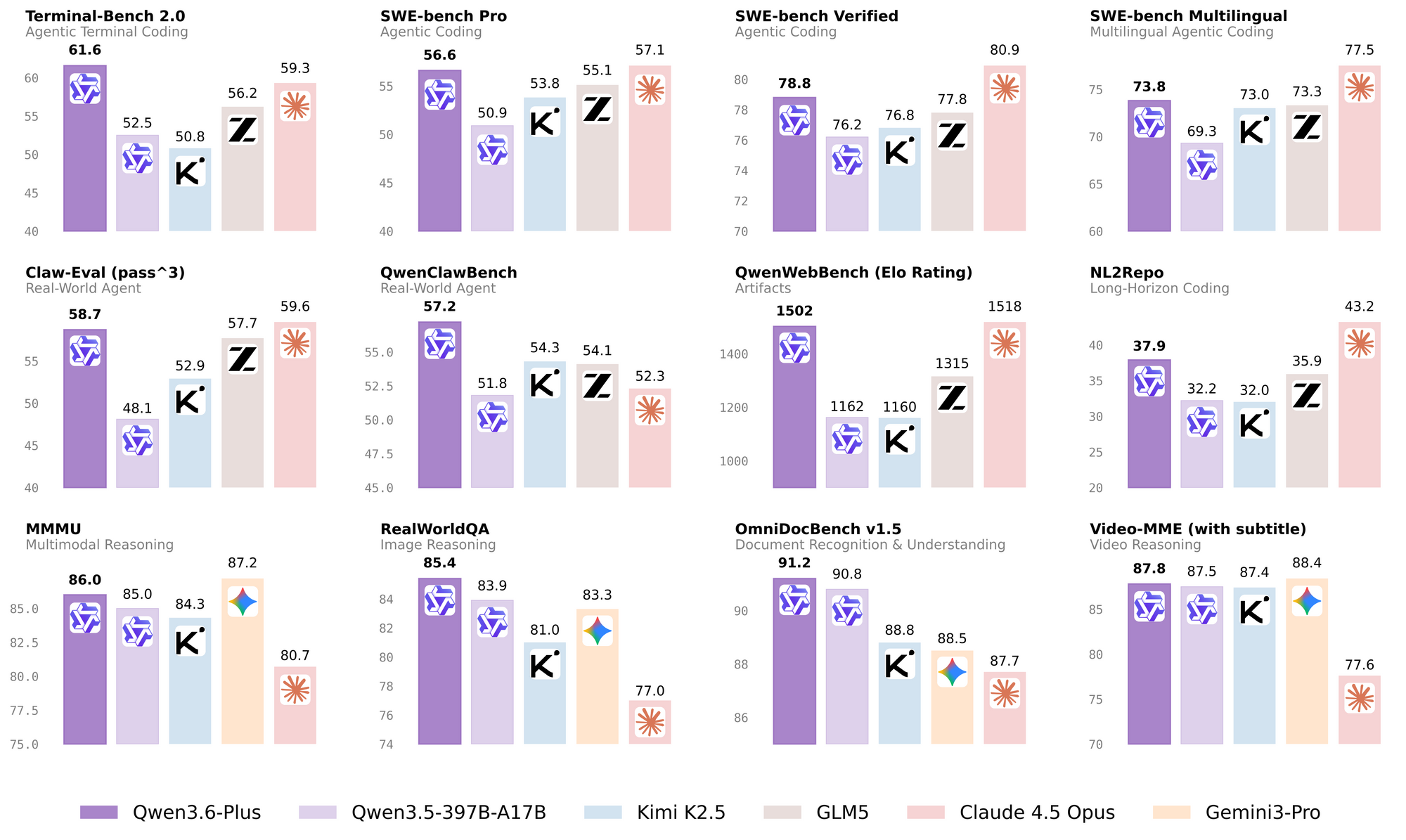
Terminal-Bench 2.0 tests real shell operations: file management, process control, multi-step terminal workflows under a 3-hour timeout with 32 CPU cores and 48GB RAM. Qwen3.6-Plus scoring 61.6% versus Claude Opus 4.5's 59.3% is a meaningful gap on exactly the kind of tasks developers run.
General agents and tool use
| Benchmark | Claude Opus 4.5 | Qwen3.6-Plus |
|---|---|---|
| TAU3-Bench | 70.2% | 70.7% |
| DeepPlanning | 33.9% | 41.5% |
| MCPMark | 42.3% | 48.2% |
| MCP-Atlas | 71.8% | 74.1% |
| WideSearch | 76.4% | 74.3% |
MCPMark tests GitHub MCP v0.30.3 tool calls, with Playwright responses truncated at 32K tokens. Leading at 48.2% matters for anyone building on MCP-based tooling. DeepPlanning at 41.5% versus 33.9% for Claude shows a significant gap on long-horizon planning tasks.
Reasoning and knowledge
| Benchmark | Claude Opus 4.5 | Qwen3.6-Plus |
|---|---|---|
| GPQA | 87.0% | 90.4% |
| LiveCodeBench v6 | 84.8% | 87.1% |
| IFEval strict | 90.9% | 94.3% |
| MMLU-Pro | 89.5% | 88.5% |
GPQA is a graduate-level science reasoning benchmark. IFEval strict measures how well a model follows precise formatting and constraint instructions. Qwen3.6-Plus leads both, which matters for structured output and agentic tasks where the model must follow complex instructions without drifting.
Multimodal
Qwen3.6-Plus is a native multimodal model. It leads several document, spatial, and object detection benchmarks.
| Benchmark | Qwen3.6-Plus | Notes |
|---|---|---|
| OmniDocBench 1.5 | 91.2% | Top in table |
| RefCOCO avg | 93.5% | Top in table |
| We-Math | 89.0% | Top in table |
| CountBench | 97.6% | Top in table |
| OSWorld-Verified | 62.5% | Behind Claude (66.3%) |
OSWorld-Verified, the desktop computer use benchmark, puts Claude Opus 4.5 ahead at 66.3% versus Qwen3.6-Plus at 62.5%. For document understanding and spatial grounding tasks, Qwen3.6-Plus leads.
How to call the API
Qwen3.6-Plus is on Alibaba Cloud Model Studio. Get your API key at modelstudio.alibabacloud.com.
Three regional base URLs:
- Singapore:
https://dashscope-intl.aliyuncs.com/compatible-mode/v1 - Beijing:
https://dashscope.aliyuncs.com/compatible-mode/v1 - US Virginia:
https://dashscope-us.aliyuncs.com/compatible-mode/v1
Basic call with streaming
from openai import OpenAI
import os

client = OpenAI(
 api_key=os.environ["DASHSCOPE_API_KEY"],
 base_url="https://dashscope-intl.aliyuncs.com/compatible-mode/v1",
)

completion = client.chat.completions.create(
 model="qwen3.6-plus",
 messages=[{"role": "user", "content": "Review this Python function and find bugs."}],
 extra_body={"enable_thinking": True},
 stream=True
)

reasoning = ""
answer = ""
is_answering = False

for chunk in completion:
 if not chunk.choices:
 continue
 delta = chunk.choices[0].delta
 if hasattr(delta, "reasoning_content") and delta.reasoning_content:
 if not is_answering:
 reasoning += delta.reasoning_content
 if delta.content:
 if not is_answering:
 is_answering = True
 answer += delta.content
 print(delta.content, end="", flush=True)
The preserve_thinking parameter
The preview version only kept reasoning from the current turn. The official release adds preserve_thinking.
When you set preserve_thinking: true, the model retains chain-of-thought from all prior turns in the conversation. Alibaba specifically recommends this for agent scenarios. The reasoning is: an agent working through a multi-step task benefits from seeing its own previous thinking. It makes better decisions on step 5 when it can see why it made the choice it did on step 2.
It's disabled by default to control token usage. Turn it on for agent loops.
completion = client.chat.completions.create(
 model="qwen3.6-plus",
 messages=conversation_history,
 extra_body={
 "enable_thinking": True,
 "preserve_thinking": True, # keep reasoning across all turns
 },
 stream=True
)
Use Qwen3.6-Plus with Claude Code
The Qwen API supports the Anthropic protocol. You can run Claude Code against Qwen3.6-Plus without changing any Claude Code configuration beyond environment variables.
npm install -g @anthropic-ai/claude-code

export ANTHROPIC_MODEL="qwen3.6-plus"
export ANTHROPIC_SMALL_FAST_MODEL="qwen3.6-plus"
export ANTHROPIC_BASE_URL=https://dashscope-intl.aliyuncs.com/apps/anthropic
export ANTHROPIC_AUTH_TOKEN=your_dashscope_api_key

claude
Use Qwen3.6-Plus with OpenClaw
OpenClaw (formerly Moltbot / Clawdbot) is an open-source self-hosted coding agent. Install it and point it at Model Studio:
# Install (Node.js 22+)
curl -fsSL https://molt.bot/install.sh | bash

export DASHSCOPE_API_KEY=your_key
openclaw dashboard
Edit ~/.openclaw/openclaw.json and merge these fields (do not overwrite the whole file):
{
 "models": {
 "providers": [{
 "name": "alibaba-coding-plan",
 "baseUrl": "https://coding-intl.dashscope.aliyuncs.com/v1",
 "apiKey": "${DASHSCOPE_API_KEY}",
 "models": [{"id": "qwen3.6-plus", "reasoning": true}]
 }]
 },
 "agents": {
 "defaults": {"models": ["qwen3.6-plus"]}
 }
}
Use Qwen3.6-Plus with Qwen Code
Qwen Code is Alibaba's own open-source terminal agent, built specifically for the Qwen series. It gives you 1,000 free API calls per day when you sign in with Qwen Code OAuth.
npm install -g @qwen-code/qwen-code@latest
qwen
# Type /auth to sign in and activate free tier
Why preserve_thinking changes agent behavior
Most LLM APIs treat each turn independently. The model generates an answer, reasoning is discarded, and the next turn starts fresh. For simple Q&A, that's fine. For agents running 10-20 step tasks, it creates a problem: the model can't see why it made earlier decisions, so it drifts.
The preserve_thinking parameter keeps the full chain of reasoning from all prior turns visible when generating the next response. The practical effect: an agent working through a complex repository-level task on step 8 can see its analysis from steps 2, 4, and 6. It makes more consistent decisions and produces fewer contradictions.
Alibaba's benchmarks show this reduces redundant reasoning too. When the model doesn't have to re-derive context it already established, it uses fewer tokens per turn on average for complex multi-step workflows.
Use this pattern for agent loops:
conversation = []

def agent_step(user_message, preserve=True):
    conversation.append({"role": "user", "content": user_message})

    response = client.chat.completions.create(
        model="qwen3.6-plus",
        messages=conversation,
        extra_body={
            "enable_thinking": True,
            "preserve_thinking": preserve,
        },
        stream=False
    )

    message = response.choices[0].message
    conversation.append({"role": "assistant", "content": message.content})
    return message.content

# Example: multi-step code review agent
result = agent_step("Analyze the auth module for security issues.")
result = agent_step("Now suggest fixes for the top 3 issues you found.")
result = agent_step("Write tests that validate each fix.")
Without preserve_thinking, the model on step 3 doesn't know which 3 issues it identified on step 1. With it, the reasoning chain is intact.
What it's best for
Repository-level bug fixing. SWE-bench Verified at 78.8% and SWE-bench Pro at 56.6% are competitive with anything available today. If you're running automated code repair or review pipelines, Qwen3.6-Plus is worth benchmarking against your current setup.
Terminal automation. Terminal-Bench 2.0 leadership makes it the strongest available model for shell-heavy workflows. Multi-step file operations, process management, build pipelines.
MCP tool calling. MCPMark at 48.2% (top result) makes it the current best choice for MCP-based tool integrations.
Long-context document analysis. The 1M token window with strong LongBench v2 scores handles full codebase reviews, large specification documents, and multi-file analysis in a single call.
Frontend code generation. Qwen team's internal QwenWebBench (Elo rating, 7 categories: Web Design, Web Apps, Games, SVG, Data Visualization, Animation, 3D) gives Qwen3.6-Plus a score of 1501.7 versus Claude Opus 4.5's 1517.9. Effectively tied for frontend generation quality.
Multilingual. WMT24++ at 84.3% (top), MAXIFE at 88.2% across 23 language settings. Strong across non-English use cases.
Testing Qwen3.6-Plus API calls with Apidog
The endpoint is OpenAI-compatible, so you can import it directly into Apidog and test it like any other API.
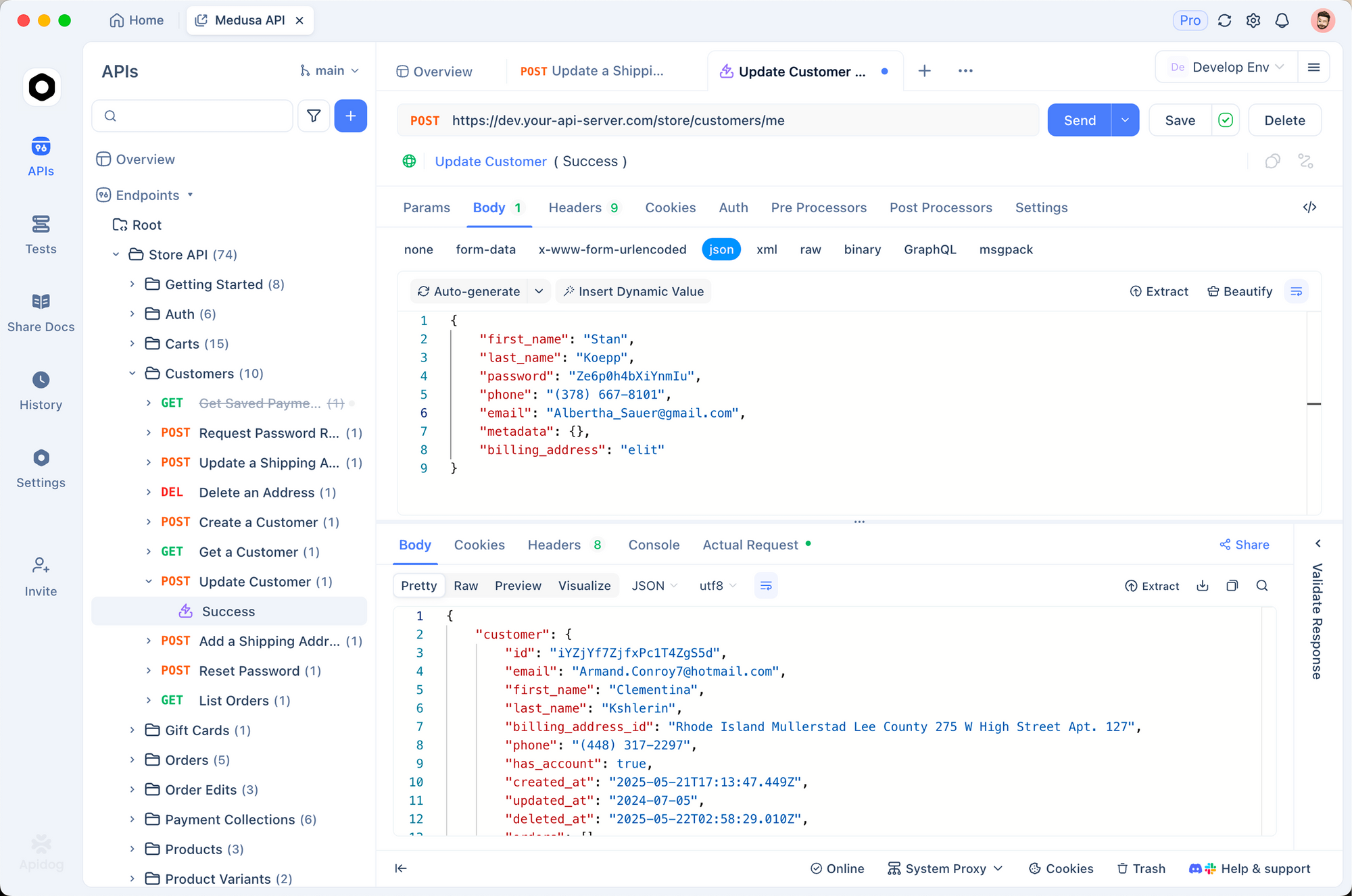
Set up a POST request to https://dashscope-intl.aliyuncs.com/compatible-mode/v1/chat/completions. Add your API key as an environment variable: Authorization: Bearer {{DASHSCOPE_API_KEY}}.
Write response assertions to validate structure and content:
pm.test("Response contains choices", () => {
 const body = pm.response.json();
 pm.expect(body).to.have.property("choices");
 pm.expect(body.choices[0].message.content).to.be.a("string").and.not.empty;
});

pm.test("No empty reasoning when thinking enabled", () => {
 const choice = pm.response.json().choices[0];
 if (choice.message.reasoning_content !== undefined) {
 pm.expect(choice.message.reasoning_content).to.not.be.empty;
 }
});
Use Apidog's Smart Mock to generate test responses during development. This means your agent orchestration code can be tested without calling the live API on every run, saving tokens and keeping test cycles fast.
If you're building a multi-turn agent, create a Test Scenario in Apidog that chains multiple requests together. Validate that preserve_thinking carries reasoning across turns by checking the response structure at each step before you run the full loop in production.
Download Apidog free to set up these tests.
What's coming next
Qwen team confirmed smaller open-source variants are shipping within days . These will follow the Qwen3.5 pattern: sparse MoE models with public Apache 2.0 weights.
The roadmap also includes:
- Longer-horizon repository-level tasks, targeting increasingly complex multi-file problem solving
- Continued multimodal agent development, with GUI agents and visual coding as first-class capabilities, not side features
The Qwen3.5 open-source variants became some of the most-deployed self-hosted models within weeks of release. If Qwen3.6 follows the same pattern, the smaller variants will likely become the default choice for self-hosted coding agents shortly after they land.
Conclusion
Qwen3.6-Plus closes the gap with Claude Opus 4.5 on coding tasks and opens a clear lead on terminal operations, MCP tool calling, and long-horizon planning. The 1M token context, Anthropic protocol compatibility, and preserve_thinking for agent loops make it a practical choice for production agentic systems right now.
The free preview period on OpenRouter was a useful way to evaluate the model. The official API brings stability, SLA coverage, and the new agent-focused parameter that makes multi-turn workflows more reliable.
Apidog handles the testing side: import the OpenAI-compatible endpoint, write response assertions, mock during development, and run regression tests whenever you update the model or bump the API version.
FAQ
What is the difference between Qwen3.6-Plus and the preview?The preview (qwen/qwen3.6-plus-preview) launched on OpenRouter on March 30, 2026. The official release adds the preserve_thinking parameter, SLA-backed uptime, and full Model Studio support. Smaller open-source variants are also coming.
What is preserve_thinking and when should I use it?By default, only the reasoning from the current turn is kept. When preserve_thinking: true is set, the model retains chain-of-thought from all previous conversation turns. Use it for multi-step agent loops where the model's past reasoning should inform its next action.
How does Qwen3.6-Plus compare to Claude Opus 4.5?Claude Opus 4.5 leads on SWE-bench Verified (80.9% vs 78.8%) and OSWorld-Verified (66.3% vs 62.5%). Qwen3.6-Plus leads on Terminal-Bench 2.0 (61.6% vs 59.3%), MCPMark (48.2% vs 42.3%), DeepPlanning (41.5% vs 33.9%), and GPQA (90.4% vs 87.0%).
Can I use Qwen3.6-Plus with Claude Code?Yes. Set ANTHROPIC_BASE_URL to the Dashscope Anthropic-compatible endpoint, ANTHROPIC_MODEL to qwen3.6-plus, and ANTHROPIC_AUTH_TOKEN to your Dashscope API key.
Is Qwen3.6-Plus open source?The hosted API model is not open-weight. Smaller variants with public weights are confirmed to be releasing within days.
How do I get free access?Install Qwen Code (npm install -g @qwen-code/qwen-code@latest), run qwen, then /auth. Sign in with Qwen Code OAuth for 1,000 free API calls per day against Qwen3.6-Plus.
What context window does it support?1 million tokens by default. Some benchmarks in the official report used 256K for standardized comparison, but the API default is 1M.
How do I test the API integration before deploying?Import the endpoint into Apidog, add your API key as an environment variable, write response assertions, and use Smart Mock for offline development. Chain requests into a Test Scenario to validate multi-turn agent behavior end to end.