Alibaba Cloud's Qwen3.5 Flash API represents a significant advancement in accessible large language models, offering developers a powerful, cost-effective solution for building AI-powered applications. Whether you're building chatbots, coding assistants, or multimodal applications, Qwen3.5 Flash provides the flexibility and performance needed to deliver exceptional user experiences. This comprehensive guide walks you through everything you need to know to get started with Qwen3.5 Flash API, from initial setup to advanced implementation techniques.
Understanding Qwen3.5 Flash API
Qwen3.5 Flash (Qwen3.5-35B-A3B) is part of Alibaba's Qwen3 series of models, designed to deliver high-performance AI capabilities at competitive price points. The "Flash" designation indicates these models are optimized for speed and cost-efficiency, making them ideal for production applications where both response quality and resource management matter.
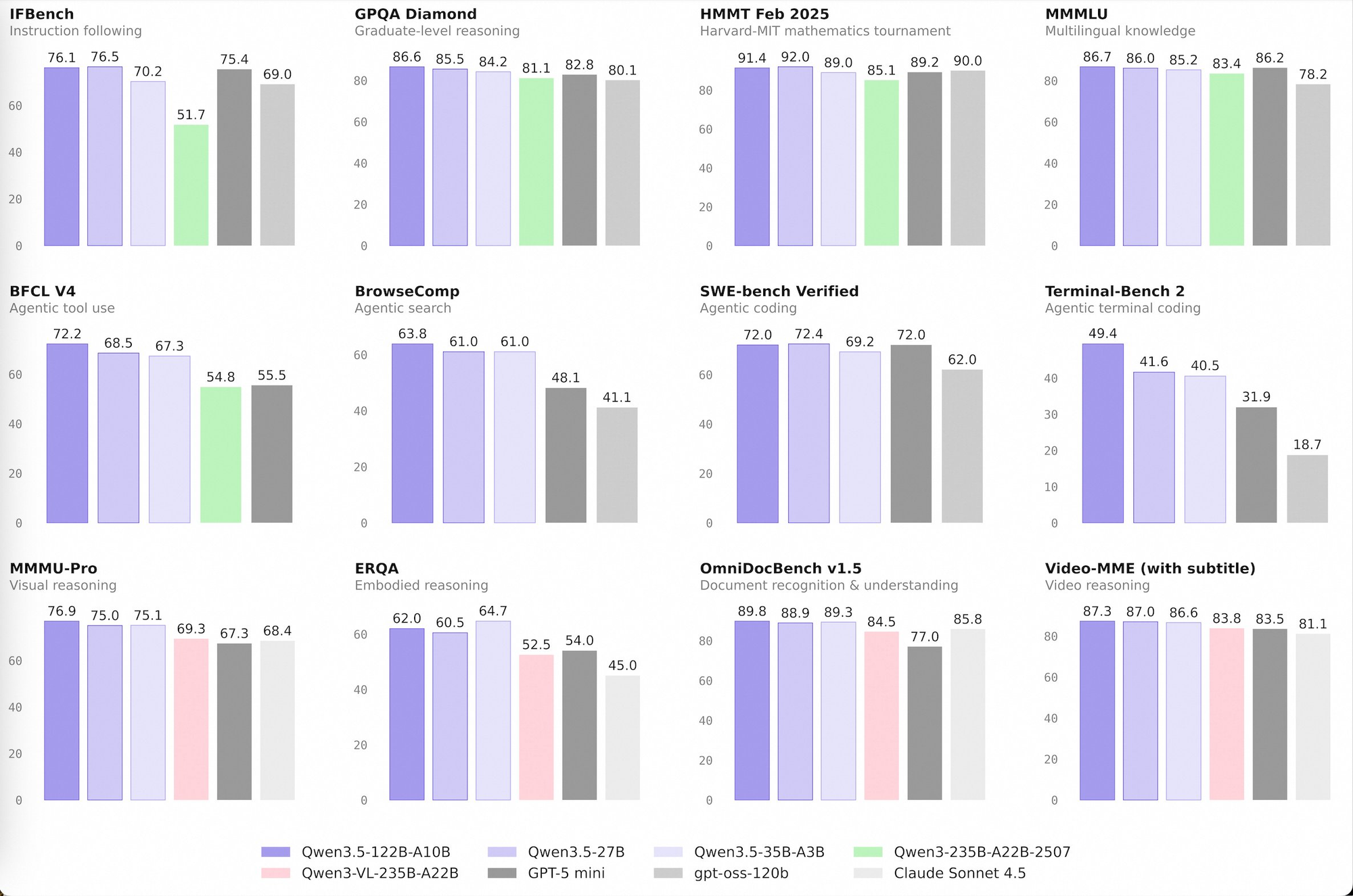
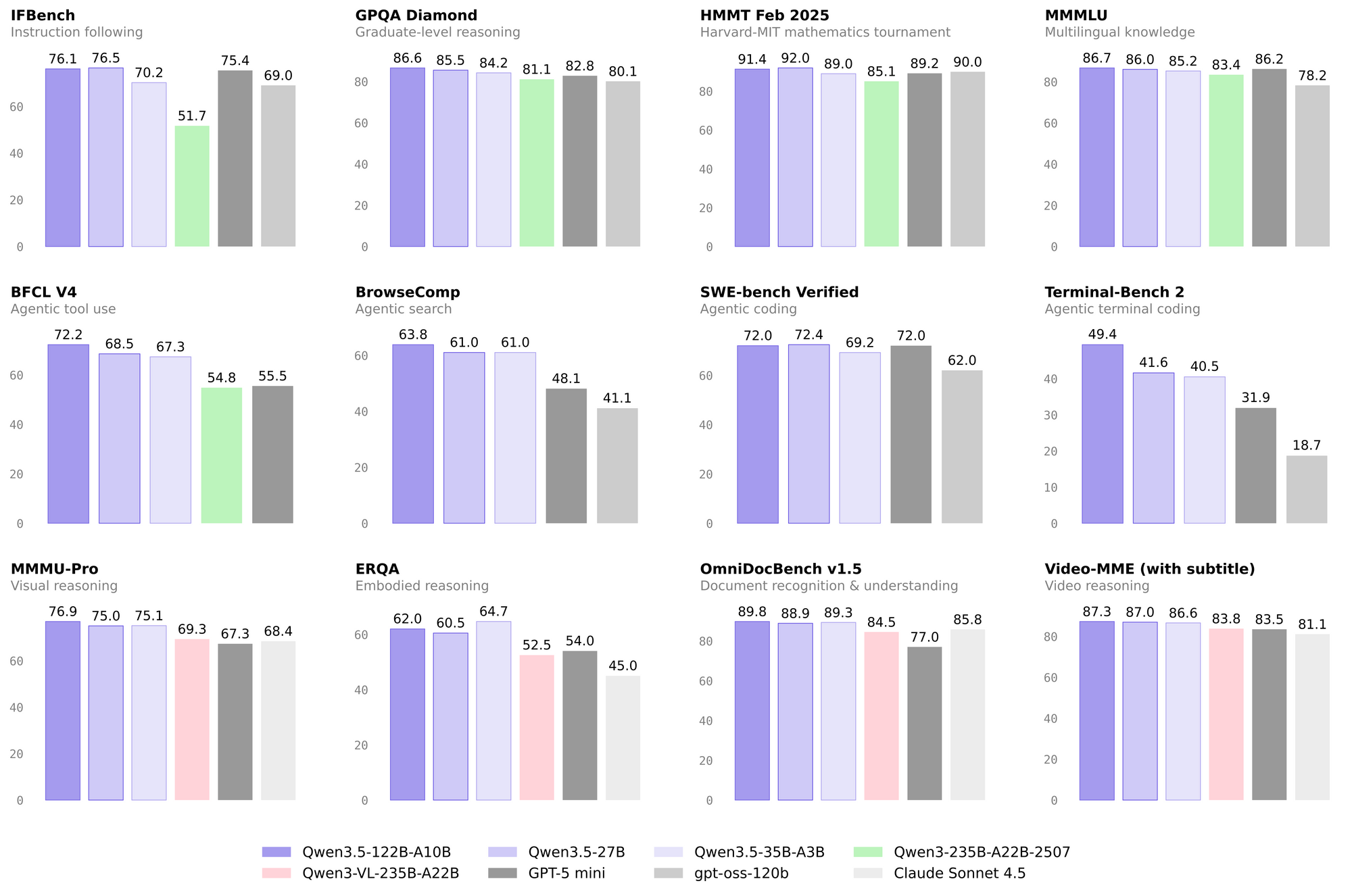
The Qwen3.5 family includes several variants tailored to different use cases. The Qwen3.5-397B-A17B model offers maximum capability with 403 billion parameters for complex reasoning tasks. The Qwen3.5-397B-FP8 provides the same capability with optimized storage. The Qwen3.5-122B-A10B offers 125 billion parameters for balanced performance, while Qwen3.5-35B-A3B(Qwen3.5 Flash) delivers 36 billion parameters as a cost-effective option for general-purpose applications. All models support vision (Image-Text-to-Text) capabilities, enabling multimodal interactions that process both text and images.
Getting Started: Prerequisites and Setup
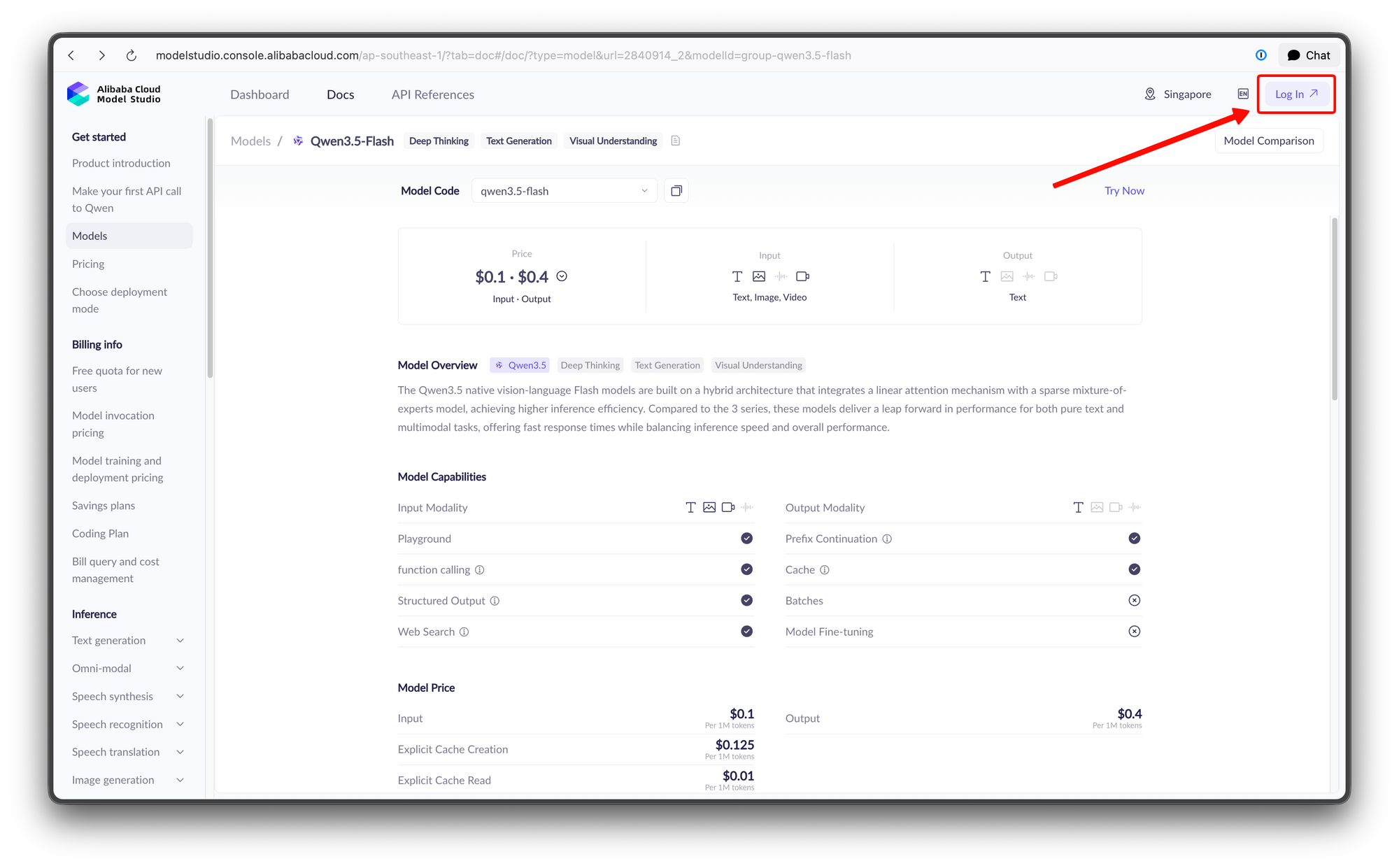
Before you can begin using the Qwen3.5 Flash API, you'll need to complete several setup steps. First, create an Alibaba Cloud account if you don't already have one, then navigate to Model Studio to generate your API key. This key authenticates your requests and tracks your usage for billing purposes. Keep this key secure and never expose it in client-side code or public repositories.
You'll also need to install the appropriate SDK for your development environment. Python developers can install the OpenAI-compatible SDK using pip:
pip install openai
For Node.js environments, the openai npm package provides equivalent functionality. The API is designed to be OpenAI-compatible, meaning if you've previously worked with OpenAI's API, you'll find the transition to Qwen3.5 Flash straightforward. The main differences involve the base URL and authentication mechanism.
API Configuration and Regional Endpoints
One critical aspect of configuring your Qwen3.5 Flash integration is selecting the appropriate regional endpoint. Your choice affects latency, pricing, and available features. Alibaba Cloud provides multiple regional endpoints to serve users worldwide:
The Singapore endpoint (https://dashscope-intl.aliyuncs.com/compatible-mode/v1) serves the Asia-Pacific region and offers a generous free tier—1 million tokens free for 90 days for new users. This makes it an excellent starting point for developers exploring the API. The Virginia (US) endpoint (https://dashscope-us.aliyuncs.com/compatible-mode/v1) provides better performance for North American users, while the Beijing endpoint (https://dashscope.aliyuncs.com/compatible-mode/v1) serves users in mainland China.
When configuring your client, ensure you select the endpoint geographically closest to your application users for optimal performance. The authentication process uses API keys rather than the OAuth flow some other services employ, simplifying integration while maintaining security.
Making Your First API Call
With your API key and endpoint configured, you're ready to make your first request. Here's a basic Python example demonstrating a simple conversation:
"""
Environment variables (per official docs):
  DASHSCOPE_API_KEY: Your API Key from https://bailian.console.aliyun.com
  DASHSCOPE_BASE_URL: (optional) Base URL for compatible-mode API.
  DASHSCOPE_MODEL: (optional) Model name; override for different models.
  DASHSCOPE_BASE_URL:
    - Beijing: https://dashscope.aliyuncs.com/compatible-mode/v1
    - Singapore: https://dashscope-intl.aliyuncs.com/compatible-mode/v1
    - US (Virginia): https://dashscope-us.aliyuncs.com/compatible-mode/v1
"""
from openai import OpenAI
import os

api_key = os.environ.get("DASHSCOPE_API_KEY")
if not api_key:
    raise ValueError(
        "DASHSCOPE_API_KEY is required. "
        "Set it via: export DASHSCOPE_API_KEY='your-api-key'"
    )

client = OpenAI(
    api_key=api_key,
    base_url=os.environ.get(
        "DASHSCOPE_BASE_URL",
        "https://dashscope-intl.aliyuncs.com/compatible-mode/v1",
    ),
)

messages = [{"role": "user", "content": "Introduce Qwen3.5."}]

model = os.environ.get(
    "DASHSCOPE_MODEL",
    "qwen3.5-plus",
)
completion = client.chat.completions.create(
    model=model,
    messages=messages,
    extra_body={
        "enable_thinking": True,
        "enable_search": False
    },
    stream=True
)

reasoning_content = ""  # Full reasoning trace
answer_content = ""  # Full response
is_answering = False  # Whether we have entered the answer phase
print("\n" + "=" * 20 + "Reasoning" + "=" * 20 + "\n")

for chunk in completion:
    if not chunk.choices:
        print("\nUsage:")
        print(chunk.usage)
        continue

    delta = chunk.choices[0].delta

    # Collect reasoning content only
    if hasattr(delta, "reasoning_content") and delta.reasoning_content is not None:
        if not is_answering:
            print(delta.reasoning_content, end="", flush=True)
        reasoning_content += delta.reasoning_content

    # Received content, start answer phase
    if hasattr(delta, "content") and delta.content:
        if not is_answering:
            print("\n" + "=" * 20 + "Answer" + "=" * 20 + "\n")
            is_answering = True
        print(delta.content, end="", flush=True)
        answer_content += delta.content
For developers preferring direct HTTP calls, here's the equivalent curl command:
curl -X POST https://dashscope-intl.aliyuncs.com/compatible-mode/v1/chat/completions \
-H "Authorization: Bearer $DASHSCOPE_API_KEY" \
-H "Content-Type: application/json" \
-d '{
    "model": "Qwen3.5-35B-A3B",
    "messages": [{"role": "user", "content": "Explain quantum computing in simple terms"}]
}'
The response structure follows the standard OpenAI format, making it easy to integrate with existing codebases that expect chat completion responses.
Advanced Features: Thinking Mode
One of Qwen3.5's most powerful features is thinking mode, which enables the model to engage in step-by-step reasoning before producing answers. This proves particularly valuable for complex mathematical problems, logical reasoning, and multi-step analysis where showing the reasoning process improves result quality.
To enable thinking mode, include the enable_thinking parameter in your request:
completion = client.chat.completions.create(
    model="qwen3.5-flash",
    messages=[
        {"role": "user", "content": "If a train travels 120km in 1.5 hours, what is its average speed?"}
    ],
    extra_body={
        'enable_thinking': True,
        'thinking_budget': 81920
    }
)
The thinking_budget parameter controls how much token allocation the model can use for reasoning. Higher budgets enable more thorough reasoning but increase token consumption and response time. For simple queries, a lower budget suffices, while complex problems benefit from generous allocation.
Implementing Multimodal Vision Capabilities
The vision-enabled variants—qwen3-vl-plus and qwen3-vl-flash—extend the API's capabilities to image understanding. These models can analyze images, describe visual content, answer questions about pictures, and extract information from photographs or diagrams. This opens possibilities for applications like automated image captioning, visual search, document processing with diagrams, and accessibility tools.
Here's how to send an image for analysis:
messages = [
    {
        "role": "user",
        "content": [
            {"type": "image_url", "image_url": {"url": "https://example.com/sample-image.jpg"}},
            {"type": "text", "text": "Describe what you see in this image"}
        ]
    }
]

completion = client.chat.completions.create(
    model="Qwen3.5-35B-A3B",
    messages=messages
)
You can provide image URLs or base64-encoded image data directly in the request. The model processes the image alongside your text prompt, generating responses that reference visual elements in the image. This capability proves invaluable for building customer service bots that can process uploaded screenshots, automated moderation systems, and educational tools that explain visual content.
Function Calling for Tool Integration
Function calling enables Qwen3.5 to intelligently invoke external tools and APIs based on user requests. This bridges the gap between conversational AI and real-world functionality, allowing your application to perform actions like querying databases, calling third-party APIs, or executing custom business logic.
To implement function calling, first define available tools in your request:
tools = [
    {
        "type": "function",
        "function": {
            "name": "get_weather",
            "description": "Get current weather for a specified location",
            "parameters": {
                "type": "object",
                "properties": {
                    "location": {
                        "type": "string",
                        "description": "City name, e.g., San Francisco"
                    }
                },
                "required": ["location"]
            }
        }
    }
]

completion = client.chat.completions.create(
    model="qwen3.5-flash",
    messages=[
        {"role": "user", "content": "What's the weather like in Tokyo?"}
    ],
    tools=tools
)
When the model determines that a function call is appropriate, the response includes a tool call object rather than a text message. Your application then executes the function and returns the results, allowing the model to generate a final contextual response. This pattern enables sophisticated workflows like booking systems, data retrieval applications, and interactive assistants that can take meaningful actions.
Streaming Responses for Real-Time Applications
For applications where perceived latency matters—such as chatbots, writing assistants, and interactive tools—streaming responses provide a better user experience by displaying text as it's generated rather than waiting for complete responses.
completion = client.chat.completions.create(
    model="qwen3.5-flash",
    messages=[
        {"role": "user", "content": "Write a short story about a robot learning to paint"}
    ],
    stream=True
)

for chunk in completion:
    if chunk.choices[0].delta.content:
        print(chunk.choices[0].delta.content, end="", flush=True)
Streaming reduces the time users wait before seeing meaningful output, particularly beneficial for longer responses. The streaming protocol sends chunks as they're generated, allowing progressive display while the model continues processing.
Cost Optimization with Context Caching
Qwen3.5 offers significant cost savings through context caching, a feature that reduces costs for applications with repeated context. When you send messages that share common system prompts or base documents, the cache stores this context for reuse. Subsequent requests referencing the same cached content receive substantial discounts—20% of the standard price for implicit caching and 10% for explicit cache management.
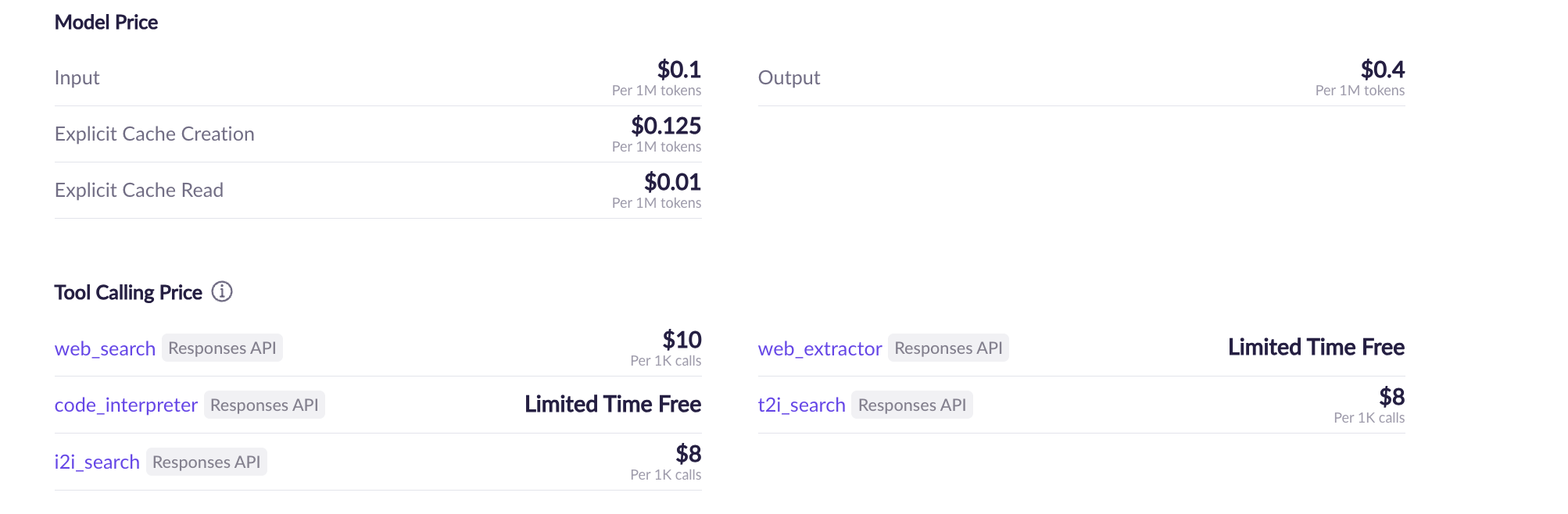
This feature proves particularly valuable for applications like document Q&A systems, where a base document remains constant while user questions vary. Instead of resending the full document with each query, you reference the cached context, dramatically reducing token costs at scale.
Selecting the Right Model for Your Needs
Choosing the appropriate Qwen3.5 variant depends on your specific requirements. Here's a practical guide:
| Model | Type | Parameters | Best For |
|---|---|---|---|
| Qwen3.5-397B-A17B | Image-Text-to-Text | 403B | Maximum capability, complex reasoning |
| Qwen3.5-397B-A17B-FP8 | Image-Text-to-Text | 403B | High capability with optimized storage |
| Qwen3.5-122B-A10B | Image-Text-to-Text | 125B | Balanced performance and efficiency |
| Qwen3.5-35B-A3B | Image-Text-to-Text | 36B | Cost-effective, general-purpose tasks |
| Qwen3.5-35B-A3B-Base | Image-Text-to-Text | 36B | Fine-tuning base model |
| Qwen3.5-27B | Image-Text-to-Text | 28B | Lightweight applications |
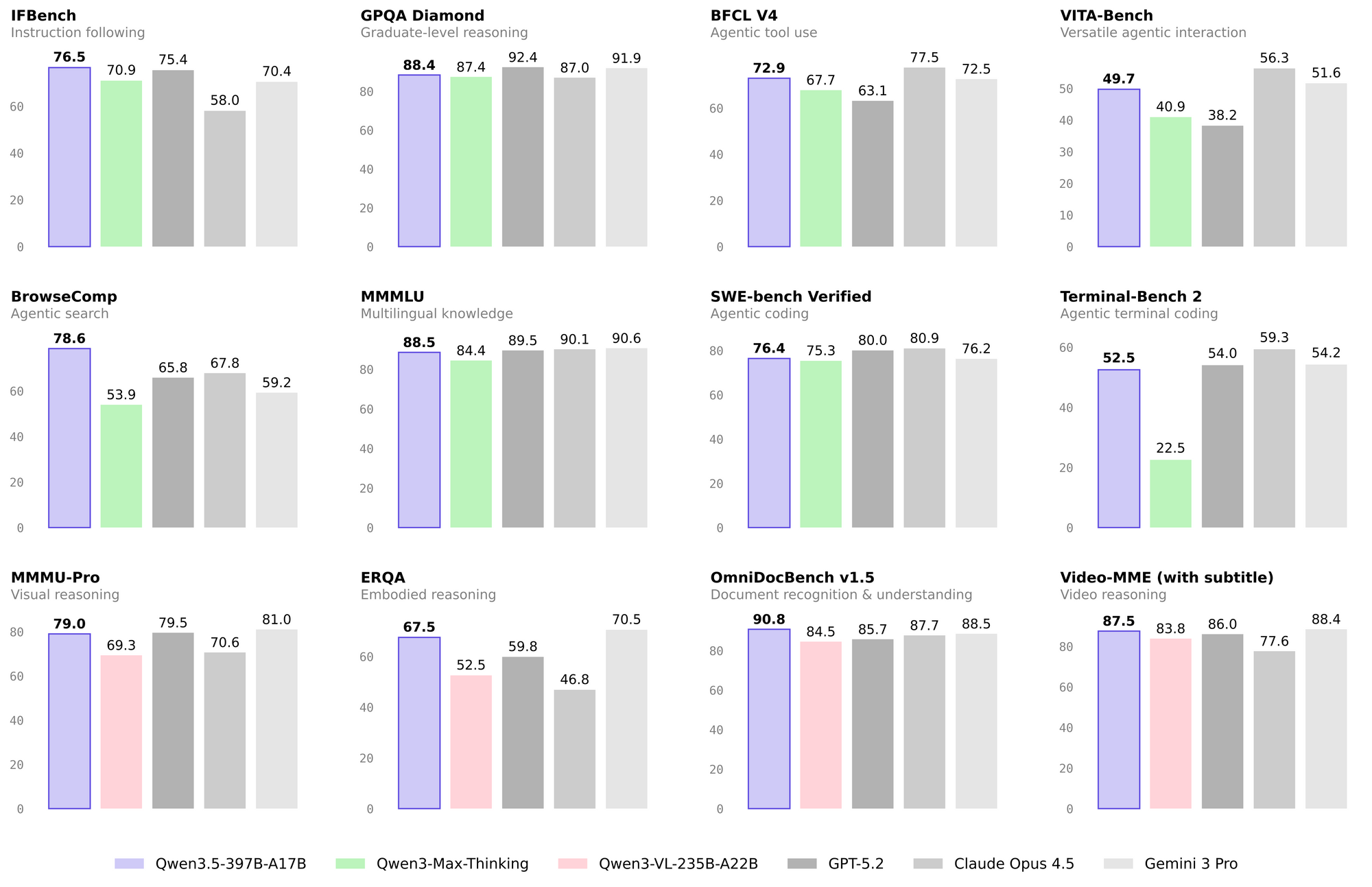
Qwen3.5-397B-A17B
The flagship model with 403 billion parameters, designed for maximum capability in complex reasoning, large-scale data analysis, and advanced problem-solving tasks.
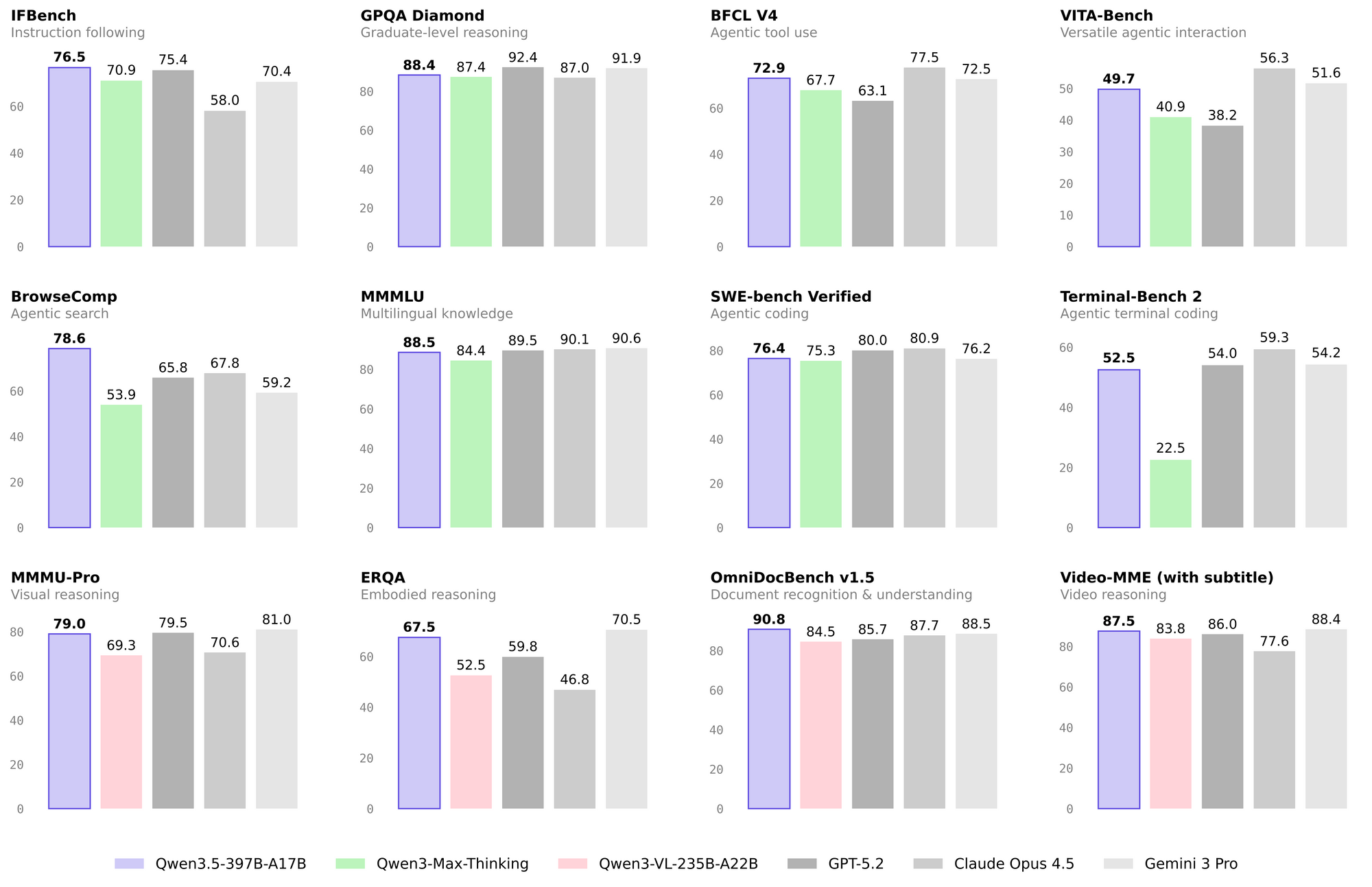
Qwen3.5-397B-A17B-FP8
Same capability as the 397B model with optimized FP8 quantization for reduced storage and faster inference while maintaining high quality.
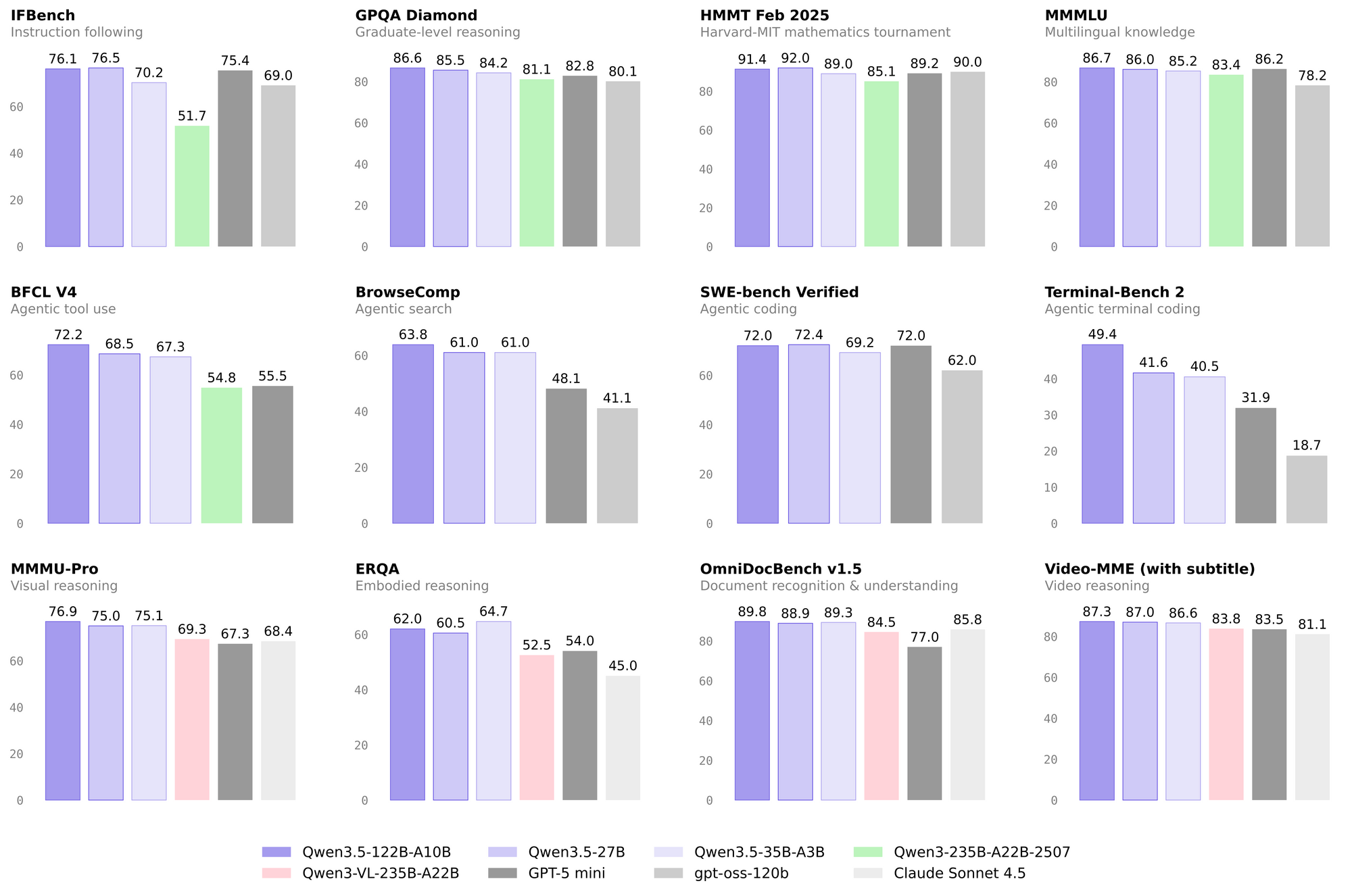
Qwen3.5-122B-A10B
A balanced 125-billion-parameter model offering strong performance across general tasks with reasonable resource requirements.
Qwen3.5-35B-A3B (Qwen3.5 Flash)
The most versatile 36-billion-parameter model, ideal for general-purpose applications, chatbots, and cost-effective production deployments.
Qwen3.5-35B-A3B-Base
The base model version of the 35B variant, perfect for fine-tuning on domain-specific datasets to create custom AI solutions.
Qwen3.5-27B
A lightweight 28-billion-parameter model designed for resource-constrained environments and applications where speed is critical.
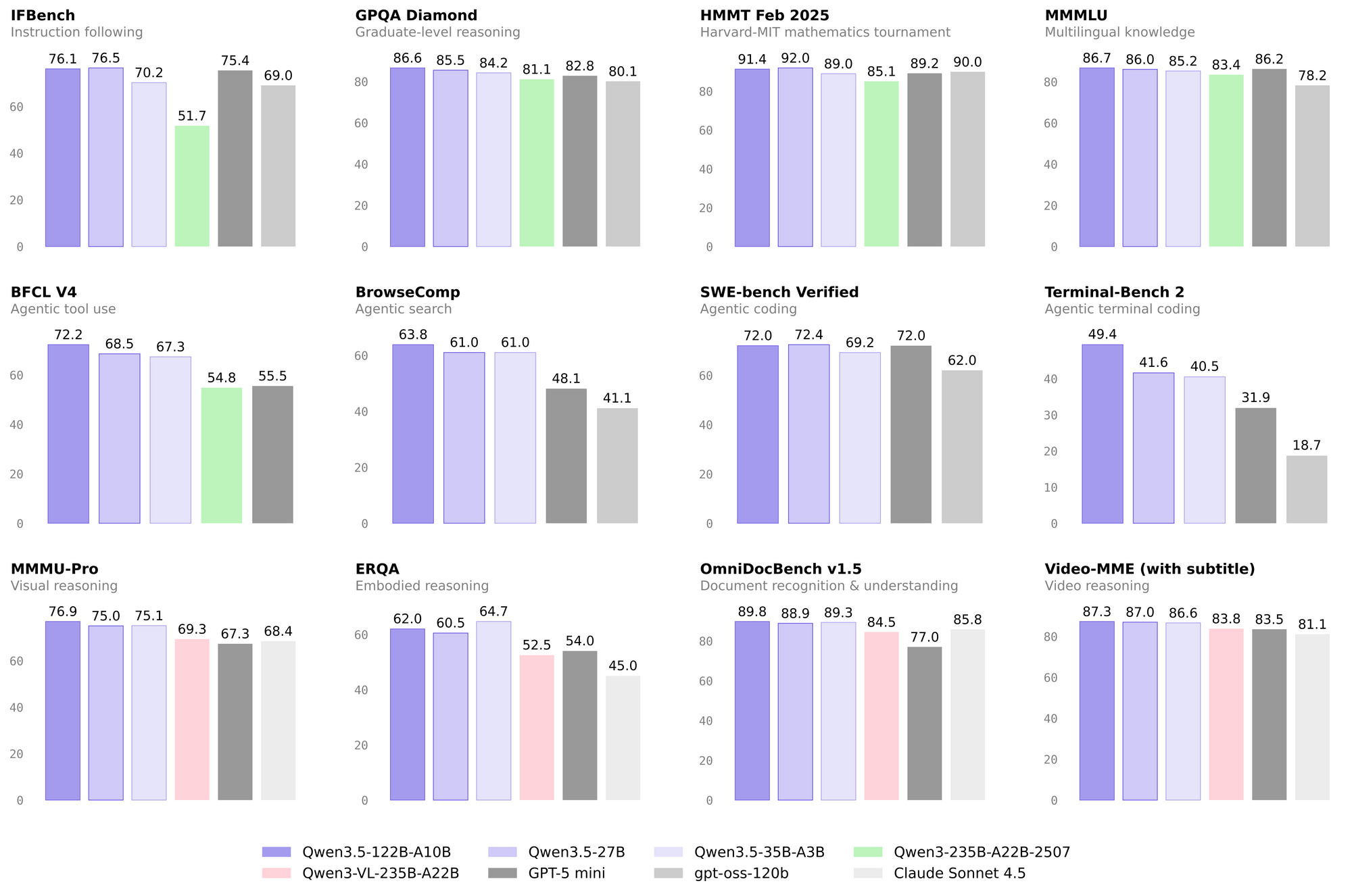
For most general applications, Qwen3.5 Flash (Qwen3.5-35B-A3B) provides the best balance of capability and cost. If you need maximum performance for complex reasoning tasks, the 397B models deliver the highest capability. The 122B variant offers a middle ground between performance and resource requirements.
Conclusion
Qwen3.5 Flash API offers developers a powerful, flexible, and cost-effective solution for integrating advanced AI capabilities into applications. With OpenAI-compatible interfaces, generous free tiers, and a range of specialized models, getting started requires minimal effort while offering pathways to sophisticated implementations. Whether you're building simple chatbots or complex multimodal applications, Qwen3.5 Flash provides the foundation for compelling AI-powered experiences.
The key to successful implementation lies in understanding your specific requirements—latency sensitivity, budget constraints, and functional needs—and selecting the appropriate model variant and configuration. Start with the free tier in the Singapore region to explore capabilities, then optimize your implementation based on real-world performance and cost observations.
Streamline your API development workflow with Apidog. From designing API schemas to debugging endpoints and generating documentation, Apidog helps you build reliable integrations faster. It's the all-in-one platform that makes working with Qwen3.5 and any other API a breeze.