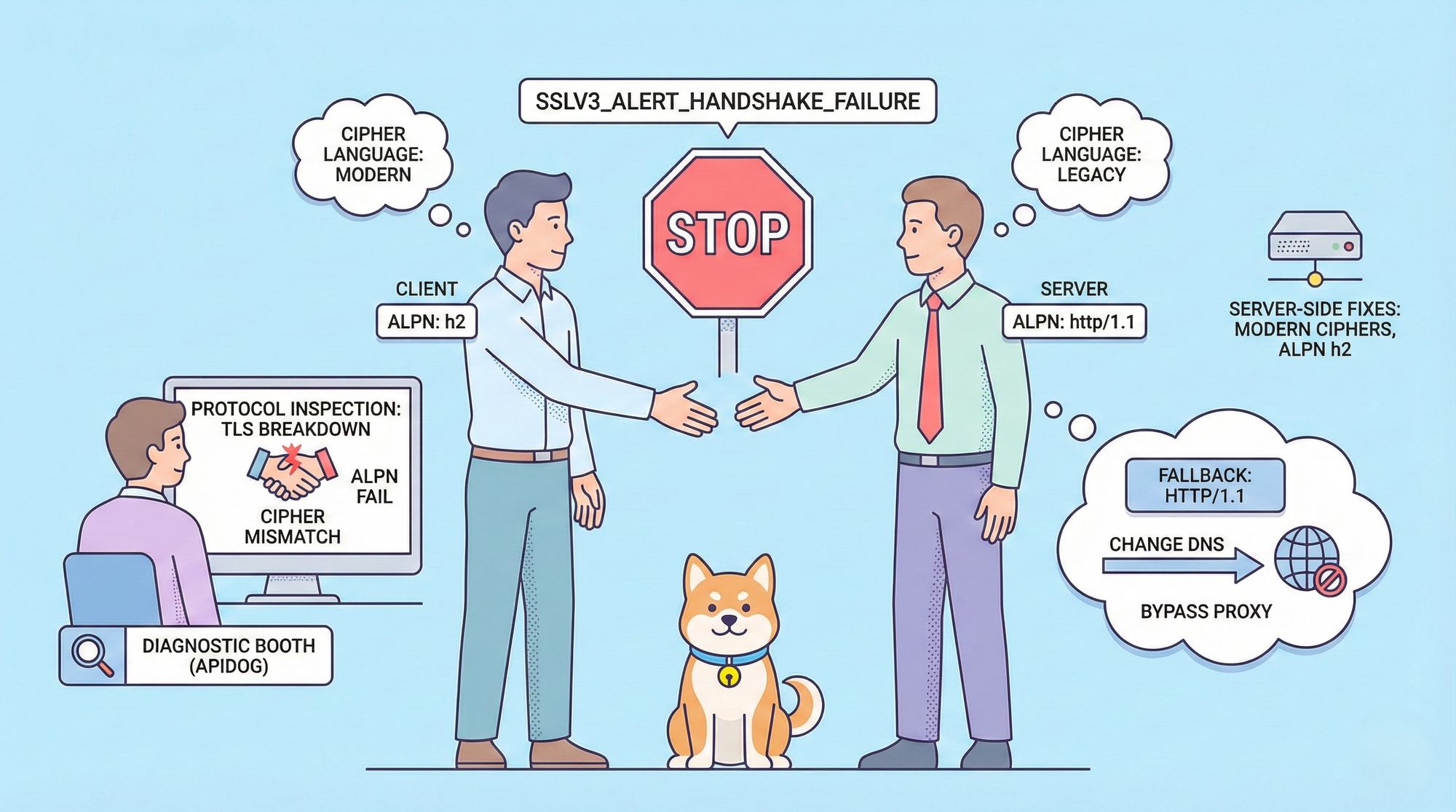
HTTP/2 boosts performance with multiplexing, server push, and efficient header compression, yet developers sometimes face HTTP/2 connection failures with SSLV3_ALERT_HANDSHAKE_FAILURE. This specific TLS alert number in the SSL/TLS specification indicates the server abruptly terminates the handshake because it cannot agree on critical parameters with the client.
In logs, the error commonly appears as :
[SSL: SSLV3_ALERT_HANDSHAKE_FAILURE]
in BoringSSL-based environments (such as Electron/Chromium apps), messages like:
ConnectError: [internal] ...:error:10000410:SSL routines:OPENSSL_internal:SSLV3_ALERT_HANDSHAKE_FAILURE:...:SSL alert number 40HTTP/2 mandates TLS 1.2 or higher and depends heavily on Application-Layer Protocol Negotiation (ALPN) to advertise and select the "h2" protocol identifier. When negotiation breaks due to incompatible ciphers, missing ALPN support, TLS version mismatches, or network interference HTTP/2 connection failures with SSLV3_ALERT_HANDSHAKE_FAILURE occur.
This guide walks through causes, diagnostics, immediate workarounds, advanced fixes, and prevention strategies so you eliminate HTTP/2 connection failures with SSLV3_ALERT_HANDSHAKE_FAILURE effectively.
Understand the Root Causes of HTTP/2 Connection Failures with SSLV3_ALERT_HANDSHAKE_FAILURE
Servers send the SSLV3_ALERT_HANDSHAKE_FAILURE alert when no mutually acceptable set of TLS parameters emerges during negotiation. HTTP/2 adds strict requirements that amplify common TLS mismatches.
Key triggers include:
- Cipher suite incompatibility: Clients propose modern suites (e.g., ECDHE with AES-GCM), but servers reject them due to outdated configurations or security policies. Older servers sometimes only accept deprecated ciphers that newer clients disable by default.
- ALPN negotiation breakdown: HTTP/2 requires the server to offer "h2" in its ALPN extension. If the server omits ALPN entirely or advertises only "http/1.1", the client aborts, producing SSLV3_ALERT_HANDSHAKE_FAILURE in HTTP/2 connection attempts.
- TLS version conflicts: Clients enforcing TLS 1.3 clash with servers limited to TLS 1.2 (or vice versa in rare downgrade scenarios).
- Missing or mismatched extensions: Issues with Server Name Indication (SNI), elliptic curves, signature algorithms, or supported groups disrupt agreement.
- Network or intermediary interference: Firewalls, DPI appliances, transparent proxies, or ISPs strip ALPN extensions, reorder packets, or block specific TLS records. Regional routing exacerbates this; for instance, certain Cloudflare paths in Eastern Europe presented handshake-incompatible endpoints in the Cursor case.
- Client library quirks: BoringSSL (used in many Electron apps) or specific OpenSSL builds enforce stricter defaults after updates, rejecting legacy configurations that previously succeeded.
These factors explain intermittent HTTP/2 connection failures with SSLV3_ALERT_HANDSHAKE_FAILURE behavior changes based on DNS resolver, exit node, or even time of day due to load balancing.

How to Diagnose HTTP/2 Connection Failures with SSLV3_ALERT_HANDSHAKE_FAILURE Step by Step
Pinpoint the failure point before applying fixes.
Start with OpenSSL to simulate the handshake:
openssl s_client -connect api.example.com:443 \
  -alpn h2 -tls1_2 -servername api.example.com -status
Examine the output carefully. Successful negotiation shows:
ALPN protocol: h2
New, TLSv1.2, Cipher is ECDHE-RSA-AES256-GCM-SHA384
Failure produces:
SSL alert number 40Next, test with curl for HTTP/2-specific behavior:
curl --http2 https://api.example.com -v --resolve api.example.com:443:YOUR_IPVerbose flags reveal ALPN offers, chosen protocol, and handshake alerts. If curl reports "ALPN, server accepted to use h2" but still fails, suspect post-handshake issues like HTTP/2 frame errors.
Capture packets with Wireshark or tcpdump:
tcpdump -i any -w handshake.pcap host api.example.com and port 443Filter for TLS records in Wireshark (tls.handshake.type == 2 for ServerHello). Verify the ALPN extension contains "h2" and check Alert records for code 40.
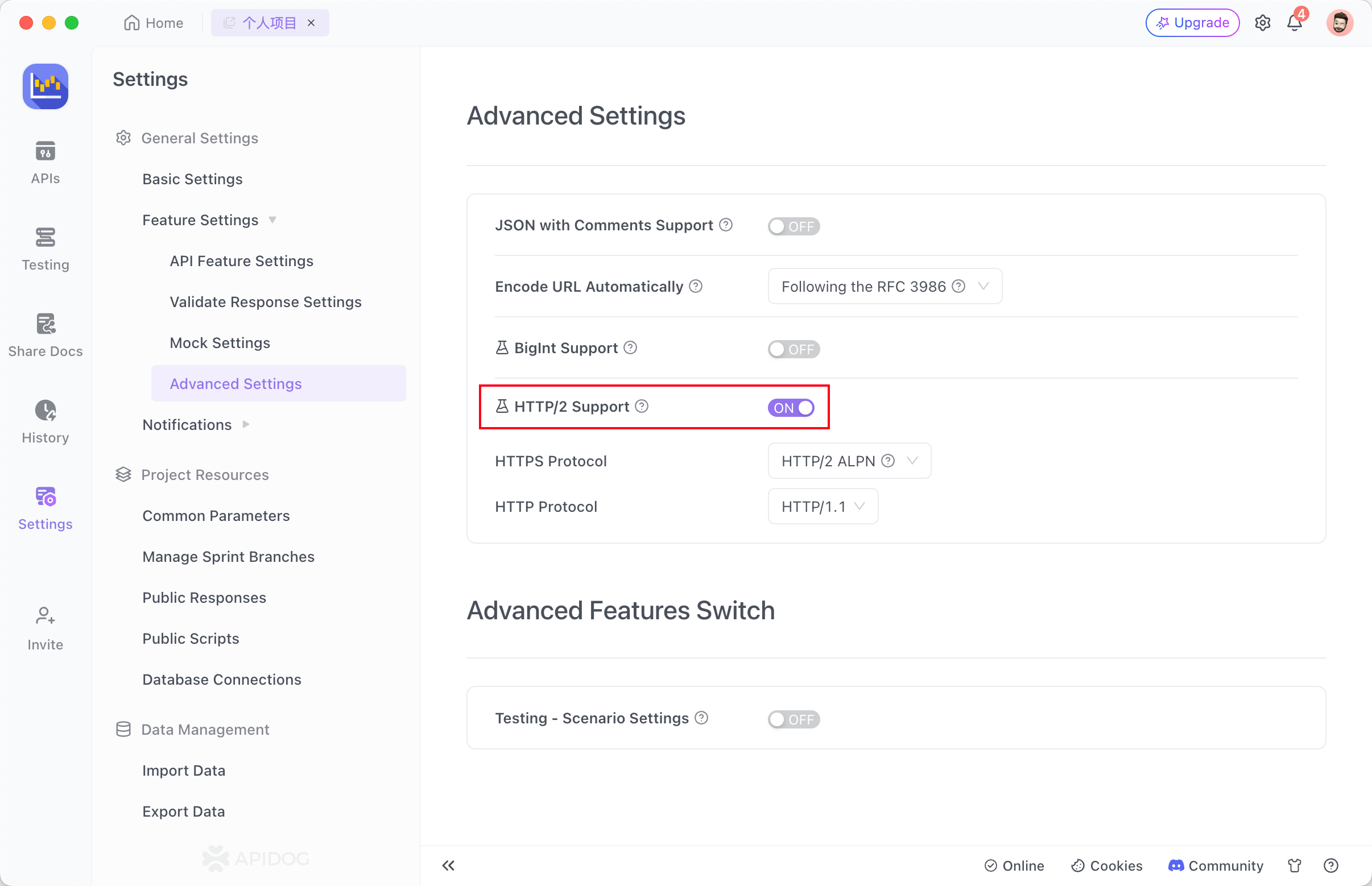
For API workflows, Apidog streamlines diagnosis. Navigate to Settings → Feature Settings → Advanced Settings, enable HTTP/2 support, and choose ALPN negotiation mode. Send requests to the target endpoint. Apidog logs the protocol version, handshake status, and any SSLV3_ALERT_HANDSHAKE_FAILURE details directly in the response pane. Switch to HTTP/1.1 mode instantly to confirm whether the issue ties specifically to HTTP/2 negotiation. This method isolates client-side, network, or server-side contributions to HTTP/2 connection failures with SSLV3_ALERT_HANDSHAKE_FAILURE faster than manual tools.
Apply Immediate Workarounds for HTTP/2 Connection Failures with SSLV3_ALERT_HANDSHAKE_FAILURE
Restore connectivity quickly with these steps.
Force HTTP/1.1 fallback: Disable HTTP/2 in your client or application. In Cursor IDE, open Settings, search "HTTP/2", select "HTTP Compatibility Mode: HTTP/1.1", and restart. Many Electron-based tools offer similar toggles. This sidesteps ALPN and HTTP/2 requirements, eliminating SSLV3_ALERT_HANDSHAKE_FAILURE in most cases, though it reduces performance.
Change DNS resolver: Switch from Google (8.8.8.8) to Quad9 (9.9.9.9), Cloudflare (1.1.1.1 with malware blocking off), or local ISP DNS. Routing variations resolve handshake mismatches caused by geo-specific CDNs.
Bypass proxies and VPNs temporarily: Disable corporate proxies or test without VPNs. Some intermediaries mangle TLS extensions, triggering SSLV3_ALERT_HANDSHAKE_FAILURE during HTTP/2 attempts.
Adjust system clock and certificate trust: Ensure date/time synchronization. Incorrect clocks invalidate certificates and abort handshakes.
These workarounds fix the majority of HTTP/2 connection failures with SSLV3_ALERT_HANDSHAKE_FAILURE within minutes.
Leverage Apidog to Test and Debug HTTP/2 Connection Failures with SSLV3_ALERT_HANDSHAKE_FAILURE
Apidog excels at HTTP/2 troubleshooting. Key capabilities include:
- Automatic ALPN negotiation for HTTPS endpoints.
- Forced HTTP/2 mode or HTTP/2 Prior Knowledge (h2c for cleartext testing).
- Detailed protocol inspection showing negotiated version, ciphers, and TLS alerts.
- Scriptable collections that replay failing scenarios across environments.
Enable HTTP/2 in Apidog's advanced settings, target your API, and observe results. If SSLV3_ALERT_HANDSHAKE_FAILURE appears, toggle protocols, inspect ALPN logs, or compare against HTTP/1.1. Apidog also supports environment variables and pre-request scripts, allowing you to simulate regional conditions or custom ciphers. Professionals use Apidog to prevent HTTP/2 connection failures with SSLV3_ALERT_HANDSHAKE_FAILURE in production APIs.
Download Apidog for free and start testing HTTP/2 connections today its intuitive interface turns complex handshake debugging into a straightforward process.
Implement Server-Side and Long-Term Fixes for HTTP/2 Connection Failures with SSLV3_ALERT_HANDSHAKE_FAILURE
Address root causes permanently.
Update server TLS configuration: Ensure modern ciphers (ECDHE-ECDSA-AES256-GCM-SHA384, etc.) and explicit ALPN "h2" support. For Nginx:
ssl_protocols TLSv1.2 TLSv1.3;
ssl_ciphers ECDHE-ECDSA-AES256-GCM-SHA384:ECDHE-RSA-AES256-GCM-SHA384:...;
ssl_alpn_protocols h2 http/1.1;
Generate strong DH parameters: Prevent Logjam-like issues:
openssl dhparam -out /etc/ssl/certs/dhparam.pem 2048Audit with external tools: Run Qualys SSL Labs or testssl.sh to verify cipher lists, protocol support, and ALPN behavior.
Monitor and log TLS alerts: Enable detailed logging in servers and clients to capture handshake failures early.
Standardize client libraries: Keep urllib3, requests, or http2 libraries updated. In Python, explicitly set secure ciphers when needed
import ssl
ctx = ssl.SSLContext(ssl.PROTOCOL_TLS_CLIENT)
ctx.minimum_version = ssl.TLSVersion.TLSv1_2
ctx.set_ciphers('HIGH:!aNULL:!MD5')
These practices minimize future HTTP/2 connection failures with SSLV3_ALERT_HANDSHAKE_FAILURE.
Eliminate HTTP/2 Connection Failures with SSLV3_ALERT_HANDSHAKE_FAILURE for Good
HTTP/2 connection failures with SSLV3_ALERT_HANDSHAKE_FAILURE frustrate developers, but systematic diagnosis and targeted fixes restore reliable performance. Begin with quick workarounds like disabling HTTP/2 or changing DNS, then use Apidog for precise HTTP/2 testing and validation.
Small adjustments proper ALPN configuration, updated ciphers, or regional routing awareness deliver outsized improvements. Proactively test with Apidog's HTTP/2 features to catch SSLV3_ALERT_HANDSHAKE_FAILURE issues before they impact users.
Download Apidog for free and build resilient HTTP/2 connections that avoid handshake failures entirely.