The ability to generate 3D models from text descriptions or images has transformed how developers build applications for gaming, e-commerce, virtual reality, and architectural visualization. Tripo 3D API provides a straightforward way to integrate AI-powered 3D model generation into your applications without requiring extensive 3D modeling expertise.
Want an integrated, All-in-One platform for your Developer Team to work together with maximum productivity?
Apidog delivers all your demands, and replaces Postman at a much more affordable price!
This guide walks through everything you need to implement Tripo 3D API, from initial setup to production deployment.
What is Tripo 3D API?
Tripo 3D API converts text prompts or 2D images into production-ready 3D models through advanced AI algorithms. The service handles the complex machine learning processes behind the scenes, exposing simple REST endpoints that developers can integrate within minutes.
You can access Want to use Tripo 3D API for cheap at Hypereal AI.
The platform supports three primary generation modes:
- Text-to-3D: Generate models from natural language descriptions
- Image-to-3D: Convert single or multiple images into 3D objects
- Multi-view to 3D: Create high-fidelity models from multiple image perspectives
Generated models export in standard formats including GLB, GLTF, FBX, and OBJ, making them compatible with most 3D software and game engines.
Getting Started: Authentication and Setup
Step 1: Generate Your API Key
Before making any API calls, you need authentication credentials:
- Visit the Tripo 3D platform documentation page
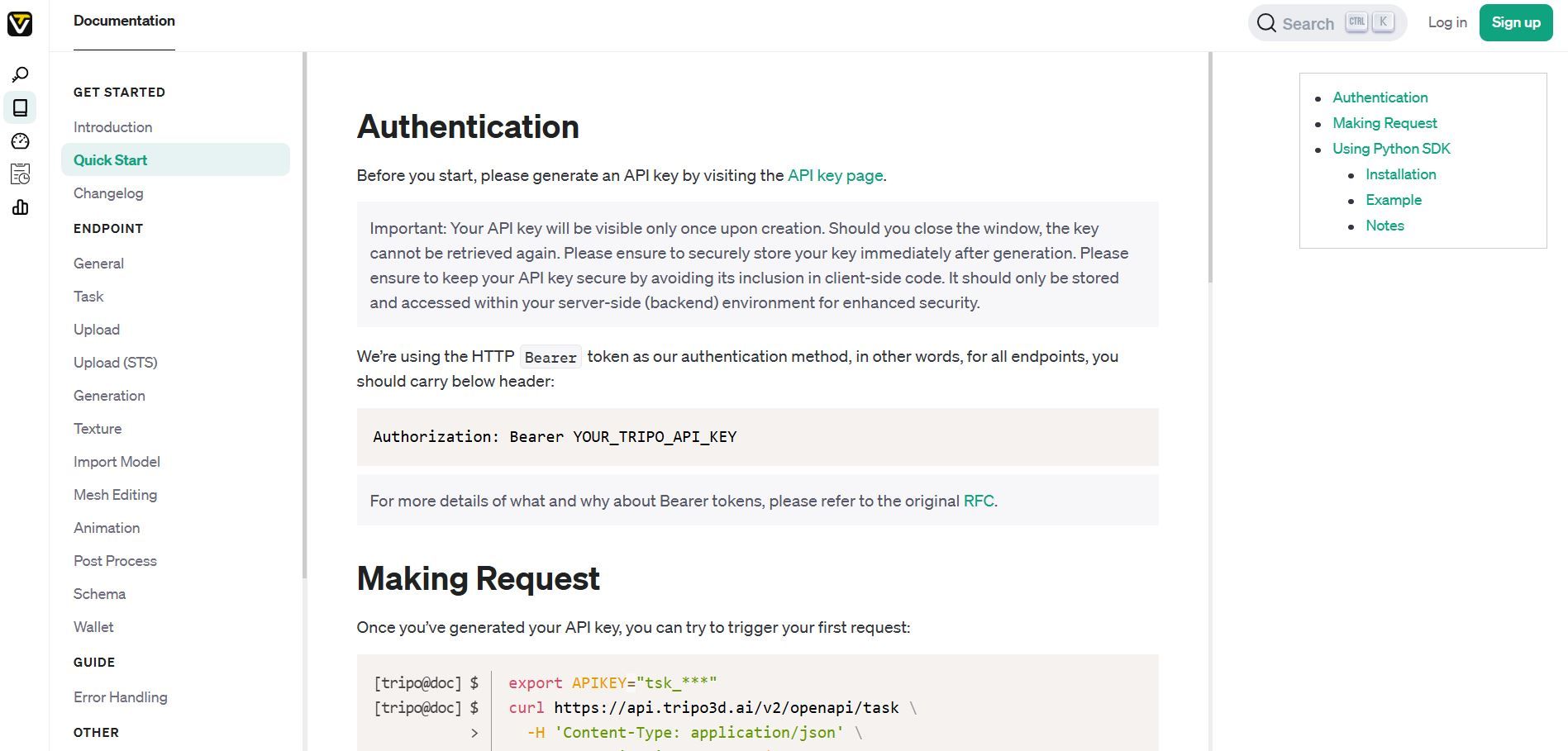
2. Click "Generate New API Key"
3. Copy your key immediately (it starts with tsk_)
4. Store it securely you cannot retrieve it again after closing the window
Security Note: Never expose API keys in client-side code or public repositories. Use environment variables or secure secret management services.
Step 2: Install the Python SDK (Optional)
While you can use the REST API directly with any HTTP client, the official Python SDK simplifies integration:
pip install tripo3d
The SDK handles authentication, asynchronous task polling, and file downloads automatically.
Step 3: Verify Your Setup
Test your authentication with this basic cURL request:
export TRIPO_API_KEY="tsk_your_actual_key_here"

curl https://api.tripo3d.ai/v2/openapi/task \
  -H 'Content-Type: application/json' \
  -H "Authorization: Bearer ${TRIPO_API_KEY}" \
  -d '{"type": "text_to_model", "prompt": "a simple wooden chair"}'
A successful response returns a task ID, indicating your authentication works correctly.
Method 1: Text-to-3D Model Generation
Basic Implementation
Text-to-3D generation transforms natural language descriptions into 3D objects. This works well for creating assets from conceptual descriptions.
Python SDK Example:
import asyncio
from tripo3d import TripoClient, TaskStatus

async def generate_from_text():
    async with TripoClient(api_key="YOUR_API_KEY") as client:
        # Submit generation task
        task_id = await client.text_to_model(
            prompt="a vintage leather armchair with wooden legs",
            negative_prompt="low quality, blurry, distorted",
            model_version="v2.5"
        )

        print(f"Task submitted: {task_id}")

        # Wait for completion
        task = await client.wait_for_task(task_id, verbose=True)

        # Download results
        if task.status == TaskStatus.SUCCESS:
            files = await client.download_task_models(task, "./output")
            for model_type, path in files.items():
                print(f"Downloaded {model_type}: {path}")
        else:
            print(f"Task failed: {task.status}")

asyncio.run(generate_from_text())
REST API Example:
curl -X POST https://api.tripo3d.ai/v2/openapi/task \
  -H 'Content-Type: application/json' \
  -H "Authorization: Bearer ${TRIPO_API_KEY}" \
  -d '{
    "type": "text_to_model",
    "prompt": "a vintage leather armchair with wooden legs",
    "negative_prompt": "low quality, blurry, distorted",
    "model_version": "v2.5"
  }'
Understanding Parameters
| Parameter | Type | Required | Description |
|---|---|---|---|
| prompt | string | Yes | Detailed description of the desired 3D model |
| negative_prompt | string | No | Characteristics to avoid in generation |
| model_version | string | No | API version (default: latest) |
Prompt Engineering Tips
- Be specific about materials, colors, and shapes
- Include style descriptors (realistic, cartoon, low-poly)
- Mention scale references when relevant
- Add lighting preferences for better texture generation
Method 2: Image-to-3D Model Generation
Single Image Conversion
Convert a single photograph or illustration into a 3D model. This works best with clear, well-lit images showing the object from a straightforward angle.
Python SDK Example:
import asyncio
from tripo3d import TripoClient, TaskStatus

async def generate_from_image():
    async with TripoClient(api_key="YOUR_API_KEY") as client:
        task_id = await client.image_to_model(
            image="./path/to/product-photo.jpg",
            texture_quality="high",
            auto_scale=True,
            face_limit=50000
        )

        print(f"Processing image: {task_id}")

        task = await client.wait_for_task(task_id, verbose=True)

        if task.status == TaskStatus.SUCCESS:
            files = await client.download_task_models(task, "./models")
            print(f"Model saved to: {files}")

asyncio.run(generate_from_image())
Advanced Parameters
| Parameter | Type | Default | Description |
|---|---|---|---|
| texture_seed | integer | Random | Seed for reproducible texture generation |
| auto_scale | boolean | False | Scale model to real-world dimensions |
| quad | boolean | False | Generate quad mesh (+$0.05 per task) |
| texture_quality | string | "original_image" | Texture alignment priority |
| orientation | string | "default" | Set to "align_image" for automatic rotation |
| face_limit | integer | Variable | Controls polygon count for optimization |
Multi-View Generation
For higher quality results, provide multiple angles of the same object:
async def generate_from_multiview():
    async with TripoClient(api_key="YOUR_API_KEY") as client:
        task_id = await client.multiview_to_model(
            images=[
                "./front-view.jpg",
                "./side-view.jpg",
                "./top-view.jpg"
            ],
            texture_quality="high"
        )

        task = await client.wait_for_task(task_id, verbose=True)

        if task.status == TaskStatus.SUCCESS:
            files = await client.download_task_models(task, "./output")
Multi-view generation produces significantly better geometry and texture detail compared to single-image conversion.
Understanding Task Status and Polling
Tripo 3D API processes requests asynchronously. After submitting a task, you poll for completion rather than blocking.
Task Lifecycle
- Submitted: Task accepted and queued
- Processing: AI model generating 3D output
- Success: Model ready for download
- Failed: Generation encountered an error
Manual Polling (REST API)
curl https://api.tripo3d.ai/v2/openapi/task/{task_id} \
  -H "Authorization: Bearer ${TRIPO_API_KEY}"
Response Structure:
{
  "code": 0,
  "data": {
    "task_id": "abc123",
    "status": "success",
    "output": {
      "model": "https://download-url/model.glb",
      "pbr_model": "https://download-url/model-pbr.glb"
    }
  }
}
Automatic Polling (Python SDK)
The SDK handles polling automatically:
task = await client.wait_for_task(
    task_id,
    verbose=True,  # Show progress updates
    timeout=300    # Maximum wait time in seconds
)
Pricing and Credit System
Tripo uses a credit-based pricing model where different operations consume varying amounts of credits.
Pricing Tiers
| Plan | Price | Monthly Credits | Concurrent Tasks |
|---|---|---|---|
| Basic | Free | 300 | 1 |
| Professional | $15.90/month* | 3,000 | 10 |
| Advanced | $39.90/month* | 8,000 | 15 |
*Annual billing: 20% discount ($190.80/year for Professional, $478.80/year for Advanced)
Credit Costs
- Text-to-3D: ~30 credits per generation
- Image-to-3D: ~30-50 credits depending on quality settings
- Multi-view to 3D: ~60-80 credits
- Quad mesh output: Additional $0.05 (approximately 5 credits)
Cost Optimization Tips
- Use lower face_limit values for preview generations
- Test with Basic plan before scaling to paid tiers
- Batch similar requests to maximize concurrent task limits
- Cache generated models to avoid regenerating identical assets
Error Handling and Best Practices
Handle API Errors Gracefully
from tripo3d import TripoClient, TripoAPIError

async def safe_generation():
    try:
        async with TripoClient(api_key="YOUR_API_KEY") as client:
            task_id = await client.text_to_model(
                prompt="a detailed spaceship"
            )
            task = await client.wait_for_task(task_id)

            if task.status == TaskStatus.SUCCESS:
                files = await client.download_task_models(task, "./output")
                return files
            else:
                print(f"Generation failed: {task.status}")
                return None

    except TripoAPIError as e:
        if e.status_code == 401:
            print("Authentication failed. Check your API key.")
        elif e.status_code == 429:
            print("Rate limit exceeded. Wait before retrying.")
        elif e.status_code >= 500:
            print("Server error. Retry after a delay.")
        else:
            print(f"API error: {e}")
        return None
Production Best Practices
- Implement retry logic for transient failures (500-level errors)
- Set appropriate timeouts based on task complexity
- Monitor credit usage to prevent service interruption
- Validate inputs before submitting expensive operations
- Store task IDs for debugging and auditing
- Use webhooks (if available) instead of aggressive polling
Rate Limiting
Respect concurrent task limits based on your plan tier. Exceeding limits results in 429 errors:
from asyncio import Semaphore

async def batch_generate(prompts, max_concurrent=10):
    semaphore = Semaphore(max_concurrent)

    async def generate_with_limit(prompt):
        async with semaphore:
            async with TripoClient(api_key="YOUR_API_KEY") as client:
                task_id = await client.text_to_model(prompt=prompt)
                return await client.wait_for_task(task_id)

    tasks = [generate_with_limit(p) for p in prompts]
    return await asyncio.gather(*tasks)
Integration with Popular Frameworks
Flask Web Application
from flask import Flask, request, jsonify
from tripo3d import TripoClient
import asyncio

app = Flask(__name__)

@app.route('/generate-3d', methods=['POST'])
def generate_model():
    data = request.json
    prompt = data.get('prompt')

    if not prompt:
        return jsonify({'error': 'Prompt required'}), 400

    async def generate():
        async with TripoClient(api_key="YOUR_API_KEY") as client:
            task_id = await client.text_to_model(prompt=prompt)
            return {'task_id': task_id}

    result = asyncio.run(generate())
    return jsonify(result)

@app.route('/check-status/<task_id>')
def check_status(task_id):
    async def get_status():
        async with TripoClient(api_key="YOUR_API_KEY") as client:
            task = await client.get_task(task_id)
            return {'status': task.status}

    result = asyncio.run(get_status())
    return jsonify(result)
Node.js Express Example
const express = require('express');
const axios = require('axios');
const app = express();

app.post('/generate', async (req, res) => {
  const { prompt } = req.body;

  try {
    const response = await axios.post(
      'https://api.tripo3d.ai/v2/openapi/task',
      {
        type: 'text_to_model',
        prompt: prompt
      },
      {
        headers: {
          'Authorization': `Bearer ${process.env.TRIPO_API_KEY}`,
          'Content-Type': 'application/json'
        }
      }
    );

    res.json({ task_id: response.data.data.task_id });
  } catch (error) {
    res.status(500).json({ error: error.message });
  }
});
Managing API Integrations with Apidog
Complex applications often integrate multiple APIs simultaneously. Managing authentication, testing endpoints, and monitoring performance across different services becomes challenging.
Apidog provides unified API management for developers working with Tripo 3D API and other services:
Key Features:
- Visual request builder: Construct API calls without manual JSON formatting
- Environment management: Switch between development, staging, and production credentials
- Automated testing: Validate responses and catch integration issues early
- Team collaboration: Share API collections and documentation with developers
- Performance monitoring: Track response times and error rates across all endpoints
Import your Tripo 3D API requests into Apidog, save them as templates, and execute them with a single click. Monitor credit consumption patterns and identify optimization opportunities through built-in analytics.
Conclusion
Tripo 3D API removes the technical barriers to integrating AI-powered 3D model generation into applications. The straightforward REST interface and official Python SDK enable developers to add text-to-3D and image-to-3D capabilities within hours rather than weeks.
Start with the free Basic plan to prototype your integration. Test different prompt styles and image inputs to understand output quality. Monitor credit consumption patterns before committing to paid tiers.
The platform's asynchronous processing model scales well for production workloads, while the standard export formats ensure compatibility with existing 3D pipelines and game engines.