Google’s Gemini Embedding 2 API lets you generate embeddings for text, images, video, audio, and PDFs. This guide shows you how to use it, with real code examples you can run today.
Note: This guide covers the public preview version (gemini-embedding-2-preview). The API may change before general availability.
Want to understand what Gemini Embedding 2 is first? Read our overview: What is Gemini Embedding 2?
Prerequisites
You need:
- A Google AI API key
- Python 3.7 or higher
- The Google Generative AI SDK
Installation
Install the SDK:
pip install google-generativeai
Basic Setup
Set up your API key:
import google.generativeai as genai

# Set your API key
genai.configure(api_key='YOUR_API_KEY')
For production, use environment variables:
import os
import google.generativeai as genai

api_key = os.getenv('GEMINI_API_KEY')
genai.configure(api_key=api_key)
Testing with Apidog
Before diving into code, you can test the Gemini Embedding API directly in Apidog:
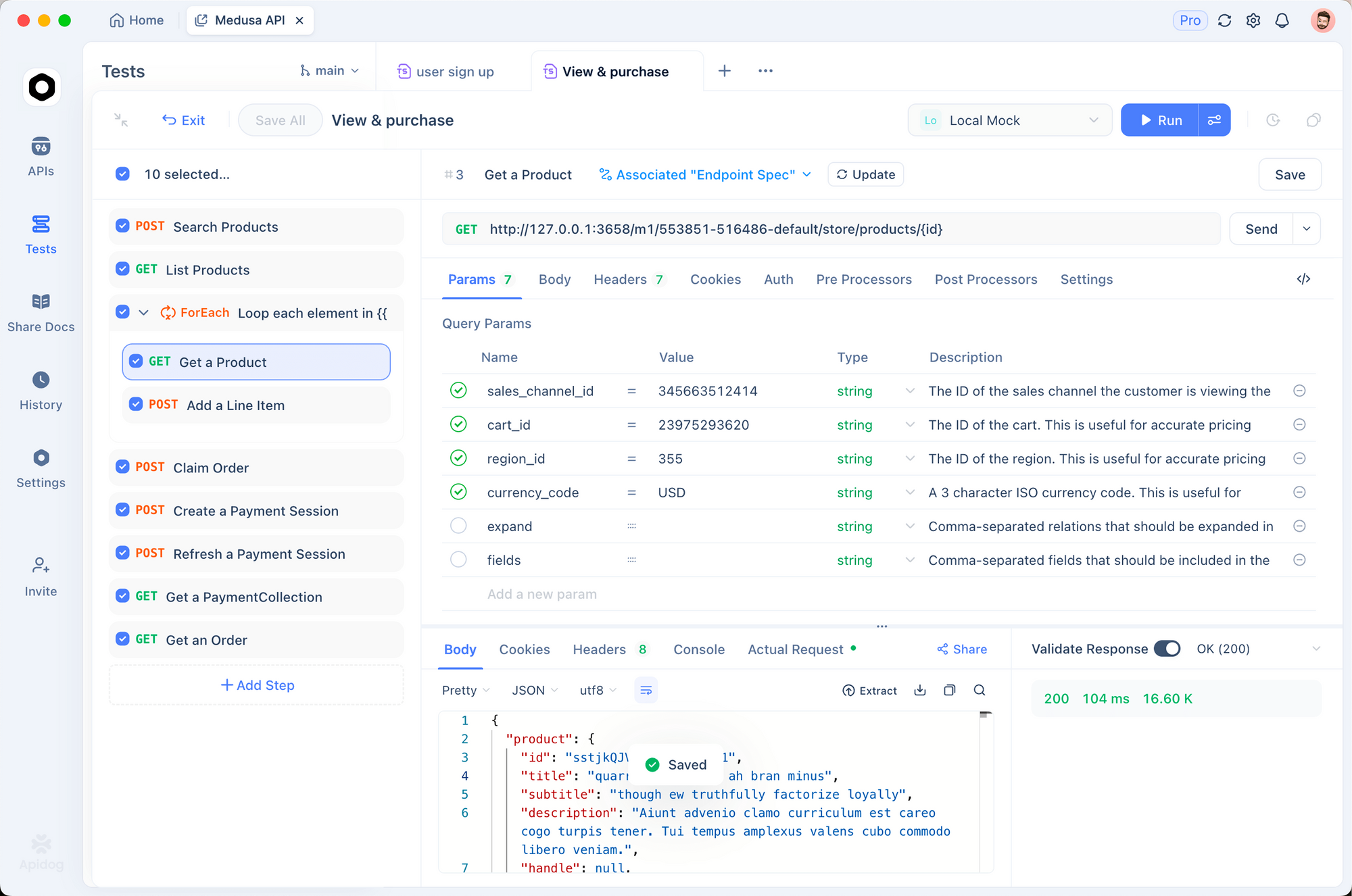
- Create a new request in Apidog
- Set method to
POST - URL:
https://generativelanguage.googleapis.com/v1beta/models/gemini-embedding-2-preview:embedContent - Add header:
x-goog-api-key: YOUR_API_KEY - Body (JSON):
{
  "content": {
    "parts": [{
      "text": "What is API testing?"
    }]
  }
}
This lets you verify your API key works and see the response structure before writing code. You can save this as a test case and validate embedding responses in your CI/CD pipeline.
Generating Text Embeddings
The simplest use case - embed text:
import google.generativeai as genai

genai.configure(api_key='YOUR_API_KEY')

# Generate embedding
result = genai.embed_content(
    model='models/gemini-embedding-2-preview',
    content='What is the meaning of life?'
)

# Get the embedding vector
embedding = result['embedding']
print(f"Embedding dimensions: {len(embedding)}")
print(f"First 5 values: {embedding[:5]}")
Output:
Embedding dimensions: 3072
First 5 values: [0.0234, -0.0156, 0.0891, -0.0423, 0.0567]
Note: The response structure is result['embedding'] which returns a list of floats. Each float represents one dimension of the embedding vector.
Using Task Instructions
Task instructions optimize embeddings for specific use cases:
# For search queries
query_result = genai.embed_content(
    model='models/gemini-embedding-2-preview',
    content='best API testing tools',
    task_type='RETRIEVAL_QUERY'
)

# For documents you're indexing
doc_result = genai.embed_content(
    model='models/gemini-embedding-2-preview',
    content='Apidog is an API testing platform...',
    task_type='RETRIEVAL_DOCUMENT'
)
Available task types:
RETRIEVAL_QUERY- Use for search queriesRETRIEVAL_DOCUMENT- Use for documents you’re indexingSEMANTIC_SIMILARITY- Use for comparing content similarityCLASSIFICATION- Use for categorization tasksCLUSTERING- Use for grouping similar content
Controlling Output Dimensions
Reduce storage costs by using smaller dimensions:
# Production-optimized: 768 dimensions
result = genai.embed_content(
    model='models/gemini-embedding-2-preview',
    content='Your text here',
    output_dimensionality=768
)

# Balanced: 1536 dimensions
result = genai.embed_content(
    model='models/gemini-embedding-2-preview',
    content='Your text here',
    output_dimensionality=1536
)

# Maximum quality: 3072 dimensions (default)
result = genai.embed_content(
    model='models/gemini-embedding-2-preview',
    content='Your text here',
    output_dimensionality=3072
)
For most applications, 768 dimensions gives near-peak quality with 75% less storage.
Embedding Images
Embed images for visual search:
import PIL.Image

# Load image
image = PIL.Image.open('product-photo.jpg')

# Generate embedding
result = genai.embed_content(
    model='models/gemini-embedding-2-preview',
    content=image
)

embedding = result['embedding']
You can embed up to 6 images per request:
images = [
    PIL.Image.open('image1.jpg'),
    PIL.Image.open('image2.jpg'),
    PIL.Image.open('image3.jpg')
]

result = genai.embed_content(
    model='models/gemini-embedding-2-preview',
    content=images
)
Embedding Video
Embed video content for video search:
# Upload video file first
video_file = genai.upload_file(path='demo-video.mp4')

# Wait for processing
import time
while video_file.state.name == 'PROCESSING':
    time.sleep(2)
    video_file = genai.get_file(video_file.name)

# Generate embedding
result = genai.embed_content(
    model='models/gemini-embedding-2-preview',
    content=video_file
)

embedding = result['embedding']
Video limits:
- Maximum 128 seconds per request
- Formats: MP4, MOV
- Codecs: H264, H265, AV1, VP9
Embedding Audio
Embed audio without transcription:
# Upload audio file
audio_file = genai.upload_file(path='podcast-episode.mp3')

# Wait for processing
while audio_file.state.name == 'PROCESSING':
    time.sleep(2)
    audio_file = genai.get_file(audio_file.name)

# Generate embedding
result = genai.embed_content(
    model='models/gemini-embedding-2-preview',
    content=audio_file
)

embedding = result['embedding']
Audio limits:
- Maximum 80 seconds per request
- Formats: MP3, WAV
Embedding PDF Documents
Embed PDF pages for document search:
# Upload PDF
pdf_file = genai.upload_file(path='user-manual.pdf')

# Wait for processing
while pdf_file.state.name == 'PROCESSING':
    time.sleep(2)
    pdf_file = genai.get_file(pdf_file.name)

# Generate embedding
result = genai.embed_content(
    model='models/gemini-embedding-2-preview',
    content=pdf_file
)

embedding = result['embedding']
PDF limits:
- Maximum 6 pages per request
- Processes both text and visual content
Multimodal Embeddings (Text + Image)
Combine multiple content types in one embedding:
import PIL.Image

image = PIL.Image.open('product.jpg')
text = "High-quality wireless headphones with noise cancellation"

# Embed both together
result = genai.embed_content(
    model='models/gemini-embedding-2-preview',
    content=[text, image]
)

embedding = result['embedding']
This captures relationships between the text and image in a single embedding.
Batch Processing
Process multiple items efficiently:
texts = [
    "First document about API testing",
    "Second document about automation",
    "Third document about performance"
]

embeddings = []
for text in texts:
    result = genai.embed_content(
        model='models/gemini-embedding-2-preview',
        content=text,
        task_type='RETRIEVAL_DOCUMENT',
        output_dimensionality=768
    )
    embeddings.append(result['embedding'])

print(f"Generated {len(embeddings)} embeddings")
For large batches, use the batch API for 50% cost savings.
Building a Semantic Search System
Here’s a complete example using Gemini Embedding 2 for semantic search.
Step 1: Install Dependencies
pip install google-generativeai numpy scikit-learn
Step 2: Embed Your Documents
import google.generativeai as genai
import numpy as np
from sklearn.metrics.pairwise import cosine_similarity

genai.configure(api_key='YOUR_API_KEY')

# Sample documents
documents = [
    "Apidog is an API testing platform for developers",
    "REST APIs use HTTP methods like GET, POST, PUT, DELETE",
    "GraphQL provides a query language for APIs",
    "API documentation helps developers understand endpoints",
    "Postman is a popular API testing tool"
]

# Generate embeddings for all documents
doc_embeddings = []
for doc in documents:
    result = genai.embed_content(
        model='models/gemini-embedding-2-preview',
        content=doc,
        task_type='RETRIEVAL_DOCUMENT',
        output_dimensionality=768
    )
    doc_embeddings.append(result['embedding'])

# Convert to numpy array
doc_embeddings = np.array(doc_embeddings)
Step 3: Create Search Function
def search(query, top_k=3):
    # Embed the query
    query_result = genai.embed_content(
        model='models/gemini-embedding-2-preview',
        content=query,
        task_type='RETRIEVAL_QUERY',
        output_dimensionality=768
    )
    query_embedding = np.array([query_result['embedding']])

    # Calculate similarities
    similarities = cosine_similarity(query_embedding, doc_embeddings)[0]

    # Get top results
    top_indices = np.argsort(similarities)[::-1][:top_k]

    results = []
    for idx in top_indices:
        results.append({
            'document': documents[idx],
            'score': similarities[idx]
        })

    return results
Step 4: Search
# Test the search
results = search("What tools can I use for API testing?")

for i, result in enumerate(results, 1):
    print(f"{i}. Score: {result['score']:.4f}")
    print(f"   {result['document']}\n")
Output:
1. Score: 0.8234
   Apidog is an API testing platform for developers

2. Score: 0.7891
   Postman is a popular API testing tool

3. Score: 0.6543
   API documentation helps developers understand endpoints
Building a RAG System
Use Gemini Embedding 2 for Retrieval-Augmented Generation.
Step 1: Set Up Knowledge Base
import google.generativeai as genai
import numpy as np
from sklearn.metrics.pairwise import cosine_similarity

genai.configure(api_key='YOUR_API_KEY')

# Knowledge base
knowledge_base = [
    "Apidog supports REST, GraphQL, and WebSocket APIs",
    "You can create test cases and run them automatically",
    "Apidog generates API documentation from your requests",
    "Mock servers help you test before backend is ready",
    "Team collaboration features include shared workspaces"
]

# Embed knowledge base
kb_embeddings = []
for doc in knowledge_base:
    result = genai.embed_content(
        model='models/gemini-embedding-2-preview',
        content=doc,
        task_type='RETRIEVAL_DOCUMENT',
        output_dimensionality=768
    )
    kb_embeddings.append(result['embedding'])

kb_embeddings = np.array(kb_embeddings)
Step 2: Create RAG Query Function
def rag_query(question):
    # 1. Embed the question
    query_result = genai.embed_content(
        model='models/gemini-embedding-2-preview',
        content=question,
        task_type='RETRIEVAL_QUERY',
        output_dimensionality=768
    )
    query_embedding = np.array([query_result['embedding']])

    # 2. Find relevant context
    similarities = cosine_similarity(query_embedding, kb_embeddings)[0]
    top_idx = np.argmax(similarities)
    context = knowledge_base[top_idx]

    # 3. Generate answer with context
    prompt = f"""Context: {context}

Question: {question}

Answer the question based on the context provided."""

    model = genai.GenerativeModel('gemini-2.0-flash-exp')
    response = model.generate_content(prompt)

    return response.text
Step 3: Query Your RAG System
# Test RAG
answer = rag_query("Can Apidog generate documentation?")
print(answer)
This retrieves the most relevant context from your knowledge base and uses it to generate accurate answers.
Storing Embeddings in a Vector Database
Use ChromaDB to store and query embeddings:
import chromadb
import google.generativeai as genai

genai.configure(api_key='YOUR_API_KEY')

# Initialize ChromaDB
client = chromadb.Client()
collection = client.create_collection(name="my_documents")

# Documents to index
documents = [
    "API testing ensures your endpoints work correctly",
    "REST APIs follow stateless architecture principles",
    "GraphQL allows clients to request specific data"
]

# Generate and store embeddings
for i, doc in enumerate(documents):
    result = genai.embed_content(
        model='models/gemini-embedding-2-preview',
        content=doc,
        task_type='RETRIEVAL_DOCUMENT',
        output_dimensionality=768
    )

    collection.add(
        embeddings=[result['embedding']],
        documents=[doc],
        ids=[f"doc_{i}"]
    )

# Query the collection
query = "How do I test my API?"
query_result = genai.embed_content(
    model='models/gemini-embedding-2-preview',
    content=query,
    task_type='RETRIEVAL_QUERY',
    output_dimensionality=768
)

results = collection.query(
    query_embeddings=[query_result['embedding']],
    n_results=2
)

print("Top results:")
for doc in results['documents'][0]:
    print(f"- {doc}")
Error Handling
Handle API errors gracefully:
import google.generativeai as genai
from google.api_core import exceptions

genai.configure(api_key='YOUR_API_KEY')

def safe_embed(content):
    try:
        result = genai.embed_content(
            model='models/gemini-embedding-2-preview',
            content=content,
            output_dimensionality=768
        )
        return result['embedding']

    except exceptions.InvalidArgument as e:
        print(f"Invalid input: {e}")
        # Example: Content too long or unsupported format
        return None

    except exceptions.ResourceExhausted as e:
        print(f"Quota exceeded: {e}")
        # Example: Rate limit hit or quota exhausted
        return None

    except exceptions.DeadlineExceeded as e:
        print(f"Request timeout: {e}")
        # Example: Network issues or slow response
        return None

    except Exception as e:
        print(f"Unexpected error: {e}")
        return None

# Use it
embedding = safe_embed("Your text here")
if embedding:
    print("Embedding generated successfully")
else:
    print("Failed to generate embedding")
Common Error Messages:
InvalidArgument: Content exceeds maximum length- Reduce input sizeResourceExhausted: Quota exceeded- Wait or upgrade planUnauthenticated: API key not valid- Check your API keyPermissionDenied: Model not available- Verify model name
Rate Limiting and Best Practices
Rate Limits:
- Free tier: 60 requests per minute
- Paid tier: Higher limits based on your plan
Best Practices:
Use appropriate dimensions: 768 for production, 3072 only when you need maximum quality
Batch requests: Process multiple items together when possible
Cache embeddings: Don’t re-embed the same content
Use task instructions: They improve accuracy for specific use cases
Handle errors: Implement retry logic with exponential backoff
Monitor costs: Track your token usage
Cost Optimization
Reduce costs with these strategies:
1. Use smaller dimensions:
# 768 dimensions = 75% less storage
result = genai.embed_content(
    model='models/gemini-embedding-2-preview',
    content=text,
    output_dimensionality=768
)
2. Use batch API for non-urgent tasks:
# 50% cost savings for batch processing
# (Batch API implementation depends on your setup)
3. Cache embeddings:
import hashlib
import json

embedding_cache = {}

def get_embedding_cached(content):
    # Create cache key
    cache_key = hashlib.md5(content.encode()).hexdigest()

    # Check cache
    if cache_key in embedding_cache:
        return embedding_cache[cache_key]

    # Generate embedding
    result = genai.embed_content(
        model='models/gemini-embedding-2-preview',
        content=content,
        output_dimensionality=768
    )

    # Store in cache
    embedding_cache[cache_key] = result['embedding']

    return result['embedding']
Common Issues and Solutions
Issue: “Invalid API key”
# Solution: Check your API key
import os
api_key = os.getenv('GEMINI_API_KEY')
if not api_key:
    print("API key not set!")
Issue: “Content too long”
# Solution: Split long text into chunks
def chunk_text(text, max_tokens=8000):
    # Simple word-based chunking
    words = text.split()
    chunks = []
    current_chunk = []

    for word in words:
        current_chunk.append(word)
        if len(current_chunk) >= max_tokens:
            chunks.append(' '.join(current_chunk))
            current_chunk = []

    if current_chunk:
        chunks.append(' '.join(current_chunk))

    return chunks

# Embed each chunk
for chunk in chunk_text(long_text):
    embedding = genai.embed_content(
        model='models/gemini-embedding-2-preview',
        content=chunk
    )
Issue: “File processing timeout”
# Solution: Increase wait time for large files
import time

video_file = genai.upload_file(path='large-video.mp4')

max_wait = 300  # 5 minutes
waited = 0
while video_file.state.name == 'PROCESSING' and waited < max_wait:
    time.sleep(5)
    waited += 5
    video_file = genai.get_file(video_file.name)

if video_file.state.name == 'PROCESSING':
    print("File processing timeout")
else:
    # Generate embedding
    result = genai.embed_content(
        model='models/gemini-embedding-2-preview',
        content=video_file
    )
Next Steps
Now you know how to use Gemini Embedding 2 API. Here’s what to try next:
- Build a semantic search system for your documentation
- Create a RAG application with multimodal context
- Implement visual search for product catalogs
- Set up audio search for podcast or video content
- Experiment with different dimensions to optimize costs
The API is straightforward, but the possibilities are huge. Start with text embeddings, then add images, video, or audio as your use case demands.
Testing your implementation? Use Apidog to test the Gemini API endpoints, validate responses, and automate your embedding pipeline tests.