
An AI coding agent ran a script, watched it succeed, then watched a production database table vanish. The Hacker News post-mortem went viral with a sharp title: “AI didn’t delete your database, you did.” The point landed because it’s true. The agent followed a tool definition, the tool hit a real endpoint, the endpoint had no guardrails, and a human had handed the keys to a process that doesn’t pause to ask if DELETE FROM users looks suspicious. A separate r/ClaudeAI thread told a similar story from a different angle: an agent in a billing loop chewed through hundreds of dollars in tokens before anyone noticed. Different surface, same failure class. The problem isn’t that the model is dumb. The problem is that nobody tested the API.
TL;DR
Agents fail in production when their tools have no API-side guardrails: missing rate limits, no idempotency, hot deletes, broken schemas. You fix this with four moves: contract-test the agent’s tool definitions against your OpenAPI spec, run a mock server for destructive endpoints, enforce per-agent budgets and idempotency keys, and replay failure scenarios in CI. Apidog gives you the OpenAPI import, mocks, and scenario runner to do all of it from one project.
Introduction
A year ago, “test the AI agent” meant prompting Claude or GPT and grading the answer. That’s not the bar anymore. Today’s agents call functions, those functions hit your APIs, and your APIs talk to real databases, payment processors, and third-party services. A bad tool definition or a missing rate limit isn’t a stylistic problem. It’s a production incident with your name on it.
The viral Hacker News story this month captured the shift. The author argued that AI didn’t delete the database; the human did, by giving the agent write access without putting any controls between the model and the data. The thread blew up because every developer reading it had thought, “I almost shipped that.” A few weeks earlier, a Reddit post described a billing loop where an agent retried a failed call so many times the bill ran past 800 euros before anyone caught it. Same root cause: trust placed in the wrong layer.
You can fix this. The model layer matters, but the API layer is where you stop the bleeding. This article shows you how to test AI agents API integrations end to end. We’ll cover the four guardrails every agent-API setup needs, walk through a step-by-step Apidog workflow for mocking destructive endpoints, and finish with advanced techniques like schema-drift detection and dual-key separation. You’ll leave with concrete patterns you can copy into your repo today. Download Apidog before you start so you can follow along with the mock-server steps.
Why agent failures look like API failures
Read enough agent post-mortems and a pattern shows up: the model isn’t the protagonist. The API is.
Take prompt injection. A user uploads a PDF with hidden instructions, the agent reads it, and the next tool call goes to your /admin/users endpoint with delete_all=true. The model didn’t choose this; it followed instructions it had no reason to distrust. The fix isn’t to harden the prompt. The fix is to build an API that doesn’t expose delete_all=true to a token that came from a user-context session. OWASP calls this LLM01 in their LLM Top 10, and the mitigation is API-side authorization, not prompt engineering.
Take faulty tool schemas. Your OpenAPI spec says amount is an integer in cents. The agent’s tool definition says amount is a float in dollars. Three months in, somebody refunds a 19-cent charge as 19 dollars and you find out about the mismatch from accounting. The model wasn’t wrong; the model used the schema you gave it. The schema drifted from the API. Nobody tested the contract.
Take missing rate limits. An agent in a retry loop hammers your transactional email endpoint a thousand times in two minutes because the agent’s planner kept marking the step as “not yet successful.” Each retry costs money. Each retry queues a real email. By the time you wake up, your provider has flagged your account and your customers are getting spammed. The model wasn’t malicious. The model was working from a tool that had no ceiling.
Take missing idempotency. The agent calls POST /payments to charge a customer, gets a network timeout, retries because the planner thinks the call failed, and now the customer is charged twice. The agent layer can’t tell whether the original call succeeded; the API didn’t give it a way to ask. Idempotency keys solve this in five lines of server code, but you have to write them.
The common thread: in every one of these incidents, the agent is doing exactly what its tools tell it to do. The tools are the API. So when you’re auditing where agent reliability breaks down, look at the API contract first, the agent harness second, and the model itself almost never. This reframing matters because it tells you where to invest. You don’t need a smarter model. You need testable APIs with the guardrails turned on.
The four guardrails every agent-API integration needs
Four controls separate agent setups that fail safely from setups that fail expensively. If you only have time to add one this quarter, start at the top. If you can do all four, you’ve covered more than 90 percent of incident scenarios you’ll see in 2026.
1. Tool-schema contract tests
Your OpenAPI spec is the source of truth for your API. Your agent has a separate tool definition, often hand-written or copy-pasted from docs. These two artefacts drift constantly. Contract tests fail your CI build the moment they diverge.
Here’s a minimal Python check that validates a Claude-style tool definition against the live OpenAPI spec:
import json
from jsonschema import Draft202012Validator

def validate_tool_against_openapi(tool_def: dict, openapi_spec: dict) -> list[str]:
    """Return a list of mismatch errors, empty list = pass."""
    errors = []
    op = openapi_spec["paths"][tool_def["path"]][tool_def["method"].lower()]
    api_schema = op["requestBody"]["content"]["application/json"]["schema"]
    tool_schema = tool_def["input_schema"]

    api_props = set(api_schema.get("properties", {}).keys())
    tool_props = set(tool_schema.get("properties", {}).keys())

    for missing in api_props - tool_props:
        if missing in api_schema.get("required", []):
            errors.append(f"Tool missing required field: {missing}")
    for extra in tool_props - api_props:
        errors.append(f"Tool defines field not in API: {extra}")

    for prop, api_def in api_schema.get("properties", {}).items():
        if prop in tool_schema.get("properties", {}):
            tool_def_prop = tool_schema["properties"][prop]
            if api_def.get("type") != tool_def_prop.get("type"):
                errors.append(
                    f"Type mismatch on {prop}: API={api_def.get('type')} "
                    f"tool={tool_def_prop.get('type')}"
                )
    return errors
Run this on every PR that touches either the OpenAPI spec or the tool definitions. Fail the build if the list isn’t empty. This single check would have caught the float-vs-cents bug in the prior section months before any refund went out.
2. Sandbox and mock environments for destructive endpoints
Agents need somewhere to practise. They should never practise in production. The pattern is straightforward: every endpoint that mutates state has a mock equivalent that returns the same shape of response without doing the work. Your agent dev loop uses the mocks. Your staging tests use a sandbox database. Production stays untouched until a human approves the deploy.
Apidog generates mocks directly from the OpenAPI spec, including realistic field values driven by Faker patterns. You point your agent’s base URL at the mock server, run a hundred iterations of your prompt, and watch how it behaves. If the agent keeps trying to PUT to /users/{id}/delete because it misunderstood the docs, the mock catches it. The user table in production never sees the mistake. See contract-first development for the broader pattern this fits into.
3. Idempotency keys and soft deletes for irreversible operations
Every write endpoint your agent can call should accept an idempotency key. Every delete should be a soft delete by default with a separate hard-delete path that humans authorize.
The middleware looks like this in Express:
const idempotencyCache = new Map();

function idempotency(req, res, next) {
  const key = req.headers['idempotency-key'];
  if (!key) {
    return res.status(400).json({ error: 'Missing Idempotency-Key header' });
  }
  if (idempotencyCache.has(key)) {
    const cached = idempotencyCache.get(key);
    return res.status(cached.status).json(cached.body);
  }
  const originalJson = res.json.bind(res);
  res.json = function (body) {
    idempotencyCache.set(key, { status: res.statusCode, body });
    setTimeout(() => idempotencyCache.delete(key), 24 * 60 * 60 * 1000);
    return originalJson(body);
  };
  next();
}

app.post('/payments', idempotency, createPayment);
The agent generates a UUID per logical operation and reuses it on retries. Your API returns the cached response on the second call instead of charging twice. This same pattern protects against double-sends in messaging APIs, duplicate row creation in CRMs, and most other “the agent retried and now we have a mess” scenarios.
4. Per-agent budget caps
Every agent gets a budget. Token budget, request budget, dollar budget, time budget. When the budget runs out, the agent stops. No exceptions. The 800-euro Reddit incident happened because nobody set a ceiling on a runaway loop, and by the time the human checked, the damage was done.
A budget middleware that wraps your API gateway might track:
- Tokens per session, capped at 50,000
- API calls per minute, capped at 30
- Cumulative spend in cents, capped at 500
- Tool-call depth, capped at 10 nested calls
When any cap is hit, return HTTP 429 with a structured Retry-After and a X-Budget-Exceeded header naming the cap. The agent’s planner can then either escalate to a human or unwind the task. Pair this with logging so you can see which agents are pushing against limits and tune accordingly.
These four controls compound. Contract tests catch the obvious schema mistakes. Mocks catch the destructive ones. Idempotency catches the retry storms. Budgets catch the runaway loops. Together, they turn “the agent did something terrible” into “the agent hit a 429, logged the issue, and asked for help.” That’s the bar.
Test agent API calls with Apidog
Now the practical part. Here’s how to set up a complete agent-API testing workflow in Apidog. You’ll need the OpenAPI spec for the API your agent calls, plus a list of the agent’s tool definitions.
Step 1: Import the OpenAPI spec
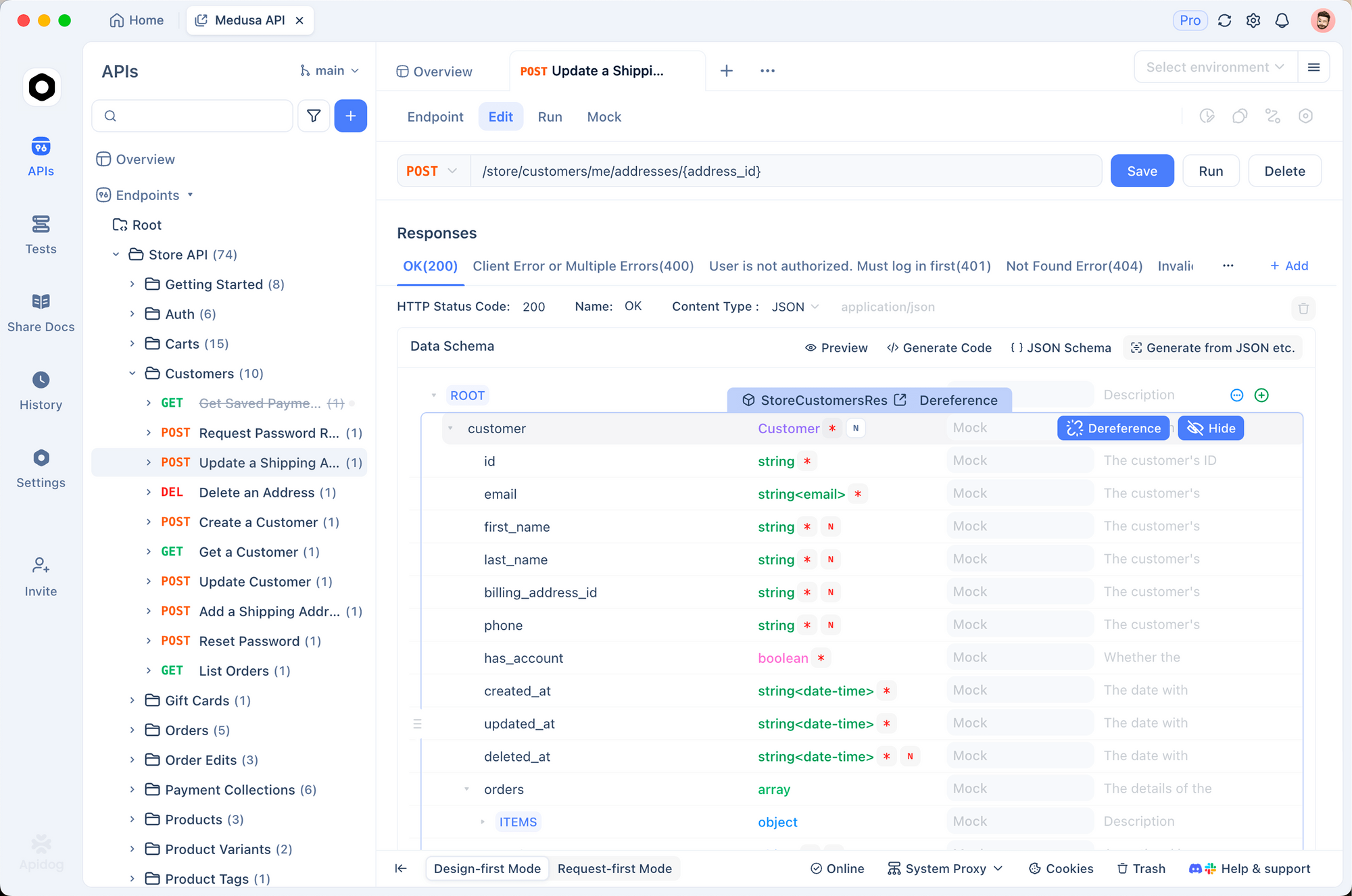
Open Apidog, create a new project, and import your OpenAPI 3.x file. Apidog parses every path, schema, and example and creates corresponding endpoints in the project. If your API isn’t documented in OpenAPI yet, this is the moment to do it; agent reliability depends on having a single source of truth that both your humans and your AI agents read. The design-first API workflow guide walks through this if you’re starting from scratch.
Step 2: Define mock responses for destructive endpoints
Find every endpoint that mutates data: POST, PUT, PATCH, DELETE. For each one, click into the endpoint and add a mock response. Apidog can auto-generate realistic mocks from your schema, but you should override the field values so they look like test data, not production data. Use prefixes like mock_user_ and timestamps in 1970 so any leakage is obvious in logs.
Start the mock server. Apidog gives you a stable URL like https://mock.apidog.com/m1/your-project-id/. Point your agent’s API base URL at the mock server during development. Now your DELETE /users/{id} returns a 200 with a fake user payload, and your real database is safe.
Step 3: Write a scenario that simulates the agent’s call sequence
Apidog scenarios let you chain API calls with assertions, the same way a test suite does. For an agent that triages support tickets, the scenario might be:
- POST
/auth/tokenwith test credentials, capture the bearer token - GET
/tickets?status=openwith the token, capture the first ticket ID - POST
/tickets/{id}/triagewith a category, assert 200 and capture the assigned-to field - POST
/notificationswith a templated message, assert the message body matches a regex
You’re effectively rehearsing what the agent will do, on the mock server, with assertions on every hop. If a developer changes the ticket schema and the regex stops matching, the scenario fails and you know before the agent ever sees production. See API testing for QA engineers for the broader scenario-testing playbook.
Step 4: Run from CI
Apidog ships a CLI that runs scenarios from a GitHub Action, GitLab pipeline, or any CI runner. The command looks like apidog run -t scenario-id --env test. Hook it into your PR pipeline so every change to the OpenAPI spec or the agent tool definitions triggers a full scenario replay.
Step 5: Compare two model versions side by side
When you’re evaluating whether to upgrade from one model to another, you want to know whether the new model’s tool calls behave the same on the same scenarios. Run the agent against the same Apidog scenario with model A, capture the trace. Run again with model B, capture the trace. Diff the request bodies. Surprises show up immediately: model B passes a different priority value, or omits a field, or uses a different format for dates. You catch behavioural drift before it ships. This is one of the patterns covered in GPT-5.5 API integration, where evaluating new model behaviour is a recurring need.
The whole workflow takes about an hour to set up the first time and minutes per run after. The payoff is that every change to your API or your agent tools gets exercised against the same baseline of expectations.
Advanced techniques and pro tips
A few patterns that experienced teams reach for after the basics are in place.
Pin temperature to zero in tests. Non-deterministic agents make non-deterministic test failures. When you’re testing tool-call behaviour, set temperature to 0 and seed any randomness sources. You’re testing the tool layer, not the creativity layer.
Snapshot tool-call traces. Every test run records the exact sequence of tool calls the agent made, with arguments. Diff against the prior baseline. If the agent suddenly starts calling /users twice instead of once, you want to know that immediately, not three weeks later when the bill arrives.
Never give an agent production credentials. Agents get scoped service accounts. Production credentials live in vaults, not in .env files an agent can read. If an agent needs to call a production endpoint, it goes through a proxy that signs requests with short-lived tokens.
Separate read and write API keys. Most agent tasks are read-mostly. Issue read-only keys for those. Write keys are reserved for tasks that have human approval gates. This single change cuts the blast radius of a compromised agent in half.
Use HTTP 423 Locked for human-approval endpoints. When an agent tries to call an endpoint that requires human confirmation, return 423 with a confirmation_url field. The agent’s planner sees the locked state, surfaces the URL to a human, and waits. This is cleaner than a 403, because 403 implies “you can’t do this” while 423 implies “you can’t do this yet.”
Fail closed on schema drift. If the agent’s tool definition doesn’t match your OpenAPI spec, the build fails. Don’t ship a warning. Ship an error. The cost of a few extra failed builds is much lower than one production incident.
Common mistakes to avoid:
- Hardcoding the mock URL into agent prompts. Use environment variables so the same prompt runs against mock, staging, and prod.
- Skipping idempotency on “small” endpoints. Every write needs it. Email send is no exception.
- Logging full request bodies in production. PII leaks into your observability stack. Redact tokens, emails, and identifiers before they reach logs.
- Letting agents have direct database access. Always go through the API. The API is where your tests live.
- Trusting the agent’s confidence score. The score reflects model certainty about the answer, not API safety. A 99 percent confident agent can still call the wrong endpoint.
If your agent talks to internal services that aren’t behind a single API gateway, microservices testing patterns covers how to fan out scenario tests across services.
Alternatives and tooling
You have options. Here’s a fair comparison of the four common approaches.
| Approach | Setup time | Strength | Weakness | Best for |
|---|---|---|---|---|
| Handcrafted unit tests | Low | Full control, no vendor lock-in | High maintenance, easy to drift from real API | Small projects, single-developer teams |
| LangSmith / LangGraph eval harness | Medium | Built-in trace replay, model-aware metrics | Heavy on the agent side, light on the API side | Eval-heavy AI teams |
| Postman + Postbot | Medium | Familiar UI, big template library | Mock server is a paid add-on, scenario syntax is dated | Teams already invested in Postman |
| Apidog scenarios + mocks | Medium | Native OpenAPI, mocks free, scenario CLI for CI | Less brand recognition than Postman | Teams who want one tool for design, mocks, and tests |
The honest summary: if you live in LangSmith, keep doing what works on the agent side and add a separate API testing layer. If you’ve outgrown Postman’s pricing or its mock model, Apidog is a strong replacement. If you’re starting fresh, pick the tool that handles OpenAPI, mocks, and scenarios in one project, because that’s where 80 percent of your agent-API testing time goes.
Some teams pair these. They keep LangSmith for prompt-level evals and use Apidog for the API-side contract tests and scenario replays. That works fine; the tools serve different layers.
Real-world use cases
Agent updates production database rows. A customer-success team built an agent that updates account fields from support tickets. Before launch, they wired every write endpoint to require an idempotency key and ran 200 scenario replays in Apidog against a sandbox database. The replays caught two cases where the agent tried to set subscription_status to a string that wasn’t in the enum. They added schema validation and shipped without incident.
Agent calls a payments API. A fintech team building an automated refund agent set hard caps: max 5 refunds per session, max 50 dollars per refund, idempotency required on every call. They ran the contract test suite against Stripe’s OpenAPI on every PR. Six months in, they’ve processed 12,000 refunds with zero duplicate charges.
Agent triages GitHub issues. A platform team built an issue-triage agent inspired by Clawsweeper. They mocked the GitHub API in Apidog, ran the agent through 50 scenario tests covering edge cases (deleted issues, missing labels, malformed user input), and found three crashes before launch. The agent now handles triage on a public repo with 5,000 open issues.
Isolation is worth applying to the agent's workspace too, not only to its API targets. Sharkly runs each task in its own directory, with an optional separate worktree per run for repository work, on Computers you connect rather than a shared sandbox. Combined with the mock endpoints above, that keeps an experimenting agent away from both production data and your working checkout.
Conclusion
If you take one thing from this guide, take this: the agent isn’t the problem. The API is the problem, or it’s the solution, depending on whether you tested it.
Five takeaways:
- Treat tool schemas as contracts and run contract tests in CI.
- Mock destructive endpoints for every agent dev loop.
- Require idempotency keys on every write your agent can call.
- Set per-agent budget caps that fail closed when they’re hit.
- Replay scenarios on every PR that touches the API or the tool definitions.
The viral incidents this year aren’t going to be the last. Every team that ships agents will hit one of these failure modes at least once. The teams that recover quickly are the teams that already had the guardrails in place. Download Apidog and start with the mock-server step; that alone will save you a sleepless night this quarter. For the QA-team perspective on this same problem, see API testing tools for QA engineers. For broader context on writing tool definitions that agents can use safely, see how to write AGENTS.md files.
FAQ
How do I test AI agents API calls without spending money on tokens?
Run your agent against a mock server during development. Apidog’s mock URLs return realistic responses for free, so your test loops don’t burn real API credits. Pin temperature to 0 and use a small fixed prompt set. You can run thousands of test iterations for the cost of the mock server, which is zero. See the QA engineer’s testing checklist for the full setup.
What’s the difference between testing the agent and testing the API?
Agent testing checks whether the model picks the right tool and fills the arguments correctly. API testing checks whether the endpoint behaves correctly when called. Both matter. A perfect agent calling a broken API still produces broken outcomes, and a broken agent calling a perfect API still ships bugs. You need both layers tested separately.
Do I need idempotency keys on every endpoint?
Yes, on every write endpoint. Reads are idempotent by definition. Writes are not, and agents retry. The five lines of middleware to support an idempotency header pay for themselves the first time the agent retries a 500 error and you don’t get a duplicate row.
How do I prevent prompt injection from triggering bad API calls?
Don’t rely on the prompt layer alone. The API has to enforce authorization based on the original user context, not the agent’s request. If a user-context session can’t normally hit /admin/delete-all-users, then the agent acting on behalf of that user shouldn’t be able to either, regardless of what the prompt says. OWASP’s LLM Top 10 covers this in detail.
Can I use Apidog with Claude or GPT directly, without writing my own tool layer?
You point your agent’s tool definitions at the Apidog mock URL during testing. Both Claude and GPT support arbitrary HTTP base URLs in their tool definitions, so the swap is one environment variable. When you’re ready to test against staging or production, change the variable.
What’s the right budget cap for an agent?
Start strict and loosen with data. Begin with 50,000 tokens per session, 30 API calls per minute, 5 dollars per task. Watch the metrics for two weeks. Raise the caps that you bump into legitimately. Drop the caps you never hit. Review monthly. The goal isn’t a fixed number; it’s a number that’s tight enough to catch runaway loops and loose enough to let real work happen.
How do I detect schema drift between my agent’s tools and my API?
Run a schema diff in CI on every PR. Compare the agent’s tool definition (JSON schema) against the OpenAPI request body schema for the same endpoint. Fail the build if they diverge. The 30-line Python snippet in the guardrails section above does this; copy it into your repo and wire it into GitHub Actions.