
TL;DR
The Grok text-to-video API generates video from a text prompt. You call POST /v1/videos/generations, get a request_id back immediately, then poll GET /v1/videos/{request_id} until status is "done". The model is grok-imagine-video, pricing starts at $0.05 per second at 480p. The xAI Python SDK handles polling automatically.
Introduction
xAI generated 1.2 billion videos in January 2026 alone. That was the first month after launching the Grok text-to-video API on January 28, 2026. The model also ranked number one on the Artificial Analysis text-to-video leaderboard that same month. Those numbers matter because they tell you the infrastructure is proven at scale.
This guide walks you through every step: making your first request, polling for the result, tuning parameters, and writing better prompts. You'll also learn how to use reference images, extend or edit existing videos, and understand when text-to-video is the right choice.
What is the Grok text to video API?
The Grok text-to-video API is part of xAI's media generation suite at https://api.x.ai. You send a text prompt and the model grok-imagine-video generates a short video clip from scratch. No source image is required.
The API sits alongside a synchronous image generation endpoint (POST /v1/images/generations, model grok-imagine-image, $0.02 per image). It also includes endpoints for extending or editing videos.
The text-to-video endpoint differs from the image-to-video endpoint in a fundamental way: you supply only words. The model creates the scene, motion, and visual style entirely from your description. See the Grok image to video API guide if you have a source image and want the model to animate it instead.
How text-to-video generation works (the async pattern explained simply)
Most API calls are synchronous. You send a request, wait a moment, get your response. Video generation takes seconds to minutes, so the API uses an async pattern instead.
Here's the flow:
- You send a POST request with your prompt.
- The API returns a
request_idimmediately (in under a second). - The video is generating on xAI's servers.
- You poll a GET endpoint with that
request_idrepeatedly. - When status changes from
"processing"to"done", the response includes a video URL.
This pattern is common in AI media APIs. It keeps your HTTP connections short and lets you check on progress at your own pace. The tricky part is that your frontend needs to handle the intermediate state, showing a loading indicator until the video URL arrives.
Prerequisites
Before you write any code, you need two things:
An xAI account. Create one at console.x.ai. You'll also add billing there before your API key has generation access.
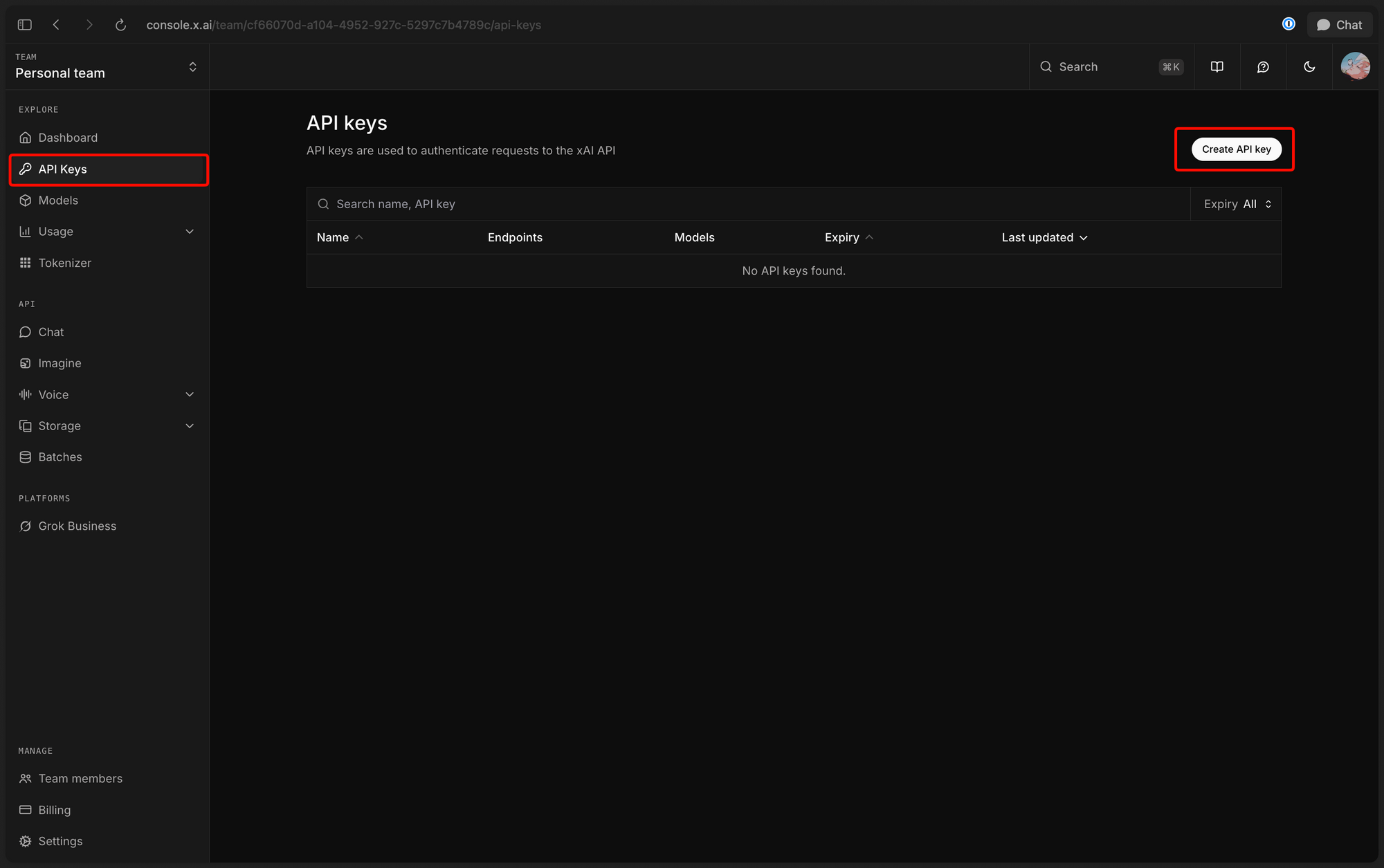
An API key. In the xAI console, navigate to API Keys and create a new key. Copy it somewhere safe. You'll pass it as a Bearer token in every request header.
Set it as an environment variable so you don't hardcode it:
export XAI_API_KEY="your_api_key_here"
Optionally, install the xAI Python SDK for the simplest integration:
pip install xai-sdk
Your first text-to-video request
The endpoint is POST https://api.x.ai/v1/videos/generations. The only required fields are model and prompt.
Using curl
curl -X POST https://api.x.ai/v1/videos/generations \
  -H "Authorization: Bearer $XAI_API_KEY" \
  -H "Content-Type: application/json" \
  -d '{
    "model": "grok-imagine-video",
    "prompt": "A golden retriever running through autumn leaves in slow motion, cinematic lighting"
  }'
The response comes back immediately:
{
  "request_id": "d97415a1-5796-b7ec-379f-4e6819e08fdf"
}
That UUID is your ticket to retrieve the video once it's ready.
Using Python with the requests library
import requests
import os

API_KEY = os.environ["XAI_API_KEY"]
BASE_URL = "https://api.x.ai"

headers = {
    "Authorization": f"Bearer {API_KEY}",
    "Content-Type": "application/json"
}

payload = {
    "model": "grok-imagine-video",
    "prompt": "A golden retriever running through autumn leaves in slow motion, cinematic lighting"
}

response = requests.post(
    f"{BASE_URL}/v1/videos/generations",
    headers=headers,
    json=payload
)

data = response.json()
request_id = data["request_id"]
print(f"Generation started. Request ID: {request_id}")
Polling for the video result
Once you have a request_id, poll GET /v1/videos/{request_id} until the status field equals "done".
The status field has three possible values: - "processing": still generating - "done": complete, video URL is available - "failed": something went wrong
Here's a complete Python polling loop:
import requests
import time
import os

API_KEY = os.environ["XAI_API_KEY"]
BASE_URL = "https://api.x.ai"

headers = {
    "Authorization": f"Bearer {API_KEY}"
}

def poll_video(request_id: str, interval: int = 5, max_attempts: int = 60) -> dict:
    """Poll until video generation is complete."""
    url = f"{BASE_URL}/v1/videos/{request_id}"

    for attempt in range(max_attempts):
        response = requests.get(url, headers=headers)
        data = response.json()

        status = data.get("status")
        progress = data.get("progress", 0)
        print(f"Attempt {attempt + 1}: status={status}, progress={progress}%")

        if status == "done":
            return data
        elif status == "failed":
            raise RuntimeError(f"Video generation failed: {data}")

        time.sleep(interval)

    raise TimeoutError(f"Video not ready after {max_attempts} attempts")


# Full workflow: generate then poll
def generate_video(prompt: str) -> str:
    """Generate a video and return its URL."""
    response = requests.post(
        f"{BASE_URL}/v1/videos/generations",
        headers={**headers, "Content-Type": "application/json"},
        json={"model": "grok-imagine-video", "prompt": prompt}
    )
    request_id = response.json()["request_id"]
    print(f"Request ID: {request_id}")

    result = poll_video(request_id)
    video_url = result["video"]["url"]
    print(f"Video ready: {video_url}")
    return video_url


video_url = generate_video(
    "A timelapse of a city skyline at sunset transitioning to night, aerial view"
)
When done, the full poll response looks like this:
{
  "status": "done",
  "video": {
    "url": "https://vidgen.x.ai/....mp4",
    "duration": 8,
    "respect_moderation": true
  },
  "progress": 100,
  "usage": {
    "cost_in_usd_ticks": 500000000
  }
}
Using the xAI Python SDK
If you'd rather skip manual polling, the xAI SDK handles it for you. The client.video.generate() method blocks until the video is ready.
from xai_sdk import Client
import os

client = Client(api_key=os.environ["XAI_API_KEY"])

result = client.video.generate(
    model="grok-imagine-video",
    prompt="A golden retriever running through autumn leaves in slow motion",
    duration=8,
    resolution="720p",
    aspect_ratio="16:9"
)

print(f"Video URL: {result.video.url}")
print(f"Duration: {result.video.duration}s")
The SDK is the quickest path to working code. Use the raw requests approach when you need more control over retry logic, progress updates, or custom polling intervals.
Writing effective prompts for video generation
Your prompt is the most important input. A detailed, structured prompt produces far better results than a vague one.
Scene description
Describe the subject and setting together. Be specific about what's visible. "A white ceramic coffee mug on a wooden table beside a rain-streaked window" generates a more grounded scene than "a coffee mug."
Motion
Tell the model what moves and how. "The camera slowly orbits the mug as steam curls upward" adds motion with clear direction. Without explicit motion cues, the model may generate minimal or jarring movement.
Camera style
Use camera terminology you'd give a cinematographer: "close-up," "tracking shot," "overhead drone view," "handheld," "dolly zoom." These cues reliably translate to the generated footage.
Lighting and mood
"Golden hour," "overcast," "neon-lit," and "studio three-point lighting" all produce different looks. Pair lighting with mood: "foggy morning, melancholic atmosphere" gives the model tonal guidance beyond color temperature.
Style references
Name a visual style if you have one in mind: "cinematic," "documentary," "anime," "stop-motion," "hyperlapse." Combining two styles often produces interesting results.
Prompt structure that works
Start with the subject, add motion, describe camera, finish with style and mood. Like this:
A lone astronaut floats past the International Space Station,
tether drifting behind them. The camera tracks slowly
alongside, showing Earth below. Cinematic, IMAX quality,
warm sunrise light reflecting off the visor.
Controlling resolution, duration, and aspect ratio
The generation endpoint accepts several optional parameters that let you control output dimensions, length, and quality.
Duration
"duration": 10
Range: 1 to 15 seconds. Default is 6 seconds. Longer videos cost more. A 10-second clip at 480p costs $0.50.
Resolution
"resolution": "720p"
Two options: "480p" (default) and "720p". Use 480p for prototyping and testing. Use 720p for production output where quality matters.
Aspect ratio
"aspect_ratio": "9:16"
Available ratios:
| Ratio | Best for |
|---|---|
16:9 |
Desktop, YouTube, presentations (default) |
9:16 |
TikTok, Instagram Reels, mobile |
1:1 |
Instagram feed, social cards |
4:3 |
Classic video, presentations |
3:4 |
Portrait mobile content |
3:2 |
Standard photo ratio |
2:3 |
Portrait photography |
Full example with all parameters
curl -X POST https://api.x.ai/v1/videos/generations \
  -H "Authorization: Bearer $XAI_API_KEY" \
  -H "Content-Type: application/json" \
  -d '{
    "model": "grok-imagine-video",
    "prompt": "A coastal town at dawn, waves breaking gently on a rocky shore",
    "duration": 10,
    "resolution": "720p",
    "aspect_ratio": "16:9"
  }'
Using reference images to guide video style
The reference_images parameter accepts an array of up to 7 image URLs. These images guide the visual style and content of the generated video without becoming the subject of it.
{
  "model": "grok-imagine-video",
  "prompt": "A coastal town at dawn, waves breaking gently on a rocky shore",
  "reference_images": [
    {"url": "https://example.com/my-style-reference.jpg"},
    {"url": "https://example.com/color-palette-reference.jpg"}
  ]
}
Reference images work best when they share a consistent aesthetic. If you provide three images from different visual styles, the model tries to reconcile them and the output may look inconsistent. Use a tight set of images with a unified look for the strongest guidance.
Reference images are different from the image-to-video endpoint. With reference images, your prompt still drives the scene. The images influence color grading, composition style, and visual texture. With image-to-video, the source image becomes the first frame.
Extending and editing generated videos
xAI provides two additional endpoints for working with videos you've already generated.
Extend a video
POST /v1/videos/extensions adds more footage to an existing generated video. You pass the request_id of the original video and a new prompt for the extension. This is useful for creating longer sequences without hitting the 15-second limit in a single call.
Edit a video
POST /v1/videos/edits modifies an existing video based on a text instruction. You can change the style, alter the scene, or apply effects to a clip you've already generated.
Both endpoints follow the same async pattern as the main generation endpoint. They return a request_id and you poll GET /v1/videos/{request_id} for the result.
Reading the cost from the API response
The completed poll response includes a usage object:
"usage": {
  "cost_in_usd_ticks": 500000000
}
The unit is USD ticks. Divide by 10,000,000 to convert to dollars.
cost_in_usd = result["usage"]["cost_in_usd_ticks"] / 10_000_000
print(f"Cost: ${cost_in_usd:.4f}")
# Output: Cost: $0.0500
Pricing reference
| Resolution | Price per second | 10-second clip |
|---|---|---|
| 480p | $0.05 | $0.50 |
| 720p | $0.07 | $0.70 |
A value of 500000000 ticks equals $0.50. That's a 10-second clip at 480p.
Track your costs by logging cost_in_usd_ticks from every completed response. This lets you build usage dashboards without calling the xAI billing API separately.
How to test your Grok video API with Apidog
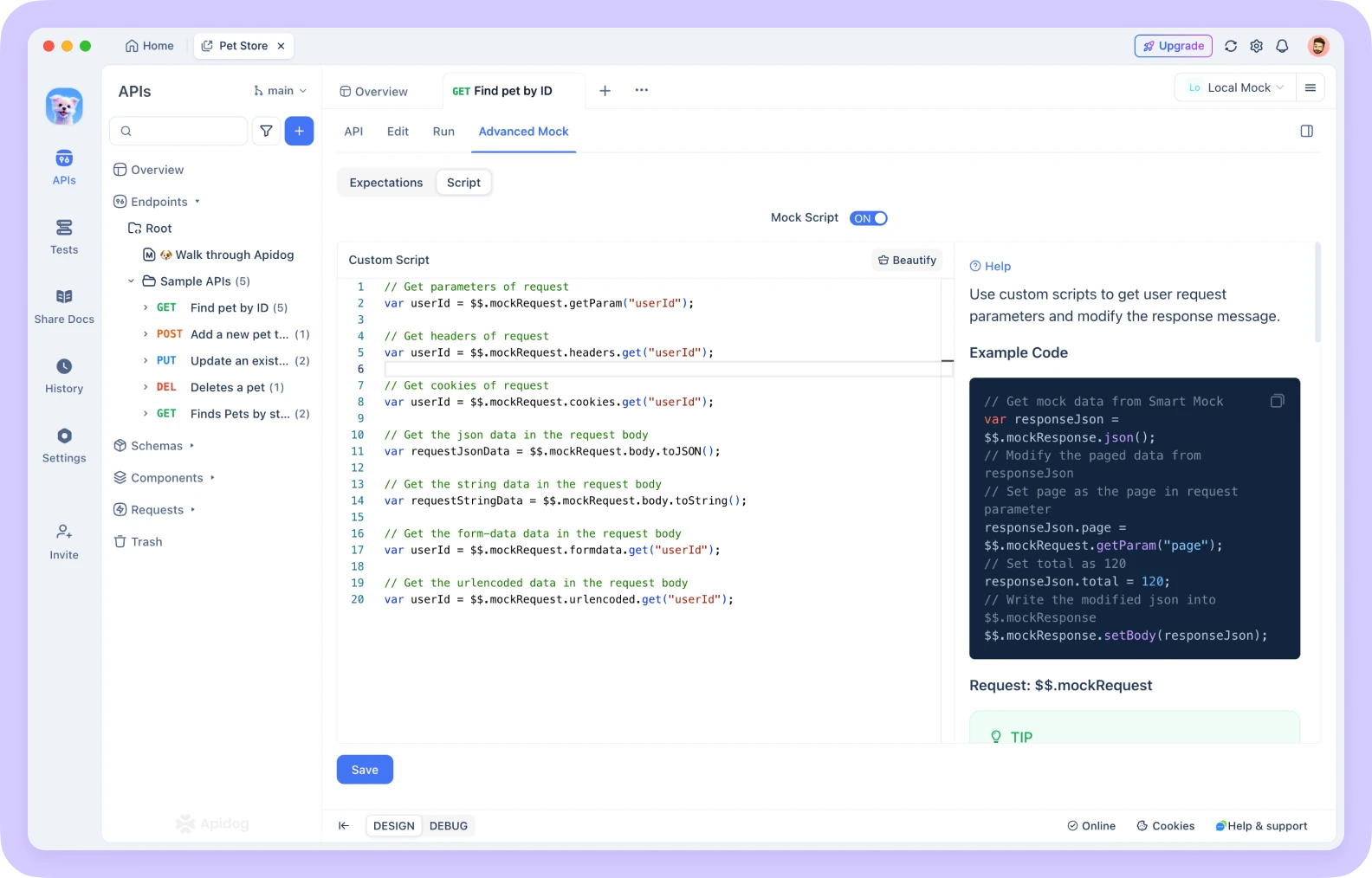
The async polling pattern creates a specific testing challenge. Your frontend code needs to handle three states: loading (while polling), success (video URL received), and error. You can't test all three states by making real API calls, because each call takes time and costs money. This is where Apidog's Smart Mock feature solves the problem directly.
Use case 1: Smart Mock for frontend development
With Apidog's Smart Mock, you define the schema for both endpoints and Apidog returns realistic fake responses instantly.
Mock the generation endpoint:
In Apidog, create the POST /v1/videos/generations endpoint in your project. Define the response schema with a single request_id string field. Smart Mock will return a fake UUID automatically based on the field name pattern.
Your mocked response:
{
  "request_id": "d97415a1-5796-b7ec-379f-4e6819e08fdf"
}
Mock the poll endpoint:
Create GET /v1/videos/{request_id} in Apidog. Define the full response schema including status, video.url, video.duration, progress, and usage.cost_in_usd_ticks. Set a Custom Mock response that returns "status": "done" with a placeholder MP4 URL.
Your mocked poll response:
{
  "status": "done",
  "video": {
    "url": "https://vidgen.x.ai/mock-video-12345.mp4",
    "duration": 8,
    "respect_moderation": true
  },
  "progress": 100,
  "usage": {
    "cost_in_usd_ticks": 400000000
  }
}
Frontend developers can now build and test the entire video player UI against this mock server. They see the loading state, the done state, and can trigger the error state by modifying the mock to return "status": "failed". No real API credits are spent during development.
Use case 2: Test Scenarios for the polling loop
Once your integration is built, use Apidog's Test Scenarios to validate the complete generate-then-poll flow automatically.
Step 1: Add the generate request. Add POST /v1/videos/generations as the first step in your test scenario. In the post-processor, add an Extract Variable to capture the request_id from the response body using the JSONPath expression $.request_id. Store it in a variable named videoRequestId.
Step 2: Add a polling loop. Add GET /v1/videos/{{videoRequestId}} as the second step. Wrap it in a For loop with a break condition: response.body.status == "done". Add a Wait processor of 5 seconds between iterations to avoid hammering the rate limit.
Step 3: Assert the result. After the loop exits, add an Assertion processor to the final GET request. Assert that $.video.url is not empty. This confirms the full cycle completed successfully.
This test scenario gives you repeatable, automated coverage of the async flow. Run it in CI to catch any regressions when your polling logic changes.
Text-to-video vs image-to-video: which to use when
Both modes use the same grok-imagine-video model, but they serve different purposes.
Choose text-to-video when:- You're generating original content from a concept or script - You want the model to have full creative control over composition - You're building a content generation tool where users type prompts - You don't have a source image to start from
Choose image-to-video when:- You have a product photo, illustration, or brand asset to animate - You need to maintain specific visual details from an existing image - You're creating consistent animations from a series of related images - You want to animate your own artwork or photography
The key distinction: text-to-video creates a scene from scratch. Image-to-video makes an existing image move. For a complete walkthrough of the image-to-video approach, see the Grok image to video API guide.
For teams building products that offer both modes, you can detect the input type at runtime. If the user uploads an image, route to POST /v1/images/generations (image-to-video). If they type a prompt only, route to POST /v1/videos/generations.
Common errors and how to fix them
401 UnauthorizedYour API key is missing, expired, or incorrectly formatted. Check that the Authorization header is exactly Bearer YOUR_XAI_API_KEY with no extra spaces. Confirm the key is active in the xAI console.
429 Too Many RequestsYou've hit a rate limit. The API allows 60 requests per minute and 1 request per second. Add a delay between requests. If you're polling, space your calls at least 5 seconds apart.
status: "failed" in poll responseThe generation failed. This usually means the prompt was rejected by content moderation. The respect_moderation field in the response will be true if moderation applied. Revise your prompt to be less ambiguous or remove potentially sensitive language.
Video URL returns 404Generated video URLs expire after a period of time. Download the video to your own storage immediately after retrieving the URL. Don't store the URL and rely on it being available days later.
Empty or frozen videoVague prompts or prompts without motion cues sometimes produce videos with minimal movement. Add explicit motion language to your prompt: describe what moves, in which direction, and at what speed.
Slow polling times720p videos take longer to generate than 480p. Longer durations also take more time. For development and prototyping, use "resolution": "480p" and short durations to speed up the iteration cycle.
Conclusion
The Grok text-to-video API gives you a straightforward path from text to video. You send a prompt, get a request_id, poll until done, and retrieve your MP4. The async pattern is the key concept to understand. Once you have the polling loop working, the rest of the parameters (duration, resolution, aspect ratio, reference images) are straightforward to tune.
For production builds, add cost tracking by reading cost_in_usd_ticks from every completed response. Mock both endpoints in Apidog during development so your frontend team isn't blocked waiting for real generations. Use Test Scenarios to keep your polling logic reliable as your integration evolves.
Download Apidog free to set up your mock server and test scenarios for the Grok video API.
FAQ
What model name do I use for text-to-video generation?Use grok-imagine-video. This is the required model field in your POST request to /v1/videos/generations.
How long does video generation take?It varies based on duration and resolution. Short 480p clips may complete in under 30 seconds. Longer 720p clips can take a few minutes. Poll every 5-10 seconds rather than hammering the endpoint continuously.
Can I generate a video longer than 15 seconds?Not in a single request. The maximum duration is 15 seconds. To create longer videos, generate a clip and then use POST /v1/videos/extensions to append more footage.
How do I download the generated video?Use the URL from result.video.url in the completed poll response. Download the MP4 to your storage immediately. The URL is temporary and will expire.
What happens if my prompt violates content moderation?The job will complete but the status will be "failed". The respect_moderation field in the poll response indicates that moderation was applied. Revise your prompt and try again.
Is there a free tier for the video API?xAI charges per second of output generated. There's no free tier for video generation specifically. Check console.x.ai for current credit offers for new accounts.
How do reference_images differ from starting with a source image?Reference images guide the visual style of a text-to-video generation. They influence the look without becoming the subject. A source image for image-to-video becomes the actual first frame of the video.
What's the best way to test the polling loop without spending credits?Use Apidog's Smart Mock to mock both the generation and poll endpoints. Define the schemas, set mock responses for the "processing" and "done" states, and your polling code will work without touching the real API.