If you’re working with GraphQL, you already know it’s a game-changer: no more over-fetching, no more under-fetching, and real-time data via subscriptions. But here’s the catch: GraphQL is only as good as your ability to test and mock it reliably.
Maybe you just need to fire off a quick query to debug a resolver.
Maybe your frontend team is blocked waiting for your schema to stabilize.
Or maybe you’re in QA and need to simulate a “user not found” error across 20 different queries.
Whatever your scenario, you need the right tool, not just another bloated platform that promises everything but delivers friction.
But Apidog is just one option. So in this guide, we'll walk you through the top 10 tools for GraphQL testing and mocking in 2025, break down what each one does best, and help you pick the perfect fit for your role, team size, and workflow.
Now, let's explore the top 10 tools that will transform how you work with GraphQL. We'll cover everything from beloved open-source projects to powerful commercial platforms.
Why GraphQL Testing and Mocking Is Different (And Why Your Tool Matters)
Unlike REST with its predictable endpoints, GraphQL flips the script:
- You have one endpoint, but infinite possible queries.
- Your schema is your contract, not your URL paths.
- You need to handle variables, fragments, directives, mutations, and subscriptions.
- Responses are deeply nested and shape-shifting.
This means generic HTTP clients fall short. You need a tool that understands GraphQL at a semantic level not just as JSON over HTTP.
And when it comes to mocking? You can’t just return static JSON. You need a mock that respects your types, unions, enums, and input objects or you’ll get false confidence.
So let’s look at the tools that actually get this right.
1. Apidog: The All-in-One GraphQL Powerhouse
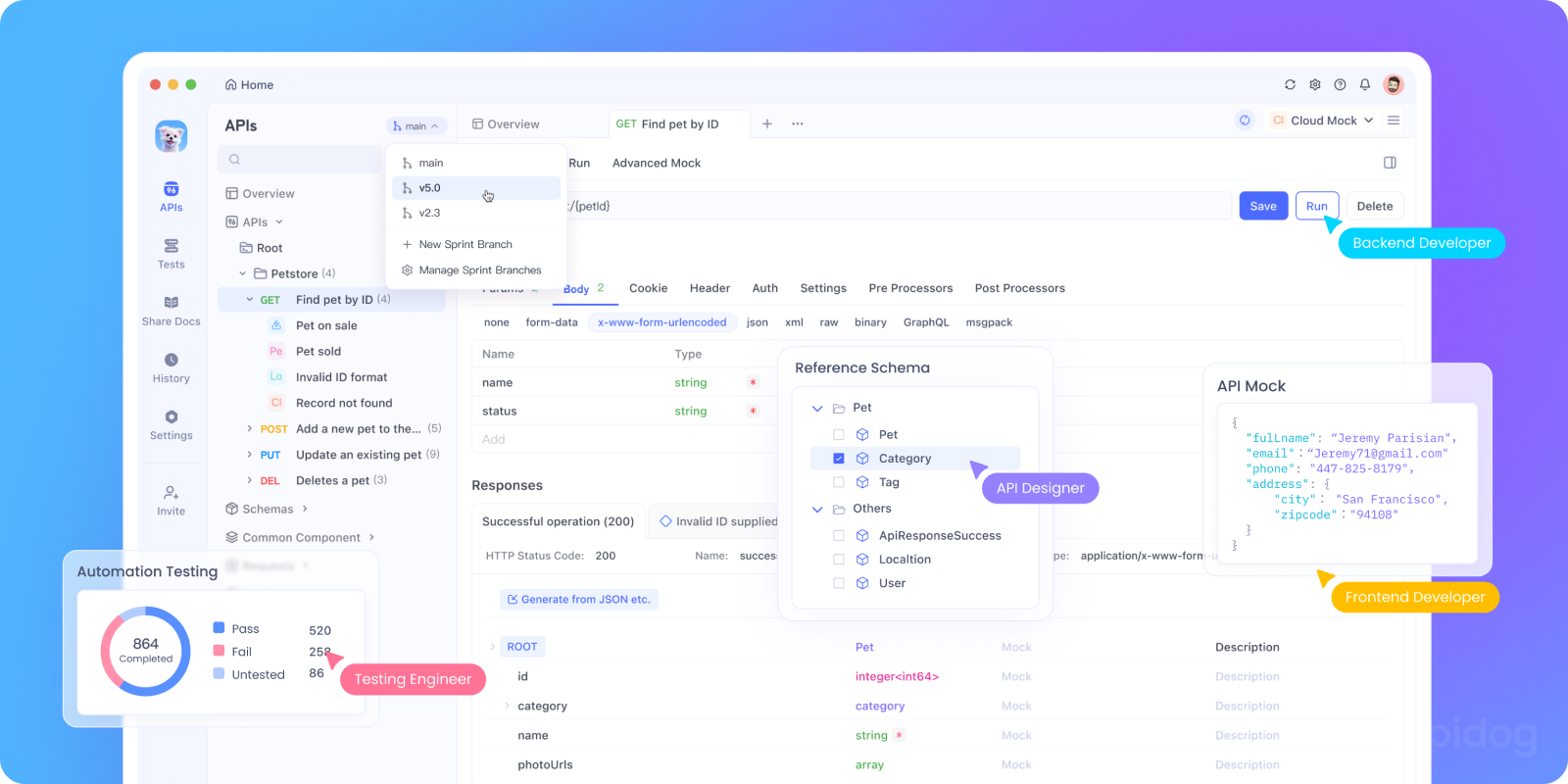
Let’s start with Apidog not because it’s new, but because it bridges the gap between quick testing and full lifecycle management.
What it does: It combines the capabilities of several tools on this list into a single, collaborative platform.
Key GraphQL Capabilities:
- Design & Document: Design your GraphQL schema visually or via SDL, with automatic documentation generation.
- Test with Power: A full-featured testing client with environments, variables, pre-request scripts, and automated test suites. Send queries, test responses, and write assertions.
- Mock Instantly: The moment you define your schema or endpoint, Apidog can generate a live mock server. This is a game-changer for parallel development.
- Collaborate: Share workspaces with your team, comment on APIs, and manage versions all within the same tool.
What Apidog Does Brilliantly for GraphQL
- One-click schema introspection: Paste your GraphQL endpoint → Apidog fetches the schema → enables autocomplete instantly.
- Smart query editor: As you type
query { user(id:, it suggests valid arguments and return fields. - Environment variables: Store
auth_token,user_id, orapi_urlonce reuse across all queries. - Automated tests: Write JavaScript assertions like
pm.expect(response.data.user.email).to.be.a('string'). - Mock server from schema: Yes, really. Apidog can generate a working GraphQL mock server based on your SDL or introspection so frontend devs can work before your resolvers are done.
- Team collaboration: Save queries, share test suites, and document usage in real time.
Imagine testing a login flow:
- Mutation:
login(email, password)→ returns JWT token. - Query:
me→ uses token in headers → returns user profile. - Test: Assert profile includes
emailandrole.
In Apidog, you chain these in a test case, extract the token via script, and run it with one click. Share it with QA. Done.
Why it's special: It eliminates context-switching. You don't need Altair to explore, MSW to mock for frontend, and a separate CI tool for testing. Apidog aims to handle the entire GraphQL API lifecycle in one place. Downloading Apidog for free lets you experience this unified workflow firsthand.
Who It’s For:
- Teams using GraphQL in production
- Developers who want testing + mocking + docs in one place
- Anyone tired of juggling GraphiQL + Postman + custom scripts
2. GraphiQL & GraphQL Playground: The Essential Explorers
Let's talk about the classics that you've probably already used.
GraphiQL
The original GraphQL IDE, created by Facebook. It's the "reference implementation" and comes bundled with many GraphQL servers.
What it does: Provides an interactive, in-browser environment where you can:
- Write and execute queries/mutations
- Get intelligent autocomplete (powered by introspection of your schema)
- Explore the schema documentation
- View query history
Best for: Developers who want a simple, no-frills way to manually test their GraphQL API during development. It's like a "scratch pad" for your GraphQL endpoint.
Limitations: It's primarily for exploration, not for comprehensive testing or mocking. No collaboration features.
GraphQL Playground
Built by Prisma, this is essentially "GraphiQL++." It takes the core concept and adds more developer-friendly features.
Key Features:
- Multi-tab interface (work on multiple queries at once)
- HTTP headers configuration
- Query history that persists across sessions
- Interactive schema docs with a cleaner UI
Why it makes the list: If you're setting up a new GraphQL project, Playground is often the default choice for a development GUI. It's incredibly useful for quick manual testing and debugging.
3. Apollo Studio (formerly Apollo Engine): The Enterprise Powerhouse

If your stack uses Apollo Server (which it probably does, given its popularity), Apollo Studio is the natural next step.
What it does: This is a comprehensive, cloud-based platform for managing your GraphQL API throughout its lifecycle.
Key Features for Testing & Development:
- Schema Registry & History: Track every change to your schema.
- Explorer: A supercharged GraphiQL with intelligent query planning hints.
- Operation Metrics: See how your queries perform in production, which helps you test optimization strategies.
- Federation Awareness: If you're using Apollo Federation for a microservice architecture, Studio provides unparalleled insight.
Caveats:
❌ Tied to Apollo: Less useful if you use Yoga, Express-GraphQL, or Hasura.
❌ Limited mocking: No built-in mock server (though you can use @apollo/server mocks separately).
❌ Free tier is generous, but advanced features cost
Best for: Teams using Apollo Server who want deep insights, historical tracking, and production metrics to inform their testing strategies.
Consideration: While it has a generous free tier, advanced features require a paid plan. It's more of an observability and management platform with testing capabilities, rather than a dedicated testing tool.
4. Insomnia: The API Workbench That Gets GraphQL
Insomnia started as a REST client but has evolved into a phenomenal tool for GraphQL as well.
What it does: Provides a desktop application for designing, testing, and debugging APIs of all kinds, with first-class GraphQL support.
Key GraphQL Features:
- Dedicated GraphQL Tab: Automatic introspection, query building with autocomplete, and variable management.
- Environment Variables: Manage different sets of variables (e.g., auth tokens, user IDs) for different testing scenarios.
- Request Chaining: Use responses from one query to power variables in another—incredible for testing complex workflows.
- Plugin Ecosystem: Extend functionality with community plugins.
Best for: Developers who work with both REST and GraphQL APIs and want a single, powerful desktop tool for all their API testing needs. Its focus on workflows and environments makes testing complex scenarios a breeze.
5. GraphQL Code Generator: Type-Safe Testing
This tool takes a different approach. Instead of a GUI, GraphQL Code Generator supercharges your development workflow with type safety.
What it does: It reads your GraphQL schema and operations (queries/mutations) and generates TypeScript (or Flow, Java, etc.) types and code for you.
How it helps with testing:
- Catch Errors at Compile Time: Your IDE will scream if you try to request a field that doesn't exist or pass a variable of the wrong type. This prevents a whole class of runtime errors before you even run a test.
- Generate Mock Functions: With plugins like
typescript-mock-data, it can generate realistic mock data functions based on your schema's types, perfect for unit testing your frontend components. - Generate React Hooks: Creates ready-to-use, fully-typed React hooks for your queries, making component testing more straightforward.
Best for: Teams using TypeScript who want to eliminate an entire category of bugs and automate the creation of boilerplate code and mocks. It's a foundational tool for a robust testing strategy.
6. MSW (Mock Service Worker): The Frontend Mocking Revolution
MSW has taken the frontend world by storm, and it works beautifully with GraphQL.
What it does: It intercepts network requests at the lowest possible level (using Service Workers) and lets you define mock responses. This means your application code doesn't know it's being mocked.
Key GraphQL Features:
graphql.link(): A dedicated function to intercept GraphQL operations.- Handler-Based Mocking: Define handlers like
graphql.query('GetUsers', (req, res, ctx) => { ... })that return mocked data. - Works Everywhere: Runs in Node.js (for Jest/Vitest tests), in the browser (for development), and even for Storybook stories.
Strengths:
✅ Realistic UI testing: Mocks run in the browser, so your app behaves exactly like production.
✅ No server setup: All mocks live in your frontend code.
✅ Great for component libraries
Weaknesses:
❌ Frontend-only: Not useful for backend or API testing.
❌ No shared mocks: Backend and QA can’t reuse these.
Best for: Frontend developers who need to write integration and unit tests for their components without relying on a running backend. It's also perfect for developing UI features in isolation.
The magic: You write your mocks once, and they work in your tests, your local development, and even your CI pipeline.
7. GraphQL Faker: The Schema-First Mocking Server
Sometimes you need a full, running mock server before you've written any resolver logic. Enter GraphQL Faker.
What it does: You give it a GraphQL Schema Definition Language (SDL) file, and it spins up a live server with realistic, fake data for every field.
Strengths:
✅ Great for prototyping
✅ No real resolvers needed
✅ Supports custom directives
Weaknesses:
❌ No GUI – CLI-only
❌ No team sharing
❌ Limited control over response logic
How it works:
- Annotate your schema with custom
@fakedirectives:email: String @fake(type: email). - Or use the default smart faking (e.g., a field named
emailwill automatically get a fake email). - It serves a GraphiQL interface where you can query your fully mocked API.
Best for: Adopting a true "schema-first" approach. Frontend and backend teams can agree on the schema, then frontend can immediately start building against a realistic, running mock API. It's also great for demos and prototyping.
8. Step CI: The Open-Source Testing Framework

This is a dedicated, declarative testing framework for APIs, including GraphQL.
What it does: Allows you to write API tests in a simple YAML or JSON format that can be run from the CLI or integrated into CI/CD pipelines.
GraphQL Support:
- Write assertions on GraphQL responses.
- Chain requests and use data from one response in the next.
- Load test your GraphQL endpoint.
Best for: Teams that need a simple, code-free way to define smoke tests, integration tests, and load tests for their GraphQL API and want to run them automatically in CI/CD. It fills the gap between manual exploration and full unit testing.
9. Altair GraphQL Client: The Feature-Packed Desktop Client
Think of Altair as a desktop application built specifically to be the best GraphQL client.
What it does: A beautiful, extensible desktop app that rivals the best REST clients for GraphQL.
Standout Features:
- Multiple Windows & Themes: Highly customizable interface.
- Dynamic Variables: Support for environment variables and scriptable variables.
- Query Collections: Organize and save your queries for different projects.
- Automatic Schema Reload: Keeps your docs and autocomplete up-to-date.
- Extensions: Add features like code generation, query cost analysis, etc.
Why Developers Love It:
✅ Beautiful UI: Cleaner than GraphiQL, with tabbed queries and saved history.
✅ Cross-platform: Windows, macOS, Linux, and Chrome/Firefox extensions.
✅ Offline-friendly: No cloud account needed.
✅ Supports headers, cookies, and file uploads
Where It Falls Short:
❌ No built-in mocking: You still need a live server.
❌ No team sharing: Queries live only on your machine.
❌ No automated tests: You see the response but can’t assert it.
Best for: Developers who live in GraphQL and want a powerful, dedicated, and polished desktop client for daily development and testing work.
Pro Tip: Use Altair for exploration, then migrate critical queries to Apidog for testing and collaboration.
10. Supertest & Jest: The Code-Purist's Combo
For developers who want everything in code, this classic combination is unbeatable.
The Stack: Jest (test runner) + supertest (HTTP assertion library) + your GraphQL server.
How it works: You write tests in JavaScript/TypeScript that programmatically start your GraphQL server (or connect to a test instance) and send queries/mutations, then make assertions on the responses.
Example:
import request from 'supertest';
import { app } from '../src/server';

describe('User Query', () => {
  it('fetches a user by id', async () => {
    const query = `{ user(id: "1") { name email } }`;
    const response = await request(app)
      .post('/graphql')
      .send({ query })
      .expect(200);

    expect(response.body.data.user.name).toBe('John Doe');
  });
});
Best for: Backend developers who want maximum control, need to test resolver logic in isolation (with a real database), and want their API tests to live right alongside their server code in the same repository and language.
Choosing Your Toolkit: A Decision Guide
Don't feel you need to pick just one! A typical, robust GraphQL workflow uses several tools:
- For Daily Development & Exploration: Altair or Insomnia (or Apidog for an all-in-one approach).
- For Schema-First Mocking: GraphQL Faker to get a server up fast.
- For Frontend Component Testing: MSW to mock GraphQL in your Jest/Vitest tests.
- For Type Safety & Codegen: GraphQL Code Generator.
- For Backend/Integration Testing: Supertest + Jest (or Step CI for a declarative approach).
- For Team Collaboration & Management: Apollo Studio (if using Apollo) or Apidog.
Conclusion: Build Your Perfect Workflow
The beauty of the modern GraphQL ecosystem is that you have choices. Whether you're a solo developer who loves a sleek desktop app or a large team needing enterprise-grade collaboration and testing, there's a tool or a combination of tools that fits your needs.
The trend is clear: tools are becoming more integrated. Platforms like Apidog are showing that the future lies in bringing design, testing, mocking, and documentation together, reducing friction and accelerating development.
Start by identifying your biggest pain points. Is it waiting for the backend to be ready? Try GraphQL Faker or Apidog's mocking. Is it catching type errors? Integrate GraphQL Code Generator. Is it testing complex user flows? Look at Insomnia or Apidog's testing suites.
Experiment with a few options, and build the toolkit that makes you and your team most productive. Your perfect GraphQL workflow is out there.