TL;DR
GPT-5.3 Codex is finally available via API, weeks after its initial release. You can access it two ways:
- OpenRouter - Model ID
openai/gpt-5.3-codex, competitive pricing - OpenAI Developers Platform - Model ID
gpt-5.3-codex, direct access
To get started: sign up at OpenRouter or OpenAI's platform, grab your API key, and make your first request using the standard Chat Completions endpoint.
Introduction
For weeks, developers wanted to integrate GPT-5.3 Codex into their applications but there was a catch. OpenAI released the model through the Codex App, CLI, and IDE extensions, yet the API remained inaccessible. Teams building AI-powered development tools, automation pipelines, and coding assistants were left waiting.
That wait is over.
GPT-5.3 Codex is now available via API, giving developers the programmatic access they've been requesting since the model's release. You have two options:
- OpenRouter - Access via openrouter.ai with competitive pricing and unified API
- OpenAI Developers Platform - Direct access via developers.openai.com
Whether you're building a SaaS product, automating internal tools, or integrating AI capabilities into your existing applications, the GPT-5.3 Codex API provides a straightforward path to leverage OpenAI's most capable coding model. With pricing starting at just $0.00125 per million input tokens and a context window that can handle massive codebases, it's never been more accessible.
In this guide, we'll walk through everything you need to know to integrate GPT-5.3 Codex into your development workflow. From setting up your OpenRouter account to making production-ready API calls, you'll have the knowledge to start building smarter, faster.
What is GPT-5.3 Codex?
Released by OpenAI, GPT-5.3 Codex is specifically optimized for code generation, understanding, and debugging tasks. Unlike general-purpose language models, Codex has been trained on vast amounts of programming code, making it exceptionally good at:
- Code Generation: Write functions, classes, and even entire applications from descriptions
- Code Understanding: Explain what unfamiliar code does and suggest improvements
- Debugging: Identify bugs and suggest fixes
- Documentation: Generate docstrings and API documentation
- Refactoring: Improve code structure without changing functionality
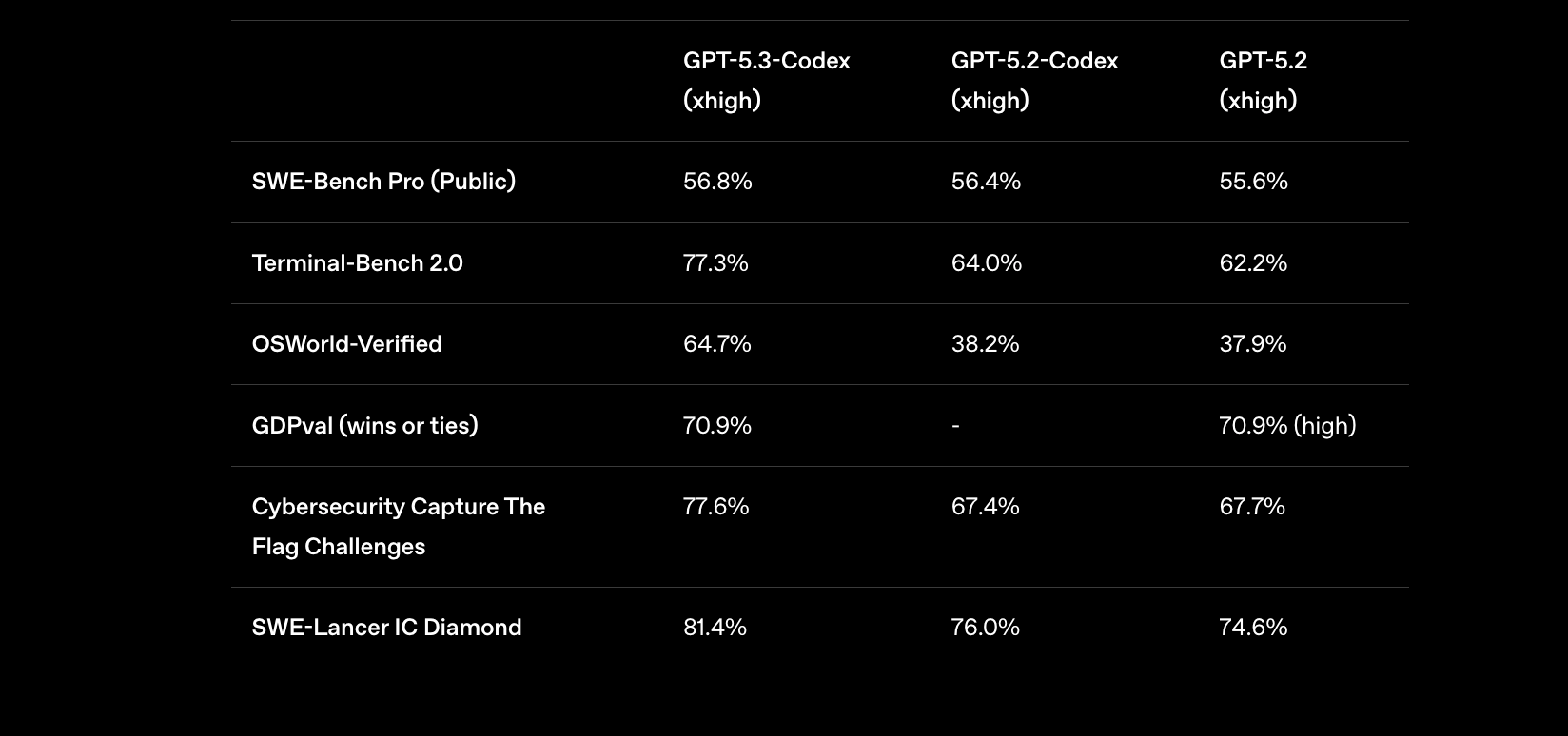
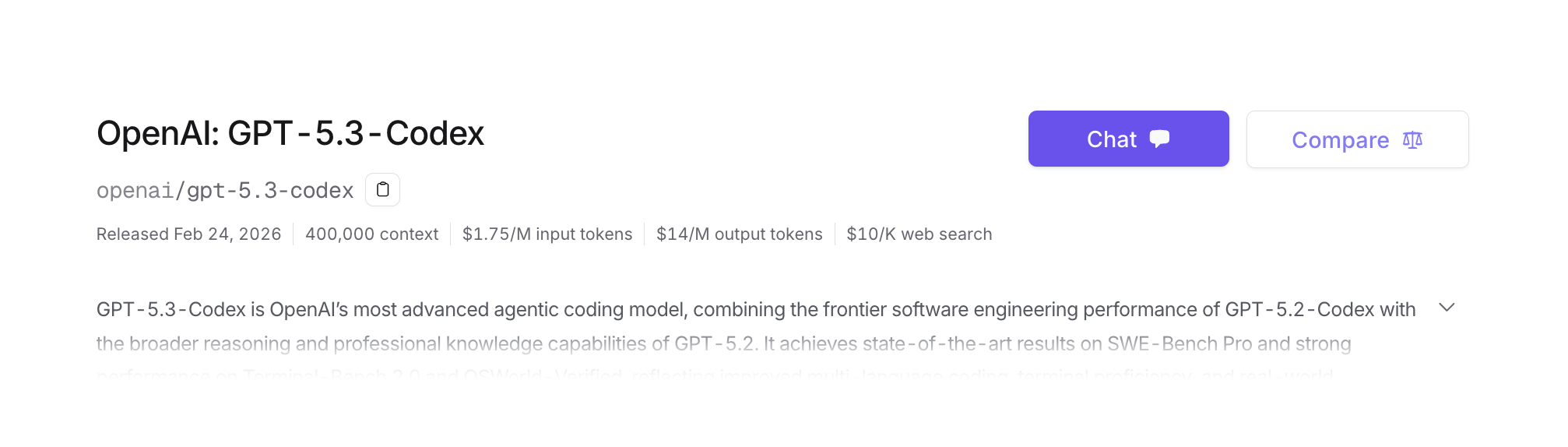
The version available through OpenRouter (openai/gpt-5.3-codex) supports a 400,000 token context window—enough to upload an entire medium-sized codebase in a single request. This makes it ideal for tasks that require understanding broad code relationships across multiple files.
Why Use OpenRouter?
OpenRouter serves as a unified API gateway that provides access to multiple AI models from various providers through a single, consistent interface.
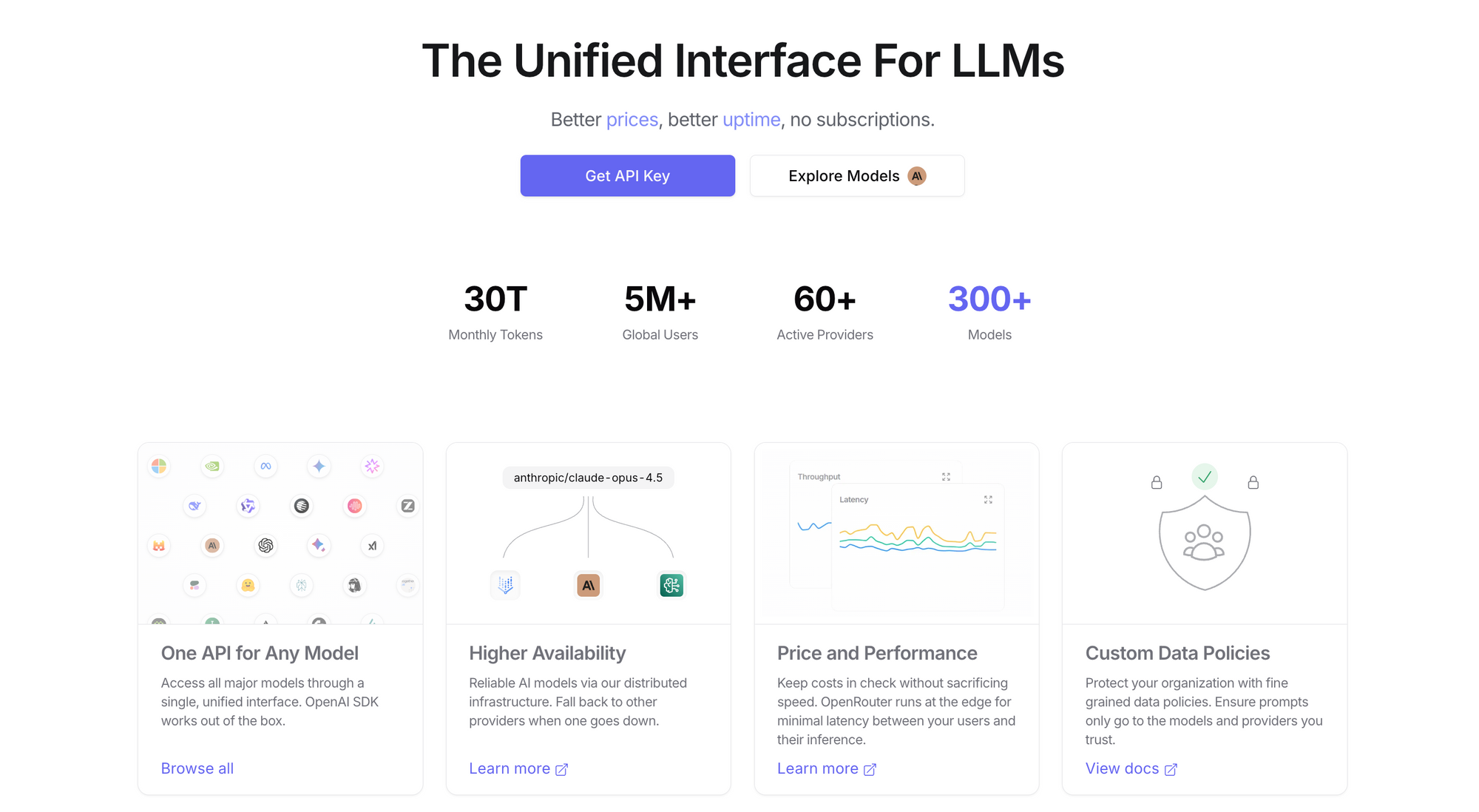
Here's why developers choose OpenRouter for accessing GPT-5 Codex:
- Unified API: One API key accesses dozens of models
- Competitive Pricing: Often cheaper than direct API access
- No Rate Limits: Flexible quotas based on usage
- Easy Switching: Swap models without changing your code
- Free Credits: New accounts receive $1 in free credits to start
If you're already using other models through OpenRouter, adding GPT-5 Codex requires just changing the model ID in your existing API calls.
OpenRouter vs OpenAI Developers Platform
You have two options to access GPT-5.3 Codex via API:
| Feature | OpenRouter | OpenAI Developers Platform |
|---|---|---|
| Model ID | openai/gpt-5.3-codex | gpt-5.3-codex |
| Input Price | $0.681 / 1M tokens | $1.75 / 1M tokens |
| Cached Input | - | $0.175 / 1M tokens |
| Output Price | $14.00 / 1M tokens | $14.00 / 1M tokens |
| Setup Time | Instant | Requires OpenAI account |
| Unified Access | Yes (100+ models) | No (OpenAI models only) |
| Best For | Multi-model projects | OpenAI-centric workflows |
Choose OpenRouter if: You want unified access to multiple LLM providers, competitive pricing, and flexibility to switch models.
Choose OpenAI Developers Platform if: You prefer direct access, already use OpenAI APIs, and want official support.
Both options provide the same underlying GPT-5.3 Codex model—the difference is in pricing, convenience, and your existing setup.
Access Option 1: OpenAI Developers Platform
If you prefer direct access through OpenAI's official API, here's how to get started:
Step 1: Create an OpenAI Account
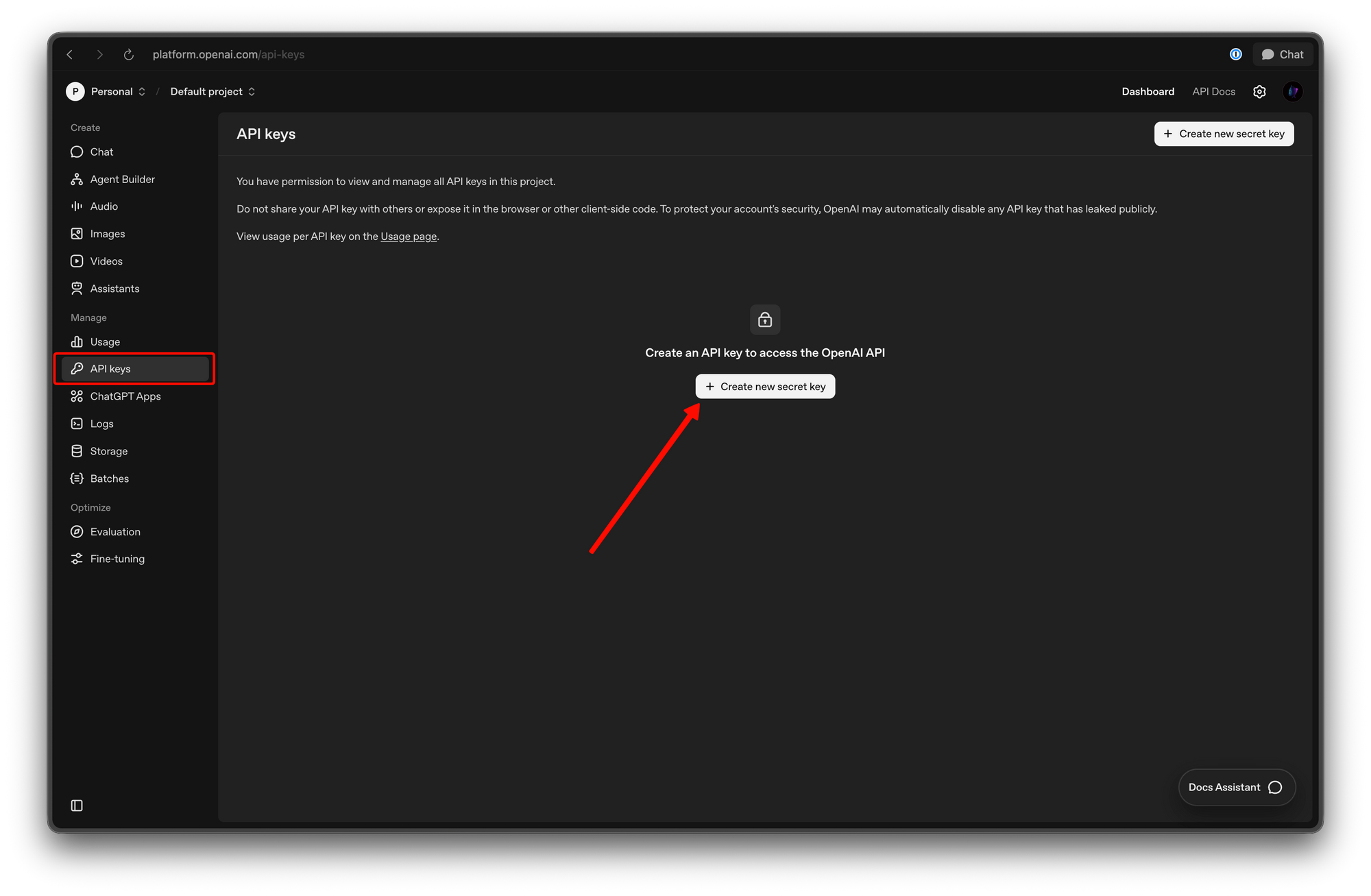
Navigate to platform.openai.com and sign up or log in.
Step 2: Generate Your API Key
- Go to API Keys in the left sidebar
- Click Create new secret key
- Copy and save your key (shown only once)
Step 3: Make Your First Request
curl -X POST https://api.openai.com/v1/chat/completions \
  -H "Authorization: Bearer YOUR_OPENAI_API_KEY" \
  -H "Content-Type: application/json" \
  -d '{
    "model": "gpt-5.3-codex",
    "messages": [
      {
        "role": "user",
        "content": "Write a Python function that calculates the factorial of a number."
      }
    ]
  }'
Replace YOUR_OPENAI_API_KEY with your actual API key.
Python Example (OpenAI Direct)
import os
from openai import OpenAI

client = OpenAI(api_key=os.getenv("OPENAI_API_KEY"))

response = client.chat.completions.create(
    model="gpt-5.3-codex",
    messages=[
        {
            "role": "user",
            "content": "Create a REST API endpoint in FastAPI for user authentication"
        }
    ],
    temperature=0.7,
    max_tokens=2000
)

print(response.choices[0].message.content)
Access Option 2: OpenRouter
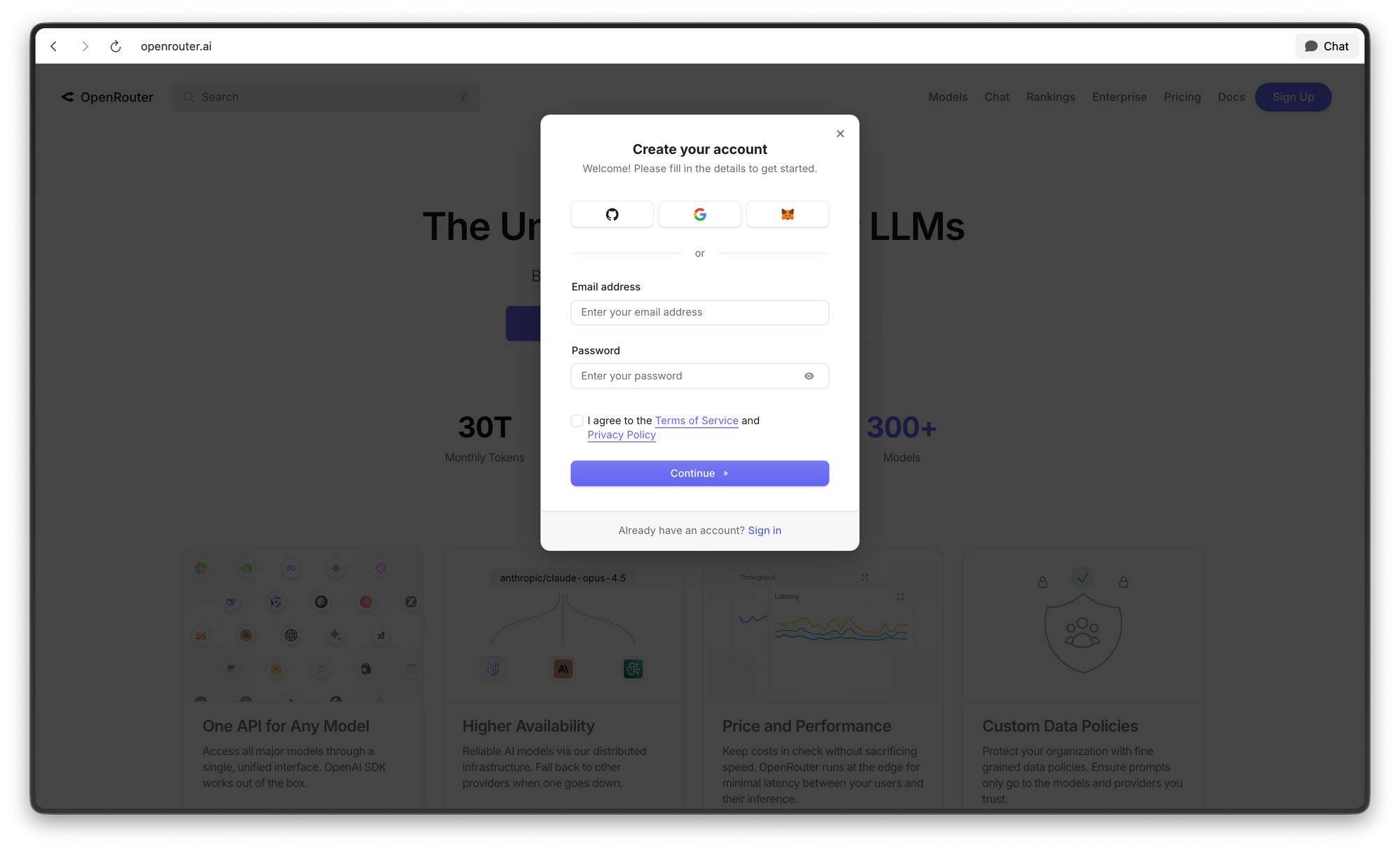
Step 1: Create Your Account
Navigate to openrouter.ai and sign up with your email. The registration process takes less than two minutes.
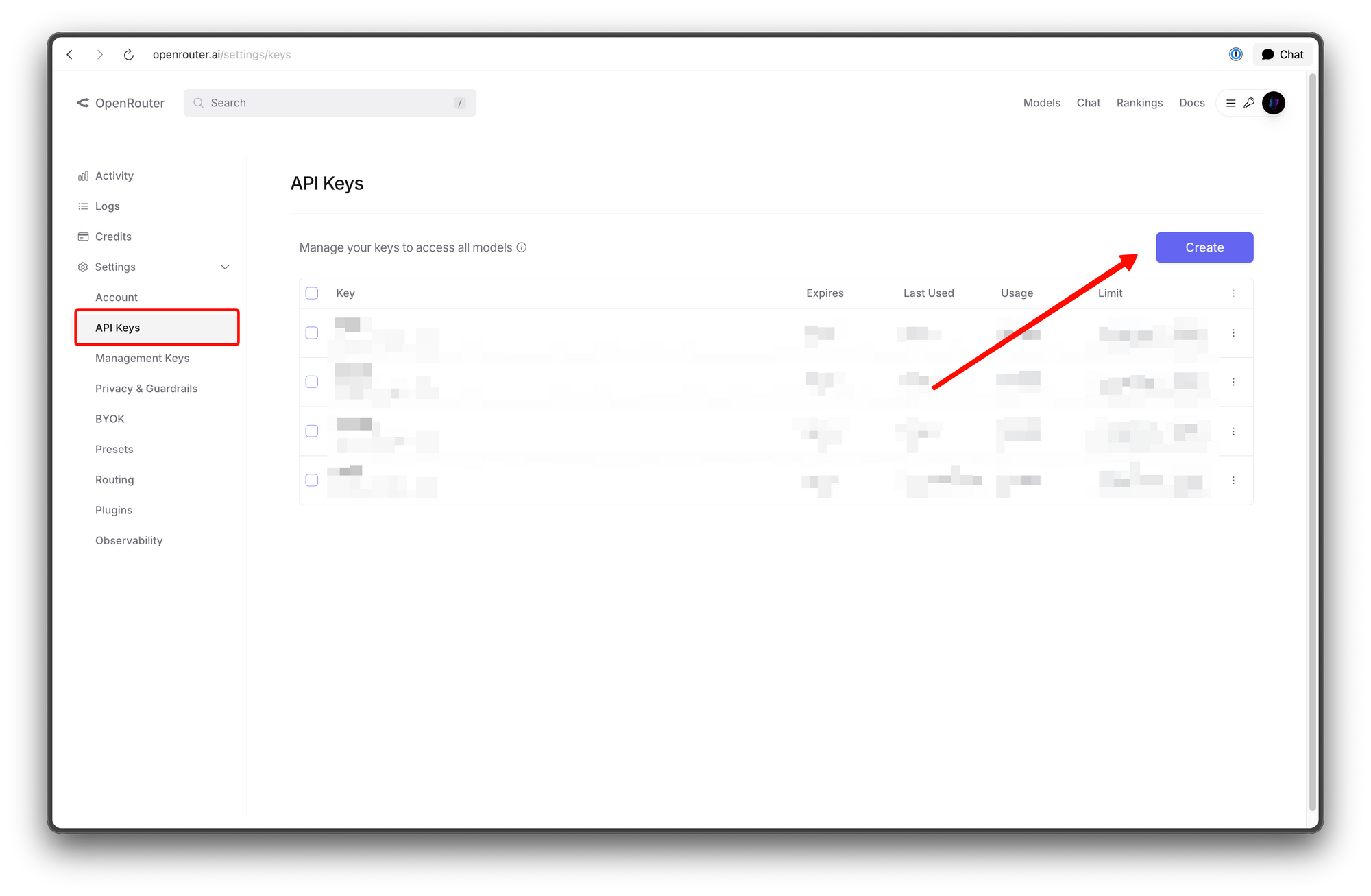
Step 2: Get Your API Key
After logging in, click your profile icon and select "API Keys." Create a new key and copy it immediately—keys are only shown once for security reasons.
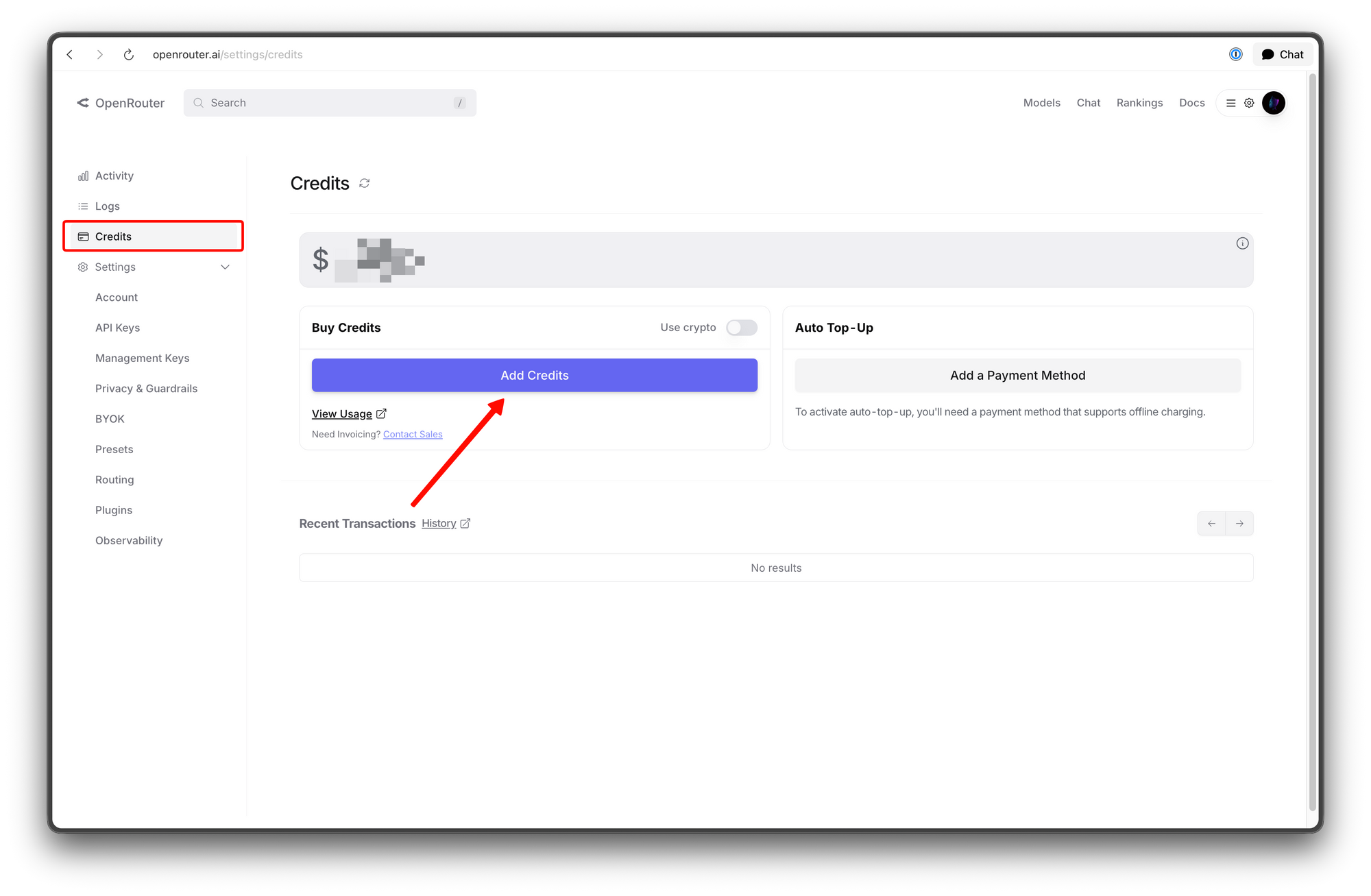
Step 3: Add Credits
While new accounts receive $1 in free credits, you'll want to add more for sustained usage. Navigate to "Credits" and add funds via credit card or other supported methods. A minimum of $5-$10 is recommended for regular development.
Step 4: Verify Model Availability
In the OpenRouter dashboard, search for "gpt-5.3-codex" to confirm it's available. The model ID you'll use is openai/gpt-5.3-codex.
Making Your First API Call
The simplest way to test your setup is with curl. Open your terminal and run:
curl -X POST https://openrouter.ai/api/v1/chat/completions \
  -H "Authorization: Bearer YOUR_OPENROUTER_API_KEY" \
  -H "Content-Type: application/json" \
  -H "HTTP-Referer: https://your-site.com" \
  -d '{
    "model": "openai/gpt-5.3-codex",
    "messages": [
      {
        "role": "user",
        "content": "Write a Python function that calculates the factorial of a number."
      }
    ]
  }'
Replace YOUR_OPENROUTER_API_KEY with your actual key and https://your-site.com with your website URL (required by OpenRouter for analytics).
You should receive a JSON response containing the generated code. Congratulations—you've made your first GPT-5.3 Codex API call.
Python Integration
For Python applications, you can use the OpenAI SDK with a custom base URL:
Installation
pip install openai requests python-dotenv
Basic Usage
import os
from openai import OpenAI
from dotenv import load_dotenv

load_dotenv()

client = OpenAI(
    base_url="https://openrouter.ai/api/v1",
    api_key=os.getenv("OPENROUTER_API_KEY"),
)

def generate_code(prompt: str) -> str:
    """Generate code using GPT-5.3 Codex via OpenRouter."""
    response = client.chat.completions.create(
        model="openai/gpt-5.3-codex",
        messages=[
            {
                "role": "system",
                "content": "You are an expert programmer. Write clean, well-documented code."
            },
            {
                "role": "user",
                "content": prompt
            }
        ],
        temperature=0.7,
        max_tokens=2000
    )

    return response.choices[0].message.content

# Example usage
code = generate_code("Create a REST API endpoint in FastAPI for user authentication")
print(code)
Streaming Responses
For longer code generation, streaming provides a better user experience:
def generate_code_streaming(prompt: str):
    """Generate code with streaming responses."""
    response = client.chat.completions.create(
        model="openai/gpt-5.3-codex",
        messages=[{"role": "user", "content": prompt}],
        stream=True,
        temperature=0.7
    )

    for chunk in response:
        if chunk.choices[0].delta.content:
            print(chunk.choices[0].delta.content, end="", flush=True)

# Example usage
generate_code_streaming("Write a React component for a file upload button")
Error Handling
Always implement proper error handling for production applications:
import json

def generate_code_safe(prompt: str) -> dict:
    """Generate code with proper error handling."""
    try:
        response = client.chat.completions.create(
            model="openai/gpt-5.3-codex",
            messages=[{"role": "user", "content": prompt}],
            temperature=0.7,
            max_tokens=2000
        )

        return {
            "success": True,
            "code": response.choices[0].message.content,
            "usage": {
                "prompt_tokens": response.usage.prompt_tokens,
                "completion_tokens": response.usage.completion_tokens,
                "total_tokens": response.usage.total_tokens
            }
        }

    except Exception as e:
        return {
            "success": False,
            "error": str(e)
        }

# Check token usage
result = generate_code_safe("Write a Python decorator for logging")
if result["success"]:
    print(f"Token usage: {result['usage']['total_tokens']} tokens")
Node.js Integration
JavaScript and TypeScript developers can integrate GPT-5.3 Codex using the OpenAI SDK or native fetch:
Installation
npm install openai
Basic Usage
import OpenAI from "openai";

const openai = new OpenAI({
  baseURL: "https://openrouter.ai/api/v1",
  apiKey: process.env.OPENROUTER_API_KEY,
  defaultHeaders: {
    "HTTP-Referer": "https://your-site.com",
    "X-Title": "Your App Name",
  },
});

async function generateCode(prompt) {
  const completion = await openai.chat.completions.create({
    model: "openai/gpt-5.3-codex",
    messages: [
      {
        role: "system",
        content: "You are an expert full-stack developer. Write production-ready code.",
      },
      {
        role: "user",
        content: prompt,
      },
    ],
    temperature: 0.7,
    max_tokens: 2000,
  });

  return completion.choices[0].message.content;
}

// Example usage
const code = await generateCode("Create a Python function for binary search");
console.log(code);
Using Native Fetch
async function generateCodeFetch(prompt) {
  const response = await fetch(
    "https://openrouter.ai/api/v1/chat/completions",
    {
      method: "POST",
      headers: {
        "Authorization": `Bearer ${process.env.OPENROUTER_API_KEY}`,
        "Content-Type": "application/json",
        "HTTP-Referer": "https://your-site.com",
        "X-Title": "Your App Name",
      },
      body: JSON.stringify({
        model: "openai/gpt-5.3-codex",
        messages: [{ role: "user", content: prompt }],
        temperature: 0.7,
        max_tokens: 2000,
      }),
    }
  );

  const data = await response.json();
  return data.choices[0].message.content;
}
Advanced Parameters and Options
GPT-5.3 Codex supports several parameters to fine-tune your API calls:
Temperature
Controls randomness. Lower values (0.1-0.3) produce more deterministic output—ideal for code generation where consistency matters:
response = client.chat.completions.create(
    model="openai/gpt-5.3-codex",
    messages=[{"role": "user", "content": "Write a sorting algorithm"}],
    temperature=0.2,  # Low for consistent, predictable code
)
Max Tokens
Limit response length to control costs:
response = client.chat.completions.create(
    model="openai/gpt-5.3-codex",
    messages=[{"role": "user", "content": "Explain this entire codebase"}],
    max_tokens=4000,  # Limit response length
)
Top P
Alternative to temperature for controlling output diversity:
response = client.chat.completions.create(
    model="openai/gpt-5.3-codex",
    messages=[{"role": "user", "content": "Write a function"}],
    top_p=0.9,
)
Stop Sequences
Specify strings that stop generation:
response = client.chat.completions.create(
    model="openai/gpt-5.3-codex",
    messages=[{"role": "user", "content": "Write Python code"}],
    stop=["```", "###"],  # Stop at code blocks
)
Validating Generated Code with Apidog
This is where many developers stumble. You ask GPT-5.3 Codex to "build an API," it generates what looks like valid code, and then you spend hours debugging why it doesn't work. The solution: validate before you deploy.
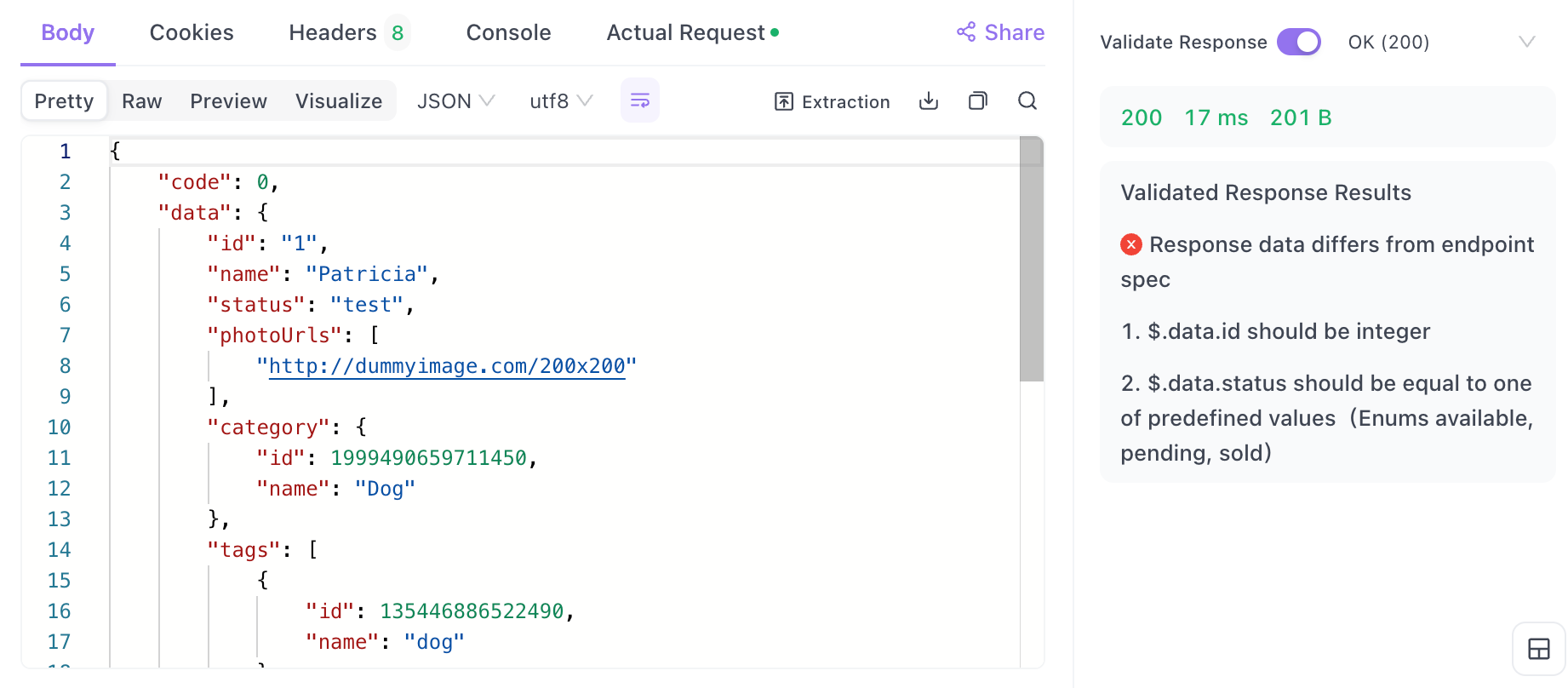
The Workflow
- Generate the Specification: Ask Codex for an OpenAPI specification, not just code
- Import to Apidog: Validate the spec and generate test cases
- Test the Implementation: Run automated tests against the generated code
Example: Validating an API Specification
# Ask Codex to generate an OpenAPI spec, not just code
prompt = """
Create a REST API for a task management application.
Output the complete OpenAPI 3.0 specification in YAML format.
Include:
- Endpoints for CRUD operations on tasks
- Authentication using Bearer tokens
- Error responses for 400, 401, 404, 500
- Request/response examples
"""
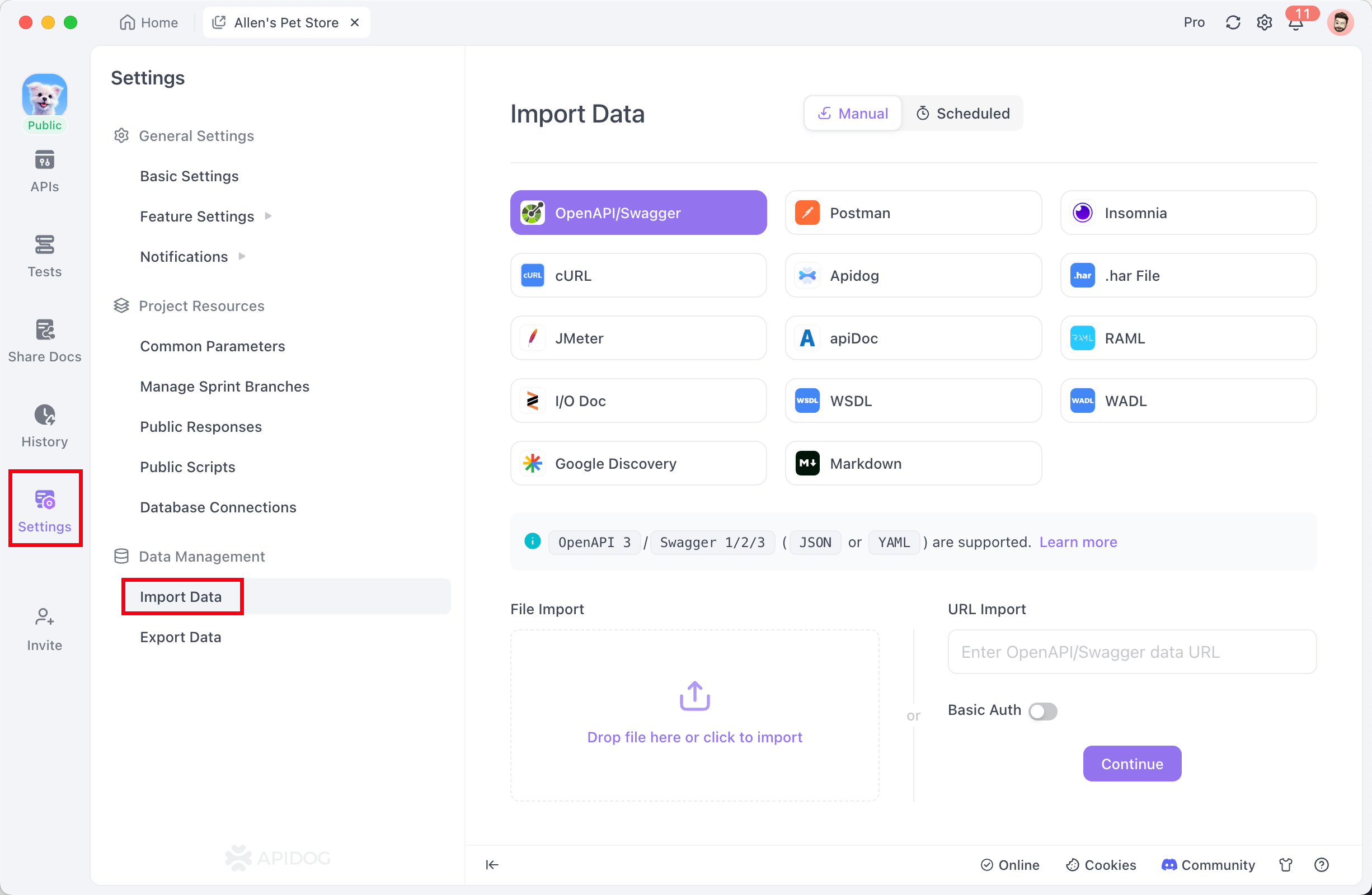
After receiving the specification, import it into Apidog:
- Open Apidog and create a new project
- Go to Import → OpenAPI/Swagger
- Paste the YAML from Codex
- Apidog automatically generates test cases
- Run the tests to validate the spec
This "trust but verify" approach saves hours of debugging and ensures your AI-generated code meets professional standards.
Pricing Breakdown
Here's what you need to know about costs for GPT-5.3 Codex:
OpenRouter Pricing
| Token Type | Price per 1M Tokens |
|---|---|
| Input | $0.681 |
| Output | $14.00 |
OpenAI Developers Platform Pricing
| Token Type | Price per 1M Tokens |
|---|---|
| Input | $1.75 |
| Cached Input | $0.175 |
| Output | $14.00 |
Note: OpenRouter offers significantly lower input pricing , making it more cost-effective for code generation tasks that involve sending large codebases as context. Both platforms share the same output pricing at $14.00 per million tokens.
Cost Comparison Examples
| Task | OpenRouter Cost | OpenAI Platform Cost |
|---|---|---|
| Small (1K in, 500 out) | $0.007 | $0.009 |
| Medium (10K in, 2K out) | $0.035 | $0.046 |
| Large (50K in, 5K out) | $0.104 | $0.158 |
Context Window
Both platforms support a 400,000 token context window, allowing you to upload entire codebases in a single request.
Troubleshooting Tips
Rate Limiting
If you hit rate limits, implement exponential backoff:
import time

def generate_code_with_retry(prompt, max_retries=3):
    for attempt in range(max_retries):
        try:
            return generate_code(prompt)
        except Exception as e:
            if attempt < max_retries - 1:
                wait_time = 2 ** attempt
                print(f"Rate limited. Waiting {wait_time}s...")
                time.sleep(wait_time)
            else:
                raise e
Invalid API Key
Ensure your key starts with "sk-or-" for OpenRouter:
# Wrong
api_key = "sk-xxxx"  # This is an OpenAI key

# Correct
api_key = "sk-or-v1-xxxx"  # This is an OpenRouter key
Model Not Found
Double-check the model ID: openai/gpt-5.3-codex (not "gpt-5" or "codex" alone).
Conclusion
Accessing GPT-5.3 Codex through OpenRouter opens up powerful AI-assisted development capabilities for every developer. With straightforward API access, competitive pricing, and a massive context window, you can integrate intelligent code generation into any application.
The key to success lies in the workflow: generate code with GPT-5.3 Codex, validate with Apidog, and deploy with confidence. This combination gives you the speed of AI generation with the reliability of professional testing.