
TL;DR
Gemma 4 dropped on April 3, 2026, and Ollama v0.20.0 added same-day support. You can pull and run the default gemma4:e4b model in two commands. This guide walks you through setup, model selection, API usage, and how to test your local Gemma 4 endpoints with Apidog.
Introduction
Google released Gemma 4 on April 2, 2026. Within 24 hours, Ollama shipped v0.20.0 with full support across all four model variants.
For developers, this matters. Gemma 4 is not a minor bump. It scores 89.2% on AIME 2026 compared to Gemma 3's 20.8%. Its coding benchmark score jumped from 110 ELO to 2150 on Codeforces. You get native function calling, configurable thinking modes, and a 256K context window on the larger variants. All of this runs on your own hardware.
If you're building API-powered apps, the local setup unlocks something useful: a fast, private AI layer for generating mock data, writing test scenarios, and validating API responses without sending data to a remote server.
This guide covers everything from installation to making your first local API call.
What's new in Gemma 4
Gemma 4 ships four model variants with meaningfully different capabilities.
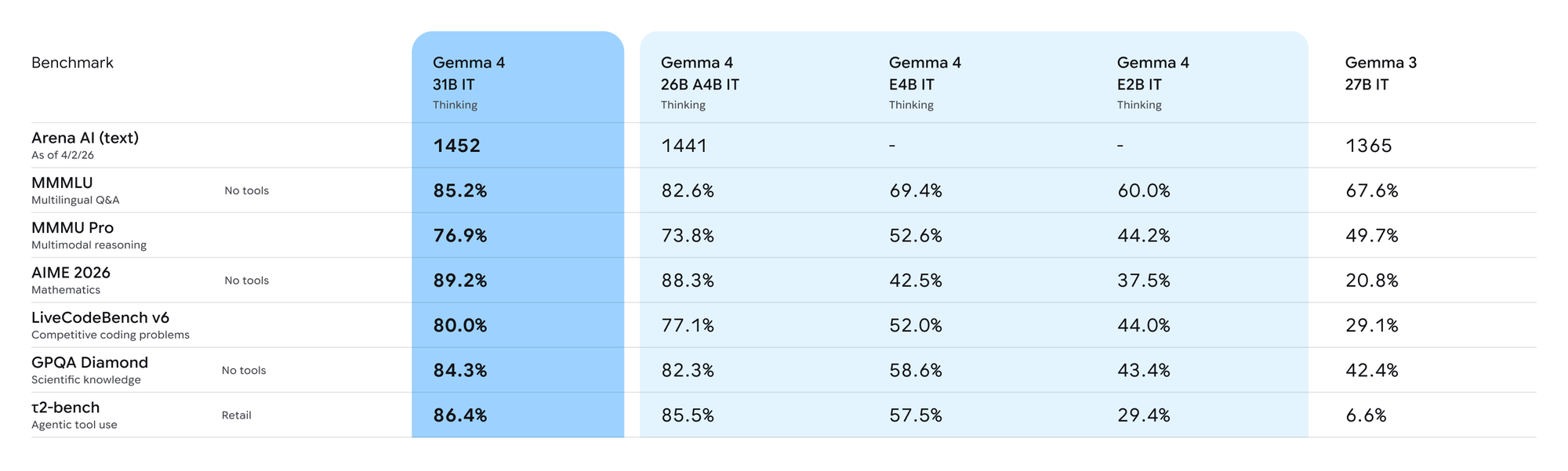
Here's what separates it from Gemma 3:
Reasoning and coding. The 31B model hits 80% on LiveCodeBench v6. The previous Gemma 3 27B scored 29.1%. That gap is not gradual improvement; it's a different class of performance.
Mixture-of-Experts architecture. The 26B variant uses MoE with only 4 billion active parameters during inference. You get near-flagship quality at a fraction of the compute cost.
Longer context. The E2B and E4B edge models support 128K tokens. The 26B and 31B models extend that to 256K, enough to fit large codebases or API specification files in a single prompt.
Native function calling. All Gemma 4 models support structured tool use out of the box. You can define a function schema and the model returns valid JSON matching that schema, no prompt engineering tricks required.
Audio and image input. The E2B and E4B models accept audio and variable-resolution image input alongside text.
Thinking modes. You can enable or disable the model's chain-of-thought reasoning per request. For simple lookups, skip it. For complex coding or math problems, turn it on.
Gemma 4 model variants explained
Before you pull anything, pick the right model for your hardware:
| Model | Size on disk | Context | Architecture | Best for |
|---|---|---|---|---|
gemma4:e2b |
7.2 GB | 128K | Dense | Laptops, edge, audio/image |
gemma4:e4b (default) |
9.6 GB | 128K | Dense | Most developers |
gemma4:26b |
18 GB | 256K | MoE (4B active) | Best quality per GB |
gemma4:31b |
20 GB | 256K | Dense | Max quality |
The e4b model is the default when you run ollama run gemma4. It fits on most consumer GPUs with 10+ GB VRAM and runs reasonably fast on Apple Silicon unified memory.
The 26b MoE variant is the sleeper pick. Because only 4 billion parameters activate per token, inference is closer to a 4B model in speed while quality sits near a 13B model. If you have 20+ GB RAM, this is worth trying.
Prerequisites
You need Ollama v0.20.0 or later. Earlier versions don't include Gemma 4 support.
Check your current version:
ollama --version
If you're on an older version, update:
# macOS
brew upgrade ollama

# Linux
curl -fsSL https://ollama.com/install.sh | sh
On Windows, download the latest installer from ollama.com.
Hardware requirements:
gemma4:e2b: 8 GB RAM minimum (16 GB recommended)gemma4:e4b: 10 GB VRAM or 16 GB unified memorygemma4:26b: 20+ GB RAM or unified memorygemma4:31b: 24 GB VRAM or 32 GB unified memory
Installing and running Gemma 4
Pull and run the default e4b model:
ollama run gemma4
This downloads roughly 9.6 GB on first run, then drops you into an interactive session. Type a message to test it:
>>> What are the HTTP status codes for client errors?
To run a specific variant:
# Edge model, smaller footprint
ollama run gemma4:e2b

# MoE model, best quality-to-size ratio
ollama run gemma4:26b

# Full flagship
ollama run gemma4:31b
To pull without running immediately:
ollama pull gemma4
ollama pull gemma4:26b
Check which models you have:
ollama list
Using the Gemma 4 API locally
Ollama exposes a local REST API at http://localhost:11434. Once the model is pulled, you can hit it from any HTTP client without starting the interactive CLI.
Generate a completion
curl http://localhost:11434/api/generate \
  -H "Content-Type: application/json" \
  -d '{
    "model": "gemma4",
    "prompt": "Write a JSON response for a user profile API endpoint",
    "stream": false
  }'
Chat completion (OpenAI-compatible endpoint)
Ollama also supports the OpenAI chat format:
curl http://localhost:11434/v1/chat/completions \
  -H "Content-Type: application/json" \
  -d '{
    "model": "gemma4",
    "messages": [
      {
        "role": "user",
        "content": "Generate a realistic JSON mock for an e-commerce order API response"
      }
    ]
  }'
Python client
import requests

def ask_gemma4(prompt: str, model: str = "gemma4") -> str:
    response = requests.post(
        "http://localhost:11434/api/generate",
        json={
            "model": model,
            "prompt": prompt,
            "stream": False
        }
    )
    response.raise_for_status()
    return response.json()["response"]

result = ask_gemma4("List the fields a payment API response should include")
print(result)
Using the OpenAI Python SDK
Because Ollama's API is OpenAI-compatible, you can point the official SDK at your local instance:
from openai import OpenAI

client = OpenAI(
    base_url="http://localhost:11434/v1",
    api_key="ollama"  # required by the SDK but unused by Ollama
)

response = client.chat.completions.create(
    model="gemma4",
    messages=[
        {
            "role": "system",
            "content": "You generate realistic API response data in JSON format."
        },
        {
            "role": "user",
            "content": "Generate a sample response for a GET /users/{id} endpoint"
        }
    ]
)

print(response.choices[0].message.content)
Using function calling with Gemma 4
Gemma 4 supports native function calling. You define a tool schema and the model returns structured JSON matching your function signature.
This is useful for building agents that call your APIs programmatically:
from openai import OpenAI

client = OpenAI(
    base_url="http://localhost:11434/v1",
    api_key="ollama"
)

tools = [
    {
        "type": "function",
        "function": {
            "name": "get_user",
            "description": "Retrieve a user by ID from the API",
            "parameters": {
                "type": "object",
                "properties": {
                    "user_id": {
                        "type": "integer",
                        "description": "The unique user ID"
                    },
                    "include_orders": {
                        "type": "boolean",
                        "description": "Whether to include order history"
                    }
                },
                "required": ["user_id"]
            }
        }
    }
]

response = client.chat.completions.create(
    model="gemma4",
    messages=[
        {"role": "user", "content": "Get user 42 with their order history"}
    ],
    tools=tools,
    tool_choice="auto"
)

tool_call = response.choices[0].message.tool_calls[0]
print(tool_call.function.name)       # get_user
print(tool_call.function.arguments)  # {"user_id": 42, "include_orders": true}
The model extracts the correct parameters from natural language and returns a valid JSON object matching your schema. No regex parsing or output cleaning needed.
Enabling thinking mode
For complex tasks like writing test scenarios or analyzing API specifications, you can enable Gemma 4's chain-of-thought reasoning:
response = client.chat.completions.create(
    model="gemma4",
    messages=[
        {
            "role": "user",
            "content": "Design a complete test scenario for a payment processing API with edge cases"
        }
    ],
    extra_body={"think": True}
)

print(response.choices[0].message.content)
For simpler requests like generating a single mock value, skip thinking mode. It adds latency you don't need.
Testing Gemma 4 API responses with Apidog
Once your local Gemma 4 instance is running, you'll want to test the API endpoints systematically. Apidog handles this without extra tooling.
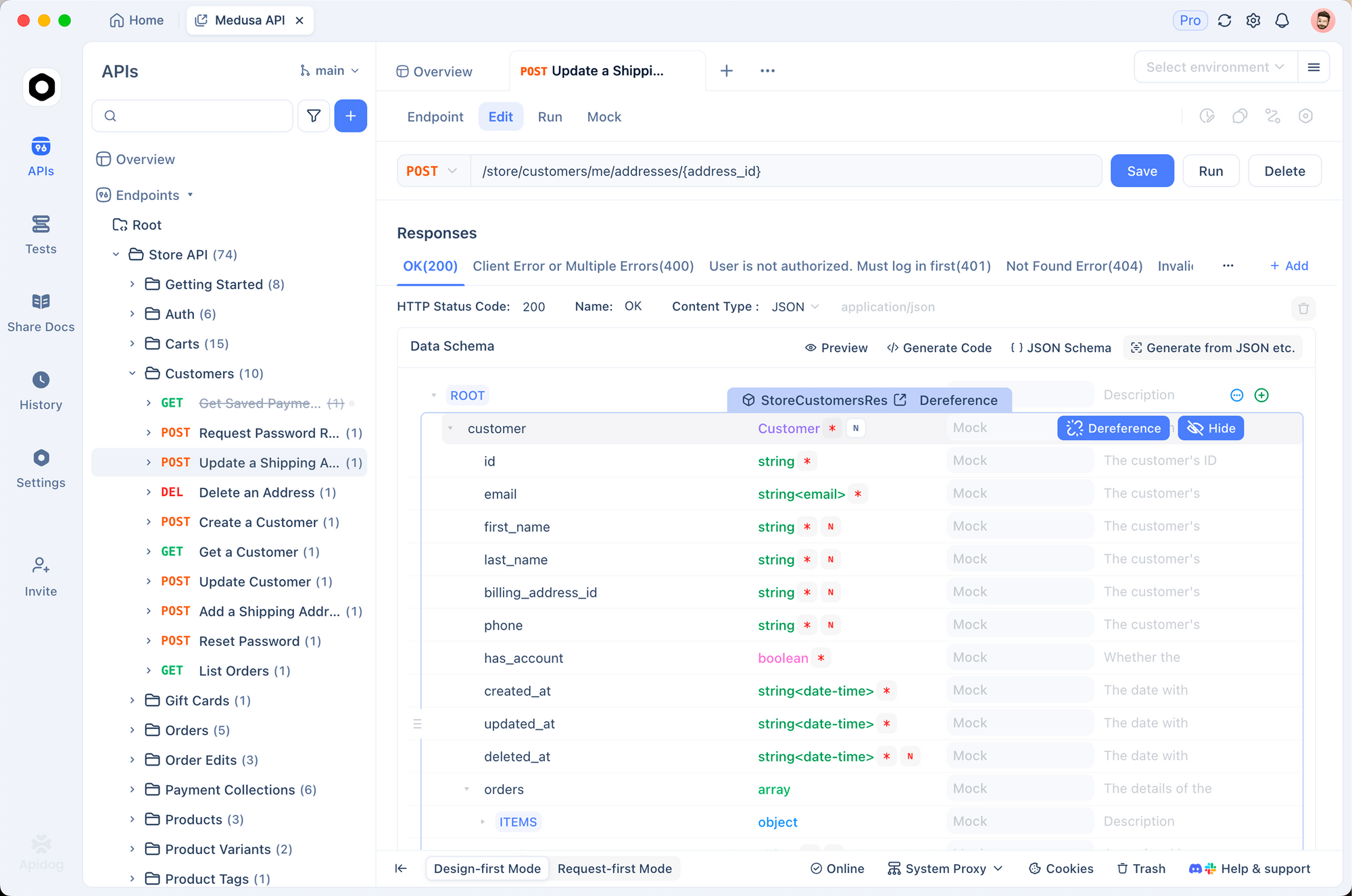
Import the Ollama API spec. Ollama's local server exposes standard REST endpoints. Create a new project in Apidog and add the base URL http://localhost:11434.
Define your endpoints. Add the endpoints you're testing:
POST /api/generatefor single-turn completionsPOST /v1/chat/completionsfor multi-turn chatGET /api/tagsto list available models
Set up a Test Scenario. In Apidog, a Test Scenario chains multiple requests with assertions between them. For Gemma 4 testing:
- Step 1:
GET /api/tagsto assert thatgemma4appears in the model list - Step 2:
POST /api/generateto send a prompt and assert theresponsefield is non-empty - Step 3:
POST /v1/chat/completionsto send a chat message and assert the reply matches your expected format
Use Apidog's Extract Variable processor to capture the response from step 2 and pass it into step 3. That lets you test multi-turn conversation flows automatically.
Validate response schemas. Apidog's Contract Testing validates API responses against your OpenAPI spec. Define the expected response shape for each Gemma 4 endpoint, then run contract tests after model updates to catch any breaking changes in Ollama's API format.
Smart Mock for parallel development. If your backend depends on Gemma 4 responses but you want frontend teams to work without waiting on the local model, Apidog's Smart Mock generates schema-compliant responses from your API spec automatically. Define what a Gemma 4 response looks like, and Smart Mock serves realistic data on demand.
Multimodal input with Gemma 4
The E2B and E4B models accept images alongside text. Pass images as base64-encoded strings:
import base64

with open("api_diagram.png", "rb") as f:
    image_data = base64.b64encode(f.read()).decode()

response = client.chat.completions.create(
    model="gemma4:e4b",
    messages=[
        {
            "role": "user",
            "content": [
                {
                    "type": "image_url",
                    "image_url": {
                        "url": f"data:image/png;base64,{image_data}"
                    }
                },
                {
                    "type": "text",
                    "text": "Describe the API flow shown in this diagram and identify potential error paths"
                }
            ]
        }
    ]
)
This is useful for analyzing architecture diagrams, reviewing API documentation screenshots, or extracting data from images that your API needs to process.
Common issues and fixes
Ollama says the model isn't found. Run ollama pull gemma4 first, or verify with ollama list.
Slow inference on CPU. Gemma 4 is GPU-optimized. On CPU-only machines, expect 1-3 tokens per second on the e4b model. Use gemma4:e2b for better CPU performance.
Out of memory errors. Check your available VRAM or unified memory with ollama ps. If the model is too large, switch to gemma4:e2b (7.2 GB).
Model not loading on Apple Silicon. Ollama 0.20.0 added MLX support for Apple Silicon in preview. If you're on an older Ollama version, update first.
Port already in use. If something else is using port 11434, set a custom port: OLLAMA_HOST=0.0.0.0:11435 ollama serve.
Responses are cut off. Increase the context window in your request: add "options": {"num_ctx": 8192} to your JSON body.
Gemma 4 vs other local models
| Model | Best size for most users | Context | Function calling | Coding benchmark |
|---|---|---|---|---|
| Gemma 4 | e4b (9.6 GB) | 128K-256K | Native | 80% LiveCodeBench |
| Llama 3.3 | 70B-Q4 (40 GB) | 128K | Native | ~60% LiveCodeBench |
| Qwen3.6-Plus | 72B-Q4 (44 GB) | 128K | Native | Strong |
| Mistral Small | 24B (14 GB) | 128K | Native | Moderate |
Gemma 4's advantage is the MoE 26B variant. At 18 GB, it delivers near-flagship quality with 4B active parameters at inference time, giving you better tokens-per-second than any of the larger dense models in this list.
For pure coding tasks, the 31B model is competitive with much larger models. For edge deployment or laptops, e2b runs in under 8 GB.
Conclusion
Gemma 4 with Ollama is one of the most capable local setups available right now. The install takes two commands. The default model runs on most developer machines. And the jump in reasoning and coding quality over Gemma 3 is substantial.
Start with ollama run gemma4, test the API with Apidog to make sure your endpoints behave as expected, then pick the right variant for your workload based on the model table above.
For teams building API-powered features on top of Gemma 4, pairing local inference with Apidog's Smart Mock and Test Scenarios gives you a complete development loop without remote dependencies.
FAQ
How do I update Gemma 4 in Ollama when a new version comes out?Run ollama pull gemma4 again. Ollama checks for the latest version and downloads only what changed.
Can I run Gemma 4 on a machine without a GPU?Yes, but it's slow. Expect 1-3 tokens per second on CPU. The e2b model is the most practical option for CPU-only machines.
What's the difference between gemma4:e2b and gemma4:e4b?Both are dense "effective" models optimized for edge hardware. E4B has more parameters and handles complex reasoning better. E2B is smaller and supports audio input. For most text tasks, e4b is the better default.
Does Gemma 4 work with LangChain and LlamaIndex?Yes. Both frameworks support Ollama as a backend. Point the Ollama provider at http://localhost:11434 and use gemma4 as the model name.
Is the local Gemma 4 API compatible with code written for the OpenAI API?For the most part, yes. Ollama's /v1/chat/completions endpoint follows the OpenAI format. Switch base_url to http://localhost:11434/v1 and api_key to any non-empty string. Most OpenAI SDK calls work without changes.
How do I use Gemma 4's thinking mode?Pass "think": true in the extra_body parameter when using the OpenAI SDK, or add "think": true to the top-level JSON body in direct API calls. Disable it for simple tasks to reduce latency.
Can I serve Gemma 4 to other machines on my network?Yes. Start Ollama with OLLAMA_HOST=0.0.0.0:11434 ollama serve and other machines can reach it at your IP address on port 11434.
What's the best Gemma 4 model for API development tasks?For generating mock data and writing test cases, e4b is the right balance of speed and quality. For complex spec analysis or architecture review, the 26b MoE model gives better results without the cost of the full 31B.