
TL;DR: Google released Gemma 4 in April 2026, a family of four open models licensed under Apache 2.0 that outperforms models 20x its size on standard benchmarks. You can call the Gemma 4 API through Google AI Studio, Vertex AI, or run it locally with Ollama and vLLM. Pair it with Apidog's Smart Mock to auto-generate realistic API responses from your OpenAPI schemas without writing a single mock rule.
Introduction
Most open-source AI models make you choose: raw capability or deployability. You either get a model too large to run on your laptop, or a small model that can't handle multi-step reasoning. Gemma 4 breaks that tradeoff.
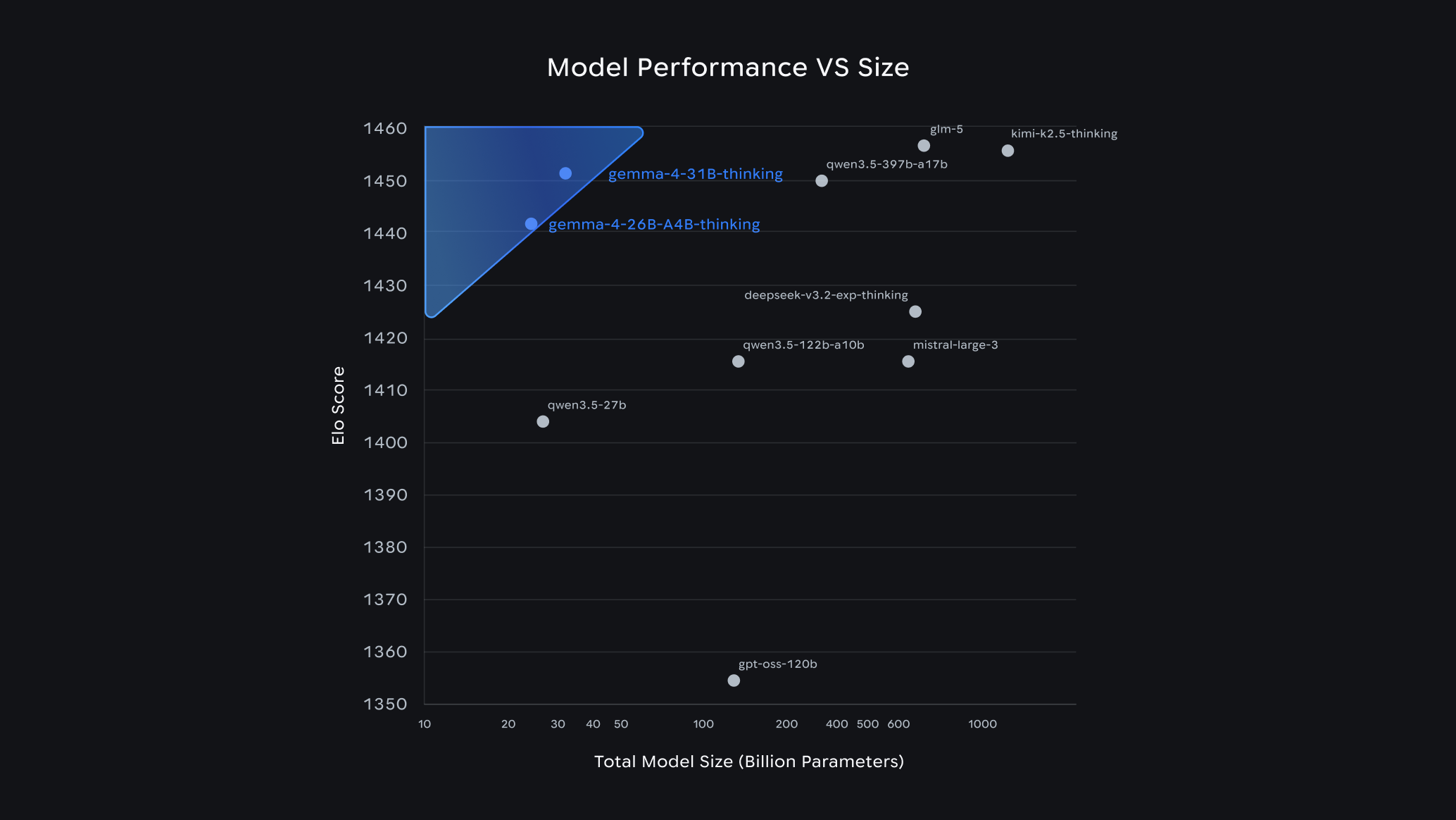
Gemma 4 is Google DeepMind's most capable open model family to date. The 31B Dense model ranks #3 among all open models on Arena AI's leaderboard, beating competitors 20x its size. The 26B Mixture of Experts (MoE) holds the #6 spot. Both run on a single 80GB GPU. The lightweight E2B and E4B models run completely offline on phones and edge devices.
For API developers, this matters more than it might seem. Gemma 4 natively supports function calling, structured JSON output, and 256K context windows. That makes it a practical choice for building AI-powered API tooling, from generating test data to writing mocks to analyzing API responses.
What is Gemma 4 and what's new
Gemma 4 is Google DeepMind's fourth generation of open language models. The name "Gemma" comes from the Latin word for gemstone. The series started in early 2024, and since launch, developers have downloaded Gemma models over 400 million times. The community has built more than 100,000 variants, forming what Google calls the "Gemmaverse."
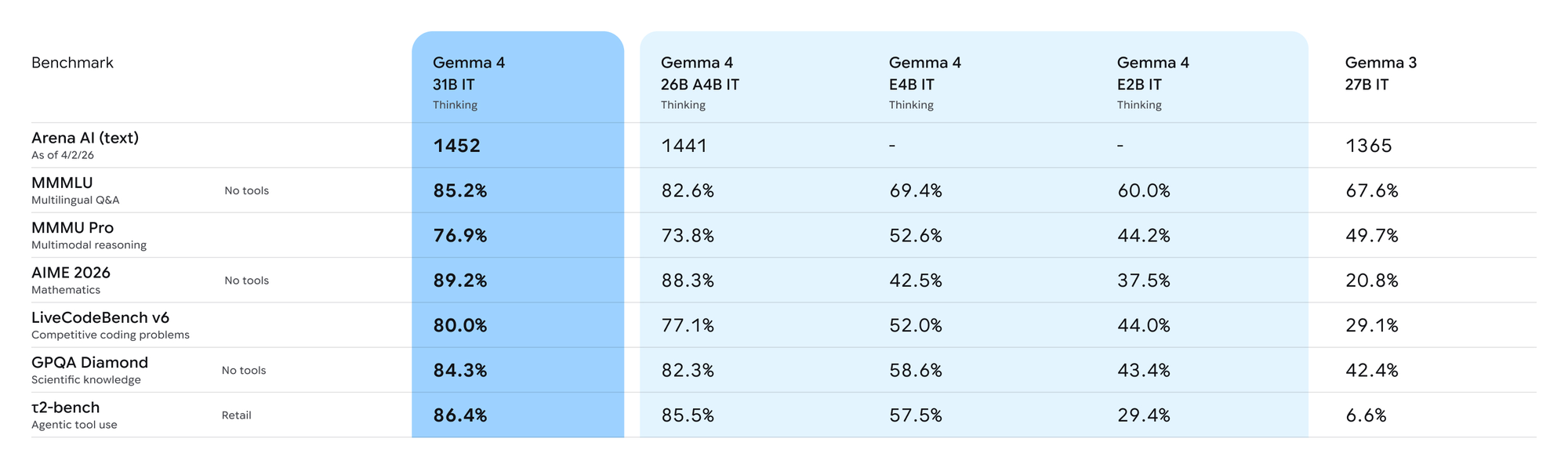
Gemma 4 launches under an Apache 2.0 license, a significant change from earlier generations that used a custom usage policy. This means you can use, modify, and distribute Gemma 4 commercially without restriction. That's a meaningful shift for enterprises and startups that need full control over their AI infrastructure.
The headline improvement in Gemma 4 is what Google calls "intelligence-per-parameter." The 31B Dense model delivers frontier-level capabilities at a fraction of the compute cost of models like GPT-4 or Claude 3 Sonnet. On the Arena AI text leaderboard (as of April 2026), Gemma 4 31B outperforms models with 600B+ parameters.
Here's what's genuinely new compared to Gemma 3:
Native multimodal input. All four Gemma 4 models process images and video natively. The E2B and E4B edge models add native audio input for speech recognition. This wasn't part of Gemma 3's base capability.
Longer context windows. The E2B and E4B models support 128K tokens. The 26B and 31B models extend to 256K tokens. That's enough to pass an entire code repository in a single prompt.
Agentic workflow support. Gemma 4 includes native function calling, structured JSON output mode, and system instructions. These three features together make it practical to build agents that call external APIs, parse responses, and chain actions together.
Advanced reasoning. The 31B model shows significant benchmark improvements in math and multi-step instruction following compared to Gemma 3. This matters for API test generation, where you need the model to understand relationships between endpoints and data schemas.
140+ language support. Gemma 4 was natively trained on over 140 languages, not retrofitted from English. This makes it usable for global API products out of the box.
Apache 2.0 licensing. As mentioned, this removes legal ambiguity for commercial use. You own your models, your data, and your deployments.
Gemma 4 model variants and capabilities
Google released Gemma 4 in four sizes, each targeting a specific hardware tier:
| Model | Parameters | Active params (inference) | Context | Best for |
|---|---|---|---|---|
| E2B | Effective 2B | ~2B | 128K | Mobile, IoT, offline edge |
| E4B | Effective 4B | ~4B | 128K | Phones, Raspberry Pi, Jetson Orin |
| 26B MoE | 26B total | ~3.8B active | 256K | Latency-sensitive server tasks |
| 31B Dense | 31B | 31B | 256K | Highest quality, research, fine-tuning |
The E2B and E4B models use a Mixture of Experts architecture that activates only a fraction of total parameters per token. This preserves battery life and RAM on constrained devices. Google built them in collaboration with Qualcomm and MediaTek, and they run completely offline on Android via the AICore Developer Preview.
The 26B MoE model activates only 3.8B parameters during inference despite having 26B total parameters. It's the fastest option for server-side deployment where you want low latency without sacrificing much quality.
The 31B Dense model is the quality leader. It's the one you'd choose for fine-tuning on domain-specific tasks, or for any use case where output quality matters more than speed. All four variants ship in instruction-tuned (IT) and base forms.
For API use cases, the 26B MoE hits the best speed/quality balance. The 31B Dense is the right choice when you need structured JSON output for complex API responses or when you're generating test scenarios with multi-step logic.
All models support function calling and JSON output mode, which are the two capabilities you'll use most when building API tooling with Gemma 4.
Setting up Gemma 4 API: step by step
You have three main paths to call Gemma 4: Google AI Studio (fastest), Vertex AI (enterprise), or local deployment with Ollama or vLLM. Here's how to set up each.
Option 1: Google AI Studio (recommended for prototyping)
Go to Google AI Studio and create a free account. From there, generate an API key.
Install the Google Generative AI SDK:
pip install google-genai
Make your first call:
import google.generativeai as genai

genai.configure(api_key="YOUR_API_KEY")

model = genai.GenerativeModel("gemma-4-31b-it")

response = model.generate_content(
    "Generate a JSON object for a user account with id, email, and created_at fields."
)

print(response.text)
For structured JSON output, use the response_mime_type parameter:
import google.generativeai as genai
import json

genai.configure(api_key="YOUR_API_KEY")

model = genai.GenerativeModel(
    "gemma-4-31b-it",
    generation_config={"response_mime_type": "application/json"}
)

prompt = """
Generate 3 sample user objects for an e-commerce API.
Each user should have: id (integer), email (string), username (string),
created_at (ISO 8601 timestamp), and subscription_tier (free|pro|enterprise).
Return as a JSON array.
"""

response = model.generate_content(prompt)
users = json.loads(response.text)
print(json.dumps(users, indent=2))
Option 2: Local deployment with Ollama
Ollama lets you run Gemma 4 completely on your machine. Install Ollama from ollama.com, then pull the model:
ollama pull gemma4
Run the model server:
ollama serve
Call it with the OpenAI-compatible API format:
import requests
import json

response = requests.post(
    "http://localhost:11434/api/chat",
    json={
        "model": "gemma4",
        "messages": [
            {
                "role": "user",
                "content": "Generate a valid JSON response for a REST API /products endpoint. Include id, name, price, and stock fields."
            }
        ],
        "stream": False
    }
)

result = response.json()
print(result["message"]["content"])
Option 3: Function calling for API orchestration
Gemma 4 supports native function calling. This lets you define tools that the model can call during a conversation:
import google.generativeai as genai

genai.configure(api_key="YOUR_API_KEY")

# Define a tool that Gemma can call
tools = [
    {
        "function_declarations": [
            {
                "name": "get_api_schema",
                "description": "Retrieve the OpenAPI schema for a given endpoint path",
                "parameters": {
                    "type": "object",
                    "properties": {
                        "endpoint_path": {
                            "type": "string",
                            "description": "The API endpoint path, e.g. /users/{id}"
                        },
                        "method": {
                            "type": "string",
                            "enum": ["GET", "POST", "PUT", "DELETE", "PATCH"]
                        }
                    },
                    "required": ["endpoint_path", "method"]
                }
            }
        ]
    }
]

model = genai.GenerativeModel("gemma-4-31b-it", tools=tools)

response = model.generate_content(
    "I need to test the GET /users/{id} endpoint. What schema should the response follow?"
)

# Check if the model wants to call a function
if response.candidates[0].content.parts[0].function_call:
    fc = response.candidates[0].content.parts[0].function_call
    print(f"Model called function: {fc.name}")
    print(f"With args: {dict(fc.args)}")
This function calling pattern is what makes Gemma 4 useful for building agentic API testing pipelines.
Building AI-powered API mocks with Gemma 4
One of the most practical applications of Gemma 4 for API developers is generating mock data. When you're building a frontend before the backend exists, or testing edge cases that are hard to trigger in production, you need realistic mock responses.
Here's how to use Gemma 4 to generate mock data from an OpenAPI schema:
import google.generativeai as genai
import json

genai.configure(api_key="YOUR_API_KEY")

model = genai.GenerativeModel(
    "gemma-4-31b-it",
    generation_config={"response_mime_type": "application/json"}
)

# Your OpenAPI schema for the response
schema = {
    "type": "object",
    "properties": {
        "id": {"type": "integer"},
        "order_number": {"type": "string", "pattern": "^ORD-[0-9]{6}$"},
        "status": {"type": "string", "enum": ["pending", "shipped", "delivered", "cancelled"]},
        "total": {"type": "number", "minimum": 0},
        "items": {
            "type": "array",
            "items": {
                "type": "object",
                "properties": {
                    "product_id": {"type": "integer"},
                    "quantity": {"type": "integer", "minimum": 1},
                    "unit_price": {"type": "number"}
                }
            }
        },
        "created_at": {"type": "string", "format": "date-time"}
    }
}

prompt = f"""
Generate 5 realistic mock responses for an order management API.
Each response must conform exactly to this JSON Schema:
{json.dumps(schema, indent=2)}

Make the data realistic: use realistic prices, product IDs, and varied statuses.
Return as a JSON array of 5 order objects.
"""

response = model.generate_content(prompt)
mock_orders = json.loads(response.text)
print(json.dumps(mock_orders, indent=2))
The key here is that Gemma 4 understands JSON Schema constraints. It respects enum values, string patterns, and numeric ranges. You get mock data that genuinely matches your API contract, not random strings.
You can extend this pattern to generate mock data for any API endpoint. Feed in the response schema from your OpenAPI spec, and Gemma 4 produces schema-compliant test data.
For more advanced mocking, combine Gemma 4 with conditional response logic. If a request contains a specific user ID, return an error response. Otherwise return success data. This is where Gemma 4's 256K context window helps: you can include your entire OpenAPI spec in the prompt and ask it to generate mock responses for multiple endpoints at once.
One practical workflow: export your Apidog collection as an OpenAPI spec, paste it into a prompt, and ask Gemma 4 to generate 10 realistic test cases per endpoint. You get a complete mock dataset in seconds rather than hours.
Testing Gemma 4 API responses with Apidog
Once you have Gemma 4 generating data or acting as part of your API pipeline, you need to verify that the responses match your schema. This is where Apidog's Test Scenarios feature fits in.
Here's the specific workflow:
Step 1: Import your Gemma 4 API endpoint into Apidog.
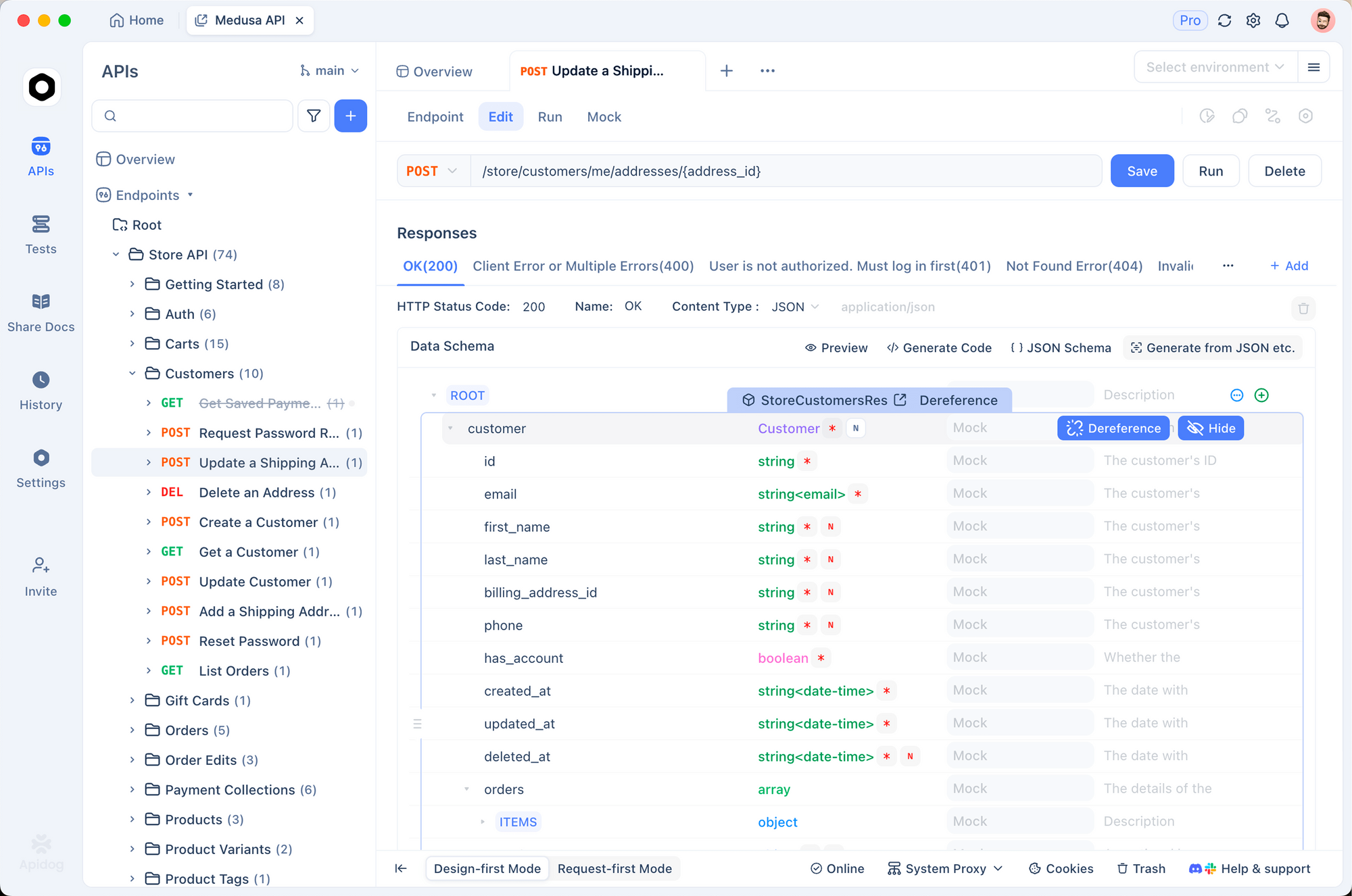
In Apidog, go to your project and create a new endpoint. Set the URL to whatever wrapper API you've built around Gemma 4 (or point directly at the Google AI Studio endpoint). Define the expected response schema in the Apidog interface.
Step 2: Use Smart Mock to prototype expected responses.
Before running live tests against Gemma 4, use Apidog's Smart Mock to generate baseline responses from your schema. Smart Mock reads your response specification and produces realistic data based on property names and types. A field named email automatically gets a valid email address. A field named created_at gets a properly formatted timestamp.
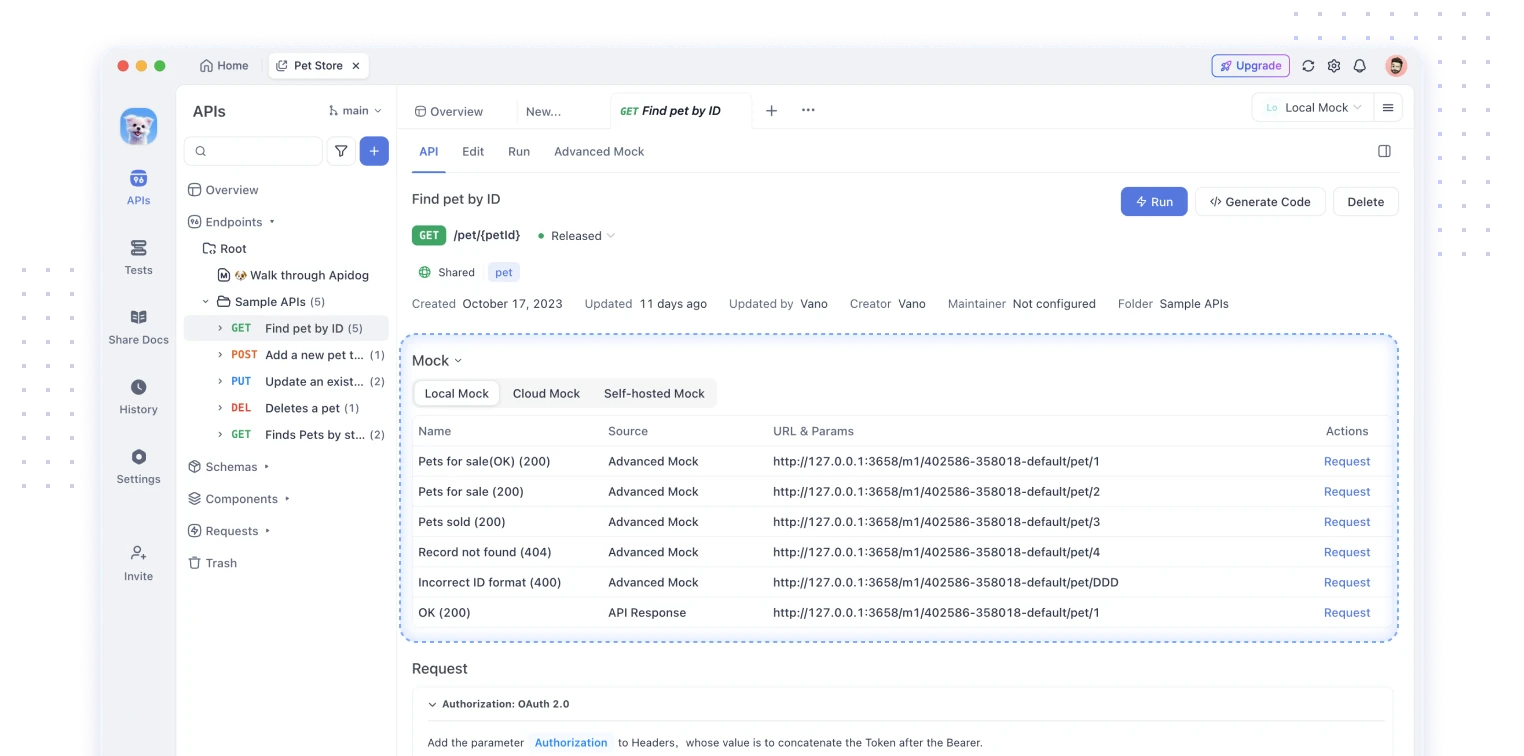
Smart Mock uses three priority layers: custom mock field values first, then property name matching (where it infers data type from field names), then JSON Schema defaults. This hierarchy means you can override specific fields while letting the engine handle the rest.
Step 3: Create a Test Scenario for your Gemma 4 pipeline.
Go to the Tests module in Apidog and create a new Test Scenario. Add your Gemma 4 API call as the first step. Then add assertion steps to validate the response.
Apidog's Test Scenario orchestrate mode lets you chain multiple requests. For a Gemma 4 API integration test, your scenario might look like this:
- Call your authentication endpoint to get a token
- Send a prompt to Gemma 4 with the auth token
- Extract the generated JSON from the response body
- Validate the extracted JSON against your schema assertions
- Pass the validated data to a downstream POST endpoint
Step 4: Set up assertions.
In the assertion step, you can check status codes, response headers, and JSON fields. For Gemma 4 responses, you'd typically assert that the candidates[0].content.parts[0].text field exists and that its parsed content matches your expected schema.
Use Apidog's Extract Variable processor to pull the Gemma 4 output into a variable. Then use that variable in subsequent request steps. This lets you chain Gemma 4-generated data through a multi-step test workflow.
Step 5: Run with data-driven testing.
Apidog supports CSV and JSON test data files. You can define 50 different prompt variations in a CSV, import it into your Test Scenario, and run all 50 variations in one click. This is how you test that your Gemma 4 integration handles diverse inputs correctly.
The full workflow from schema definition to test execution takes about 15 minutes to set up. After that, you can run it on every commit via Apidog CLI in your CI/CD pipeline.
Real-world use cases
API test data generation. QA teams spend significant time writing test fixtures. With Gemma 4's JSON output mode and your OpenAPI schema, you can generate hundreds of realistic test records in minutes. Feed the schema, specify edge cases you want to cover, and let the model produce the data.
Intelligent API mocking. Traditional mocks return static data. With Gemma 4 behind your mock server, you can return contextually appropriate responses. A mock for a product search API could return different product sets based on the search query, even without hard-coding each case.
API documentation generation. Gemma 4's 256K context window lets you feed your entire codebase into a prompt. Ask it to generate OpenAPI documentation for undocumented endpoints. The function-calling support means you can build an agent that reads your route files and automatically writes API specs.
Response schema validation. When consuming third-party APIs, you want to validate that responses match your expectations. Use Gemma 4 to analyze API responses and flag schema violations. It can spot missing fields, incorrect types, and inconsistent enums better than a simple JSON Schema validator.
Automated regression test writing. Give Gemma 4 your API spec and a list of bug reports. Ask it to write test cases that would have caught each bug. Because it understands the schema relationships, it can write non-trivial tests that check state transitions and field dependencies.
Gemma 4 vs other open models for API use
How does Gemma 4 compare to other open models when your goal is building API tooling?
| Model | Params | Context | JSON output | Function calling | License |
|---|---|---|---|---|---|
| Gemma 4 31B | 31B | 256K | Native | Native | Apache 2.0 |
| Gemma 4 26B MoE | 26B (3.8B active) | 256K | Native | Native | Apache 2.0 |
| Llama 3.3 70B | 70B | 128K | Via prompt | Via prompt | Llama Community |
| Mistral 7B | 7B | 32K | Via prompt | Limited | Apache 2.0 |
| Qwen 2.5 72B | 72B | 128K | Native | Native | Apache 2.0 |
For API use cases, the critical features are native JSON output mode, function calling support, and context length. Gemma 4 31B and 26B both have all three.
Llama 3.3 70B is the main competitor. It's a strong model, but it requires 2x the compute of Gemma 4 31B to run. On Arena AI's leaderboard, Gemma 4 31B ranks above Llama 3.3 70B despite being half the size. If you're running inference at scale, that difference in GPU requirements translates directly to infrastructure cost.
Mistral 7B is much smaller and faster, but its 32K context window limits its usefulness for large API specs. It also lacks native JSON mode and reliable function calling.
Qwen 2.5 72B is a capable alternative, particularly for multilingual applications. Its API tooling features are comparable to Gemma 4, but it requires significantly more hardware.
The Apache 2.0 license on Gemma 4 is an underrated advantage. Llama uses the Llama Community License, which has restrictions on certain commercial uses. If you're building a product on top of an open model, the legal clarity of Apache 2.0 matters.
For most API tooling use cases: start with Gemma 4 26B MoE for latency-sensitive tasks, or Gemma 4 31B for highest quality output.
Conclusion
Gemma 4 gives developers a credible open alternative to proprietary AI APIs for building API tooling. The Apache 2.0 license removes the legal friction that made earlier open models complicated to ship commercially. Native function calling and JSON output mode make it practical to integrate into API workflows without extensive prompt engineering.
The four model sizes cover every hardware tier from phones to workstations. The 26B MoE model is the standout option for most API development use cases: it delivers near-frontier quality at a fraction of the inference cost.
Pair Gemma 4 with Apidog to close the loop between AI-generated data and API validation. Use Gemma 4 to generate test data and mock responses. Use Apidog's Smart Mock to prototype schemas and its Test Scenarios to validate that the AI output meets your API contract. Together they form a practical workflow for building and testing AI-powered APIs.
FAQ
What is Gemma 4?Gemma 4 is Google DeepMind's latest family of open language models, released in April 2026. It comes in four sizes (E2B, E4B, 26B MoE, 31B Dense) and is licensed under Apache 2.0. The 31B model currently ranks #3 among all open models on Arena AI's text leaderboard.
Is Gemma 4 free to use?The model weights are free to download and use under the Apache 2.0 license. You pay for compute when you run it yourself. If you use Google AI Studio, there's a free tier with rate limits. Vertex AI charges standard Google Cloud compute rates.
Can Gemma 4 output structured JSON?Yes. Gemma 4 supports a native response_mime_type: "application/json" parameter through the Google Generative AI SDK. This forces the model to return valid JSON every time, which is essential for API integrations where you're parsing the output programmatically.
How does Gemma 4 compare to GPT-4o for API development?GPT-4o is a proprietary model with no local deployment option and higher API costs. Gemma 4 31B is free to deploy locally, and its benchmark scores are competitive with GPT-4o on reasoning tasks. For teams that need data privacy or cost control, Gemma 4 is worth evaluating seriously.
Can I fine-tune Gemma 4 on my own API data?Yes. Google supports fine-tuning Gemma 4 through Google AI Studio, Vertex AI, and third-party tools like Hugging Face TRL. Fine-tuning on domain-specific API schemas and response patterns can significantly improve output quality for specialized use cases.
What hardware do I need to run Gemma 4 locally?The 31B and 26B models fit on a single 80GB NVIDIA H100 in bfloat16. Quantized versions run on consumer GPUs with 16-24GB VRAM. The E4B and E2B models run on phones and edge devices, including Raspberry Pi and NVIDIA Jetson.
Does Gemma 4 support function calling?Yes, all Gemma 4 models support native function calling. You define tools as JSON objects with a name, description, and parameter schema. The model decides when to call a tool and passes structured arguments you can act on in code.
How do I test Gemma 4 API responses automatically?Use Apidog's Test Scenarios to build a chained test workflow. Import your Gemma 4 API endpoint, set up request steps, and add assertions to validate response structure. You can run the scenario locally, via CLI, or automatically in your CI/CD pipeline on every code push.