TL;DR
DigitalOcean APIs manage droplets, volumes, firewalls, load balancers, Kubernetes clusters, and more. Authenticate with personal access tokens, call api.digitalocean.com/v2, and handle rate limits. For testing, use Apidog to validate configurations, test infrastructure provisioning, and document your automation workflows.
Introduction
DigitalOcean simplifies cloud computing. While AWS and GCP offer hundreds of services, DigitalOcean focuses on the essentials: compute (droplets), storage (volumes), networking (floating IPs, firewalls), managed Kubernetes, and app platform. The API matches this simplicity.
Developers use DigitalOcean’s API for:
- Spinning up development environments automatically
- Managing Kubernetes clusters
- Infrastructure as code with Terraform or Pulumi
- CI/CD pipeline provisioning
- Multi-region deployments
Authentication
Personal access tokens
- Go to DigitalOcean Dashboard → API → Generate New Token
- Name the token and set expiration
- Copy and store securely
Using the token:
curl -X GET "https://api.digitalocean.com/v2/account" \
  -H "Authorization: Bearer YOUR_TOKEN"
Response format
{
  "account": {
    "droplet_limit": 25,
    "email": "you@example.com",
    "name": "Your Name",
    "uuid": "abc123xyz",
    "email_verified": true,
    "status": "active"
  }
}
Droplets (virtual machines)
List all droplets
curl -X GET "https://api.digitalocean.com/v2/droplets" \
  -H "Authorization: Bearer YOUR_TOKEN"
Create a droplet
curl -X POST "https://api.digitalocean.com/v2/droplets" \
  -H "Authorization: Bearer YOUR_TOKEN" \
  -H "Content-Type: application/json" \
  -d '{
    "name": "my-droplet",
    "region": "nyc1",
    "size": "s-2vcpu-4gb",
    "image": "ubuntu-20-04-x64",
    "ssh_keys": ["ssh-rsa AAAA..."],
    "backups": false,
    "ipv6": true,
    "tags": ["web", "production"]
  }'
Popular sizes:
s-1vcpu-1gb- 1 vCPU, 1GB RAM ($5/mo)s-2vcpu-2gb- 2 vCPU, 2GB RAM ($10/mo)s-2vcpu-4gb- 2 vCPU, 4GB RAM ($20/mo)s-4vcpu-8gb- 4 vCPU, 8GB RAM ($40/mo)
Regions:
nyc1,nyc3- New Yorksfo3- San Franciscoams3- Amsterdamsgp1- Singapore
Get droplet details
curl -X GET "https://api.digitalocean.com/v2/droplets/DROPLET_ID" \
  -H "Authorization: Bearer YOUR_TOKEN"
Delete a droplet
curl -X DELETE "https://api.digitalocean.com/v2/droplets/DROPLET_ID" \
  -H "Authorization: Bearer YOUR_TOKEN"
Droplet actions
Reboot:
curl -X POST "https://api.digitalocean.com/v2/droplets/DROPLET_ID/actions" \
  -H "Authorization: Bearer YOUR_TOKEN" \
  -H "Content-Type: application/json" \
  -d '{
    "type": "reboot"
  }'
Resize:
curl -X POST "https://api.digitalocean.com/v2/droplets/DROPLET_ID/actions" \
  -H "Authorization: Bearer YOUR_TOKEN" \
  -H "Content-Type: application/json" \
  -d '{
    "type": "resize",
    "size": "s-4vcpu-8gb"
  }'
Snapshot:
curl -X POST "https://api.digitalocean.com/v2/droplets/DROPLET_ID/actions" \
  -H "Authorization: Bearer YOUR_TOKEN" \
  -H "Content-Type: application/json" \
  -d '{
    "type": "snapshot",
    "name": "my-snapshot"
  }'
Volumes (block storage)
Create a volume
curl -X POST "https://api.digitalocean.com/v2/volumes" \
  -H "Authorization: Bearer YOUR_TOKEN" \
  -H "Content-Type: application/json" \
  -d '{
    "size_gigabytes": 100,
    "name": "my-volume",
    "region": "nyc1",
    "description": "Data volume for web servers"
  }'
Attach volume to droplet
curl -X POST "https://api.digitalocean.com/v2/volumes/VOLUME_ID/actions" \
  -H "Authorization: Bearer YOUR_TOKEN" \
  -H "Content-Type: application/json" \
  -d '{
    "type": "attach",
    "droplet_id": DROPLET_ID
  }'
List volumes
curl -X GET "https://api.digitalocean.com/v2/volumes" \
  -H "Authorization: Bearer YOUR_TOKEN"
Networking
List floating IPs
curl -X GET "https://api.digitalocean.com/v2/floating_ips" \
  -H "Authorization: Bearer YOUR_TOKEN"
Assign floating IP
curl -X POST "https://api.digitalocean.com/v2/floating_ips" \
  -H "Authorization: Bearer YOUR_TOKEN" \
  -H "Content-Type: application/json" \
  -d '{
    "droplet_id": DROPLET_ID,
    "region": "nyc1"
  }'
Create firewall
curl -X POST "https://api.digitalocean.com/v2/firewalls" \
  -H "Authorization: Bearer YOUR_TOKEN" \
  -H "Content-Type: application/json" \
  -d '{
    "name": "web-firewall",
    "inbound_rules": [
      {
        "protocol": "tcp",
        "ports": "80",
        "sources": {
          "addresses": ["0.0.0.0/0"]
        }
      },
      {
        "protocol": "tcp",
        "ports": "443",
        "sources": {
          "addresses": ["0.0.0.0/0"]
        }
      },
      {
        "protocol": "tcp",
        "ports": "22",
        "sources": {
          "addresses": ["your-ip/32"]
        }
      }
    ],
    "outbound_rules": [
      {
        "protocol": "tcp",
        "ports": "80",
        "destinations": {
          "addresses": ["0.0.0.0/0"]
        }
      }
    ],
    "droplet_ids": [DROPLET_ID]
  }'
Load balancers
Create a load balancer
curl -X POST "https://api.digitalocean.com/v2/load_balancers" \
  -H "Authorization: Bearer YOUR_TOKEN" \
  -H "Content-Type: application/json" \
  -d '{
    "name": "my-lb",
    "region": "nyc1",
    "algorithm": "round_robin",
    "health_check": {
      "protocol": "http",
      "port": 80,
      "path": "/",
      "check_interval_seconds": 10,
      "response_timeout_seconds": 5,
      "healthy_threshold": 3,
      "unhealthy_threshold": 3
    },
    "forwarding_rules": [
      {
        "entry_protocol": "http",
        "entry_port": 80,
        "target_protocol": "http",
        "target_port": 80
      },
      {
        "entry_protocol": "https",
        "entry_port": 443,
        "target_protocol": "https",
        "target_port": 443,
        "tls_passthrough": true
      }
    ],
    "droplet_ids": [DROPLET_ID_1, DROPLET_ID_2]
  }'
Kubernetes clusters
Create a Kubernetes cluster
curl -X POST "https://api.digitalocean.com/v2/kubernetes/clusters" \
  -H "Authorization: Bearer YOUR_TOKEN" \
  -H "Content-Type: application/json" \
  -d '{
    "name": "my-cluster",
    "region": "nyc1",
    "version": "1.28",
    "node_pools": [
      {
        "name": "worker-pool",
        "size": "s-2vcpu-4gb",
        "count": 3,
        "auto_scale": true,
        "min_nodes": 2,
        "max_nodes": 6
      }
    ]
  }'
List node pools
curl -X GET "https://api.digitalocean.com/v2/kubernetes/clusters/CLUSTER_ID/node_pools" \
  -H "Authorization: Bearer YOUR_TOKEN"
Scale node pool
curl -X PUT "https://api.digitalocean.com/v2/kubernetes/clusters/CLUSTER_ID/node_pools/POOL_ID" \
  -H "Authorization: Bearer YOUR_TOKEN" \
  -H "Content-Type: application/json" \
  -d '{
    "count": 5
  }'
Delete cluster
curl -X DELETE "https://api.digitalocean.com/v2/kubernetes/clusters/CLUSTER_ID" \
  -H "Authorization: Bearer YOUR_TOKEN"
Testing with Apidog
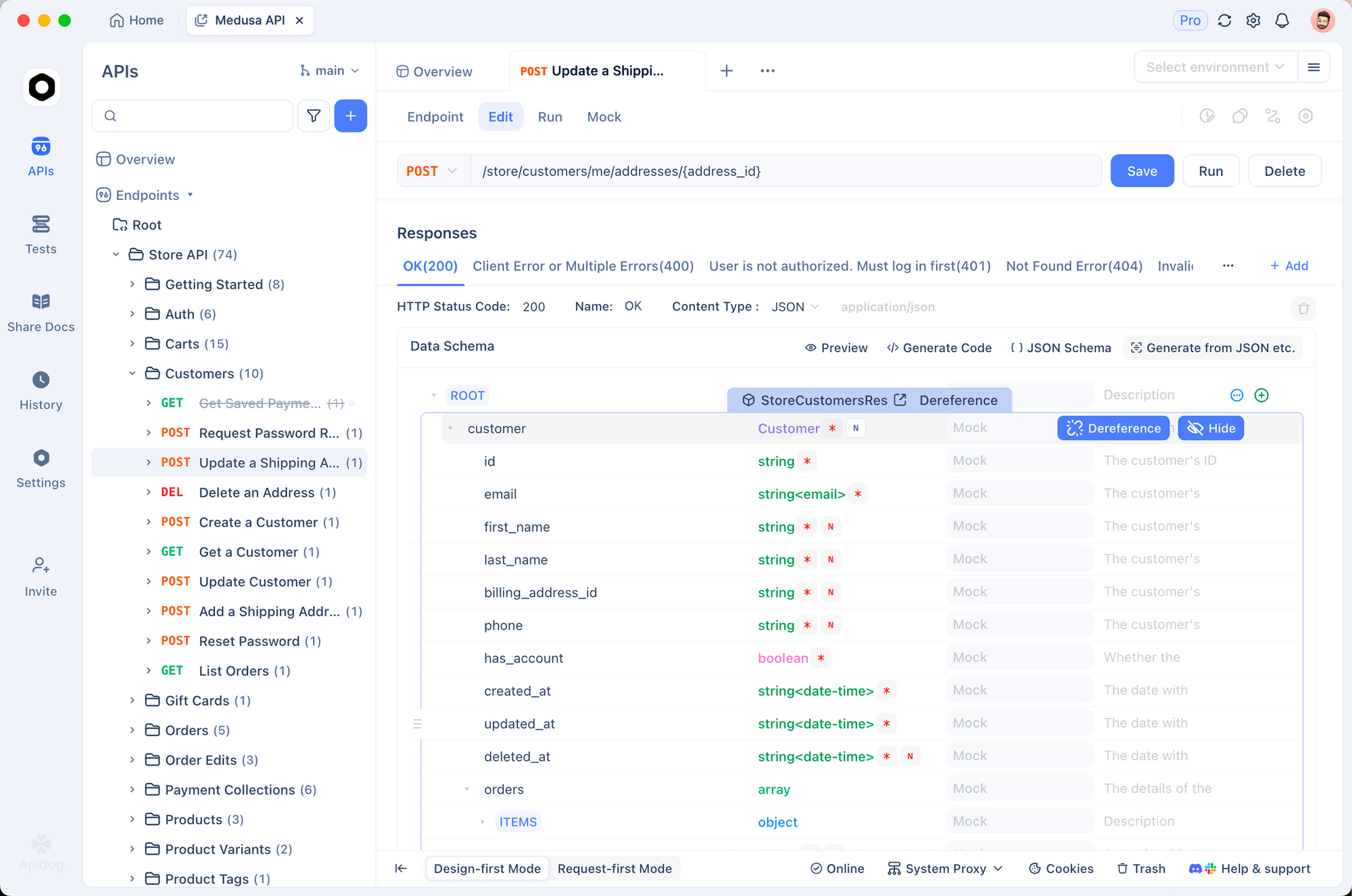
Infrastructure provisioning is expensive. Test thoroughly before creating resources.
1. Environment setup
DIGITALOCEAN_TOKEN: your_token
BASE_URL: https://api.digitalocean.com/v2
DEFAULT_REGION: nyc1
DEFAULT_SIZE: s-2vcpu-4gb
2. Validate responses
pm.test('Droplet created successfully', () => {
  const response = pm.response.json()
  pm.expect(response.droplet).to.have.property('id')
  pm.expect(response.droplet.status).to.eql('new')
})

pm.test('Token is valid', () => {
  const response = pm.response.json()
  pm.expect(response.account).to.exist
  pm.expect(response.account.status).to.eql('active')
})
3. Dry run concepts
DigitalOcean doesn’t offer true dry runs, but you can validate inputs:
const validRegions = ['nyc1', 'sfo3', 'ams3', 'sgp1']
const validSizes = ['s-1vcpu-1gb', 's-2vcpu-2gb', 's-2vcpu-4gb']

pm.test('Region is valid', () => {
  const requestBody = JSON.parse(pm.request.body.raw)
  pm.expect(validRegions).to.include(requestBody.region)
})

pm.test('Size is valid', () => {
  const requestBody = JSON.parse(pm.request.body.raw)
  pm.expect(validSizes).to.include(requestBody.size)
})
Test DigitalOcean infrastructure APIs with Apidog - free
Common errors and fixes
401 Unauthorized
Cause: Invalid or expired token.
Fix: Regenerate your token from the dashboard. Check the Authorization header format.
422 Unprocessable Entity
Cause: Invalid parameters (wrong region, size, image, etc.).
Fix: Check DigitalOcean’s API documentation for valid values. Common issues:
- Region doesn’t support the requested size
- Image ID doesn’t exist
- Droplet limit reached
429 Too Many Requests
Cause: Rate limit exceeded (default 2000 requests/hour).
Fix: Implement backoff:
async function doRequest(url, options, retries = 3) {
  for (let i = 0; i < retries; i++) {
    const response = await fetch(url, options)
    if (response.status === 429) {
      await sleep(Math.pow(2, i) * 1000)
      continue
    }
    return response
  }
  throw new Error('Rate limited')
}
Droplet limit reached
Cause: Account has too many droplets.
Fix: Delete unused droplets or request a limit increase from support.
Alternatives and comparisons
| Feature | DigitalOcean | AWS | GCP |
|---|---|---|---|
| Droplet sizes | Fixed | Custom | Custom |
| Kubernetes | Managed DOKS | EKS | GKE |
| Object storage | Spaces | S3 | Cloud Storage |
| Block storage | Volumes | EBS | Persistent Disk |
| Load balancers | Built-in | ELB | Cloud Load Balancing |
| Free tier | $200 credit | Limited | $300 credit |
| API simplicity | ★★★★★ | ★★☆☆☆ | ★★★☆☆ |
DigitalOcean wins on simplicity. The API is straightforward, and most operations work without dealing with dozens of nested services.
Real-world use cases
Development environments. A startup creates isolated dev environments per branch. Every PR triggers API calls to create a droplet with the latest code. After merge, the droplet is destroyed. Developers test in production-like environments without manual setup.
Auto-scaling web servers. A web application monitors load. When CPU exceeds 70%, the API creates new droplets and adds them to the load balancer. When load drops, droplets are destroyed. Costs stay low while performance stays high.
Database clusters. A managed database service provisions primary and replica volumes across regions. The API handles replication configuration, backup scheduling, and failover setup automatically.
Conclusion
Here’s what you’ve learned:
- Authenticate with personal access tokens
- Create and manage droplets programmatically
- Work with volumes for persistent storage
- Configure firewalls and load balancers
- Manage Kubernetes clusters
- Test infrastructure with Apidog before provisioning
FAQ
How much does a droplet cost?Prices start at $5/month for 1 vCPU/1GB. Check pricing page for current rates. Hourly billing is available.
Can I use SSH keys with API-created droplets?Yes. Include the SSH key fingerprint in the ssh_keys array when creating droplets.
What’s the difference between volumes and Spaces?Volumes are block storage attached to droplets. Spaces are object storage (like S3). Use volumes for databases, Spaces for files.
How do I get the Kubernetes config?
curl -X GET "https://api.digitalocean.com/v2/kubernetes/clusters/CLUSTER_ID/kubeconfig" \
  -H "Authorization: Bearer YOUR_TOKEN"
Can I resize a droplet?Yes, use the resize action. Downgrades require a power-off. Upgrades can be done while running.
What’s the difference between backups and snapshots?Backups are automatic weekly/daily copies managed by DigitalOcean. Snapshots are manual on-demand images you create.
How long do droplets take to create?Usually 30-60 seconds. Some regions and sizes may take longer.
Can I use Terraform with DigitalOcean?Yes. DigitalOcean has an official Terraform provider. It’s excellent for infrastructure as code.