
Developers and AI engineers continually face the challenge of bridging visual data (like images and documents) with text-based processing in large language models (LLMs). DeepSeek-AI tackles this with DeepSeek-OCR, a model purpose-built for "contexts optical compression"—efficiently compressing complex visual information into concise, context-rich text tokens that LLMs can handle.
Released in October 2025, DeepSeek-OCR represents a leap forward for teams working on document automation, image-to-text conversion, and visual data analysis. Its LLM-focused design enables high accuracy, reduced computational overhead, and support for real-time, large-scale workloads.
What Is Contexts Optical Compression?
Contexts optical compression is the process of transforming images into compact, information-rich text tokens for efficient LLM consumption. Unlike traditional OCR—often limited to plain text extraction—DeepSeek-OCR preserves layout, spatial relationships, and context, enabling more meaningful and actionable outputs.
Key Advantages:
- Rich Context: Retains document structure, headings, tables, and spatial references.
- Flexible Resolution Modes: Supports images from quick previews (tiny mode) to high-detail (large mode) with minimal tokens.
- Grounding Capabilities: Enables precise location referencing within images for advanced use cases.
Traditional OCR tools, like Tesseract, can struggle with complex layouts and context. DeepSeek-OCR leverages deep neural architectures, enabling it to handle handwritten notes, distorted scans, and multilingual content with high fidelity.
How DeepSeek-OCR Works: Technical Fundamentals
DeepSeek-OCR is engineered with an LLM-centric vision encoder that compresses visual data into a minimal yet informative token set.
Compression Workflow:
- Image Analysis: Encodes native-resolution images, identifying text, layout, and figures.
- Token Generation: Translates visual features into compressed representations, distinguishing sections like headings, body, and tables.
- Dynamic Resolution: "Gundam" mode combines multiple image segments for dense or oversized documents.
- Grounding Tags: Uses special references (e.g.,
<|ref|>xxxx<|/ref|>) for pinpointing elements in images—ideal for AR or interactive document scenarios.
Token Modes:
- Tiny: 512×512 px, 64 tokens
- Small: 640×640 px, 100 tokens
- Base: 1024×1024 px, 256 tokens
- Large: 1280×1280 px, 400 tokens
This scalability allows you to optimize for speed, resource usage, or detail, depending on your workflow.
DeepSeek-OCR in Action: Features for Developers
DeepSeek-OCR comes packed with features tailored for modern AI and API development:
- Native Resolution Flexibility: Choose the optimal mode for your use case, from quick previews to detailed scans.
- Dynamic “Gundam” Mode: Processes ultra-high-res documents by stitching multiple segments.
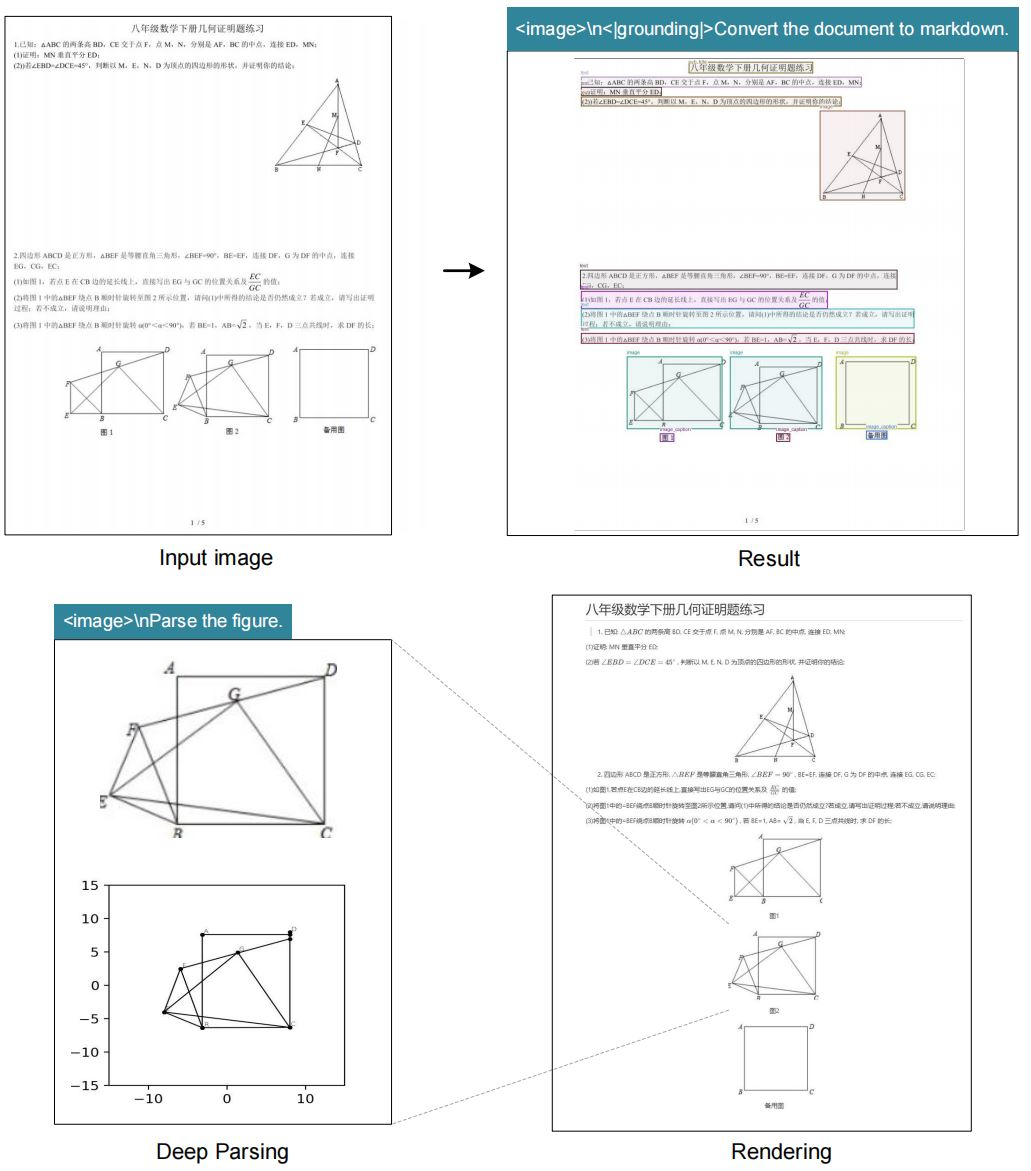
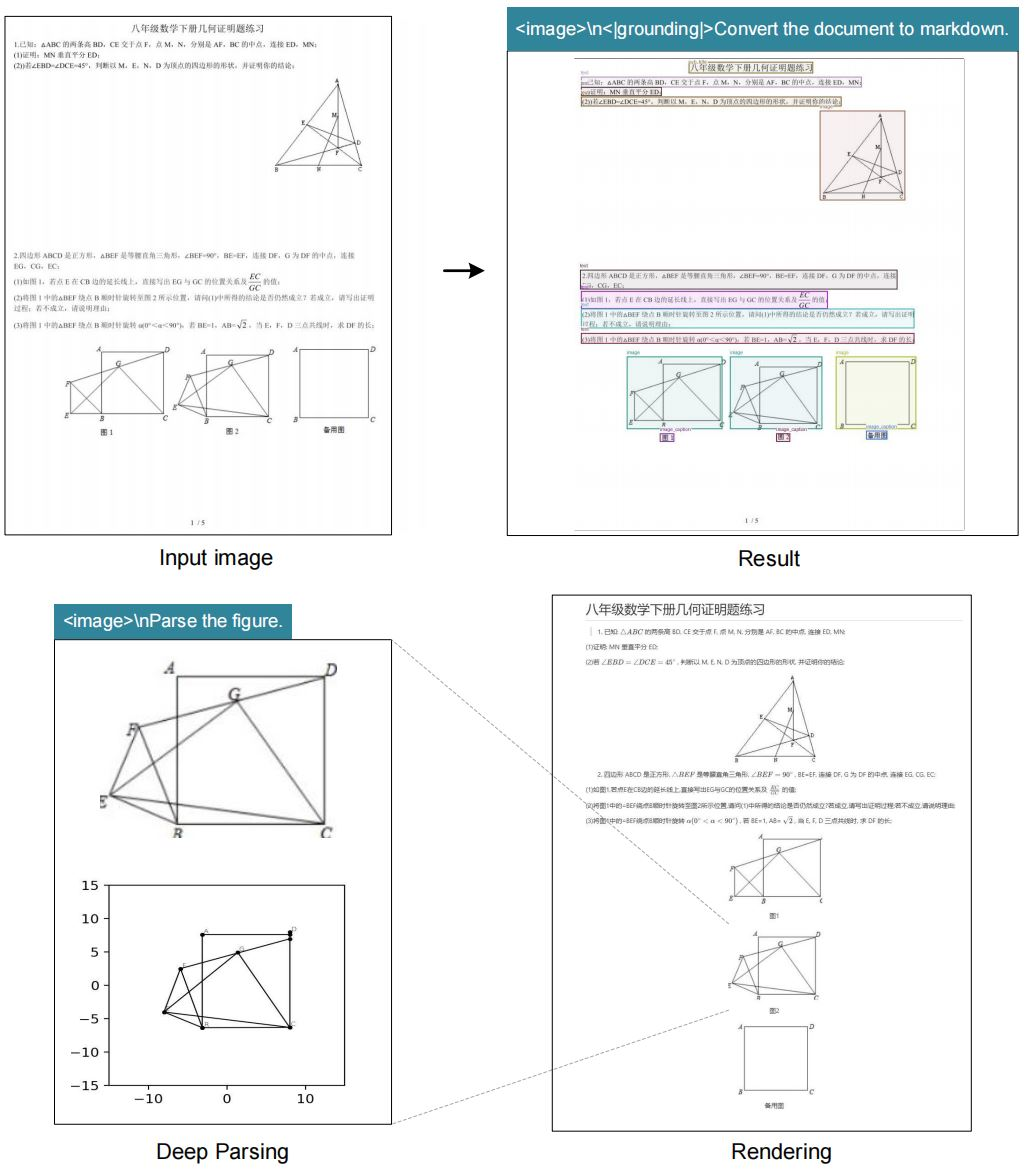
- Markdown Output: Converts documents into structured markdown, preserving tables, lists, and hierarchies.
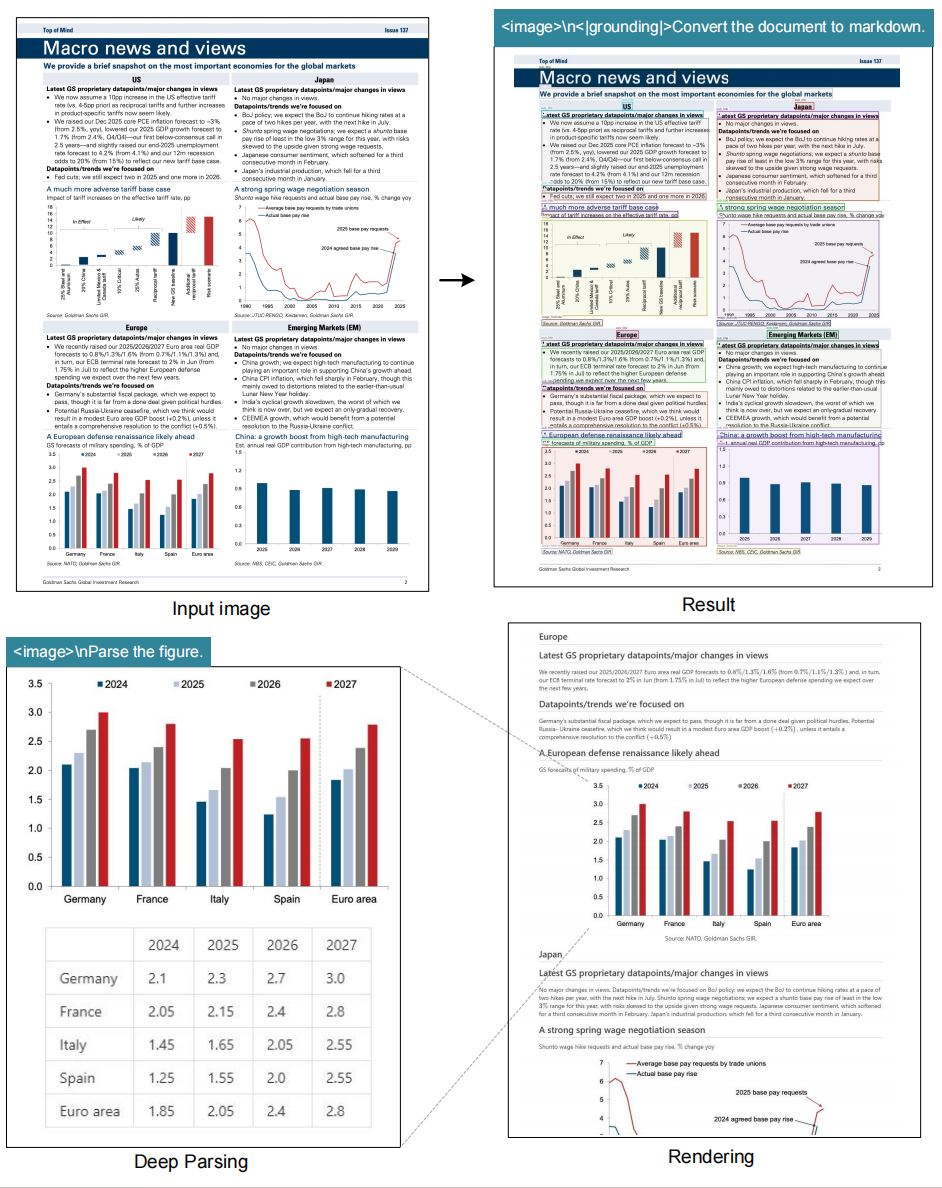
- Figure Parsing: Extracts data and descriptions from charts and graphs.
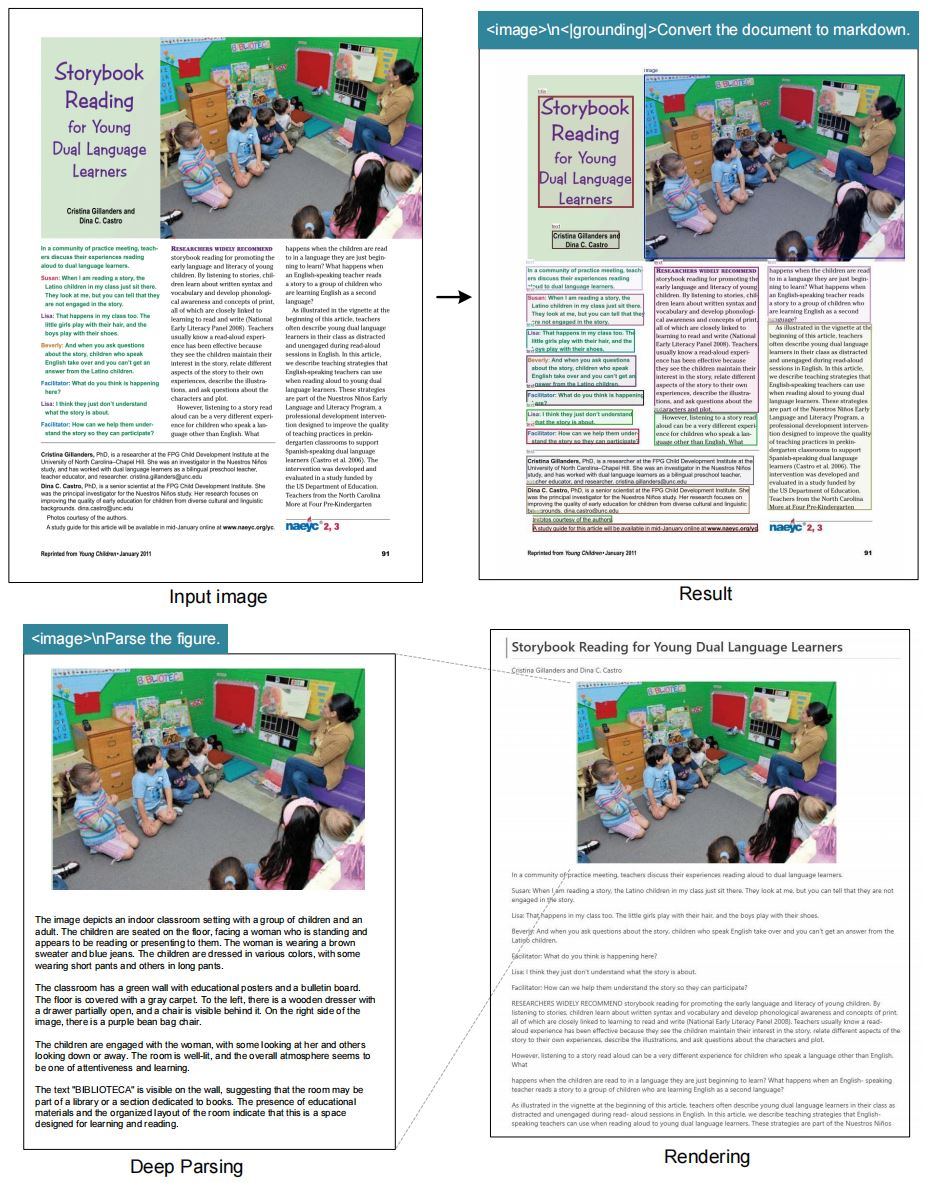
- General Image Captioning: Generates accessible, context-aware image descriptions.
- Location Referencing: Query or extract data about specific elements, thanks to advanced grounding.
- Fast Inference: Achieves up to 2500 tokens/sec on an A100-40G GPU (vLLM and Transformers compatible).
- Lightweight Deployments: Minimal dependencies for secure, scalable integration.
Example Use Cases:
- Automated document processing in financial or legal workflows
- Building visual question-answering systems
- Enhancing accessibility tools with rich image descriptions
- API-driven batch OCR pipelines for digital archiving
Under the Hood: DeepSeek-OCR Architecture
DeepSeek-OCR’s architecture is designed for efficient, accurate, and context-aware OCR.
- Image Preprocessing: Resizes and normalizes input images.
- Vision Transformer Backbone: Splits images into patches, each encoded into embeddings.
- Compressed Tokenization: Multi-head attention and feed-forward networks synthesize visual context into concise tokens.
- LLM Integration: Prepends vision tokens to text prompts, minimizing context length and memory use.
- Spatial Grounding: Special tokens activate modules that map queries to specific coordinates or regions within the image.
- Optimized Training: Fine-tuned on paired image-text datasets, balancing compression and accuracy.
Dynamic Mode: Dynamically stitches embeddings from multiple passes, ensuring consistency when processing documents of varying sizes.
Installation Guide: Getting Started with DeepSeek-OCR
Set up DeepSeek-OCR in a modern Python environment with CUDA support. Here’s how:
- Clone the Repository:
git clone https://github.com/deepseek-ai/DeepSeek-OCR.git cd DeepSeek-OCR - Create & Activate Conda Environment:
conda create -n deepseek-ocr python=3.12.9 -y conda activate deepseek-ocr - Install PyTorch & Dependencies:
pip install torch==2.6.0 torchvision==0.21.0 torchaudio==2.6.0 --index-url https://download.pytorch.org/whl/cu118 - Install vLLM:
- Download the vLLM-0.8.5 wheel from the official release.
- Install:
pip install vllm-0.8.5+cu118-cp38-abi3-manylinux1_x86_64.whl
- Install Requirements:
pip install -r requirements.txt
pip install flash-attn==2.7.3 --no-build-isolation
Note: Ignore any errors related to vLLM and Transformers as advised in the documentation.
Performance & Benchmarking
DeepSeek-OCR is engineered for high throughput and accuracy:
- Speed: Up to 2500 tokens/sec (A100-40G GPU)
- Benchmarks:
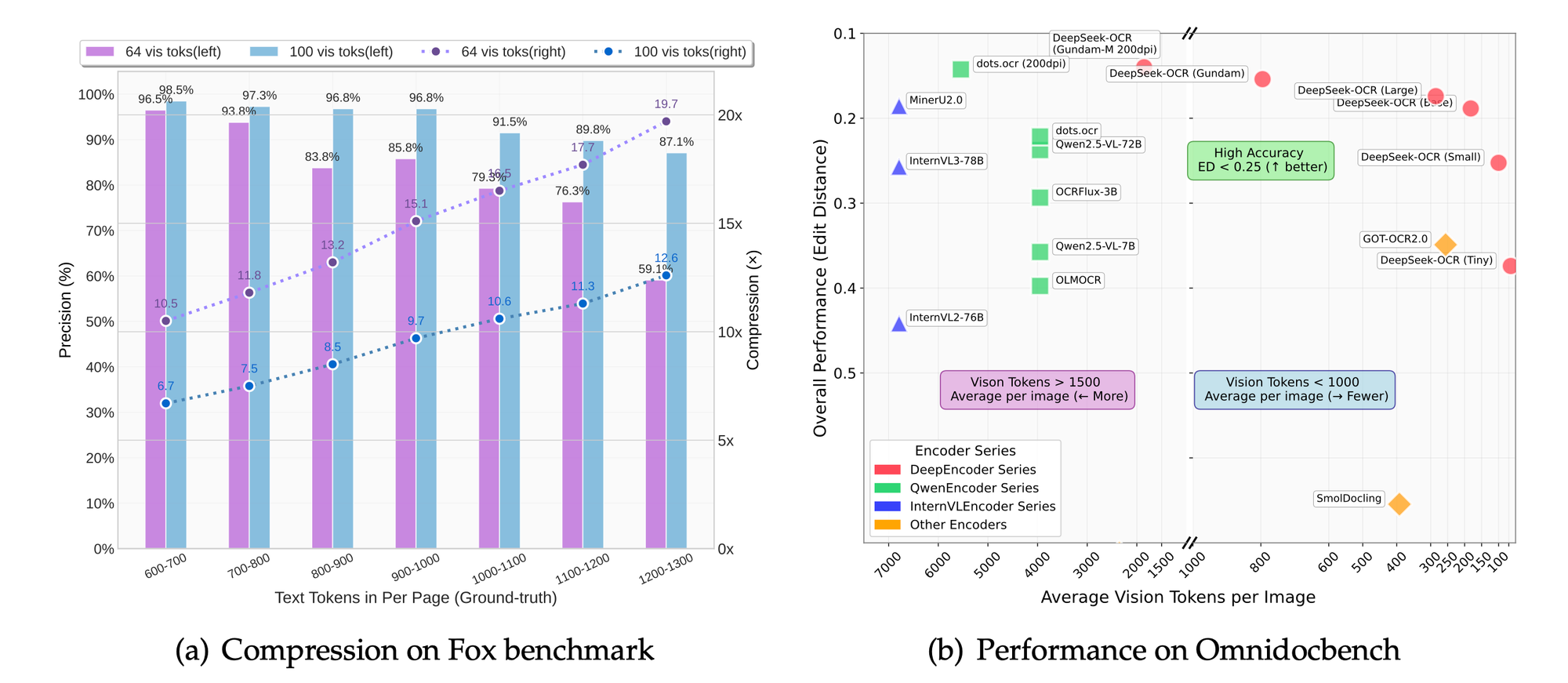
- Fox, OmniDocBench: Outperforms on OCR precision, layout retention, and figure parsing.
- Compression: Reduces tokens by 50% while maintaining 95%+ extraction accuracy.
- Resolution Scaling: Higher modes provide finer detail at the cost of more tokens; "base" mode offers a strong balance for most production scenarios.
Comparing DeepSeek-OCR with Other OCR Solutions
| Feature | DeepSeek-OCR | PaddleOCR | GOT-OCR2.0 | MinerU | Tesseract |
|---|---|---|---|---|---|
| LLM Integration | Yes | No | Partial | No | No |
| Contextual Output | Yes | No | Partial | No | No |
| Dynamic Resolution | Yes | No | No | No | No |
| Grounding Support | Yes | No | No | No | No |
| Token Compression | High | Medium | Medium | Low | Low |
| Markdown Output | Yes | No | No | No | No |
DeepSeek-OCR stands out for LLM compatibility, advanced context retention, and efficient visual token compression—ideal for modern AI and API-based applications.
Why Apidog Matters for DeepSeek-OCR API Integration
When deploying DeepSeek-OCR in real-world projects, managing API endpoints, testing OCR responses, and monitoring performance are key challenges. Apidog offers a unified platform for:
- Rapid API Testing: Validate OCR endpoints, payloads, and responses in real time.
- Mocking and Automation: Simulate OCR APIs for integration and QA without production dependencies.
- Performance Monitoring: Track response times and errors to optimize workflows.
- Seamless Collaboration: Share API collections with your team for faster debugging and iteration.
Download Apidog to accelerate your DeepSeek-OCR API development and ensure robust production deployments.
Conclusion
DeepSeek-OCR is redefining how developers and teams process visual data, bridging the gap between images and LLM-powered text workflows. Its architecture, features, and speed make it a top choice for advanced OCR and context-rich document processing. Combined with tools like Apidog, integrating DeepSeek-OCR into your API stack is faster, more reliable, and ready for the demands of modern AI applications.