Accelerating software development with AI-powered tools is now a core strategy for API and backend engineers. Cursor Composer, a specialized AI agent within the Cursor IDE, is gaining traction among developers for its efficiency in code generation, refactoring, and agentic workflows. But how does its pricing structure compare to alternatives, and is it worth the investment for API-focused teams?
💡 Seamless API management is essential alongside modern AI coding tools. Download Apidog for free to streamline your API testing and documentation—integrate smoothly with solutions like Cursor Composer and keep your development pipeline efficient.
What Is Cursor Composer? An Overview for API Developers
Cursor Composer operates as an agent-driven language model within the Cursor IDE, purpose-built for software engineering tasks. API developers and backend engineers use it for:
- Automated code generation and refactoring
- Debugging across large codebases
- Semantic file search and batch edits
- Integrating AI-driven workflows into daily tasks
Unlike generic coding assistants, Composer leverages a mixture-of-experts (MoE) architecture and is trained on real-world development environments. This results in smarter, faster code suggestions and efficient handling of complex engineering scenarios.
How Composer Works in Cursor IDE
- Supports parallel file edits and semantic search
- Integrates terminal commands for agentic workflows
- Learns to minimize unnecessary output via reinforcement learning
- Offers inline code generation, diff previews, and production-ready planning
For API and QA teams, this means less manual work and more reliable code changes—especially when paired with robust API management tools like Apidog.
Key Features: What Sets Cursor Composer Apart?
1. Agentic Workflows
Composer autonomously orchestrates sequences of actions—such as searching, editing, and testing code—across entire repositories. This agentic workflow reduces the need for manual intervention, especially useful for large-scale API projects.
2. Real-World Training
Reinforcement learning in sandboxed, production-like environments ensures Composer prioritizes verifiable and safe code actions. This increases reliability for enterprise and team settings.
3. Speed & Scalability
- MoE architecture enables rapid response times—up to 4x faster than some alternatives.
- Custom kernels minimize latency, which is critical for teams working with extensive codebases.
4. Deep IDE Integration
Composer’s tight integration with Cursor IDE features (inline code, diff previews) supports efficient iteration and review cycles.
5. Evaluation & Specialization
Benchmarks like Cursor Bench measure Composer’s adherence to best coding practices, correctness, and abstraction. This technical rigor matters for teams maintaining high API quality standards.
Cursor Pricing Plans: Which Tier Fits Your Workflow?
Cursor offers a range of subscription plans to fit different engineering needs:
- Hobby (Free): Limited access, ideal for evaluation or occasional use.
- Pro ($20/month): Includes 500 fast agent requests/month. Access to Composer and other models for code generation, refactoring, and agentic tasks.
- Pro+ ($60/month): 3x the usage credits, suitable for power users or frequent automations.
- Ultra ($200/month): High-volume capacity for teams running continuous AI-driven workflows.
- Teams ($40/user/month): Adds centralized billing, analytics, and admin controls.
- Enterprise (Custom): Privacy controls, role-based access, and tailored features for large organizations.

Note: All paid plans include Composer agent access, but advanced models and higher usage limits require paid tiers. Exceeding included credits triggers pay-as-you-go fees, making costs scalable for growing teams.
Understanding Token-Based Pricing for Composer
Cursor Composer uses a token-based pricing model for usage beyond included credits:
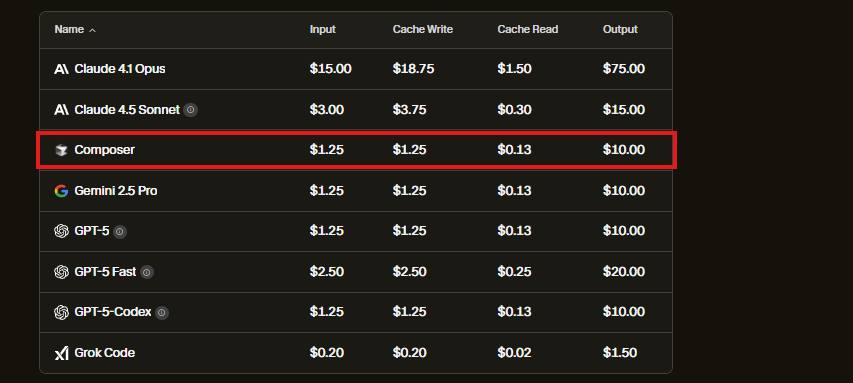
- Input tokens: $1.25 per million
- Output tokens: $1.25 per million
- Caching: $0.13 per million tokens (saves costs on repeated prompts)
- Special tool calls: $10.00 each in certain contexts
Example Calculation:
- 10,000 input tokens + 5,000 output tokens = $0.01875 per request
- Fast (low-latency) requests are deducted from your plan’s credit pool
Comparison:
Claude 4.5 Sonnet (via Cursor) is $3.00 input and $3.75 output per million tokens—over double Composer’s rates, making Composer a cost-efficient choice for regular API development work.
Typical Usage Scenarios: How Much Will Composer Cost You?
For most API or backend engineers:
- Moderate Pro users: 20–30 requests/day = $60–$100/month, covering code generation, refactoring, and semantic searches.
- Power users: Advanced automations or multiple agents may exceed $200/month (Ultra plan recommended).
- Enterprise/API teams: Shared usage pools on Teams or Enterprise plans enable predictable cost management.
Cost Factors:
- Large codebases (longer prompts/context) increase token usage.
- Repeated tasks can save money via caching.
- Usage analytics (available in higher tiers) help teams optimize prompts and reduce waste.
Practical Tip:
Break up massive codebase prompts and leverage caching to control costs without sacrificing productivity.
Cursor Composer vs. Other AI Coding Tools
How does Composer stack up against popular coding AI solutions?
| Tool | Individual Price | Model Depth | Token Pricing | Team Features |
|---|---|---|---|---|
| Cursor Composer | $20/month (Pro) | Agentic, MoE, IDE | $1.25/million tokens | Centralized, analytics |
| GitHub Copilot | $10/month | Autocomplete | N/A (flat rate) | Basic |
| Claude 3.5 Sonnet | $3–3.75/million | General AI | Higher | Limited |
| Windsurf | $15/seat | AI code editor | Complex | Not transparent |
| Ollama (Open-source) | Hardware cost | Run-your-own models | Variable, high infra | None |
- Copilot is more affordable but lacks agentic automation and deep IDE integration.
- Claude is more expensive per token and less specialized for software engineering.
- Open-source options like Ollama can incur significant hardware/cloud costs and require manual setup.
For API and QA engineers: Composer’s focus on real-world code workflows, speed, and cost transparency make it a strong choice—especially when paired with API management solutions like Apidog to cover end-to-end development needs.
Is Cursor Composer Worth It for API Teams?
If you’re a developer or team focused on API development, testing, or backend engineering, Composer offers:
- Reliable, fast code generation at a competitive price
- Specialized agentic workflows to automate routine tasks
- Scalable plans that fit solo users and large teams alike
For those seeking to maximize productivity, investing in Composer—especially at the Pro or Teams tier—can accelerate development cycles without unpredictable costs.
And with tools like Apidog integrated into your workflow, you can ensure API quality, testing, and documentation remain streamlined alongside your AI-powered codebase enhancements.