TL;DR
Claude Code Skills are custom capabilities that extend Claude’s functionality for specific workflows. The Skill Creator system automates skill creation through a structured process: define your skill’s purpose, draft the SKILL.md file, create test cases, run evaluations with quantitative benchmarks, and iteratively improve based on feedback.
Introduction
You’re using Claude Code daily. You notice yourself repeating the same sequences: setting up project structures, running specific test commands, formatting outputs a certain way. Each time, you explain the workflow from scratch. What if Claude remembered? What if you could capture that workflow once, and have it available forever? That’s what Claude Code Skills do. They’re custom capabilities you create to extend Claude’s functionality for your specific workflows. And with Skill Creator, the process is automated and systematic.
This guide walks you through the entire process. You’ll learn the skill anatomy, the creation workflow, the evaluation system, and how to optimize for reliable triggering. You’ll see working examples from the official Anthropic skills repository.
What Are Claude Code Skills?
Claude Code Skills are specialized instruction sets that extend Claude’s capabilities for specific domains or workflows. Think of them as custom plugins that live in markdown files.
The Skill System Architecture
Skills use a three-level loading system:
- Metadata (~100 words) - Name and description, always in context
- SKILL.md body (<500 lines) - Core instructions, loaded when skill triggers
- Bundled resources (unlimited) - Scripts, references, assets loaded on demand
skill-name/
├── SKILL.md (required)
│   ├── YAML frontmatter (name, description)
│   └── Markdown instructions
└── Bundled Resources (optional)
    ├── scripts/    - Executable code for repetitive tasks
    ├── references/ - Documentation loaded as needed
    └── assets/     - Templates, icons, fonts
When Skills Trigger
Skills appear in Claude’s available_skills list with their name and description. Claude decides whether to consult a skill based on that description.
Important: Skills only trigger for tasks Claude can’t handle directly. Simple queries like “read this file” won’t trigger a skill even with a matching description. Complex, multi-step workflows reliably trigger when the description matches.
Real-World Examples from Anthropic’s Repository
| Skill | Purpose | Key Features |
|---|---|---|
| skill-creator | Create new skills | Test case generation, benchmark evaluation, description optimization |
| mcp-builder | Build MCP servers | Python/Node templates, evaluation framework, best practices |
| docx | Generate Word documents | python-docx scripts, template system, styling guide |
| Extract and manipulate PDFs | Form handling, text extraction, reference docs | |
| frontend-design | Build web interfaces | Component library, Tailwind patterns, accessibility checks |
The Skill Creation Workflow
The skill creation process follows a systematic loop:
- Capture intent - What should the skill do?
- Write a draft - Create the SKILL.md file
- Create test cases - Define realistic prompts
- Run evaluations - Execute with and without the skill
- Review results - Qualitative feedback + quantitative metrics
- Iterate - Improve based on findings
- Optimize description - Maximize trigger accuracy
- Package - Distribute as a .skill file
Let’s walk through each step.
Step 1: Capture Intent
Start by understanding what you want the skill to accomplish. If you’re capturing a workflow you’ve already been doing, extract the pattern from your conversation history.
Ask these four questions:
- What should this skill enable Claude to do? Be specific about the outcome.
- When should this skill trigger? What user phrases or contexts?
- What’s the expected output format? Files, code, reports?
- Should we set up test cases? Skills with verifiable outputs (code generation, data extraction, file transforms) benefit from test cases. Skills with subjective outputs (writing style, design) often don’t need them.
Example: API Testing Skill
Intent: Help developers test REST APIs systematically
Trigger: When user mentions API testing, endpoints, REST, GraphQL, or wants to validate responses
Output: Test reports with pass/fail status, curl commands, response comparisons
Test cases: Yes - outputs are objectively verifiable
Step 2: Write the SKILL.md File
Every skill starts with a SKILL.md file containing YAML frontmatter and markdown instructions.
Skill Anatomy
---
name: api-tester
description: How to test REST APIs systematically. Use when users mention API testing, endpoints, REST, GraphQL, or want to validate API responses. Make sure to suggest this skill whenever testing is involved.
compatibility: Requires curl or HTTP client tools
---

# API Tester Skill

## Core Workflow

When testing an API, follow these steps:

1. **Understand the endpoint** - Read the spec or ask for the schema
2. **Design test cases** - Happy path, edge cases, error conditions
3. **Execute tests** - Use curl or Apidog for requests
4. **Validate responses** - Check status codes, headers, body structure
5. **Report results** - Summarize pass/fail with evidence

## Test Case Template

For each endpoint, test:

- Valid authentication with correct payload
- Valid authentication with missing required fields
- Invalid authentication (401 expected)
- Rate limiting behavior
- Response time under load

## Output Format

Always structure reports like this:

# API Test Report

## Summary
- Tests run: X
- Passed: Y
- Failed: Z

## Failed Tests

### Test Name
**Expected:** 200 OK
**Actual:** 400 Bad Request
**Response:** {...}

## Recommendations
...
Writing Best Practices
Use progressive disclosure: Keep SKILL.md under 500 lines. Move detailed references to separate files.
api-tester/
├── SKILL.md (workflow overview)
└── references/
    ├── authentication.md
    ├── rate-limiting.md
    └── response-codes.md
Explain the why: Don’t just list rules. Explain why they matter.
## Why we test error cases first

Testing error conditions before happy paths catches 80% of issues faster.
When authentication fails silently, the happy path tests become meaningless.
Start with the 401 check.
Use imperative form: “Always validate the status code first” not “You should validate…”
Include examples: Show input and expected output.
## Commit message format

**Example:**
Input: Added user authentication with JWT tokens
Output: feat(auth): implement JWT-based authentication
Step 3: Create Test Cases
After drafting the skill, create 2-3 realistic test prompts. These are the kind of requests a real user would actually make.
Test Case Format
Save test cases to evals/evals.json:
{
  "skill_name": "api-tester",
  "evals": [
    {
      "id": 1,
      "prompt": "Test the /users endpoint on api.example.com - it needs a Bearer token and returns a list of users with id, name, email fields",
      "expected_output": "Test report with at least 5 test cases including auth failure, success, and pagination tests",
      "files": []
    },
    {
      "id": 2,
      "prompt": "I need to verify our new POST /orders endpoint handles invalid quantities correctly",
      "expected_output": "Test cases that send negative, zero, and non-numeric quantities with appropriate error responses",
      "files": ["openapi.yaml"]
    }
  ]
}
What Makes a Good Test Prompt
Bad: “Test this API”
Good: “ok so my team just deployed this new payments endpoint at https://api.stripe.com/v1/charges and I need to verify it handles edge cases - specifically what happens when you send a negative amount or a currency code that doesn’t exist. The docs say it should return 400 but I want to see the actual error messages”
The good test prompt includes:
- Specific URL
- Concrete scenario
- Expected behavior
- Real-world context
Share your test cases with the user before running: “Here are a few test scenarios I’d like to try. Do these look right, or do you want to add more?”
Step 4: Run Evaluations
This is where Skill Creator shines. You’ll run each test case twice: once with the skill, once without (or with the old version if improving an existing skill).
Workspace Structure
Results go in <skill-name>-workspace/ as a sibling to the skill directory:
api-tester-workspace/
├── iteration-1/
│   ├── eval-0-auth-failure/
│   │   ├── with_skill/
│   │   │   ├── outputs/
│   │   │   └── timing.json
│   │   ├── without_skill/
│   │   │   ├── outputs/
│   │   │   └── timing.json
│   │   └── eval_metadata.json
│   ├── eval-1-pagination/
│   │   └── ...
│   ├── benchmark.json
│   └── benchmark.md
├── iteration-2/
└── feedback.json
Launch Parallel Runs
For each test case, spawn two subagents in the same turn:
With-skill run:
Execute this task:
- Skill path: /path/to/api-tester
- Task: Test the /users endpoint on api.example.com
- Input files: none
- Save outputs to: api-tester-workspace/iteration-1/eval-0/with_skill/outputs/
Baseline run:
Execute this task:
- Skill path: (none)
- Task: Test the /users endpoint on api.example.com
- Input files: none
- Save outputs to: api-tester-workspace/iteration-1/eval-0/without_skill/outputs/
Capture Timing Data
When each subagent completes, you receive total_tokens and duration_ms. Save immediately to timing.json:
{
  "total_tokens": 84852,
  "duration_ms": 23332,
  "total_duration_seconds": 23.3
}
This data only comes through the task notification. Process each as it arrives.
Step 5: Draft Assertions While Runs Complete
Don’t just wait for runs to finish. Use that time productively by drafting quantitative assertions.
What Makes a Good Assertion
Good assertions are:
- Objectively verifiable - Pass/fail is unambiguous
- Descriptively named - Clear what’s being checked
- Reusable - Works across iterations
Example assertions for API testing skill:
{
  "assertions": [
    {
      "name": "includes_auth_failure_test",
      "description": "Test report includes at least one authentication failure test case",
      "type": "contains",
      "value": "401"
    },
    {
      "name": "includes_success_test",
      "description": "Test report includes at least one successful request test",
      "type": "contains",
      "value": "200"
    },
    {
      "name": "includes_curl_commands",
      "description": "Each test case includes executable curl commands",
      "type": "regex",
      "value": "curl -"
    },
    {
      "name": "includes_response_validation",
      "description": "Report validates response structure against schema",
      "type": "contains",
      "value": "schema"
    }
  ]
}
Update eval_metadata.json and evals/evals.json with assertions once drafted.
Step 6: Grade and Aggregate
Once all runs complete:
Grade Each Run
Spawn a grader subagent that reads agents/grader.md and evaluates each assertion against the outputs. Save results to grading.json in each run directory:
{
  "eval_id": 0,
  "grading": [
    {
      "text": "includes_auth_failure_test",
      "passed": true,
      "evidence": "Found 401 status code in test case 3"
    },
    {
      "text": "includes_curl_commands",
      "passed": true,
      "evidence": "Found 'curl -X POST' in test case 1"
    }
  ]
}
Important: The grading.json expectations array must use text, passed, and evidence field names. The viewer depends on these exact names.
Aggregate Into Benchmark
Run the aggregation script from the skill-creator directory:
python -m scripts.aggregate_benchmark api-tester-workspace/iteration-1 --skill-name api-tester
This produces benchmark.json and benchmark.md with pass_rate, time, and tokens for each configuration, including mean ± stddev and delta.
Do an Analyst Pass
Read the benchmark data and surface patterns:
- Non-discriminating assertions - Always pass regardless of skill (not useful)
- High-variance evals - Possibly flaky, needs investigation
- Time/token tradeoffs - Does the skill improve quality at reasonable cost?
See agents/analyzer.md for detailed guidance.
Step 7: Launch the Eval Viewer
The eval viewer shows both qualitative outputs and quantitative metrics in a browser interface.
Generate the Viewer
nohup python /path/to/skill-creator/eval-viewer/generate_review.py \
  api-tester-workspace/iteration-1 \
  --skill-name "api-tester" \
  --benchmark api-tester-workspace/iteration-1/benchmark.json \
  > /dev/null 2>&1 &
VIEWER_PID=$!
For iteration 2+, also pass --previous-workspace:
--previous-workspace api-tester-workspace/iteration-1
What the User Sees
Outputs tab shows one test case at a time:
- Prompt - The task given
- Output - Files produced, rendered inline
- Previous Output (iteration 2+) - Collapsed section with last iteration’s output
- Formal Grades - Collapsed assertion pass/fail
- Feedback - Textbox that auto-saves as they type
- Previous Feedback (iteration 2+) - Comments from last iteration
Benchmark tab shows:
- Pass rates for each configuration
- Timing comparisons
- Token usage
- Per-eval breakdowns
- Analyst observations
Tell the user: “I’ve opened the results in your browser. There are two tabs - ‘Outputs’ lets you click through each test case and leave feedback, ‘Benchmark’ shows the quantitative comparison. When you’re done, come back here and let me know.”
Cowork / Headless Environments
If webbrowser.open() isn’t available, use --static to write a standalone HTML file:
--static /path/to/output/review.html
Feedback downloads as feedback.json when the user clicks “Submit All Reviews”.
Step 8: Read Feedback and Iterate
When the user finishes, read feedback.json:
{
  "reviews": [
    {
      "run_id": "eval-0-with_skill",
      "feedback": "the chart is missing axis labels",
      "timestamp": "2026-03-23T10:30:00Z"
    },
    {
      "run_id": "eval-1-with_skill",
      "feedback": "",
      "timestamp": "2026-03-23T10:31:00Z"
    },
    {
      "run_id": "eval-2-with_skill",
      "feedback": "perfect, love this",
      "timestamp": "2026-03-23T10:32:00Z"
    }
  ],
  "status": "complete"
}
Empty feedback means the user thought it was fine. Focus improvements on test cases with specific complaints.
How to Think About Improvements
Generalize from feedback: You’re creating skills used thousands of times across many prompts. Don’t overfit to specific test cases. If there’s a stubborn issue, try different metaphors or patterns rather than restrictive MUST statements.
Keep the prompt lean: Remove what isn’t pulling its weight. Read the transcripts, not just final outputs. If the skill makes the model waste time on unproductive steps, remove those parts.
Explain the why: LLMs have good theory of mind. When given a good harness, they go beyond rote instructions. Explain why each requirement matters. If you find yourself writing ALWAYS or NEVER in all caps, reframe and explain the reasoning instead.
Look for repeated work: Did all test cases independently write similar helper scripts? That’s a signal the skill should bundle that script. Write it once, put it in scripts/, and tell the skill to use it.
The Iteration Loop
- Apply improvements to the skill
- Rerun all test cases into
iteration-<N+1>/with baseline runs - Launch the viewer with
--previous-workspacepointing at the previous iteration - Wait for user review
- Read new feedback, improve again, repeat
Continue until:
- The user says they’re happy
- Feedback is all empty (everything looks good)
- You’re not making meaningful progress
Kill the viewer when done:
kill $VIEWER_PID 2>/dev/null
Step 9: Optimize the Skill Description
The description field in SKILL.md frontmatter is the primary triggering mechanism. After creating or improving a skill, optimize it for better trigger accuracy.
Generate Trigger Eval Queries
Create 20 eval queries - a mix of should-trigger and should-not-trigger:
[
  {
    "query": "ok so my boss just sent me this xlsx file (its in my downloads, called something like 'Q4 sales final FINAL v2.xlsx') and she wants me to add a column that shows the profit margin as a percentage. The revenue is in column C and costs are in column D i think",
    "should_trigger": true
  },
  {
    "query": "I need to create a pivot table from this CSV and email it to the team",
    "should_trigger": false
  }
]
For should-trigger queries (8-10):
- Different phrasings of the same intent
- Formal and casual language
- Cases where users don’t explicitly name the skill but clearly need it
- Edge cases and uncommon use cases
For should-not-trigger queries (8-10):
- Near-misses that share keywords but need something different
- Adjacent domains where another tool is more appropriate
- Ambiguous phrasing where naive keyword matching would trigger incorrectly
Bad negative tests: “Write a fibonacci function” as a negative test for a PDF skill is too easy. The negative cases should be genuinely tricky.
Review With User
Present the eval set using the HTML template:
- Read
assets/eval_review.html - Replace placeholders with eval data, skill name, and description
- Write to temp file and open:
open /tmp/eval_review_api-tester.html - User can edit queries, toggle should-trigger, add/remove entries
- User clicks “Export Eval Set”
- File downloads to
~/Downloads/eval_set.json
This step matters. Bad eval queries lead to bad descriptions.
Run the Optimization Loop
python -m scripts.run_loop \
  --eval-set /path/to/trigger-eval.json \
  --skill-path /path/to/api-tester \
  --model claude-sonnet-4-6 \
  --max-iterations 5 \
  --verbose
Use the model ID powering your current session so triggering tests match what users experience.
The script:
- Splits eval set into 60% train, 40% held-out test
- Evaluates current description (3 runs each for reliability)
- Calls Claude to propose improvements based on failures
- Re-evaluates on train and test
- Iterates up to 5 times
- Returns
best_descriptionselected by test score (not train score to avoid overfitting)
Apply the Result
Take best_description from the JSON output and update the skill’s SKILL.md frontmatter. Show the user before/after with scores.
Before:
description: How to test REST APIs systematically
After:
description: How to test REST APIs systematically. Use when users mention API testing, endpoints, REST, GraphQL, or want to validate API responses. Make sure to suggest this skill whenever testing is involved, even if they don't explicitly mention 'testing'.
Step 10: Package and Distribute
Once the skill is complete, package it for distribution:
python -m scripts.package_skill /path/to/api-tester
This creates a .skill file users can install. Direct users to the resulting file path.
Installation
Users install skills by placing the .skill file in their skills directory or using the Claude Code skill install command.
Common Skill Creation Mistakes
Mistake 1: Vague Description
Bad:
description: A skill for working with APIs
Good:
description: How to test REST APIs systematically. Use when users mention API testing, endpoints, REST, GraphQL, or want to validate API responses. Make sure to suggest this skill whenever testing is involved, even if they don't explicitly mention 'testing'.
Mistake 2: Overly Restrictive Instructions
Bad:
ALWAYS use this exact format. NEVER deviate. MUST include these sections.
Good:
Use this format because it ensures stakeholders can quickly find the information they need. If your audience has different needs, adapt the structure accordingly.
Mistake 3: Skipping Test Cases
Test cases catch issues before users encounter them. Even for subjective skills, run 2-3 examples to verify the output quality.
Mistake 4: Ignoring Timing Data
Skills that take 10x longer aren’t sustainable. Capture timing data and optimize for efficiency alongside quality.
Mistake 5: Not Bundling Repeated Scripts
If every test run independently writes a generate_report.py, bundle it in the skill. Saves time and ensures consistency.
Real-World Skill Examples
MCP Builder Skill
Created by Anthropic for building MCP (Model Context Protocol) servers.
Key features:
- Python and Node.js templates
- Evaluation framework for MCP servers
- Best practices reference docs
Structure:
mcp-builder/
├── SKILL.md
├── reference/
│   ├── mcp_best_practices.md
│   ├── python_mcp_server.md
│   └── node_mcp_server.md
└── evaluation/
    └── evaluation.md
Docx Skill
Generates Word documents programmatically.
Key features:
- python-docx scripts bundled
- Template system for common documents
- Styling guide for consistent formatting
Workflow:
- Understand document requirements
- Select or create template
- Generate via python-docx script
- Validate output structure
Frontend Design Skill
Builds web interfaces with modern patterns.
Key features:
- Component library
- Tailwind CSS patterns
- Accessibility checks
Progressive disclosure: Core workflow in SKILL.md, component docs in references/.
Testing Your Skill with Apidog
If you’re building API-related skills, Apidog integrates naturally into the workflow.
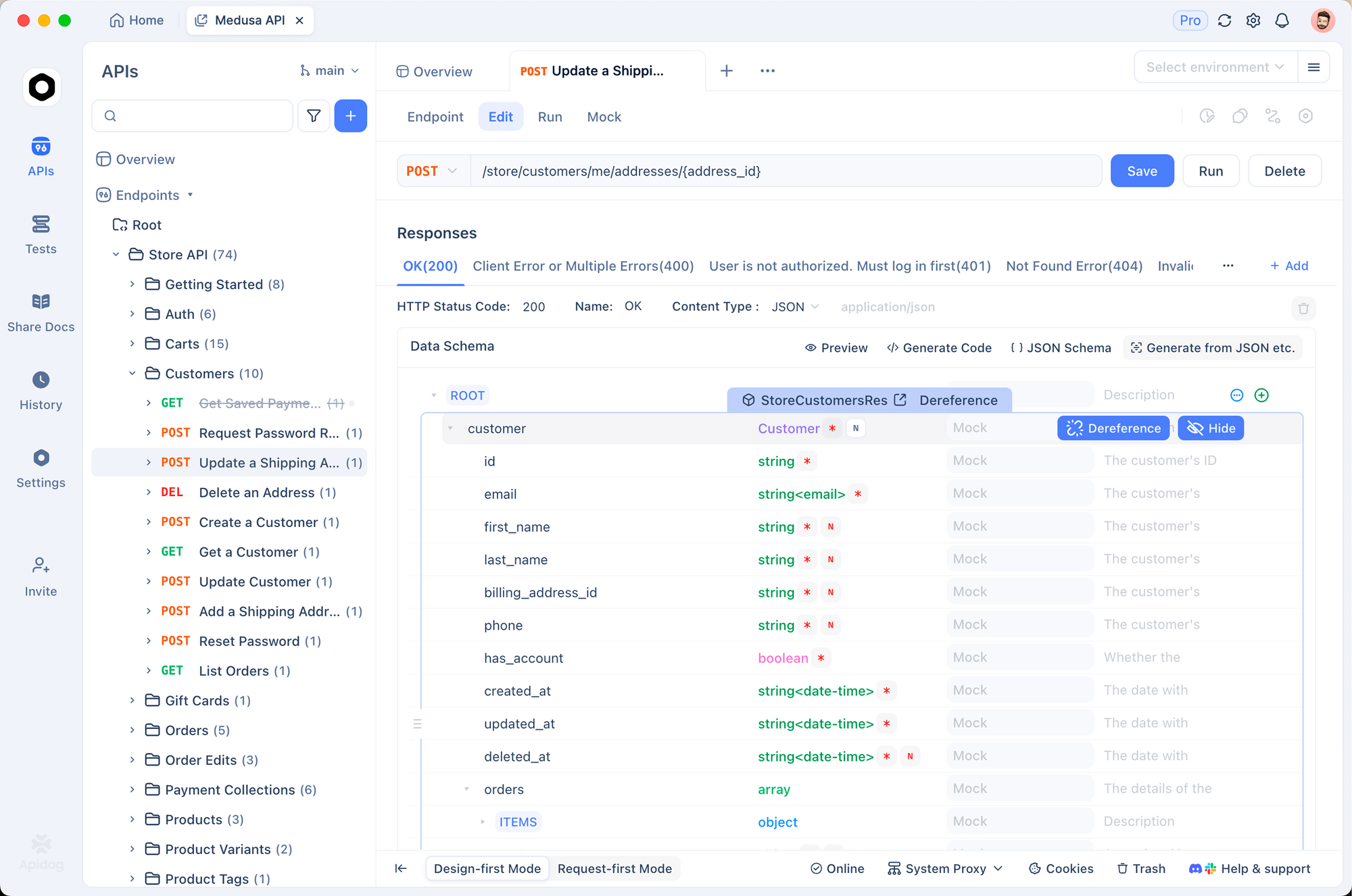
Example: API Testing Skill Integration
## Running API Tests

Use Apidog for systematic testing:

1. Import the OpenAPI spec into Apidog
2. Generate test cases from the spec
3. Run tests and export results as JSON
4. Validate responses against expected schemas

For custom assertions, use Apidog's scripting feature.
Bundle Apidog Scripts
api-tester/
├── SKILL.md
└── scripts/
    ├── run-apidog-tests.py
    └── generate-report.py
This saves every future invocation from reinventing the wheel.
Conclusion
Claude Code Skills extend Claude’s capabilities for your specific workflows. The Skill Creator system provides a systematic process:
- Capture intent - Define what the skill should do
- Draft SKILL.md - Write clear instructions with examples
- Create test cases - Realistic prompts users would actually make
- Run evaluations - Parallel execution with and without the skill
- Review results - Qualitative feedback + quantitative benchmarks
- Iterate - Improve based on findings
- Optimize description - Maximize trigger accuracy
- Package - Distribute as .skill file
FAQ
How long does it take to create a skill?
Simple skills take 15-30 minutes. Complex skills with multiple reference files and bundled scripts can take 2-3 hours including evaluation iterations.
Do I need to write test cases for every skill?
No. Skills with objectively verifiable outputs (code generation, file transforms, data extraction) benefit from test cases. Skills with subjective outputs (writing style, design quality) are better evaluated qualitatively.
What if my skill doesn’t trigger reliably?
Optimize the description field. Include specific trigger phrases and contexts. Make it slightly “pushy” - explicitly state when to use the skill. Run the description optimization loop with 20 eval queries.
How do I share skills with my team?
Package the skill with python -m scripts.package_skill <path>, then distribute the .skill file. Team members place it in their skills directory.
Can skills call external APIs?
Yes. Bundle scripts that make API calls. The skill instructions tell Claude when and how to use them. Store API keys in environment variables, not in the skill itself.
What’s the file size limit for skills?
No hard limit, but keep SKILL.md under 500 lines. Move detailed references to separate files. Scripts and assets don’t count against the line limit since they load on demand.
How do I update an existing skill?
Copy the installed skill to a writable location, edit there, and repackage. Preserve the original name - don’t add version suffixes unless creating a distinct variant.