TL;DR
The Claude Code source leak exposed a 512,000-line TypeScript codebase on March 31, 2026. The architecture boils down to a while-loop that calls the Claude API, dispatches tool calls, and feeds results back. You can build your own version with Python, the Anthropic SDK, and about 200 lines of code for the core loop. This guide breaks down each component and shows you how to recreate them.
Introduction
On March 31, 2026, Anthropic shipped a 59.8 MB source map file inside version 2.1.88 of their @anthropic-ai/claude-code npm package. Source maps are debugging artifacts that reverse minified JavaScript back to original source. Because Anthropic’s build tool (Bun’s bundler) generates these by default, the entire TypeScript codebase was recoverable.
Within hours, developers had mirrored the code across dozens of GitHub repositories. The community quickly dissected every module, from the master agent loop to hidden features like “undercover mode” and fake tool injection.
The reaction was split. Some criticized Anthropic’s security practices. Others were fascinated by the architecture. But the most productive response came from developers who asked: “Can I build this myself?”
The answer is yes. The core patterns are straightforward. This guide walks through each architectural layer, explains why Anthropic made the choices they did, and provides working code you can use as a starting point. You’ll also learn how to test your custom agent’s API interactions with Apidog, which makes debugging multi-turn API conversations far easier than raw curl commands.
What the leak revealed about Claude Code’s architecture
The codebase at a glance
Claude Code, internally codenamed “Tengu,” spans about 1,900 files. The module organization breaks down into clear layers:
cli/          - Terminal UI (React + Ink)
tools/        - 40+ tool implementations
core/         - System prompts, permissions, constants
assistant/    - Agent orchestration
services/     - API calls, compaction, OAuth, telemetry
The CLI itself is a React app rendered via Ink, a React renderer for terminal output. It uses Yoga (a CSS flexbox engine) for layout and ANSI escape codes for styling. Every conversation view, input area, tool call display, and permission dialog is a React component.
This is overengineered for most DIY projects. You don’t need a React-based terminal UI to build a working coding agent. A simple REPL loop works fine.
The master agent loop
Strip away the UI, telemetry, and feature flags, and Claude Code’s core is a while-loop. Anthropic internally calls it “nO.” Here’s what it does:
- Send messages to the Claude API (system prompt + tool definitions)
- Receive a response containing text and/or
tool_useblocks - Execute each requested tool via a name-to-handler dispatch map
- Append tool results back to the message list
- If the response contains more tool calls, loop back to step 1
- If the response is plain text with no tool calls, return it to the user
A “turn” is one complete round trip. Turns continue until Claude produces text with no tool invocations. That’s the entire agent pattern.
Here’s a minimal Python version that captures the core:
import anthropic

client = anthropic.Anthropic()
MODEL = "claude-sonnet-4-6"

def agent_loop(system_prompt: str, tools: list, messages: list) -> str:
    """The core agent loop - keep calling until no more tool use."""
    while True:
        response = client.messages.create(
            model=MODEL,
            max_tokens=16384,
            system=system_prompt,
            tools=tools,
            messages=messages,
        )

        # Add assistant response to conversation
        messages.append({"role": "assistant", "content": response.content})

        # If the model stopped without requesting tools, we're done
        if response.stop_reason != "tool_use":
            # Extract the final text
            return "".join(
                block.text for block in response.content
                if hasattr(block, "text")
            )

        # Execute each tool call and collect results
        tool_results = []
        for block in response.content:
            if block.type == "tool_use":
                result = execute_tool(block.name, block.input)
                tool_results.append({
                    "type": "tool_result",
                    "tool_use_id": block.id,
                    "content": result,
                })

        # Feed results back as a user message
        messages.append({"role": "user", "content": tool_results})
That’s about 30 lines. The rest of Claude Code’s complexity comes from the tools themselves, the permission system, context management, and memory.
Building the tool system
Why dedicated tools beat a single bash command
One of the clearest architectural decisions in the leak: Claude Code uses dedicated tools for file operations instead of routing everything through bash.
There’s a Read tool (not cat), an Edit tool (not sed), a Grep tool (not grep), and a Glob tool (not find). The system prompt explicitly tells the model to prefer these over bash equivalents.
Why? Three reasons:
- Structured output. A dedicated
Greptool returns results in a consistent format the model can parse. Piping bash commands produces unpredictable output that the model struggles to interpret. - Safety. The
BashToolin Claude Code blocks backticks and$()subshell syntax to prevent injection. Dedicated tools sidestep this risk entirely. - Token efficiency. Tool results can be truncated, sampled, or offloaded to disk. Large
catoutputs waste context window tokens.
The essential tool set
From the leak, Claude Code exposes fewer than 20 tools by default, with 60+ behind feature flags. For a DIY agent, you need five:
TOOLS = [
    {
        "name": "read_file",
        "description": "Read a file from the filesystem. Returns contents with line numbers.",
        "input_schema": {
            "type": "object",
            "properties": {
                "file_path": {
                    "type": "string",
                    "description": "Absolute path to the file"
                },
                "offset": {
                    "type": "integer",
                    "description": "Line number to start reading from (0-indexed)"
                },
                "limit": {
                    "type": "integer",
                    "description": "Max lines to read. Defaults to 2000."
                }
            },
            "required": ["file_path"]
        }
    },
    {
        "name": "write_file",
        "description": "Write content to a file. Creates the file if it doesn't exist.",
        "input_schema": {
            "type": "object",
            "properties": {
                "file_path": {"type": "string", "description": "Absolute path"},
                "content": {"type": "string", "description": "File content to write"}
            },
            "required": ["file_path", "content"]
        }
    },
    {
        "name": "edit_file",
        "description": "Replace a specific string in a file. The old_string must be unique.",
        "input_schema": {
            "type": "object",
            "properties": {
                "file_path": {"type": "string", "description": "Absolute path"},
                "old_string": {"type": "string", "description": "Text to find"},
                "new_string": {"type": "string", "description": "Replacement text"}
            },
            "required": ["file_path", "old_string", "new_string"]
        }
    },
    {
        "name": "run_command",
        "description": "Execute a shell command and return stdout/stderr.",
        "input_schema": {
            "type": "object",
            "properties": {
                "command": {"type": "string", "description": "Shell command to run"},
                "timeout": {"type": "integer", "description": "Timeout in seconds. Default 120."}
            },
            "required": ["command"]
        }
    },
    {
        "name": "search_code",
        "description": "Search for a regex pattern across files in a directory.",
        "input_schema": {
            "type": "object",
            "properties": {
                "pattern": {"type": "string", "description": "Regex pattern"},
                "path": {"type": "string", "description": "Directory to search"},
                "file_glob": {"type": "string", "description": "File pattern filter, e.g. '*.py'"}
            },
            "required": ["pattern"]
        }
    }
]
Tool handler dispatch
The tool execution function maps tool names to handler functions:
import subprocess
import os
import re

def execute_tool(name: str, params: dict) -> str:
    """Dispatch tool calls to their handlers."""
    handlers = {
        "read_file": handle_read_file,
        "write_file": handle_write_file,
        "edit_file": handle_edit_file,
        "run_command": handle_run_command,
        "search_code": handle_search_code,
    }

    handler = handlers.get(name)
    if not handler:
        return f"Error: Unknown tool '{name}'"

    try:
        return handler(params)
    except Exception as e:
        return f"Error: {str(e)}"


def handle_read_file(params: dict) -> str:
    path = params["file_path"]
    offset = params.get("offset", 0)
    limit = params.get("limit", 2000)

    with open(path, "r") as f:
        lines = f.readlines()

    selected = lines[offset:offset + limit]
    numbered = [f"{i + offset + 1}\t{line}" for i, line in enumerate(selected)]
    return "".join(numbered)


def handle_write_file(params: dict) -> str:
    path = params["file_path"]
    os.makedirs(os.path.dirname(path), exist_ok=True)
    with open(path, "w") as f:
        f.write(params["content"])
    return f"Successfully wrote to {path}"


def handle_edit_file(params: dict) -> str:
    path = params["file_path"]
    with open(path, "r") as f:
        content = f.read()

    old = params["old_string"]
    if content.count(old) == 0:
        return f"Error: '{old[:50]}...' not found in {path}"
    if content.count(old) > 1:
        return f"Error: '{old[:50]}...' matches {content.count(old)} locations. Be more specific."

    new_content = content.replace(old, params["new_string"], 1)
    with open(path, "w") as f:
        f.write(new_content)
    return f"Successfully edited {path}"


def handle_run_command(params: dict) -> str:
    cmd = params["command"]
    timeout = params.get("timeout", 120)

    # Basic safety: block dangerous patterns
    blocked = ["rm -rf /", "mkfs", "> /dev/"]
    for pattern in blocked:
        if pattern in cmd:
            return f"Error: Blocked dangerous command pattern: {pattern}"

    result = subprocess.run(
        cmd, shell=True, capture_output=True, text=True,
        timeout=timeout, cwd=os.getcwd()
    )

    output = ""
    if result.stdout:
        output += result.stdout
    if result.stderr:
        output += f"\nSTDERR:\n{result.stderr}"
    if not output.strip():
        output = f"Command completed with exit code {result.returncode}"

    # Truncate large outputs to save context tokens
    if len(output) > 30000:
        output = output[:15000] + "\n\n... [truncated] ...\n\n" + output[-15000:]

    return output


def handle_search_code(params: dict) -> str:
    pattern = params["pattern"]
    path = params.get("path", os.getcwd())
    file_glob = params.get("file_glob", "")

    cmd = ["grep", "-rn", "--include", file_glob, pattern, path] if file_glob else \
          ["grep", "-rn", pattern, path]

    result = subprocess.run(cmd, capture_output=True, text=True, timeout=30)

    if not result.stdout.strip():
        return f"No matches found for pattern: {pattern}"

    lines = result.stdout.strip().split("\n")
    if len(lines) > 50:
        return "\n".join(lines[:50]) + f"\n\n... ({len(lines) - 50} more matches)"
    return result.stdout
Context management: the hard problem
Why context matters more than prompt engineering
The leaked source reveals Claude Code spends more engineering effort on context management than on the system prompt itself. The context compressor (internally called “wU2”) has five strategies.
For a DIY build, you need two:
Auto-compaction triggers when the conversation approaches the context window limit. Claude Code triggers at approximately 92% usage, reserving a 13,000-token buffer for the summary itself.
CLAUDE.md re-injection ensures project guidelines don’t drift during long sessions. Claude Code re-injects project configuration on every turn, not at initialization. This is the single most impactful pattern for keeping a coding agent on track.
Building a simple compressor
def maybe_compact(messages: list, system_prompt: str, max_tokens: int = 180000) -> list:
    """Compact conversation when it gets too long."""
    # Rough estimate: 4 chars per token
    total_chars = sum(
        len(str(m.get("content", ""))) for m in messages
    )
    estimated_tokens = total_chars // 4

    if estimated_tokens < max_tokens * 0.85:
        return messages  # Not yet at the limit

    # Ask the model to summarize the conversation so far
    summary_response = client.messages.create(
        model=MODEL,
        max_tokens=4096,
        system="Summarize this conversation. Keep all file paths, decisions made, errors encountered, and current task state. Be specific about what was changed and why.",
        messages=messages,
    )

    summary_text = summary_response.content[0].text

    # Replace conversation with summary + recent messages
    compacted = [
        {"role": "user", "content": f"[Conversation summary]\n{summary_text}"},
        {"role": "assistant", "content": "I have the context from our previous conversation. What should I work on next?"},
    ]

    # Keep the last 4 messages for immediate context
    compacted.extend(messages[-4:])

    return compacted
Re-injecting project context
Claude Code reads .claude/CLAUDE.md and injects it into every turn. Here’s how to replicate it:
def build_system_prompt(project_dir: str) -> str:
    """Build system prompt with project context re-injection."""
    base_prompt = """You are a coding assistant that helps with software engineering tasks.
You have access to tools for reading, writing, editing files, running commands, and searching code.
Always read files before modifying them. Prefer edit_file over write_file for existing files.
Keep responses concise. Focus on the code, not explanations."""

    # Look for project guidelines
    claude_md_path = os.path.join(project_dir, ".claude", "CLAUDE.md")
    if os.path.exists(claude_md_path):
        with open(claude_md_path, "r") as f:
            project_context = f.read()
        base_prompt += f"\n\n# Project guidelines\n{project_context}"

    # Also check for a root CLAUDE.md
    root_md = os.path.join(project_dir, "CLAUDE.md")
    if os.path.exists(root_md):
        with open(root_md, "r") as f:
            root_context = f.read()
        base_prompt += f"\n\n# Repository guidelines\n{root_context}"

    return base_prompt
The three-layer memory system
The leaked source shows Claude Code uses a three-tier memory architecture. This is one of the most underappreciated parts of the system.
Layer 1: MEMORY.md (always loaded)
A lightweight index that stays in the system prompt at all times. Each entry is one line, under 150 characters. Acts as a table of contents pointing to deeper knowledge. Capped at 200 lines / 25KB.
- [User preferences](memory/user-prefs.md) - prefers TypeScript, uses Vim keybindings
- [API conventions](memory/api-conventions.md) - REST with JSON:API spec, snake_case
- [Deploy process](memory/deploy.md) - uses GitHub Actions, deploys to AWS EKS
Layer 2: topic files (loaded on demand)
Detailed knowledge files loaded when the index suggests relevance. These contain project conventions, architectural decisions, and learned patterns.
Layer 3: session transcripts (searched, never read)
Full session logs that are never loaded wholesale. The agent greps them for specific identifiers. This prevents context bloat while preserving searchability.
Building a minimal memory system
import json

MEMORY_DIR = ".agent/memory"

def load_memory_index() -> str:
    """Load the memory index for system prompt injection."""
    index_path = os.path.join(MEMORY_DIR, "MEMORY.md")
    if os.path.exists(index_path):
        with open(index_path, "r") as f:
            return f.read()
    return ""


def save_memory(key: str, content: str, description: str):
    """Save a memory entry and update the index."""
    os.makedirs(MEMORY_DIR, exist_ok=True)

    # Write the memory file
    filename = f"{key.replace(' ', '-').lower()}.md"
    filepath = os.path.join(MEMORY_DIR, filename)
    with open(filepath, "w") as f:
        f.write(f"---\nname: {key}\ndescription: {description}\n---\n\n{content}")

    # Update the index
    index_path = os.path.join(MEMORY_DIR, "MEMORY.md")
    index_lines = []
    if os.path.exists(index_path):
        with open(index_path, "r") as f:
            index_lines = f.readlines()

    # Add or update entry
    new_entry = f"- [{key}]({filename}) - {description}\n"
    updated = False
    for i, line in enumerate(index_lines):
        if filename in line:
            index_lines[i] = new_entry
            updated = True
            break
    if not updated:
        index_lines.append(new_entry)

    with open(index_path, "w") as f:
        f.writelines(index_lines)
Add a save_memory tool to your tool list so the agent can persist knowledge between sessions.
Adding a permission system
The leak reveals five permission modes: default (interactive prompts), auto (ML-based approval), bypass, yolo (approve everything), and deny. Every tool action is classified as LOW, MEDIUM, or HIGH risk.
For a DIY agent, a simple three-tier system works:
# Risk levels for operations
RISK_LEVELS = {
    "read_file": "low",
    "search_code": "low",
    "edit_file": "medium",
    "write_file": "medium",
    "run_command": "high",
}

def check_permission(tool_name: str, params: dict, auto_approve_low: bool = True) -> bool:
    """Check if the user approves this tool call."""
    risk = RISK_LEVELS.get(tool_name, "high")

    if risk == "low" and auto_approve_low:
        return True

    # Show the user what's about to happen
    print(f"\n--- Permission check ({risk.upper()} risk) ---")
    print(f"Tool: {tool_name}")
    for key, value in params.items():
        display = str(value)[:200]
        print(f"  {key}: {display}")

    response = input("Allow? [y/n/always]: ").strip().lower()
    if response == "always":
        RISK_LEVELS[tool_name] = "low"  # Auto-approve this tool going forward
        return True
    return response == "y"
Testing your agent’s API calls with Apidog
Building a coding agent means making hundreds of API calls to Claude. Debugging these interactions, especially multi-turn conversations with tool use, is painful with raw logs.
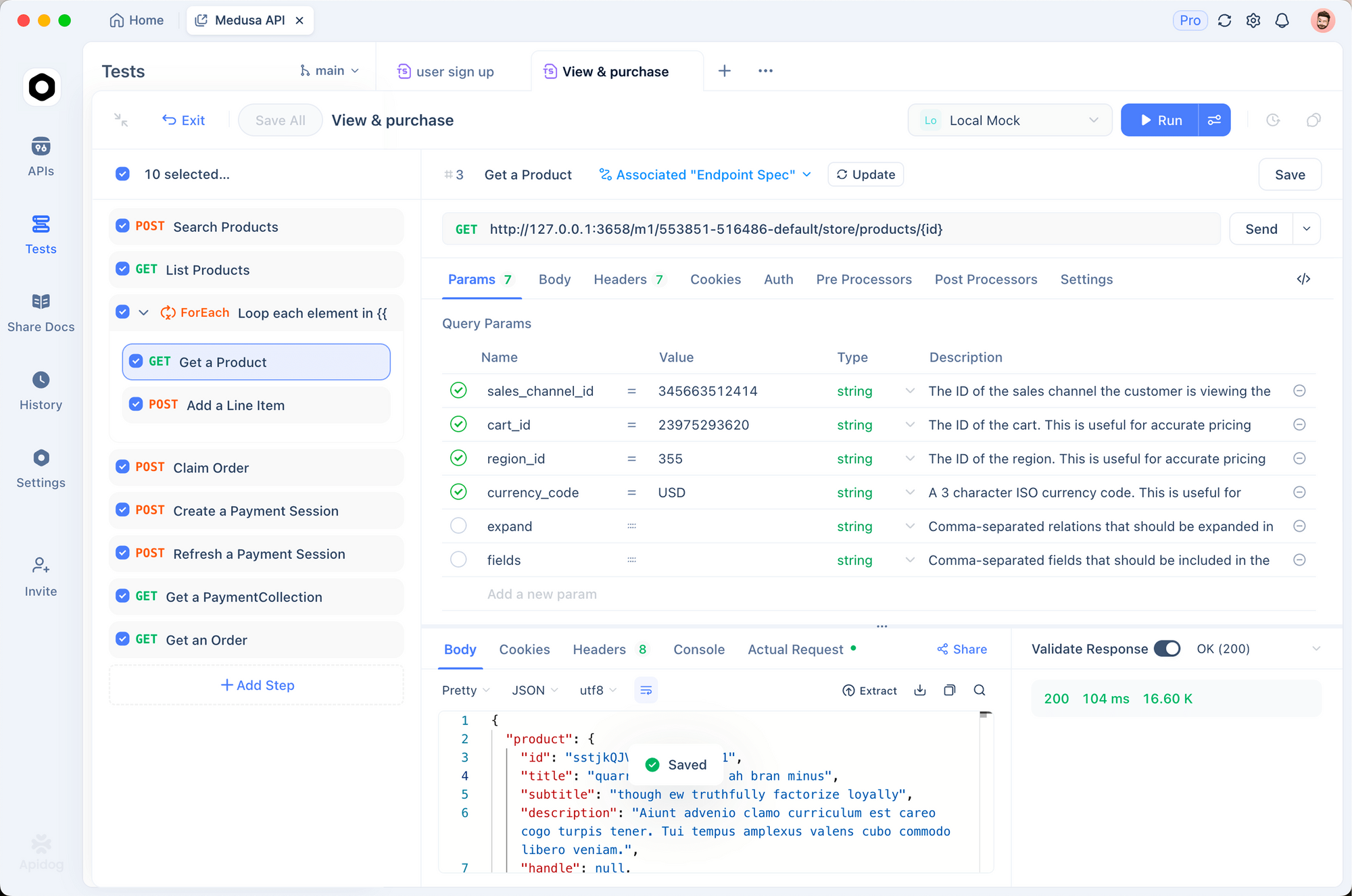
Apidog helps you inspect and test the exact API requests your agent sends. Here’s how to use it during development:
Capture and replay API requests
Set up Apidog as a proxy to intercept your agent’s calls to the Anthropic API:
- Open Apidog and create a new project for your agent
- Import the Anthropic Messages API endpoint:
POST https://api.anthropic.com/v1/messages - Set up the request body with your system prompt, tools array, and messages
- Test individual turns by replaying captured requests with modified parameters
This lets you isolate specific tool-use turns without running the full agent loop. When the model returns an unexpected tool call or hallucinated parameter, you can modify the request body in Apidog’s visual editor and resend it to see how different inputs change the response.
Debug multi-turn conversations
The hardest part of agent debugging is reproducing a conversation state. Apidog’s environment variables let you save conversation snapshots:
- Save the full
messagesarray as an environment variable after each turn - Replay from any point in the conversation
- Compare tool results between runs to find where behavior diverges
Validate tool schemas
Your tool definitions (the JSON schemas you pass to the API) determine what the model can request. Malformed schemas cause silent failures where the model skips a tool or passes wrong parameters.
Import your tool schemas into Apidog and use its JSON Schema validator to catch issues before they reach the API. Download Apidog to start debugging your agent’s API interactions.
Putting it all together: the complete REPL
Here’s the full agent tied together as a working REPL:
#!/usr/bin/env python3
"""A minimal Claude Code-style coding agent."""

import anthropic
import os
import sys

client = anthropic.Anthropic()
MODEL = "claude-sonnet-4-6"
PROJECT_DIR = os.getcwd()


def main():
    system_prompt = build_system_prompt(PROJECT_DIR)
    memory = load_memory_index()
    if memory:
        system_prompt += f"\n\n# Memory\n{memory}"

    messages = []
    print("Coding agent ready. Type 'quit' to exit.\n")

    while True:
        user_input = input("> ").strip()
        if user_input.lower() in ("quit", "exit"):
            break
        if not user_input:
            continue

        messages.append({"role": "user", "content": user_input})

        # Compact if needed
        messages = maybe_compact(messages, system_prompt)

        # Re-inject project context (Claude Code does this every turn)
        current_system = build_system_prompt(PROJECT_DIR)
        memory = load_memory_index()
        if memory:
            current_system += f"\n\n# Memory\n{memory}"

        # Run the agent loop
        result = agent_loop(current_system, TOOLS, messages)
        print(f"\n{result}\n")


if __name__ == "__main__":
    main()
This gives you a working coding agent in under 300 lines of Python. It reads files, edits code, runs commands, searches codebases, manages context, and persists memory between sessions.
What to add next
The leaked source reveals several features worth building once your core loop works:
Sub-agents for parallel work
Claude Code spawns sub-agents (called “forked” agents) for independent tasks. The sub-agent gets a copy of the parent context, executes its task, and returns a result. This avoids polluting the main conversation with exploratory work.
The pattern: spawn a new agent_loop() with a focused task description and a subset of tools. Return the result as a string.
File-read deduplication
Claude Code tracks which files were read and their modification times. If a file hasn’t changed since the last read, it skips the read and tells the model “file unchanged since last read.” This saves tokens on re-reads during long sessions.
Output truncation and sampling
When a tool returns a massive output (10,000+ lines of grep results, for example), Claude Code truncates it and tells the model how many results were omitted. Without this, one large tool result can eat your entire context window.
Auto-compaction with file re-injection
The leaked compressor doesn’t discard file contents. After summarizing the conversation, it re-injects the contents of recently accessed files (up to 5,000 tokens per file). This means the model keeps working knowledge of the codebase even after compaction.
What we learned from the leak
The Claude Code leak confirmed several patterns the AI agent community had theorized about:
The core loop is simple. The entire agent pattern fits in 30 lines. Complexity lives in the tools and context management, not in prompt engineering.
Dedicated tools outperform bash. Structured, purpose-built tools give the model better information density per token than piping bash commands.
Memory needs layers. An always-loaded index, on-demand topic files, and grep-only transcripts balance recall against context costs.
Context management is the real product. Auto-compaction, project guideline re-injection, and output truncation are what make long coding sessions viable.
The harness is the product, not the model. The model provides intelligence. The harness provides perception (file reading, code search), action (file writing, command execution), and memory. Building a coding agent is building the harness.
If you want to test and debug your custom agent’s API interactions, including multi-turn tool-use conversations, complex request schemas, and response validation, try Apidog free. It handles the API debugging so you can focus on the agent logic.
FAQ
Can I legally use patterns from the Claude Code leak?
The leak exposed architectural patterns, not proprietary algorithms. Building a coding agent that uses a while-loop with tool dispatch is a standard pattern documented in Anthropic’s own API docs. You should not copy Anthropic’s code verbatim, but recreating the architecture with your own code is standard practice.
What model should I use for a DIY coding agent?
Claude Sonnet 4.6 offers the right balance of speed and capability for coding tasks. Claude Opus 4.6 produces better results on complex architecture decisions but costs more and runs slower. For simple file edits and searches, Claude Haiku 4.5 works and costs 90% less.
How much does it cost to run your own coding agent?
A typical coding session (30-50 turns) with Claude Sonnet 4.6 costs $1-5 in API fees. The main cost driver is context window size; aggressive compaction keeps costs down. Claude Code’s leaked source shows it triggers compaction at 92% context usage to control this.
Why does Claude Code use React for a terminal app?
Ink (React for terminals) lets the team reuse React’s component model and state management for complex UI interactions like permission dialogs, streaming output, and tool call displays. For a DIY project, a simple input() / print() REPL is enough.
What’s the most important feature to build after the core loop?
The permission system. Without it, the model can overwrite files and run arbitrary commands with no user oversight. Even a simple “confirm before write/execute” gate prevents most accidental damage.
How does Claude Code handle errors from tool calls?
Tool errors are returned as text content in the tool_result message. The model sees the error and decides whether to retry, try a different approach, or ask the user. There’s no special error handling; the model’s reasoning handles recovery.
Can I use this with models other than Claude?
Yes. The tool-use pattern works with any model that supports function calling: GPT-4, Gemini, Llama, and others. You’ll need to adapt the API call format, but the agent loop, tools, and memory system are model-agnostic.
How do I prevent the agent from running dangerous commands?
Start with a blocklist of dangerous patterns (rm -rf /, mkfs, etc.) and require explicit approval for all run_command calls. Claude Code classifies every operation as LOW, MEDIUM, or HIGH risk and blocks or prompts based on the classification. Build the same for your tools.