
TL;DR
GPT-5.3 Instant is OpenAI's newest model (released March 3, 2026) that makes everyday conversations more helpful and natural. Key improvements: 26.8% fewer hallucinations, better web search integration, more direct answers without unnecessary refusals, and stronger writing capabilities. Available now in ChatGPT (all users) and via API as gpt-5.3-chat-latest. Test it easily with Apidog's API testing platform.
Quick access:
- ChatGPT: Already live for all users
- API: Use model name
gpt-5.3-chat-latest - Legacy model (GPT-5.2): Available until June 3, 2026
What is GPT-5.3 Instant?
GPT-5.3 Instant is the latest update to ChatGPT's most-used model, released by OpenAI on March 3, 2026. Unlike previous updates that focused on raw capabilities or benchmark performance, this release targets the everyday experience: tone, relevance, and conversational flow.
The model addresses feedback about GPT-5.2 Instant's tendency to refuse safe questions, add unnecessary disclaimers, or respond in overly cautious ways. GPT-5.3 Instant gets straight to helpful answers without the preamble.
Why "Instant" Matters
The "Instant" designation refers to the model's focus on real-time conversational quality rather than deep reasoning tasks. It's optimized for:
- Quick, helpful responses
- Natural conversation flow
- Everyday tasks and questions
- Web-enhanced answers
- Creative writing
For complex reasoning or coding tasks, OpenAI offers specialized models like GPT-5.3-Codex or the o-series thinking models.
Key Improvements in GPT-5.3 Instant
1. Better Judgment Around Refusals
GPT-5.2 Instant would sometimes refuse questions it could answer safely, or lead with lengthy safety disclaimers. GPT-5.3 Instant fixes this.
Example: Technical Question
When asked about archery trajectory calculations, GPT-5.2 Instant started with a long preamble about what it couldn't help with. GPT-5.3 Instant jumps straight into the physics and math, providing the helpful answer immediately.
The model now:
- Reduces unnecessary refusals significantly
- Tones down defensive or moralizing preambles
- Provides direct answers when appropriate
- Stays focused on your question without excessive caveats
2. More Useful Web-Synthesized Answers
GPT-5.3 Instant dramatically improves how it uses web search results. Instead of simply summarizing links or overindexing on search results, it:
- Balances web findings with its own knowledge and reasoning
- Contextualizes recent news with existing understanding
- Recognizes question subtext better
- Surfaces the most important information upfront
- Delivers more relevant, immediately usable answers
Example: Current Events
When asked about the biggest baseball signing of the 2025-26 offseason, GPT-5.2 gave a stale answer from the previous year. GPT-5.3 correctly identified Kyle Tucker's signing with the Dodgers and contextualized it against broader league trends like talent concentration and upcoming labor negotiations.
3. Smoother Conversational Style
The model's tone is more natural and less "cringe." Changes include:
- Cutting back on unnecessary proclamations
- Removing phrases like "Stop. Take a breath."
- More consistent personality across conversations
- Less overbearing or assumption-heavy responses
- Adjustable tone settings (warmth, enthusiasm)
Example: Personal Advice
When asked "why can't I find love in San Francisco," GPT-5.2 started with "First of all — you're not broken, and it's not just you." GPT-5.3 skips the unnecessary reassurance and goes straight into analyzing the structural dating challenges in SF.
4. More Reliably Accurate Responses
GPT-5.3 Instant delivers more factual responses with reduced hallucinations. OpenAI measured this using two internal evaluations:
Higher-stakes domains (medicine, law, finance):
- 26.8% reduction in hallucinations with web search
- 19.7% reduction without web search
User-flagged errors (especially hallucination-prone cases):
- 22.5% reduction with web search
- 9.6% reduction without web search
This makes GPT-5.3 Instant more trustworthy for factual questions and research tasks.
5. Stronger Writing Capabilities
GPT-5.3 Instant is a better writing partner. It helps you create:
- Resonant, imaginative prose
- Immersive fiction
- Emotionally impactful content
- Clear, coherent writing across styles
Example: Creative Writing
When asked to write a poem about a retiring mailman in Philadelphia, GPT-5.3 produced more lived-in, specific, and structurally controlled output. It builds emotion through observed detail rather than explaining the sentiment.
The model moves more fluidly between practical tasks and expressive writing without losing clarity.
How to Access GPT-5.3 Instant
Option 1: ChatGPT (All Users)
GPT-5.3 Instant is already live in ChatGPT for all users as of March 3, 2026.
Steps:
- Go to chat.openai.com
- Log in to your account (or create one)
- Start chatting - you're already using GPT-5.3 Instant
No configuration needed. The model is now the default for all ChatGPT conversations.
Accessing Legacy Models:
If you're a paid user (Plus, Team, or Enterprise) and want to compare with GPT-5.2:
- Click the model selector at the top of the chat
- Go to "Legacy Models" section
- Select "GPT-5.2 Instant"
Note: GPT-5.2 Instant will be retired on June 3, 2026.
Option 2: OpenAI API
Developers can access GPT-5.3 Instant through the OpenAI API.
Model name: gpt-5.3-chat-latest
Basic API call:
import openai

client = openai.OpenAI(api_key="your-api-key")

response = client.chat.completions.create(
    model="gpt-5.3-chat-latest",
    messages=[
        {"role": "user", "content": "Explain quantum computing in simple terms"}
    ]
)

print(response.choices[0].message.content)
API pricing: Check OpenAI's pricing page for current rates.
Option 3: Test with Apidog
Apidog makes it easy to test and integrate GPT-5.3 Instant without writing code first.
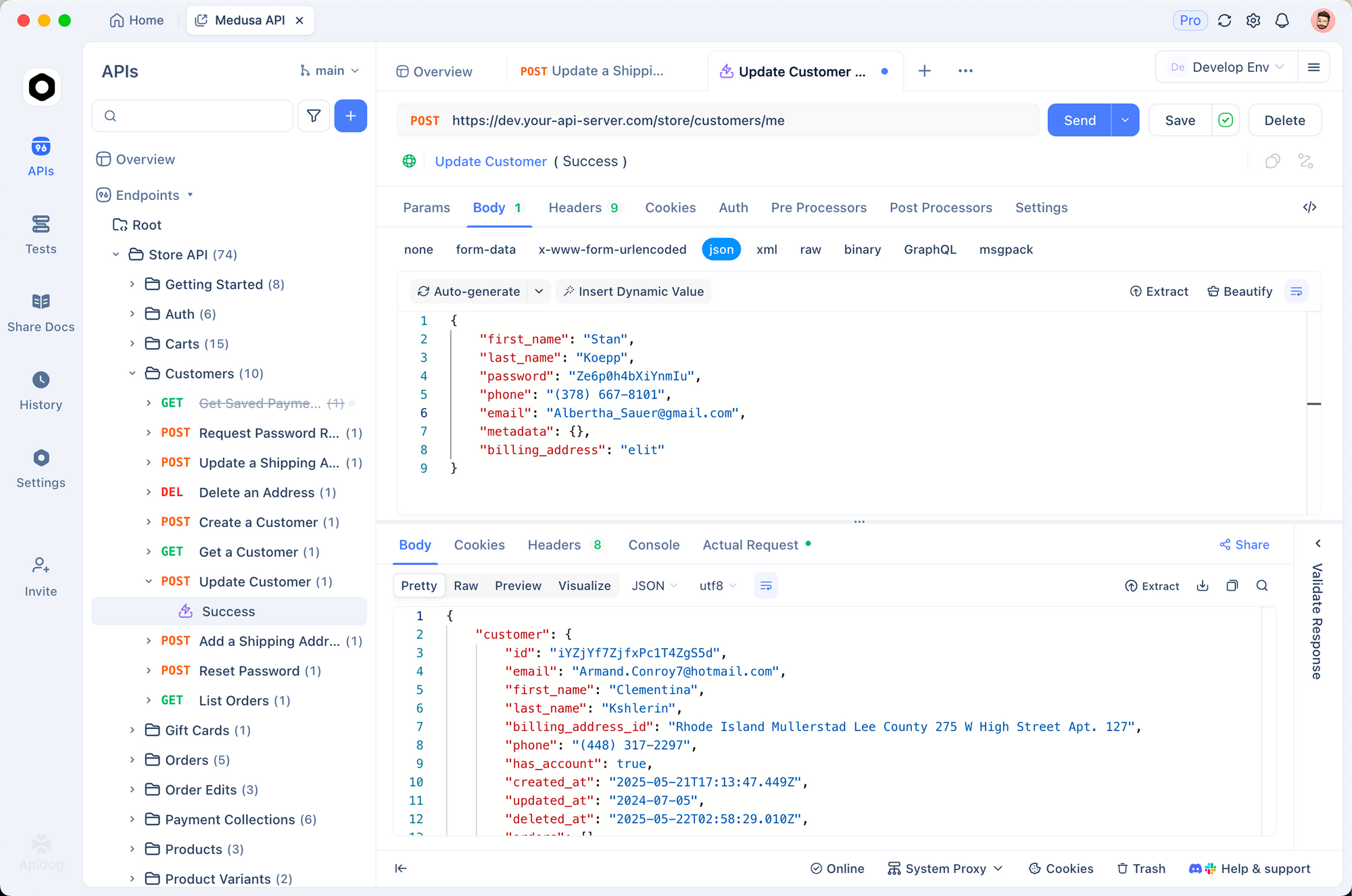
Why use Apidog for GPT-5.3 Instant:
- Visual API testing interface
- Save and organize API requests
- Test different prompts and parameters
- Monitor response times and token usage
- Share API collections with your team
- Generate code in multiple languages
Pro tip: Create an Apidog environment with your OpenAI API key as a variable, so you can reuse it across multiple requests without exposing it in your request bodies.
GPT-5.3 Instant vs GPT-5.2 Instant: What Changed?
| Feature | GPT-5.2 Instant | GPT-5.3 Instant |
|---|---|---|
| Refusals | Sometimes refused safe questions | Significantly fewer unnecessary refusals |
| Tone | Could feel preachy or overly cautious | More direct and natural |
| Web search | Sometimes overindexed on links | Better synthesis with internal knowledge |
| Hallucinations (with web) | Baseline | 26.8% reduction |
| Hallucinations (no web) | Baseline | 19.7% reduction |
| Writing quality | Good | Stronger, more textured prose |
| Conversational flow | Occasional interruptions | Smoother, more consistent |
| Response style | Sometimes "cringe" | More focused and natural |
Bottom line: GPT-5.3 Instant feels more helpful and less frustrating in everyday use.
Best Practices for API Integration
1. Use the latest model identifier
model="gpt-5.3-chat-latest"
This ensures you always get the newest version as OpenAI releases updates.
2. Set appropriate parameters
response = client.chat.completions.create(
    model="gpt-5.3-chat-latest",
    messages=messages,
    temperature=0.7,      # 0.0-2.0, higher = more creative
    max_tokens=1000,      # Limit response length
    top_p=1.0,            # Nucleus sampling
    frequency_penalty=0,  # Reduce repetition
    presence_penalty=0    # Encourage topic diversity
)
3. Handle errors gracefully
try:
    response = client.chat.completions.create(
        model="gpt-5.3-chat-latest",
        messages=messages
    )
except openai.APIError as e:
    print(f"API error: {e}")
except openai.RateLimitError as e:
    print(f"Rate limit exceeded: {e}")
4. Monitor token usage
response = client.chat.completions.create(...)

tokens_used = response.usage.total_tokens
prompt_tokens = response.usage.prompt_tokens
completion_tokens = response.usage.completion_tokens

print(f"Total tokens: {tokens_used}")
5. Test with Apidog before production
Before deploying GPT-5.3 Instant in your application:
- Create test requests in Apidog
- Try different prompts and parameters
- Measure response times
- Validate output quality
- Check token consumption
- Generate client code for your language
This saves debugging time and helps you optimize your integration.
Step-by-Step: Setting Up GPT-5.3 Instant API Access
Prerequisites
- OpenAI account
- API key with credits
- Development environment (Python, Node.js, etc.)
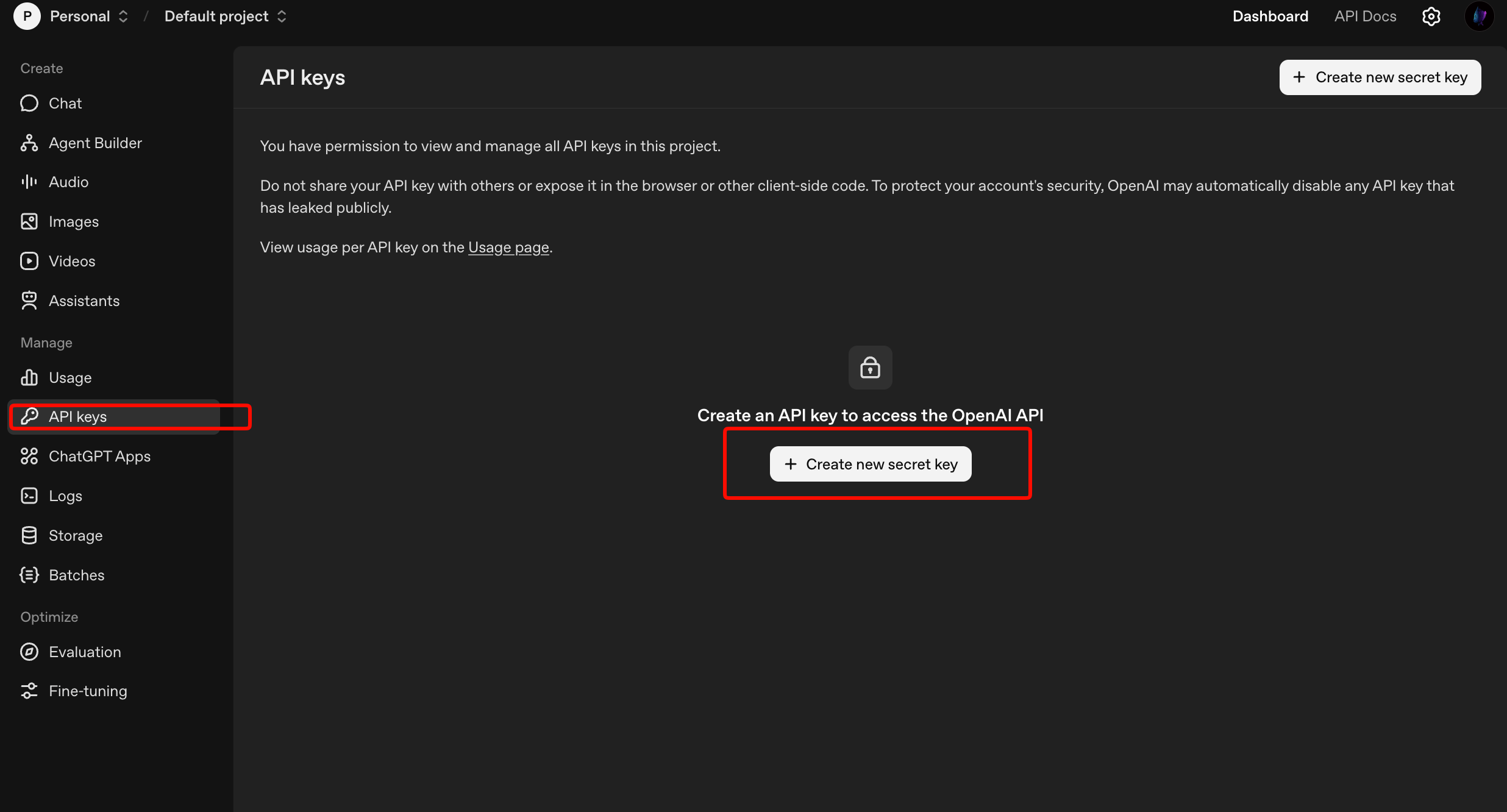
Step 1: Get Your OpenAI API Key
- Go to platform.openai.com
- Log in or create an account
- Navigate to API Keys section
- Click "Create new secret key"
- Copy and save the key securely (you won't see it again)
Step 2: Install the OpenAI SDK
Python:
pip install openai
Node.js:
npm install openai
Other languages: Check OpenAI's documentation for SDKs in Go, Java, .NET, etc.
Step 3: Make Your First API Call
Python example:
from openai import OpenAI

# Initialize client
client = OpenAI(api_key="your-api-key-here")

# Make a request
response = client.chat.completions.create(
    model="gpt-5.3-chat-latest",
    messages=[
        {"role": "system", "content": "You are a helpful assistant."},
        {"role": "user", "content": "What's new in GPT-5.3 Instant?"}
    ]
)

# Print the response
print(response.choices[0].message.content)
Node.js example:
import OpenAI from 'openai';

const client = new OpenAI({
  apiKey: process.env.OPENAI_API_KEY
});

async function main() {
  const response = await client.chat.completions.create({
    model: 'gpt-5.3-chat-latest',
    messages: [
      { role: 'user', content: 'What are the benefits of GPT-5.3 Instant?' }
    ]
  });

  console.log(response.choices[0].message.content);
}

main();
Step 4: Test in Apidog
Before deploying to production, test your API integration in Apidog:
1. Import OpenAI API collection
- Open Apidog
- Go to Import → OpenAPI/Swagger
- Import OpenAI's API specification
- Or create requests manually
2. Configure authentication
- Select your OpenAI request
- Go to Auth tab
- Choose "Bearer Token"
- Add your API key
3. Test different scenarios
- Try various prompts
- Test error handling
- Measure response times
- Compare token usage across models
4. Generate production code
- Click "Code" button in Apidog
- Select your language (Python, JavaScript, Go, etc.)
- Copy the generated code
- Use in your application
Step 5: Monitor Usage and Costs
Track your API usage:
- Go to platform.openai.com/usage
- View token consumption
- Monitor costs
- Set usage limits if needed
Limitations and Considerations
While GPT-5.3 Instant brings significant improvements, it's important to understand its limitations:
1. Not Designed for Deep Reasoning
GPT-5.3 Instant is optimized for conversational quality, not complex reasoning tasks. For tasks requiring deep analysis or multi-step problem solving, consider:
- GPT-5.3-Codex for programming
- o-series models for mathematical reasoning
- Specialized models for domain-specific tasks
2. Still Capable of Hallucinations
Despite a 26.8% reduction, GPT-5.3 Instant can still generate incorrect information. Always verify:
- Medical or legal advice
- Financial information
- Historical facts
- Technical specifications
- Citations and sources
3. Knowledge Cutoff
The model's training data has a cutoff date. For current events after that date, it relies on web search. Without web access, it can't provide information about very recent developments.
4. Context Window Limits
Like all models, GPT-5.3 Instant has a maximum context window. Very long conversations or documents may exceed this limit, requiring summarization or chunking.
5. Not a Replacement for Human Judgment
Use GPT-5.3 Instant as a tool to augment your work, not replace critical thinking. Review outputs, especially for:
- High-stakes decisions
- Customer-facing content
- Technical implementations
- Legal or compliance matters
Pricing and Cost Optimization
Current Pricing
Check OpenAI's pricing page for the latest rates. Pricing is typically based on:
- Input tokens (prompt)
- Output tokens (completion)
- Model tier
Cost Optimization Tips
1. Use appropriate max_tokens
# Don't request more tokens than you need
max_tokens=500  # For short answers
max_tokens=2000  # For detailed explanations
2. Optimize your prompts
Shorter, clearer prompts use fewer input tokens:
Good: "Summarize this article in 3 bullet points"
Less efficient: "I would like you to please read through this article and provide me with a summary that captures the main points, ideally in a bulleted list format with around 3 items"
3. Cache system messages
If you use the same system message repeatedly, OpenAI's prompt caching can reduce costs.
4. Monitor usage in Apidog
Track token consumption across different prompts to identify optimization opportunities:
- Create test requests in Apidog
- Compare token usage across prompt variations
- Choose the most efficient approach
- Monitor production usage
5. Set usage limits
Configure spending limits in your OpenAI account to prevent unexpected costs.
Troubleshooting Common Issues
Issue 1: "Model not found" Error
Problem: API returns error saying model doesn't exist.
Solution:
- Verify you're using
gpt-5.3-chat-latest(notgpt-5.3-instant) - Check your OpenAI SDK is up to date:
pip install --upgrade openai - Ensure your API key has access to GPT-5.3 models
Issue 2: Rate Limit Errors
Problem: Getting 429 rate limit errors.
Solution:
import time
from openai import RateLimitError

def call_with_retry(client, messages, max_retries=3):
    for attempt in range(max_retries):
        try:
            return client.chat.completions.create(
                model="gpt-5.3-chat-latest",
                messages=messages
            )
        except RateLimitError:
            if attempt < max_retries - 1:
                time.sleep(2 ** attempt)  # Exponential backoff
            else:
                raise
Issue 3: Inconsistent Response Quality
Problem: Responses vary significantly in quality.
Solution:
- Lower temperature for more consistent outputs (0.2-0.5)
- Use more specific system messages
- Provide examples in your prompt
- Test different prompt formulations in Apidog
Issue 4: Token Limit Exceeded
Problem: Context too long error.
Solution:
- Reduce conversation history
- Summarize earlier messages
- Split long documents into chunks
- Use a model with larger context window if needed
Issue 5: Unexpected Refusals
Problem: Model refuses safe requests.
Solution:
- Rephrase your question more directly
- Remove ambiguous language
- Provide more context about your use case
- If the refusal seems incorrect, report it to OpenAI
Frequently Asked Questions
Is GPT-5.3 Instant free?
GPT-5.3 Instant is available in ChatGPT for all users (free and paid). API access requires an OpenAI account with credits and follows standard API pricing.
Can I still use GPT-5.2 Instant?
Yes, until June 3, 2026. After that date, GPT-5.2 Instant will be retired. Paid ChatGPT users can access it through the Legacy Models section.
What's the difference between "Instant" and other GPT-5.3 models?
"Instant" models are optimized for conversational quality and speed. Other variants like GPT-5.3-Codex focus on specific domains (programming, reasoning, etc.).
Does GPT-5.3 Instant have web search?
Yes, when used in ChatGPT. API access doesn't include automatic web search, but you can implement it separately and pass results to the model.
How do I know if I'm using GPT-5.3 Instant in ChatGPT?
As of March 3, 2026, all ChatGPT conversations use GPT-5.3 Instant by default. You can verify by checking the model selector at the top of the chat interface.
Can I use GPT-5.3 Instant for commercial applications?
Yes, both ChatGPT and API access support commercial use. Review OpenAI's terms of service for specific requirements.
What's the context window size?
Check OpenAI's documentation for the exact token limit, as it may vary. GPT-5.3 Instant supports multi-turn conversations with reasonable context retention.
How do I test GPT-5.3 Instant before integrating it?
Use Apidog to test API calls without writing code first. Create requests, test different parameters, and generate production code once you're satisfied.
Is GPT-5.3 Instant better than GPT-5.2 for coding?
For conversational coding help and explanations, yes. For complex code generation or debugging, consider GPT-5.3-Codex instead.
Can I fine-tune GPT-5.3 Instant?
Check OpenAI's documentation for current fine-tuning availability. Fine-tuning options vary by model and account type.
Conclusion
GPT-5.3 Instant represents a meaningful step forward in making AI conversations more helpful and natural. With 26.8% fewer hallucinations, better web integration, reduced unnecessary refusals, and stronger writing capabilities, it addresses many of the frustrations users experienced with GPT-5.2 Instant.
The model is already live in ChatGPT for all users and available via API as gpt-5.3-chat-latest. Whether you're building customer support chatbots, creating content, conducting research, or developing AI-powered applications, GPT-5.3 Instant offers improved reliability and conversational quality.
Key takeaways:
- More direct, less preachy responses
- Better synthesis of web search results
- Significantly reduced hallucinations
- Stronger creative writing capabilities
- Smoother conversational flow
Getting started:
- Try it in ChatGPT at chat.openai.com
- Test API integration with Apidog
- Use model name
gpt-5.3-chat-latestin your API calls - Monitor usage and optimize costs
For developers, Apidog makes it easy to test GPT-5.3 Instant API calls, compare responses, monitor token usage, and generate production-ready code without writing integration code first.