OpenAI released GPT-5.3-Codex on February 5, 2026, marking a significant leap in agentic AI for coding and professional computer-based work. This model merges frontier-level coding prowess from its predecessor GPT-5.2-Codex with enhanced reasoning and broad professional knowledge from GPT-5.2, all in a single package that runs 25% faster. Developers now handle long-horizon tasks involving research, tool usage, complex execution, and real-time interaction—essentially turning the AI into an interactive collaborator rather than a simple code generator.
Small adjustments in how you access and steer these models create substantial productivity gains. For instance, enabling mid-turn feedback or selecting the right reasoning effort level transforms hours of manual debugging into minutes of guided iteration.
This guide explains precisely how to access GPT-5.3-Codex, covers its core features, benchmarks, practical usage, and optimization strategies. Expect detailed steps, comparisons, and real-world applications to help you start building effectively.
What Exactly Is GPT-5.3-Codex?
OpenAI positions GPT-5.3-Codex as the most capable agentic coding model available. It expands beyond traditional code completion or generation. The model tackles the full software lifecycle: writing code, reviewing pull requests, debugging issues, deploying applications, monitoring performance, drafting product requirements documents (PRDs), conducting user research simulations, writing tests, and defining success metrics.
Beyond pure software tasks, GPT-5.3-Codex manages productivity workflows. It creates slide decks, analyzes spreadsheet data, or performs visual desktop operations in simulated environments. The agentic nature stands out: it executes multi-step plans autonomously over extended periods (sometimes hours or days), provides frequent progress updates, and accepts real-time steering from users without dropping context.
A notable milestone: GPT-5.3-Codex became the first model instrumental in its own creation. The Codex team relied on early versions to debug training pipelines, manage deployments, and diagnose evaluation results. This self-acceleration highlights its reliability in complex, real-world technical scenarios.
Technically, the model achieves these advances through combined capabilities. It retains top-tier coding benchmarks while boosting general reasoning. Infrastructure upgrades on NVIDIA GB200 NVL72 systems contribute to the 25% speed increase, allowing more efficient handling of long contexts and iterative tasks.
Key Capabilities and Benchmarks of GPT-5.3-Codex
GPT-5.3-Codex demonstrates clear superiority across multiple evaluations. Developers benefit from these gains in practical work.
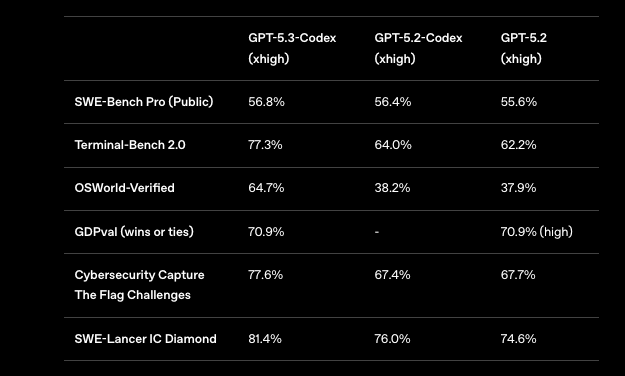
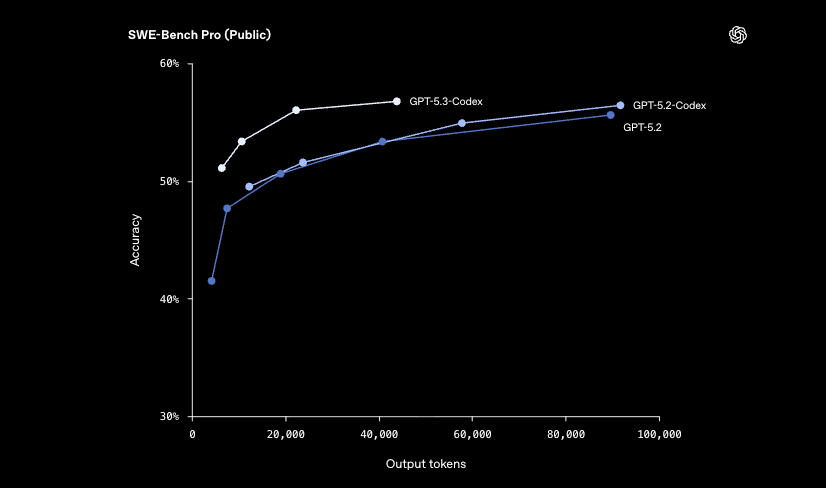
On SWE-Bench Pro—a contamination-resistant benchmark spanning four programming languages—GPT-5.3-Codex scores 56.8% with high reasoning effort. This edges out GPT-5.2-Codex (56.4%) and GPT-5.2 (55.6%). The model solves real GitHub issues more effectively, often requiring fewer tokens.
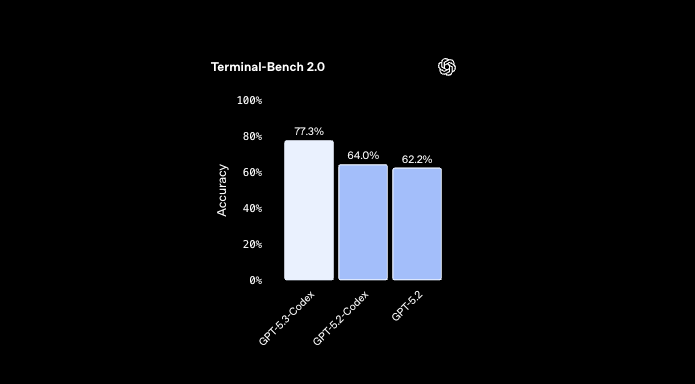
Terminal-Bench 2.0 measures terminal and command-line proficiency. Here, GPT-5.3-Codex reaches 77.3%, a substantial jump from 64.0% (GPT-5.2-Codex) and 62.2% (GPT-5.2). This improvement translates to better automation of shell scripts, server management, and deployment pipelines.
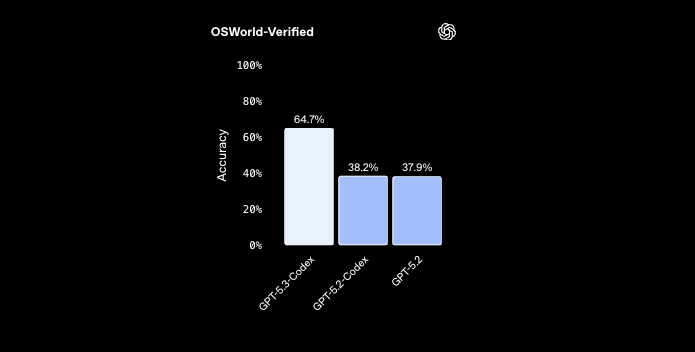
OSWorld-Verified evaluates agentic computer use with vision capabilities for productivity tasks. GPT-5.3-Codex achieves 64.7%, compared to around 38% for prior versions. Humans score roughly 72% on similar tasks, so the gap narrows significantly.
Other highlights include:
- GDPval: Matches GPT-5.2 at 70.9% wins/ties across 44 professional occupations.
- Cybersecurity Capture The Flag Challenges: 77.6% success rate, up from ~67% on earlier models.
- SWE-Lancer IC Diamond: 81.4%, showing strong performance on high-difficulty software engineering tasks.
These results confirm GPT-5.3-Codex handles ambiguous prompts better. For example, when asked to build a landing page for "Quiet KPI," it automatically incorporates discounts, carousels, and sensible UI defaults—demonstrating deeper intent understanding.
In web development, the model constructs complex applications like racing games (with maps, racers, items) or diving simulators (reefs, fish collection, oxygen mechanics) from high-level descriptions. It iterates over days, refining aesthetics and functionality.
Cybersecurity receives special attention. OpenAI classifies GPT-5.3-Codex as "High" capability under its Preparedness Framework due to vulnerability identification skills. The company deploys enhanced safety measures, including trusted access pilots and monitoring.
Step-by-Step: How to Access GPT-5.3-Codex Today
Access GPT-5.3-Codex requires a paid ChatGPT subscription. OpenAI ties availability to existing Codex surfaces—no separate waitlist exists.
Subscribe to a Paid Plan
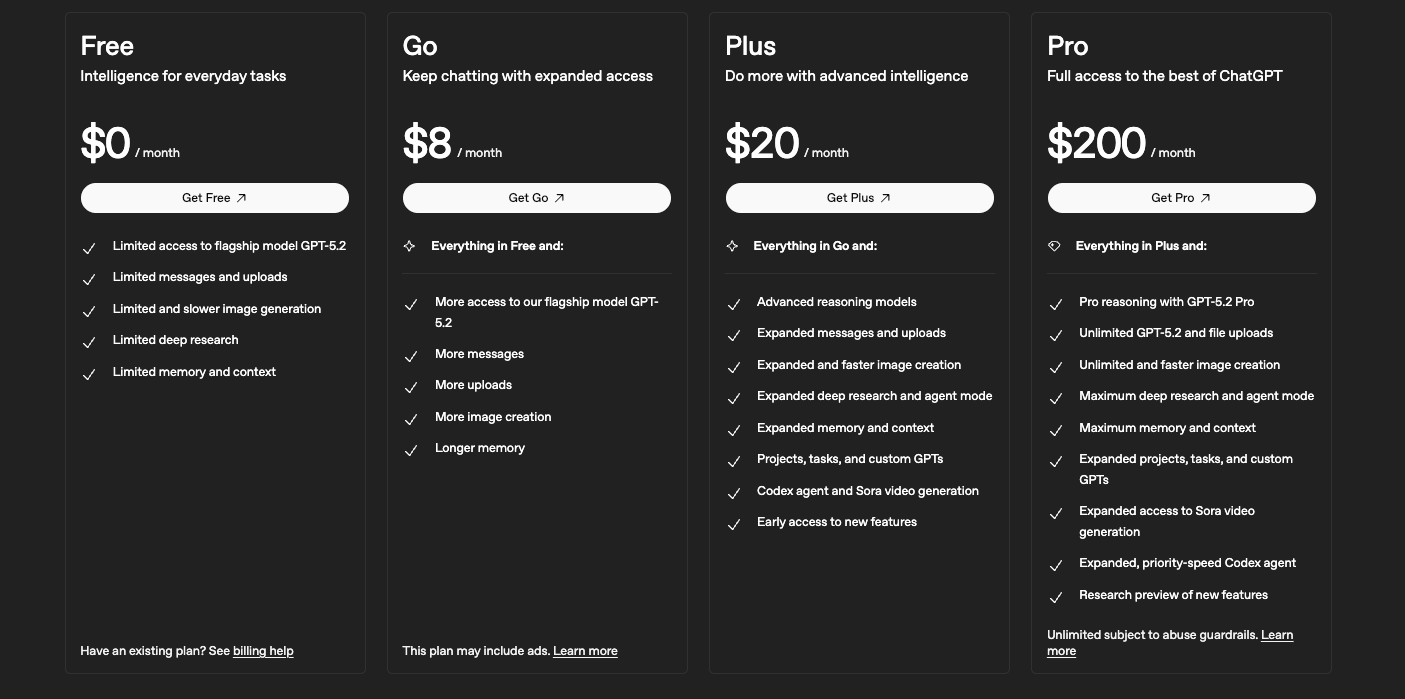
Visit pricing page and select ChatGPT Plus ($20/month), Pro, Business, Enterprise, or Edu. These plans unlock GPT-5.3-Codex immediately. Free or Go tiers may have limited or temporary access during promotions, but consistent full use demands a paid tier.
Access via the Codex App (Recommended for Interactive Work)
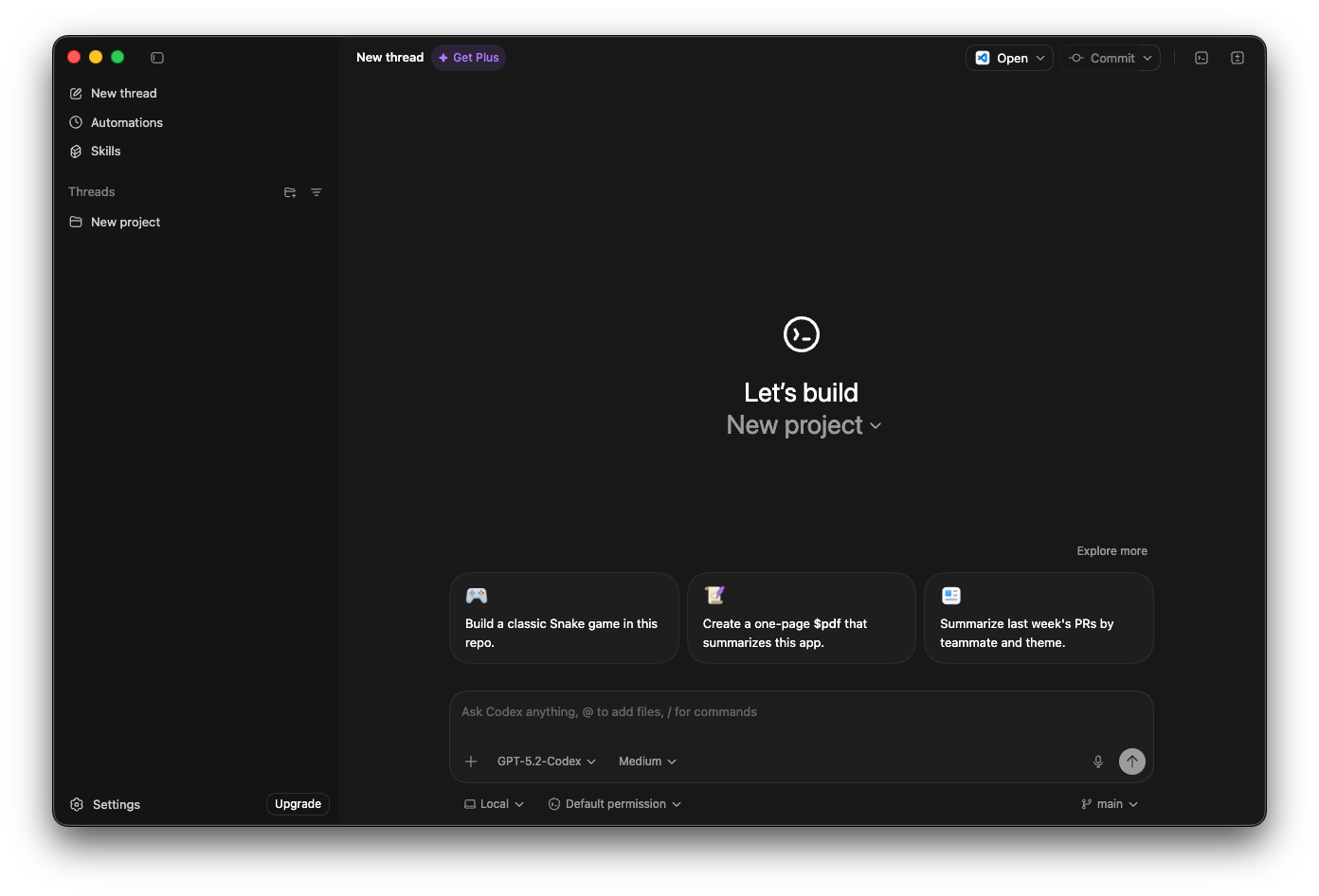
Download the macOS app from OpenAI's site (a Windows version is planned). Log in with your ChatGPT credentials.
In Settings > General > Follow-up behavior, enable steering options for real-time interaction.
Start a session: describe your task (e.g., "Build a full-stack dashboard for KPI tracking with authentication"). The agent proceeds autonomously, shares updates, and accepts corrections mid-process.
Use the Command-Line Interface (CLI)
Install or update the Codex CLI via npm: npm i -g @openai/codex.
Run the tool and select the model with /model (choose gpt-5.3-codex).
Issue commands for tasks like script generation or server automation. The CLI suits scripted workflows or remote sessions.
Integrate with IDE Extensions
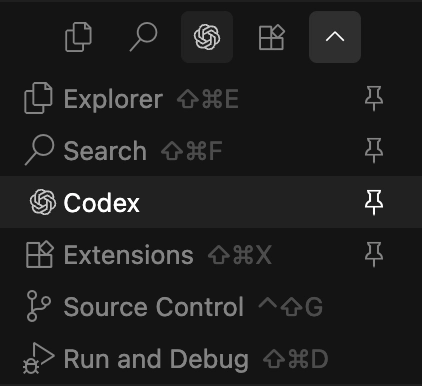
Install the Codex extension in VS Code, JetBrains, or similar. Authenticate with your OpenAI account.
Highlight code or describe features in comments; the extension invokes GPT-5.3-Codex for completions, refactors, or full implementations. Adjust reasoning effort (medium/high/xhigh) based on task complexity.
Web Interface
Log into chatgpt.com or the Codex web portal. Switch to GPT-5.3-Codex in model selectors where available. This method works well for quick prototypes or non-desktop environments.
API access rolls out soon after launch. Developers building production systems should monitor OpenAI announcements for model ID (likely gpt-5.3-codex) and endpoint updates. In the interim, use the above channels.
Validating AI-Generated APIs with Apidog
This is the critical step most developers miss. When you ask GPT-5.3-Codex to "build a backend API," it will generate code that looks correct. It might even run. But does it handle edge cases? Is the schema valid? Does it match your frontend requirements?
You cannot manually inspect thousands of lines of generated code. You need an automated validation platform. Apidog is the perfect companion for GPT-5.3-Codex.
Here is the golden workflow for modern AI-assisted development:
Step 1: Generate the Specification
Don't just ask Codex for code; ask it for the contract.
Prompt for Codex:
"Design a REST API for a user management system. Output the OpenAPI 3.0 (Swagger) specification in YAML format. Ensure it includes error responses, authentication headers, and example values."
Codex will generate a openapi.yaml file.
Step 2: Import into Apidog
- Open Apidog.
- Create a new project.
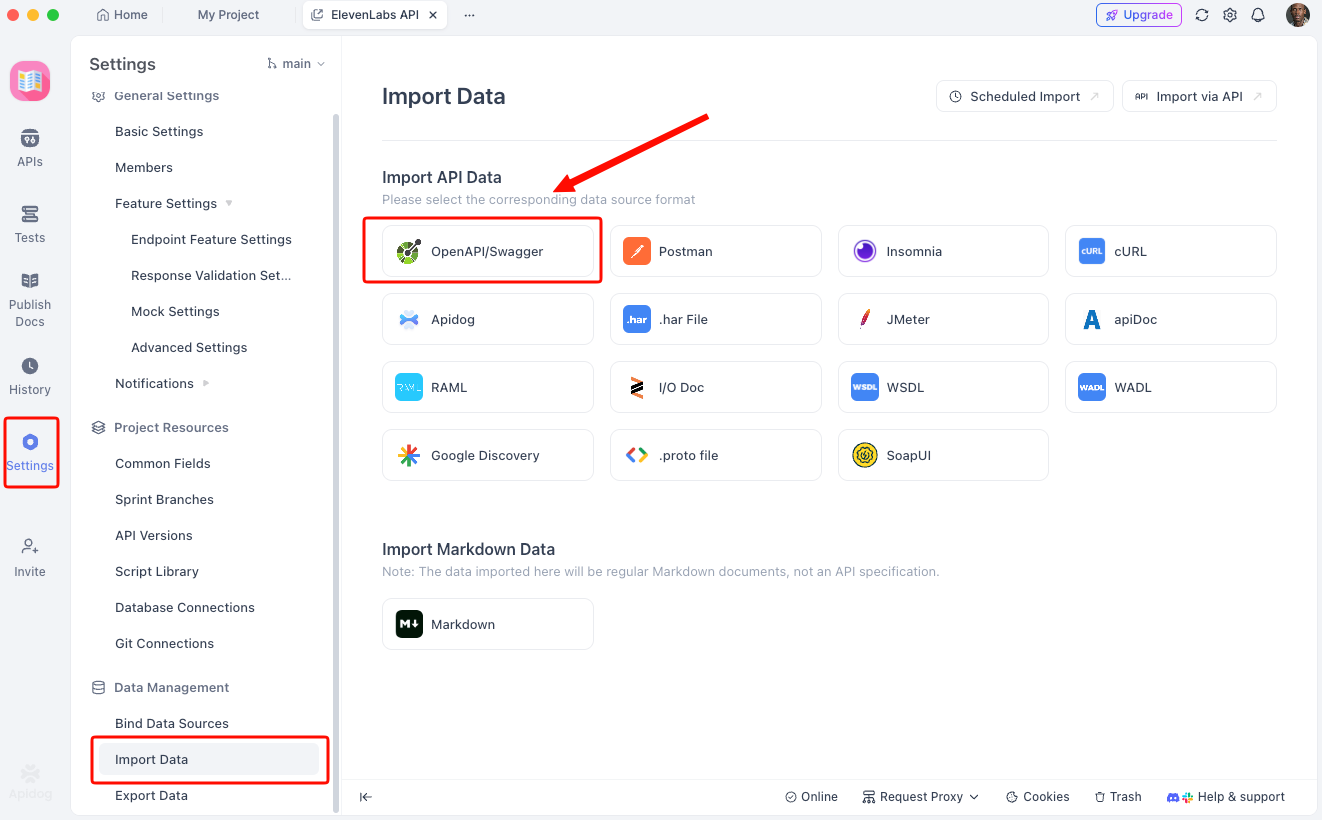
- Go to Settings -> Import Data.
- Select OpenAPI/Swagger and paste the YAML generated by Codex.
Step 3: Visual Validation
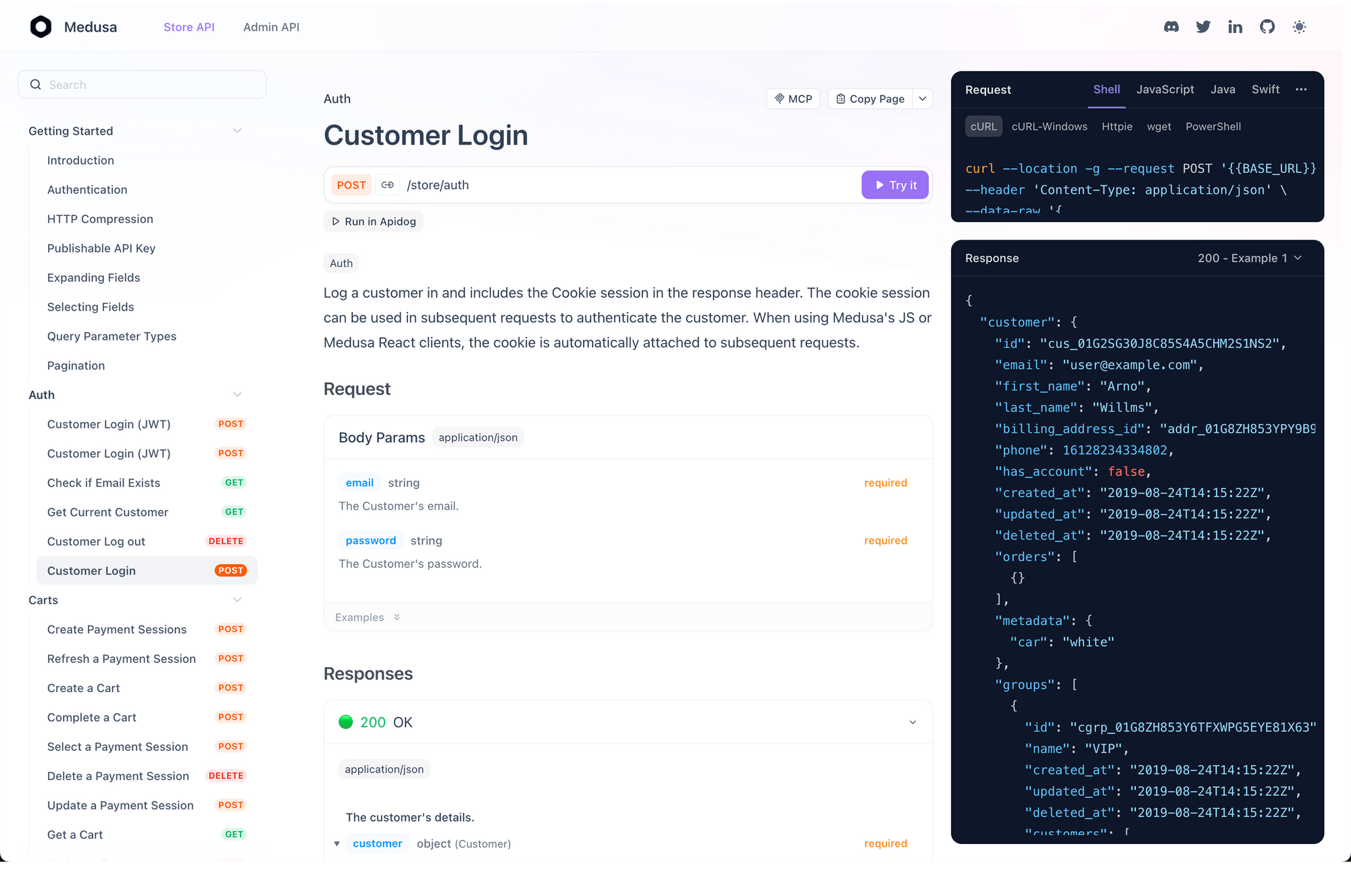
Once imported, Apidog renders the API in a human-readable format. You can instantly see if Codex made logical errors, like missing required fields or inconsistent naming conventions.
Step 4: Automated Testing
This is where the magic happens. Apidog can automatically generate test scenarios based on the imported spec.
- Navigate to the Testing module in Apidog.
- Select your imported API.
- Click "Generate Test Cases".
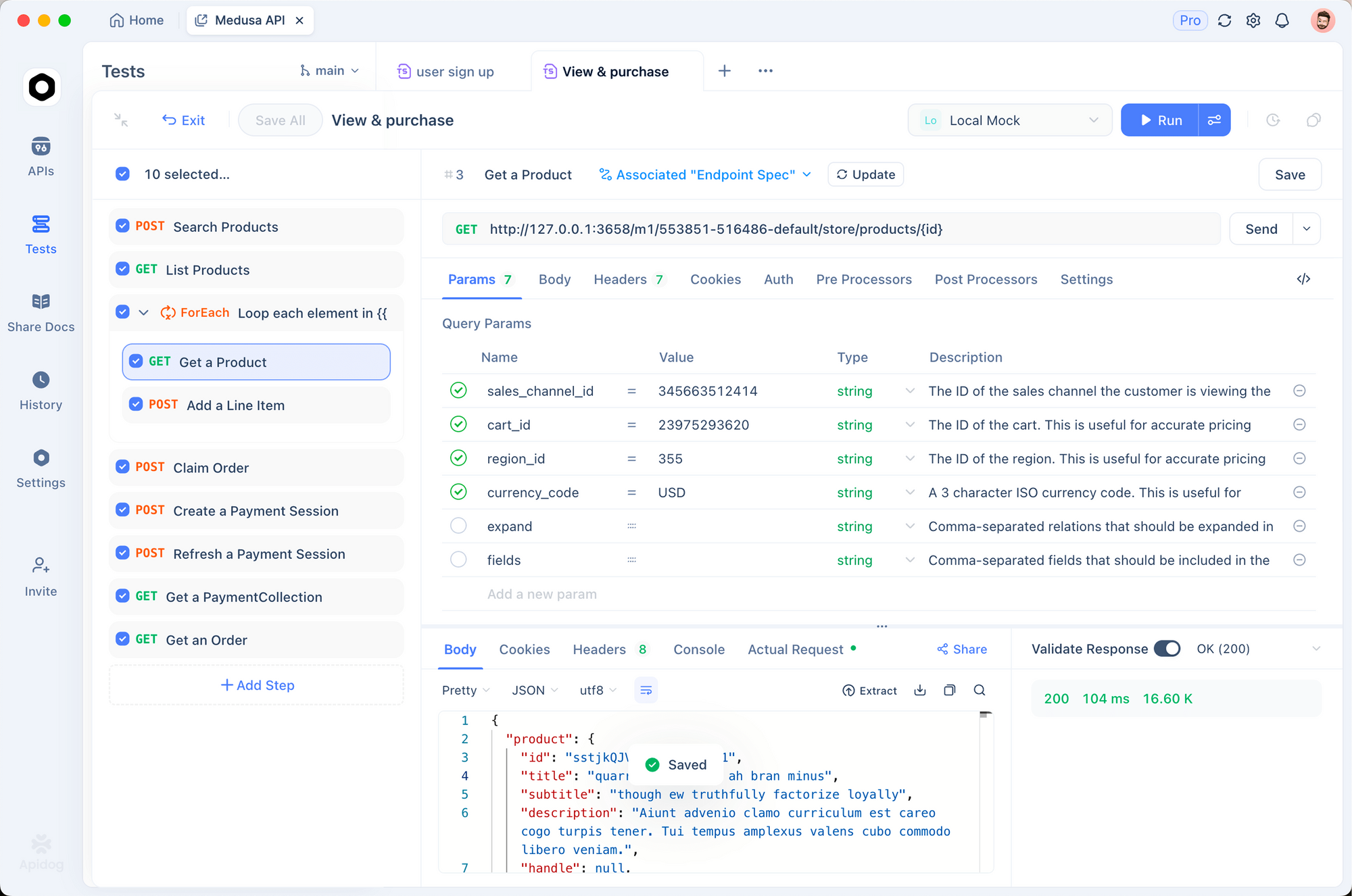
Apidog will create positive and negative test cases (e.g., sending invalid IDs, missing tokens) to stress-test the API implementation that Codex builds.
// Example Apidog Pre-request Script to generate dynamic data
// This ensures your Codex-generated API handles unique inputs correctly
pm.environment.set("randomEmail", `user_${Date.now()}@example.com`);
Step 5: Mocking for Frontend Devs
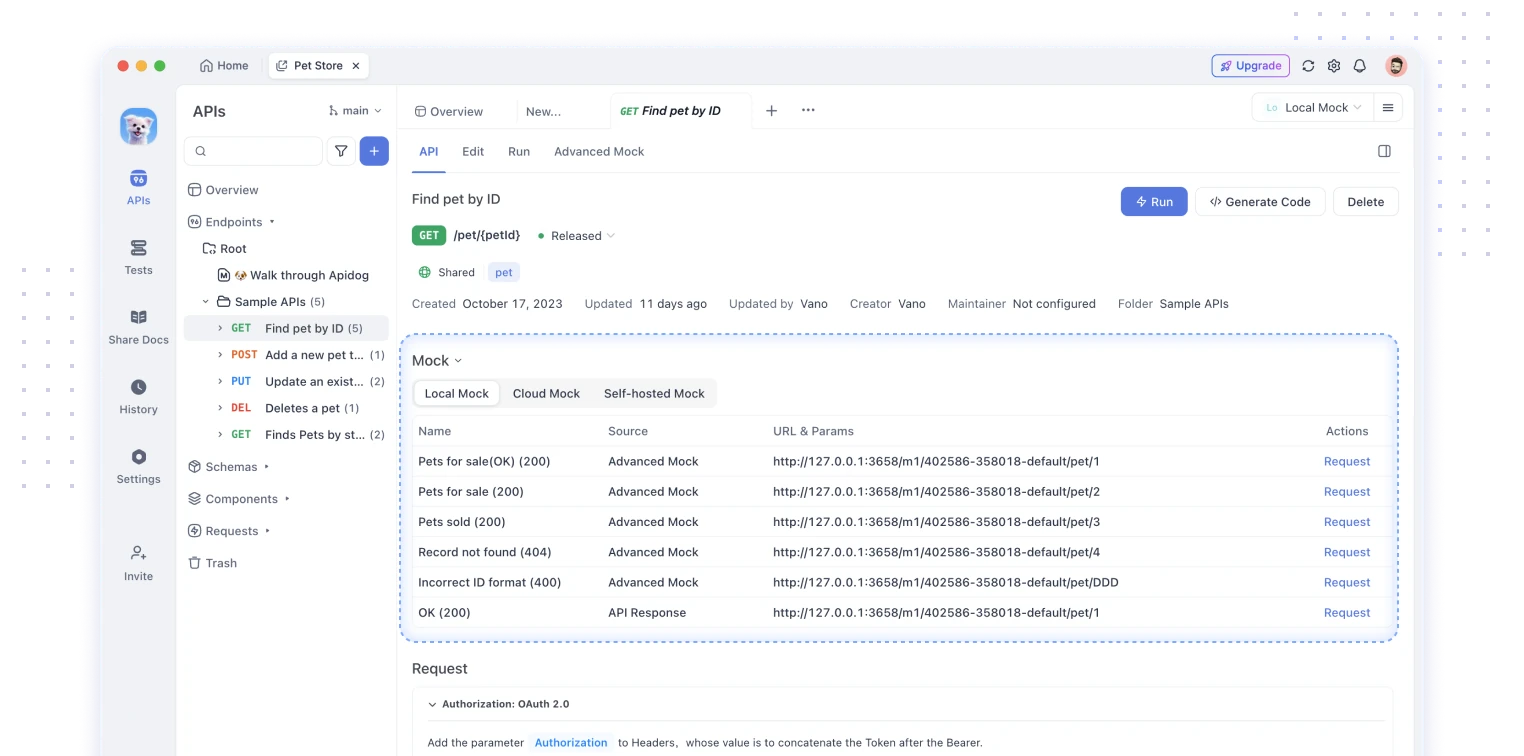
While Codex is busy writing the backend implementation (which might take hours for a complex system), you can use Apidog's Mock Server feature to instantly serve the API endpoints based on the spec. This allows your frontend team (or your frontend Codex agent!) to start working immediately.
Practical Tips for Getting Started with GPT-5.3-Codex
Start simple. Prompt the model to build a small tool, then scale. For example: "Create a Python script that fetches stock data via API, analyzes trends, and generates a report slide deck."
Leverage interactivity. Check progress every few minutes and steer: "Focus more on error handling" or "Add unit tests here." This prevents drift in long tasks.
Optimize token usage. GPT-5.3-Codex often solves problems with fewer tokens than predecessors—monitor costs on paid plans.
Combine with external tools. When generating API clients or backends, import specs into Apidog. Design requests visually, mock responses, and validate generated code against real endpoints. This workflow catches integration issues early.
Handle cybersecurity responsibly. Avoid prompts that probe vulnerabilities unless participating in OpenAI's Trusted Access for Cyber pilot.
Advanced Usage: Agentic Workflows and Integrations
GPT-5.3-Codex excels at multi-day projects. Provide a high-level goal; it researches dependencies, writes code, tests locally (in simulated environments), deploys to staging, and monitors logs.
For API-heavy development, generate server code with FastAPI or Express, then test endpoints. Use Apidog to create collections from OpenAPI specs produced by the model—automate validation and share with teams.
In data tasks, instruct it to analyze CSVs or build dashboards. It handles tools like pandas or visualization libraries natively.
Monitor long runs. The model provides frequent updates; review them to maintain alignment.
Conclusion: Start Building with GPT-5.3-Codex Today
GPT-5.3-Codex redefines agentic coding by combining speed, reasoning, and execution in one model. Access it now through paid ChatGPT plans across the app, CLI, IDE, and web. Experiment with complex tasks to see the difference small steering inputs make.
Pair it with Apidog (free download available) for end-to-end API workflows—generate code with GPT-5.3-Codex, design and test in Apidog, and deploy confidently.
The model evolves rapidly. Stay updated via OpenAI's blog and community forums. Start your first project today—what will you build?