

สรุปย่อ
BigCommerce APIs ช่วยให้คุณจัดการผลิตภัณฑ์, คำสั่งซื้อ, ลูกค้า และการดำเนินงานของร้านค้าได้ด้วยโปรแกรม คุณจะยืนยันตัวตนด้วย API tokens (สำหรับฝั่งเซิร์ฟเวอร์) หรือ OAuth (สำหรับแอป) เรียกใช้ REST endpoints ที่ api.bigcommerce.com และจัดการ webhooks เพื่อรับการอัปเดตแบบเรียลไทม์ สำหรับการทดสอบ ให้ใช้ Apidog เพื่อบันทึกการเรียกใช้ API ของคุณ ตรวจสอบความถูกต้องของคำตอบ และแชร์คอลเลกชันกับทีมของคุณ
บทนำ
BigCommerce ขับเคลื่อนร้านค้าออนไลน์กว่า 60,000 แห่ง แต่ละแห่งต้องการการผสานรวมที่กำหนดเอง เช่น การซิงค์สต็อกสินค้า, การประมวลผลคำสั่งซื้อ, การจัดการลูกค้า, การจัดการการชำระเงิน นั่นคือที่มาของ API
แพลตฟอร์มนี้มี API สามประเภท: Storefront API (headless commerce), Management API (การดำเนินงานแบ็กเอนด์) และ Payments API (ธุรกรรม) นักพัฒนาส่วนใหญ่ทำงานกับ Management API ซึ่งจัดการผลิตภัณฑ์, คำสั่งซื้อ, ลูกค้า และทุกสิ่งที่เกิดขึ้นเบื้องหลัง
การเรียนรู้ไม่ได้ยาก แต่เอกสารประกอบอาจดูเยอะเกินไป คุณจะพบว่าตัวเองต้องกระโดดไปมาระหว่างเอกสารการยืนยันตัวตน, การอ้างอิง API และ คู่มือ webhook เพียงเพื่อให้งานง่ายๆ เสร็จสมบูรณ์
คู่มือนี้เน้นสิ่งที่คุณจะใช้จริง ๆ ได้แก่ ผลิตภัณฑ์, คำสั่งซื้อ, ลูกค้า และ webhooks คุณจะได้เรียนรู้การยืนยันตัวตน รูปแบบทั่วไป และวิธีการทดสอบการผสานรวมของคุณก่อนที่จะใช้งานจริงกับร้านค้า
ทดสอบ BigCommerce APIs ของคุณด้วย Apidog - ฟรี
เมื่อจบคู่มือนี้ คุณจะสามารถ:
- ตั้งค่าการยืนยันตัวตน BigCommerce ได้อย่างถูกต้อง
- จัดการผลิตภัณฑ์, ตัวเลือกสินค้า (variants) และสต็อกสินค้า
- ประมวลผลคำสั่งซื้อและจัดการข้อมูลลูกค้า
- ตั้งค่า webhooks สำหรับการอัปเดตแบบเรียลไทม์
- ทดสอบและจัดทำเอกสารการผสานรวมของคุณด้วย Apidog
การยืนยันตัวตน: การเข้าถึงร้านค้าของคุณ
BigCommerce มีวิธีการยืนยันตัวตนสองแบบขึ้นอยู่กับสิ่งที่คุณกำลังสร้าง
วิธีที่ 1: API Tokens (สำหรับการผสานรวมที่กำหนดเอง)
หากคุณกำลังสร้างสคริปต์หรือบริการที่ทำงานกับร้านค้าเดียว ให้ใช้ API tokens
สร้างบัญชี API:
- ไปที่แผงควบคุมผู้ดูแลระบบของร้านค้าคุณ
- การตั้งค่า (Settings) → บัญชี API (API Accounts) → สร้างบัญชี API (Create API Account)
- เลือก “V3/V2 API Token”
- เลือกขอบเขตที่คุณต้องการ (ผลิตภัณฑ์, คำสั่งซื้อ, ลูกค้า ฯลฯ)
- บันทึกข้อมูลการเข้าสู่ระบบ
คุณจะได้รับ:
- Store URL:
mystore.mybigcommerce.com - Access Token:
abc123def456... - Client ID:
abc123... - Client Secret:
xyz789...
ทำการเรียกใช้ครั้งแรก:
curl -X GET "https://api.bigcommerce.com/stores/{store-hash}/v3/catalog/products" \
  -H "X-Auth-Token: {access-token}" \
  -H "Content-Type: application/json" \
  -H "Accept: application/json"
store-hash คือส่วนที่อยู่หลัง /stores/ ในพาธ API ของคุณ นอกจากนี้ยังสามารถดูได้ใน URL ผู้ดูแลระบบร้านค้าของคุณ
วิธีที่ 2: OAuth (สำหรับแอปพลิเคชันใน Marketplace)
หากคุณกำลังสร้างแอปพลิเคชันสำหรับ BigCommerce marketplace ให้ใช้ OAuth
ขั้นตอน OAuth:
- ผู้ใช้คลิก “ติดตั้ง” (Install) บนแอปของคุณใน marketplace
- BigCommerce จะเปลี่ยนเส้นทางไปยัง callback URL ของคุณพร้อมกับโค้ดยืนยันตัวตน (auth code)
- เซิร์ฟเวอร์ของคุณจะแลกเปลี่ยนโค้ดเพื่อรับ access token
- จัดเก็บโทเค็นสำหรับการเรียกใช้ API ในอนาคต
แลกเปลี่ยนโค้ดเพื่อรับโทเค็น:
const response = await fetch('https://login.bigcommerce.com/oauth2/token', {
  method: 'POST',
  headers: { 'Content-Type': 'application/x-www-form-urlencoded' },
  body: new URLSearchParams({
    client_id: process.env.BC_CLIENT_ID,
    client_secret: process.env.BC_CLIENT_SECRET,
    redirect_uri: 'https://yourapp.com/auth/callback',
    grant_type: 'authorization_code',
    code: authCode,
    scope: 'store_v2_default store_v3_products'
  })
})

const { access_token, context } = await response.json()
// access_token คือสิ่งที่คุณใช้สำหรับการเรียกใช้ API
// context ประกอบด้วย store_hash
ใช้โทเค็น:
curl -X GET "https://api.bigcommerce.com/stores/{store-hash}/v3/catalog/products" \
  -H "X-Auth-Token: {access-token}" \
  -H "Content-Type: application/json"
การจัดการผลิตภัณฑ์และแค็ตตาล็อก
ผลิตภัณฑ์คือหัวใจของร้านค้า BigCommerce ทุกแห่ง V3 Catalog API จัดการผลิตภัณฑ์, ตัวเลือกสินค้า (variants), หมวดหมู่ และแบรนด์
รายการผลิตภัณฑ์
GET https://api.bigcommerce.com/stores/{store-hash}/v3/catalog/products
X-Auth-Token: {token}
Accept: application/json
การตอบสนอง:
{
  "data": [
    {
      "id": 174,
      "name": "Plain T-Shirt",
      "type": "physical",
      "sku": "PLAIN-T",
      "price": 29.99,
      "sale_price": 24.99,
      "inventory_level": 150,
      "inventory_tracking": "product",
      "is_visible": true,
      "categories": [23, 45],
      "brand_id": 12
    }
  ],
  "meta": {
    "pagination": {
      "total": 500,
      "count": 50,
      "page": 1,
      "per_page": 50
    }
  }
}
สร้างผลิตภัณฑ์
POST https://api.bigcommerce.com/stores/{store-hash}/v3/catalog/products
X-Auth-Token: {token}
Content-Type: application/json

{
  "name": "Premium Hoodie",
  "type": "physical",
  "sku": "HOODIE-PREM",
  "price": 79.99,
  "description": "Premium cotton blend hoodie",
  "weight": 1.5,
  "width": 20,
  "height": 28,
  "depth": 2,
  "inventory_level": 100,
  "inventory_tracking": "product",
  "is_visible": true,
  "categories": [23]
}
อัปเดตตัวเลือกสินค้า
ผลิตภัณฑ์ที่มีตัวเลือก (ขนาด, สี) มีตัวเลือกสินค้า (variants) ตัวเลือกสินค้าแต่ละรายการสามารถมี SKU, ราคา และสต็อกสินค้าของตัวเองได้
PUT https://api.bigcommerce.com/stores/{store-hash}/v3/catalog/products/{product-id}/variants/{variant-id}
X-Auth-Token: {token}
Content-Type: application/json

{
  "sku": "HOODIE-PREM-BLK-M",
  "price": 79.99,
  "inventory_level": 50,
  "option_values": [
    {
      "option_display_name": "Color",
      "label": "Black"
    },
    {
      "option_display_name": "Size",
      "label": "Medium"
    }
  ]
}
จัดการสต็อกสินค้า
PUT https://api.bigcommerce.com/stores/{store-hash}/v3/catalog/products/{product-id}
X-Auth-Token: {token}
Content-Type: application/json

{
  "inventory_level": 75
}
หรืออัปเดตสต็อกสินค้าตัวเลือก:
PUT https://api.bigcommerce.com/stores/{store-hash}/v3/catalog/products/{product-id}/variants/{variant-id}
Content-Type: application/json

{
  "inventory_level": 25
}
คำสั่งซื้อและการจัดการการจัดส่ง
คำสั่งซื้อคือจุดที่ธุรกิจดำเนินไป Orders V2 API จัดการการสร้าง, การอัปเดต และการจัดการการจัดส่งคำสั่งซื้อ
รายการคำสั่งซื้อ
GET https://api.bigcommerce.com/stores/{store-hash}/v2/orders
X-Auth-Token: {token}
Accept: application/json
การตอบสนอง:
[
  {
    "id": 115,
    "status": "Awaiting Fulfillment",
    "status_id": 11,
    "customer_id": 45,
    "date_created": "2026-03-24T10:30:00+00:00",
    "subtotal_ex_tax": 149.99,
    "total_inc_tax": 162.49,
    "items_total": 2,
    "items_shipped": 0,
    "shipping_address": {
      "first_name": "John",
      "last_name": "Doe",
      "street_1": "123 Main St",
      "city": "Austin",
      "state": "Texas",
      "zip": "78701",
      "country": "United States"
    }
  }
]
ดูรายละเอียดคำสั่งซื้อ
GET https://api.bigcommerce.com/stores/{store-hash}/v2/orders/{order-id}
X-Auth-Token: {token}
ดูผลิตภัณฑ์ในคำสั่งซื้อ
GET https://api.bigcommerce.com/stores/{store-hash}/v2/orders/{order-id}/products
X-Auth-Token: {token}
อัปเดตสถานะคำสั่งซื้อ
PUT https://api.bigcommerce.com/stores/{store-hash}/v2/orders/{order-id}
X-Auth-Token: {token}
Content-Type: application/json

{
  "status_id": 12
}
ID สถานะทั่วไป:
- 0: ไม่สมบูรณ์ (Incomplete)
- 11: รอการจัดส่ง (Awaiting Fulfillment)
- 12: เสร็จสมบูรณ์ (Completed)
- 5: ยกเลิก (Cancelled)
- 4: คืนเงิน (Refunded)
สร้างการจัดส่ง (fulfillment)
POST https://api.bigcommerce.com/stores/{store-hash}/v2/orders/{order-id}/shipments
X-Auth-Token: {token}
Content-Type: application/json

{
  "tracking_number": "1Z999AA10123456784",
  "carrier": "UPS",
  "shipping_method": "UPS Ground",
  "items": [
    {
      "order_product_id": 234,
      "quantity": 1
    }
  ]
}
ลูกค้าและการแบ่งกลุ่ม
Customers V3 API จัดการข้อมูลลูกค้า, ที่อยู่ และกลุ่มลูกค้า
รายการลูกค้า
GET https://api.bigcommerce.com/stores/{store-hash}/v3/customers
X-Auth-Token: {token}
Accept: application/json
การตอบสนอง:
{
  "data": [
    {
      "id": 45,
      "email": "john.doe@example.com",
      "first_name": "John",
      "last_name": "Doe",
      "company": "Acme Corp",
      "phone": "512-555-1234",
      "customer_group_id": 1,
      "notes": "VIP customer",
      "tax_exempt_category": "",
      "date_created": "2025-11-15T09:30:00+00:00",
      "date_modified": "2026-03-20T14:22:00+00:00"
    }
  ]
}
สร้างลูกค้า
POST https://api.bigcommerce.com/stores/{store-hash}/v3/customers
X-Auth-Token: {token}
Content-Type: application/json

{
  "email": "jane.smith@example.com",
  "first_name": "Jane",
  "last_name": "Smith",
  "phone": "512-555-5678",
  "customer_group_id": 2
}
อัปเดตลูกค้า
PUT https://api.bigcommerce.com/stores/{store-hash}/v3/customers/{customer-id}
X-Auth-Token: {token}
Content-Type: application/json

{
  "notes": "Repeat customer - priority support",
  "customer_group_id": 3
}
Webhooks สำหรับการอัปเดตแบบเรียลไทม์
Webhooks จะแจ้งเตือนแอปของคุณเมื่อมีเหตุการณ์เกิดขึ้นในร้านค้า แทนที่จะต้องคอยตรวจสอบ BigCommerce จะส่งข้อมูลไปยัง endpoints ของคุณโดยตรง
สร้าง webhook
POST https://api.bigcommerce.com/stores/{store-hash}/v3/hooks
X-Auth-Token: {token}
Content-Type: application/json

{
  "scope": "store/order/created",
  "destination": "https://yourapp.com/webhooks/orders",
  "is_active": true
}
ขอบเขตที่พร้อมใช้งาน:
store/order/created- คำสั่งซื้อใหม่ถูกสร้างขึ้นstore/order/updated- สถานะคำสั่งซื้อมีการเปลี่ยนแปลงstore/order/archived- คำสั่งซื้อถูกเก็บถาวรstore/product/created- ผลิตภัณฑ์ถูกเพิ่มstore/product/updated- ผลิตภัณฑ์ถูกแก้ไขstore/product/deleted- ผลิตภัณฑ์ถูกลบstore/customer/created- ลูกค้าใหม่store/inventory/updated- สต็อกสินค้ามีการเปลี่ยนแปลง
ตรวจสอบลายเซ็น webhook
BigCommerce ลงนามใน webhooks เพื่อให้คุณสามารถตรวจสอบได้ว่าถูกต้องตามกฎหมาย:
import crypto from 'crypto'

function verifyWebhook(payload, signature, secret) {
  const expectedSignature = crypto
    .createHmac('sha256', secret)
    .update(payload)
    .digest('hex')

  return crypto.timingSafeEqual(
    Buffer.from(signature),
    Buffer.from(expectedSignature)
  )
}

app.post('/webhooks/orders', (req, res) => {
  const signature = req.headers['x-bc-webhook-signature']
  const payload = JSON.stringify(req.body)

  if (!verifyWebhook(payload, signature, process.env.BC_CLIENT_SECRET)) {
    return res.status(401).send('Invalid signature')
  }

  // Process the webhook
  console.log('Order created:', req.body.data.id)
  res.status(200).send('OK')
})
การทดสอบ BigCommerce API ด้วย Apidog
BigCommerce API ต้องการ header ที่สอดคล้องกันและการยืนยันตัวตนที่ถูกต้อง การทดสอบด้วย curl ด้วยตนเองนั้นน่าเบื่อ Apidog ช่วยให้กระบวนการนี้ง่ายขึ้น
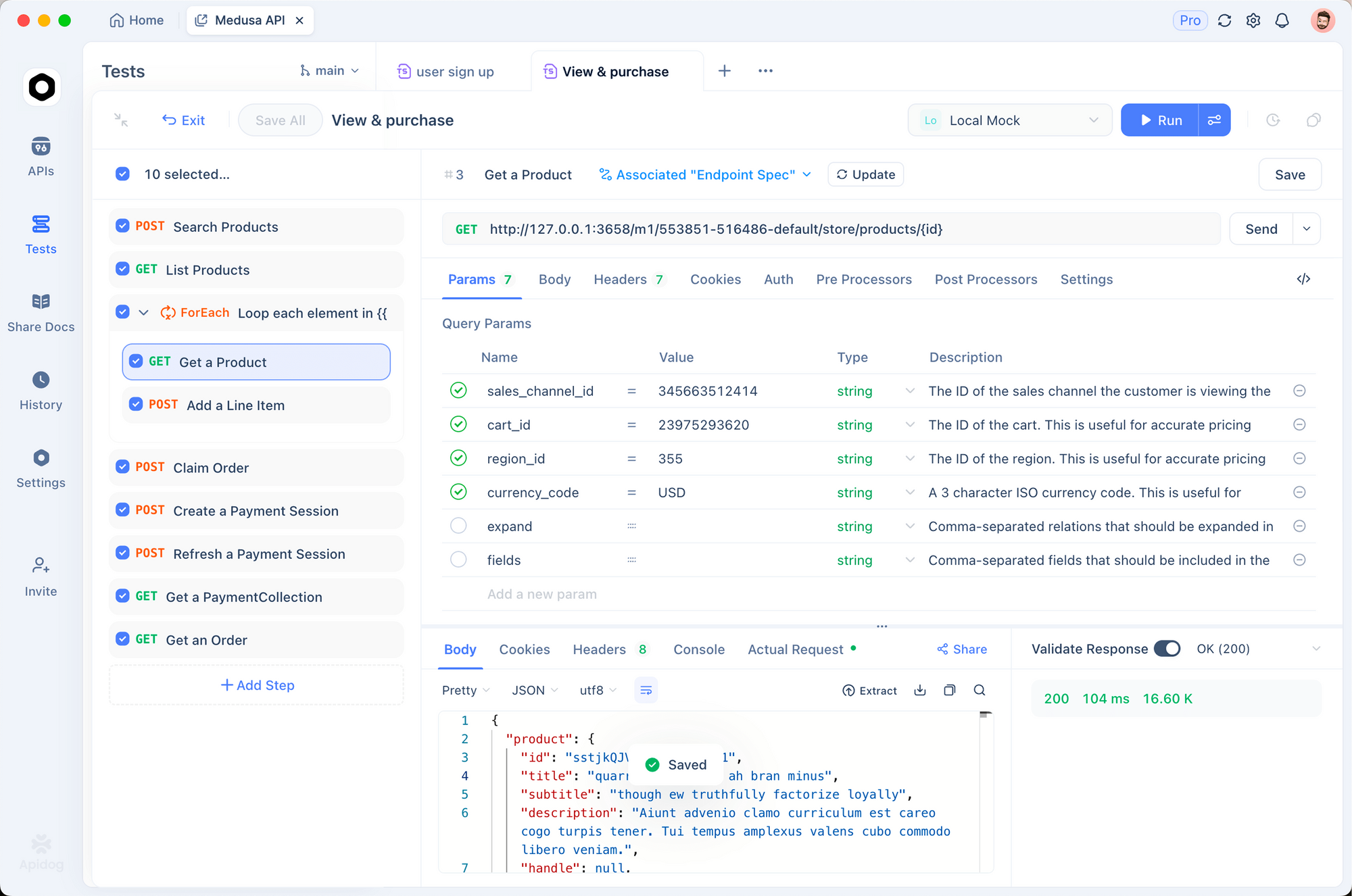
1. การตั้งค่าสภาพแวดล้อม
สร้างสภาพแวดล้อมสำหรับแต่ละร้านค้า:
# Production Store
STORE_HASH: abc123
ACCESS_TOKEN: xyz789
BASE_URL: https://api.bigcommerce.com/stores/abc123

# Staging Store
STORE_HASH: staging456
ACCESS_TOKEN: staging_token
BASE_URL: https://api.bigcommerce.com/stores/staging456
2. สคริปต์ก่อนการเรียกใช้
เพิ่ม header การยืนยันตัวตนโดยอัตโนมัติ:
pm.request.headers.add({
  key: 'X-Auth-Token',
  value: pm.environment.get('ACCESS_TOKEN')
})
pm.request.headers.add({
  key: 'Accept',
  value: 'application/json'
})
3. ตรวจสอบความถูกต้องของคำตอบ
ทดสอบว่าผลิตภัณฑ์มีฟิลด์ที่จำเป็น:
pm.test('Products have required fields', () => {
  const response = pm.response.json()
  response.data.forEach(product => {
    pm.expect(product).to.have.property('id')
    pm.expect(product).to.have.property('name')
    pm.expect(product).to.have.property('price')
    pm.expect(product.price).to.be.above(0)
  })
})

pm.test('Pagination works', () => {
  const response = pm.response.json()
  pm.expect(response.meta.pagination).to.have.property('total')
  pm.expect(response.meta.pagination.page).to.eql(1)
})
ทดสอบ BigCommerce API ด้วย Apidog - ฟรี
ข้อผิดพลาดที่พบบ่อยและการแก้ไข
401 ไม่ได้รับอนุญาต (Unauthorized)
สาเหตุ: Access token ไม่ถูกต้องหรือไม่มีอยู่
วิธีแก้ไข:
- ตรวจสอบว่าตั้งค่า header
X-Auth-Tokenแล้ว - ยืนยันว่าโทเค็นยังไม่ถูกเพิกถอน
- ตรวจสอบให้แน่ใจว่าบัญชี API มีขอบเขตที่ถูกต้อง
403 ห้ามเข้าถึง (Forbidden)
สาเหตุ: โทเค็นถูกต้องแต่ไม่มีขอบเขตที่จำเป็น
วิธีแก้ไข:
- ตรวจสอบสิทธิ์ของบัญชี API ของคุณ
- เพิ่มขอบเขตที่ขาดหายไป (ผลิตภัณฑ์, คำสั่งซื้อ ฯลฯ)
- สร้างโทเค็นใหม่ด้วยสิทธิ์ที่ขยายเพิ่ม
404 ไม่พบ (Not Found)
สาเหตุ: Endpoint ผิด หรือทรัพยากรไม่มีอยู่จริง
วิธีแก้ไข:
- ยืนยันว่า store hash ถูกต้อง
- ตรวจสอบเวอร์ชัน API ใน URL (v2 เทียบกับ v3)
- ตรวจสอบให้แน่ใจว่า ID ทรัพยากรมีอยู่จริง
429 คำขอมากเกินไป (Too Many Requests)
สาเหตุ: เกินขีดจำกัดการเรียกใช้ (Rate limit exceeded)
วิธีแก้ไข: BigCommerce อนุญาตให้มีขีดจำกัดที่แตกต่างกันในแต่ละ endpoint ผลิตภัณฑ์: 10,000 คำขอ/ชั่วโมง คำสั่งซื้อ: 30,000 คำขอ/ชั่วโมง ตรวจสอบ header X-Rate-Limit-Remaining และใช้กลยุทธ์ backoff
async function callWithBackoff(fn, maxRetries = 3) {
  for (let i = 0; i < maxRetries; i++) {
    const response = await fn()
    if (response.status === 429) {
      const retryAfter = response.headers.get('X-Rate-Limit-Reset')
      await new Promise(r => setTimeout(r, retryAfter * 1000))
    } else {
      return response
    }
  }
}
422 เอนทิตีไม่สามารถประมวลผลได้ (Unprocessable Entity)
สาเหตุ: ข้อผิดพลาดในการตรวจสอบความถูกต้องในเนื้อหาคำขอ
วิธีแก้ไข: ตรวจสอบคำตอบเพื่อดูรายละเอียด BigCommerce จะส่งคืนข้อผิดพลาดในการตรวจสอบความถูกต้องเฉพาะ:
{
  "errors": {
    "price": "Price must be greater than zero",
    "sku": "SKU already exists"
  }
}
ทางเลือกและการเปรียบเทียบ
| คุณสมบัติ | BigCommerce | Shopify | WooCommerce |
|---|---|---|---|
| การกำหนดเวอร์ชัน API | V2 และ V3 | REST และ GraphQL | REST |
| ขีดจำกัดการเรียกใช้ | 10K-30K/ชั่วโมง | 2/นาที (leaky bucket) | ขึ้นอยู่กับโฮสติ้ง |
| Webhooks | มี | มี | มี (ปลั๊กอิน) |
| GraphQL | ไม่มี | มี | ไม่มี |
| คุณภาพ SDK | ดี | ยอดเยี่ยม | PHP เท่านั้น |
| หลายร้านค้า (Multi-store) | มี | ไม่มี | ไม่มี |
V3 API ของ BigCommerce มีความสอดคล้องกันมากกว่าวิธีการที่กระจัดกระจายของ Shopify แต่ GraphQL API ของ Shopify ให้ความยืดหยุ่นมากขึ้นสำหรับการสอบถามที่ซับซ้อน
กรณีการใช้งานจริง
การซิงค์สต็อกสินค้าหลายช่องทาง แบรนด์ขายสินค้าบน BigCommerce, Amazon และร้านค้าจริง พวกเขาใช้ Products API เพื่อซิงค์ระดับสต็อกสินค้าในทุกช่องทาง เพื่อป้องกันการขายเกิน Apidog ทดสอบ endpoints การซิงค์ก่อนการใช้งานจริงแต่ละครั้ง
การจัดการคำสั่งซื้ออัตโนมัติ บริษัทกล่องสมัครสมาชิกใช้ webhooks เพื่อกระตุ้นการจัดส่งเมื่อมีการสร้างคำสั่งซื้อ Orders API อัปเดตหมายเลขติดตาม โกดังของพวกเขาได้รับรายการสินค้าเพื่อจัดส่งโดยอัตโนมัติผ่านตัวจัดการ webhook
การแบ่งกลุ่มลูกค้า เว็บไซต์อีคอมเมิร์ซใช้ Customers API เพื่อแบ่งกลุ่มผู้ซื้อตามประวัติการซื้อ ลูกค้า VIP จะถูกเพิ่มในกลุ่มพิเศษพร้อมราคาพิเศษ การผสานรวมนี้ทำงานทุกสัปดาห์ผ่านงานที่กำหนดไว้
สรุป
นี่คือสิ่งที่คุณได้เรียนรู้:
- การยืนยันตัวตนใช้ API tokens (การผสานรวมแบบง่าย) หรือ OAuth (แอปพลิเคชันใน marketplace)
- V3 Catalog API จัดการผลิตภัณฑ์และตัวเลือกสินค้า
- V2 Orders API จัดการการประมวลผลและการจัดส่งคำสั่งซื้อ
- V3 Customers API จัดการข้อมูลลูกค้า
- Webhooks ส่งการอัปเดตแบบเรียลไทม์ไปยัง endpoints ของคุณ
- ทดสอบและจัดทำเอกสารด้วย Apidog เพื่อการผสานรวมที่เชื่อถือได้
ขั้นตอนต่อไปของคุณ:
- สร้างบัญชี API ในร้านค้า BigCommerce ของคุณ
- ทำการเรียกใช้ API ครั้งแรกเพื่อแสดงรายการผลิตภัณฑ์
- ตั้งค่า webhook สำหรับการสร้างคำสั่งซื้อ
- บันทึกการเรียกใช้ API ของคุณใน Apidog
- สร้างการผสานรวมของคุณ
ทดสอบ BigCommerce API ด้วย Apidog - ฟรี
คำถามที่พบบ่อย
ความแตกต่างระหว่าง V2 และ V3 API คืออะไร?V3 เป็น API ที่ใหม่กว่าและสอดคล้องกันมากกว่า ใช้สำหรับผลิตภัณฑ์, หมวดหมู่, แบรนด์ และลูกค้า V2 จัดการคำสั่งซื้อที่ยังไม่ได้ย้าย คุณจะต้องใช้ทั้งสองเวอร์ชันในการผสานรวมส่วนใหญ่
ฉันจะรับ store hash ของฉันได้อย่างไร?อยู่ใน URL ผู้ดูแลระบบ BigCommerce ของคุณ: https://store-abc123.mybigcommerce.com/manage ส่วน abc123 คือ store hash ของคุณ นอกจากนี้ยังสามารถดูได้ในการตั้งค่าบัญชี API
ฉันสามารถใช้ API บนร้านค้าทดลองได้หรือไม่?ได้ ร้านค้าทดลองของ BigCommerce มีการเข้าถึง API เต็มรูปแบบ ซึ่งเหมาะสำหรับการพัฒนาและทดสอบก่อนที่จะใช้งานจริง
ขีดจำกัดการเรียกใช้ API คืออะไร?ขึ้นอยู่กับ endpoint ผลิตภัณฑ์: 10,000 คำขอ/ชั่วโมง คำสั่งซื้อ: 30,000 คำขอ/ชั่วโมง ตรวจสอบ X-Rate-Limit-Remaining ใน header การตอบกลับเพื่อดูขีดจำกัดปัจจุบันของคุณ
ฉันจะจัดการการแบ่งหน้า (pagination) ได้อย่างไร?ใช้พารามิเตอร์การค้นหา page และ limit ขีดจำกัดเริ่มต้นคือ 50 ตรวจสอบ meta.pagination ในการตอบกลับสำหรับจำนวนหน้ารวม วนซ้ำจนกว่าคุณจะดึงบันทึกทั้งหมด
let allProducts = []
let page = 1

while (true) {
  const response = await fetch(
    `${baseUrl}/v3/catalog/products?page=${page}&limit=100`,
    { headers: { 'X-Auth-Token': token } }
  )
  const data = await response.json()
  allProducts.push(...data.data)

  if (page >= data.meta.pagination.total_pages) break
  page++
}
ฉันสามารถอัปโหลดรูปภาพผลิตภัณฑ์ผ่าน API ได้หรือไม่?ได้ ใช้ endpoint รูปภาพผลิตภัณฑ์:
POST https://api.bigcommerce.com/stores/{store-hash}/v3/catalog/products/{product-id}/images
Content-Type: application/json

{
  "image_url": "https://example.com/image.jpg",
  "is_thumbnail": true
}
ฉันจะจัดการสกุลเงินและร้านค้าหลายแห่งได้อย่างไร?ร้านค้า BigCommerce มีสกุลเงินพื้นฐาน การรองรับหลายสกุลเงินจะจัดการในระดับ Storefront ไม่ใช่ API สำหรับร้านค้าหลายแห่ง ให้สร้างบัญชี API แยกต่างหากและใช้สภาพแวดล้อมที่แตกต่างกันใน Apidog
จะเกิดอะไรขึ้นหาก endpoint webhook ของฉันล่ม?BigCommerce จะพยายามส่ง webhooks ที่ล้มเหลวซ้ำด้วย exponential backoff หลังจาก 5 ครั้งที่ล้มเหลวภายใน 24 ชั่วโมง webhook จะถูกปิดใช้งาน ตรวจสอบ endpoints ของคุณและแจ้งเตือนเมื่อเกิดข้อผิดพลาด