

คุณกำลังสร้างแอป ผู้ใช้จำเป็นต้องเข้าสู่ระบบ ข้อมูลจำเป็นต้องซิงค์แบบเรียลไทม์ ไฟล์ต้องมีที่เก็บ คุณอาจต้องตั้งเซิร์ฟเวอร์, กำหนดค่าฐานข้อมูล และจัดการโครงสร้างพื้นฐานเป็นเวลาหลายสัปดาห์ หรือคุณอาจใช้ Firebase
Firebase ขับเคลื่อนแอปพลิเคชันกว่า 1.5 ล้านแอป รวมถึง The New York Times, Duolingo และ Alibaba นักพัฒนาเลือกใช้เพราะช่วยลดความซับซ้อนของส่วนหลังบ้าน (backend) คุณสามารถมุ่งเน้นไปที่คุณสมบัติ (features) ไม่ใช่การบำรุงรักษาเซิร์ฟเวอร์ แต่ Firebase API ก็มีจุดที่ต้องทำความเข้าใจเป็นพิเศษ กระบวนการยืนยันตัวตนอาจทำให้ผู้เริ่มต้นสับสน กฎของฐานข้อมูลก็อาจเป็นอุปสรรคต่อนักพัฒนาที่มีประสบการณ์ Cloud Functions ดูเหมือนมีมนต์ขลังจนกว่าคุณจะเข้าใจการทำงานของทริกเกอร์
ผมได้รวม Firebase เข้ากับแอปพลิเคชันที่ใช้งานจริงซึ่งให้บริการผู้ใช้นับล้าน ผมเคยทำผิดพลาดมาทุกรูปแบบ: ตั้งค่า service account keys ให้เข้าถึงได้, เขียนคำสั่งคิวรีที่ไม่มีประสิทธิภาพ, และปรับใช้ฟังก์ชันที่ทำงานผิดพลาด คู่มือนี้ได้รวบรวมบทเรียนเหล่านั้นมาไว้
คุณจะได้เรียนรู้การยืนยันตัวตน, การดำเนินการฐานข้อมูล, Cloud Functions และการจัดเก็บข้อมูล คุณจะได้เห็นโค้ดที่ใช้งานได้จริง ไม่ใช่แค่ทฤษฎี คุณจะหลีกเลี่ยงข้อผิดพลาดที่อาจก่อให้เกิดปัญหาในการใช้งานจริงได้
Firebase API คืออะไร และทำไมถึงสำคัญ?
Firebase ไม่ใช่ API เพียงตัวเดียว เป็นชุดบริการแบ็คเอนด์ที่เข้าถึงได้ผ่าน SDKs แบบรวม และ REST endpoints
บริการหลักของ Firebase
| บริการ | วัตถุประสงค์ | ประเภท API |
|---|---|---|
| การยืนยันตัวตน | การเข้าสู่ระบบและระบุตัวตนของผู้ใช้ | SDK + REST |
| ฐานข้อมูล Firestore | ฐานข้อมูลเอกสาร NoSQL | SDK + REST |
| ฐานข้อมูล Realtime | การซิงค์ JSON แบบเรียลไทม์ | SDK + REST |
| Cloud Storage | การจัดเก็บไฟล์และ CDN | SDK + REST |
| Cloud Functions | การประมวลผลแบบไร้เซิร์ฟเวอร์ | Deployment CLI |
| Hosting | การโฮสต์เว็บแบบคงที่ | Deployment CLI |
| Cloud Messaging | การแจ้งเตือนแบบพุช (Push notifications) | HTTP v1 API |
เมื่อใดที่ Firebase มีความเหมาะสม
Firebase แก้ปัญหาเฉพาะทางได้ดี:
ควรใช้ Firebase เมื่อ:
- คุณต้องการการซิงโครไนซ์แบบเรียลไทม์ (เช่น แชท, การทำงานร่วมกัน, การอัปเดตสด)
- คุณต้องการสถาปัตยกรรมแบบไร้เซิร์ฟเวอร์ (ไม่ต้องจัดการโครงสร้างพื้นฐาน)
- คุณกำลังสร้างแอปบนมือถือหรือเว็บ (SDK จัดการความแตกต่างของแพลตฟอร์ม)
- คุณต้องการการรองรับการใช้งานแบบออฟไลน์ (SDK จะแคชข้อมูลโดยอัตโนมัติ)
- คุณต้องการการยืนยันตัวตนในตัว (Google, Apple, อีเมล, การเข้าสู่ระบบด้วยโทรศัพท์)
ควรหลีกเลี่ยง Firebase เมื่อ:
- คุณต้องการคำสั่งคิวรีแบบเชิงสัมพันธ์ที่ซับซ้อน (ควรใช้ PostgreSQL แทน)
- คุณมีข้อกำหนดเรื่องถิ่นที่อยู่ของข้อมูลที่เข้มงวด (ภูมิภาคของ Firebase มีจำกัด)
- คุณต้องการความสามารถของ SQL อย่างเต็มรูปแบบ (Firestore มีข้อจำกัดในการคิวรี)
- ต้นทุนเมื่อขยายขนาดมีความสำคัญมากกว่าความเร็วในการพัฒนา (การโฮสต์เองอาจถูกกว่า)
สถาปัตยกรรม Firebase API
Firebase ใช้วิธีการแบบไฮบริด:
┌─────────────────────────────────────────────────────────┐
│                    Your Application                      │
├─────────────────────────────────────────────────────────┤
│  Firebase SDK (Client)                                   │
│  - Auto-handles auth tokens                              │
│  - Manages offline cache                                 │
│  - Real-time listeners                                   │
└─────────────────────────────────────────────────────────┘
                          │
                          │ HTTPS + WebSocket
                          ▼
┌─────────────────────────────────────────────────────────┐
│                   Firebase Backend                       │
├──────────────┬──────────────┬──────────────┬────────────┤
│   Auth       │  Firestore   │   Storage    │ Functions  │
│   Service    │  Database    │   Service    │  Runtime   │
└──────────────┴──────────────┴──────────────┴────────────┘
Client SDKs จะจัดการเลเยอร์ HTTP ที่ซับซ้อนให้ เบื้องหลังแล้ว ทุกการดำเนินการจะถูกแปลงเป็นการเรียกใช้ REST API พร้อมการยืนยันตัวตนด้วย JWT
การยืนยันตัวตนด้วย Firebase: การตั้งค่าที่สมบูรณ์
การยืนยันตัวตนคือการผสานรวม Firebase ขั้นแรกของคุณ หากทำขั้นตอนนี้ผิดพลาด ทุกอย่างอื่นก็จะล้มเหลว
ขั้นตอนที่ 1: สร้างโปรเจกต์ Firebase
- ไปที่ Firebase Console
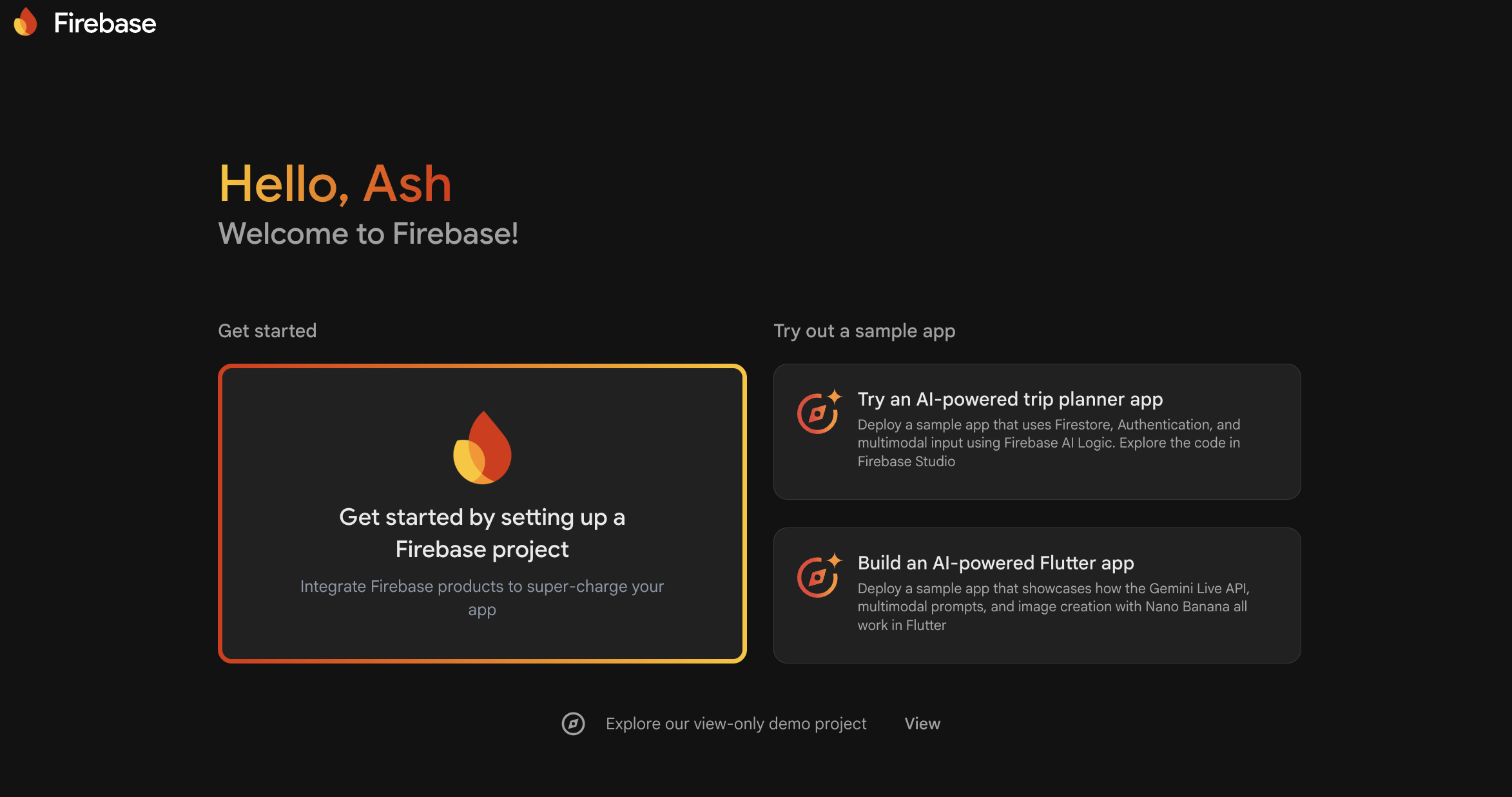
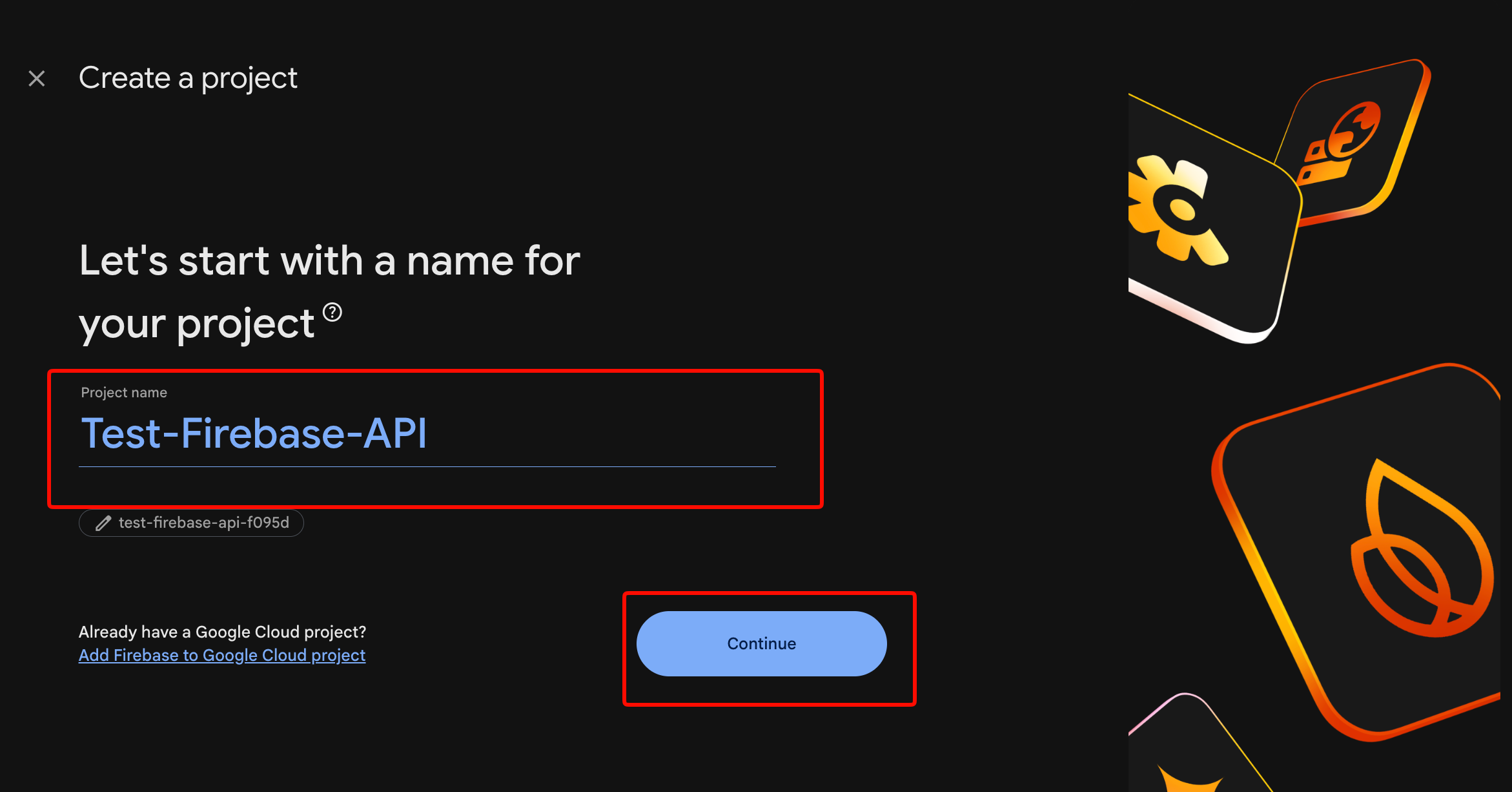
คลิก “Add project” และป้อนชื่อโปรเจกต์ (ไม่มีเว้นวรรค)
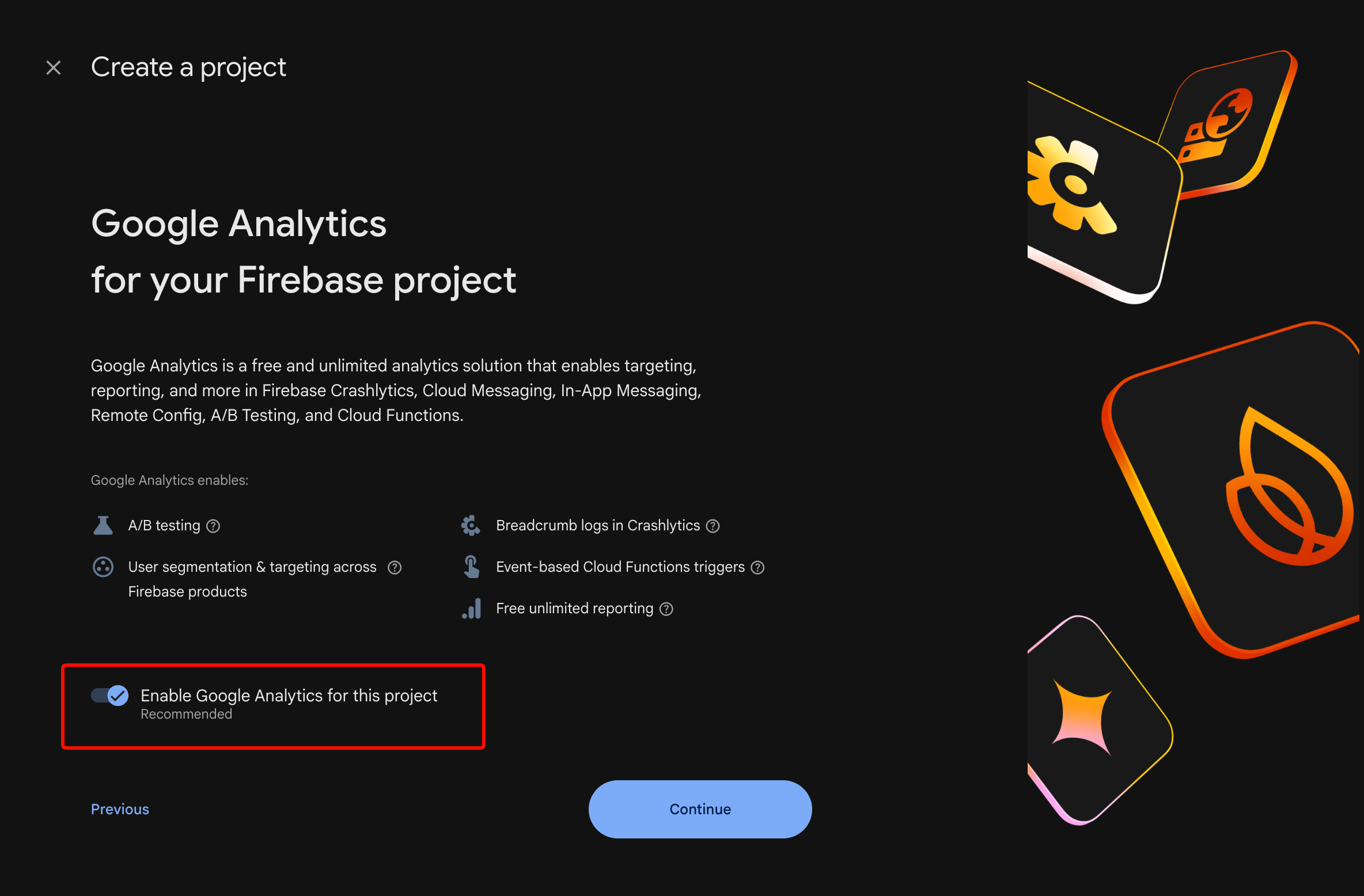
เปิดใช้งาน Google Analytics (เป็นทางเลือกแต่แนะนำ)
คลิก “Create project”
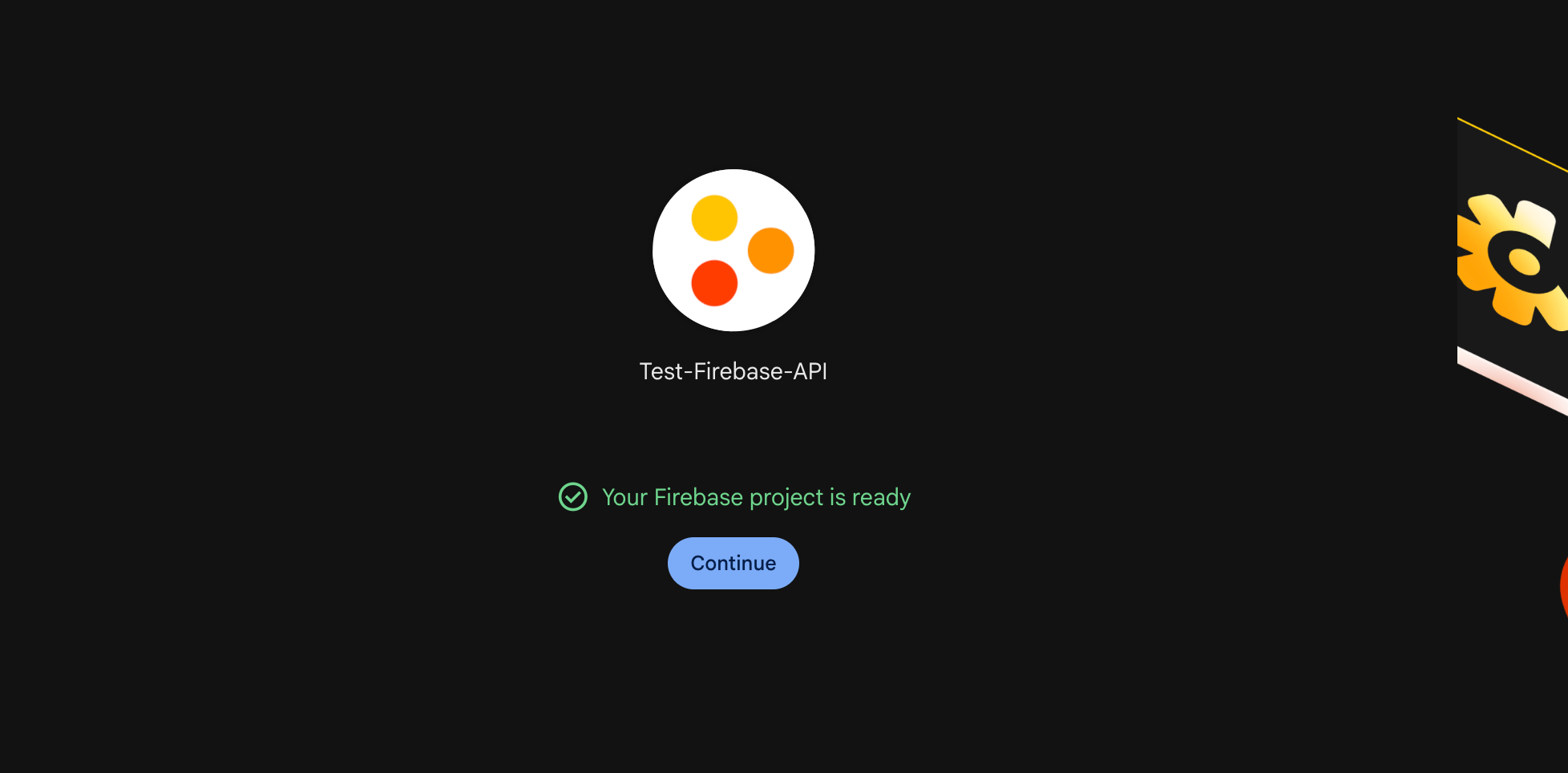
รอประมาณ 30 วินาทีสำหรับการจัดเตรียม คุณจะเห็นแดชบอร์ดโปรเจกต์
ขั้นตอนที่ 2: ลงทะเบียนแอปของคุณ
สำหรับแอปพลิเคชันบนเว็บ:
// In Firebase Console > Project Settings > General
// Click "Add app" > Web icon

// Register web app
const firebaseConfig = {
  apiKey: "AIzaSyDxxxxxxxxxxxxxxxxxxxxxxxxxxxxx",
  authDomain: "your-app.firebaseapp.com",
  projectId: "your-app",
  storageBucket: "your-app.appspot.com",
  messagingSenderId: "123456789012",
  appId: "1:123456789012:web:abc123def456"
};

// Initialize Firebase
import { initializeApp } from 'firebase/app';
const app = initializeApp(firebaseConfig);
สำหรับแอปพลิเคชันบน iOS:
ดาวน์โหลด GoogleService-Info.plist และเพิ่มไปยังโปรเจกต์ Xcode ตรวจสอบให้แน่ใจว่า “Target Membership” มีแอปของคุณอยู่
สำหรับแอปพลิเคชันบน Android:
ดาวน์โหลด google-services.json และวางไว้ในไดเรกทอรี app/ เพิ่มลงใน build.gradle:
// Project-level build.gradle
buildscript {
    dependencies {
        classpath 'com.google.gms:google-services:4.4.0'
    }
}

// App-level build.gradle
plugins {
    id 'com.google.gms.google-services'
}
ขั้นตอนที่ 3: เปิดใช้งานวิธีการยืนยันตัวตน
ใน Firebase Console > Authentication > Sign-in method:
- อีเมล/รหัสผ่าน: เปิดใช้งานสำหรับการสมัครสมาชิกแบบดั้งเดิม
- Google: เพิ่ม SHA-1 certificate fingerprint (สำหรับ Android) หรือ bundle ID (สำหรับ iOS) ของคุณ
- Apple: จำเป็นสำหรับแอป iOS หากคุณเปิดใช้งานการเข้าสู่ระบบด้วยโซเชียลใดๆ
- โทรศัพท์: เปิดใช้งานสำหรับการยืนยันตัวตนด้วย SMS (ต้องมีการเรียกเก็บเงิน)
ขั้นตอนที่ 4: พัฒนากระบวนการยืนยันตัวตน
การสมัครสมาชิกด้วยอีเมล/รหัสผ่าน:
import {
  createUserWithEmailAndPassword,
  getAuth,
  updateProfile
} from 'firebase/auth';

const auth = getAuth(app);

async function signUp(email, password, displayName) {
  try {
    const userCredential = await createUserWithEmailAndPassword(
      auth,
      email,
      password
    );

    // Set display name
    await updateProfile(userCredential.user, {
      displayName: displayName
    });

    console.log('User created:', userCredential.user.uid);
    return userCredential.user;
  } catch (error) {
    // Handle specific error codes
    switch (error.code) {
      case 'auth/email-already-in-use':
        throw new Error('This email is already registered');
      case 'auth/weak-password':
        throw new Error('Password must be at least 6 characters');
      case 'auth/invalid-email':
        throw new Error('Invalid email address');
      default:
        throw new Error('Sign up failed: ' + error.message);
    }
  }
}
การเข้าสู่ระบบด้วยอีเมล/รหัสผ่าน:
import {
  signInWithEmailAndPassword,
  signOut
} from 'firebase/auth';

async function signIn(email, password) {
  try {
    const userCredential = await signInWithEmailAndPassword(
      auth,
      email,
      password
    );

    const user = userCredential.user;

    // Get ID token for API calls
    const idToken = await user.getIdToken();
    console.log('Auth token:', idToken);

    return user;
  } catch (error) {
    switch (error.code) {
      case 'auth/user-not-found':
        throw new Error('No account with this email');
      case 'auth/wrong-password':
        throw new Error('Incorrect password');
      case 'auth/too-many-requests':
        throw new Error('Too many attempts. Try again later');
      default:
        throw new Error('Sign in failed');
    }
  }
}

async function logOut() {
  await signOut(auth);
  console.log('User signed out');
}
การเข้าสู่ระบบด้วย Google (เว็บ):
import {
  GoogleAuthProvider,
  signInWithPopup
} from 'firebase/auth';

async function signInWithGoogle() {
  const provider = new GoogleAuthProvider();

  // Request additional scopes
  provider.addScope('email');
  provider.addScope('profile');

  try {
    const result = await signInWithPopup(auth, provider);
    const user = result.user;

    // Access Google OAuth token
    const credential = GoogleAuthProvider.credentialFromResult(result);
    const googleAccessToken = credential.accessToken;

    return user;
  } catch (error) {
    if (error.code === 'auth/popup-closed-by-user') {
      throw new Error('Sign-in cancelled');
    }
    throw new Error('Google sign-in failed');
  }
}
ขั้นตอนที่ 5: ปกป้องเส้นทางด้วยสถานะการยืนยันตัวตน
import { onAuthStateChanged } from 'firebase/auth';

// Subscribe to auth state changes
onAuthStateChanged(auth, (user) => {
  if (user) {
    // User is signed in
    console.log('User:', user.email);
    // Redirect to dashboard
    window.location.href = '/dashboard';
  } else {
    // User is signed out
    console.log('No user');
    // Redirect to login
    window.location.href = '/login';
  }
});
ข้อผิดพลาดทั่วไปในการยืนยันตัวตน
ข้อผิดพลาด 1: ไม่ได้จัดการการรีเฟรชโทเค็น
Firebase SDK จะรีเฟรชโทเค็นโดยอัตโนมัติ แต่หากคุณแคชโทเค็นที่ฝั่งเซิร์ฟเวอร์ โทเค็นเหล่านั้นจะหมดอายุหลังจาก 1 ชั่วโมง ควรตรวจสอบโทเค็นในทุกคำขอ หรือพัฒนาระบบการรีเฟรชโทเค็น
ข้อผิดพลาด 2: เปิดเผยข้อมูลประจำตัวของผู้ดูแลระบบในโค้ดไคลเอ็นต์
ห้ามใช้ service account keys ในแอปไคลเอ็นต์โดยเด็ดขาด บัญชีบริการ (Service accounts) จะข้ามกฎความปลอดภัย ควรใช้ในสภาพแวดล้อมเซิร์ฟเวอร์ที่เชื่อถือได้เท่านั้น
ข้อผิดพลาด 3: ข้ามการยืนยันอีเมล
import { sendEmailVerification } from 'firebase/auth';

async function sendVerificationEmail(user) {
  await sendEmailVerification(user);
  console.log('Verification email sent');
}

// Check verification status
if (!auth.currentUser.emailVerified) {
  console.log('Email not verified');
  // Restrict access
}
ฐานข้อมูล Firestore: การดำเนินการและคำสั่งคิวรี
Firestore เป็นฐานข้อมูล NoSQL ของ Firebase เอกสารจะถูกจัดระเบียบเป็นคอลเล็กชัน คำสั่งคิวรีสามารถปรับขนาดได้โดยอัตโนมัติ
โครงสร้างข้อมูล
your-project (root)
└── users (collection)
    ├── userId123 (document)
    │   ├── name: "John"
    │   ├── email: "john@example.com"
    │   └── posts (subcollection)
    │       ├── postId1 (document)
    │       └── postId2 (document)
    └── userId456 (document)
เริ่มต้นใช้งาน Firestore
import { getFirestore } from 'firebase/firestore';

const db = getFirestore(app);
สร้างเอกสาร
import {
  collection,
  addDoc,
  setDoc,
  doc
} from 'firebase/firestore';

// Option 1: Auto-generated ID
async function createUser(userData) {
  const docRef = await addDoc(collection(db, 'users'), userData);
  console.log('Document written with ID:', docRef.id);
  return docRef.id;
}

// Option 2: Custom ID
async function createUserWithId(userId, userData) {
  await setDoc(doc(db, 'users', userId), userData);
  console.log('Document written with custom ID:', userId);
}

// Usage
const userId = await createUser({
  name: 'Alice',
  email: 'alice@example.com',
  createdAt: new Date(),
  role: 'user'
});
อ่านเอกสาร
import {
  getDoc,
  getDocs,
  query,
  where,
  orderBy,
  limit
} from 'firebase/firestore';

// Get single document
async function getUser(userId) {
  const docRef = doc(db, 'users', userId);
  const docSnap = await getDoc(docRef);

  if (docSnap.exists()) {
    return docSnap.data();
  } else {
    throw new Error('User not found');
  }
}

// Query with filters
async function getUsersByRole(role) {
  const q = query(
    collection(db, 'users'),
    where('role', '==', role),
    orderBy('createdAt', 'desc'),
    limit(10)
  );

  const querySnapshot = await getDocs(q);
  const users = [];

  querySnapshot.forEach((doc) => {
    users.push({ id: doc.id, ...doc.data() });
  });

  return users;
}

// Usage
const adminUsers = await getUsersByRole('admin');
console.log('Admin users:', adminUsers);
อัปเดตเอกสาร
import {
  updateDoc,
  increment,
  arrayUnion,
  arrayRemove
} from 'firebase/firestore';

async function updateUser(userId, updates) {
  const userRef = doc(db, 'users', userId);
  await updateDoc(userRef, updates);
}

// Atomic operations
await updateUser('userId123', {
  loginCount: increment(1),
  tags: arrayUnion('premium', 'beta-tester'),
  lastLogin: new Date()
});

// Remove from array
await updateUser('userId123', {
  tags: arrayRemove('beta-tester')
});
ลบเอกสาร
import { deleteDoc } from 'firebase/firestore';

async function deleteUser(userId) {
  await deleteDoc(doc(db, 'users', userId));
  console.log('User deleted');
}
ผู้ฟังแบบเรียลไทม์ (Real-Time Listeners)
import { onSnapshot } from 'firebase/firestore';

// Listen to single document
const unsubscribe = onSnapshot(
  doc(db, 'users', userId),
  (doc) => {
    console.log('User updated:', doc.data());
  },
  (error) => {
    console.error('Listen error:', error);
  }
);

// Listen to query results
const q = query(collection(db, 'posts'), where('published', '==', true));

const unsubscribeQuery = onSnapshot(q, (snapshot) => {
  const posts = snapshot.docs.map(doc => ({
    id: doc.id,
    ...doc.data()
  }));
  console.log('Published posts:', posts);
});

// Stop listening
unsubscribe();
unsubscribeQuery();
กฎความปลอดภัยของ Firestore
หากไม่มีกฎที่เหมาะสม ใครๆ ก็สามารถอ่านข้อมูลของคุณได้ ตั้งค่ากฎใน Firebase Console > Firestore > Rules:
rules_version = '2';
service cloud.firestore {
  match /databases/{database}/documents {

    // Helper function
    function isAuthenticated() {
      return request.auth != null;
    }

    function isOwner(userId) {
      return request.auth.uid == userId;
    }

    // Users collection
    match /users/{userId} {
      allow read: if isAuthenticated();
      allow create: if isAuthenticated() && isOwner(userId);
      allow update, delete: if isOwner(userId);
    }

    // Posts collection
    match /posts/{postId} {
      allow read: if true; // Public read
      allow create: if isAuthenticated();
      allow update, delete: if resource.data.authorId == request.auth.uid;
    }

    // Private subcollection
    match /users/{userId}/private/{document} {
      allow read, write: if isOwner(userId);
    }
  }
}
ข้อจำกัดของคำสั่งคิวรี
Firestore มีข้อจำกัด:
- ไม่มีคำสั่งคิวรีแบบ OR (ใช้
inกับอาร์เรย์หรือคำสั่งคิวรีหลายรายการ) - ไม่มีการค้นหาแบบ wildcard (ใช้ Algolia หรือ Meilisearch สำหรับการค้นหาข้อความแบบเต็ม)
- คำสั่งคิวรีแบบซับซ้อนต้องใช้ดัชนี (Firestore สร้างดัชนีสำหรับฟิลด์เดียวโดยอัตโนมัติ)
- จำกัด 30 disjunctions ในคำสั่งคิวรี
in
วิธีแก้ไขสำหรับคำสั่งคิวรีแบบ OR:
// Instead of: where('status', '==', 'active') OR where('status', '==', 'pending')

const activeQuery = query(
  collection(db, 'tasks'),
  where('status', '==', 'active')
);

const pendingQuery = query(
  collection(db, 'tasks'),
  where('status', '==', 'pending')
);

const [activeSnap, pendingSnap] = await Promise.all([
  getDocs(activeQuery),
  getDocs(pendingQuery)
]);

// Merge results in client
Cloud Functions: ตรรกะแบ็คเอนด์แบบไร้เซิร์ฟเวอร์
Cloud Functions รันโค้ดแบ็คเอนด์โดยไม่ต้องจัดการเซิร์ฟเวอร์ ทริกเกอร์จากการเปลี่ยนแปลงฐานข้อมูล, คำขอ HTTP หรือเหตุการณ์ตามกำหนดเวลา
การตั้งค่า
# Install Firebase CLI
npm install -g firebase-tools

# Login
firebase login

# Initialize functions in your project
firebase init functions

# Select: JavaScript, ESLint yes, Express.js no
HTTP Functions (เอนด์พอยต์ API)
// functions/index.js
const { onRequest } = require('firebase-functions/v2/https');
const admin = require('firebase-admin');

admin.initializeApp();
const db = admin.firestore();

// Public endpoint
exports.getPublicData = onRequest(async (req, res) => {
  res.set('Access-Control-Allow-Origin', '*');

  try {
    const snapshot = await db.collection('public').get();
    const data = snapshot.docs.map(doc => doc.data());
    res.json({ success: true, data });
  } catch (error) {
    res.status(500).json({ error: error.message });
  }
});

// Protected endpoint (verify auth token)
exports.getUserProfile = onRequest(async (req, res) => {
  res.set('Access-Control-Allow-Origin', '*');

  // Get token from Authorization header
  const authHeader = req.headers.authorization || '';
  const token = authHeader.split('Bearer ')[1];

  if (!token) {
    return res.status(401).json({ error: 'Unauthorized' });
  }

  try {
    // Verify token
    const decodedToken = await admin.auth().verifyIdToken(token);
    const userId = decodedToken.uid;

    // Get user data
    const userDoc = await db.collection('users').doc(userId).get();

    if (!userDoc.exists) {
      return res.status(404).json({ error: 'User not found' });
    }

    res.json({
      success: true,
      data: { id: userId, ...userDoc.data() }
    });
  } catch (error) {
    res.status(401).json({ error: 'Invalid token' });
  }
});
ปรับใช้:
firebase deploy --only functions:getUserProfile
เรียกใช้จากไคลเอ็นต์:
async function getUserProfile(token) {
  const response = await fetch(
    'https://us-central1-your-app.cloudfunctions.net/getUserProfile',
    {
      headers: {
        'Authorization': `Bearer ${token}`
      }
    }
  );

  const data = await response.json();
  return data;
}
ทริกเกอร์ฐานข้อมูล
const { onDocumentWritten } = require('firebase-functions/v2/firestore');

// Trigger when user document changes
exports.onUserUpdate = onDocumentWritten(
  'users/{userId}',
  async (event) => {
    const userId = event.params.userId;
    const before = event.data?.before?.data();
    const after = event.data?.after?.data();

    // Check if email changed
    if (before?.email !== after?.email) {
      console.log(`User ${userId} email changed: ${before?.email} → ${after?.email}`);

      // Send notification email
      await admin.auth().getUser(userId);
      // Add your email logic here
    }
  }
);

// Trigger on new post creation
exports.onNewPost = onDocumentWritten(
  'posts/{postId}',
  async (event) => {
    const post = event.data?.after?.data();

    if (!post) return; // Document deleted

    // Check if this is a new document
    if (!event.data?.before?.exists) {
      console.log('New post created:', post.title);

      // Notify followers
      const followersSnap = await admin.firestore()
        .collection('users')
        .where('following', 'array-contains', post.authorId)
        .get();

      const notifications = followersSnap.docs.map(doc => ({
        userId: doc.id,
        postId: event.params.postId,
        type: 'new_post',
        createdAt: admin.firestore.FieldValue.serverTimestamp()
      }));

      const batch = admin.firestore().batch();
      notifications.forEach(notif => {
        const ref = admin.firestore().collection('notifications').doc();
        batch.set(ref, notif);
      });

      await batch.commit();
    }
  }
);
Scheduled Functions (Cron Jobs)
const { onSchedule } = require('firebase-functions/v2/scheduler');

// Run every day at midnight UTC
exports.dailyCleanup = onSchedule('every 24 hours', async (event) => {
  console.log('Running daily cleanup');

  // Delete old notifications (30+ days)
  const thirtyDaysAgo = new Date();
  thirtyDaysAgo.setDate(thirtyDaysAgo.getDate() - 30);

  const oldNotifs = await admin.firestore()
    .collection('notifications')
    .where('createdAt', '<', thirtyDaysAgo)
    .get();

  const batch = admin.firestore().batch();
  oldNotifs.forEach(doc => batch.delete(doc.ref));
  await batch.commit();

  console.log(`Deleted ${oldNotifs.size} old notifications`);
});
การกำหนดค่าสภาพแวดล้อม
# Set environment variables
firebase functions:config:set \
  stripe.secret="sk_test_xxx" \
  email.api_key="key_xxx"

# Access in functions
const config = require('firebase-functions/config');
const stripe = require('stripe')(config.stripe.secret);
Cloud Storage: การอัปโหลดและจัดการไฟล์
จัดเก็บไฟล์ที่ผู้ใช้อัปโหลด, รูปภาพ และไฟล์ต่างๆ พร้อมการกระจาย CDN อัตโนมัติ
ตั้งค่ากฎ Storage
// Firebase Console > Storage > Rules
rules_version = '2';
service firebase.storage {
  match /b/{bucket}/o {

    // User uploads folder
    match /users/{userId}/{allPaths=**} {
      allow read: if true; // Public read
      allow write: if request.auth.uid == userId;
      allow delete: if request.auth.uid == userId;
    }

    // Public assets
    match /public/{allPaths=**} {
      allow read: if true;
      allow write: if false; // Admin only via Firebase Console
    }
  }
}
อัปโหลดไฟล์ (ไคลเอ็นต์)
import {
  getStorage,
  ref,
  uploadBytesResumable,
  getDownloadURL
} from 'firebase/storage';

const storage = getStorage(app);

async function uploadProfileImage(userId, file) {
  // Create storage reference
  const storageRef = ref(storage, `users/${userId}/profile/${file.name}`);

  // Upload file
  const uploadTask = uploadBytesResumable(storageRef, file);

  return new Promise((resolve, reject) => {
    uploadTask.on(
      'state_changed',
      (snapshot) => {
        // Track progress
        const progress = (snapshot.bytesTransferred / snapshot.totalBytes) * 100;
        console.log(`Upload: ${progress.toFixed(0)}%`);
      },
      (error) => {
        // Handle errors
        switch (error.code) {
          case 'storage/unauthorized':
            reject(new Error('You do not have permission'));
            break;
          case 'storage/canceled':
            reject(new Error('Upload cancelled'));
            break;
          default:
            reject(new Error('Upload failed'));
        }
      },
      async () => {
        // Upload completed
        const downloadURL = await getDownloadURL(uploadTask.snapshot.ref);
        console.log('File available at:', downloadURL);
        resolve(downloadURL);
      }
    );
  });
}

// Usage
const fileInput = document.querySelector('input[type="file"]');
const file = fileInput.files[0];

if (file) {
  const imageUrl = await uploadProfileImage(auth.currentUser.uid, file);

  // Save URL to Firestore
  await updateDoc(doc(db, 'users', auth.currentUser.uid), {
    profileImage: imageUrl
  });
}
ดาวน์โหลดไฟล์
import { getDownloadURL } from 'firebase/storage';

async function getProfileImage(userId) {
  const imageRef = ref(storage, `users/${userId}/profile/avatar.png`);

  try {
    const url = await getDownloadURL(imageRef);
    return url;
  } catch (error) {
    if (error.code === 'storage/object-not-found') {
      return null; // No profile image
    }
    throw error;
  }
}
ลบไฟล์
import { deleteObject } from 'firebase/storage';

async function deleteProfileImage(userId) {
  const imageRef = ref(storage, `users/${userId}/profile/avatar.png`);
  await deleteObject(imageRef);
  console.log('Profile image deleted');
}
การทดสอบ Firebase API ด้วย Apidog
Firebase มี REST API สำหรับบริการทั้งหมด การทดสอบโดยตรงช่วยให้แก้ไขข้อผิดพลาดและทำความเข้าใจคำขอพื้นฐานได้ง่ายขึ้น
นำเข้า Firebase REST API
- เปิด Apidog
- สร้างโปรเจกต์ใหม่: “Firebase API”
- นำเข้า OpenAPI spec จากเอกสาร Firebase
- หรือเพิ่มเอนด์พอยต์ด้วยตนเอง:
เอนด์พอยต์ Firestore REST:
POST https://firestore.googleapis.com/v1/projects/{projectId}/databases/(default)/documents
Authorization: Bearer {oauth2_token}
Content-Type: application/json

{
  "fields": {
    "name": { "stringValue": "John" },
    "email": { "stringValue": "john@example.com" },
    "age": { "integerValue": 30 }
  }
}
เอนด์พอยต์การยืนยันตัวตน:
POST https://identitytoolkit.googleapis.com/v1/accounts:signInWithPassword?key={api_key}
Content-Type: application/json

{
  "email": "user@example.com",
  "password": "secret123",
  "returnSecureToken": true
}
ทดสอบกระบวนการยืนยันตัวตน
- สร้างคำขอ: “Sign In”
- ตั้งค่าเมธอด: POST
- เพิ่มอีเมล/รหัสผ่านใน body
- บันทึกโทเค็นตอบกลับเป็นตัวแปรสภาพแวดล้อม
- ใช้
{{token}}ในคำขอถัดไป
ดีบักกฎความปลอดภัย
ใช้ Firebase Emulator Suite สำหรับการทดสอบในเครื่อง:
# Start emulator
firebase emulators:start

# Test against local Firestore
# http://localhost:8080
แนวทางปฏิบัติที่ดีที่สุดสำหรับการใช้งานจริง
1. พัฒนาระบบจัดการข้อผิดพลาดที่เหมาะสม
// Retry logic for transient failures
async function firestoreWithRetry(operation, maxRetries = 3) {
  for (let i = 0; i < maxRetries; i++) {
    try {
      return await operation();
    } catch (error) {
      if (
        error.code === 'unavailable' ||
        error.code === 'deadline-exceeded'
      ) {
        const delay = Math.pow(2, i) * 1000; // Exponential backoff
        await new Promise(resolve => setTimeout(resolve, delay));
        continue;
      }
      throw error;
    }
  }
}
2. ปรับปรุงประสิทธิภาพของคำสั่งคิวรี
เพิ่ม composite indexes สำหรับคำสั่งคิวรีที่มีหลายฟิลด์:
// This query needs a composite index
const q = query(
  collection(db, 'posts'),
  where('category', '==', 'tech'),
  where('views', '>', 1000),
  orderBy('views', 'desc')
);
Firestore จะแจ้งให้คุณสร้างดัชนีพร้อมลิงก์โดยตรงเมื่อคุณรันคำสั่งคิวรีนี้
3. การดำเนินการแบบแบตช์
import { writeBatch } from 'firebase/firestore';

async function bulkUpdate(userIds, updates) {
  const batch = writeBatch(db);

  userIds.forEach(id => {
    const ref = doc(db, 'users', id);
    batch.update(ref, updates);
  });

  await batch.commit();
  console.log(`Updated ${userIds.length} users`);
}

// Max 500 operations per batch
4. ตรวจสอบค่าใช้จ่าย
ราคาของ Firebase:
| บริการ | ระดับฟรี | แบบชำระเงิน |
|---|---|---|
| Firestore | 50K ครั้งในการอ่าน/วัน | $0.036/100K ครั้งในการอ่าน |
| Storage | 5GB | $0.023/GB |
| Functions | 2 ล้านการเรียกใช้ | $0.40/1 ล้าน |
| Auth | 10K/เดือน | $0.0055/100K |
ตั้งค่าการแจ้งเตือนงบประมาณใน Google Cloud Console
5. รักษาความปลอดภัยของ Service Accounts
// WRONG: Never do this in client code
admin.initializeApp({
  credential: admin.credential.cert(require('./serviceAccountKey.json'))
});

// CORRECT: Use in server environment only
const serviceAccount = JSON.parse(process.env.FIREBASE_SERVICE_ACCOUNT);
admin.initializeApp({
  credential: admin.credential.cert(serviceAccount)
});
6. จัดการสถานการณ์ออฟไลน์
// Enable offline persistence (web)
import { enableMultiTabIndexedDbPersistence } from 'firebase/firestore';

enableMultiTabIndexedDbPersistence(db)
  .catch((err) => {
    if (err.code === 'failed-precondition') {
      // Multiple tabs open
    } else if (err.code === 'unimplemented') {
      // Browser doesn't support
    }
  });

// Listen to connectivity
import { onSnapshot } from 'firebase/firestore';

onSnapshot(doc(db, 'status', 'online'), (doc) => {
  if (!doc.exists()) {
    console.log('You are offline');
    // Show offline UI
  }
});
ปัญหาและวิธีแก้ไขทั่วไปของ Firebase API
ปัญหาที่ 1: ข้อผิดพลาดการปฏิเสธสิทธิ์ (Permission Denied Errors)
อาการ: Error: 7 PERMISSION_DENIED
สาเหตุ: กฎความปลอดภัยบล็อกการดำเนินการ
วิธีแก้ไข:
- ตรวจสอบกฎใน Firebase Console
- ตรวจสอบว่า
request.auth.uidตรงกับผู้ใช้ที่คาดหวัง - ทดสอบกฎด้วย Rules Playground
ปัญหาที่ 2: โทเค็นหมดอายุ
อาการ: Error: ID token expired
วิธีแก้ไข:
// Force token refresh
const user = auth.currentUser;
if (user) {
  await user.getIdToken(true); // Force refresh
}
ปัญหาที่ 3: ความหน่วงในการเริ่มต้นแบบ Cold Start
อาการ: Cloud Functions ใช้เวลา 2-5 วินาทีในการเรียกใช้ครั้งแรก
วิธีแก้ไข:
// Keep functions warm with scheduled pings
exports.keepWarm = onSchedule('every 60 seconds', async () => {
  await fetch('https://your-function.cloudfunctions.net/health');
});
ปัญหาที่ 4: คำสั่งคิวรีส่งคืนผลลัพธ์ว่างเปล่า
อาการ: คำสั่งคิวรีควรส่งคืนข้อมูลแต่กลับส่งคืนอาร์เรย์ว่างเปล่า
สาเหตุ: ดัชนีหายไปหรือลำดับฟิลด์ผิด
วิธีแก้ไข: ตรวจสอบ Firestore Console > Indexes สำหรับ composite indexes ที่จำเป็น
กรณีการใช้งานจริง
แอปพลิเคชัน Fintech: การอัปเดตธุรกรรมแบบเรียลไทม์
สตาร์ทอัพด้านการชำระเงินรายหนึ่งใช้ Firebase Firestore เพื่อสร้างการแจ้งเตือนธุรกรรมแบบเรียลไทม์ เมื่อการชำระเงินดำเนินการ Cloud Functions จะทริกเกอร์การอัปเดตไปยังแดชบอร์ดของผู้ดูแลระบบที่เชื่อมต่อทั้งหมดภายใน 200 มิลลิวินาที ผลลัพธ์: ลดจำนวนตั๋วสนับสนุนเกี่ยวกับธุรกรรม “ที่รอดำเนินการ” ลง 40%
E-commerce: การซิงโครไนซ์สต็อกสินค้า
ผู้ค้าปลีกออนไลน์รายหนึ่งซิงโครไนซ์สต็อกสินค้าบนเว็บ, iOS และ Android โดยใช้ Firestore listeners เมื่อสต็อกมีการเปลี่ยนแปลง ไคลเอ็นต์ทั้งหมดจะอัปเดตโดยอัตโนมัติ การทำงานแบบออฟไลน์ช่วยให้พนักงานคลังสินค้าสามารถสแกนสินค้าได้แม้ไม่มีการเชื่อมต่อ และจะซิงค์ข้อมูลโดยอัตโนมัติเมื่อกลับมาเชื่อมต่อได้
SaaS: การยืนยันตัวตนแบบ Multi-Tenant
แพลตฟอร์ม B2B แห่งหนึ่งใช้ Firebase Auth พร้อม custom claims สำหรับการเข้าถึงตามบทบาท (role-based access) ผู้ใช้ที่เป็นผู้ดูแลระบบจะได้รับสิทธิ์ที่สูงขึ้นผ่าน Cloud Functions ที่ตรวจสอบการตั้งค่า tenant ใน Firestore โค้ดเบสเดียวรองรับองค์กรกว่า 500 แห่ง โดยมีข้อมูลที่แยกจากกัน
สรุป
การผสานรวม Firebase API เกี่ยวข้องกับบริการหลักสี่อย่าง:
- การยืนยันตัวตน: การเข้าสู่ระบบด้วยอีเมล, Google, Apple พร้อมโทเค็น JWT
- Firestore: ฐานข้อมูล NoSQL พร้อม real-time listeners และกฎความปลอดภัย
- Cloud Functions: แบ็คเอนด์แบบไร้เซิร์ฟเวอร์ที่ถูกทริกเกอร์ด้วยเหตุการณ์หรือ HTTP
- Storage: การอัปโหลดไฟล์พร้อมการกระจาย CDN
คุณได้เรียนรู้กระบวนการยืนยันตัวตน, การดำเนินการฐานข้อมูล, การปรับใช้ฟังก์ชัน และการจัดการไฟล์ คุณได้เห็นรูปแบบการใช้งานจริง: การจัดการข้อผิดพลาด, การดำเนินการแบบแบตช์, การรองรับออฟไลน์ และความปลอดภัย
คำถามที่พบบ่อย
Firebase ใช้งานได้ฟรีหรือไม่?
ใช่ Firebase มีระดับฟรีที่ใช้งานได้เยอะ (Spark Plan) ซึ่งรวมถึงพื้นที่เก็บข้อมูล 5GB, การอ่าน Firestore 50K ครั้ง/วัน, การเรียกใช้ Cloud Function 2 ล้านครั้ง และผู้ใช้ Auth 10K คน/เดือน แผนแบบชำระเงิน (Blaze) ใช้ราคาแบบจ่ายตามการใช้งานจริง
ฉันสามารถใช้ Firebase กับฐานข้อมูลที่มีอยู่ได้หรือไม่?
ได้ ใช้ Firebase Extensions เพื่อซิงค์กับ PostgreSQL, MySQL หรือ MongoDB หรือเรียกใช้ API ภายนอกจาก Cloud Functions เพื่อผสานรวมกับระบบที่มีอยู่
ฉันจะย้ายจาก Firebase ไปยังแพลตฟอร์มอื่นได้อย่างไร?
ส่งออกข้อมูลโดยใช้ฟังก์ชันส่งออกของ Firestore หรือ Firebase CLI สำหรับชุดข้อมูลขนาดใหญ่ ให้ใช้ Dataflow export pipeline ความซับซ้อนในการย้ายข้อมูลขึ้นอยู่กับโครงสร้างข้อมูลของคุณ
Firebase รองรับ GraphQL หรือไม่?
ไม่รองรับโดยตรง ใช้โซลูชันจากภายนอก เช่น firestore-graphql หรือสร้างเลเยอร์ GraphQL ด้วย Cloud Functions และ Apollo Server
ฉันสามารถใช้ Firebase แบบ on-premise ได้หรือไม่?
ไม่ได้ Firebase เป็นบริการบน Google Cloud เท่านั้น สำหรับทางเลือกที่โฮสต์เอง ลองพิจารณา Appwrite, Supabase หรือ Nhost
ฉันจะจัดการการอัปโหลดไฟล์ที่ใหญ่กว่า 100MB ได้อย่างไร?
ใช้ resumable uploads พร้อมการแบ่งเป็นส่วน (chunking) Firebase SDK จัดการสิ่งนี้โดยอัตโนมัติ สำหรับไฟล์ที่ใหญ่มาก ให้ใช้ Google Cloud Storage โดยตรงพร้อม signed URLs
จะเกิดอะไรขึ้นหากฉันเกินขีดจำกัดของคำสั่งคิวรี Firestore?
คำสั่งคิวรีจะล้มเหลวพร้อมข้อผิดพลาด FAILED_PRECONDITION เพิ่มดัชนีที่จำเป็นหรือปรับโครงสร้างคำสั่งคิวรีใหม่ Firestore มีลิงก์โดยตรงสำหรับสร้างดัชนีที่ขาดหายไปในข้อความแสดงข้อผิดพลาด
Firebase ปฏิบัติตาม GDPR หรือไม่?
ใช่ Firebase มีการประมวลผลข้อมูลที่สอดคล้องกับ GDPR เปิดใช้งานการเก็บข้อมูลในภูมิภาคที่เฉพาะเจาะจง, ดำเนินการส่งออก/ลบข้อมูลผู้ใช้ และลงนามใน Google’s Data Processing Amendment