
요약
Calendly API를 통해 예약 워크플로우를 자동화할 수 있습니다. OAuth 2.0으로 인증하고, api.calendly.com을 통해 이벤트 유형 및 예약을 액세스하며, 웹훅을 통해 실시간 업데이트를 받을 수 있습니다. 테스트를 위해 Apidog를 사용하여 웹훅 페이로드를 검증하고 실제 예약을 생성하지 않고 통합을 테스트할 수 있습니다.
소개
Calendly는 매달 수백만 건의 회의를 처리합니다. 사람들은 이를 영업 통화, 지원 세션, 상담 및 인터뷰에 사용합니다. API를 통해 이러한 예약 기능을 자신의 앱에 통합할 수 있습니다.
일반적인 패턴은 Calendly 예약이 시스템에서 작업을 트리거하도록 하는 것입니다. 사용자가 데모를 예약하면 CRM이 업데이트됩니다. 상담이 예약되면 설문지를 보냅니다. 회의가 취소되면 팀에 알림을 보냅니다.
Calendly의 API는 웹훅을 통해 이를 처리합니다. 이벤트가 발생하면 (예약 생성, 취소, 재조정) Calendly는 사용자의 엔드포인트로 POST 요청을 보냅니다. 페이로드를 처리하고 조치를 취합니다.
OAuth 2.0을 사용한 인증
Calendly는 API 접근을 위해 OAuth 2.0을 사용합니다. 단순히 API 키만 사용할 수는 없습니다.
OAuth 애플리케이션 생성
- Calendly → 통합(Integrations) → API & 웹훅(Webhooks)으로 이동하세요.
- “새 애플리케이션 생성(Create New Application)”을 클릭하세요.
- 리다이렉트 URI를 설정하세요 (예:
https://yourapp.com/auth/calendly/callback). - 클라이언트 ID와 클라이언트 시크릿을 얻으세요.
OAuth 흐름
단계 1: 사용자에게 권한 부여를 위한 리다이렉션
https://auth.calendly.com/oauth/authorize?
  client_id=YOUR_CLIENT_ID&
  response_type=code&
  redirect_uri=https://yourapp.com/auth/calendly/callback
단계 2: 사용자 권한 부여 후 다시 리다이렉션
https://yourapp.com/auth/calendly/callback?code=AUTHORIZATION_CODE
단계 3: 액세스 토큰을 위한 코드 교환
const response = await fetch('https://auth.calendly.com/oauth/token', {
  method: 'POST',
  headers: {
    'Content-Type': 'application/x-www-form-urlencoded',
    'Authorization': 'Basic ' + Buffer.from(clientId + ':' + clientSecret).toString('base64')
  },
  body: new URLSearchParams({
    grant_type: 'authorization_code',
    code: authCode,
    redirect_uri: 'https://yourapp.com/auth/calendly/callback'
  })
})

const { access_token, refresh_token, expires_in } = await response.json()
단계 4: 토큰 사용
curl -X GET "https://api.calendly.com/users/me" \
  -H "Authorization: Bearer ACCESS_TOKEN"
리프레시 토큰
액세스 토큰은 2시간 후에 만료됩니다. 새 토큰을 얻으려면 리프레시 토큰을 사용하세요:
const response = await fetch('https://auth.calendly.com/oauth/token', {
  method: 'POST',
  headers: {
    'Content-Type': 'application/x-www-form-urlencoded',
    'Authorization': 'Basic ' + Buffer.from(clientId + ':' + clientSecret).toString('base64')
  },
  body: new URLSearchParams({
    grant_type: 'refresh_token',
    refresh_token: storedRefreshToken
  })
})
사용자 정보 가져오기
현재 사용자 가져오기
curl -X GET "https://api.calendly.com/users/me" \
  -H "Authorization: Bearer ACCESS_TOKEN"
응답:
{
  "resource": {
    "avatar_url": "https://calendly.com/avatar.jpg",
    "created_at": "2024-01-15T10:00:00Z",
    "current_organization": "https://api.calendly.com/organizations/ABC123",
    "email": "you@example.com",
    "name": "John Doe",
    "scheduling_url": "https://calendly.com/johndoe",
    "slug": "johndoe",
    "timezone": "America/New_York",
    "uri": "https://api.calendly.com/users/ABC123"
  }
}
조직 멤버십 가져오기
curl -X GET "https://api.calendly.com/organization_memberships/me" \
  -H "Authorization: Bearer ACCESS_TOKEN"
이벤트 유형
이벤트 유형은 사용자가 생성하는 회의 템플릿입니다 (30분 통화, 60분 상담 등).
이벤트 유형 목록
curl -X GET "https://api.calendly.com/event_types?user=https://api.calendly.com/users/ABC123" \
  -H "Authorization: Bearer ACCESS_TOKEN"
응답:
{
  "resource": {
    "uri": "https://api.calendly.com/event_types/ETC123",
    "active": true,
    "booking_method": "instant",
    "color": "#0066FF",
    "created_at": "2024-01-15T10:00:00Z",
    "description_html": "<p>30-minute consultation</p>",
    "duration": 30,
    "internal_note": "Use Zoom link",
    "kind": "solo",
    "name": "30 Min Consultation",
    "pooling_type": null,
    "profile": {
      "name": "John Doe",
      "type": "User",
      "owner": "https://api.calendly.com/users/ABC123"
    },
    "scheduling_url": "https://calendly.com/johndoe/30min",
    "slug": "30min",
    "type": "StandardEventType"
  },
  "pagination": {
    "count": 1,
    "next_page": null
  }
}
특정 이벤트 유형 가져오기
curl -X GET "https://api.calendly.com/event_types/ETC123" \
  -H "Authorization: Bearer ACCESS_TOKEN"
예약된 이벤트 (예약)
이벤트는 Calendly를 통해 이루어진 실제 예약입니다.
예약된 이벤트 목록
curl -X GET "https://api.calendly.com/scheduled_events?user=https://api.calendly.com/users/ABC123" \
  -H "Authorization: Bearer ACCESS_TOKEN"
날짜 범위로 필터링:
curl -X GET "https://api.calendly.com/scheduled_events?min_start_time=2026-03-01T00:00:00Z&max_start_time=2026-03-31T23:59:59Z" \
  -H "Authorization: Bearer ACCESS_TOKEN"
응답:
{
  "resource": {
    "uri": "https://api.calendly.com/scheduled_events/ABC123",
    "status": "active",
    "tracking": {
      "utm_campaign": "spring_sale",
      "utm_source": "email",
      "utm_medium": "newsletter"
    },
    "created_at": "2026-03-24T10:00:00Z",
    "end_time": "2026-03-25T11:00:00Z",
    "event_type": "https://api.calendly.com/event_types/ETC123",
    "invitees_counter": {
      "active": 1,
      "limit": 1,
      "total": 1
    },
    "location": {
      "type": "zoom",
      "join_url": "https://zoom.us/j/123456789"
    },
    "start_time": "2026-03-25T10:30:00Z",
    "updated_at": "2026-03-24T10:00:00Z"
  }
}
이벤트 세부 정보 가져오기
curl -X GET "https://api.calendly.com/scheduled_events/EVENT_ID" \
  -H "Authorization: Bearer ACCESS_TOKEN"
이벤트 초대자 가져오기
curl -X GET "https://api.calendly.com/scheduled_events/EVENT_ID/invitees" \
  -H "Authorization: Bearer ACCESS_TOKEN"
응답:
{
  "resource": [
    {
      "cancel_url": "https://calendly.com/cancellations/ABC123",
      "created_at": "2026-03-24T10:00:00Z",
      "email": "jane@example.com",
      "event": "https://api.calendly.com/scheduled_events/ABC123",
      "name": "Jane Smith",
      "new_invitee": null,
      "old_invitee": null,
      "reschedule_url": "https://calendly.com/reschedulings/ABC123",
      "status": "active",
      "text_reminder_number": "+15551234567",
      "timezone": "America/New_York",
      "tracking": {
        "utm_campaign": null,
        "utm_source": null
      },
      "updated_at": "2026-03-24T10:00:00Z",
      "uri": "https://api.calendly.com/scheduled_event_invitees/INV123",
      "canceled": null
    }
  ]
}
실시간 업데이트를 위한 웹훅
웹훅은 예약 이벤트에 대해 앱에 실시간으로 알림을 보냅니다.
웹훅 구독 생성
curl -X POST "https://api.calendly.com/webhook_subscriptions" \
  -H "Authorization: Bearer ACCESS_TOKEN" \
  -H "Content-Type: application/json" \
  -d '{
    "url": "https://yourapp.com/webhooks/calendly",
    "events": [
      "invitee.created",
      "invitee.canceled",
      "invitee.rescheduled"
    ],
    "organization": "https://api.calendly.com/organizations/ORG123",
    "scope": "organization"
  }'
사용 가능한 이벤트:
invitee.created- 새 예약 생성됨invitee.canceled- 예약 취소됨invitee.rescheduled- 예약 재조정됨
웹훅 구독 목록
curl -X GET "https://api.calendly.com/webhook_subscriptions?organization=https://api.calendly.com/organizations/ORG123" \
  -H "Authorization: Bearer ACCESS_TOKEN"
웹훅 삭제
curl -X DELETE "https://api.calendly.com/webhook_subscriptions/WEBHOOK_ID" \
  -H "Authorization: Bearer ACCESS_TOKEN"
웹훅 페이로드 처리
웹훅 서명 확인
Calendly는 Calendly-Webhook-Signature 헤더에 서명을 포함하여 웹훅에 서명합니다:
import crypto from 'crypto'

function verifySignature(payload, signature, secret) {
  const [t, v1] = signature.split(',')
  const timestamp = t.split('=')[1]
  const hash = v1.split('=')[1]

  const expectedSignature = crypto
    .createHmac('sha256', secret)
    .update(timestamp + '.' + payload)
    .digest('hex')

  return crypto.timingSafeEqual(
    Buffer.from(hash),
    Buffer.from(expectedSignature)
  )
}

app.post('/webhooks/calendly', (req, res) => {
  const signature = req.headers['calendly-webhook-signature']
  const payload = JSON.stringify(req.body)

  if (!verifySignature(payload, signature, process.env.CALENDLY_WEBHOOK_SECRET)) {
    return res.status(401).send('Invalid signature')
  }

  // Process webhook
  handleWebhook(req.body)
  res.status(200).send('OK')
})
예약 이벤트 처리
function handleWebhook(payload) {
  const { event, payload: data } = payload

  switch (event) {
    case 'invitee.created':
      console.log(`New booking: ${data.event.start_time}`)
      console.log(`Invitee: ${data.email}`)
      // Add to CRM, send confirmation email, etc.
      syncToCRM(data)
      break

    case 'invitee.canceled':
      console.log(`Booking canceled: ${data.event.uri}`)
      // Update CRM, notify team, etc.
      removeFromCRM(data)
      break

    case 'invitee.rescheduled':
      console.log(`Booking rescheduled: ${data.event.start_time}`)
      // Update calendar, notify team, etc.
      updateCRM(data)
      break
  }
}
Apidog로 테스트하기
Calendly의 API는 OAuth를 필요로 하여 테스트를 복잡하게 만듭니다. Apidog는 이를 간소화합니다.
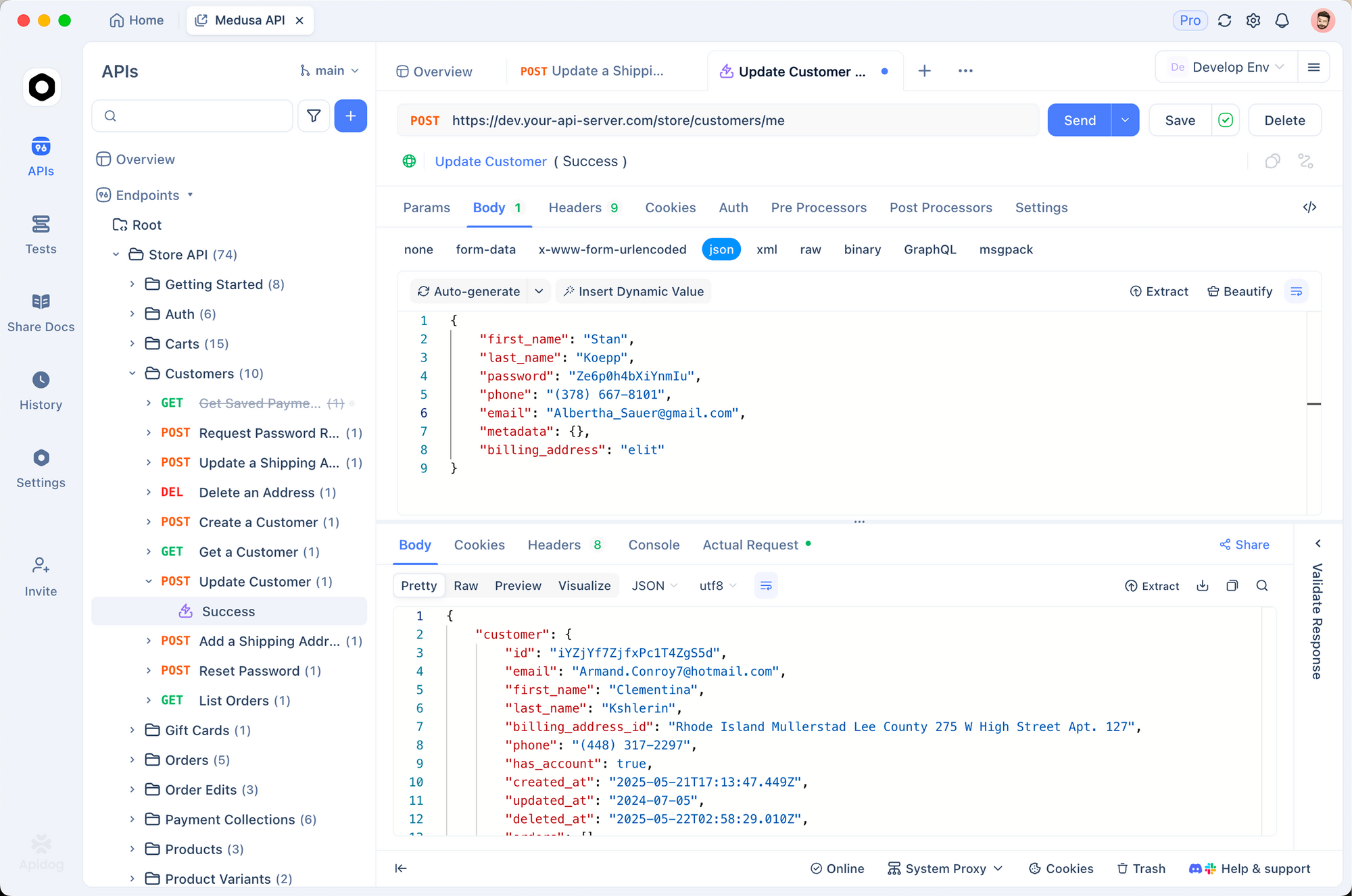
1. OAuth 응답 모의(Mock)
개발 중에는 매번 전체 OAuth 흐름을 거치지 마세요. 토큰 응답을 모의하세요:
{
  "access_token": "mock_access_token",
  "refresh_token": "mock_refresh_token",
  "expires_in": 7200,
  "created_at": 1700000000
}
2. 웹훅 핸들러 테스트
모의 웹훅 페이로드를 생성하세요:
{
  "created_at": "2026-03-24T10:00:00Z",
  "event": "invitee.created",
  "payload": {
    "email": "test@example.com",
    "name": "Test User",
    "event": {
      "start_time": "2026-03-25T10:30:00Z",
      "end_time": "2026-03-25T11:00:00Z",
      "event_type": {
        "name": "30 Min Consultation"
      }
    }
  }
}
웹훅 엔드포인트로 전송하고 처리를 확인하세요.
3. 환경 변수
CALENDLY_CLIENT_ID: abc123
CALENDLY_CLIENT_SECRET: xyz789
CALENDLY_ACCESS_TOKEN: stored_token
CALENDLY_REFRESH_TOKEN: stored_refresh
CALENDLY_WEBHOOK_SECRET: webhook_signing_secret
4. 웹훅 서명 유효성 검사
pm.test('Webhook signature is valid', () => {
  const signature = pm.request.headers.get('Calendly-Webhook-Signature')
  pm.expect(signature).to.exist

  const payload = pm.request.body.raw
  const secret = pm.environment.get('CALENDLY_WEBHOOK_SECRET')

  // Verify signature
  const valid = verifySignature(payload, signature, secret)
  pm.expect(valid).to.be.true
})
Apidog로 Calendly 웹훅 테스트 - 무료
일반적인 오류 및 해결 방법
401 권한 없음
원인: 유효하지 않거나 만료된 토큰.
해결:
- 토큰이 만료되지 않았는지 확인하세요 (2시간 만료).
- 리프레시 토큰을 사용하여 새 액세스 토큰을 얻으세요.
- Authorization 헤더가
Bearer {token}형식인지 확인하세요.
403 접근 금지
원인: OAuth 스코프가 불충분함.
해결: OAuth 토큰에는 적절한 스코프가 필요합니다. 권한을 요청할 때 필요한 스코프를 포함하세요. Calendly의 스코프는 사용자가 부여하는 권한에 따라 암묵적으로 결정됩니다.
404 찾을 수 없음
원인: 리소스가 존재하지 않거나 사용자에게 접근 권한이 없음.
해결:
- 리소스 URI가 올바른지 확인하세요.
- 인증된 사용자에게 해당 리소스에 대한 접근 권한이 있는지 확인하세요.
- 이벤트 유형 또는 이벤트 ID가 유효한지 확인하세요.
422 처리할 수 없는 엔티티
원인: 요청 유효성 검사 오류.
해결: 자세한 내용은 응답을 확인하세요:
{
  "title": "Validation Error",
  "message": "Invalid parameter: url must be a valid HTTPS URL"
}
대안 및 비교
| 기능 | Calendly | Acuity | Cal.com | Calendly |
|---|---|---|---|---|
| 무료 요금제 | 제한적 | 제한적 | 자체 호스팅 무료 | ✓ |
| API 접근 | ✓ | ✓ | ✓ | ✓ |
| 웹훅 | ✓ | ✓ | ✓ | ✓ |
| OAuth | ✓ | API 키 | API 키 | OAuth |
| 팀 예약 | ✓ | ✓ | ✓ | ✓ |
| 오픈 소스 | 아니오 | 아니오 | 예 | 아니오 |
Calendly는 가장 잘 다듬어진 API 문서와 OAuth 흐름을 제공합니다. Cal.com은 더 간단한 API 키 인증을 제공하는 오픈 소스 대안입니다.
실제 사용 사례
영업 CRM 통합. B2B SaaS 회사가 가격 책정 페이지에 Calendly를 포함합니다. 누군가 데모를 예약하면 웹훅이 다음을 트리거합니다:
- Salesforce에 리드 생성
- 영업팀에 Slack 알림 전송
- 마케팅 자동화 시퀀스에 추가
- 고객 성공 플랫폼에 활동 기록
상담 플랫폼. 법률 서비스 플랫폼은 고객이 변호사와 상담을 예약할 수 있도록 합니다. API 통합은 다음을 수행합니다:
- 내부 예약 시스템과 예약 동기화
- Zoom 회의 링크 생성
- 24시간 전에 사전 설문지 발송
- 회의 완료 시 사건 파일 생성
인터뷰 예약. 채용 플랫폼은 지원자 인터뷰를 위해 Calendly를 사용합니다. 웹훅은:
- ATS에 인터뷰 세부 정보 업데이트
- 채용 관리자에게 이메일로 알림
- 모든 참가자에게 캘린더 초대장 발송
- 후속 조치를 위해 불참자 추적
결론
다음은 학습한 내용입니다:
- Calendly는 API 인증을 위해 OAuth 2.0을 사용합니다.
- API를 통해 이벤트 유형 및 예약된 이벤트에 액세스합니다.
- 웹훅은 실시간 예약 알림을 제공합니다.
- 보안을 위해 항상 웹훅 서명을 확인하세요.
- 실제 캘린더에 연결하기 전에 Apidog로 테스트하세요.
다음 단계:
- Calendly에서 OAuth 애플리케이션을 생성하세요.
- OAuth 흐름을 구현하세요.
- 웹훅 구독을 설정하세요.
- Apidog에서 모의 페이로드로 테스트하세요.
- 프로덕션에 배포하세요.
Apidog로 Calendly 웹훅 테스트 - 무료
자주 묻는 질문 (FAQ)
API를 사용하려면 유료 Calendly 요금제가 필요한가요? 아니요. API는 무료를 포함한 모든 요금제에서 사용할 수 있습니다. 그러나 무료 요금제는 기능이 제한적입니다. 웹훅은 모든 요금제에서 사용할 수 있습니다.
사용자 수준 웹훅과 조직 수준 웹훅의 차이점은 무엇인가요? 사용자 수준 웹훅은 한 사용자에 대한 이벤트만 캡처합니다. 조직 수준 웹훅은 모든 팀 구성원에 대한 이벤트를 캡처합니다. 대부분의 통합은 조직 스코프를 사용합니다.
웹훅 서명 시크릿은 어떻게 얻나요? API를 통해 웹훅을 생성하면 응답에 signing_key가 포함됩니다. 이를 안전하게 저장하세요. 이는 웹훅 서명을 확인하는 데 사용됩니다.
API를 통해 예약을 생성할 수 있나요? 아니요. Calendly는 예약을 생성하는 API 엔드포인트가 없습니다. 예약은 Calendly UI 또는 임베디드 위젯을 통해 이루어져야 합니다. API는 예약에 대해 읽기 전용입니다.
시간대 변환은 어떻게 처리해야 하나요? API의 모든 타임스탬프는 UTC (ISO 8601)입니다. 애플리케이션에서 로컬 시간으로 변환하세요. 사용자 타임존은 사용자 리소스에서 사용할 수 있습니다.
속도 제한은 어떻게 되나요? Calendly는 공개적으로 속도 제한을 문서화하지 않습니다. 합리적인 요청 패턴을 사용하세요. 제한에 도달하면 지수 백오프를 구현하세요.
과거 예약을 가져올 수 있나요? 예. min_start_time 및 max_start_time을 사용하여 과거 이벤트를 쿼리할 수 있습니다. 얼마나 오래된 데이터를 쿼리할 수 있는지에 대한 제한은 없습니다.
로컬에서 OAuth 흐름을 어떻게 테스트하나요? ngrok와 같은 터널링 서비스를 사용하여 로컬 서버를 노출하세요. 리다이렉트 URI를 ngrok URL로 설정하세요. 브라우저에서 OAuth 흐름을 완료한 다음 콜백을 검사하세요.