

핵심 요약
BigCommerce API를 사용하면 제품, 주문, 고객 및 스토어 운영을 프로그래밍 방식으로 관리할 수 있습니다. API 토큰(서버 측용) 또는 OAuth(앱용)로 인증하고, api.bigcommerce.com에서 REST 엔드포인트를 호출하며, 실시간 업데이트를 위해 웹훅을 처리합니다. 테스트를 위해서는 Apidog를 사용하여 API 호출을 저장하고, 응답을 검증하며, 팀과 컬렉션을 공유하세요.
소개
BigCommerce는 60,000개 이상의 온라인 스토어를 지원합니다. 각 스토어는 재고 동기화, 주문 처리, 고객 관리, 결제 처리 등 맞춤형 통합이 필요하며, 여기에 API가 사용됩니다.
이 플랫폼은 세 가지 API 유형을 제공합니다: 스토어프론트 API(헤드리스 커머스), 관리 API(백엔드 운영), 결제 API(거래). 대부분의 개발자는 관리 API를 사용합니다. 이 API는 제품, 주문, 고객 및 모든 백엔드 작업을 처리합니다.
학습 곡선이 가파르지는 않지만, 문서는 다소 부담스러울 수 있습니다. 간단한 작업을 완료하기 위해서도 인증 문서, API 참조, 그리고 웹훅 가이드 사이를 오가야 할 것입니다.
이 가이드는 실제로 사용하게 될 내용에 중점을 둡니다. 제품, 주문, 고객, 그리고 웹훅입니다. 인증, 일반적인 패턴, 그리고 실제 스토어에 적용하기 전에 통합을 테스트하는 방법을 배우게 될 것입니다.
Apidog로 BigCommerce API를 테스트하세요 - 무료
이 가이드의 끝에 도달하면 다음을 수행할 수 있습니다:
- BigCommerce 인증을 올바르게 설정하기
- 제품, 변형 및 재고 관리하기
- 주문 처리 및 고객 데이터 관리하기
- 실시간 업데이트를 위한 웹훅 설정하기
- Apidog로 통합을 테스트하고 문서화하기
인증: 스토어에 액세스하기
BigCommerce는 구축하려는 대상에 따라 두 가지 인증 방법을 제공합니다.
방법 1: API 토큰 (맞춤 통합용)
하나의 스토어와 연동되는 스크립트 또는 서비스를 구축하는 경우 API 토큰을 사용하세요.
API 계정 생성:
- 스토어의 관리자 패널로 이동
- 설정 → API 계정 → API 계정 생성
- “V3/V2 API 토큰” 선택
- 필요한 스코프(제품, 주문, 고객 등) 선택
- 자격 증명 저장
다음 정보를 얻게 됩니다:
- 스토어 URL:
mystore.mybigcommerce.com - 액세스 토큰:
abc123def456... - 클라이언트 ID:
abc123... - 클라이언트 시크릿:
xyz789...
첫 번째 호출 수행:
curl -X GET "https://api.bigcommerce.com/stores/{store-hash}/v3/catalog/products" \
  -H "X-Auth-Token: {access-token}" \
  -H "Content-Type: application/json" \
  -H "Accept: application/json"
store-hash는 API 경로에서 /stores/ 다음에 오는 부분입니다. 스토어 관리자 URL에서도 확인할 수 있습니다.
방법 2: OAuth (마켓플레이스 앱용)
BigCommerce 마켓플레이스용 앱을 구축하는 경우 OAuth를 사용하세요.
OAuth 흐름:
- 사용자가 마켓플레이스에서 앱의 “설치”를 클릭
- BigCommerce가 인증 코드와 함께 콜백 URL로 리디렉션
- 서버가 코드를 액세스 토큰으로 교환
- 향후 API 호출을 위해 토큰 저장
코드를 토큰으로 교환:
const response = await fetch('https://login.bigcommerce.com/oauth2/token', {
  method: 'POST',
  headers: { 'Content-Type': 'application/x-www-form-urlencoded' },
  body: new URLSearchParams({
    client_id: process.env.BC_CLIENT_ID,
    client_secret: process.env.BC_CLIENT_SECRET,
    redirect_uri: 'https://yourapp.com/auth/callback',
    grant_type: 'authorization_code',
    code: authCode,
    scope: 'store_v2_default store_v3_products'
  })
})

const { access_token, context } = await response.json()
// access_token은 API 호출에 사용됩니다
// context에는 store_hash가 포함됩니다
토큰 사용:
curl -X GET "https://api.bigcommerce.com/stores/{store-hash}/v3/catalog/products" \
  -H "X-Auth-Token: {access-token}" \
  -H "Content-Type: application/json"
제품 및 카탈로그 관리
제품은 모든 BigCommerce 스토어의 핵심입니다. V3 카탈로그 API는 제품, 변형, 카테고리 및 브랜드를 처리합니다.
제품 목록
GET https://api.bigcommerce.com/stores/{store-hash}/v3/catalog/products
X-Auth-Token: {token}
Accept: application/json
응답:
{
  "data": [
    {
      "id": 174,
      "name": "Plain T-Shirt",
      "type": "physical",
      "sku": "PLAIN-T",
      "price": 29.99,
      "sale_price": 24.99,
      "inventory_level": 150,
      "inventory_tracking": "product",
      "is_visible": true,
      "categories": [23, 45],
      "brand_id": 12
    }
  ],
  "meta": {
    "pagination": {
      "total": 500,
      "count": 50,
      "page": 1,
      "per_page": 50
    }
  }
}
제품 생성
POST https://api.bigcommerce.com/stores/{store-hash}/v3/catalog/products
X-Auth-Token: {token}
Content-Type: application/json

{
  "name": "Premium Hoodie",
  "type": "physical",
  "sku": "HOODIE-PREM",
  "price": 79.99,
  "description": "Premium cotton blend hoodie",
  "weight": 1.5,
  "width": 20,
  "height": 28,
  "depth": 2,
  "inventory_level": 100,
  "inventory_tracking": "product",
  "is_visible": true,
  "categories": [23]
}
제품 변형 업데이트
옵션(크기, 색상)이 있는 제품은 변형을 가집니다. 각 변형은 고유한 SKU, 가격 및 재고를 가질 수 있습니다.
PUT https://api.bigcommerce.com/stores/{store-hash}/v3/catalog/products/{product-id}/variants/{variant-id}
X-Auth-Token: {token}
Content-Type: application/json

{
  "sku": "HOODIE-PREM-BLK-M",
  "price": 79.99,
  "inventory_level": 50,
  "option_values": [
    {
      "option_display_name": "Color",
      "label": "Black"
    },
    {
      "option_display_name": "Size",
      "label": "Medium"
    }
  ]
}
재고 관리
PUT https://api.bigcommerce.com/stores/{store-hash}/v3/catalog/products/{product-id}
X-Auth-Token: {token}
Content-Type: application/json

{
  "inventory_level": 75
}
또는 변형 재고 업데이트:
PUT https://api.bigcommerce.com/stores/{store-hash}/v3/catalog/products/{product-id}/variants/{variant-id}
Content-Type: application/json

{
  "inventory_level": 25
}
주문 및 이행
주문은 비즈니스가 발생하는 곳입니다. 주문 V2 API는 주문 생성, 업데이트 및 이행을 처리합니다.
주문 목록
GET https://api.bigcommerce.com/stores/{store-hash}/v2/orders
X-Auth-Token: {token}
Accept: application/json
응답:
[
  {
    "id": 115,
    "status": "Awaiting Fulfillment",
    "status_id": 11,
    "customer_id": 45,
    "date_created": "2026-03-24T10:30:00+00:00",
    "subtotal_ex_tax": 149.99,
    "total_inc_tax": 162.49,
    "items_total": 2,
    "items_shipped": 0,
    "shipping_address": {
      "first_name": "John",
      "last_name": "Doe",
      "street_1": "123 Main St",
      "city": "Austin",
      "state": "Texas",
      "zip": "78701",
      "country": "United States"
    }
  }
]
주문 상세 정보 가져오기
GET https://api.bigcommerce.com/stores/{store-hash}/v2/orders/{order-id}
X-Auth-Token: {token}
주문 제품 가져오기
GET https://api.bigcommerce.com/stores/{store-hash}/v2/orders/{order-id}/products
X-Auth-Token: {token}
주문 상태 업데이트
PUT https://api.bigcommerce.com/stores/{store-hash}/v2/orders/{order-id}
X-Auth-Token: {token}
Content-Type: application/json

{
  "status_id": 12
}
일반적인 상태 ID:
- 0: 불완전
- 11: 이행 대기 중
- 12: 완료됨
- 5: 취소됨
- 4: 환불됨
배송 생성 (이행)
POST https://api.bigcommerce.com/stores/{store-hash}/v2/orders/{order-id}/shipments
X-Auth-Token: {token}
Content-Type: application/json

{
  "tracking_number": "1Z999AA10123456784",
  "carrier": "UPS",
  "shipping_method": "UPS Ground",
  "items": [
    {
      "order_product_id": 234,
      "quantity": 1
    }
  ]
}
고객 및 세분화
고객 V3 API는 고객 데이터, 주소 및 고객 그룹을 처리합니다.
고객 목록
GET https://api.bigcommerce.com/stores/{store-hash}/v3/customers
X-Auth-Token: {token}
Accept: application/json
응답:
{
  "data": [
    {
      "id": 45,
      "email": "john.doe@example.com",
      "first_name": "John",
      "last_name": "Doe",
      "company": "Acme Corp",
      "phone": "512-555-1234",
      "customer_group_id": 1,
      "notes": "VIP customer",
      "tax_exempt_category": "",
      "date_created": "2025-11-15T09:30:00+00:00",
      "date_modified": "2026-03-20T14:22:00+00:00"
    }
  ]
}
고객 생성
POST https://api.bigcommerce.com/stores/{store-hash}/v3/customers
X-Auth-Token: {token}
Content-Type: application/json

{
  "email": "jane.smith@example.com",
  "first_name": "Jane",
  "last_name": "Smith",
  "phone": "512-555-5678",
  "customer_group_id": 2
}
고객 업데이트
PUT https://api.bigcommerce.com/stores/{store-hash}/v3/customers/{customer-id}
X-Auth-Token: {token}
Content-Type: application/json

{
  "notes": "Repeat customer - priority support",
  "customer_group_id": 3
}
실시간 업데이트를 위한 웹훅
웹훅은 스토어에서 이벤트가 발생할 때 앱에 알립니다. 폴링 대신 BigCommerce가 데이터를 엔드포인트로 푸시합니다.
웹훅 생성
POST https://api.bigcommerce.com/stores/{store-hash}/v3/hooks
X-Auth-Token: {token}
Content-Type: application/json

{
  "scope": "store/order/created",
  "destination": "https://yourapp.com/webhooks/orders",
  "is_active": true
}
사용 가능한 스코프:
store/order/created- 새 주문 접수됨store/order/updated- 주문 상태 변경됨store/order/archived- 주문 보관됨store/product/created- 제품 추가됨store/product/updated- 제품 수정됨store/product/deleted- 제품 삭제됨store/customer/created- 새 고객store/inventory/updated- 재고 변경됨
웹훅 서명 확인
BigCommerce는 웹훅에 서명하므로 합법적인 웹훅인지 확인할 수 있습니다:
import crypto from 'crypto'

function verifyWebhook(payload, signature, secret) {
  const expectedSignature = crypto
    .createHmac('sha256', secret)
    .update(payload)
    .digest('hex')

  return crypto.timingSafeEqual(
    Buffer.from(signature),
    Buffer.from(expectedSignature)
  )
}

app.post('/webhooks/orders', (req, res) => {
  const signature = req.headers['x-bc-webhook-signature']
  const payload = JSON.stringify(req.body)

  if (!verifyWebhook(payload, signature, process.env.BC_CLIENT_SECRET)) {
    return res.status(401).send('Invalid signature')
  }

  // Process the webhook
  console.log('Order created:', req.body.data.id)
  res.status(200).send('OK')
})
Apidog로 BigCommerce API 테스트하기
BigCommerce API는 일관된 헤더와 올바른 인증이 필요합니다. curl을 이용한 수동 테스트는 번거로울 수 있습니다. Apidog는 이러한 과정을 간소화합니다.
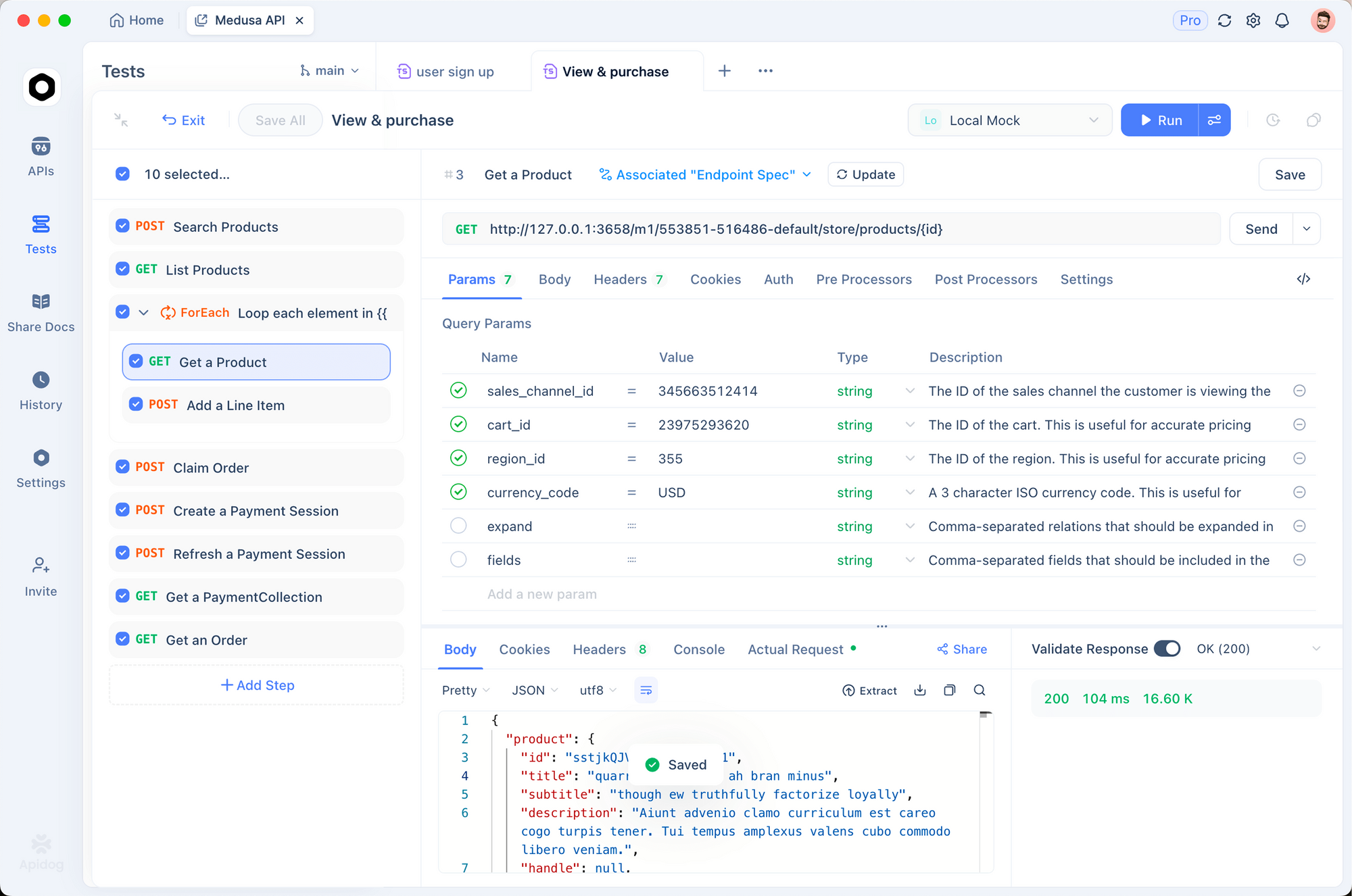
1. 환경 설정
각 스토어에 대한 환경 생성:
# 운영 스토어
STORE_HASH: abc123
ACCESS_TOKEN: xyz789
BASE_URL: https://api.bigcommerce.com/stores/abc123

# 스테이징 스토어
STORE_HASH: staging456
ACCESS_TOKEN: staging_token
BASE_URL: https://api.bigcommerce.com/stores/staging456
2. 사전 요청 스크립트
인증 헤더 자동 추가:
pm.request.headers.add({
  key: 'X-Auth-Token',
  value: pm.environment.get('ACCESS_TOKEN')
})
pm.request.headers.add({
  key: 'Accept',
  value: 'application/json'
})
3. 응답 유효성 검사
제품에 필수 필드가 있는지 테스트:
pm.test('Products have required fields', () => {
  const response = pm.response.json()
  response.data.forEach(product => {
    pm.expect(product).to.have.property('id')
    pm.expect(product).to.have.property('name')
    pm.expect(product).to.have.property('price')
    pm.expect(product.price).to.be.above(0)
  })
})

pm.test('Pagination works', () => {
  const response = pm.response.json()
  pm.expect(response.meta.pagination).to.have.property('total')
  pm.expect(response.meta.pagination.page).to.eql(1)
})
Apidog로 BigCommerce API 테스트하기 - 무료
일반적인 오류 및 해결 방법
401 권한 없음
원인: 유효하지 않거나 누락된 액세스 토큰.
해결:
X-Auth-Token헤더가 설정되어 있는지 확인- 토큰이 해지되지 않았는지 확인
- API 계정이 올바른 스코프를 가지고 있는지 확인
403 접근 금지
원인: 토큰은 유효하지만 필수 스코프가 부족합니다.
해결:
- API 계정 권한 확인
- 누락된 스코프 추가 (제품, 주문 등)
- 확장된 권한으로 새 토큰 생성
404 찾을 수 없음
원인: 잘못된 엔드포인트 또는 리소스가 존재하지 않습니다.
해결:
- 스토어 해시가 올바른지 확인
- URL의 API 버전 확인 (v2 vs v3)
- 리소스 ID가 존재하는지 확인
429 너무 많은 요청
원인: 요청 제한 초과.
해결: BigCommerce는 엔드포인트별로 다른 제한을 허용합니다. 제품: 시간당 10,000회 요청. 주문: 시간당 30,000회 요청. X-Rate-Limit-Remaining 헤더를 확인하고 백오프를 구현하세요.
async function callWithBackoff(fn, maxRetries = 3) {
  for (let i = 0; i < maxRetries; i++) {
    const response = await fn()
    if (response.status === 429) {
      const retryAfter = response.headers.get('X-Rate-Limit-Reset')
      await new Promise(r => setTimeout(r, retryAfter * 1000))
    } else {
      return response
    }
  }
}
422 처리할 수 없는 엔티티
원인: 요청 본문에서 유효성 검사 오류.
해결: 응답에서 상세 정보를 확인하세요. BigCommerce는 특정 유효성 검사 오류를 반환합니다:
{
  "errors": {
    "price": "가격은 0보다 커야 합니다",
    "sku": "SKU가 이미 존재합니다"
  }
}
대안 및 비교
| 기능 | BigCommerce | Shopify | WooCommerce |
|---|---|---|---|
| API 버전 관리 | V2 및 V3 | REST 및 GraphQL | REST |
| 요청 제한 | 시간당 1만-3만 | 분당 2회 (리키 버킷) | 호스팅에 따라 다름 |
| 웹훅 | 예 | 예 | 예 (플러그인) |
| GraphQL | 아니요 | 예 | 아니요 |
| SDK 품질 | 좋음 | 우수함 | PHP 전용 |
| 멀티 스토어 | 예 | 아니요 | 아니요 |
BigCommerce의 V3 API는 Shopify의 파편화된 접근 방식보다 일관성이 있지만, Shopify의 GraphQL API는 복잡한 쿼리에 더 많은 유연성을 제공합니다.
실제 사용 사례
다채널 재고 동기화. 한 브랜드가 BigCommerce, Amazon 및 실제 매장에서 제품을 판매합니다. 제품 API를 사용하여 채널 전반의 재고 수준을 동기화하여 과다 판매를 방지합니다. Apidog는 각 배포 전에 동기화 엔드포인트를 테스트합니다.
주문 자동화. 구독 박스 회사는 주문이 생성될 때 웹훅을 사용하여 이행을 트리거합니다. 주문 API는 추적 번호를 업데이트합니다. 창고는 웹훅 핸들러를 통해 자동으로 피킹 리스트를 받습니다.
고객 세분화. 한 전자상거래 사이트는 고객 API를 사용하여 구매 내역을 기반으로 구매자를 세분화합니다. VIP 고객은 독점 가격이 적용되는 특별 그룹에 추가됩니다. 이 통합은 예약된 작업을 통해 매주 실행됩니다.
결론
다음 내용을 학습했습니다:
- 인증은 API 토큰(간단한 통합) 또는 OAuth(마켓플레이스 앱)를 사용합니다
- V3 카탈로그 API는 제품 및 변형을 처리합니다
- V2 주문 API는 주문 처리 및 이행을 처리합니다
- V3 고객 API는 고객 데이터를 처리합니다
- 웹훅은 엔드포인트로 실시간 업데이트를 푸시합니다
- 신뢰할 수 있는 통합을 위해 Apidog로 테스트 및 문서화하기
다음 단계:
- BigCommerce 스토어에서 API 계정 생성
- 제품 목록을 가져오는 첫 API 호출 수행
- 주문 생성을 위한 웹훅 설정
- Apidog에 API 호출 저장
- 통합 구축
Apidog로 BigCommerce API 테스트하기 - 무료
자주 묻는 질문
V2 및 V3 API의 차이점은 무엇인가요?V3는 더 새롭고 일관성 있는 API입니다. 제품, 카테고리, 브랜드 및 고객에 사용하세요. V2는 아직 마이그레이션되지 않은 주문을 처리합니다. 대부분의 통합에서 둘 다 사용하게 될 것입니다.
내 스토어 해시는 어떻게 얻나요?BigCommerce 관리자 URL에 있습니다: https://store-abc123.mybigcommerce.com/manage. abc123 부분은 스토어 해시입니다. API 계정 설정에서도 확인할 수 있습니다.
체험 스토어에서 API를 사용할 수 있나요?예. BigCommerce 체험 스토어는 전체 API 액세스 권한을 가집니다. 이는 실제 운영 전에 개발 및 테스트에 완벽합니다.
API 호출의 요청 제한은 얼마인가요?엔드포인트에 따라 다릅니다. 제품: 시간당 10,000회 요청. 주문: 시간당 30,000회 요청. 응답 헤더의 X-Rate-Limit-Remaining을 확인하여 현재 제한을 확인하세요.
페이지네이션은 어떻게 처리하나요?page 및 limit 쿼리 파라미터를 사용하세요. 기본 제한은 50입니다. 응답의 meta.pagination에서 총 페이지를 확인하세요. 모든 레코드를 가져올 때까지 반복하세요.
let allProducts = []
let page = 1

while (true) {
  const response = await fetch(
    `${baseUrl}/v3/catalog/products?page=${page}&limit=100`,
    { headers: { 'X-Auth-Token': token } }
  )
  const data = await response.json()
  allProducts.push(...data.data)

  if (page >= data.meta.pagination.total_pages) break
  page++
}
API를 통해 제품 이미지를 업로드할 수 있나요?예. 제품 이미지 엔드포인트를 사용하세요:
POST https://api.bigcommerce.com/stores/{store-hash}/v3/catalog/products/{product-id}/images
Content-Type: application/json

{
  "image_url": "https://example.com/image.jpg",
  "is_thumbnail": true
}
통화 및 멀티 스토어는 어떻게 처리하나요?BigCommerce 스토어는 기본 통화를 가집니다. 다중 통화는 API가 아닌 스토어프론트 수준에서 처리됩니다. 여러 스토어의 경우, 별도의 API 계정을 생성하고 Apidog에서 다른 환경을 사용하세요.
웹훅 엔드포인트가 다운되면 어떻게 되나요?BigCommerce는 실패한 웹훅을 지수 백오프 방식으로 재시도합니다. 24시간 동안 5번의 실패가 발생하면 웹훅이 비활성화됩니다. 엔드포인트를 모니터링하고 실패 시 알림을 받으세요.