텍스트 설명이나 이미지로부터 3D 모델을 생성하는 기능은 게임, 전자상거래, 가상 현실, 건축 시각화를 위한 애플리케이션을 개발하는 방식을 변화시켰습니다. Tripo 3D API는 광범위한 3D 모델링 전문 지식 없이도 AI 기반 3D 모델 생성을 애플리케이션에 통합할 수 있는 간단한 방법을 제공합니다.
개발팀이 최대 생산성으로 함께 작업할 수 있는 통합된 올인원 플랫폼을 원하십니까?
Apidog는 귀하의 모든 요구 사항을 충족하며 Postman을 훨씬 저렴한 가격으로 대체합니다!
이 가이드는 초기 설정부터 프로덕션 배포에 이르기까지 Tripo 3D API를 구현하는 데 필요한 모든 것을 안내합니다.
Tripo 3D API란 무엇인가요?
Tripo 3D API는 고급 AI 알고리즘을 통해 텍스트 프롬프트 또는 2D 이미지를 프로덕션 준비 3D 모델로 변환합니다. 이 서비스는 복잡한 머신러닝 프로세스를 백그라운드에서 처리하며, 개발자가 몇 분 안에 통합할 수 있는 간단한 REST 엔드포인트를 노출합니다.
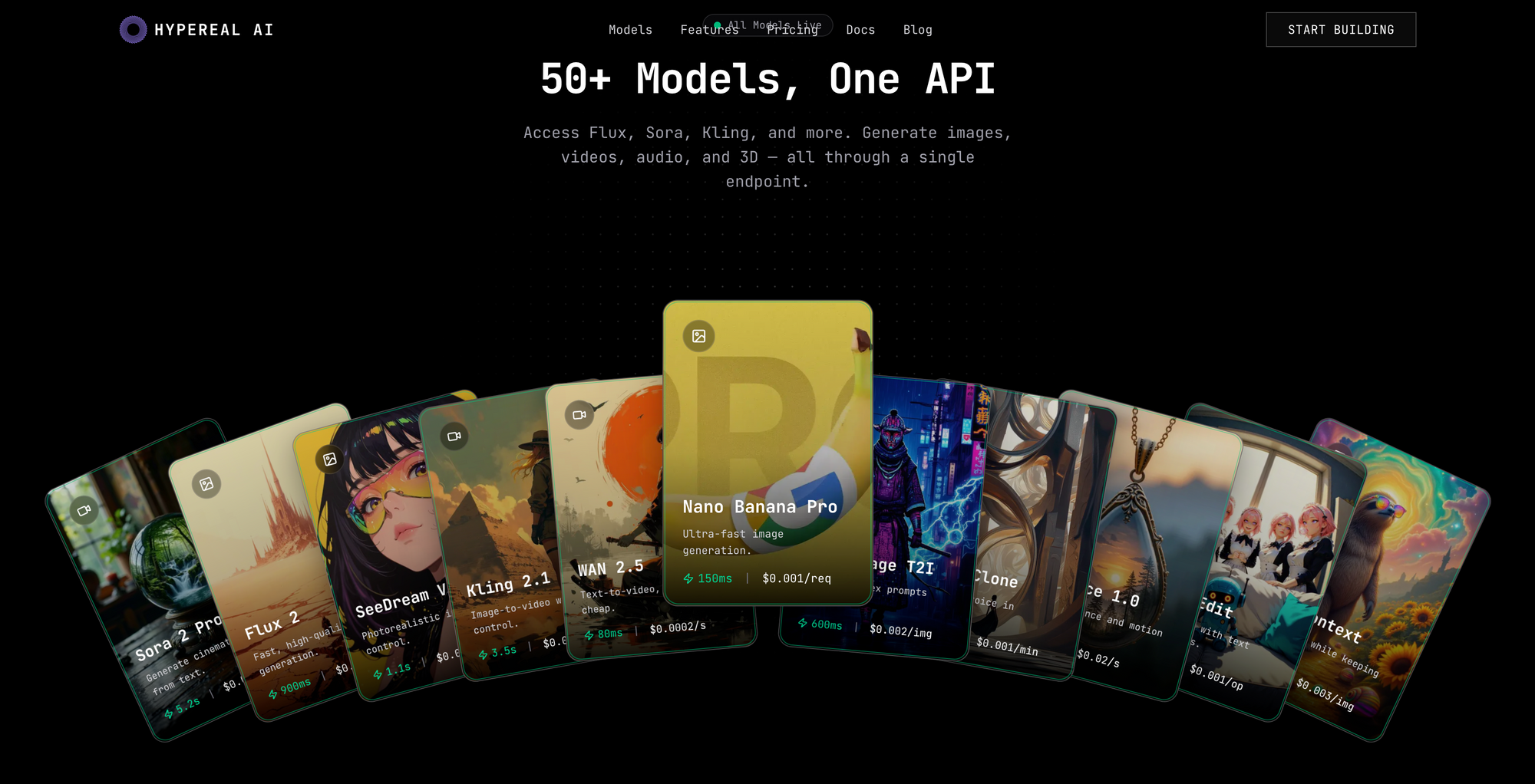
Hypereal AI에서 저렴하게 Tripo 3D API를 이용할 수 있습니다.
이 플랫폼은 세 가지 주요 생성 모드를 지원합니다.
- 텍스트-3D: 자연어 설명에서 모델 생성
- 이미지-3D: 단일 또는 여러 이미지를 3D 객체로 변환
- 다중 시점-3D: 여러 이미지 시점에서 고품질 모델 생성
생성된 모델은 GLB, GLTF, FBX, OBJ를 포함한 표준 형식으로 내보내지며, 대부분의 3D 소프트웨어 및 게임 엔진과 호환됩니다.
시작하기: 인증 및 설정
1단계: API 키 생성
API 호출을 하기 전에 인증 자격 증명이 필요합니다.
- Tripo 3D 플랫폼 문서 페이지를 방문하세요.
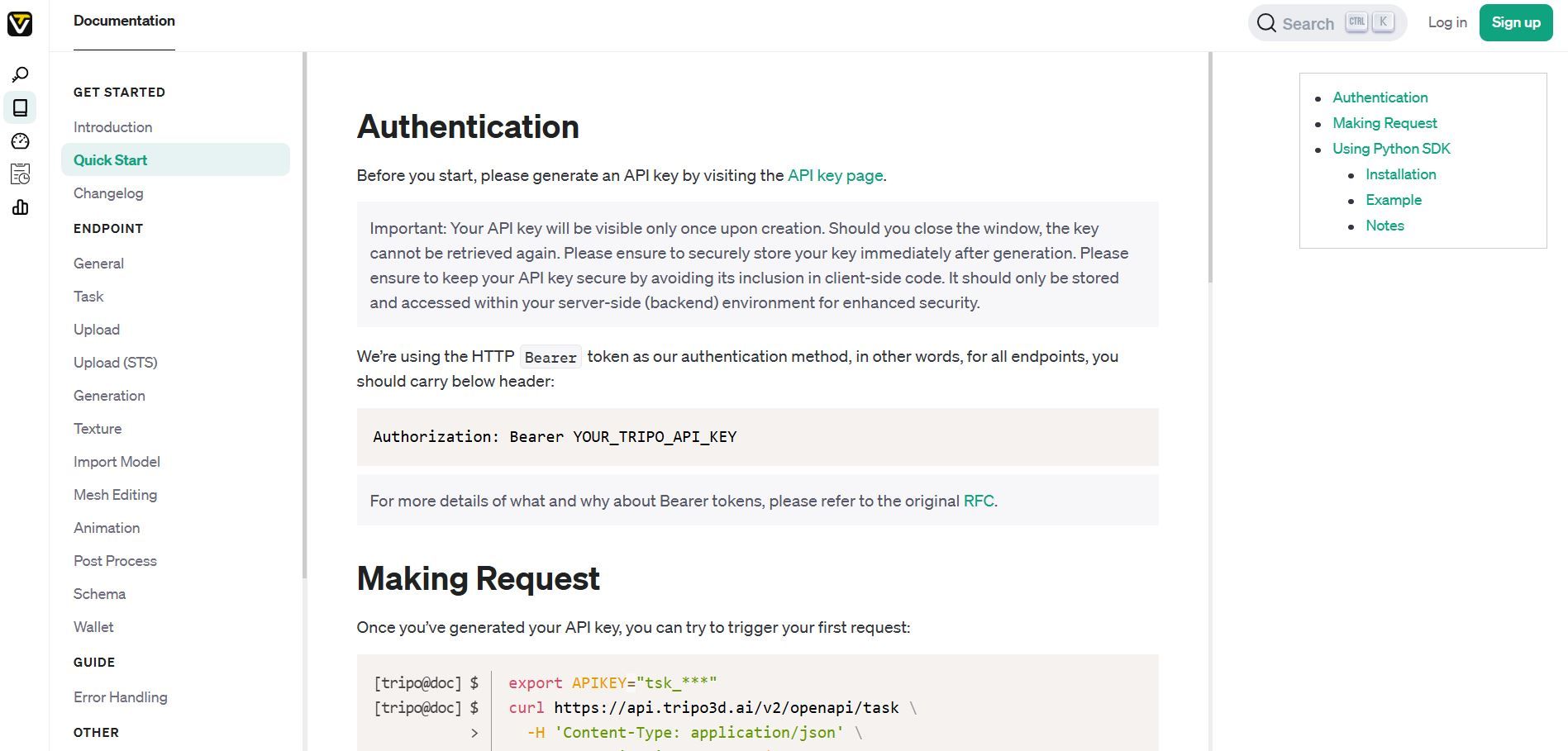
2. "새 API 키 생성(Generate New API Key)"을 클릭하세요.
3. 키를 즉시 복사하세요 (`tsk_`로 시작합니다).
4. 창을 닫은 후에는 다시 검색할 수 없으므로 안전하게 보관하세요.
보안 참고: 클라이언트 측 코드나 공개 저장소에 API 키를 노출하지 마십시오. 환경 변수 또는 보안 비밀 관리 서비스를 사용하십시오.
2단계: Python SDK 설치 (선택 사항)
어떤 HTTP 클라이언트로든 REST API를 직접 사용할 수 있지만, 공식 Python SDK는 통합을 단순화합니다.
pip install tripo3d
SDK는 인증, 비동기 작업 폴링 및 파일 다운로드를 자동으로 처리합니다.
3단계: 설정 확인
이 기본적인 cURL 요청으로 인증을 테스트하세요.
export TRIPO_API_KEY="tsk_your_actual_key_here"

curl https://api.tripo3d.ai/v2/openapi/task \
  -H 'Content-Type: application/json' \
  -H "Authorization: Bearer ${TRIPO_API_KEY}" \
  -d '{"type": "text_to_model", "prompt": "a simple wooden chair"}'
성공적인 응답은 작업 ID를 반환하며, 이는 인증이 올바르게 작동함을 나타냅니다.
방법 1: 텍스트-3D 모델 생성
기본 구현
텍스트-3D 생성은 자연어 설명을 3D 객체로 변환합니다. 이는 개념적 설명에서 에셋을 생성하는 데 잘 작동합니다.
Python SDK 예제:
import asyncio
from tripo3d import TripoClient, TaskStatus

async def generate_from_text():
    async with TripoClient(api_key="YOUR_API_KEY") as client:
        # Submit generation task
        task_id = await client.text_to_model(
            prompt="a vintage leather armchair with wooden legs",
            negative_prompt="low quality, blurry, distorted",
            model_version="v2.5"
        )

        print(f"Task submitted: {task_id}")

        # Wait for completion
        task = await client.wait_for_task(task_id, verbose=True)

        # Download results
        if task.status == TaskStatus.SUCCESS:
            files = await client.download_task_models(task, "./output")
            for model_type, path in files.items():
                print(f"Downloaded {model_type}: {path}")
        else:
            print(f"Task failed: {task.status}")

asyncio.run(generate_from_text())
REST API 예제:
curl -X POST https://api.tripo3d.ai/v2/openapi/task \
  -H 'Content-Type: application/json' \
  -H "Authorization: Bearer ${TRIPO_API_KEY}" \
  -d '{
    "type": "text_to_model",
    "prompt": "a vintage leather armchair with wooden legs",
    "negative_prompt": "low quality, blurry, distorted",
    "model_version": "v2.5"
  }'
파라미터 이해
| 파라미터 | 유형 | 필수 | 설명 |
|---|---|---|---|
| prompt | string | 예 | 원하는 3D 모델에 대한 자세한 설명 |
| negative_prompt | string | 아니오 | 생성 시 피해야 할 특징 |
| model_version | string | 아니오 | API 버전 (기본값: 최신) |
프롬프트 엔지니어링 팁
- 재료, 색상, 모양에 대해 구체적으로 설명하세요.
- 스타일 설명자(사실적, 카툰, 로우폴리)를 포함하세요.
- 필요할 때 스케일 참조를 언급하세요.
- 더 나은 텍스처 생성을 위해 조명 선호도를 추가하세요.
방법 2: 이미지-3D 모델 생성
단일 이미지 변환
단일 사진 또는 일러스트레이션을 3D 모델로 변환합니다. 이는 객체를 정면 각도에서 보여주는 선명하고 조명이 잘 된 이미지에 가장 적합합니다.
Python SDK 예제:
import asyncio
from tripo3d import TripoClient, TaskStatus

async def generate_from_image():
    async with TripoClient(api_key="YOUR_API_KEY") as client:
        task_id = await client.image_to_model(
            image="./path/to/product-photo.jpg",
            texture_quality="high",
            auto_scale=True,
            face_limit=50000
        )

        print(f"Processing image: {task_id}")

        task = await client.wait_for_task(task_id, verbose=True)

        if task.status == TaskStatus.SUCCESS:
            files = await client.download_task_models(task, "./models")
            print(f"Model saved to: {files}")

asyncio.run(generate_from_image())
고급 파라미터
| 파라미터 | 유형 | 기본값 | 설명 |
|---|---|---|---|
| texture_seed | integer | Random | 재현 가능한 텍스처 생성을 위한 시드 |
| auto_scale | boolean | False | 모델을 실제 크기로 스케일 조정 |
| quad | boolean | False | 쿼드 메시 생성 (작업당 +$0.05) |
| texture_quality | string | "original_image" | 텍스처 정렬 우선순위 |
| orientation | string | "default" | 자동 회전을 위해 "align_image"로 설정 |
| face_limit | integer | Variable | 최적화를 위한 폴리곤 수 제어 |
다중 시점 생성
더 높은 품질의 결과를 얻으려면 동일한 객체의 여러 각도를 제공하십시오.
async def generate_from_multiview():
    async with TripoClient(api_key="YOUR_API_KEY") as client:
        task_id = await client.multiview_to_model(
            images=[
                "./front-view.jpg",
                "./side-view.jpg",
                "./top-view.jpg"
            ],
            texture_quality="high"
        )

        task = await client.wait_for_task(task_id, verbose=True)

        if task.status == TaskStatus.SUCCESS:
            files = await client.download_task_models(task, "./output")
다중 시점 생성은 단일 이미지 변환에 비해 훨씬 더 나은 기하학적 구조와 텍스처 디테일을 생성합니다.
작업 상태 및 폴링 이해
Tripo 3D API는 요청을 비동기적으로 처리합니다. 작업을 제출한 후에는 차단하는 대신 완료를 위해 폴링합니다.
작업 라이프사이클
- 제출됨(Submitted): 작업이 수락되고 대기열에 추가됨
- 처리 중(Processing): AI 모델이 3D 출력을 생성 중
- 성공(Success): 모델 다운로드 준비 완료
- 실패(Failed): 생성 중 오류 발생
수동 폴링 (REST API)
curl https://api.tripo3d.ai/v2/openapi/task/{task_id} \
  -H "Authorization: Bearer ${TRIPO_API_KEY}"
응답 구조:
{
  "code": 0,
  "data": {
    "task_id": "abc123",
    "status": "success",
    "output": {
      "model": "https://download-url/model.glb",
      "pbr_model": "https://download-url/model-pbr.glb"
    }
  }
}
자동 폴링 (Python SDK)
SDK는 폴링을 자동으로 처리합니다.
task = await client.wait_for_task(
    task_id,
    verbose=True,  # Show progress updates
    timeout=300    # Maximum wait time in seconds
)
가격 및 크레딧 시스템
Tripo는 다양한 작업에 따라 다른 양의 크레딧을 소모하는 크레딧 기반 가격 모델을 사용합니다.
가격 등급
| 플랜 | 가격 | 월간 크레딧 | 동시 작업 수 |
|---|---|---|---|
| Basic | 무료 | 300 | 1 |
| Professional | $15.90/월* | 3,000 | 10 |
| Advanced | $39.90/월* | 8,000 | 15 |
*연간 청구: 20% 할인 (Professional의 경우 $190.80/년, Advanced의 경우 $478.80/년)
크레딧 비용
- 텍스트-3D: 생성당 ~30 크레딧
- 이미지-3D: 품질 설정에 따라 ~30-50 크레딧
- 다중 시점-3D: ~60-80 크레딧
- 쿼드 메시 출력: 추가 $0.05 (약 5 크레딧)
비용 최적화 팁
- 미리 보기 생성 시 낮은 face_limit 값을 사용하세요.
- 유료 등급으로 확장하기 전에 Basic 플랜으로 테스트하세요.
- 동시 작업 제한을 최대화하기 위해 유사한 요청을 일괄 처리하세요.
- 동일한 에셋을 다시 생성하는 것을 방지하기 위해 생성된 모델을 캐시하세요.
오류 처리 및 모범 사례
API 오류를 우아하게 처리하기
from tripo3d import TripoClient, TripoAPIError

async def safe_generation():
    try:
        async with TripoClient(api_key="YOUR_API_KEY") as client:
            task_id = await client.text_to_model(
                prompt="a detailed spaceship"
            )
            task = await client.wait_for_task(task_id)

            if task.status == TaskStatus.SUCCESS:
                files = await client.download_task_models(task, "./output")
                return files
            else:
                print(f"Generation failed: {task.status}")
                return None

    except TripoAPIError as e:
        if e.status_code == 401:
            print("Authentication failed. Check your API key.")
        elif e.status_code == 429:
            print("Rate limit exceeded. Wait before retrying.")
        elif e.status_code >= 500:
            print("Server error. Retry after a delay.")
        else:
            print(f"API error: {e}")
        return None
프로덕션 모범 사례
- 일시적인 실패(500 수준 오류)에 대한 재시도 로직을 구현하세요.
- 작업 복잡성에 따라 적절한 시간 제한을 설정하세요.
- 서비스 중단을 방지하기 위해 크레딧 사용량을 모니터링하세요.
- 비용이 많이 드는 작업을 제출하기 전에 입력을 검증하세요.
- 디버깅 및 감사 목적으로 작업 ID를 저장하세요.
- 적극적인 폴링 대신 웹훅(사용 가능한 경우)을 사용하세요.
속도 제한
플랜 등급에 따른 동시 작업 제한을 준수하세요. 제한을 초과하면 429 오류가 발생합니다.
from asyncio import Semaphore

async def batch_generate(prompts, max_concurrent=10):
    semaphore = Semaphore(max_concurrent)

    async def generate_with_limit(prompt):
        async with semaphore:
            async with TripoClient(api_key="YOUR_API_KEY") as client:
                task_id = await client.text_to_model(prompt=prompt)
                return await client.wait_for_task(task_id)

    tasks = [generate_with_limit(p) for p in prompts]
    return await asyncio.gather(*tasks)
인기 프레임워크와의 통합
Flask 웹 애플리케이션
from flask import Flask, request, jsonify
from tripo3d import TripoClient
import asyncio

app = Flask(__name__)

@app.route('/generate-3d', methods=['POST'])
def generate_model():
    data = request.json
    prompt = data.get('prompt')

    if not prompt:
        return jsonify({'error': 'Prompt required'}), 400

    async def generate():
        async with TripoClient(api_key="YOUR_API_KEY") as client:
            task_id = await client.text_to_model(prompt=prompt)
            return {'task_id': task_id}

    result = asyncio.run(generate())
    return jsonify(result)

@app.route('/check-status/<task_id>')
def check_status(task_id):
    async def get_status():
        async with TripoClient(api_key="YOUR_API_KEY") as client:
            task = await client.get_task(task_id)
            return {'status': task.status}

    result = asyncio.run(get_status())
    return jsonify(result)
Node.js Express 예제
const express = require('express');
const axios = require('axios');
const app = express();

app.post('/generate', async (req, res) => {
  const { prompt } = req.body;

  try {
    const response = await axios.post(
      'https://api.tripo3d.ai/v2/openapi/task',
      {
        type: 'text_to_model',
        prompt: prompt
      },
      {
        headers: {
          'Authorization': `Bearer ${process.env.TRIPO_API_KEY}`,
          'Content-Type': 'application/json'
        }
      }
    );

    res.json({ task_id: response.data.data.task_id });
  } catch (error) {
    res.status(500).json({ error: error.message });
  }
});
Apidog를 통한 API 통합 관리
복잡한 애플리케이션은 종종 여러 API를 동시에 통합합니다. 다양한 서비스에 걸쳐 인증 관리, 엔드포인트 테스트 및 성능 모니터링은 어려운 작업이 됩니다.
Apidog는 Tripo 3D API 및 기타 서비스와 함께 작업하는 개발자를 위한 통합 API 관리를 제공합니다.
주요 기능:
- 시각적 요청 빌더: 수동 JSON 형식 지정 없이 API 호출 구성
- 환경 관리: 개발, 스테이징, 프로덕션 자격 증명 간 전환
- 자동화된 테스트: 응답 유효성 검사 및 통합 문제 조기 파악
- 팀 협업: 개발자와 API 컬렉션 및 문서 공유
- 성능 모니터링: 모든 엔드포인트의 응답 시간 및 오류율 추적
Tripo 3D API 요청을 Apidog로 가져와 템플릿으로 저장하고 한 번의 클릭으로 실행하십시오. 내장된 분석 기능을 통해 크레딧 소비 패턴을 모니터링하고 최적화 기회를 식별하십시오.
결론
Tripo 3D API는 AI 기반 3D 모델 생성을 애플리케이션에 통합하는 데 기술적 장벽을 제거합니다. 간단한 REST 인터페이스와 공식 Python SDK를 통해 개발자는 몇 주가 아닌 몇 시간 내에 텍스트-3D 및 이미지-3D 기능을 추가할 수 있습니다.
무료 Basic 플랜으로 통합 프로토타입을 시작하세요. 다양한 프롬프트 스타일과 이미지 입력을 테스트하여 출력 품질을 이해하세요. 유료 등급을 확정하기 전에 크레딧 소비 패턴을 모니터링하세요.
플랫폼의 비동기 처리 모델은 프로덕션 워크로드에 잘 확장되며, 표준 내보내기 형식은 기존 3D 파이프라인 및 게임 엔진과의 호환성을 보장합니다.