

앱을 구축 중이신가요? 사용자 로그인이 필요하고, 데이터는 실시간으로 동기화되어야 하며, 파일 저장 공간도 필요합니다. 서버를 설치하고, 데이터베이스를 구성하며, 인프라를 몇 주 동안 관리할 수도 있습니다. 아니면 Firebase를 사용할 수도 있죠.
Firebase는 The New York Times, Duolingo, Alibaba를 포함한 150만 개 이상의 앱에 사용되고 있습니다. 개발자들이 Firebase를 선택하는 이유는 백엔드 복잡성을 제거해주기 때문입니다. 서버 유지보수가 아닌 기능 개발에 집중할 수 있게 해주죠. 하지만 Firebase API에는 몇 가지 특이한 점이 있습니다. 인증 흐름은 초보자를 혼란스럽게 하고, 데이터베이스 규칙은 숙련된 개발자도 헤매게 만들며, 클라우드 함수는 트리거를 이해하기 전까지는 마법처럼 보입니다.
저는 수백만 명의 사용자에게 서비스를 제공하는 프로덕션 앱에 Firebase를 통합해왔습니다. 서비스 계정 키 노출, 비효율적인 쿼리 작성, 손상된 함수 배포 등 가능한 모든 실수를 저질러봤죠. 이 가이드는 이러한 교훈들을 압축한 것입니다.
이 가이드를 통해 인증, 데이터베이스 작업, 클라우드 함수, 스토리지에 대해 배우게 될 것입니다. 단순히 이론이 아닌 실제 작동하는 코드를 보게 될 것입니다. 프로덕션에 문제를 일으킬 수 있는 함정을 피할 수 있을 겁니다.
Firebase API란 무엇이며 왜 중요한가?
Firebase는 단일 API가 아닙니다. 통합 SDK 및 REST 엔드포인트를 통해 액세스하는 백엔드 서비스 모음입니다.
핵심 Firebase 서비스
| 서비스 | 목적 | API 유형 |
|---|---|---|
| 인증 (Authentication) | 사용자 로그인 및 신원 확인 | SDK + REST |
| Firestore 데이터베이스 | NoSQL 문서 데이터베이스 | SDK + REST |
| 실시간 데이터베이스 (Realtime Database) | JSON 실시간 동기화 | SDK + REST |
| 클라우드 스토리지 (Cloud Storage) | 파일 저장소 및 CDN | SDK + REST |
| 클라우드 함수 (Cloud Functions) | 서버리스 컴퓨팅 | 배포 CLI |
| 호스팅 (Hosting) | 정적 웹 호스팅 | 배포 CLI |
| 클라우드 메시징 (Cloud Messaging) | 푸시 알림 | HTTP v1 API |
Firebase가 적합한 경우
Firebase는 특정 문제들을 잘 해결합니다.
다음과 같은 경우 Firebase를 사용하세요:
- 실시간 동기화 (채팅, 협업, 실시간 업데이트)가 필요한 경우
- 서버리스 아키텍처 (인프라 관리 불필요)를 원하는 경우
- 모바일 또는 웹 앱을 구축하는 경우 (SDK가 플랫폼 차이 처리)
- 오프라인 지원이 필요한 경우 (SDK가 자동으로 데이터 캐싱)
- 내장 인증 (Google, Apple, 이메일, 전화 로그인)이 필요한 경우
다음과 같은 경우 Firebase를 사용하지 마세요:
- 복잡한 관계형 쿼리가 필요한 경우 (PostgreSQL 사용 권장)
- 엄격한 데이터 상주 요구 사항이 있는 경우 (Firebase 지역 제한적)
- 완전한 SQL 기능이 필요한 경우 (Firestore 쿼리 제한 존재)
- 개발 속도보다 대규모 비용이 더 중요한 경우 (자체 호스팅이 더 저렴할 수 있음)
Firebase API 아키텍처
Firebase는 하이브리드 접근 방식을 사용합니다:
┌─────────────────────────────────────────────────────────┐
│                    당신의 애플리케이션                      │
├─────────────────────────────────────────────────────────┤
│  Firebase SDK (클라이언트)                               │
│  - 인증 토큰 자동 처리                                    │
│  - 오프라인 캐시 관리                                     │
│  - 실시간 리스너                                          │
└─────────────────────────────────────────────────────────┘
                          │
                          │ HTTPS + WebSocket
                          ▼
┌─────────────────────────────────────────────────────────┐
│                   Firebase 백엔드                        │
├──────────────┬──────────────┬──────────────┬────────────┤
│   인증       │  Firestore   │   스토리지   │   함수     │
│   서비스     │  데이터베이스  │   서비스     │  런타임    │
└──────────────┴──────────────┴──────────────┴────────────┘
클라이언트 SDK는 HTTP 계층을 추상화합니다. 내부적으로 모든 작업은 JWT 인증을 사용하는 REST API 호출로 변환됩니다.
Firebase 인증: 완전한 설정
인증은 Firebase 통합의 첫 번째 단계입니다. 이 단계를 잘못하면 다른 모든 것이 실패합니다.
1단계: Firebase 프로젝트 생성
- Firebase 콘솔로 이동
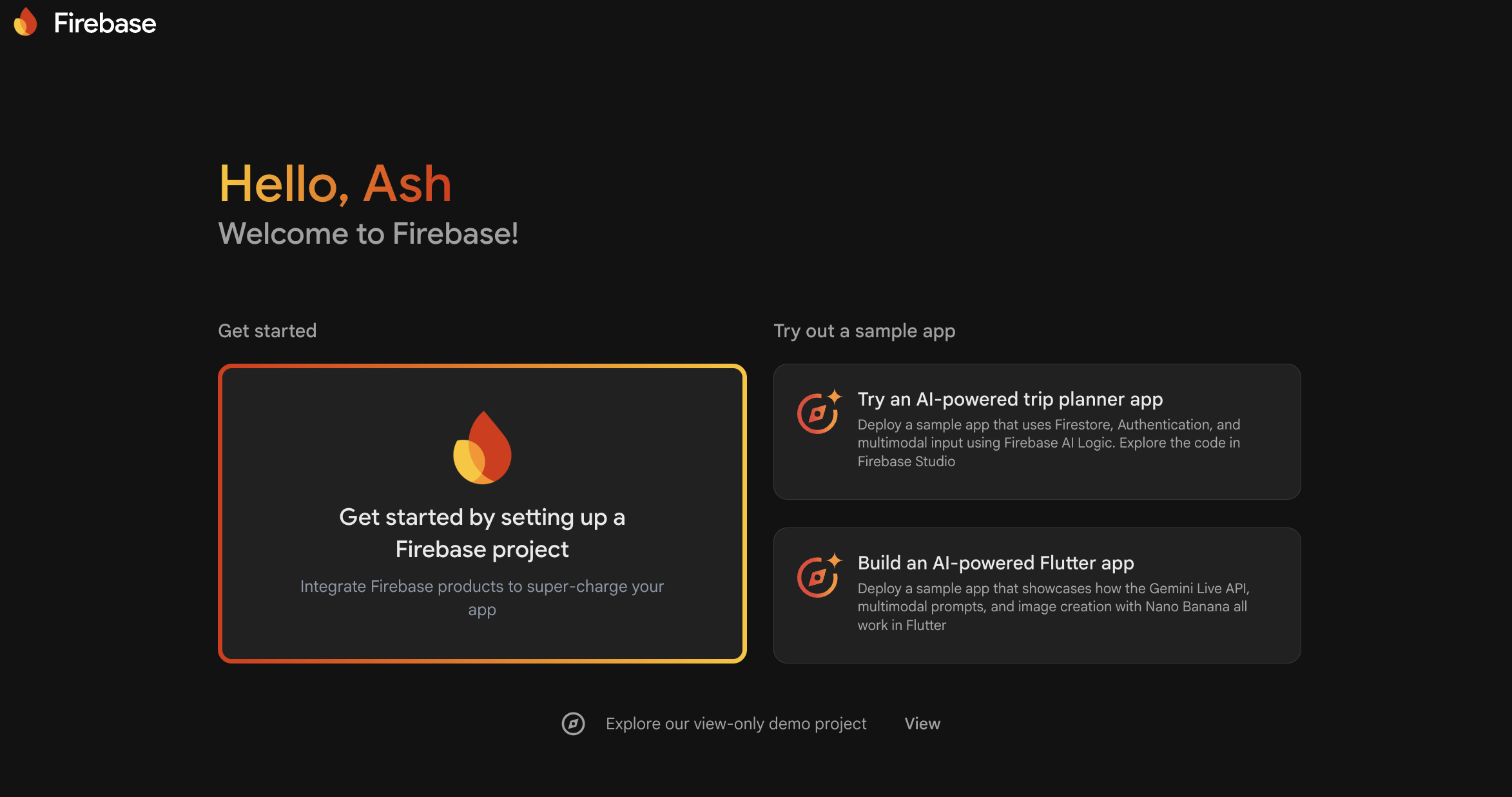
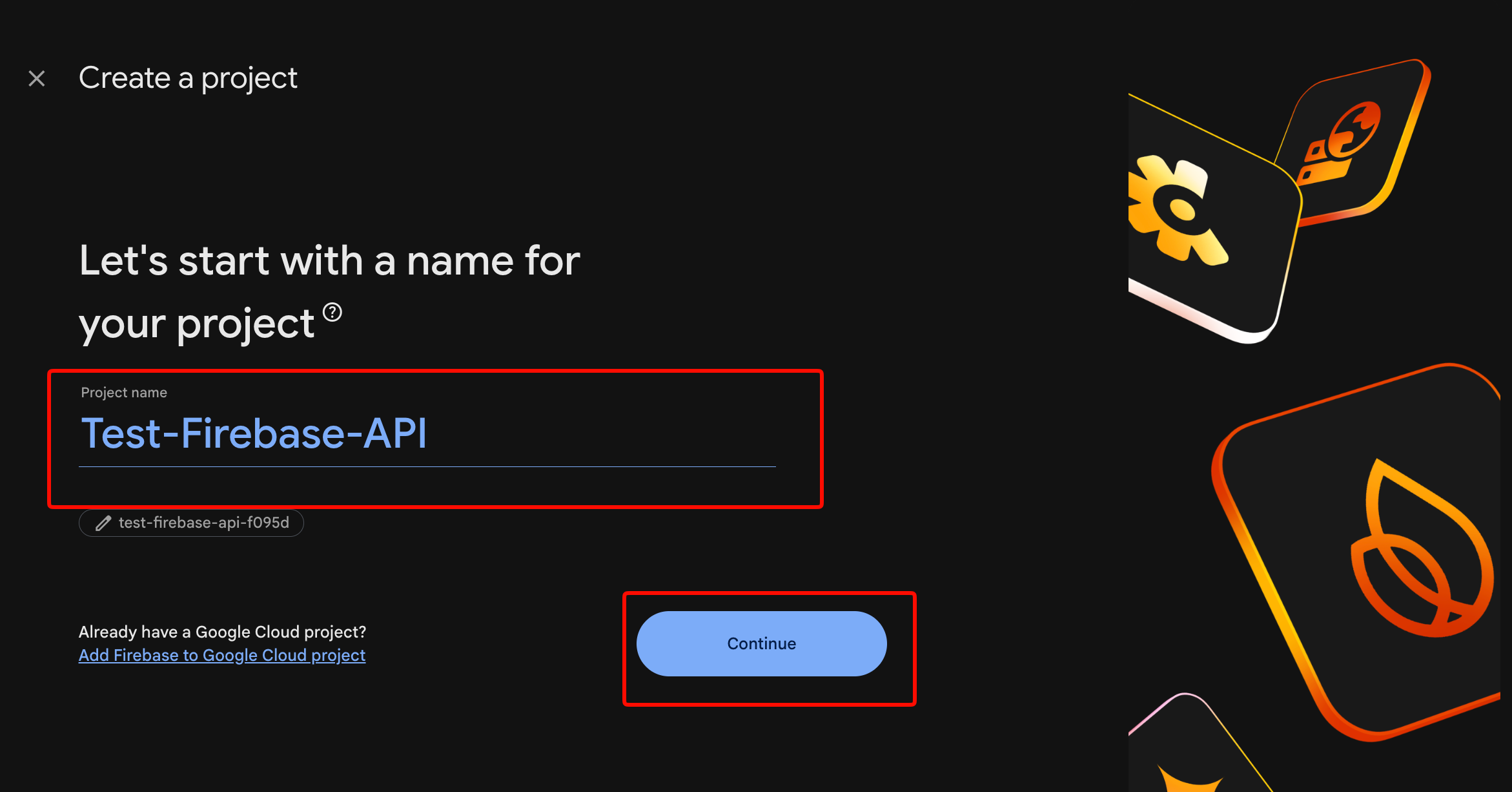
"프로젝트 추가"를 클릭하고 프로젝트 이름 입력 (공백 없음)
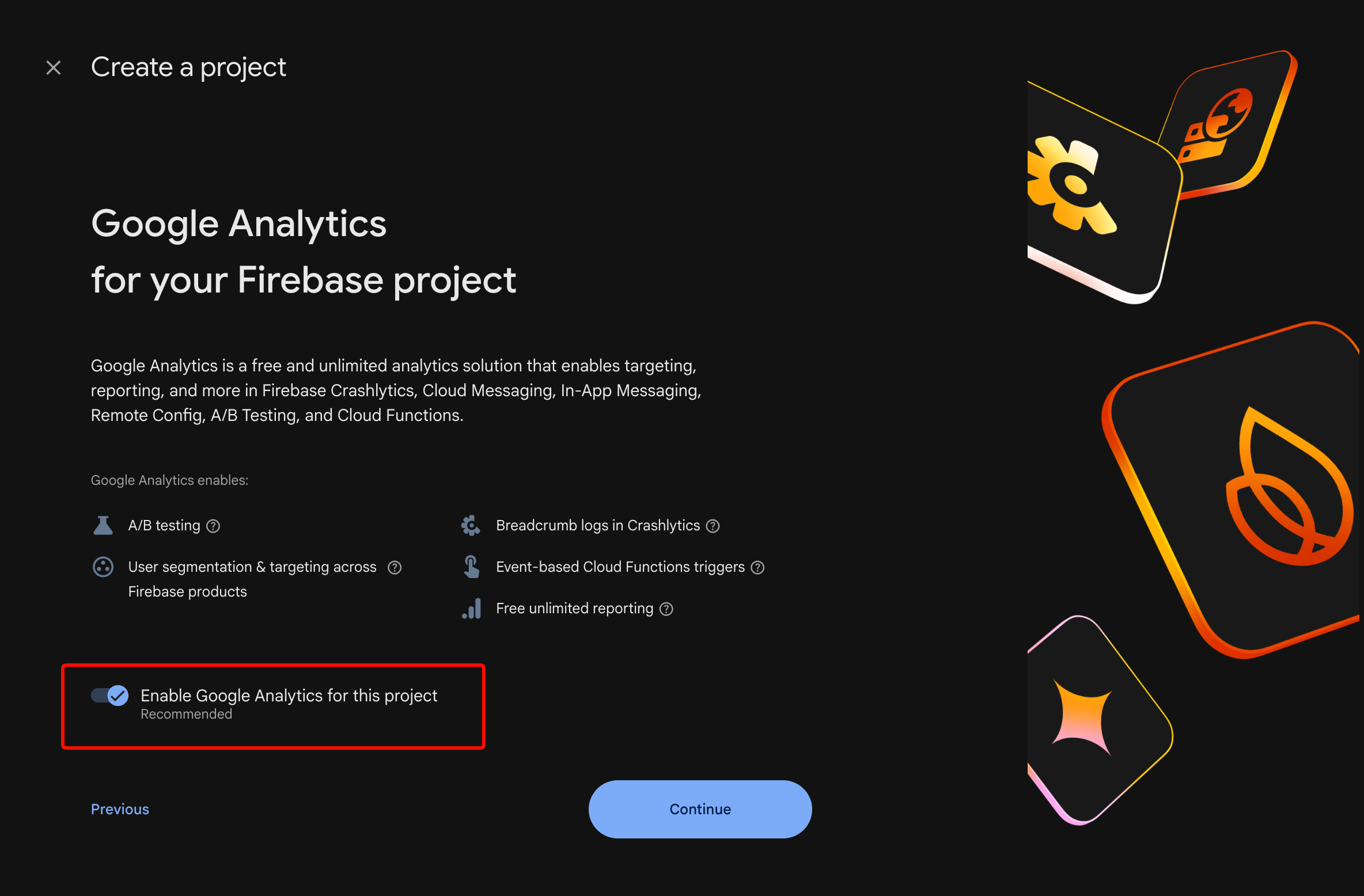
Google 애널리틱스 활성화 (선택 사항이지만 권장)
"프로젝트 생성" 클릭
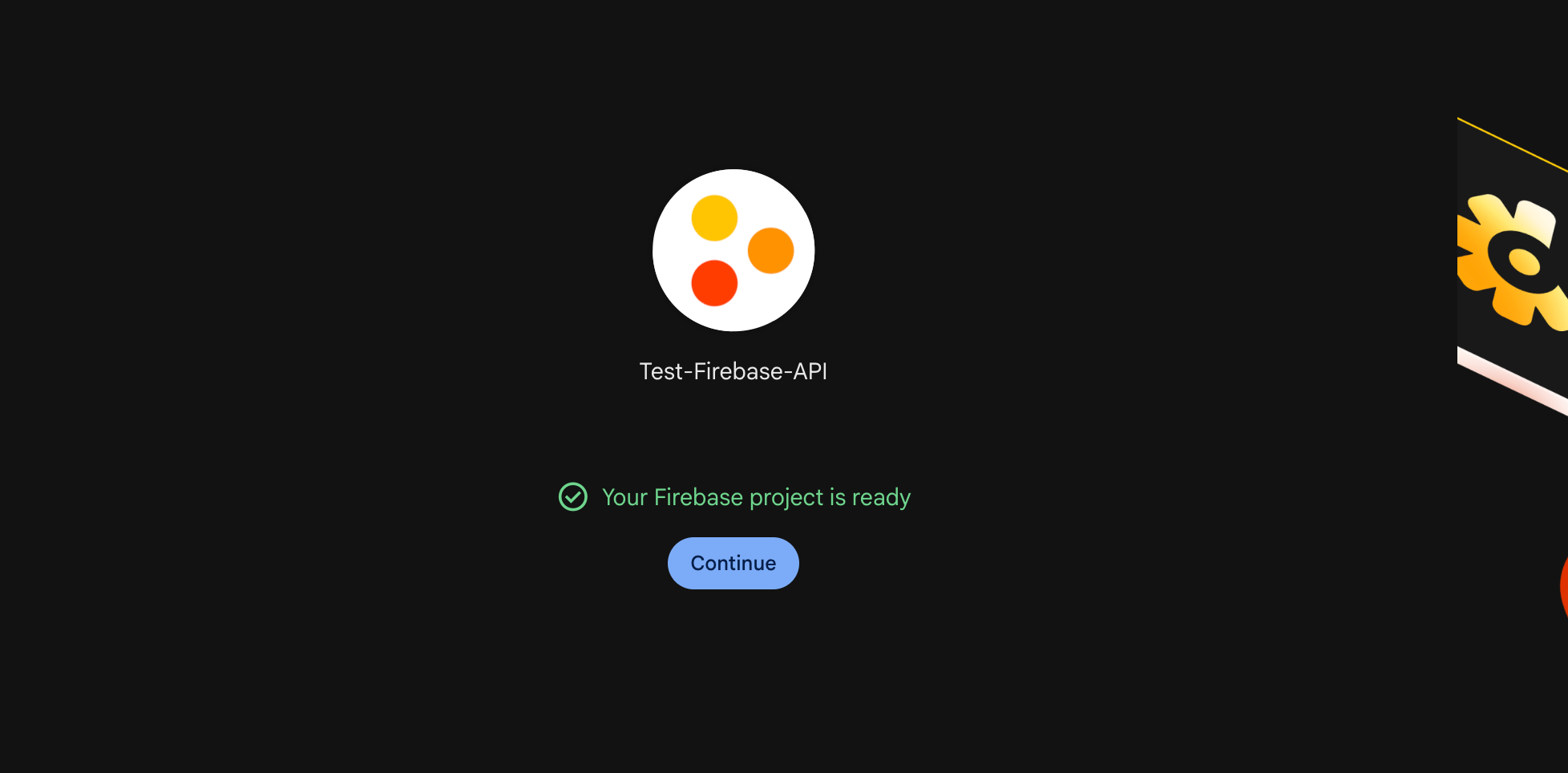
프로비저닝을 위해 30초 정도 기다립니다. 프로젝트 대시보드가 표시됩니다.
2단계: 앱 등록
웹 앱의 경우:
// Firebase 콘솔 > 프로젝트 설정 > 일반
// "앱 추가" > 웹 아이콘 클릭

// 웹 앱 등록
const firebaseConfig = {
  apiKey: "AIzaSyDxxxxxxxxxxxxxxxxxxxxxxxxxxxxx",
  authDomain: "your-app.firebaseapp.com",
  projectId: "your-app",
  storageBucket: "your-app.appspot.com",
  messagingSenderId: "123456789012",
  appId: "1:123456789012:web:abc123def456"
};

// Firebase 초기화
import { initializeApp } from 'firebase/app';
const app = initializeApp(firebaseConfig);
iOS 앱의 경우:
GoogleService-Info.plist를 다운로드하여 Xcode 프로젝트에 추가합니다. "Target Membership"에 앱이 포함되어 있는지 확인하세요.
Android 앱의 경우:
google-services.json을 다운로드하여 app/ 디렉터리에 넣습니다. build.gradle에 추가합니다:
// Project-level build.gradle
buildscript {
    dependencies {
        classpath 'com.google.gms:google-services:4.4.0'
    }
}

// App-level build.gradle
plugins {
    id 'com.google.gms.google-services'
}
3단계: 인증 방법 활성화
Firebase 콘솔 > 인증 > 로그인 방법에서:
- 이메일/비밀번호: 전통적인 회원가입을 위해 활성화
- Google: SHA-1 인증서 지문 (Android) 또는 번들 ID (iOS) 추가
- Apple: 소셜 로그인을 활성화하는 경우 iOS 앱에 필수
- 전화: SMS 인증을 위해 활성화 (결제 필요)
4단계: 인증 흐름 구현
이메일/비밀번호 회원가입:
import {
  createUserWithEmailAndPassword,
  getAuth,
  updateProfile
} from 'firebase/auth';

const auth = getAuth(app);

async function signUp(email, password, displayName) {
  try {
    const userCredential = await createUserWithEmailAndPassword(
      auth,
      email,
      password
    );

    // 표시 이름 설정
    await updateProfile(userCredential.user, {
      displayName: displayName
    });

    console.log('사용자 생성됨:', userCredential.user.uid);
    return userCredential.user;
  } catch (error) {
    // 특정 오류 코드 처리
    switch (error.code) {
      case 'auth/email-already-in-use':
        throw new Error('이미 등록된 이메일입니다');
      case 'auth/weak-password':
        throw new Error('비밀번호는 최소 6자 이상이어야 합니다');
      case 'auth/invalid-email':
        throw new Error('유효하지 않은 이메일 주소입니다');
      default:
        throw new Error('회원가입 실패: ' + error.message);
    }
  }
}
이메일/비밀번호 로그인:
import {
  signInWithEmailAndPassword,
  signOut
} from 'firebase/auth';

async function signIn(email, password) {
  try {
    const userCredential = await signInWithEmailAndPassword(
      auth,
      email,
      password
    );

    const user = userCredential.user;

    // API 호출을 위한 ID 토큰 가져오기
    const idToken = await user.getIdToken();
    console.log('인증 토큰:', idToken);

    return user;
  } catch (error) {
    switch (error.code) {
      case 'auth/user-not-found':
        throw new Error('이 이메일로 된 계정이 없습니다');
      case 'auth/wrong-password':
        throw new Error('비밀번호가 틀렸습니다');
      case 'auth/too-many-requests':
        throw new Error('시도 횟수가 너무 많습니다. 나중에 다시 시도하세요');
      default:
        throw new Error('로그인 실패');
    }
  }
}

async function logOut() {
  await signOut(auth);
  console.log('사용자가 로그아웃되었습니다');
}
Google 로그인 (웹):
import {
  GoogleAuthProvider,
  signInWithPopup
} from 'firebase/auth';

async function signInWithGoogle() {
  const provider = new GoogleAuthProvider();

  // 추가 범위 요청
  provider.addScope('email');
  provider.addScope('profile');

  try {
    const result = await signInWithPopup(auth, provider);
    const user = result.user;

    // Google OAuth 토큰 액세스
    const credential = GoogleAuthProvider.credentialFromResult(result);
    const googleAccessToken = credential.accessToken;

    return user;
  } catch (error) {
    if (error.code === 'auth/popup-closed-by-user') {
      throw new Error('로그인이 취소되었습니다');
    }
    throw new Error('Google 로그인 실패');
  }
}
5단계: 인증 상태로 경로 보호
import { onAuthStateChanged } from 'firebase/auth';

// 인증 상태 변경 구독
onAuthStateChanged(auth, (user) => {
  if (user) {
    // 사용자 로그인됨
    console.log('사용자:', user.email);
    // 대시보드로 리디렉션
    window.location.href = '/dashboard';
  } else {
    // 사용자 로그아웃됨
    console.log('사용자 없음');
    // 로그인으로 리디렉션
    window.location.href = '/login';
  }
});
흔한 인증 실수
실수 1: 토큰 새로 고침을 처리하지 않음
Firebase SDK는 토큰을 자동으로 새로 고칩니다. 하지만 서버 측에서 토큰을 캐싱하는 경우, 토큰은 1시간 후에 만료됩니다. 항상 각 요청에서 토큰을 확인하거나 새로 고침 로직을 구현하세요.
실수 2: 클라이언트 코드에 관리자 자격 증명 노출
클라이언트 앱에서 서비스 계정 키를 절대 사용하지 마세요. 서비스 계정은 보안 규칙을 우회합니다. 신뢰할 수 있는 서버 환경에서만 사용하세요.
실수 3: 이메일 인증 건너뛰기
import { sendEmailVerification } from 'firebase/auth';

async function sendVerificationEmail(user) {
  await sendEmailVerification(user);
  console.log('인증 이메일 전송됨');
}

// 인증 상태 확인
if (!auth.currentUser.emailVerified) {
  console.log('이메일이 인증되지 않았습니다');
  // 접근 제한
}
Firestore 데이터베이스: 작업 및 쿼리
Firestore는 Firebase의 NoSQL 데이터베이스입니다. 문서는 컬렉션으로 구성됩니다. 쿼리는 자동으로 확장됩니다.
데이터 구조
your-project (루트)
└── users (컬렉션)
    ├── userId123 (문서)
    │   ├── name: "John"
    │   ├── email: "john@example.com"
    │   └── posts (하위 컬렉션)
    │       ├── postId1 (문서)
    │       └── postId2 (문서)
    └── userId456 (문서)
Firestore 초기화
import { getFirestore } from 'firebase/firestore';

const db = getFirestore(app);
문서 생성
import {
  collection,
  addDoc,
  setDoc,
  doc
} from 'firebase/firestore';

// 옵션 1: 자동 생성 ID
async function createUser(userData) {
  const docRef = await addDoc(collection(db, 'users'), userData);
  console.log('ID가 포함된 문서가 작성됨:', docRef.id);
  return docRef.id;
}

// 옵션 2: 사용자 지정 ID
async function createUserWithId(userId, userData) {
  await setDoc(doc(db, 'users', userId), userData);
  console.log('사용자 지정 ID가 포함된 문서가 작성됨:', userId);
}

// 사용 예시
const userId = await createUser({
  name: 'Alice',
  email: 'alice@example.com',
  createdAt: new Date(),
  role: 'user'
});
문서 읽기
import {
  getDoc,
  getDocs,
  query,
  where,
  orderBy,
  limit
} from 'firebase/firestore';

// 단일 문서 가져오기
async function getUser(userId) {
  const docRef = doc(db, 'users', userId);
  const docSnap = await getDoc(docRef);

  if (docSnap.exists()) {
    return docSnap.data();
  } else {
    throw new Error('사용자를 찾을 수 없습니다');
  }
}

// 필터가 포함된 쿼리
async function getUsersByRole(role) {
  const q = query(
    collection(db, 'users'),
    where('role', '==', role),
    orderBy('createdAt', 'desc'),
    limit(10)
  );

  const querySnapshot = await getDocs(q);
  const users = [];

  querySnapshot.forEach((doc) => {
    users.push({ id: doc.id, ...doc.data() });
  });

  return users;
}

// 사용 예시
const adminUsers = await getUsersByRole('admin');
console.log('관리자 사용자:', adminUsers);
문서 업데이트
import {
  updateDoc,
  increment,
  arrayUnion,
  arrayRemove
} from 'firebase/firestore';

async function updateUser(userId, updates) {
  const userRef = doc(db, 'users', userId);
  await updateDoc(userRef, updates);
}

// 원자적 작업
await updateUser('userId123', {
  loginCount: increment(1),
  tags: arrayUnion('premium', 'beta-tester'),
  lastLogin: new Date()
});

// 배열에서 제거
await updateUser('userId123', {
  tags: arrayRemove('beta-tester')
});
문서 삭제
import { deleteDoc } from 'firebase/firestore';

async function deleteUser(userId) {
  await deleteDoc(doc(db, 'users', userId));
  console.log('사용자 삭제됨');
}
실시간 리스너
import { onSnapshot } from 'firebase/firestore';

// 단일 문서 리스닝
const unsubscribe = onSnapshot(
  doc(db, 'users', userId),
  (doc) => {
    console.log('사용자 업데이트됨:', doc.data());
  },
  (error) => {
    console.error('리스닝 오류:', error);
  }
);

// 쿼리 결과 리스닝
const q = query(collection(db, 'posts'), where('published', '==', true));

const unsubscribeQuery = onSnapshot(q, (snapshot) => {
  const posts = snapshot.docs.map(doc => ({
    id: doc.id,
    ...doc.data()
  }));
  console.log('게시된 게시물:', posts);
});

// 리스닝 중지
unsubscribe();
unsubscribeQuery();
Firestore 보안 규칙
적절한 규칙이 없으면 누구나 데이터를 읽을 수 있습니다. Firebase 콘솔 > Firestore > 규칙에서 규칙을 설정하세요:
rules_version = '2';
service cloud.firestore {
  match /databases/{database}/documents {

    // 헬퍼 함수
    function isAuthenticated() {
      return request.auth != null;
    }

    function isOwner(userId) {
      return request.auth.uid == userId;
    }

    // 사용자 컬렉션
    match /users/{userId} {
      allow read: if isAuthenticated();
      allow create: if isAuthenticated() && isOwner(userId);
      allow update, delete: if isOwner(userId);
    }

    // 게시물 컬렉션
    match /posts/{postId} {
      allow read: if true; // 공개 읽기
      allow create: if isAuthenticated();
      allow update, delete: if resource.data.authorId == request.auth.uid;
    }

    // 비공개 하위 컬렉션
    match /users/{userId}/private/{document} {
      allow read, write: if isOwner(userId);
    }
  }
}
쿼리 제한 사항
Firestore에는 다음과 같은 제약 사항이 있습니다:
- OR 쿼리 없음 (배열 또는 여러 쿼리에
in사용) - 와일드카드 검색 없음 (전체 텍스트 검색에는 Algolia 또는 Meilisearch 사용)
- 복합 쿼리는 인덱스 필요 (Firestore는 단일 필드 인덱스를 자동으로 생성)
in쿼리에서 논리합(disjunctions)은 30개로 제한
OR 쿼리 해결 방법:
// 대신: where('status', '==', 'active') OR where('status', '==', 'pending')

const activeQuery = query(
  collection(db, 'tasks'),
  where('status', '==', 'active')
);

const pendingQuery = query(
  collection(db, 'tasks'),
  where('status', '==', 'pending')
);

const [activeSnap, pendingSnap] = await Promise.all([
  getDocs(activeQuery),
  getDocs(pendingQuery)
]);

// 클라이언트에서 결과 병합
클라우드 함수: 서버리스 백엔드 로직
클라우드 함수는 서버를 관리할 필요 없이 백엔드 코드를 실행합니다. 데이터베이스 변경, HTTP 요청 또는 예약된 이벤트에 따라 트리거됩니다.
설정
# Firebase CLI 설치
npm install -g firebase-tools

# 로그인
firebase login

# 프로젝트에서 함수 초기화
firebase init functions

# 선택: JavaScript, ESLint yes, Express.js no
HTTP 함수 (API 엔드포인트)
// functions/index.js
const { onRequest } = require('firebase-functions/v2/https');
const admin = require('firebase-admin');

admin.initializeApp();
const db = admin.firestore();

// 공개 엔드포인트
exports.getPublicData = onRequest(async (req, res) => {
  res.set('Access-Control-Allow-Origin', '*');

  try {
    const snapshot = await db.collection('public').get();
    const data = snapshot.docs.map(doc => doc.data());
    res.json({ success: true, data });
  } catch (error) {
    res.status(500).json({ error: error.message });
  }
});

// 보호된 엔드포인트 (인증 토큰 확인)
exports.getUserProfile = onRequest(async (req, res) => {
  res.set('Access-Control-Allow-Origin', '*');

  // Authorization 헤더에서 토큰 가져오기
  const authHeader = req.headers.authorization || '';
  const token = authHeader.split('Bearer ')[1];

  if (!token) {
    return res.status(401).json({ error: '인증되지 않음' });
  }

  try {
    // 토큰 확인
    const decodedToken = await admin.auth().verifyIdToken(token);
    const userId = decodedToken.uid;

    // 사용자 데이터 가져오기
    const userDoc = await db.collection('users').doc(userId).get();

    if (!userDoc.exists) {
      return res.status(404).json({ error: '사용자를 찾을 수 없음' });
    }

    res.json({
      success: true,
      data: { id: userId, ...userDoc.data() }
    });
  } catch (error) {
    res.status(401).json({ error: '유효하지 않은 토큰' });
  }
});
배포:
firebase deploy --only functions:getUserProfile
클라이언트에서 호출:
async function getUserProfile(token) {
  const response = await fetch(
    'https://us-central1-your-app.cloudfunctions.net/getUserProfile',
    {
      headers: {
        'Authorization': `Bearer ${token}`
      }
    }
  );

  const data = await response.json();
  return data;
}
데이터베이스 트리거
const { onDocumentWritten } = require('firebase-functions/v2/firestore');

// 사용자 문서가 변경될 때 트리거
exports.onUserUpdate = onDocumentWritten(
  'users/{userId}',
  async (event) => {
    const userId = event.params.userId;
    const before = event.data?.before?.data();
    const after = event.data?.after?.data();

    // 이메일 변경 확인
    if (before?.email !== after?.email) {
      console.log(`사용자 ${userId}의 이메일 변경: ${before?.email} → ${after?.email}`);

      // 알림 이메일 전송
      await admin.auth().getUser(userId);
      // 여기에 이메일 로직 추가
    }
  }
);

// 새 게시물 생성 시 트리거
exports.onNewPost = onDocumentWritten(
  'posts/{postId}',
  async (event) => {
    const post = event.data?.after?.data();

    if (!post) return; // 문서가 삭제됨

    // 새 문서인지 확인
    if (!event.data?.before?.exists) {
      console.log('새 게시물 생성됨:', post.title);

      // 팔로워에게 알림
      const followersSnap = await admin.firestore()
        .collection('users')
        .where('following', 'array-contains', post.authorId)
        .get();

      const notifications = followersSnap.docs.map(doc => ({
        userId: doc.id,
        postId: event.params.postId,
        type: 'new_post',
        createdAt: admin.firestore.FieldValue.serverTimestamp()
      }));

      const batch = admin.firestore().batch();
      notifications.forEach(notif => {
        const ref = admin.firestore().collection('notifications').doc();
        batch.set(ref, notif);
      });

      await batch.commit();
    }
  }
);
예약된 함수 (크론 작업)
const { onSchedule } = require('firebase-functions/v2/scheduler');

// UTC 자정마다 매일 실행
exports.dailyCleanup = onSchedule('every 24 hours', async (event) => {
  console.log('일일 정리 작업 실행 중');

  // 오래된 알림 삭제 (30일 이상)
  const thirtyDaysAgo = new Date();
  thirtyDaysAgo.setDate(thirtyDaysAgo.getDate() - 30);

  const oldNotifs = await admin.firestore()
    .collection('notifications')
    .where('createdAt', '<', thirtyDaysAgo)
    .get();

  const batch = admin.firestore().batch();
  oldNotifs.forEach(doc => batch.delete(doc.ref));
  await batch.commit();

  console.log(`${oldNotifs.size}개의 오래된 알림 삭제됨`);
});
환경 구성
# 환경 변수 설정
firebase functions:config:set \
  stripe.secret="sk_test_xxx" \
  email.api_key="key_xxx"

# 함수에서 접근
const config = require('firebase-functions/config');
const stripe = require('stripe')(config.stripe.secret);
클라우드 스토리지: 파일 업로드 및 관리
자동 CDN 배포를 통해 사용자 업로드, 이미지 및 파일을 저장합니다.
스토리지 규칙 설정
// Firebase 콘솔 > 스토리지 > 규칙
rules_version = '2';
service firebase.storage {
  match /b/{bucket}/o {

    // 사용자 업로드 폴더
    match /users/{userId}/{allPaths=**} {
      allow read: if true; // 공개 읽기
      allow write: if request.auth.uid == userId;
      allow delete: if request.auth.uid == userId;
    }

    // 공개 자산
    match /public/{allPaths=**} {
      allow read: if true;
      allow write: if false; // Firebase 콘솔을 통한 관리자만 가능
    }
  }
}
파일 업로드 (클라이언트)
import {
  getStorage,
  ref,
  uploadBytesResumable,
  getDownloadURL
} from 'firebase/storage';

const storage = getStorage(app);

async function uploadProfileImage(userId, file) {
  // 스토리지 참조 생성
  const storageRef = ref(storage, `users/${userId}/profile/${file.name}`);

  // 파일 업로드
  const uploadTask = uploadBytesResumable(storageRef, file);

  return new Promise((resolve, reject) => {
    uploadTask.on(
      'state_changed',
      (snapshot) => {
        // 진행 상황 추적
        const progress = (snapshot.bytesTransferred / snapshot.totalBytes) * 100;
        console.log(`업로드: ${progress.toFixed(0)}%`);
      },
      (error) => {
        // 오류 처리
        switch (error.code) {
          case 'storage/unauthorized':
            reject(new Error('권한이 없습니다'));
            break;
          case 'storage/canceled':
            reject(new Error('업로드가 취소되었습니다'));
            break;
          default:
            reject(new Error('업로드 실패'));
        }
      },
      async () => {
        // 업로드 완료
        const downloadURL = await getDownloadURL(uploadTask.snapshot.ref);
        console.log('파일 사용 가능 위치:', downloadURL);
        resolve(downloadURL);
      }
    );
  });
}

// 사용 예시
const fileInput = document.querySelector('input[type="file"]');
const file = fileInput.files[0];

if (file) {
  const imageUrl = await uploadProfileImage(auth.currentUser.uid, file);

  // Firestore에 URL 저장
  await updateDoc(doc(db, 'users', auth.currentUser.uid), {
    profileImage: imageUrl
  });
}
파일 다운로드
import { getDownloadURL } from 'firebase/storage';

async function getProfileImage(userId) {
  const imageRef = ref(storage, `users/${userId}/profile/avatar.png`);

  try {
    const url = await getDownloadURL(imageRef);
    return url;
  } catch (error) {
    if (error.code === 'storage/object-not-found') {
      return null; // 프로필 이미지가 없음
    }
    throw error;
  }
}
파일 삭제
import { deleteObject } from 'firebase/storage';

async function deleteProfileImage(userId) {
  const imageRef = ref(storage, `users/${userId}/profile/avatar.png`);
  await deleteObject(imageRef);
  console.log('프로필 이미지 삭제됨');
}
Apidog로 Firebase API 테스트하기
Firebase는 모든 서비스에 대한 REST API를 제공합니다. 이를 직접 테스트하면 문제를 디버그하고 기본 요청을 이해하는 데 도움이 됩니다.
Firebase REST API 가져오기
- Apidog 열기
- 새 프로젝트 생성: "Firebase API"
- Firebase 문서에서 OpenAPI 사양 가져오기
- 또는 수동으로 엔드포인트 추가:
Firestore REST 엔드포인트:
POST https://firestore.googleapis.com/v1/projects/{projectId}/databases/(default)/documents
Authorization: Bearer {oauth2_token}
Content-Type: application/json

{
  "fields": {
    "name": { "stringValue": "John" },
    "email": { "stringValue": "john@example.com" },
    "age": { "integerValue": 30 }
  }
}
인증 엔드포인트:
POST https://identitytoolkit.googleapis.com/v1/accounts:signInWithPassword?key={api_key}
Content-Type: application/json

{
  "email": "user@example.com",
  "password": "secret123",
  "returnSecureToken": true
}
인증 흐름 테스트
- 요청 생성: "로그인"
- 메서드 설정: POST
- 본문에 이메일/비밀번호 추가
- 응답 토큰을 환경 변수로 저장
- 후속 요청에서
{{token}}사용
보안 규칙 디버그
로컬 테스트를 위해 Firebase 에뮬레이터 제품군을 사용하세요:
# 에뮬레이터 시작
firebase emulators:start

# 로컬 Firestore에 대해 테스트
# http://localhost:8080
프로덕션 모범 사례
1. 적절한 오류 처리 구현
// 일시적인 실패를 위한 재시도 로직
async function firestoreWithRetry(operation, maxRetries = 3) {
  for (let i = 0; i < maxRetries; i++) {
    try {
      return await operation();
    } catch (error) {
      if (
        error.code === 'unavailable' ||
        error.code === 'deadline-exceeded'
      ) {
        const delay = Math.pow(2, i) * 1000; // 지수 백오프
        await new Promise(resolve => setTimeout(resolve, delay));
        continue;
      }
      throw error;
    }
  }
}
2. 쿼리 성능 최적화
다중 필드 쿼리에 대한 복합 인덱스 추가:
// 이 쿼리에는 복합 인덱스가 필요합니다
const q = query(
  collection(db, 'posts'),
  where('category', '==', 'tech'),
  where('views', '>', 1000),
  orderBy('views', 'desc')
);
이 쿼리를 실행하면 Firestore는 직접 링크를 통해 인덱스 생성을 요청합니다.
3. 배치 작업
import { writeBatch } from 'firebase/firestore';

async function bulkUpdate(userIds, updates) {
  const batch = writeBatch(db);

  userIds.forEach(id => {
    const ref = doc(db, 'users', id);
    batch.update(ref, updates);
  });

  await batch.commit();
  console.log(`${userIds.length}명의 사용자가 업데이트됨`);
}

// 배치당 최대 500개 작업
4. 비용 모니터링
Firebase 가격:
| 서비스 | 무료 계층 | 유료 |
|---|---|---|
| Firestore | 일 50K 읽기 | 100K 읽기당 $0.036 |
| Storage | 5GB | GB당 $0.023 |
| Functions | 2M 호출 | 1M 호출당 $0.40 |
| Auth | 월 10K | 100K 사용자당 $0.0055 |
Google Cloud 콘솔에서 예산 알림을 설정하세요.
5. 서비스 계정 보호
// 잘못된 예: 클라이언트 코드에서 절대 이렇게 하지 마세요
admin.initializeApp({
  credential: admin.credential.cert(require('./serviceAccountKey.json'))
});

// 올바른 예: 서버 환경에서만 사용
const serviceAccount = JSON.parse(process.env.FIREBASE_SERVICE_ACCOUNT);
admin.initializeApp({
  credential: admin.credential.cert(serviceAccount)
});
6. 오프라인 시나리오 처리
// 오프라인 지속성 활성화 (웹)
import { enableMultiTabIndexedDbPersistence } from 'firebase/firestore';

enableMultiTabIndexedDbPersistence(db)
  .catch((err) => {
    if (err.code === 'failed-precondition') {
      // 여러 탭이 열려 있음
    } else if (err.code === 'unimplemented') {
      // 브라우저에서 지원하지 않음
    }
  });

// 연결 상태 리스닝
import { onSnapshot } from 'firebase/firestore';

onSnapshot(doc(db, 'status', 'online'), (doc) => {
  if (!doc.exists()) {
    console.log('오프라인 상태입니다');
    // 오프라인 UI 표시
  }
});
일반적인 Firebase API 문제 및 해결책
문제 1: 권한 거부 오류
증상: Error: 7 PERMISSION_DENIED
원인: 보안 규칙이 작업을 차단함
해결책:
- Firebase 콘솔에서 규칙 확인
request.auth.uid가 예상 사용자와 일치하는지 확인- 규칙 플레이그라운드(Rules Playground)로 규칙 테스트
문제 2: 토큰 만료
증상: Error: ID token expired
해결책:
// 토큰 강제 새로 고침
const user = auth.currentUser;
if (user) {
  await user.getIdToken(true); // 강제 새로 고침
}
문제 3: 콜드 스타트 지연
증상: 클라우드 함수가 첫 호출 시 2-5초 소요
해결책:
// 예약된 핑으로 함수를 따뜻하게 유지
exports.keepWarm = onSchedule('every 60 seconds', async () => {
  await fetch('https://your-function.cloudfunctions.net/health');
});
문제 4: 쿼리가 빈 결과를 반환함
증상: 쿼리가 데이터를 반환해야 하지만 빈 배열을 반환함
원인: 인덱스 누락 또는 잘못된 필드 순서
해결책: Firestore 콘솔 > 인덱스에서 필요한 복합 인덱스를 확인하세요.
실제 사용 사례
핀테크 앱: 실시간 거래 업데이트
한 결제 스타트업은 Firebase Firestore를 사용하여 실시간 거래 알림을 구축했습니다. 결제가 처리될 때, 클라우드 함수가 200ms 이내에 연결된 모든 관리자 대시보드에 업데이트를 트리거합니다. 결과: "대기 중" 거래에 대한 지원 티켓이 40% 감소했습니다.
전자상거래: 재고 동기화
온라인 소매업체는 Firestore 리스너를 사용하여 웹, iOS, Android 간에 재고를 동기화합니다. 재고가 변경되면 모든 클라이언트가 자동으로 업데이트됩니다. 오프라인 지속성은 창고 작업자들이 연결 없이 품목을 스캔하고, 재연결 시 자동으로 동기화되도록 보장합니다.
SaaS: 다중 테넌트 인증
B2B 플랫폼은 역할 기반 액세스를 위해 커스텀 클레임이 있는 Firebase Auth를 사용합니다. 관리자 사용자는 Firestore 테넌트 구성을 기반으로 유효성을 검사하는 클라우드 함수를 통해 상위 권한을 얻습니다. 단일 코드베이스가 격리된 데이터로 500개 이상의 조직에 서비스를 제공합니다.
결론
Firebase API 통합에는 네 가지 핵심 서비스가 포함됩니다:
- 인증: JWT 토큰을 사용한 이메일, Google, Apple 로그인
- Firestore: 실시간 리스너 및 보안 규칙을 갖춘 NoSQL 데이터베이스
- 클라우드 함수: 이벤트 또는 HTTP에 의해 트리거되는 서버리스 백엔드
- 스토리지: CDN 배포를 통한 파일 업로드
인증 흐름, 데이터베이스 작업, 함수 배포 및 파일 관리에 대해 배웠습니다. 오류 처리, 배치 처리, 오프라인 지원 및 보안과 같은 프로덕션 패턴도 살펴보았습니다.
자주 묻는 질문
Firebase는 무료로 사용할 수 있나요?
네, Firebase는 넉넉한 무료 티어(스파크 플랜)를 제공하며, 5GB 스토리지, 일 50K Firestore 읽기, 2M 클라우드 함수 호출, 월 10K 인증 사용자가 포함됩니다. 유료 플랜(블레이즈)은 사용량 기반으로 요금이 부과됩니다.
기존 데이터베이스와 Firebase를 함께 사용할 수 있나요?
네. Firebase 확장 프로그램을 사용하여 PostgreSQL, MySQL 또는 MongoDB와 동기화할 수 있습니다. 또는 클라우드 함수에서 외부 API를 호출하여 기존 시스템과 통합할 수 있습니다.
Firebase에서 다른 플랫폼으로 마이그레이션하려면 어떻게 해야 하나요?
Firestore 내보내기 기능 또는 Firebase CLI를 사용하여 데이터를 내보냅니다. 대규모 데이터셋의 경우 Dataflow 내보내기 파이프라인을 사용하세요. 마이그레이션 복잡성은 데이터 구조에 따라 달라집니다.
Firebase는 GraphQL을 지원하나요?
네이티브하게는 지원하지 않습니다. firestore-graphql과 같은 서드파티 솔루션을 사용하거나 클라우드 함수 및 Apollo 서버를 사용하여 GraphQL 계층을 구축하세요.
온프레미스에서 Firebase를 사용할 수 있나요?
아니요. Firebase는 Google Cloud 전용입니다. 자체 호스팅 대안으로는 Appwrite, Supabase 또는 Nhost를 고려해 보세요.
100MB보다 큰 파일 업로드는 어떻게 처리하나요?
청킹을 사용하는 재개 가능한 업로드를 사용하세요. Firebase SDK는 이를 자동으로 처리합니다. 매우 큰 파일의 경우 서명된 URL과 함께 Google Cloud Storage를 직접 사용하세요.
Firestore 쿼리 제한을 초과하면 어떻게 되나요?
쿼리가 FAILED_PRECONDITION 오류와 함께 실패합니다. 필요한 인덱스를 추가하거나 쿼리 구조를 재구성하세요. Firestore는 오류 메시지에 누락된 인덱스를 생성하기 위한 직접 링크를 제공합니다.
Firebase는 GDPR을 준수하나요?
네, Firebase는 GDPR을 준수하는 데이터 처리를 제공합니다. 특정 지역에 데이터 상주를 활성화하고, 사용자 데이터 내보내기/삭제를 구현하며, Google의 데이터 처리 수정 조항에 서명하세요.