

요약 (TL;DR)
Claude 코드 소스 유출 사건으로 2026년 3월 31일에 512,000줄 분량의 TypeScript 코드베이스가 노출되었습니다. 아키텍처는 Claude API를 호출하고, 도구 호출을 디스패치하며, 결과를 다시 피드하는 while-루프로 요약됩니다. Anthropic SDK와 약 200줄의 파이썬 코드로 핵심 루프를 포함한 자체 버전을 구축할 수 있습니다. 이 가이드는 각 구성 요소를 분석하고 이를 재현하는 방법을 보여줍니다.
서론
2026년 3월 31일, Anthropic은 @anthropic-ai/claude-code npm 패키지의 2.1.88 버전 내부에 59.8MB 크기의 소스 맵 파일을 배포했습니다. 소스 맵은 난독화된 JavaScript를 원래 소스로 되돌리는 디버깅 아티팩트입니다. Anthropic의 빌드 도구(Bun의 번들러)가 기본적으로 이를 생성했기 때문에 전체 TypeScript 코드베이스를 복구할 수 있었습니다.
몇 시간 만에 개발자들은 수십 개의 GitHub 저장소에 코드를 미러링했습니다. 커뮤니티는 마스터 에이전트 루프부터 "언더커버 모드" 및 가짜 도구 주입과 같은 숨겨진 기능에 이르기까지 모든 모듈을 빠르게 분석했습니다.
반응은 엇갈렸습니다. 일부는 Anthropic의 보안 관행을 비판했습니다. 다른 이들은 아키텍처에 매료되었습니다. 그러나 가장 생산적인 반응은 "내가 직접 만들 수 있을까?"라고 질문한 개발자들로부터 나왔습니다.
답은 '예'입니다. 핵심 패턴은 간단합니다. 이 가이드는 각 아키텍처 레이어를 자세히 살펴보고, Anthropic이 어떤 선택을 했는지 설명하며, 시작점으로 사용할 수 있는 작동하는 코드를 제공합니다. 또한 Apidog를 사용하여 커스텀 에이전트의 API 상호 작용을 테스트하는 방법을 배우게 될 것입니다. 이는 순수 curl 명령보다 다중 턴 API 대화를 디버깅하는 것을 훨씬 쉽게 만듭니다.
유출을 통해 밝혀진 Claude Code의 아키텍처
한눈에 보는 코드베이스
내부적으로 "Tengu"라는 코드명을 가진 Claude Code는 약 1,900개의 파일로 구성되어 있습니다. 모듈 구성은 명확한 계층으로 나뉩니다:
cli/          - 터미널 UI (React + Ink)
tools/        - 40개 이상의 도구 구현체
core/         - 시스템 프롬프트, 권한, 상수
assistant/    - 에이전트 오케스트레이션
services/     - API 호출, 압축, OAuth, 텔레메트리
CLI 자체는 Ink(터미널 출력을 위한 React 렌더러)를 통해 렌더링되는 React 앱입니다. 레이아웃을 위해 Yoga(CSS flexbox 엔진)를 사용하고 스타일링을 위해 ANSI 이스케이프 코드를 사용합니다. 모든 대화 보기, 입력 영역, 도구 호출 표시 및 권한 대화 상자는 React 컴포넌트입니다.
이는 대부분의 DIY 프로젝트에는 과도하게 설계되었습니다. 작동하는 코딩 에이전트를 구축하기 위해 React 기반 터미널 UI가 필요하지 않습니다. 간단한 REPL 루프면 충분합니다.
마스터 에이전트 루프
UI, 텔레메트리, 기능 플래그를 제외하면 Claude Code의 핵심은 while-루프입니다. Anthropic은 내부적으로 이를 "nO"라고 부릅니다. 작동 방식은 다음과 같습니다:
- Claude API에 메시지 전송 (시스템 프롬프트 + 도구 정의)
- 텍스트 및/또는
tool_use블록을 포함하는 응답 수신 - 이름-핸들러 디스패치 맵을 통해 요청된 각 도구 실행
- 도구 결과를 메시지 목록에 다시 추가
- 응답에 추가 도구 호출이 포함되어 있으면 1단계로 루프 백
- 응답이 도구 호출이 없는 일반 텍스트이면 사용자에게 반환
"턴"은 한 번의 완전한 왕복입니다. Claude가 도구 호출 없이 텍스트를 생성할 때까지 턴은 계속됩니다. 이것이 전체 에이전트 패턴입니다.
다음은 핵심을 포착한 최소한의 파이썬 버전입니다:
import anthropic

client = anthropic.Anthropic()
MODEL = "claude-sonnet-4-6"

def agent_loop(system_prompt: str, tools: list, messages: list) -> str:
    """The core agent loop - keep calling until no more tool use."""
    while True:
        response = client.messages.create(
            model=MODEL,
            max_tokens=16384,
            system=system_prompt,
            tools=tools,
            messages=messages,
        )

        # Add assistant response to conversation
        messages.append({"role": "assistant", "content": response.content})

        # If the model stopped without requesting tools, we're done
        if response.stop_reason != "tool_use":
            # Extract the final text
            return "".join(
                block.text for block in response.content
                if hasattr(block, "text")
            )

        # Execute each tool call and collect results
        tool_results = []
        for block in response.content:
            if block.type == "tool_use":
                result = execute_tool(block.name, block.input)
                tool_results.append({
                    "type": "tool_result",
                    "tool_use_id": block.id,
                    "content": result,
                })

        # Feed results back as a user message
        messages.append({"role": "user", "content": tool_results})
약 30줄 정도입니다. Claude Code의 나머지 복잡성은 도구 자체, 권한 시스템, 컨텍스트 관리 및 메모리에서 비롯됩니다.
도구 시스템 구축
단일 bash 명령보다 전용 도구가 더 나은 이유
유출된 코드에서 가장 명확한 아키텍처 결정 중 하나는 Claude Code가 모든 것을 bash를 통해 라우팅하는 대신 파일 작업에 전용 도구를 사용한다는 것입니다.
Read 도구(cat 아님), Edit 도구(sed 아님), Grep 도구(grep 아님), Glob 도구(find 아님)가 있습니다. 시스템 프롬프트는 모델에게 bash와 동등한 도구보다 이들을 선호하도록 명시적으로 지시합니다.
왜 그럴까요? 세 가지 이유가 있습니다:
- 구조화된 출력. 전용
Grep도구는 모델이 구문 분석할 수 있는 일관된 형식으로 결과를 반환합니다. bash 명령을 파이핑하면 모델이 해석하기 어려운 예측 불가능한 출력이 생성됩니다. - 안전성. Claude Code의
BashTool은 백틱과$()서브쉘 구문을 차단하여 주입을 방지합니다. 전용 도구는 이러한 위험을 완전히 회피합니다. - 토큰 효율성. 도구 결과는 잘리거나, 샘플링되거나, 디스크로 오프로드될 수 있습니다. 대규모
cat출력은 컨텍스트 창 토큰을 낭비합니다.
필수 도구 세트
유출된 코드에서 Claude Code는 기본적으로 20개 미만의 도구를 노출하며, 60개 이상은 기능 플래그 뒤에 숨겨져 있습니다. DIY 에이전트의 경우 다음 다섯 가지가 필요합니다:
TOOLS = [
    {
        "name": "read_file",
        "description": "Read a file from the filesystem. Returns contents with line numbers.",
        "input_schema": {
            "type": "object",
            "properties": {
                "file_path": {
                    "type": "string",
                    "description": "Absolute path to the file"
                },
                "offset": {
                    "type": "integer",
                    "description": "Line number to start reading from (0-indexed)"
                },
                "limit": {
                    "type": "integer",
                    "description": "Max lines to read. Defaults to 2000."
                }
            },
            "required": ["file_path"]
        }
    },
    {
        "name": "write_file",
        "description": "Write content to a file. Creates the file if it doesn't exist.",
        "input_schema": {
            "type": "object",
            "properties": {
                "file_path": {"type": "string", "description": "Absolute path"},
                "content": {"type": "string", "description": "File content to write"}
            },
            "required": ["file_path", "content"]
        }
    },
    {
        "name": "edit_file",
        "description": "Replace a specific string in a file. The old_string must be unique.",
        "input_schema": {
            "type": "object",
            "properties": {
                "file_path": {"type": "string", "description": "Absolute path"},
                "old_string": {"type": "string", "description": "Text to find"},
                "new_string": {"type": "string", "description": "Replacement text"}
            },
            "required": ["file_path", "old_string", "new_string"]
        }
    },
    {
        "name": "run_command",
        "description": "Execute a shell command and return stdout/stderr.",
        "input_schema": {
            "type": "object",
            "properties": {
                "command": {"type": "string", "description": "Shell command to run"},
                "timeout": {"type": "integer", "description": "Timeout in seconds. Default 120."}
            },
            "required": ["command"]
        }
    },
    {
        "name": "search_code",
        "description": "Search for a regex pattern across files in a directory.",
        "input_schema": {
            "type": "object",
            "properties": {
                "pattern": {"type": "string", "description": "Regex pattern"},
                "path": {"type": "string", "description": "Directory to search"},
                "file_glob": {"type": "string", "description": "File pattern filter, e.g. '*.py'"}
            },
            "required": ["pattern"]
        }
    }
]
도구 핸들러 디스패치
도구 실행 함수는 도구 이름을 핸들러 함수에 매핑합니다:
import subprocess
import os
import re

def execute_tool(name: str, params: dict) -> str:
    """Dispatch tool calls to their handlers."""
    handlers = {
        "read_file": handle_read_file,
        "write_file": handle_write_file,
        "edit_file": handle_edit_file,
        "run_command": handle_run_command,
        "search_code": handle_search_code,
    }

    handler = handlers.get(name)
    if not handler:
        return f"Error: Unknown tool '{name}'"

    try:
        return handler(params)
    except Exception as e:
        return f"Error: {str(e)}"


def handle_read_file(params: dict) -> str:
    path = params["file_path"]
    offset = params.get("offset", 0)
    limit = params.get("limit", 2000)

    with open(path, "r") as f:
        lines = f.readlines()

    selected = lines[offset:offset + limit]
    numbered = [f"{i + offset + 1}\t{line}" for i, line in enumerate(selected)]
    return "".join(numbered)


def handle_write_file(params: dict) -> str:
    path = params["file_path"]
    os.makedirs(os.path.dirname(path), exist_ok=True)
    with open(path, "w") as f:
        f.write(params["content"])
    return f"Successfully wrote to {path}"


def handle_edit_file(params: dict) -> str:
    path = params["file_path"]
    with open(path, "r") as f:
        content = f.read()

    old = params["old_string"]
    if content.count(old) == 0:
        return f"Error: '{old[:50]}...' not found in {path}"
    if content.count(old) > 1:
        return f"Error: '{old[:50]}...' matches {content.count(old)} locations. Be more specific."

    new_content = content.replace(old, params["new_string"], 1)
    with open(path, "w") as f:
        f.write(new_content)
    return f"Successfully edited {path}"


def handle_run_command(params: dict) -> str:
    cmd = params["command"]
    timeout = params.get("timeout", 120)

    # Basic safety: block dangerous patterns
    blocked = ["rm -rf /", "mkfs", "> /dev/"]
    for pattern in blocked:
        if pattern in cmd:
            return f"Error: Blocked dangerous command pattern: {pattern}"

    result = subprocess.run(
        cmd, shell=True, capture_output=True, text=True,
        timeout=timeout, cwd=os.getcwd()
    )

    output = ""
    if result.stdout:
        output += result.stdout
    if result.stderr:
        output += f"\nSTDERR:\n{result.stderr}"
    if not output.strip():
        output = f"Command completed with exit code {result.returncode}"

    # Truncate large outputs to save context tokens
    if len(output) > 30000:
        output = output[:15000] + "\n\n... [truncated] ...\n\n" + output[-15000:]

    return output


def handle_search_code(params: dict) -> str:
    pattern = params["pattern"]
    path = params.get("path", os.getcwd())
    file_glob = params.get("file_glob", "")

    cmd = ["grep", "-rn", "--include", file_glob, pattern, path] if file_glob else \
          ["grep", "-rn", pattern, path]

    result = subprocess.run(cmd, capture_output=True, text=True, timeout=30)

    if not result.stdout.strip():
        return f"No matches found for pattern: {pattern}"

    lines = result.stdout.strip().split("\n")
    if len(lines) > 50:
        return "\n".join(lines[:50]) + f"\n\n... ({len(lines) - 50} more matches)"
    return result.stdout
컨텍스트 관리: 어려운 문제
프롬프트 엔지니어링보다 컨텍스트가 더 중요한 이유
유출된 소스 코드를 보면 Claude Code는 시스템 프롬프트 자체보다 컨텍스트 관리에 더 많은 엔지니어링 노력을 기울였습니다. 컨텍스트 압축기(내부적으로 "wU2"라고 불림)는 다섯 가지 전략을 가지고 있습니다.
DIY 빌드의 경우 두 가지가 필요합니다:
자동 압축은 대화가 컨텍스트 창 제한에 가까워질 때 트리거됩니다. Claude Code는 약 92% 사용 시 트리거되며, 요약 자체를 위해 13,000 토큰 버퍼를 예약합니다.
CLAUDE.md 재주입은 긴 세션 동안 프로젝트 가이드라인이 벗어나지 않도록 보장합니다. Claude Code는 초기화 시가 아니라 매 턴마다 프로젝트 구성을 재주입합니다. 이는 코딩 에이전트를 올바른 방향으로 유지하는 데 가장 영향력 있는 단일 패턴입니다.
간단한 압축기 구축
def maybe_compact(messages: list, system_prompt: str, max_tokens: int = 180000) -> list:
    """Compact conversation when it gets too long."""
    # Rough estimate: 4 chars per token
    total_chars = sum(
        len(str(m.get("content", ""))) for m in messages
    )
    estimated_tokens = total_chars // 4

    if estimated_tokens < max_tokens * 0.85:
        return messages  # Not yet at the limit

    # Ask the model to summarize the conversation so far
    summary_response = client.messages.create(
        model=MODEL,
        max_tokens=4096,
        system="Summarize this conversation. Keep all file paths, decisions made, errors encountered, and current task state. Be specific about what was changed and why.",
        messages=messages,
    )

    summary_text = summary_response.content[0].text

    # Replace conversation with summary + recent messages
    compacted = [
        {"role": "user", "content": f"[Conversation summary]\n{summary_text}"},
        {"role": "assistant", "content": "I have the context from our previous conversation. What should I work on next?"},
    ]

    # Keep the last 4 messages for immediate context
    compacted.extend(messages[-4:])

    return compacted
프로젝트 컨텍스트 재주입
Claude Code는 .claude/CLAUDE.md를 읽고 매 턴마다 이를 주입합니다. 이를 재현하는 방법은 다음과 같습니다:
def build_system_prompt(project_dir: str) -> str:
    """Build system prompt with project context re-injection."""
    base_prompt = """You are a coding assistant that helps with software engineering tasks.
You have access to tools for reading, writing, editing files, running commands, and searching code.
Always read files before modifying them. Prefer edit_file over write_file for existing files.
Keep responses concise. Focus on the code, not explanations."""

    # Look for project guidelines
    claude_md_path = os.path.join(project_dir, ".claude", "CLAUDE.md")
    if os.path.exists(claude_md_path):
        with open(claude_md_path, "r") as f:
            project_context = f.read()
        base_prompt += f"\n\n# Project guidelines\n{project_context}"

    # Also check for a root CLAUDE.md
    root_md = os.path.join(project_dir, "CLAUDE.md")
    if os.path.exists(root_md):
        with open(root_md, "r") as f:
            root_context = f.read()
        base_prompt += f"\n\n# Repository guidelines\n{root_context}"

    return base_prompt
3계층 메모리 시스템
유출된 소스 코드는 Claude Code가 3계층 메모리 아키텍처를 사용한다는 것을 보여줍니다. 이는 시스템에서 가장 저평가된 부분 중 하나입니다.
계층 1: MEMORY.md (항상 로드됨)
항상 시스템 프롬프트에 남아 있는 경량 인덱스. 각 항목은 150자 미만의 한 줄입니다. 더 깊은 지식을 가리키는 목차 역할을 합니다. 200줄/25KB로 제한됩니다.
- [User preferences](memory/user-prefs.md) - prefers TypeScript, uses Vim keybindings
- [API conventions](memory/api-conventions.md) - REST with JSON:API spec, snake_case
- [Deploy process](memory/deploy.md) - uses GitHub Actions, deploys to AWS EKS
계층 2: 주제 파일 (요청 시 로드됨)
인덱스가 관련성을 제시할 때 로드되는 상세 지식 파일. 여기에는 프로젝트 규칙, 아키텍처 결정 및 학습된 패턴이 포함됩니다.
계층 3: 세션 기록 (검색만, 읽지 않음)
전체 세션 로그는 통째로 로드되지 않습니다. 에이전트는 특정 식별자를 위해 이를 grep합니다. 이는 컨텍스트 비대화를 방지하면서 검색 가능성을 유지합니다.
최소한의 메모리 시스템 구축
import json

MEMORY_DIR = ".agent/memory"

def load_memory_index() -> str:
    """Load the memory index for system prompt injection."""
    index_path = os.path.join(MEMORY_DIR, "MEMORY.md")
    if os.path.exists(index_path):
        with open(index_path, "r") as f:
            return f.read()
    return ""


def save_memory(key: str, content: str, description: str):
    """Save a memory entry and update the index."""
    os.makedirs(MEMORY_DIR, exist_ok=True)

    # Write the memory file
    filename = f"{key.replace(' ', '-').lower()}.md"
    filepath = os.path.join(MEMORY_DIR, filename)
    with open(filepath, "w") as f:
        f.write(f"---\nname: {key}\ndescription: {description}\n---\n\n{content}")

    # Update the index
    index_path = os.path.join(MEMORY_DIR, "MEMORY.md")
    index_lines = []
    if os.path.exists(index_path):
        with open(index_path, "r") as f:
            index_lines = f.readlines()

    # Add or update entry
    new_entry = f"- [{key}]({filename}) - {description}\n"
    updated = False
    for i, line in enumerate(index_lines):
        if filename in line:
            index_lines[i] = new_entry
            updated = True
            break
    if not updated:
        index_lines.append(new_entry)

    with open(index_path, "w") as f:
        f.writelines(index_lines)
에이전트가 세션 간에 지식을 유지할 수 있도록 도구 목록에 save_memory 도구를 추가하세요.
권한 시스템 추가
유출된 코드는 다섯 가지 권한 모드를 보여줍니다: default (대화형 프롬프트), auto (ML 기반 승인), bypass, yolo (모두 승인), deny. 모든 도구 작업은 LOW, MEDIUM 또는 HIGH 위험으로 분류됩니다.
DIY 에이전트의 경우 간단한 3단계 시스템이 작동합니다:
# Risk levels for operations
RISK_LEVELS = {
    "read_file": "low",
    "search_code": "low",
    "edit_file": "medium",
    "write_file": "medium",
    "run_command": "high",
}

def check_permission(tool_name: str, params: dict, auto_approve_low: bool = True) -> bool:
    """Check if the user approves this tool call."""
    risk = RISK_LEVELS.get(tool_name, "high")

    if risk == "low" and auto_approve_low:
        return True

    # Show the user what's about to happen
    print(f"\n--- Permission check ({risk.upper()} risk) ---")
    print(f"Tool: {tool_name}")
    for key, value in params.items():
        display = str(value)[:200]
        print(f"  {key}: {display}")

    response = input("Allow? [y/n/always]: ").strip().lower()
    if response == "always":
        RISK_LEVELS[tool_name] = "low"  # Auto-approve this tool going forward
        return True
    return response == "y"
Apidog로 에이전트의 API 호출 테스트하기
코딩 에이전트를 구축한다는 것은 Claude에 수백 개의 API 호출을 하는 것을 의미합니다. 이러한 상호 작용, 특히 도구 사용을 포함하는 다중 턴 대화를 디버깅하는 것은 원시 로그만으로는 고통스러운 일입니다.
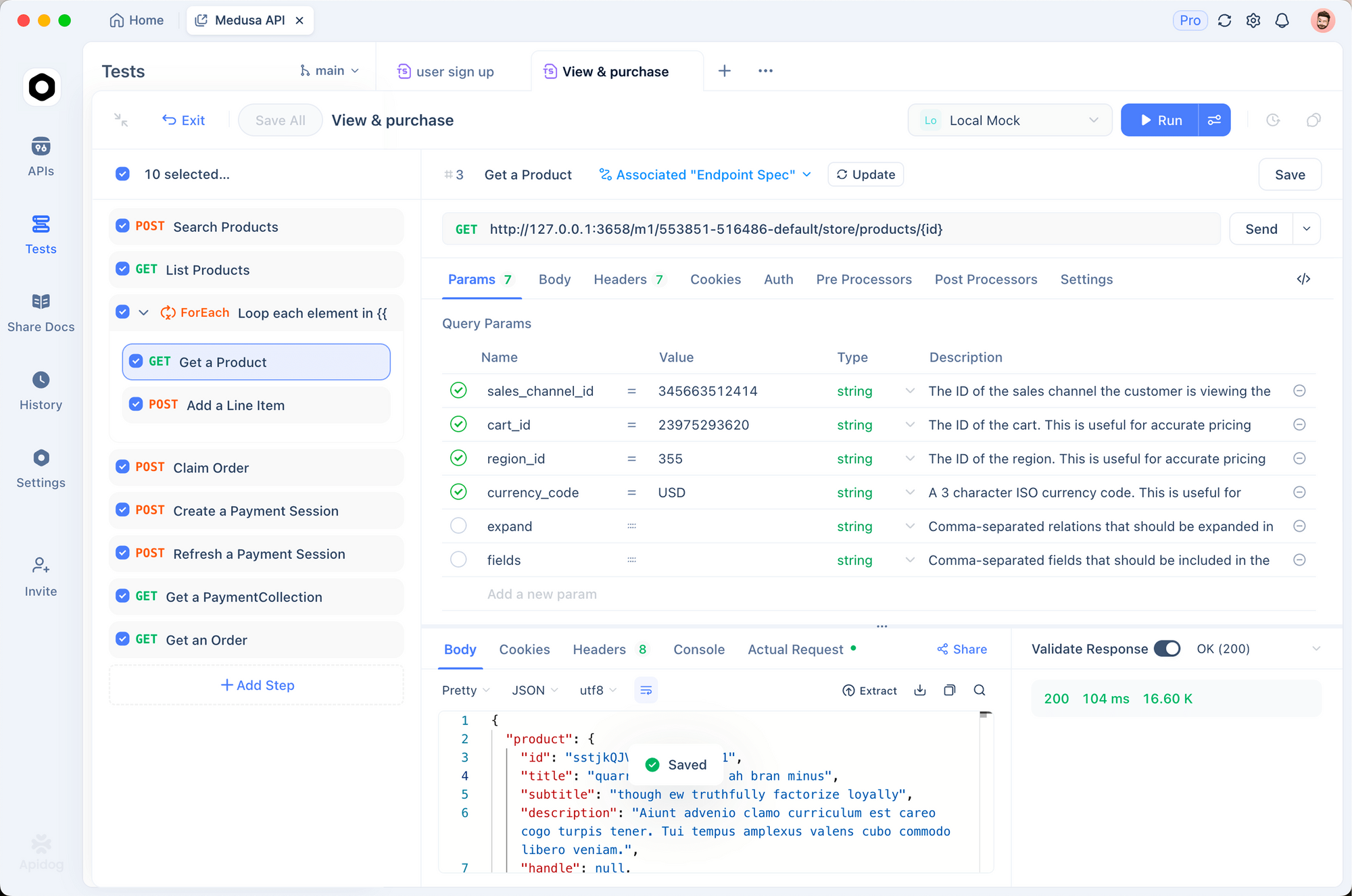
Apidog는 에이전트가 보내는 정확한 API 요청을 검사하고 테스트하는 데 도움을 줍니다. 개발 중 이를 사용하는 방법은 다음과 같습니다:
API 요청 캡처 및 재실행
Anthropic API에 대한 에이전트의 호출을 가로채기 위해 Apidog를 프록시로 설정합니다:
- Apidog를 열고 에이전트의 새 프로젝트를 생성합니다.
- Anthropic Messages API 엔드포인트:
POST https://api.anthropic.com/v1/messages를 가져옵니다. - 시스템 프롬프트, 도구 배열 및 메시지로 요청 본문을 설정합니다.
- 수정된 매개변수로 캡처된 요청을 재실행하여 개별 턴을 테스트합니다.
이렇게 하면 전체 에이전트 루프를 실행하지 않고도 특정 도구 사용 턴을 분리할 수 있습니다. 모델이 예상치 못한 도구 호출을 반환하거나 잘못된 매개변수를 전달하는 경우, Apidog의 시각 편집기에서 요청 본문을 수정하고 다시 보내어 다른 입력이 응답을 어떻게 변경하는지 확인할 수 있습니다.
다중 턴 대화 디버깅
에이전트 디버깅에서 가장 어려운 부분은 대화 상태를 재현하는 것입니다. Apidog의 환경 변수를 사용하면 대화 스냅샷을 저장할 수 있습니다:
- 각 턴 후에 전체
messages배열을 환경 변수로 저장합니다. - 대화의 어느 지점에서든 재생합니다.
- 행동이 달라지는 지점을 찾기 위해 실행 간 도구 결과를 비교합니다.
도구 스키마 유효성 검사
도구 정의(API에 전달하는 JSON 스키마)는 모델이 요청할 수 있는 것을 결정합니다. 잘못된 스키마는 모델이 도구를 건너뛰거나 잘못된 매개변수를 전달하는 조용한 실패를 유발합니다.
도구 스키마를 Apidog로 가져와서 JSON 스키마 유효성 검사기를 사용하여 API에 도달하기 전에 문제를 발견하세요. Apidog를 다운로드하여 에이전트의 API 상호 작용 디버깅을 시작하세요.
모든 것을 통합하기: 완전한 REPL
다음은 작동하는 REPL로 통합된 전체 에이전트입니다:
#!/usr/bin/env python3
"""A minimal Claude Code-style coding agent."""

import anthropic
import os
import sys

client = anthropic.Anthropic()
MODEL = "claude-sonnet-4-6"
PROJECT_DIR = os.getcwd()


def main():
    system_prompt = build_system_prompt(PROJECT_DIR)
    memory = load_memory_index()
    if memory:
        system_prompt += f"\n\n# Memory\n{memory}"

    messages = []
    print("Coding agent ready. Type 'quit' to exit.\n")

    while True:
        user_input = input("> ").strip()
        if user_input.lower() in ("quit", "exit"):
            break
        if not user_input:
            continue

        messages.append({"role": "user", "content": user_input})

        # Compact if needed
        messages = maybe_compact(messages, system_prompt)

        # Re-inject project context (Claude Code does this every turn)
        current_system = build_system_prompt(PROJECT_DIR)
        memory = load_memory_index()
        if memory:
            current_system += f"\n\n# Memory\n{memory}"

        # Run the agent loop
        result = agent_loop(current_system, TOOLS, messages)
        print(f"\n{result}\n")


if __name__ == "__main__":
    main()
이것으로 300줄 미만의 파이썬 코드로 작동하는 코딩 에이전트를 만들 수 있습니다. 파일을 읽고, 코드를 편집하고, 명령을 실행하고, 코드베이스를 검색하며, 컨텍스트를 관리하고, 세션 간에 메모리를 유지합니다.
다음에 추가할 기능
유출된 소스 코드에는 핵심 루프가 작동한 후 구축할 가치가 있는 몇 가지 기능이 있습니다:
병렬 작업을 위한 서브 에이전트
Claude Code는 독립적인 작업을 위해 서브 에이전트( "forked" 에이전트라고 함)를 생성합니다. 서브 에이전트는 부모 컨텍스트의 복사본을 받아 작업을 실행하고 결과를 반환합니다. 이는 탐색적 작업으로 인해 주 대화가 오염되는 것을 방지합니다.
패턴: 집중된 작업 설명과 도구 하위 집합을 사용하여 새 agent_loop()를 생성합니다. 결과를 문자열로 반환합니다.
파일 읽기 중복 제거
Claude Code는 어떤 파일이 읽혔는지와 해당 수정 시간을 추적합니다. 파일이 마지막 읽기 이후 변경되지 않았다면, 읽기를 건너뛰고 모델에게 "파일이 마지막 읽기 이후 변경되지 않음"이라고 알립니다. 이는 긴 세션 동안 다시 읽을 때 토큰을 절약합니다.
출력 자르기 및 샘플링
도구가 대량의 출력(예: grep 결과 10,000줄 이상)을 반환할 때, Claude Code는 이를 자르고 모델에게 생략된 결과의 수를 알려줍니다. 이 기능이 없으면 하나의 큰 도구 결과가 전체 컨텍스트 창을 잡아먹을 수 있습니다.
파일 재주입을 통한 자동 압축
유출된 압축기는 파일 내용을 버리지 않습니다. 대화를 요약한 후, 최근 액세스한 파일의 내용(파일당 최대 5,000 토큰)을 다시 주입합니다. 이는 압축 후에도 모델이 코드베이스에 대한 작동 지식을 유지한다는 것을 의미합니다.
유출을 통해 배운 점
Claude Code 유출은 AI 에이전트 커뮤니티에서 이론화했던 몇 가지 패턴을 확인시켜 주었습니다:
핵심 루프는 간단합니다. 전체 에이전트 패턴은 30줄에 불과합니다. 복잡성은 프롬프트 엔지니어링이 아닌 도구 및 컨텍스트 관리에 있습니다.
전용 도구가 bash보다 성능이 좋습니다. 구조화되고 목적에 맞게 제작된 도구는 bash 명령을 파이핑하는 것보다 토큰당 더 나은 정보 밀도를 모델에 제공합니다.
메모리에는 계층이 필요합니다. 항상 로드되는 인덱스, 주문형 주제 파일 및 grep 전용 기록은 검색 효율성과 컨텍스트 비용 사이의 균형을 맞춥니다.
컨텍스트 관리가 진정한 제품입니다. 자동 압축, 프로젝트 지침 재주입 및 출력 자르기는 긴 코딩 세션을 가능하게 합니다.
하네스가 제품이지 모델이 아닙니다. 모델은 지능을 제공합니다. 하네스는 인식(파일 읽기, 코드 검색), 행동(파일 쓰기, 명령 실행) 및 메모리를 제공합니다. 코딩 에이전트를 구축하는 것은 하네스를 구축하는 것입니다.
다중 턴 도구 사용 대화, 복잡한 요청 스키마 및 응답 유효성 검사를 포함하여 커스텀 에이전트의 API 상호 작용을 테스트하고 디버깅하고 싶다면 Apidog를 무료로 사용해 보세요. API 디버깅을 처리하므로 에이전트 로직에 집중할 수 있습니다.
자주 묻는 질문 (FAQ)
Claude Code 유출에서 얻은 패턴을 합법적으로 사용할 수 있나요?
유출은 독점 알고리즘이 아닌 아키텍처 패턴을 노출했습니다. 도구 디스패치를 사용하는 while-루프를 가진 코딩 에이전트를 구축하는 것은 Anthropic 자체 API 문서에 기록된 표준 패턴입니다. Anthropic의 코드를 그대로 복사해서는 안 되지만, 자신만의 코드로 아키텍처를 재현하는 것은 일반적인 관행입니다.
DIY 코딩 에이전트에 어떤 모델을 사용해야 하나요?
Claude Sonnet 4.6은 코딩 작업에 적합한 속도와 기능의 균형을 제공합니다. Claude Opus 4.6은 복잡한 아키텍처 결정에서 더 나은 결과를 생성하지만 비용이 더 많이 들고 속도가 느립니다. 간단한 파일 편집 및 검색의 경우 Claude Haiku 4.5가 작동하며 비용이 90% 더 저렴합니다.
자체 코딩 에이전트를 실행하는 데 비용이 얼마나 드나요?
Claude Sonnet 4.6을 사용하는 일반적인 코딩 세션(30-50턴)은 API 수수료로 $1-5가 듭니다. 주요 비용 요인은 컨텍스트 창 크기입니다. 적극적인 압축은 비용을 낮춥니다. Claude Code의 유출된 소스 코드는 이를 제어하기 위해 92%의 컨텍스트 사용량에서 압축을 트리거하는 것을 보여줍니다.
Claude Code는 왜 터미널 앱에 React를 사용하나요?
Ink(터미널용 React)는 팀이 권한 대화 상자, 스트리밍 출력 및 도구 호출 표시와 같은 복잡한 UI 상호 작용을 위해 React의 컴포넌트 모델과 상태 관리를 재사용할 수 있도록 합니다. DIY 프로젝트의 경우 간단한 input() / print() REPL이면 충분합니다.
핵심 루프 다음에 구축해야 할 가장 중요한 기능은 무엇인가요?
권한 시스템입니다. 이 시스템이 없으면 모델은 사용자 감독 없이 파일을 덮어쓰고 임의의 명령을 실행할 수 있습니다. 간단한 "쓰기/실행 전 확인" 게이트만으로도 대부분의 우발적인 손상을 방지할 수 있습니다.
Claude Code는 도구 호출의 오류를 어떻게 처리하나요?
도구 오류는 tool_result 메시지에서 텍스트 내용으로 반환됩니다. 모델은 오류를 보고 재시도할지, 다른 접근 방식을 시도할지, 사용자에게 물어볼지 결정합니다. 특별한 오류 처리는 없으며, 모델의 추론이 복구를 처리합니다.
이것을 Claude 외의 다른 모델과 함께 사용할 수 있나요?
네. 이 도구 사용 패턴은 함수 호출을 지원하는 모든 모델(GPT-4, Gemini, Llama 등)에서 작동합니다. API 호출 형식을 조정해야 하지만, 에이전트 루프, 도구 및 메모리 시스템은 모델에 구애받지 않습니다.
에이전트가 위험한 명령을 실행하는 것을 어떻게 막을 수 있나요?
위험한 패턴(rm -rf /, mkfs 등)의 차단 목록부터 시작하고, 모든 run_command 호출에 대한 명시적인 승인을 요구하세요. Claude Code는 모든 작업을 LOW, MEDIUM 또는 HIGH 위험으로 분류하고 해당 분류에 따라 차단하거나 프롬프트를 띄웁니다. 당신의 도구에도 동일한 것을 구축하세요.