

Anda sedang membangun aplikasi. Pengguna perlu masuk. Data perlu disinkronkan secara real-time. Berkas perlu penyimpanan. Anda bisa menyiapkan server, mengonfigurasi basis data, dan mengelola infrastruktur selama berminggu-minggu. Atau Anda bisa menggunakan Firebase.
Firebase mendukung lebih dari 1,5 juta aplikasi termasuk The New York Times, Duolingo, dan Alibaba. Pengembang memilihnya karena menghilangkan kompleksitas backend. Anda fokus pada fitur, bukan pemeliharaan server. Namun API Firebase memiliki keunikan. Alur autentikasi membingungkan pemula. Aturan basis data menjebak pengembang berpengalaman. Cloud Functions terlihat ajaib sampai Anda memahami pemicunya.
Saya telah mengintegrasikan Firebase ke dalam aplikasi produksi yang melayani jutaan pengguna. Saya telah membuat setiap kesalahan yang mungkin terjadi: mengekspos kunci akun layanan, menulis kueri yang tidak efisien, menyebarkan fungsi yang rusak. Panduan ini menyaring pelajaran-pelajaran tersebut.
Anda akan belajar autentikasi, operasi basis data, Cloud Functions, dan penyimpanan. Anda akan melihat kode yang berfungsi, bukan hanya teori. Anda akan menghindari jebakan yang menyebabkan masalah produksi.
Apa Itu API Firebase dan Mengapa Itu Penting?
Firebase bukanlah satu API tunggal. Ini adalah serangkaian layanan backend yang diakses melalui SDK terpadu dan endpoint REST.
Layanan Inti Firebase
| Layanan | Tujuan | Jenis API |
|---|---|---|
| Autentikasi | Masuk pengguna dan identitas | SDK + REST |
| Basis Data Firestore | Basis data dokumen NoSQL | SDK + REST |
| Basis Data Realtime | Sinkronisasi real-time JSON | SDK + REST |
| Cloud Storage | Penyimpanan file dan CDN | SDK + REST |
| Cloud Functions | Komputasi tanpa server | CLI Deployment |
| Hosting | Hosting web statis | CLI Deployment |
| Cloud Messaging | Notifikasi push | HTTP v1 API |
Kapan Firebase Masuk Akal
Firebase memecahkan masalah tertentu dengan baik:
Gunakan Firebase ketika:
- Anda membutuhkan sinkronisasi real-time (obrolan, kolaborasi, pembaruan langsung)
- Anda menginginkan arsitektur tanpa server (tanpa pengelolaan infrastruktur)
- Anda sedang membangun aplikasi seluler atau web (SDK menangani perbedaan platform)
- Anda membutuhkan dukungan offline (SDK secara otomatis menyimpan data)
- Anda menginginkan autentikasi bawaan (Google, Apple, email, masuk telepon)
Lewati Firebase ketika:
- Anda membutuhkan kueri relasional yang kompleks (gunakan PostgreSQL sebagai gantinya)
- Anda memiliki persyaratan residensi data yang ketat (wilayah Firebase terbatas)
- Anda membutuhkan kemampuan SQL penuh (batasan kueri Firestore ada)
- Biaya pada skala lebih penting daripada kecepatan pengembangan (hosting sendiri lebih murah)
Arsitektur API Firebase
Firebase menggunakan pendekatan hibrida:
┌─────────────────────────────────────────────────────────┐
│                    Aplikasi Anda                         │
├─────────────────────────────────────────────────────────┤
│  Firebase SDK (Klien)                                    │
│  - Otomatis menangani token autentikasi                  │
│  - Mengelola cache offline                               │
│  - Pendengar real-time                                   │
└─────────────────────────────────────────────────────────┘
                          │
                          │ HTTPS + WebSocket
                          ▼
┌─────────────────────────────────────────────────────────┐
│                   Backend Firebase                       │
├──────────────┬──────────────┬──────────────┬────────────┤
│   Layanan    │  Basis Data  │   Layanan    │ Fungsi     │
│    Auth      │   Firestore  │   Penyimpanan│  Runtime   │
└──────────────┴──────────────┴──────────────┴────────────┘
SDK Klien mengabstraksi lapisan HTTP. Di balik layar, setiap operasi diterjemahkan ke panggilan API REST dengan autentikasi JWT.
Autentikasi Firebase: Penyiapan Lengkap
Autentikasi adalah integrasi Firebase pertama Anda. Jika salah, yang lain akan gagal.
Langkah 1: Buat Proyek Firebase
- Buka Firebase Console
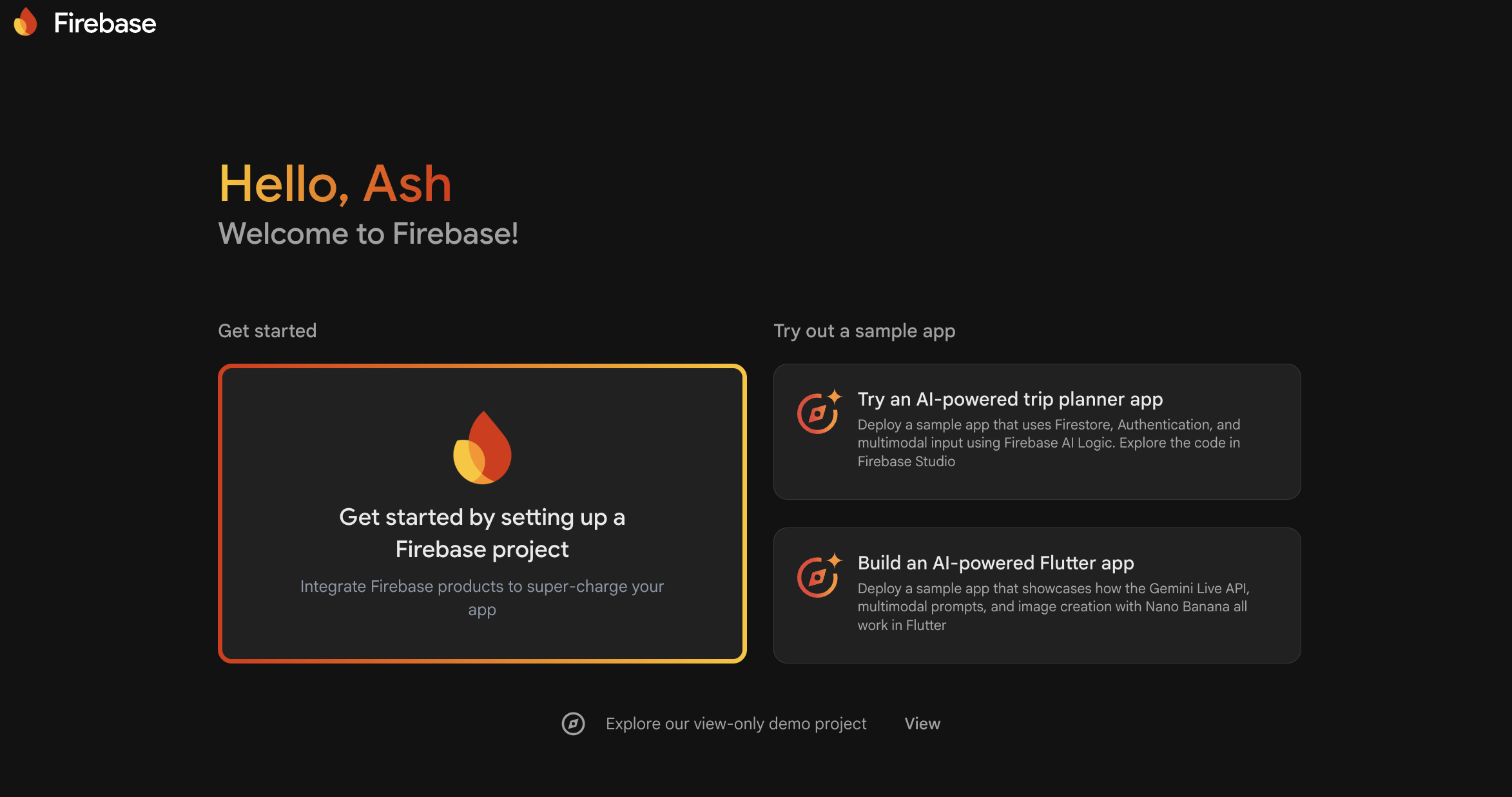
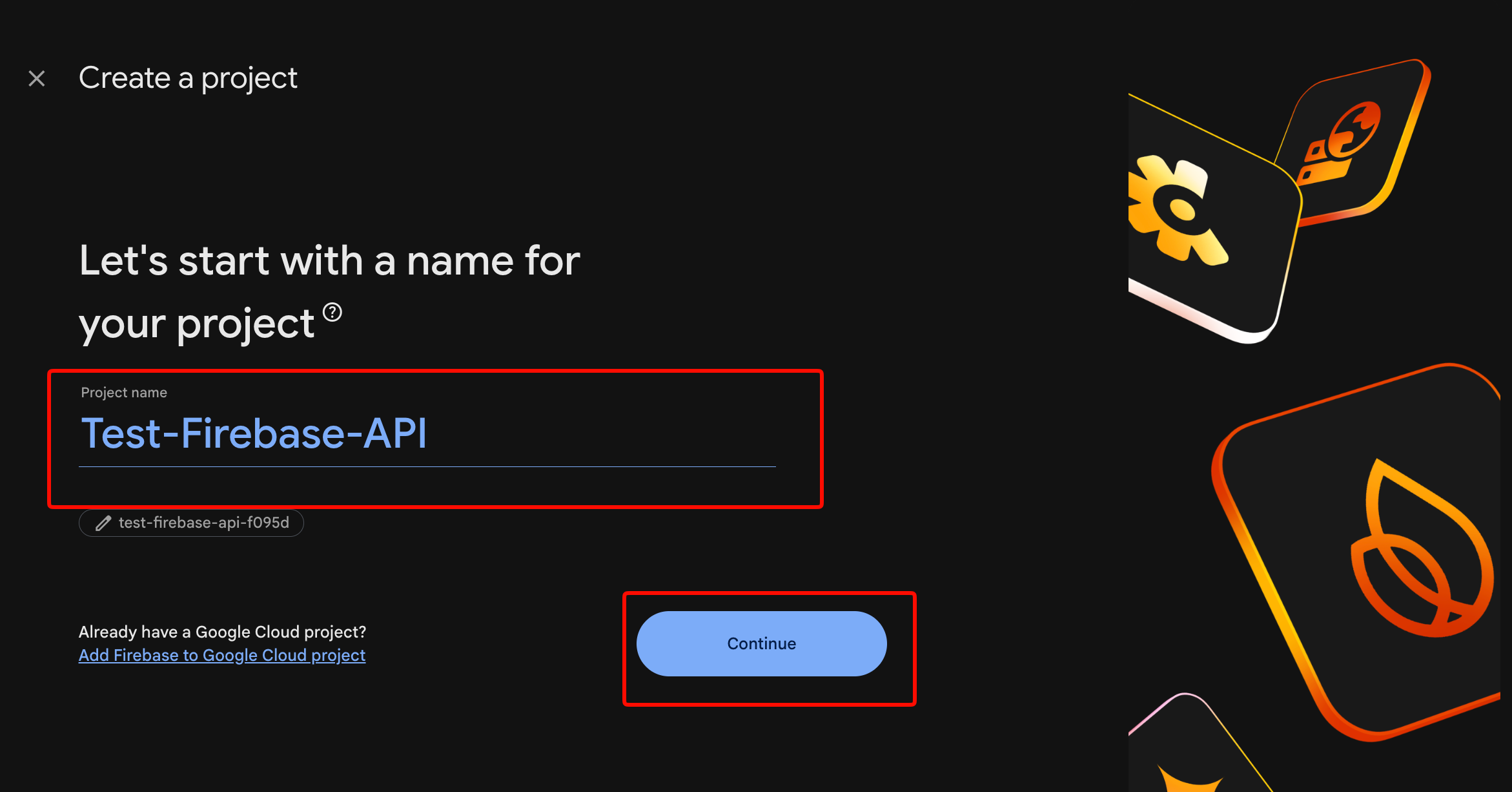
Klik “Tambahkan proyek” dan masukkan nama proyek (tanpa spasi)
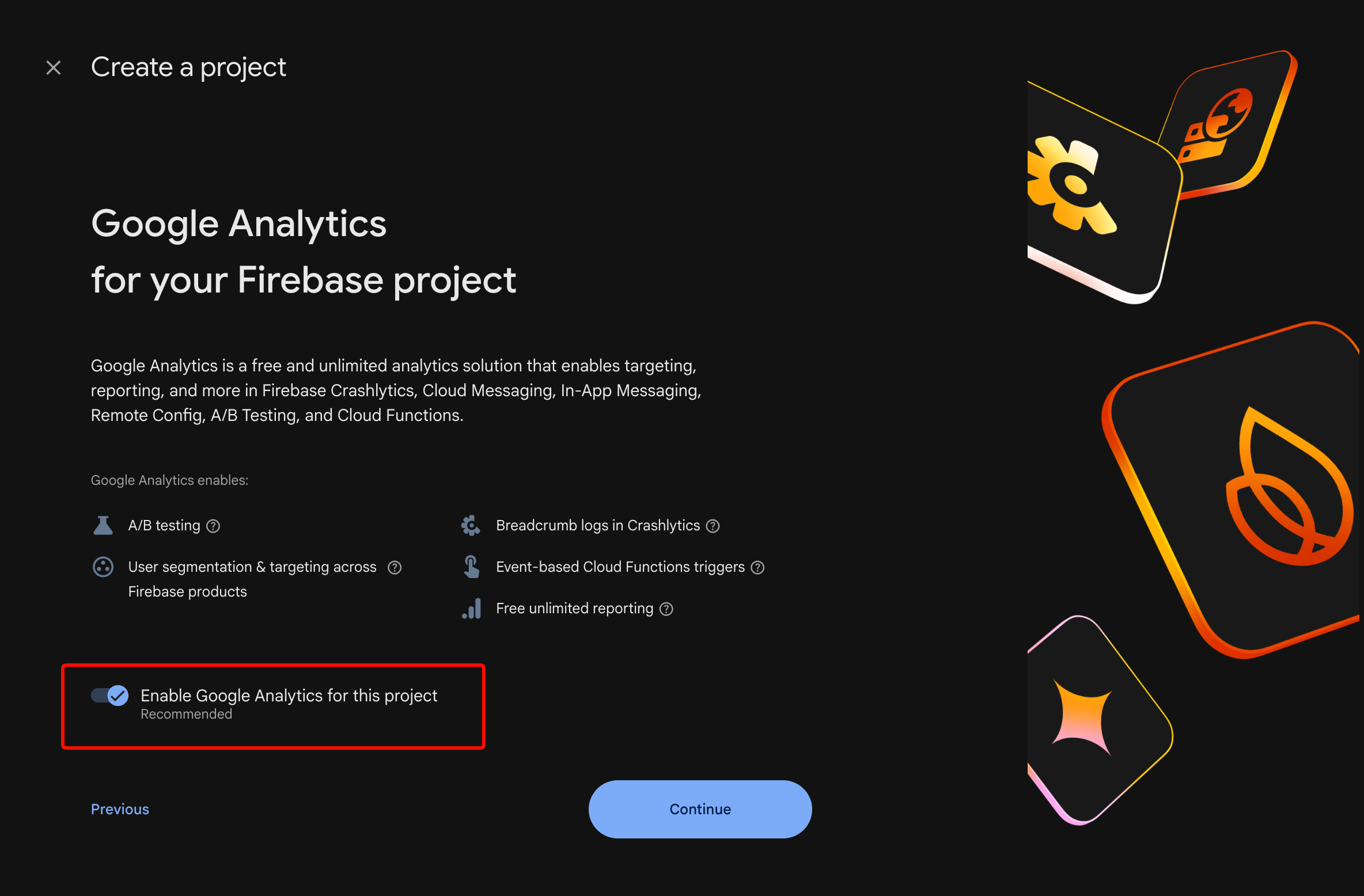
Aktifkan Google Analytics (opsional tetapi direkomendasikan)
Klik “Buat proyek”
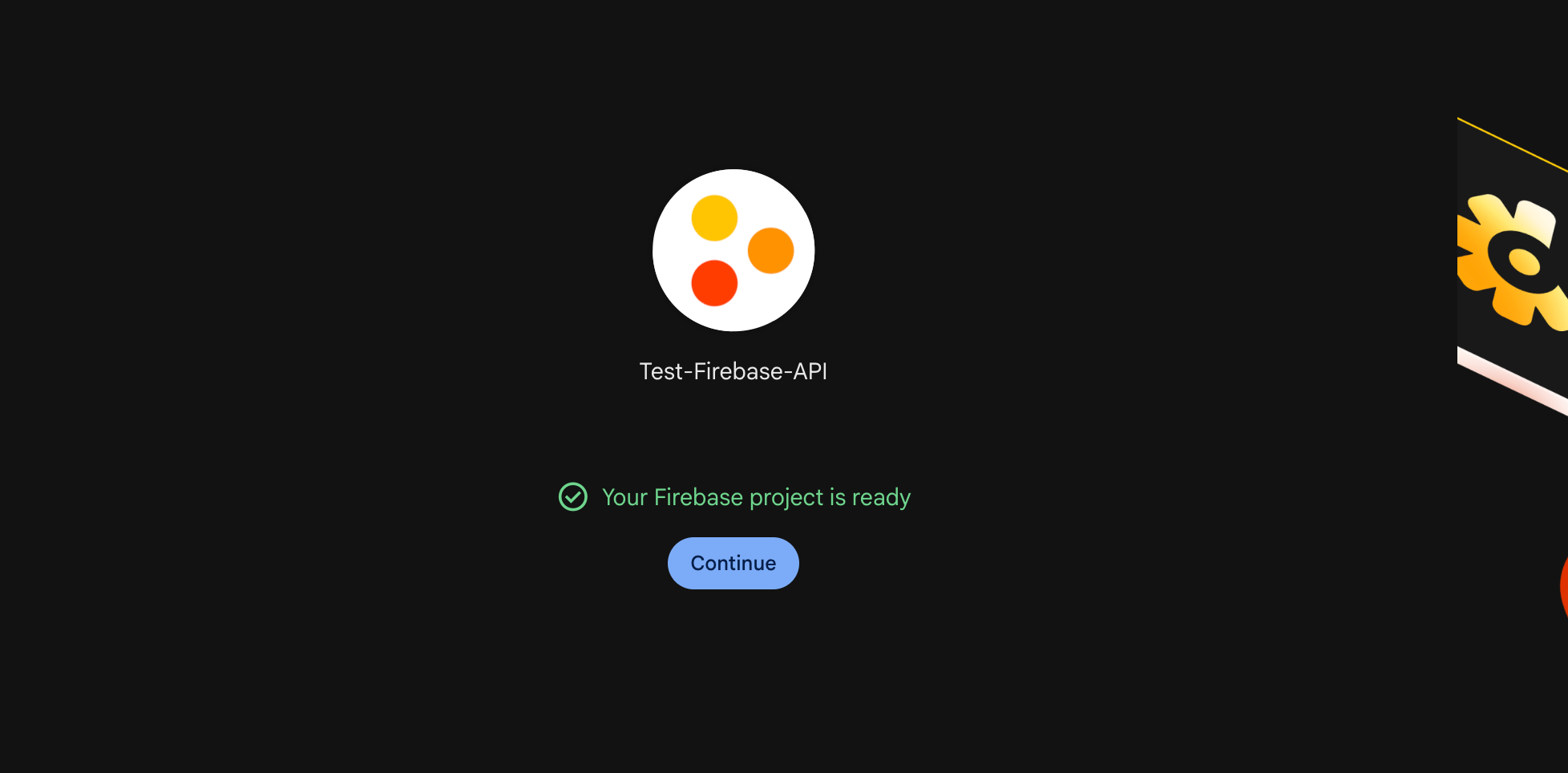
Tunggu 30 detik untuk penyediaan. Anda akan melihat dasbor proyek.
Langkah 2: Daftarkan Aplikasi Anda
Untuk Aplikasi Web:
// Di Firebase Console > Project Settings > General
// Klik "Add app" > ikon Web

// Daftarkan aplikasi web
const firebaseConfig = {
  apiKey: "AIzaSyDxxxxxxxxxxxxxxxxxxxxxxxxxxxxx",
  authDomain: "your-app.firebaseapp.com",
  projectId: "your-app",
  storageBucket: "your-app.appspot.com",
  messagingSenderId: "123456789012",
  appId: "1:123456789012:web:abc123def456"
};

// Inisialisasi Firebase
import { initializeApp } from 'firebase/app';
const app = initializeApp(firebaseConfig);
Untuk Aplikasi iOS:
Unduh GoogleService-Info.plist dan tambahkan ke proyek Xcode. Pastikan “Target Membership” menyertakan aplikasi Anda.
Untuk Aplikasi Android:
Unduh google-services.json dan tempatkan di direktori app/. Tambahkan ke build.gradle:
// build.gradle tingkat proyek
buildscript {
    dependencies {
        classpath 'com.google.gms:google-services:4.4.0'
    }
}

// build.gradle tingkat aplikasi
plugins {
    id 'com.google.gms.google-services'
}
Langkah 3: Aktifkan Metode Autentikasi
Di Firebase Console > Authentication > Sign-in method:
- Email/Kata Sandi: Aktifkan untuk pendaftaran tradisional
- Google: Tambahkan fingerprint sertifikat SHA-1 Anda (Android) atau ID bundel (iOS)
- Apple: Diperlukan untuk aplikasi iOS jika Anda mengaktifkan login sosial apa pun
- Telepon: Aktifkan untuk autentikasi SMS (membutuhkan penagihan)
Langkah 4: Implementasikan Alur Autentikasi
Pendaftaran Email/Kata Sandi:
import {
  createUserWithEmailAndPassword,
  getAuth,
  updateProfile
} from 'firebase/auth';

const auth = getAuth(app);

async function signUp(email, password, displayName) {
  try {
    const userCredential = await createUserWithEmailAndPassword(
      auth,
      email,
      password
    );

    // Atur nama tampilan
    await updateProfile(userCredential.user, {
      displayName: displayName
    });

    console.log('Pengguna dibuat:', userCredential.user.uid);
    return userCredential.user;
  } catch (error) {
    // Tangani kode error spesifik
    switch (error.code) {
      case 'auth/email-already-in-use':
        throw new Error('Email ini sudah terdaftar');
      case 'auth/weak-password':
        throw new Error('Kata sandi harus minimal 6 karakter');
      case 'auth/invalid-email':
        throw new Error('Alamat email tidak valid');
      default:
        throw new Error('Pendaftaran gagal: ' + error.message);
    }
  }
}
Masuk Email/Kata Sandi:
import {
  signInWithEmailAndPassword,
  signOut
} from 'firebase/auth';

async function signIn(email, password) {
  try {
    const userCredential = await signInWithEmailAndPassword(
      auth,
      email,
      password
    );

    const user = userCredential.user;

    // Dapatkan token ID untuk panggilan API
    const idToken = await user.getIdToken();
    console.log('Token Autentikasi:', idToken);

    return user;
  } catch (error) {
    switch (error.code) {
      case 'auth/user-not-found':
        throw new Error('Tidak ada akun dengan email ini');
      case 'auth/wrong-password':
        throw new Error('Kata sandi salah');
      case 'auth/too-many-requests':
        throw new Error('Terlalu banyak percobaan. Coba lagi nanti');
      default:
        throw new Error('Masuk gagal');
    }
  }
}

async function logOut() {
  await signOut(auth);
  console.log('Pengguna keluar');
}
Masuk Google (Web):
import {
  GoogleAuthProvider,
  signInWithPopup
} from 'firebase/auth';

async function signInWithGoogle() {
  const provider = new GoogleAuthProvider();

  // Minta cakupan tambahan
  provider.addScope('email');
  provider.addScope('profile');

  try {
    const result = await signInWithPopup(auth, provider);
    const user = result.user;

    // Akses token Google OAuth
    const credential = GoogleAuthProvider.credentialFromResult(result);
    const googleAccessToken = credential.accessToken;

    return user;
  } catch (error) {
    if (error.code === 'auth/popup-closed-by-user') {
      throw new Error('Masuk dibatalkan');
    }
    throw new Error('Masuk Google gagal');
  }
}
Langkah 5: Lindungi Rute dengan Status Autentikasi
import { onAuthStateChanged } from 'firebase/auth';

// Berlangganan perubahan status autentikasi
onAuthStateChanged(auth, (user) => {
  if (user) {
    // Pengguna sudah masuk
    console.log('Pengguna:', user.email);
    // Arahkan ke dasbor
    window.location.href = '/dashboard';
  } else {
    // Pengguna sudah keluar
    console.log('Tidak ada pengguna');
    // Arahkan ke halaman login
    window.location.href = '/login';
  }
});
Kesalahan Umum Autentikasi
Kesalahan 1: Tidak menangani penyegaran token
SDK Firebase otomatis menyegarkan token. Namun jika Anda menyimpan token di sisi server, token tersebut akan kedaluwarsa setelah 1 jam. Selalu verifikasi token pada setiap permintaan atau implementasikan logika penyegaran.
Kesalahan 2: Mengekspos kredensial admin dalam kode klien
Jangan pernah menggunakan kunci akun layanan di aplikasi klien. Akun layanan melewati aturan keamanan. Gunakan hanya di lingkungan server yang tepercaya.
Kesalahan 3: Melewatkan verifikasi email
import { sendEmailVerification } from 'firebase/auth';

async function sendVerificationEmail(user) {
  await sendEmailVerification(user);
  console.log('Email verifikasi dikirim');
}

// Periksa status verifikasi
if (!auth.currentUser.emailVerified) {
  console.log('Email belum diverifikasi');
  // Batasi akses
}
Basis Data Firestore: Operasi dan Kueri
Firestore adalah basis data NoSQL Firebase. Dokumen diatur dalam koleksi. Kueri berskala secara otomatis.
Struktur Data
proyek-anda (root)
└── users (koleksi)
    ├── userId123 (dokumen)
    │   ├── nama: "John"
    │   ├── email: "john@example.com"
    │   └── posts (subkoleksi)
    │       ├── postId1 (dokumen)
    │       └── postId2 (dokumen)
    └── userId456 (dokumen)
Inisialisasi Firestore
import { getFirestore } from 'firebase/firestore';

const db = getFirestore(app);
Buat Dokumen
import {
  collection,
  addDoc,
  setDoc,
  doc
} from 'firebase/firestore';

// Opsi 1: ID yang dibuat secara otomatis
async function createUser(userData) {
  const docRef = await addDoc(collection(db, 'users'), userData);
  console.log('Dokumen ditulis dengan ID:', docRef.id);
  return docRef.id;
}

// Opsi 2: ID Kustom
async function createUserWithId(userId, userData) {
  await setDoc(doc(db, 'users', userId), userData);
  console.log('Dokumen ditulis dengan ID kustom:', userId);
}

// Penggunaan
const userId = await createUser({
  name: 'Alice',
  email: 'alice@example.com',
  createdAt: new Date(),
  role: 'user'
});
Baca Dokumen
import {
  getDoc,
  getDocs,
  query,
  where,
  orderBy,
  limit
} from 'firebase/firestore';

// Dapatkan satu dokumen
async function getUser(userId) {
  const docRef = doc(db, 'users', userId);
  const docSnap = await getDoc(docRef);

  if (docSnap.exists()) {
    return docSnap.data();
  } else {
    throw new Error('Pengguna tidak ditemukan');
  }
}

// Kueri dengan filter
async function getUsersByRole(role) {
  const q = query(
    collection(db, 'users'),
    where('role', '==', role),
    orderBy('createdAt', 'desc'),
    limit(10)
  );

  const querySnapshot = await getDocs(q);
  const users = [];

  querySnapshot.forEach((doc) => {
    users.push({ id: doc.id, ...doc.data() });
  });

  return users;
}

// Penggunaan
const adminUsers = await getUsersByRole('admin');
console.log('Pengguna admin:', adminUsers);
Perbarui Dokumen
import {
  updateDoc,
  increment,
  arrayUnion,
  arrayRemove
} from 'firebase/firestore';

async function updateUser(userId, updates) {
  const userRef = doc(db, 'users', userId);
  await updateDoc(userRef, updates);
}

// Operasi atomik
await updateUser('userId123', {
  loginCount: increment(1),
  tags: arrayUnion('premium', 'beta-tester'),
  lastLogin: new Date()
});

// Hapus dari array
await updateUser('userId123', {
  tags: arrayRemove('beta-tester')
});
Hapus Dokumen
import { deleteDoc } from 'firebase/firestore';

async function deleteUser(userId) {
  await deleteDoc(doc(db, 'users', userId));
  console.log('Pengguna dihapus');
}
Pendengar Real-Time
import { onSnapshot } from 'firebase/firestore';

// Dengarkan satu dokumen
const unsubscribe = onSnapshot(
  doc(db, 'users', userId),
  (doc) => {
    console.log('Pengguna diperbarui:', doc.data());
  },
  (error) => {
    console.error('Kesalahan pendengar:', error);
  }
);

// Dengarkan hasil kueri
const q = query(collection(db, 'posts'), where('published', '==', true));

const unsubscribeQuery = onSnapshot(q, (snapshot) => {
  const posts = snapshot.docs.map(doc => ({
    id: doc.id,
    ...doc.data()
  }));
  console.log('Posting yang diterbitkan:', posts);
});

// Berhenti mendengarkan
unsubscribe();
unsubscribeQuery();
Aturan Keamanan Firestore
Tanpa aturan yang tepat, siapa pun dapat membaca data Anda. Atur aturan di Firebase Console > Firestore > Rules:
rules_version = '2';
service cloud.firestore {
  match /databases/{database}/documents {

    // Fungsi pembantu
    function isAuthenticated() {
      return request.auth != null;
    }

    function isOwner(userId) {
      return request.auth.uid == userId;
    }

    // Koleksi pengguna
    match /users/{userId} {
      allow read: if isAuthenticated();
      allow create: if isAuthenticated() && isOwner(userId);
      allow update, delete: if isOwner(userId);
    }

    // Koleksi posting
    match /posts/{postId} {
      allow read: if true; // Baca publik
      allow create: if isAuthenticated();
      allow update, delete: if resource.data.authorId == request.auth.uid;
    }

    // Subkoleksi pribadi
    match /users/{userId}/private/{document} {
      allow read, write: if isOwner(userId);
    }
  }
}
Batasan Kueri
Firestore memiliki batasan:
- Tidak ada kueri OR (gunakan
indengan array atau beberapa kueri) - Tidak ada pencarian wildcard (gunakan Algolia atau Meilisearch untuk teks lengkap)
- Kueri majemuk membutuhkan indeks (Firestore otomatis membuat bidang tunggal)
- Batasi hingga 30 disjungsi dalam kueri
in
Solusi untuk kueri OR:
// Daripada: where('status', '==', 'active') OR where('status', '==', 'pending')

const activeQuery = query(
  collection(db, 'tasks'),
  where('status', '==', 'active')
);

const pendingQuery = query(
  collection(db, 'tasks'),
  where('status', '==', 'pending')
);

const [activeSnap, pendingSnap] = await Promise.all([
  getDocs(activeQuery),
  getDocs(pendingQuery)
]);

// Gabungkan hasil di klien
Cloud Functions: Logika Backend Tanpa Server
Cloud Functions menjalankan kode backend tanpa mengelola server. Dipicu pada perubahan basis data, permintaan HTTP, atau acara terjadwal.
Penyiapan
# Instal Firebase CLI
npm install -g firebase-tools

# Login
firebase login

# Inisialisasi fungsi dalam proyek Anda
firebase init functions

# Pilih: JavaScript, ESLint yes, Express.js no
Fungsi HTTP (Endpoint API)
// functions/index.js
const { onRequest } = require('firebase-functions/v2/https');
const admin = require('firebase-admin');

admin.initializeApp();
const db = admin.firestore();

// Endpoint publik
exports.getPublicData = onRequest(async (req, res) => {
  res.set('Access-Control-Allow-Origin', '*');

  try {
    const snapshot = await db.collection('public').get();
    const data = snapshot.docs.map(doc => doc.data());
    res.json({ success: true, data });
  } catch (error) {
    res.status(500).json({ error: error.message });
  }
});

// Endpoint terlindungi (verifikasi token autentikasi)
exports.getUserProfile = onRequest(async (req, res) => {
  res.set('Access-Control-Allow-Origin', '*');

  // Dapatkan token dari header Authorization
  const authHeader = req.headers.authorization || '';
  const token = authHeader.split('Bearer ')[1];

  if (!token) {
    return res.status(401).json({ error: 'Tidak sah' });
  }

  try {
    // Verifikasi token
    const decodedToken = await admin.auth().verifyIdToken(token);
    const userId = decodedToken.uid;

    // Dapatkan data pengguna
    const userDoc = await db.collection('users').doc(userId).get();

    if (!userDoc.exists) {
      return res.status(404).json({ error: 'Pengguna tidak ditemukan' });
    }

    res.json({
      success: true,
      data: { id: userId, ...userDoc.data() }
    });
  } catch (error) {
    res.status(401).json({ error: 'Token tidak valid' });
  }
});
Deploy:
firebase deploy --only functions:getUserProfile
Panggil dari klien:
async function getUserProfile(token) {
  const response = await fetch(
    'https://us-central1-your-app.cloudfunctions.net/getUserProfile',
    {
      headers: {
        'Authorization': `Bearer ${token}`
      }
    }
  );

  const data = await response.json();
  return data;
}
Pemicu Basis Data
const { onDocumentWritten } = require('firebase-functions/v2/firestore');

// Pemicu saat dokumen pengguna berubah
exports.onUserUpdate = onDocumentWritten(
  'users/{userId}',
  async (event) => {
    const userId = event.params.userId;
    const before = event.data?.before?.data();
    const after = event.data?.after?.data();

    // Periksa apakah email berubah
    if (before?.email !== after?.email) {
      console.log(`Email pengguna ${userId} berubah: ${before?.email} → ${after?.email}`);

      // Kirim email notifikasi
      await admin.auth().getUser(userId);
      // Tambahkan logika email Anda di sini
    }
  }
);

// Pemicu pada pembuatan postingan baru
exports.onNewPost = onDocumentWritten(
  'posts/{postId}',
  async (event) => {
    const post = event.data?.after?.data();

    if (!post) return; // Dokumen dihapus

    // Periksa apakah ini dokumen baru
    if (!event.data?.before?.exists) {
      console.log('Postingan baru dibuat:', post.title);

      // Beri tahu pengikut
      const followersSnap = await admin.firestore()
        .collection('users')
        .where('following', 'array-contains', post.authorId)
        .get();

      const notifications = followersSnap.docs.map(doc => ({
        userId: doc.id,
        postId: event.params.postId,
        type: 'new_post',
        createdAt: admin.firestore.FieldValue.serverTimestamp()
      }));

      const batch = admin.firestore().batch();
      notifications.forEach(notif => {
        const ref = admin.firestore().collection('notifications').doc();
        batch.set(ref, notif);
      });

      await batch.commit();
    }
  }
);
Fungsi Terjadwal (Cron Jobs)
const { onSchedule } = require('firebase-functions/v2/scheduler');

// Jalankan setiap hari pada tengah malam UTC
exports.dailyCleanup = onSchedule('every 24 hours', async (event) => {
  console.log('Menjalankan pembersihan harian');

  // Hapus notifikasi lama (30+ hari)
  const thirtyDaysAgo = new Date();
  thirtyDaysAgo.setDate(thirtyDaysAgo.getDate() - 30);

  const oldNotifs = await admin.firestore()
    .collection('notifications')
    .where('createdAt', '<', thirtyDaysAgo)
    .get();

  const batch = admin.firestore().batch();
  oldNotifs.forEach(doc => batch.delete(doc.ref));
  await batch.commit();

  console.log(`Menghapus ${oldNotifs.size} notifikasi lama`);
});
Konfigurasi Lingkungan
# Atur variabel lingkungan
firebase functions:config:set \
  stripe.secret="sk_test_xxx" \
  email.api_key="key_xxx"

# Akses dalam fungsi
const config = require('firebase-functions/config');
const stripe = require('stripe')(config.stripe.secret);
Cloud Storage: Unggah dan Pengelolaan File
Simpan unggahan pengguna, gambar, dan file dengan distribusi CDN otomatis.
Siapkan Aturan Penyimpanan
// Firebase Console > Storage > Rules
rules_version = '2';
service firebase.storage {
  match /b/{bucket}/o {

    // Folder unggahan pengguna
    match /users/{userId}/{allPaths=**} {
      allow read: if true; // Baca publik
      allow write: if request.auth.uid == userId;
      allow delete: if request.auth.uid == userId;
    }

    // Aset publik
    match /public/{allPaths=**} {
      allow read: if true;
      allow write: if false; // Hanya admin melalui Firebase Console
    }
  }
}
Unggah File (Klien)
import {
  getStorage,
  ref,
  uploadBytesResumable,
  getDownloadURL
} from 'firebase/storage';

const storage = getStorage(app);

async function uploadProfileImage(userId, file) {
  // Buat referensi penyimpanan
  const storageRef = ref(storage, `users/${userId}/profile/${file.name}`);

  // Unggah file
  const uploadTask = uploadBytesResumable(storageRef, file);

  return new Promise((resolve, reject) => {
    uploadTask.on(
      'state_changed',
      (snapshot) => {
        // Lacak progres
        const progress = (snapshot.bytesTransferred / snapshot.totalBytes) * 100;
        console.log(`Unggahan: ${progress.toFixed(0)}%`);
      },
      (error) => {
        // Tangani kesalahan
        switch (error.code) {
          case 'storage/unauthorized':
            reject(new Error('Anda tidak memiliki izin'));
            break;
          case 'storage/canceled':
            reject(new Error('Unggahan dibatalkan'));
            break;
          default:
            reject(new Error('Unggahan gagal'));
        }
      },
      async () => {
        // Unggahan selesai
        const downloadURL = await getDownloadURL(uploadTask.snapshot.ref);
        console.log('File tersedia di:', downloadURL);
        resolve(downloadURL);
      }
    );
  });
}

// Penggunaan
const fileInput = document.querySelector('input[type="file"]');
const file = fileInput.files[0];

if (file) {
  const imageUrl = await uploadProfileImage(auth.currentUser.uid, file);

  // Simpan URL ke Firestore
  await updateDoc(doc(db, 'users', auth.currentUser.uid), {
    profileImage: imageUrl
  });
}
Unduh File
import { getDownloadURL } from 'firebase/storage';

async function getProfileImage(userId) {
  const imageRef = ref(storage, `users/${userId}/profile/avatar.png`);

  try {
    const url = await getDownloadURL(imageRef);
    return url;
  } catch (error) {
    if (error.code === 'storage/object-not-found') {
      return null; // Tidak ada gambar profil
    }
    throw error;
  }
}
Hapus File
import { deleteObject } from 'firebase/storage';

async function deleteProfileImage(userId) {
  const imageRef = ref(storage, `users/${userId}/profile/avatar.png`);
  await deleteObject(imageRef);
  console.log('Gambar profil dihapus');
}
Menguji API Firebase dengan Apidog
Firebase menyediakan API REST untuk semua layanan. Mengujinya secara langsung membantu mendebug masalah dan memahami permintaan yang mendasarinya.
Impor API REST Firebase
- Buka Apidog
- Buat proyek baru: "Firebase API"
- Impor spesifikasi OpenAPI dari dokumentasi Firebase
- Atau tambahkan endpoint secara manual:
Endpoint REST Firestore:
POST https://firestore.googleapis.com/v1/projects/{projectId}/databases/(default)/documents
Authorization: Bearer {oauth2_token}
Content-Type: application/json

{
  "fields": {
    "name": { "stringValue": "John" },
    "email": { "stringValue": "john@example.com" },
    "age": { "integerValue": 30 }
  }
}
Endpoint Autentikasi:
POST https://identitytoolkit.googleapis.com/v1/accounts:signInWithPassword?key={api_key}
Content-Type: application/json

{
  "email": "user@example.com",
  "password": "secret123",
  "returnSecureToken": true
}
Uji Alur Autentikasi
- Buat permintaan: "Masuk"
- Setel metode: POST
- Tambahkan email/kata sandi di badan
- Simpan token respons sebagai variabel lingkungan
- Gunakan
{{token}}dalam permintaan berikutnya
Debug Aturan Keamanan
Gunakan Firebase Emulator Suite untuk pengujian lokal:
# Mulai emulator
firebase emulators:start

# Uji terhadap Firestore lokal
# http://localhost:8080
Praktik Terbaik Produksi
1. Implementasikan Penanganan Kesalahan yang Tepat
// Logika coba lagi untuk kegagalan sementara
async function firestoreWithRetry(operation, maxRetries = 3) {
  for (let i = 0; i < maxRetries; i++) {
    try {
      return await operation();
    } catch (error) {
      if (
        error.code === 'unavailable' ||
        error.code === 'deadline-exceeded'
      ) {
        const delay = Math.pow(2, i) * 1000; // Backoff eksponensial
        await new Promise(resolve => setTimeout(resolve, delay));
        continue;
      }
      throw error;
    }
  }
}
2. Optimalkan Kinerja Kueri
Tambahkan indeks komposit untuk kueri multi-bidang:
// Kueri ini membutuhkan indeks komposit
const q = query(
  collection(db, 'posts'),
  where('category', '==', 'tech'),
  where('views', '>', 1000),
  orderBy('views', 'desc')
);
Firestore akan meminta Anda untuk membuat indeks dengan tautan langsung saat Anda menjalankan kueri ini.
3. Operasi Batch
import { writeBatch } from 'firebase/firestore';

async function bulkUpdate(userIds, updates) {
  const batch = writeBatch(db);

  userIds.forEach(id => {
    const ref = doc(db, 'users', id);
    batch.update(ref, updates);
  });

  await batch.commit();
  console.log(`Memperbarui ${userIds.length} pengguna`);
}

// Maksimal 500 operasi per batch
4. Pantau Biaya
Harga Firebase:
| Layanan | Tingkat Gratis | Berbayar |
|---|---|---|
| Firestore | 50K baca/hari | $0,036/100K baca |
| Penyimpanan | 5GB | $0,023/GB |
| Fungsi | 2M pemanggilan | $0,40/1M |
| Auth | 10K/bulan | $0,0055/100K |
Atur peringatan anggaran di Google Cloud Console.
5. Amankan Akun Layanan
// SALAH: Jangan pernah melakukan ini dalam kode klien
admin.initializeApp({
  credential: admin.credential.cert(require('./serviceAccountKey.json'))
});

// BENAR: Gunakan hanya di lingkungan server
const serviceAccount = JSON.parse(process.env.FIREBASE_SERVICE_ACCOUNT);
admin.initializeApp({
  credential: admin.credential.cert(serviceAccount)
});
6. Tangani Skenario Offline
// Aktifkan persistensi offline (web)
import { enableMultiTabIndexedDbPersistence } from 'firebase/firestore';

enableMultiTabIndexedDbPersistence(db)
  .catch((err) => {
    if (err.code === 'failed-precondition') {
      // Beberapa tab terbuka
    } else if (err.code === 'unimplemented') {
      // Browser tidak mendukung
    }
  });

// Dengarkan konektivitas
import { onSnapshot } from 'firebase/firestore';

onSnapshot(doc(db, 'status', 'online'), (doc) => {
  if (!doc.exists()) {
    console.log('Anda offline');
    // Tampilkan UI offline
  }
});
Masalah dan Solusi API Firebase Umum
Masalah 1: Kesalahan Izin Ditolak
Gejala: Error: 7 PERMISSION_DENIED
Penyebab: Aturan keamanan memblokir operasi
Perbaikan:
- Periksa aturan di Firebase Console
- Verifikasi
request.auth.uidcocok dengan pengguna yang diharapkan - Uji aturan dengan Rules Playground
Masalah 2: Kedaluwarsa Token
Gejala: Error: ID token expired
Perbaikan:
// Paksa penyegaran token
const user = auth.currentUser;
if (user) {
  await user.getIdToken(true); // Paksa penyegaran
}
Masalah 3: Latensi Mulai Dingin (Cold Start)
Gejala: Cloud Functions membutuhkan waktu 2-5 detik pada panggilan pertama
Perbaikan:
// Jaga agar fungsi tetap hangat dengan ping terjadwal
exports.keepWarm = onSchedule('every 60 seconds', async () => {
  await fetch('https://your-function.cloudfunctions.net/health');
});
Masalah 4: Kueri Mengembalikan Hasil Kosong
Gejala: Kueri seharusnya mengembalikan data tetapi mengembalikan array kosong
Penyebab: Indeks hilang atau urutan bidang salah
Perbaikan: Periksa Firebase Console > Indexes untuk indeks komposit yang diperlukan.
Studi Kasus Dunia Nyata
Aplikasi Fintech: Pembaruan Transaksi Real-Time
Startup pembayaran menggunakan Firebase Firestore untuk membangun notifikasi transaksi real-time. Ketika pembayaran diproses, Cloud Functions memicu pembaruan ke semua dasbor admin yang terhubung dalam waktu 200ms. Hasil: Pengurangan 40% dalam tiket dukungan tentang transaksi "tertunda".
E-commerce: Sinkronisasi Inventaris
Pengecer online menyinkronkan inventaris di web, iOS, dan Android menggunakan pendengar Firestore. Ketika stok berubah, semua klien diperbarui secara otomatis. Persistensi offline memastikan pekerja gudang dapat memindai item tanpa konektivitas, dengan sinkronisasi otomatis saat terhubung kembali.
SaaS: Autentikasi Multi-Tenant
Platform B2B menggunakan Firebase Auth dengan klaim kustom untuk akses berbasis peran. Pengguna admin mendapatkan izin yang lebih tinggi melalui Cloud Functions yang memvalidasi terhadap konfigurasi tenant Firestore. Basis kode tunggal melayani lebih dari 500 organisasi dengan data terisolasi.
Kesimpulan
Integrasi API Firebase melibatkan empat layanan inti:
- Autentikasi: Masuk melalui Email, Google, Apple dengan token JWT
- Firestore: Basis data NoSQL dengan pendengar real-time dan aturan keamanan
- Cloud Functions: Backend tanpa server yang dipicu oleh peristiwa atau HTTP
- Penyimpanan: Unggah file dengan distribusi CDN
Anda telah mempelajari alur autentikasi, operasi basis data, deployment fungsi, dan pengelolaan file. Anda telah melihat pola produksi: penanganan kesalahan, batching, dukungan offline, dan keamanan.
FAQ
Apakah Firebase gratis untuk digunakan?
Ya, Firebase memiliki tingkatan gratis yang murah hati (Paket Spark) termasuk penyimpanan 5GB, 50K bacaan Firestore/hari, 2M pemanggilan Cloud Function, dan 10K pengguna Auth/bulan. Paket berbayar (Blaze) menggunakan harga bayar-sesuai-pakai.
Bisakah saya menggunakan Firebase dengan basis data yang sudah ada?
Ya. Gunakan Firebase Extensions untuk menyinkronkan dengan PostgreSQL, MySQL, atau MongoDB. Atau panggil API eksternal dari Cloud Functions untuk berintegrasi dengan sistem yang sudah ada.
Bagaimana cara saya bermigrasi dari Firebase ke platform lain?
Ekspor data menggunakan fungsi ekspor Firestore atau Firebase CLI. Untuk set data besar, gunakan pipeline ekspor Dataflow. Kompleksitas migrasi tergantung pada struktur data Anda.
Apakah Firebase mendukung GraphQL?
Tidak secara native. Gunakan solusi pihak ketiga seperti firestore-graphql atau bangun lapisan GraphQL dengan Cloud Functions dan Apollo Server.
Bisakah saya menggunakan Firebase on-premise?
Tidak. Firebase hanya berbasis Google Cloud. Untuk alternatif yang di-hosting sendiri, pertimbangkan Appwrite, Supabase, atau Nhost.
Bagaimana cara saya menangani unggahan file yang lebih besar dari 100MB?
Gunakan unggahan yang dapat dilanjutkan dengan chunking. SDK Firebase menangani ini secara otomatis. Untuk file yang sangat besar, gunakan Google Cloud Storage secara langsung dengan URL bertanda tangan.
Apa yang terjadi jika saya melebihi batas kueri Firestore?
Kueri gagal dengan kesalahan FAILED_PRECONDITION. Tambahkan indeks yang diperlukan atau restrukturisasi kueri. Firestore menyediakan tautan langsung untuk membuat indeks yang hilang dalam pesan kesalahan.
Apakah Firebase patuh GDPR?
Ya, Firebase menawarkan pemrosesan data yang patuh GDPR. Aktifkan residensi data di wilayah tertentu, implementasikan ekspor/penghapusan data pengguna, dan tandatangani Amandemen Pemrosesan Data Google.