

要約
BigCommerce APIを使用すると、製品、注文、顧客、およびストアの操作をプログラムで管理できます。APIトークン(サーバーサイド用)またはOAuth(アプリ用)で認証し、api.bigcommerce.comのRESTエンドポイントを呼び出し、リアルタイム更新のためのWebhookを処理します。テストには、Apidogを使用してAPI呼び出しを保存し、応答を検証し、チームとコレクションを共有できます。
はじめに
BigCommerceは60,000以上のオンラインストアを運営しています。それぞれのストアには、在庫同期、注文処理、顧客管理、支払い処理など、カスタムの統合が必要です。そこでAPIの出番です。
このプラットフォームは、ストアフロントAPI(ヘッドレスコマース)、管理API(バックエンド操作)、支払いAPI(トランザクション)の3種類のAPIを提供しています。ほとんどの開発者は管理APIを利用します。これは製品、注文、顧客、および舞台裏で起こるすべてのことを処理します。
学習曲線は急ではありませんが、ドキュメントは圧倒されるかもしれません。簡単なタスクを完了するためだけに、認証ドキュメント、APIリファレンス、およびWebhookガイドの間を行ったり来たりすることになるでしょう。
このガイドは、実際に使用するであろうものに焦点を当てています。製品、注文、顧客、そしてWebhook。認証、一般的なパターン、およびライブストアに触れる前に統合をテストする方法を学びます。
ApidogでBigCommerce APIを無料でテストしましょう
このガイドを読み終えるまでに、次のことができるようになります。
- BigCommerceの認証を正しく設定する
- 製品、バリアント、在庫を管理する
- 注文を処理し、顧客データを扱う
- リアルタイム更新のためにWebhookを設定する
- Apidogで統合をテストし、ドキュメント化する
認証:ストアへのアクセスを取得する
BigCommerceは、構築するものに応じて2つの認証方法を提供しています。
方法1:APIトークン(カスタム統合用)
1つのストアで動作するスクリプトやサービスを構築している場合は、APIトークンを使用します。
APIアカウントの作成:
- ストアの管理パネルに移動します
- 設定 → APIアカウント → APIアカウントの作成
- 「V3/V2 APIトークン」を選択します
- 必要なスコープ(製品、注文、顧客など)を選択します
- 認証情報を保存します
次のものが得られます:
- ストアURL:
mystore.mybigcommerce.com - アクセストークン:
abc123def456... - クライアントID:
abc123... - クライアントシークレット:
xyz789...
最初の呼び出しを行う:
curl -X GET "https://api.bigcommerce.com/stores/{store-hash}/v3/catalog/products" \
  -H "X-Auth-Token: {access-token}" \
  -H "Content-Type: application/json" \
  -H "Accept: application/json"
store-hashは、APIパスの/stores/の後の部分です。ストア管理URLでも確認できます。
方法2:OAuth(マーケットプレイスアプリ用)
BigCommerceマーケットプレイス用のアプリを構築している場合は、OAuthを使用します。
OAuthフロー:
- ユーザーがマーケットプレイスであなたのアプリの「インストール」をクリックします
- BigCommerceは認証コードとともにあなたのコールバックURLにリダイレクトします
- あなたのサーバーはコードをアクセストークンと交換します
- 将来のAPI呼び出しのためにトークンを保存します
コードをトークンと交換する:
const response = await fetch('https://login.bigcommerce.com/oauth2/token', {
  method: 'POST',
  headers: { 'Content-Type': 'application/x-www-form-urlencoded' },
  body: new URLSearchParams({
    client_id: process.env.BC_CLIENT_ID,
    client_secret: process.env.BC_CLIENT_SECRET,
    redirect_uri: 'https://yourapp.com/auth/callback',
    grant_type: 'authorization_code',
    code: authCode,
    scope: 'store_v2_default store_v3_products'
  })
})

const { access_token, context } = await response.json()
// access_token is what you use for API calls
// context contains store_hash
トークンを使用する:
curl -X GET "https://api.bigcommerce.com/stores/{store-hash}/v3/catalog/products" \
  -H "X-Auth-Token: {access-token}" \
  -H "Content-Type: application/json"
製品とカタログ管理
製品はBigCommerceストアの心臓部です。V3カタログAPIは、製品、バリアント、カテゴリ、ブランドを処理します。
製品を一覧表示
GET https://api.bigcommerce.com/stores/{store-hash}/v3/catalog/products
X-Auth-Token: {token}
Accept: application/json
応答:
{
  "data": [
    {
      "id": 174,
      "name": "Plain T-Shirt",
      "type": "physical",
      "sku": "PLAIN-T",
      "price": 29.99,
      "sale_price": 24.99,
      "inventory_level": 150,
      "inventory_tracking": "product",
      "is_visible": true,
      "categories": [23, 45],
      "brand_id": 12
    }
  ],
  "meta": {
    "pagination": {
      "total": 500,
      "count": 50,
      "page": 1,
      "per_page": 50
    }
  }
}
製品を作成する
POST https://api.bigcommerce.com/stores/{store-hash}/v3/catalog/products
X-Auth-Token: {token}
Content-Type: application/json

{
  "name": "Premium Hoodie",
  "type": "physical",
  "sku": "HOODIE-PREM",
  "price": 79.99,
  "description": "Premium cotton blend hoodie",
  "weight": 1.5,
  "width": 20,
  "height": 28,
  "depth": 2,
  "inventory_level": 100,
  "inventory_tracking": "product",
  "is_visible": true,
  "categories": [23]
}
製品バリアントを更新する
オプション(サイズ、色)を持つ製品にはバリアントがあります。各バリアントは独自のSKU、価格、在庫を持つことができます。
PUT https://api.bigcommerce.com/stores/{store-hash}/v3/catalog/products/{product-id}/variants/{variant-id}
X-Auth-Token: {token}
Content-Type: application/json

{
  "sku": "HOODIE-PREM-BLK-M",
  "price": 79.99,
  "inventory_level": 50,
  "option_values": [
    {
      "option_display_name": "Color",
      "label": "Black"
    },
    {
      "option_display_name": "Size",
      "label": "Medium"
    }
  ]
}
在庫を管理する
PUT https://api.bigcommerce.com/stores/{store-hash}/v3/catalog/products/{product-id}
X-Auth-Token: {token}
Content-Type: application/json

{
  "inventory_level": 75
}
またはバリアントの在庫を更新する:
PUT https://api.bigcommerce.com/stores/{store-hash}/v3/catalog/products/{product-id}/variants/{variant-id}
Content-Type: application/json

{
  "inventory_level": 25
}
注文とフルフィルメント
注文はビジネスが行われる場所です。Orders V2 APIは、注文の作成、更新、フルフィルメントを処理します。
注文を一覧表示
GET https://api.bigcommerce.com/stores/{store-hash}/v2/orders
X-Auth-Token: {token}
Accept: application/json
応答:
[
  {
    "id": 115,
    "status": "Awaiting Fulfillment",
    "status_id": 11,
    "customer_id": 45,
    "date_created": "2026-03-24T10:30:00+00:00",
    "subtotal_ex_tax": 149.99,
    "total_inc_tax": 162.49,
    "items_total": 2,
    "items_shipped": 0,
    "shipping_address": {
      "first_name": "John",
      "last_name": "Doe",
      "street_1": "123 Main St",
      "city": "Austin",
      "state": "Texas",
      "zip": "78701",
      "country": "United States"
    }
  }
]
注文の詳細を取得する
GET https://api.bigcommerce.com/stores/{store-hash}/v2/orders/{order-id}
X-Auth-Token: {token}
注文の製品を取得する
GET https://api.bigcommerce.com/stores/{store-hash}/v2/orders/{order-id}/products
X-Auth-Token: {token}
注文ステータスを更新する
PUT https://api.bigcommerce.com/stores/{store-hash}/v2/orders/{order-id}
X-Auth-Token: {token}
Content-Type: application/json

{
  "status_id": 12
}
一般的なステータスID:
- 0:不完全
- 11:フルフィルメント待ち
- 12:完了
- 5:キャンセル済み
- 4:返金済み
出荷(フルフィルメント)を作成する
POST https://api.bigcommerce.com/stores/{store-hash}/v2/orders/{order-id}/shipments
X-Auth-Token: {token}
Content-Type: application/json

{
  "tracking_number": "1Z999AA10123456784",
  "carrier": "UPS",
  "shipping_method": "UPS Ground",
  "items": [
    {
      "order_product_id": 234,
      "quantity": 1
    }
  ]
}
顧客とセグメンテーション
Customers V3 APIは、顧客データ、住所、顧客グループを処理します。
顧客を一覧表示
GET https://api.bigcommerce.com/stores/{store-hash}/v3/customers
X-Auth-Token: {token}
Accept: application/json
応答:
{
  "data": [
    {
      "id": 45,
      "email": "john.doe@example.com",
      "first_name": "John",
      "last_name": "Doe",
      "company": "Acme Corp",
      "phone": "512-555-1234",
      "customer_group_id": 1,
      "notes": "VIP customer",
      "tax_exempt_category": "",
      "date_created": "2025-11-15T09:30:00+00:00",
      "date_modified": "2026-03-20T14:22:00+00:00"
    }
  ]
}
顧客を作成する
POST https://api.bigcommerce.com/stores/{store-hash}/v3/customers
X-Auth-Token: {token}
Content-Type: application/json

{
  "email": "jane.smith@example.com",
  "first_name": "Jane",
  "last_name": "Smith",
  "phone": "512-555-5678",
  "customer_group_id": 2
}
顧客を更新する
PUT https://api.bigcommerce.com/stores/{store-hash}/v3/customers/{customer-id}
X-Auth-Token: {token}
Content-Type: application/json

{
  "notes": "Repeat customer - priority support",
  "customer_group_id": 3
}
リアルタイム更新のためのWebhook
Webhookは、ストアでイベントが発生したときにアプリに通知します。ポーリングする代わりに、BigCommerceがデータをエンドポイントにプッシュします。
Webhookを作成する
POST https://api.bigcommerce.com/stores/{store-hash}/v3/hooks
X-Auth-Token: {token}
Content-Type: application/json

{
  "scope": "store/order/created",
  "destination": "https://yourapp.com/webhooks/orders",
  "is_active": true
}
利用可能なスコープ:
store/order/created- 新しい注文が作成されたstore/order/updated- 注文ステータスが変更されたstore/order/archived- 注文がアーカイブされたstore/product/created- 製品が追加されたstore/product/updated- 製品が変更されたstore/product/deleted- 製品が削除されたstore/customer/created- 新しい顧客store/inventory/updated- 在庫が変更された
Webhook署名を検証する
BigCommerceはWebhookに署名しているため、正当なものかどうかを検証できます。
import crypto from 'crypto'

function verifyWebhook(payload, signature, secret) {
  const expectedSignature = crypto
    .createHmac('sha256', secret)
    .update(payload)
    .digest('hex')

  return crypto.timingSafeEqual(
    Buffer.from(signature),
    Buffer.from(expectedSignature)
  )
}

app.post('/webhooks/orders', (req, res) => {
  const signature = req.headers['x-bc-webhook-signature']
  const payload = JSON.stringify(req.body)

  if (!verifyWebhook(payload, signature, process.env.BC_CLIENT_SECRET)) {
    return res.status(401).send('Invalid signature')
  }

  // Process the webhook
  console.log('Order created:', req.body.data.id)
  res.status(200).send('OK')
})
ApidogでBigCommerce APIをテストする
BigCommerce APIは、一貫したヘッダーと適切な認証が必要です。curlで手動でテストするのは面倒です。Apidogはこれを効率化します。
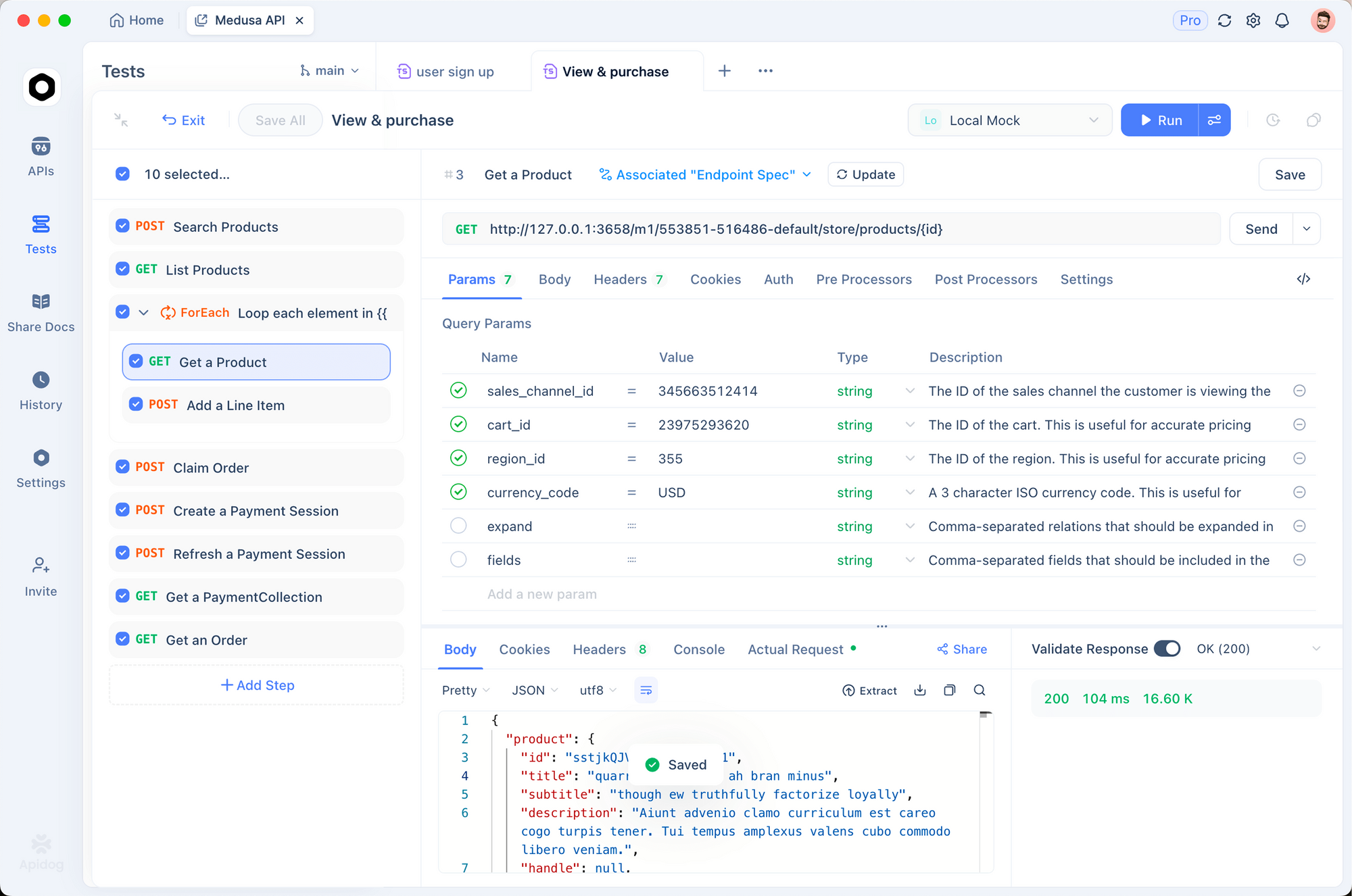
1. 環境設定
各ストアの環境を作成します:
# 本番ストア
STORE_HASH: abc123
ACCESS_TOKEN: xyz789
BASE_URL: https://api.bigcommerce.com/stores/abc123

# ステージングストア
STORE_HASH: staging456
ACCESS_TOKEN: staging_token
BASE_URL: https://api.bigcommerce.com/stores/staging456
2. プリリクエストスクリプト
認証ヘッダーを自動的に追加します:
pm.request.headers.add({
  key: 'X-Auth-Token',
  value: pm.environment.get('ACCESS_TOKEN')
})
pm.request.headers.add({
  key: 'Accept',
  value: 'application/json'
})
3. 応答を検証する
製品が必要なフィールドを持っていることをテストします:
pm.test('Products have required fields', () => {
  const response = pm.response.json()
  response.data.forEach(product => {
    pm.expect(product).to.have.property('id')
    pm.expect(product).to.have.property('name')
    pm.expect(product).to.have.property('price')
    pm.expect(product.price).to.be.above(0)
  })
})

pm.test('Pagination works', () => {
  const response = pm.response.json()
  pm.expect(response.meta.pagination).to.have.property('total')
  pm.expect(response.meta.pagination.page).to.eql(1)
})
ApidogでBigCommerce APIを無料でテストしましょう
一般的なエラーと修正
401 Unauthorized(認証されていない)
原因:無効または欠落しているアクセストークン。
修正:
X-Auth-Tokenヘッダーが設定されていることを確認する- トークンが失効していないことを確認する
- APIアカウントに適切なスコープがあることを確認する
403 Forbidden(禁止されている)
原因:トークンは有効だが、必要なスコープが不足している。
修正:
- APIアカウントの権限を確認する
- 不足しているスコープ(製品、注文など)を追加する
- 拡張された権限を持つ新しいトークンを生成する
404 Not Found(見つかりません)
原因:エンドポイントが間違っているか、リソースが存在しない。
修正:
- ストアハッシュが正しいことを確認する
- URLのAPIバージョン(v2とv3)を確認する
- リソースIDが存在することを確認する
429 Too Many Requests(リクエストが多すぎます)
原因:レート制限を超過した。
修正:BigCommerceはエンドポイントごとに異なる制限を許可しています。製品:1時間あたり10,000リクエスト。注文:1時間あたり30,000リクエスト。X-Rate-Limit-Remainingヘッダーを確認し、バックオフを実装します。
async function callWithBackoff(fn, maxRetries = 3) {
  for (let i = 0; i < maxRetries; i++) {
    const response = await fn()
    if (response.status === 429) {
      const retryAfter = response.headers.get('X-Rate-Limit-Reset')
      await new Promise(r => setTimeout(r, retryAfter * 1000))
    } else {
      return response
    }
  }
}
422 Unprocessable Entity(処理できないエンティティ)
原因:リクエストボディの検証エラー。
修正:詳細については応答を確認してください。BigCommerceは特定の検証エラーを返します:
{
  "errors": {
    "price": "Price must be greater than zero",
    "sku": "SKU already exists"
  }
}
代替案と比較
| 機能 | BigCommerce | Shopify | WooCommerce |
|---|---|---|---|
| APIバージョン管理 | V2とV3 | RESTとGraphQL | REST |
| レート制限 | 10K-30K/時間 | 2/分 (リーキーバケット) | ホスティングに依存 |
| Webhook | はい | はい | はい (プラグイン) |
| GraphQL | いいえ | はい | いいえ |
| SDK品質 | 良い | 非常に良い | PHPのみ |
| マルチストア | はい | いいえ | いいえ |
BigCommerceのV3 APIはShopifyの断片化されたアプローチよりも一貫性がありますが、ShopifyのGraphQL APIは複雑なクエリに対してより高い柔軟性を提供します。
実世界のユースケース
マルチチャネル在庫同期。あるブランドがBigCommerce、Amazon、実店舗で販売しています。彼らは製品APIを使用して、チャネル間で在庫レベルを同期させ、売り越しを防いでいます。Apidogは各デプロイメント前に同期エンドポイントをテストします。
注文の自動化。サブスクリプションボックス会社は、注文が作成されたときにフルフィルメントをトリガーするためにWebhookを使用しています。Orders APIは追跡番号を更新します。彼らの倉庫は、Webhookハンドラーを介して自動的にピッキングリストを受け取ります。
顧客セグメンテーション。あるEコマースサイトは、顧客APIを使用して購入履歴に基づいて購入者をセグメント化しています。VIP顧客は、特別な価格設定の特別なグループに追加されます。この統合は、スケジュールされたジョブを介して毎週実行されます。
まとめ
ここで学んだことは次のとおりです:
- 認証にはAPIトークン(シンプルな統合)またはOAuth(マーケットプレイスアプリ)を使用します。
- V3カタログAPIは製品とバリアントを処理します。
- V2注文APIは注文処理とフルフィルメントを処理します。
- V3顧客APIは顧客データを処理します。
- Webhookはリアルタイム更新をエンドポイントにプッシュします。
- 信頼性の高い統合のためにApidogでテストし、ドキュメント化します。
次のステップ:
- BigCommerceストアでAPIアカウントを作成する
- 製品を一覧表示するために最初のAPI呼び出しを行う
- 注文作成のためのWebhookを設定する
- API呼び出しをApidogに保存する
- 統合を構築する
ApidogでBigCommerce APIを無料でテストしましょう
よくある質問
V2 APIとV3 APIの違いは何ですか?V3はより新しく、より一貫性のあるAPIです。製品、カテゴリ、ブランド、顧客に使用します。V2は注文を処理しますが、これはまだ移行されていません。ほとんどの統合では両方を使用することになります。
ストアハッシュはどうやって取得しますか?BigCommerce管理URL(例:https://store-abc123.mybigcommerce.com/manage)にあります。abc123の部分がストアハッシュです。APIアカウント設定でも確認できます。
試用ストアでAPIを使用できますか?はい。BigCommerceの試用ストアは完全なAPIアクセスを持っています。これは、本番稼働前の開発とテストに最適です。
API呼び出しのレート制限はどれくらいですか?エンドポイントによって異なります。製品:1時間あたり10,000リクエスト。注文:1時間あたり30,000リクエスト。応答ヘッダーのX-Rate-Limit-Remainingを確認して、現在の制限を確認してください。
ページネーションはどのように処理しますか?pageとlimitクエリパラメータを使用します。デフォルトの制限は50です。合計ページ数については、応答のmeta.paginationを確認してください。すべてのレコードを取得するまでループします。
let allProducts = []
let page = 1

while (true) {
  const response = await fetch(
    `${baseUrl}/v3/catalog/products?page=${page}&limit=100`,
    { headers: { 'X-Auth-Token': token } }
  )
  const data = await response.json()
  allProducts.push(...data.data)

  if (page >= data.meta.pagination.total_pages) break
  page++
}
API経由で製品画像をアップロードできますか?はい。製品画像エンドポイントを使用します:
POST https://api.bigcommerce.com/stores/{store-hash}/v3/catalog/products/{product-id}/images
Content-Type: application/json

{
  "image_url": "https://example.com/image.jpg",
  "is_thumbnail": true
}
通貨とマルチストアはどのように処理しますか?BigCommerceストアにはベース通貨があります。多通貨はストアフロントレベルで処理され、APIではありません。複数のストアの場合、別々のAPIアカウントを作成し、Apidogで異なる環境を使用します。
Webhookエンドポイントがダウンした場合どうなりますか?BigCommerceは、失敗したWebhookを指数関数的バックオフで再試行します。24時間以内に5回失敗すると、Webhookは無効になります。エンドポイントを監視し、失敗時にアラートを出すようにしてください。