

OpenAI took GPT-5.6 to general availability on July 9, 2026, and the first decision it forces has nothing to do with whether to upgrade. It’s a menu choice. The release ships as three models, gpt-5.6-sol, gpt-5.6-terra, and gpt-5.6-luna, sitting at three points on the cost-capability curve. Pick too high and you pay Sol rates for work Terra handles fine. Pick too low and your agent stalls on tasks Luna was never built for.
The names follow a system: the number marks the generation, while Sol, Terra, and Luna are durable tiers that advance on their own cadence. Our GPT-5.6 naming explainer covers that structure in depth, so this guide skips the history. What you’ll find here is the buying decision: what each tier does well, where the pricing trap hides, and how to settle the choice with your own prompts instead of launch-day charts.
The 30-second answer
| Model | Price per 1M tokens | Pick it when |
|---|---|---|
gpt-5.6-sol |
$5 input / $30 output | The task is genuinely hard: agentic coding, multi-step tool orchestration, deep research |
gpt-5.6-terra |
$2.50 input / $15 output | Almost everything else. The default for production work |
gpt-5.6-luna |
$1 input / $6 output | Volume and latency rule: classification, extraction, routing, first-pass drafts |
Terra is the sensible default. OpenAI positions it as competitive with GPT-5.5 at roughly half the price, which means the model class most production apps ran on last month now costs half as much. Sol earns its premium only when the task is hard enough to show a measurable gap. Luna wins whenever you multiply per-token prices by millions of requests.
If you’d rather test than trust, good instinct. All three models accept the same Responses API calls, so you can run one prompt set against each tier in Apidog and let the outputs settle the argument. The setup takes ten minutes; more on it below.
What each tier is built for
All three models are live in the API for any account. Access is self-serve with no plan gating, and the model IDs above come straight from OpenAI’s developer docs. Early documentation coverage reports a 1M-token context window, 128K max output, and a February 16, 2026 knowledge cutoff across the family; treat those as reported figures until OpenAI’s model page confirms them for your account.
Sol: the flagship for hard problems
Sol is the deep-reasoning tier, and the launch benchmarks concentrate its gains exactly where you’d expect: long-horizon, agentic work. Per OpenAI, Sol scores around 53 on Agents’ Last Exam against 46.9 for GPT-5.5, hits 88.8% on Terminal-Bench 2.1, and jumps from 47.5 to 62.6 on OSWorld 2.0. Those are launch-day claims, so hold them loosely. But the pattern is consistent: planning, tool use, and error recovery improved far more than routine text quality.
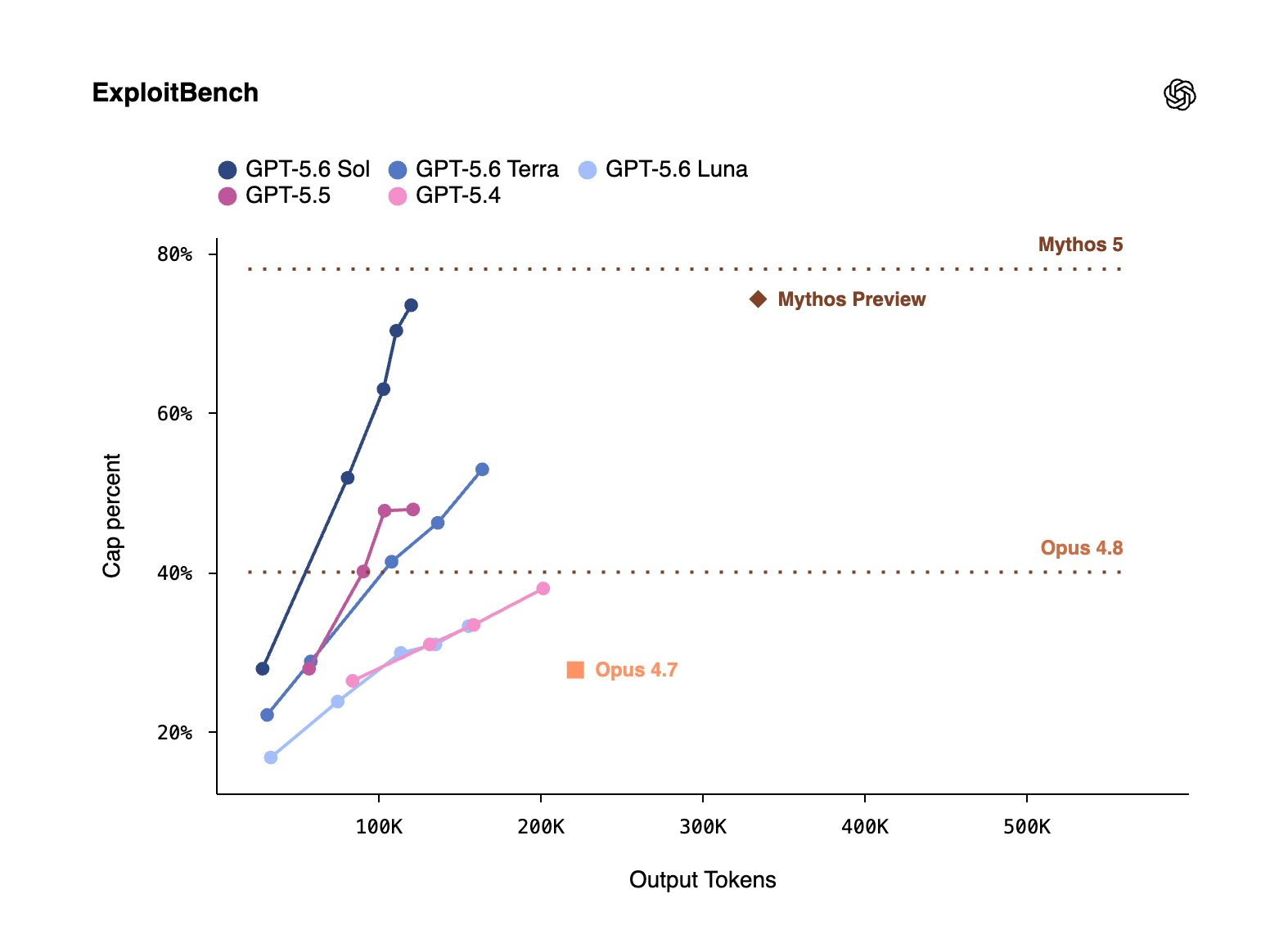
It isn’t a clean sweep. On SWE-Bench Pro, Claude Fable 5 leads at 80.3% against Sol’s 64.6%, so “flagship” does not mean “best at everything.” We break down where the numbers look strongest and weakest in our GPT-5.6 Sol benchmarks analysis.
Terra: the default for production work
Terra’s pitch is economic rather than heroic. OpenAI positions it as GPT-5.5-competitive at roughly 2x cheaper, and that framing decides most real workloads on its own. If your product ran well on GPT-5.5, Terra gives you the same class of capability at half the spend. Chat assistants, summarization, content pipelines, most RAG setups: this is the tier to start from, and the one you should have to argue your way out of.
Luna: unit economics and speed
Luna handles the work where nobody reads the reasoning: classification, entity extraction, request routing, first-pass drafts that a human or a bigger model revises. At $1 input / $6 output it costs a fifth of Sol on both sides of the meter, and it’s the fastest of the three. The common mistake is emotional, not technical: teams skip Luna because “cheapest” sounds like “worst,” then pay Terra rates for tasks with one-word outputs.
The trap in the default
Here’s the detail that quietly inflates bills: the bare alias gpt-5.6 routes to Sol. Reach for the obvious model string and you’ve picked the priciest tier without ever deciding to.
Pin the tier explicitly in every call:
{
  "model": "gpt-5.6-terra",
  "input": "Classify this support ticket by urgency and product area.",
  "reasoning": { "effort": "medium" }
}
The difference compounds fast. A service pushing 50M input and 10M output tokens a month pays about $275 on Terra, $550 on Sol, and $110 on Luna. Same traffic, a 5x spread, decided by one string. For the full rate card, caching discounts included, see our GPT-5.6 pricing breakdown. Simon Willison’s launch write-up is also worth your time as an independent developer’s first pass at the release.
Match the model to your workload
Three scenarios cover most of the decision space.
An agentic coding pipeline. Pick Sol. The benchmark gains land here, and so do the GA features: programmatic tool calling lets the model write JavaScript that orchestrates your tool calls, executed in an isolated V8 runtime with no network access, and persisted reasoning carries context across turns. When a run takes 40 steps and a bad decision at step 12 wastes the next 28, model quality is the cheapest line item in the pipeline. The full Sol profile covers what else the flagship changes.
A production chat assistant. Pick Terra. Users judge latency and helpfulness, not benchmark deltas, and on routine questions they cannot tell Sol from Terra. Route the rare hard query to Sol behind a heuristic if your logs prove you need it; don’t pay flagship rates for “how do I reset my password.”
A high-volume document pipeline. Pick Luna, then stack caching on top. GPT-5.6 supports explicit cache breakpoints (prompt_cache_options.mode: "explicit" with a ttl field); cache reads keep the 90% discount, writes bill at 1.25x the input rate, and cached content lives at least 30 minutes. For extraction jobs that reuse a long system prompt across thousands of documents, Luna plus explicit caching sits in a different cost class from either sibling. The new vision detail settings (original and auto) preserve source image dimensions too, which matters when you’re pulling fields from scans.
Effort levels change the math
The tier is only half the knob. GPT-5.6 exposes six reasoning effort levels on every tier: none, low, medium, high, xhigh, and max. That turns three models into a grid, and the most interesting cell comparison is not Sol against Terra at the same setting. It’s Terra at high against Sol at medium. Terra with more thinking time can close much of the quality gap at half the token price, and whether it closes enough of it for your tasks is an empirical question, not a spec-sheet one.
OpenAI’s own migration guidance points the same way: treat the move as a tuning pass, not a model-slug swap. Benchmark representative tasks first, and test your current effort level alongside one level lower. One more prompt note from the docs: GPT-5.6 writes noticeably shorter answers with fewer generic intros, so strip the “be concise” boilerplate from prompts you carry over, or you’ll get terse to the point of unhelpful.
For quality-first work where you’d rather wait than re-run, pro mode (reasoning.mode: "pro") is available on all three models. It’s a setting, not a separate model, so you can flip it on Terra as easily as on Sol.
Test all three before you commit
The honest answer to “which model should you use” is: the one that wins on your prompts. Benchmarks are OpenAI’s tasks; your production traffic is not.
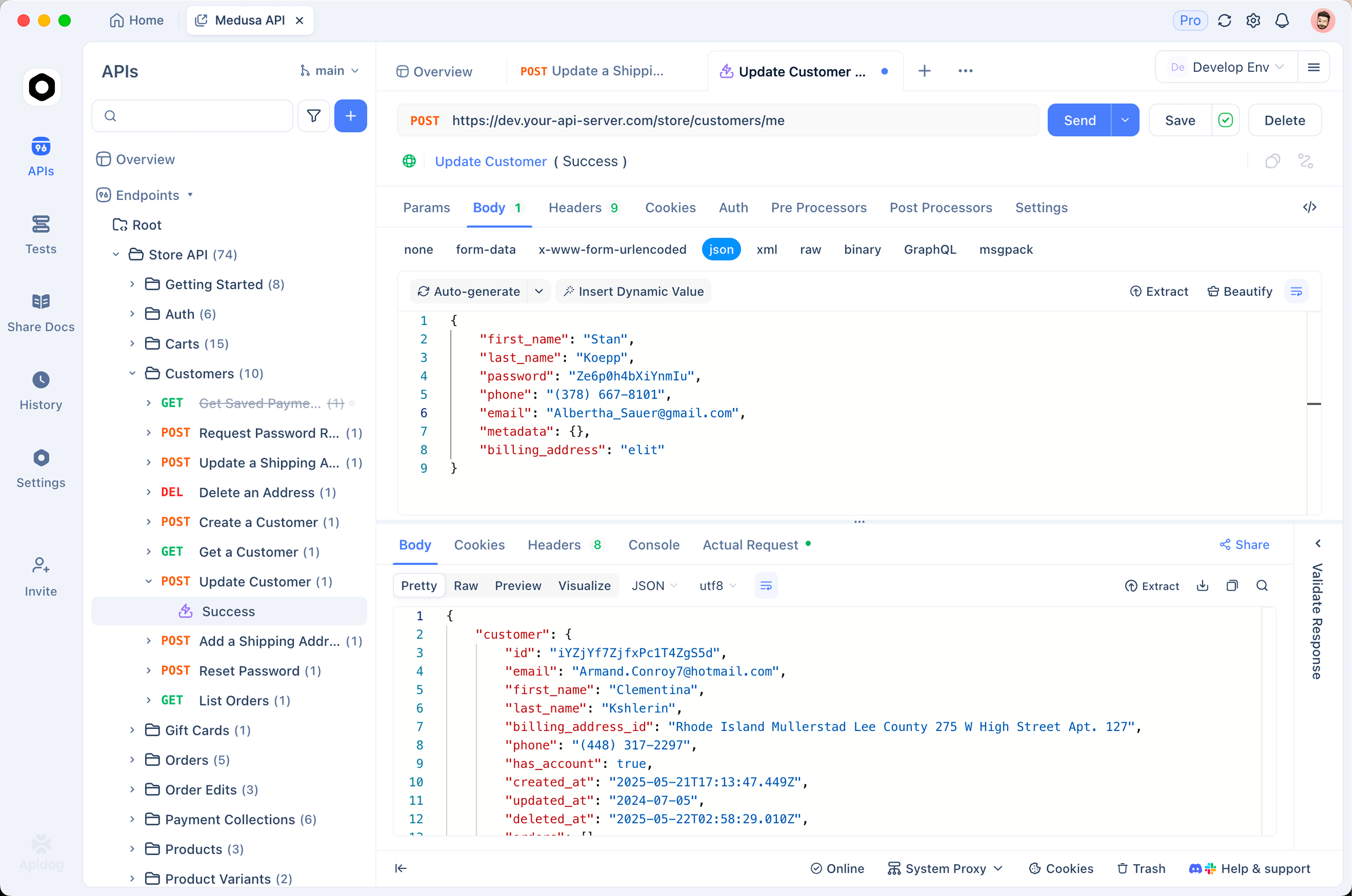
The test is cheap to run. Collect 10 to 20 real tasks from your logs, the ugly ones included. Download Apidog, save the OpenAI base URL and API key once, then put the model ID in an environment variable so one request definition covers all three tiers. Flip {{model}} between gpt-5.6-sol, gpt-5.6-terra, and gpt-5.6-luna, run the same prompt set, and compare two things side by side: output quality against your own bar, and the usage token counts in each response. Multiply those counts by the rate card and the cost-per-task table writes itself.
Two findings show up in most of these bake-offs. Terra matches Sol on a larger share of tasks than the pricing gap implies. And Luna survives structured-output work, the classify-and-extract lane, far more often than its price suggests. You only learn where your workload breaks that pattern by running it.
Where ultra fits
Ultra is the one option in this lineup that is not an API model ID. It’s a multi-agent setting that runs four agents in parallel by default, spending more tokens deliberately in exchange for faster wall-clock results on hard problems. Per OpenAI, ultra lifts Sol’s Terminal-Bench 2.1 score from 88.8% to 91.9%.
Availability is plan-gated on the product side: ultra lives in ChatGPT Work on Pro and Enterprise plans, and in Codex from Plus upward. The chat product has its own tier map, per OpenAI’s help center:
| ChatGPT plan | GPT-5.6 access |
|---|---|
| Free / Go | Terra |
| Plus | Sol, Terra, and Luna with per-model effort control (Sol from medium effort up) |
| Pro / Business / Enterprise | All of the above, plus Sol Pro |
| ChatGPT Work (Pro / Enterprise), Codex (Plus and up) | Ultra |
If your parallel-agent workload lives in code rather than chat, watch the multi-agent beta in the Responses API; it’s the API-side sibling of the same idea.
FAQ
Is gpt-5.6-terra good enough to replace GPT-5.5 in production?
For most workloads, yes. OpenAI positions Terra as competitive with GPT-5.5 at roughly half the price, and the same Responses API surface means switching is low-risk. Run your evals before cutting over, and keep an eye on output length, since GPT-5.6 answers run shorter by design.
What happens if I call the bare gpt-5.6 alias?
Your request routes to Sol and bills at Sol rates, $5 per 1M input tokens and $30 per 1M output. Nothing breaks, which is the problem; the cost shows up later on the invoice. Pin gpt-5.6-terra or gpt-5.6-luna explicitly wherever a cheaper tier does the job.
Can I switch tiers without changing my integration?
Yes. Sol, Terra, and Luna share the same Responses API surface, so moving between them is a one-line model string change. Effort levels and pro mode work across all three as well. Our guide on how to use the GPT-5.6 API walks through the request shape end to end.
Do I need a specific ChatGPT plan to use these models in the API?
No. API access is self-serve for any API account, with no plan gating on any of the three models. ChatGPT plan tiers control the chat product only, and ultra is the one capability that stays product-side (ChatGPT Work and Codex) rather than shipping as an API model.
Your first hour with the tiers
Start on Terra and make the other tiers prove themselves. Escalate to Sol only where your own evals show a gap worth paying double for, which usually means agentic and long-horizon work. Downshift to Luna wherever outputs are short and volume is high. Pin explicit model IDs everywhere so the Sol-by-default alias never chooses for you, and tune effort levels before you change tiers, because Terra at high is the cheapest quality upgrade in the lineup.
Then stop reading and measure. Load your ten ugliest production prompts into Apidog, point one request at all three model IDs with an environment variable, and let your own token counts and outputs make the call. The whole exercise costs less than a dollar in API spend and settles a decision that compounds every month.


