
AIOHTTP and HTTPX are two popular Python libraries commonly used for making HTTP requests. However, as they are each other's alternatives, does one rank better than the other?
To focus on the more important aspects of your application development, consider using Apidog, an all-in-one API development tool that has code generation features to increase one's productivity!
Apidog is free to use, so it is possible to start now - all you have to do is click the button below to start downloading Apidog! 👇 👇 👇
To showcase the differences between AIOHTTP and HTTPX, a clear distinction and description of each Python library will be provided, as well as their key features and common use cases. Furthermore, there will be code samples to demonstrate the finer details.
What is AIOHTTP?
AIOHTTP is a Python library that empowers developers to create asynchronous HTTP clients and servers by leveraging the asyncio library to handle multiple HTTP requests concurrently. AIOHTTP is therefore ideal for creating applications that deal with high volumes of internet traffic.
In case you want to learn more about AIOHTTP, check out the article on the AIOHTTP documentation right below here:
 Steven Ang Cheong Seng
AIOHTTP Key Features
1. Asynchronous HTTP Requests and Responses:
- Non-Blocking Magic: Unlike traditional libraries, AIOHTTP does require waiting for responses. It initiates multiple requests concurrently, keeping your application responsive even during high traffic.
- Multiple Request Handling: You can send various HTTP methods like GET, POST, PUT, and DELETE simultaneously and manage them efficiently using the
asynciolibrary. - Future-Proof Responses: Responses are handled as asynchronous objects called
Futures. You can useawaitto retrieve the data once the request finishes, ensuring proper flow control.
2. Building Powerful Web Servers:
- URL Routing: Define how your server handles different URL requests by mapping URLs to specific functions that process incoming requests and generate responses.
- Middleware Flexibility: Intercept and customize request processing behavior using middleware components. Implement functionalities like authentication, logging, rate limiting, or custom logic before requests reach their destination.
3. Real-Time Communication with WebSockets:
- Two-Way Communication: AIOHTTP offers support for both client-side and server-side WebSockets. This allows for real-time, bidirectional communication between your application and the server, ideal for features like chat applications or live data updates.
To learn more about combining AIOHTTP and WebSockets, check out this article here!
Steven Ang Cheong Seng
4. Additional Features for Enhanced Development:
- Session Management: Maintain user sessions across multiple requests using cookies or other mechanisms. This is crucial for building interactive web applications that remember user state.
- Connection Pooling: Reuse established connections to servers. This improves performance by avoiding the overhead of creating new connections for every request.
- Content Negotiation: Choose between different content representations based on the client's capabilities, allowing you to serve optimized content for various devices.
- Form Data Handling: Easily handle form data submissions from web clients, including parsing multipart forms and accessing uploaded files.
5. Developer-Friendly Enhancements:
- Clean and Concise API: AIOHTTP provides a well-documented and intuitive API, making it easy to learn and use.
- Context Managers: Utilize context managers like
aiohttp.ClientSessionto manage connections efficiently and ensure proper cleanup. - Error Handling: Implement robust error handling mechanisms to gracefully handle exceptions during requests or server responses.
When to Choose AIOHTTP?
You should consider using the AIOHTTP framework if you desire, or are planning to face these scenarios:
High Volume of HTTP Traffic: If your application deals with a constant stream of HTTP requests, AIOHTTP's asynchronous nature shines. It efficiently handles many concurrent requests without blocking, keeping your application responsive. This makes it perfect for building:
- Modern web applications.
- Scalable APIs that can handle numerous simultaneous requests.
- Real-time data applications that require constant communication.
Real-Time Functionality: Do you need two-way, real-time communication between your application and the server? AIOHTTP's WebSocket support makes it ideal for building features like:
- Chat applications.
- Live data updates (e.g., stock prices, sports scores).
- Collaborative editing tools.
Scalability and Performance: AIOHTTP is built for performance. Its asynchronous approach allows it to handle many connections efficiently, making it a great choice for applications that need to scale to serve a large user base.
Additional Factors to Consider:
- Project Complexity: For highly complex projects with numerous asynchronous operations, AIOHTTP integrates well with other asynchronous libraries in the Python ecosystem.
- Developer Experience: If your team prefers a clean and well-documented API, AIOHTTP excels in this regard.
AIOHTTP Code Examples
1. Making an asynchronous GET request:
import aiohttp

async def fetch_data(url):
  async with aiohttp.ClientSession() as session:
    async with session.get(url) as response:
      if response.status == 200:
        data = await response.read()
        print(f"Data from {url}: {data[:100]}...")  # Truncate for brevity

asyncio.run(fetch_data("https://www.example.com"))
The code example above defines an asynchronous function called `fetch_data1 that takes a URL, uses aiohttp.ClientSession to manage connections, and makes a GET request. The response is then processed if successful, printing a snippet of the data.
2. Building a simple web server:
from aiohttp import web

async def hello(request):
  return web.Response(text="Hello, World!")

app = web.Application()
app.add_routes([web.get('/', hello)])

if __name__ == '__main__':
  web.run_app(app)
The code example above demonstrates creating a simple web server, where there is a hello function that handles all the GET requests to the root path ("/") and returns a message "Hello, World!".
3. Real-time communication with WebSockets:
import asyncio
from aiohttp import web
from websockets import WebSocketServerProtocol

async def handle_websocket(websocket: WebSocketServerProtocol):
  async for message in websocket:
    print(f"Received message: {message}")
    await websocket.send_text(f"You sent: {message}")

async def main():
  async with web.Application() as app:
    app.add_routes([web.get('/ws', handle_websocket)])
    async with web.start_server(app, port=8765):
      await asyncio.Future()  # Run the server forever

asyncio.run(main())
The code example above demonstrates a basic WebSocket server, where the handle_websocket function handles communication with connected clients, receiving and echoing back messages.
What is HTTPX?
HTTPX is another popular Python library specialized in efficiently making HTTP requests and prioritizing speed compared to other libraries.
HTTPX Key Features
1. High Performance and Efficiency:
- Focus on Speed: HTTPX prioritizes speed and efficiency. It utilizes asynchronous operations and connection pooling to handle multiple requests concurrently, making it ideal for applications dealing with high HTTP traffic.
- Streaming Support: It offers efficient streaming capabilities for large data transfers, allowing you to process data in chunks as it arrives without waiting for the entire response to download.
2. Flexible Request Construction and Response Handling:
- Detailed Request Control: HTTPX provides granular control over request construction. You can define various request parameters like headers, body content, timeouts, and authentication methods.
- Rich Response Data Access: It allows you to access and process response data in multiple ways, including reading the entire response as text, iterating over lines, or accessing headers and status codes.
3. Advanced Features for Robust Communication:
- Automatic Decompression: HTTPX automatically handles compressed responses (like Gzip), simplifying data handling.
- Retries and Timeouts: You can configure retries for failed requests and set timeouts to prevent applications from hanging on unresponsive servers.
- Interceptors and Hooks: HTTPX allows you to implement custom interceptors and hooks to modify request behavior or intercept responses for advanced control.
4. Integration and Ecosystem:
- Asyncio Compatibility: HTTPX integrates seamlessly with the
asynciolibrary, enabling asynchronous programming for efficient concurrent requests. - Third-Party Library Support: It plays well with other popular Python libraries for web development, making it a versatile tool for building web applications.
When to Choose HTTPX?
1. Thriving under high traffic:
HTTPX excels in dealing with a bombardment of HTTP requests due to its asynchronous nature (and compatibility with asyncio) and connection pooling. It can handle numerous concurrent requests efficiently, making it ideal for building:
- High-traffic web applications.
- APIs that require handling a massive number of simultaneous requests.
- Real-time applications that need constant communication and speed priority.
2. Handling large data transfers seamlessly:
HTTPX's streaming capabilities can be very helpful for dealing with large datasets or real-time data streams. With HTTPX, you can immediately process the data chunk as it arrives, avoiding the need to download the entire data response. HTTPX excels in:
- Downloading large files.
- Processing real-time data feeds (examples: stock prices and sensor data).
- Building applications that handle large data transfers efficiently.
3. Fine-grained control for complex requirements
HTTPX can accommodate intricate control over HTTP requests while offering the flexibility developers need. This flexibility comes in the form of request specification, including:
- Headers for specific information exchange.
- Body content for sending complex data.
- Timeouts to prevent applications from hanging on unresponsive servers.
- Authentication methods for secure communication.
- Other advanced options for tailored request behavior.
4. Additional features for robust and resilient communication:
HTTPX has additional features to create more robust applications, such as:
- Retries and timeouts: You can configure retires for failed requests to handle temporary network issues gracefully by setting timeouts to avoid applications hanging on unresponsive servers.
- Automatic decompression: HTTPX can automatically handle compressed responses (like zip files), simplifying data handling and reducing overhead processes.
Lastly, HTTPX is a library that integrates seamlessly with other popular Python web development libraries, allowing it to be a versatile tool for building web applications with diverse functionalities. So, do not let other Python library frameworks be a deterrence in using HTTPX.
HTTPX Code Examples
1. Making a basic GET request:
import httpx

async def fetch_data(url):
  async with httpx.AsyncClient() as client:
    response = await client.get(url)
    if response.status_code == 200:
      data = await response.text()
      print(f"Data from {url}: {data[:100]}...")  # Truncate for brevity

asyncio.run(fetch_data("https://www.example.com"))
The code example above defines an asynchronous function fetch_data, taking a URL to use httpx.AsyncClinet to make a GET request. The response is then processed if successful, and a data snippet is printed.
2. Handling large data transfers with streaming:
import httpx

async def download_file(url, filename):
  async with httpx.AsyncClient() as client:
    response = await client.get(url, stream=True)
    if response.status_code == 200:
      async with open(filename, 'wb') as f:
        async for chunk in response.aiter_content(chunk_size=1024):
          await f.write(chunk)
      print(f"File downloaded: {filename}")

asyncio.run(download_file("https://large-file.com/data.zip", "data.zip"))
The code example demonstrates downloading a large file by streaming.
The stream=True argument in the get request enables processing data in chunks, while the aiter_content method allows iterating over the response content in manageable chunks, which are then written to the file.
3. Retries and interceptors (advanced):
from httpx import retries

async def fetch_data_with_retries(url):
  async with httpx.AsyncClient(retries=retries.Retry(total=3, backoff_factor=1)) as client:
    response = await client.get(url)
    # Process response

async def logging_interceptor(request, response):
  print(f"Request: {request.method} {request.url}")
  print(f"Response: {response.status_code}")

async def main():
  async with httpx.AsyncClient(interceptors=[logging_interceptor]) as client:
    await fetch_data_with_retries("https://unreliable-api.com/data")

asyncio.run(main())
This advanced code example demonstrates two more advanced features:
- Retries: The
retriesargument configures automatic retries for failed requests with a specified number of attempts and a back-off strategy. - Interceptors: A custom
logging_interceptorfunction is added using theinterceptorsargument, where it logs information about the request and response during the communication process.
Summarized Differences Between AIOHTTPS VS. HTTPX
| Feature | AIOHTTP | HTTPX |
|---|---|---|
| Focus | Asynchronous development, real-time communication | Requests-style API, sync and async, optional HTTP/2 |
| Key Strength | Concurrency, WebSockets | HTTP/2 support, familiar API, fine-grained control |
| Ideal Use Cases | High-traffic web applications, real-time data | Projects needing HTTP/2 or a requests-like API |
| Asynchronous | Yes | Yes (Compatible with asyncio) |
| Connection Pooling | Yes (session connection pool, on by default) | Yes |
| Streaming Support | Yes (resp.content is a StreamReader; streamed unless you call read/text/json) | Opt-in via client.stream(); buffered into memory by default |
Apidog: Versatile API Platform for Python Development
With both AIOHTTP and HTTPX being Python libraries, developers would need to be adept to begin writing code for the application or API. However, with the modern world advancing so quickly, spending too much time learning a single programming language can hinder your app development, delaying its completion. This is why you should consider Apidog, a one-stop solution to your API and app development problems.


Generating Python Client Code Using Apidog
Apidog can fast-track anyone's API or app development processes with the help of its handy code generation feature. Within a few clicks of a button, you can have ready-to-use code for your applications - all you need to do is copy and paste it over to your working IDE!
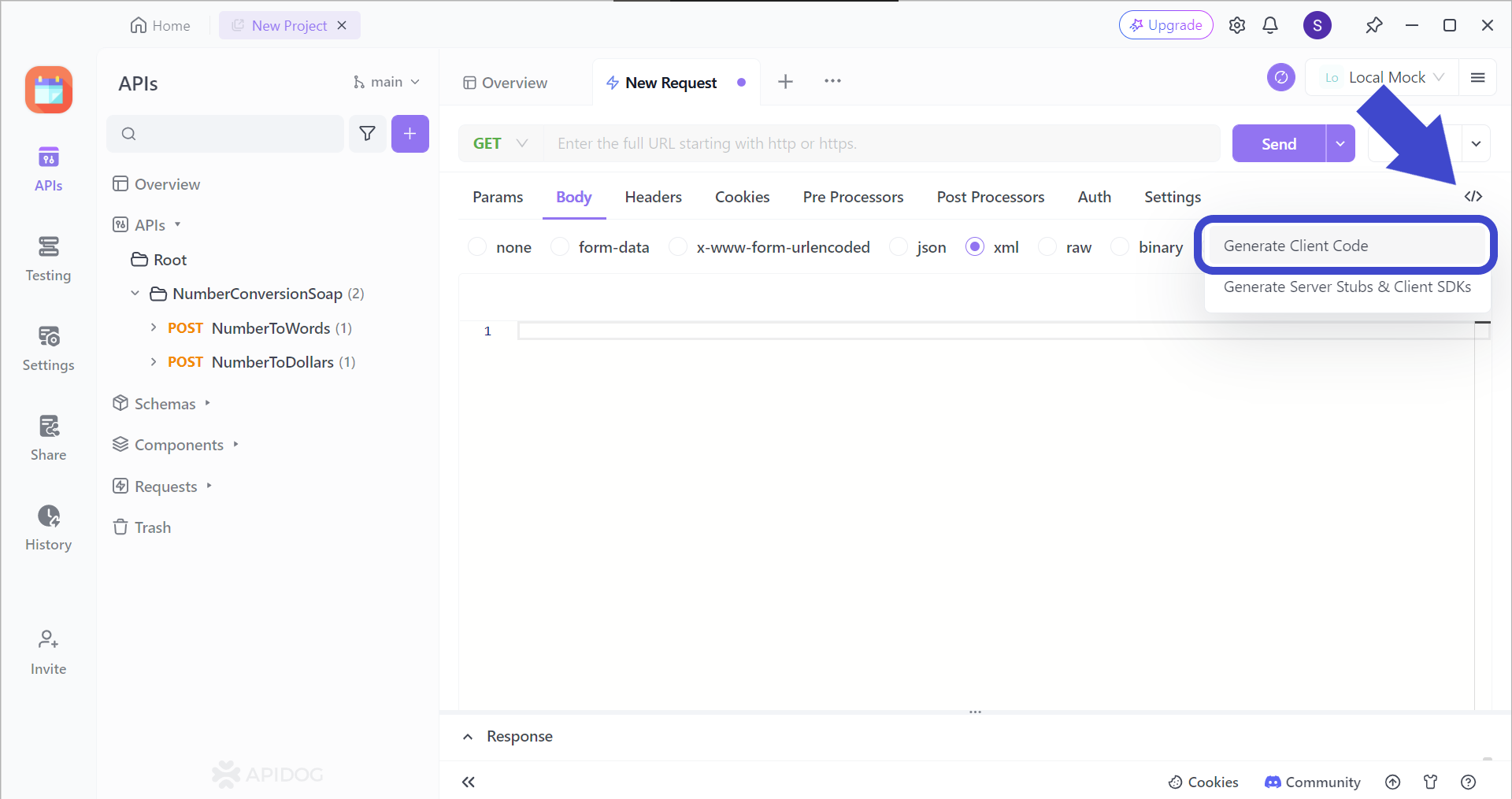
Firstly, locate this </> button found on the top right corner of the screen when you are trying to create a new request. Then, select Generate Client Code.
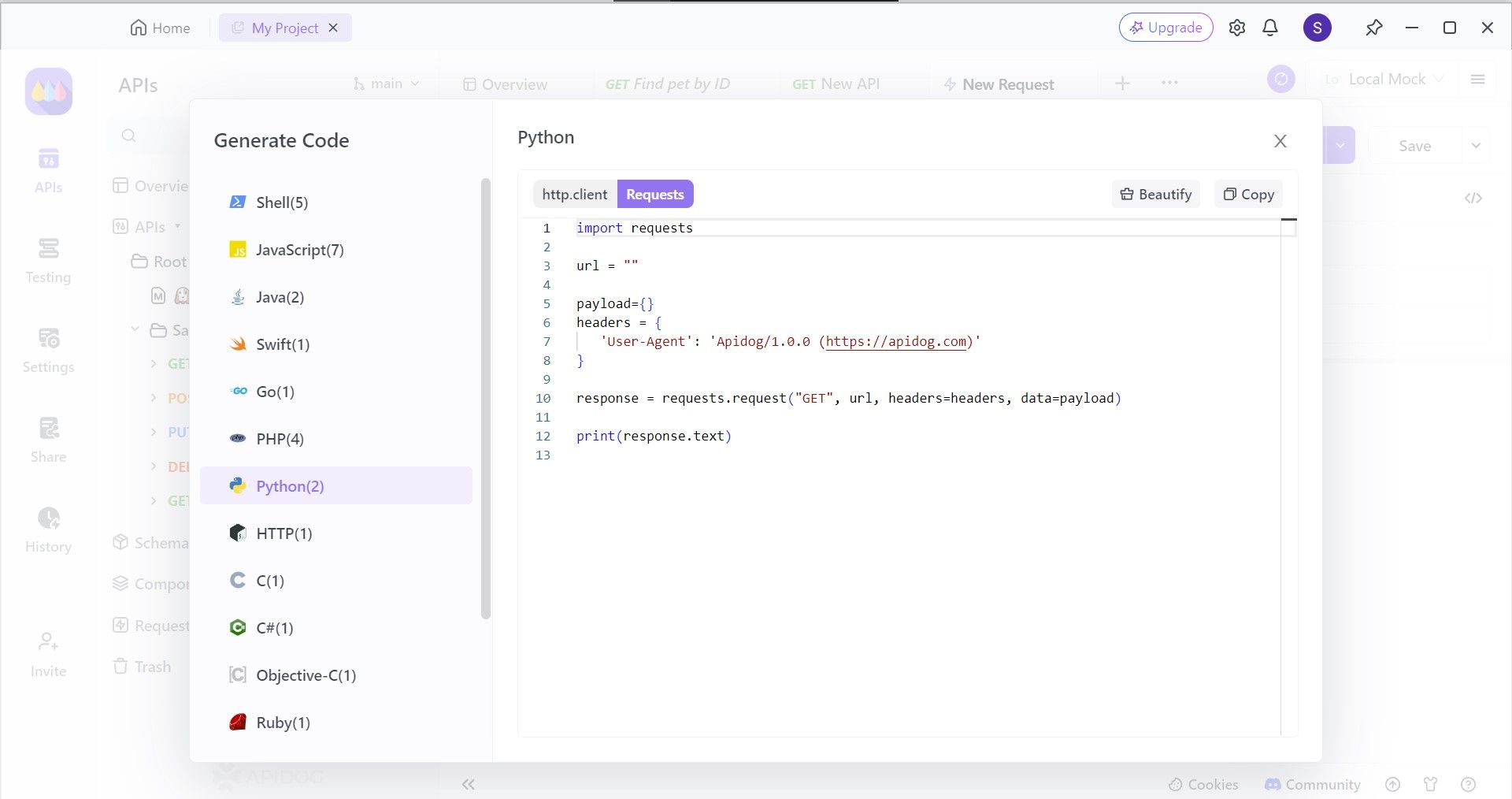
You can observe that Apidog supports code generation for a variety of other code languages as well. However, as we are trying to import Python client code, select Python. Copy and paste the code over to your IDE to begin completing your application.
Apidog's API Hub Feature
Apidog also has a feature that can inspire developers who are having a mind block.

Through API Hub, you can discover all of the third-party APIs that Apidog supports. All you have to do is search for one that you like. If you are interested in learning how to implement them into your application, you can also open and modify it on Apidog!
Conclusion
Both AIOHTTP and HTTPX are excellent choices for making HTTP requests in Python applications. However, their strengths lie in different areas. AIOHTTP shines with its asynchronous nature, making it ideal for building highly concurrent web applications and real-time features like WebSockets. If your project prioritizes handling a high volume of requests efficiently and maintaining responsiveness, AIOHTTP is the way to go.
HTTPX takes a different approach. It offers one library with both a sync and an async API, a surface that mirrors requests, and optional HTTP/2 support you enable with pip install httpx[http2] and httpx.AsyncClient(http2=True). AIOHTTP does not speak HTTP/2 at all, so if you need it, HTTPX is the choice. Do not pick HTTPX expecting it to be faster than AIOHTTP under load. Published benchmarks generally favour AIOHTTP on raw throughput, and an earlier version of this article claimed the opposite without evidence. Benchmark both against your own workload before you decide, because the result depends on payload size, concurrency and how you configure the client.
Apidog can be a work booster in case you are a new developer, or are confused with working with a new library like AIOHTTP and HTTPX. If this is a common event for you, consider trying Apidog. With helpful features to take away your obstacles, you can allocate more attention to more urgent or important factors of your API or application development!