You can run NVIDIA’s new Nemotron 3.5 Transcribe on one GPU and transcribe hour-long recordings in 40 languages without paying per minute or sending audio to anyone. It’s the top open-weight model on the Hugging Face Open ASR Leaderboard, it ships under the commercial-friendly OpenMDW-1.1 license, and NVIDIA published BF16, FP8 and NVFP4 weights on release day, October 28, 2026.
This guide covers the hardware you need, the three ways to run it (vLLM, SGLang-Omni and Transformers), the exact commands from the official model card, and the settings that trip people up. All commands were copied from the card on October 29, 2026.
New to the model? Our free guide explains what it does and how it ranks. Don’t have a GPU? The hosted API costs $0.002 per minute.
Why run it locally
- No per-minute bill. At DeepInfra’s $0.002 per minute, 10,000 hours costs $1,200. On your own GPU it costs electricity.
- Privacy. Customer calls, medical dictation and legal recordings never leave your network.
- Full feature set. The vLLM path supports word timestamps, speaker diarization, translation and context prompts. Some hosted endpoints expose only part of that.
- Fine-tuning. NVIDIA’s launch post shows a medical fine-tune cutting WER from 30.8% to 11.8%. You can only do that with the weights.
Hardware: what runs it
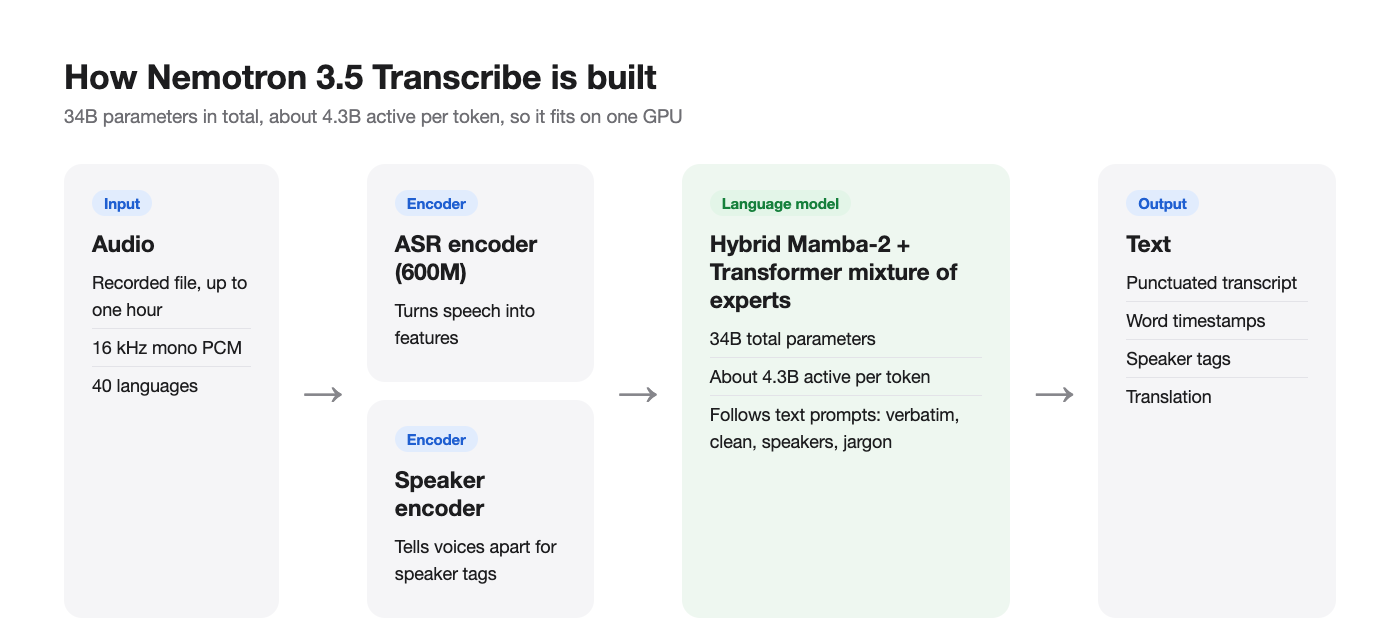
The model has 34B parameters in total and about 4.3B active, so the weights are large even though compute per token is small. NVIDIA’s reference target is one H100 80 GB in BF16. The compatibility table on the model card:
| GPU | Precisions | Runtimes |
|---|---|---|
| H100, H200 | BF16, FP8 | vLLM 0.32.0, Transformers, SGLang-Omni 0.2.0 (H100) |
| A100 80 GB | BF16 | vLLM 0.32.0, Transformers |
| L40S 48 GB | FP8 | vLLM 0.32.0, Transformers |
| B200, GB200, GB300 DGX Station | BF16, FP8, NVFP4 | vLLM 0.32.0, Transformers |
| DGX Spark (GB10), Jetson Thor | BF16, FP8, NVFP4 | vLLM 0.32.0, Transformers |
| RTX PRO 6000 Blackwell Server | BF16, FP8, NVFP4 | vLLM, Transformers, SGLang-Omni, GGML |
| RTX 5090 (32 GB) | NVFP4 only | vLLM 0.32.0, Transformers, GGML |
Pick the checkpoint for your card:
nvidia/NVIDIA-Nemotron-3.5-Transcribe-30B-A4B(BF16)nvidia/NVIDIA-Nemotron-3.5-Transcribe-30B-A4B-FP8nvidia/NVIDIA-Nemotron-3.5-Transcribe-30B-A4B-NVFP4
A 24 GB card like the RTX 4090 isn’t on the list, and Apple Silicon isn’t supported. Operating systems are Linux, or Windows through WSL2. GGML also runs on native Windows, but NVIDIA’s launch post says the NeMo-Speech.cpp local build is still “coming soon.”
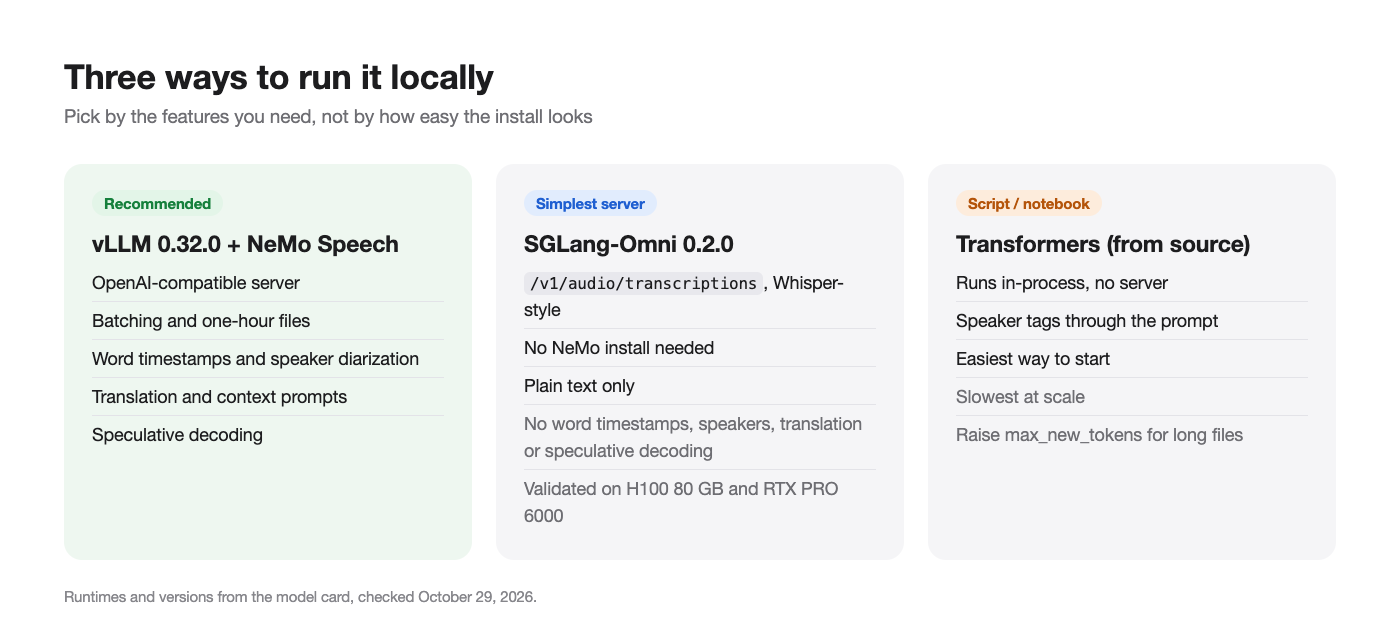
Option 1: vLLM server (recommended)
vLLM gives you an OpenAI-compatible endpoint with batching, one-hour files, speculative decoding and word timestamps. It needs vLLM 0.32.0 plus the latest NeMo Speech main branch, which provides the model’s vLLM plugin.
Install
The card uses uv and Python 3.13:
git clone https://github.com/NVIDIA-NeMo/Speech.git nemo-speech
cd nemo-speech
uv venv --python 3.13 .venv
UV_PROJECT_ENVIRONMENT=$PWD/.venv uv sync --extra asr --extra vllm --locked --no-install-project
uv pip install --python .venv/bin/python --no-deps -e .
uv pip install --python .venv/bin/python --no-deps av==19.0.2
uv pip install --python .venv/bin/python --no-deps opencv-python-headless==5.0.0.93
source .venv/bin/activate
hf download nvidia/NVIDIA-Nemotron-3.5-Transcribe-30B-A4B --local-dir ./NVIDIA-Nemotron-3.5-Transcribe-30B-A4B
PyAV (av) lets it decode M4A and other compressed formats without a system FFmpeg. OpenCV is there because vLLM needs it and NeMo’s dependency settings leave it out.
Start the server
export VLLM_PLUGINS=nemo_speechlm
export VLLM_MAX_AUDIO_DECODE_DURATION_S=3600
export VLLM_MAX_AUDIO_CLIP_FILESIZE_MB=180
export VLLM_USE_V2_MODEL_RUNNER=0
vllm serve ./NVIDIA-Nemotron-3.5-Transcribe-30B-A4B \
  --served-model-name nvidia/NVIDIA-Nemotron-3.5-Transcribe-30B-A4B \
  --trust-remote-code --dtype bfloat16 --gpu-memory-utilization 0.94 \
  --max-model-len 65536 --max-num-batched-tokens 4096 --max-num-seqs 192 \
  --enable-chunked-prefill --no-enable-prefix-caching \
  --use-replayssm --mamba-backend flashinfer --mamba-cache-mode none \
  --mm-processor-cache-gb 0 --no-async-scheduling \
  --limit-mm-per-prompt '{"audio":{"count":6,"length":120000000}}' \
  --speculative-config '{"method":"mtp","num_speculative_tokens":8}' \
  --reasoning-parser nemotron_v3 \
  --trust-request-mm-kwargs \
  --middleware nemo.collections.speechlm2.vllm.salm.ctc_serving.ctc_timestamp_middleware
The flags worth understanding:
VLLM_MAX_AUDIO_DECODE_DURATION_S=3600raises vLLM’s audio limit from 600 seconds to one hour. Forget it and long files fail.VLLM_USE_V2_MODEL_RUNNER=0keeps the V1 runner, which word timestamps need.--speculative-configturns on multi-token prediction with eight draft tokens (MTP8). On an H100, NVIDIA measured batched English RTFx of 270 with MTP8 and 410 with MTP2, so try"num_speculative_tokens":2if you care about throughput more than latency.--middleware ... ctc_timestamp_middlewareand--trust-request-mm-kwargslet requests ask for word timestamps.- The settings target an 80 GB H100. On other cards, lower
--gpu-memory-utilization,--max-model-lenor--max-num-seqs.
The server listens on 127.0.0.1:8000. Add --host 0.0.0.0 to reach it from other machines on your network.
Send a file
import base64
from openai import OpenAI

client = OpenAI(base_url="http://127.0.0.1:8000/v1", api_key="EMPTY")
audio = base64.b64encode(open("standup.wav", "rb").read()).decode()

response = client.chat.completions.create(
    model="nvidia/NVIDIA-Nemotron-3.5-Transcribe-30B-A4B",
    messages=[{"role": "user", "content": [
        {"type": "text", "text": "Transcribe the following audio."},
        {"type": "audio_url", "audio_url": {"url": f"data:audio/wav;base64,{audio}"}},
    ]}],
    temperature=0,
    extra_body={"chat_template_kwargs": {"enable_thinking": False}, "skip_special_tokens": False},
)
print(response.choices[0].message.content)
Swap the text instruction for any task prompt. For a meeting with several voices:
Transcribe verbatim, including fillers. Write numbers as spoken, without punctuation or capitalization. Start every speaker turn with <spk:0>, <spk:1>, etc. Keep one stable tag per speaker. Output only the speaker-tagged transcript.
Word-timestamp requests have rules: one recording per request, stream=false and n=1. The response then includes a ctc_timestamps object with words, start and end times in seconds, and speaker tags.
Option 2: SGLang-Omni for plain transcription
If you only need text out of whole files, SGLang-Omni 0.2.0 is simpler and doesn’t need NeMo. It’s validated on one H100 80 GB and one RTX PRO 6000 Blackwell with the BF16 or FP8 checkpoint.
sgl-omni serve \
  --model-path nvidia/NVIDIA-Nemotron-3.5-Transcribe-30B-A4B \
  --model-name nemotron-transcribe \
  --mem-fraction-static 0.85 \
  --port 8000

curl http://localhost:8000/v1/audio/transcriptions \
  -F model=nemotron-transcribe \
  -F file=@audio.wav
That /v1/audio/transcriptions route matches the shape OpenAI’s Whisper API uses, so existing Whisper client code often needs only a new base URL. The trade-off: no word timestamps, speaker labels, translation or speculative decoding in this integration.
Option 3: Transformers in a script
For notebooks and one-off jobs, run it in-process with Hugging Face Transformers installed from source:
pip install git+https://github.com/huggingface/transformers
from transformers import AutoModelForMultimodalLM, AutoProcessor

model_id = "nvidia/NVIDIA-Nemotron-3.5-Transcribe-30B-A4B"
processor = AutoProcessor.from_pretrained(model_id)
model = AutoModelForMultimodalLM.from_pretrained(model_id, device_map="auto")

prompt = ("Transcribe this audio with punctuation and capitalization. Include all spoken words "
          "and verbal fillers. Put speaker tags <spk:0> <spk:1> <spk:2> <spk:3> on the transcription.")
inputs = processor.apply_transcription_request(["podcast.mp3"], prompt=[prompt]).to(model.device)
outputs = model.generate(**inputs, max_new_tokens=4096)
print(processor.decode(outputs[:, inputs.input_ids.shape[1]:], skip_special_tokens=False))
It’s the easiest way to start and the slowest way to run at scale. Raise max_new_tokens for long files: a dense hour can produce about 20,000 tokens.
How fast is it on your own GPU?
NVIDIA’s headline figure is 2,238 seconds of audio per second on one RTX PRO 6000 Blackwell, with NVFP4 weights and DFlash2 speculative decoding, and 0.13 seconds to return a 30-second clip. Read the footnote: those numbers come from the optimized NIM, whose serving changes aren’t open source yet. The card says the open vLLM integration is expected to be about two times slower.
For H100 batched English transcription in BF16, the card lists these RTFx numbers (seconds of audio per second of compute):
| Speculative decoding | RTFx |
|---|---|
| MTP2 | 410 |
| DFlash2, K=7 | 340 |
| MTP8 | 270 |
| DFlash2, K=15 | 260 |
Even the slowest row clears an hour of audio in under 15 seconds of GPU time on batched work. If you want the DFlash2 draft model, note that vLLM 0.32.0 needs a small patch from the card, DFlash2 disables word timestamps, and you shouldn’t combine it with MTP.
Common problems and fixes
- Long files cut off at 10 minutes. You skipped
VLLM_MAX_AUDIO_DECODE_DURATION_S=3600. - No timestamps in the response. Check
VLLM_USE_V2_MODEL_RUNNER=0, the--middlewareflag, and that the request hasstream=falseand one recording. - Out of memory on smaller cards. Switch to the FP8 or NVFP4 checkpoint and lower
--max-num-seqs. - Repeated phrases at the end of a transcript. The card recommends a generation-loop guardrail on final outputs. Cap
max_tokensand trim repeats. - Wrong spelling of names. Add
Context terms: <names>to the prompt. - Background voices in the transcript. Try the experimental near-field prompt from the card, which cut WER on mixed audio from 27.32% to 4.78% in NVIDIA’s test.
If you’re new to vLLM itself, our vLLM explainer covers how it batches requests and manages GPU memory.
Let your coding agent test the local server with Apidog CLI
A local model is only useful if its endpoint stays correct across vLLM upgrades, prompt tweaks and checkpoint swaps. Let your coding agent own that with Apidog CLI, running checks against http://127.0.0.1:8000 from the same machine.
npm install -g apidog-cli@latest
apidog login --with-token <YOUR_TOKEN>
npx -y skills add https://apidog.com   # pick your agent when prompted
Then give your agent one prompt:
In Apidog project <id>, add POST {{baseUrl}}/v1/chat/completions for my local
Nemotron 3.5 Transcribe server. Create test cases that send samples/en.wav and
samples/two-speakers.wav as base64 audio_url content with temperature 0, and assert
status 200, a non-empty choices[0].message.content, and at least two distinct <spk:N>
tags for the two-speaker file. Run them against the local environment and report failures.
The agent reads the schema, validates its payload, writes the cases and runs them:
apidog cli-schema get test-case-create
apidog cli-schema validate test-case-create --file case.json
apidog test-case create --project <id> --file case.json
apidog run --test-case <caseId> --project <id> -e <envId> -r cli,json
Run it after every server upgrade, or wire apidog run ... -r junit into CI as shown in Apidog CLI in a CI/CD pipeline. For agent setup, see Apidog CLI in Claude Code.
FAQ
Can I run Nemotron 3.5 Transcribe on an RTX 4090? It isn’t on NVIDIA’s compatibility list. The smallest listed consumer card is the RTX 5090 with the NVFP4 checkpoint.
Does it run on a Mac? No official runtime supports Apple Silicon as of October 29, 2026.
Is local use free for commercial products? The OpenMDW-1.1 license permits commercial and non-commercial use. Read the license text for attribution terms before shipping.
Can it transcribe live audio? No. It’s an offline model for recorded files. NVIDIA offers a separate Nemotron 3.5 ASR Streaming model for live use.
Which is faster, vLLM or SGLang-Omni? NVIDIA doesn’t publish a head-to-head. Use vLLM when you need timestamps, speakers or translation, and SGLang-Omni for the simplest text-only server.
How does it rank against other local models? It leads every open-weight model on the October 28 Open ASR Leaderboard. Our best open-source speech-to-text models list compares it with Qwen3-ASR, Granite Speech, Canary-Qwen, Voxtral and Whisper.
Run it
Download the checkpoint that fits your GPU, start vLLM with the one-hour audio limit and timestamp middleware, and send a WAV file through the OpenAI client. Then let your agent run Apidog checks against the local endpoint so every upgrade proves it still transcribes before you trust it with real recordings.