You want to know what happens to your API when 80 people hit checkout at the same time. So you open Locust, and the first thing it asks you to do is write a Python class. Define a HttpUser. Decorate methods with @task. Build a locustfile.py, set up a virtual environment, pin a few dependencies, and then figure out why your auth token isn’t being reused across requests. None of that is the test. It’s the cost of admission before the test starts.
Locust is a fine tool, and that code-first design is the point of it. But if your goal is a straight answer to “does my login endpoint hold up at 100 concurrent users,” writing and maintaining a Python harness is a lot of yak-shaving for one number. There’s a faster path when the API requests you want to hammer already live in an API client. With Apidog, you point a performance test at an existing test scenario, set the number of virtual users and a duration, and read throughput, response time, and error rate off a live chart. No locustfile, no pip install, no Python at all.
What Locust actually does well
Locust is an open-source load testing tool written in Python, and it’s good at what it was built for. You describe user behavior as code. A virtual user is a Python class, and the things that user does are methods you tag as tasks. Here’s the canonical shape of a locustfile.py:
from locust import HttpUser, task, between

class CheckoutUser(HttpUser):
    wait_time = between(1, 3)

    @task(3)
    def browse_products(self):
        self.client.get("/api/products")

    @task(1)
    def add_to_cart(self):
        self.client.post("/api/cart", json={"sku": "AK-204", "qty": 1})
You run it with locust -f locustfile.py, open the web UI at localhost:8089, set a user count and spawn rate, and watch the numbers climb. Because the behavior is code, you get real expressive power. Conditional logic, weighted task distributions, sequential user journeys, custom clients for protocols beyond HTTP, shared state across requests. The @task(3) versus @task(1) weighting above means browsing happens three times as often as adding to cart, which is the kind of realism a flat request list can’t capture.
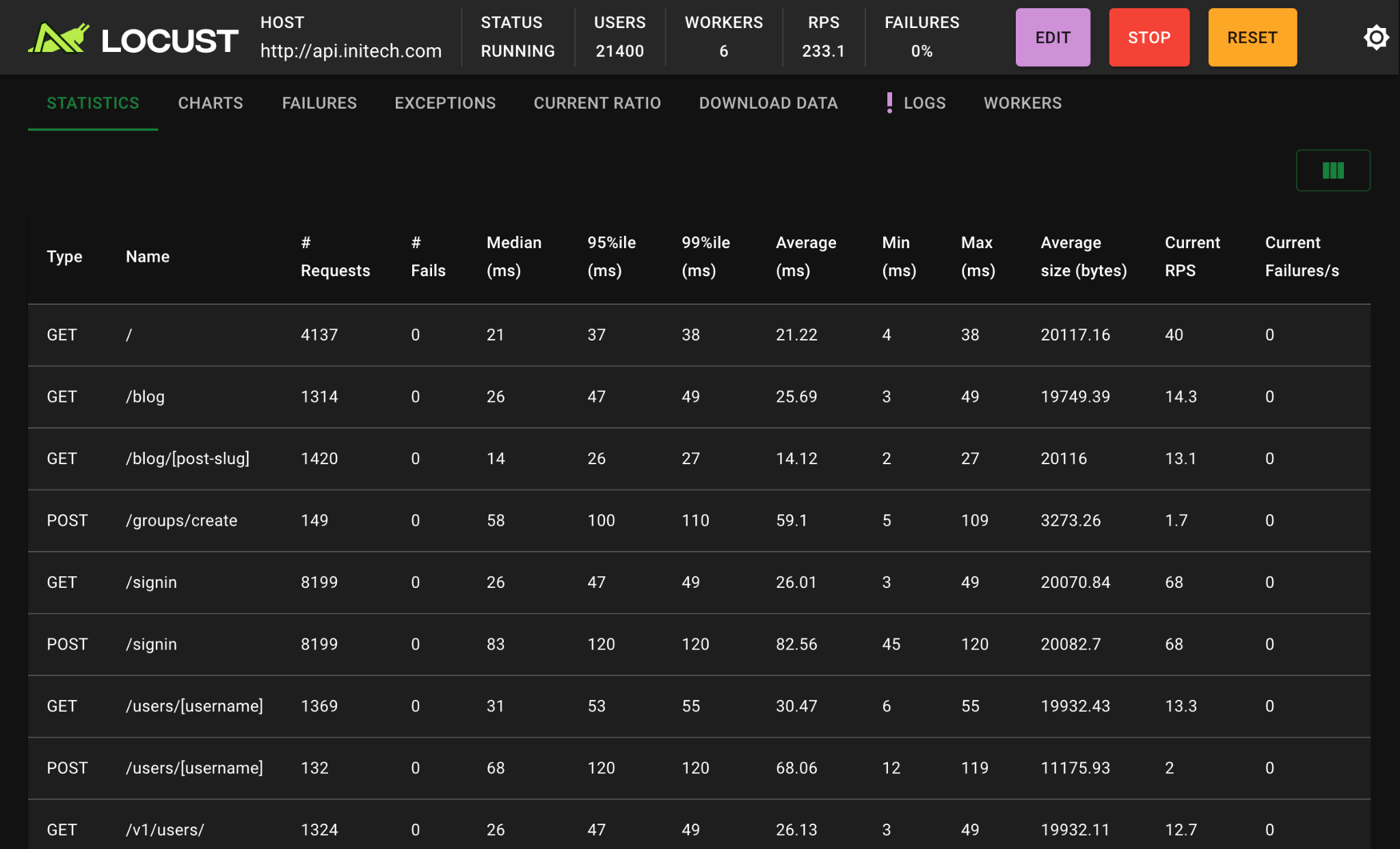
Locust also scales horizontally. Run it distributed across multiple worker processes or machines and a single master coordinates them, so you can push past what one box can generate. It’s event-driven under the hood, so each worker holds thousands of concurrent users without a thread per user eating memory. For a team that already lives in Python, treats its load tests as version-controlled code, and needs to model complex multi-step user behavior, Locust is a strong choice. None of that is in dispute.
The cost is the code. Every test is a program you write, debug, and maintain. If your API changes, the locustfile changes. If a new engineer needs to run the test, they need a Python environment that matches. And if you don’t already write Python, the language itself becomes a prerequisite for answering a question that has nothing to do with Python.
Where the code-first model becomes friction
The friction shows up in three places.
First, setup. Before you measure anything, you install Python, create a virtual environment, pip install locust, and write the harness. For a quick “can this endpoint take 50 users” check, that’s more plumbing than payload.
Second, duplication. You probably already have these requests defined somewhere. Maybe in Postman, maybe in a .http file, maybe in an API client your team uses every day. The locustfile re-describes requests that already exist, including the auth flow, the headers, the request bodies. Now you maintain two copies of the same API knowledge, and they drift.
Third, the people who need the answer. A QA engineer, a product manager sweating a launch, or a frontend developer who just wants to know if the API survives the marketing email all need the load test result. They don’t necessarily need to read or write Python to deserve it. When the test is locked behind a locustfile, the answer is locked behind a skill set.
If your load tests genuinely need branching logic and custom protocol clients, that friction is worth paying and Locust is the right tool. For the common case of “run my real API requests under concurrent load and show me the numbers,” it’s worth asking whether the Python layer is buying you anything.
The Apidog approach: load-test the requests you already have
Apidog comes at load testing from the other direction. You don’t write a script that describes requests. You take requests you’ve already built and run them under load. The unit of a load test is a test scenario, which is just an ordered set of API requests with their environments, variables, and assertions already attached. If you’ve used Apidog to test or debug an endpoint, the request is already there. The performance test reuses it.
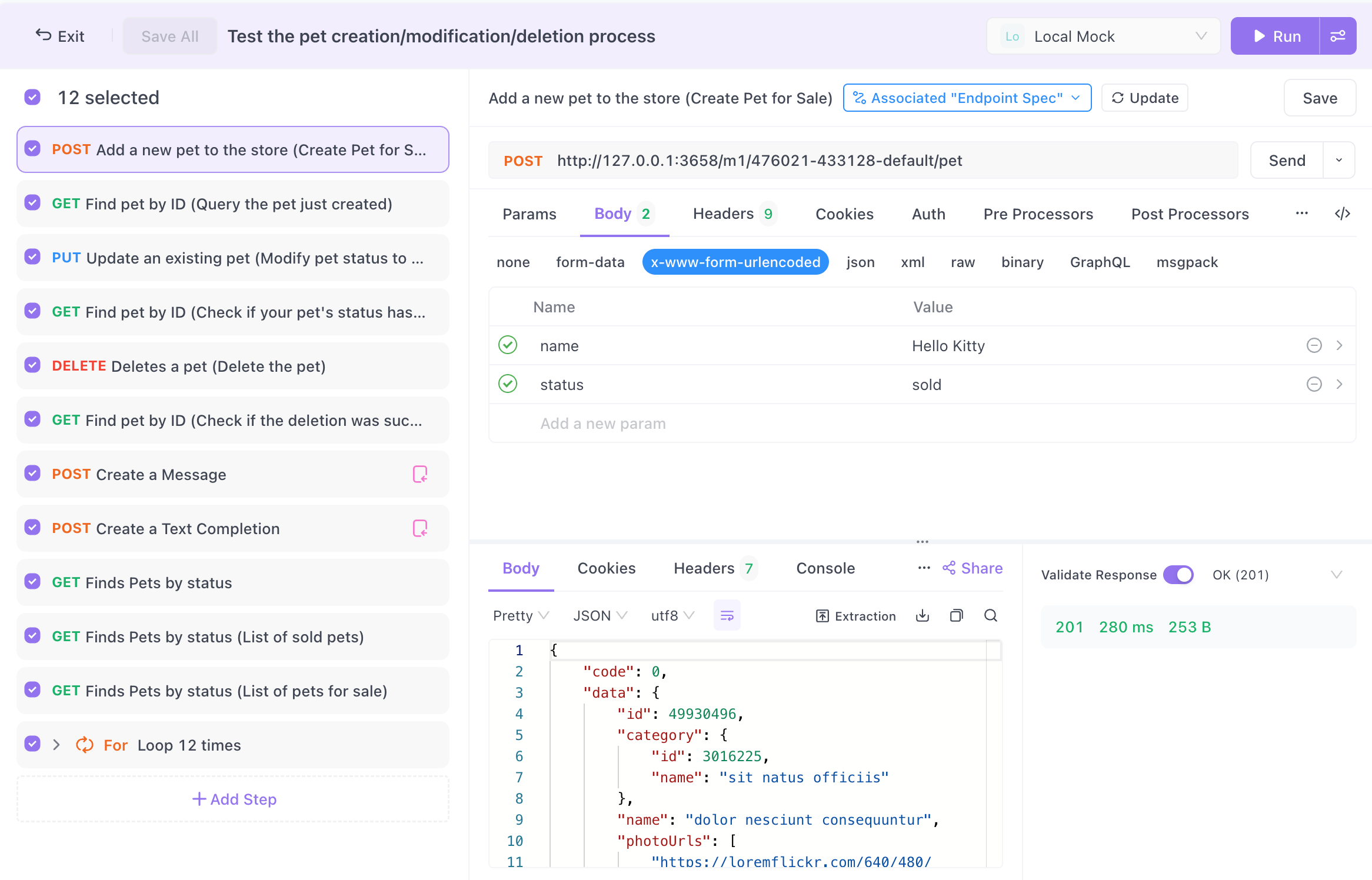
Here’s the full flow.
- Open the test scenario you want to load-test. This is the same scenario you’d run as a normal functional test, with the same requests and the same environment variables.
- Choose to run it as a performance test instead of a single pass.
- Set the number of virtual users. Apidog supports up to 100 virtual users, each one looping through every request in the scenario in parallel for the whole test.
- Set the test duration. That’s how long the virtual users keep looping.
- Set a ramp-up duration if you want a gradual climb. Over the first X minutes Apidog brings users online incrementally instead of all at once; set it to 0 and every virtual user starts immediately.
- If your scenario is data-driven, pick a matching mode. “Random Match” has each virtual user pull a random row from your test data on each loop; “Sequential Match” walks the rows in order.
- Start the test and watch the live panel.
The chart updates in real time. For each API in the scenario you get Total Requests, Avg Throughput, Avg Response Time, Maximum and Minimum Response Time, and Errors. Hover over the chart to see the numbers for a given slice of time. An “Error” tab breaks down the failed requests so you can see which endpoint started buckling and when. When the run finishes, the “Test Reports” tab keeps the history so you can compare today’s run against last week’s after you ship a change.
The whole point is that there’s no locustfile to write and no Python environment to manage. The same request that passed your functional test is the request generating load. That’s the difference between describing a load test and running one. Apidog is an all-in-one API platform, so the design, debugging, functional testing, and load testing of an endpoint all happen against one definition of that endpoint.
A concrete comparison
Say you want to confirm a login endpoint handles 100 concurrent users for two minutes, with a 30-second ramp-up.
In Locust, you write a user class with a task that posts credentials, handle the token the response returns, store it for any follow-up calls, save the file, start locust -f login_test.py, open the web UI, and enter 100 users, a spawn rate, and a run time. If the token handling is wrong, you debug Python before you debug your API.
In Apidog, you open the login test scenario you already built, switch it to a performance test, type 100 for virtual users, 2 minutes for duration, 30 seconds for ramp-up, and start it. The auth that already worked in your functional test still works, because it’s the same scenario. You read the response-time curve and error rate as they happen.
Both arrive at the same kind of answer. One asks you to write and maintain a program first. The other reuses what you already have. For complex, code-modeled user journeys, the program is worth it. For “is my endpoint fast and stable under load,” the reuse wins on time.
Honest limits on both sides
Be clear-eyed about the tradeoffs, because picking the wrong tool wastes a day either way.
Apidog’s performance testing tops out at 100 virtual users from a single run, and the load is generated from your machine running the app. If you need to simulate tens of thousands of users or generate load from multiple geographic regions at once, that’s beyond what the in-app performance test targets, and a distributed setup like Locust workers or a dedicated load-generation cluster is the right call. Apidog also records failed requests statistically rather than capturing the full request and response body for every failure, so deep forensic debugging of one specific failed call mid-load is not its strength.
Locust’s tradeoff is the one this whole article is about. The power comes from code, and the code is a standing cost. You maintain a locustfile per scenario, keep a Python environment around, and accept that anyone who wants to run the test needs to read Python to understand it. For very high virtual-user counts and bespoke protocol logic, that cost buys you something real. For the everyday API load check, it’s overhead.
A reasonable rule: if you can describe the test as “run these requests at this concurrency for this long,” reach for the in-app performance test. If you need conditional branching, weighted task graphs, custom clients, or six-figure user counts, reach for code. For a broader survey of where each option fits, see our roundup of the top load testing tools and the API-specific load testing tool comparison.
Reading the numbers you get back
A load test is only useful if you know what the output means. Four metrics carry most of the weight.
Throughput (RPS/TPS) is requests or transactions per second, the rate your API actually served. It’s the ceiling of what your system can handle. If throughput flattens while you keep adding virtual users, you’ve found a saturation point.
Response time (latency) is how long each request took. Watch the average, but watch the maximum harder. A healthy average with an ugly maximum means some users are having a bad time even if most are fine. Tail latency is where real users feel pain.
Error rate is the share of requests that failed. A clean test at low load that starts throwing 500s or timeouts as virtual users climb is telling you exactly where the system breaks. The point where errors begin is often more interesting than the raw throughput number.
Concurrency is how many virtual users are active. In Apidog this is the virtual-user count you set, and the ramp-up controls how fast you get there. Ramping matters because a system that handles 100 users reached gradually can still fall over if all 100 arrive in the same second.
If you want the deeper version of this, our guide to API performance testing walks through metrics, test types, and how to read the curves, and the performance testing fundamentals piece covers the broader discipline.
How this fits the tools you already compare against
If you’ve used JMeter, the mental model is similar to Apidog’s, since both let you configure a load test through a UI rather than code. JMeter trades that for a heavier XML-based test plan and a steeper learning curve; our JMeter load testing tutorial covers it in detail. If you’ve run load through Postman’s collection runner, you’ve seen a lighter version of the same idea, covered in load testing with Postman, and Apidog adds dedicated performance reporting on top of requests you can also use for API testing without Postman. Apidog sits between the no-code simplicity people want and the request reuse that keeps you from maintaining a separate harness.
The thread across all of them is that your load test should reuse the API knowledge you already encoded, not duplicate it in a new language. Locust duplicates it in Python because Python is its strength. Apidog reuses your scenarios because reuse is its strength.
Getting started
If your requests already live in Apidog, you can run a performance test in the next five minutes. Open a test scenario, switch it to a performance test, set virtual users and duration, and start it. If you’re coming from a locustfile and tired of maintaining the Python layer, rebuild the scenario once in the app and you won’t write load-test code again for that endpoint.
Download Apidog and point a performance test at an endpoint you already test. You’ll have throughput, latency, and error-rate curves before you’d have finished writing the equivalent locustfile. Locust stays the right answer for distributed, code-modeled load at massive scale. For the question most developers are actually asking, run the requests you already have.
FAQ
Is Apidog a drop-in replacement for Locust?
Not for every job. For load-testing API requests at up to 100 virtual users without writing code, Apidog replaces the whole Locust workflow because it runs your existing test scenarios directly. For distributed load at very high user counts or custom non-HTTP protocols modeled in code, Locust is still the better fit.
Do I need to write any code to load-test in Apidog?
No. You configure virtual users, test duration, and ramp-up time in the UI, and the test runs the requests from a test scenario you already built. There’s no locustfile and no Python environment to set up.
How many virtual users can Apidog simulate?
Up to 100 virtual users in a single performance test. Each one loops through every API in the scenario in parallel for the duration you set. If you need far more than that or load from multiple regions, a distributed code-based tool like Locust is the right call.
What metrics does the Apidog performance test report?
For each API in the scenario you get Total Requests, Avg Throughput, Avg Response Time, Maximum and Minimum Response Time, and Errors, updated live on a chart. An Error tab breaks down failed requests, and the Test Reports tab keeps run history so you can compare across changes.
Can I load-test with data-driven requests?
Yes. If your scenario is backed by test data, choose “Random Match” to have each virtual user pull a random row each loop, or “Sequential Match” to walk the rows in order.
Should I still use Locust for anything?
Yes, when its strengths match your need: code-defined user behavior with branching and weighted tasks, custom protocol clients, and distributed load generation that pushes well past 100 virtual users. Use the right tool for the shape of the test.