Here’s how to use Kimi K3.1 Pro in four ways: chat with it on the Kimi web or mobile app, call kimi-k3.1-pro through the OpenAI-compatible API at https://api.moonshot.ai/v1, run it inside the Kimi Code CLI on a paid membership, or point Codex, Claude Code or OpenCode at Moonshot’s endpoints. The API unlocks after a $1 top-up and costs $2 per million input tokens and $10 per million output tokens.
Moonshot AI released Kimi K3.1 Pro on October 23, 2026. It’s a post-trained version of Kimi K3 with the same 2.8T-parameter MoE design (about 104B active), a 1,048,576-token context window, and thinking that’s always on. If you want the background first, read what Kimi K3.1 Pro is. If you want to spend nothing, our guide to using Kimi K3.1 Pro for free covers the $0 routes. Every fact below comes from Moonshot’s announcement, API quickstart and pricing page, read on October 24, 2026.
Which Kimi K3.1 Pro route should you pick?
Pick by what you’re building. Chat suits quick questions, the API suits apps, Kimi Code suits members who want an agent with no key to manage, and your own agent suits teams already living in Codex or Claude Code.
| Route | Best for | Cost to start | What you need |
|---|---|---|---|
| Kimi web/app chat | Trying prompts, documents, images | Free account | Sign-in |
| Kimi API | Apps, scripts, pipelines | $1 minimum top-up | API key |
| Kimi Code CLI | Terminal coding agent | Paid membership (Plus and up) | /login |
| Codex, Claude Code, OpenCode | Your existing agent workflow | $1 minimum top-up | API key + config |
Use Kimi K3.1 Pro in the Kimi web and mobile apps
The chat apps are the fastest way in. Open the Kimi web app or the iOS, Android or HarmonyOS app, sign in with a free account, and K3.1 Pro is already the default model in the composer, with thinking effort set to High.
Before you sign in, the composer also lists K2.8 Preview and Instant. Sending a prompt requires an account. Moonshot doesn’t publish the free plan’s K3.1 Pro message quota [VERIFY], so treat chat as a testing ground, not a production channel.
Kimi Work desktop 3.1.0 and later (Windows and Apple silicon Macs) also runs the model. On Kimi Business and Enterprise, an admin has to switch it on, because it’s off by default at launch.
Kimi K3.1 Pro API: first call in Python and cURL
The Kimi K3.1 Pro API is OpenAI compatible, so the standard openai SDK works with a changed base URL. Setup takes three steps:
- Top up at least $1. K3.1 Pro is a flagship model and unlocks only after a successful top-up.
- Create a key in the API keys console and export it as
MOONSHOT_API_KEY. - Call model
kimi-k3.1-pro(orkimi-k3.1-pro-highspeed) athttps://api.moonshot.ai/v1.
Here’s Moonshot’s official Python example:
import os
from openai import OpenAI
client = OpenAI(api_key=os.environ["MOONSHOT_API_KEY"], base_url="https://api.moonshot.ai/v1")
completion = client.chat.completions.create(
    model="kimi-k3.1-pro",
    reasoning_effort="high",
    messages=[{"role": "user", "content": "Introduce Kimi K3.1 Pro in one sentence."}],
)
print(completion.choices[0].message.content)
The same call in cURL:
curl https://api.moonshot.ai/v1/chat/completions \
  --header "Authorization: Bearer $MOONSHOT_API_KEY" \
  --header "Content-Type: application/json" \
  --data '{"model": "kimi-k3.1-pro","reasoning_effort": "high","messages": [{"role": "user", "content": "Introduce Kimi K3.1 Pro in one sentence."}]}'
The model takes text, images and video as input (the quickstart shows image_url and video_url parts) and returns text. You can also try prompts in the Playground before writing code. For K3-era patterns that still apply, see our Kimi K3 API guide.
Kimi K3.1 Pro reasoning effort: low, high or max
reasoning_effort is a top-level request field that sets how much the model thinks before it answers. It accepts "low", "high" and "max", and the default is "max". Thinking can’t be turned off. There’s no "medium" level.
| Value | When to use it |
|---|---|
low |
Classification, extraction, short replies where latency matters |
high |
Most coding and analysis work |
max (default) |
Long-horizon tasks, hard debugging, multi-step plans |
Moonshot’s reasoning effort guide has the full reference. Since you pay for output tokens at $10 per million, dropping from max to low on simple calls is the easiest saving you’ll find. Leave out temperature and top_p: the quickstart lists them as fixed at 1.0 and 0.95.
Stream reasoning, keep multi-turn state, get JSON back
Three API behaviors trip people up, and each has a simple rule.
Streaming. A streamed response sends separate reasoning_content and content deltas. Show or log the first, render the second:
stream = client.chat.completions.create(
    model="kimi-k3.1-pro", reasoning_effort="low", stream=True,
    messages=[{"role": "user", "content": "Explain MoE routing briefly."}],
)
for chunk in stream:
    delta = chunk.choices[0].delta
    thinking = getattr(delta, "reasoning_content", None)
    if thinking:
        print(thinking, end="")
    if delta.content:
        print(delta.content, end="")
Multi-turn and tool calls. Send back the complete assistant message, not only its content. Moonshot’s docs are explicit about this, and it matters most when tool calls are involved:
messages.append(completion.choices[0].message)  # whole message, not .content
messages.append({"role": "user", "content": "Now add tests."})
tool_choice: "required" is supported when you need the model to call a tool. Partial mode works too: end your messages with an assistant message that has "partial": true and the model continues it.
Structured output. Pass response_format with type json_schema and strict: true, then parse message.content only. Never parse the reasoning text.
Kimi Code K3.1 Pro: the membership route
Kimi Code is Moonshot’s own terminal coding agent, and it’s the route with no API key. You sign in with your Kimi account instead. It’s a membership benefit, so the free Adagio plan doesn’t include it.
Install it and sign in:
# macOS / Linux
curl -fsSL https://code.kimi.com/kimi-code/install.sh | bash
# Windows PowerShell: irm https://code.kimi.com/kimi-code/install.ps1 | iex
kimi
Inside the session, run /login, then /model to pick K3.1 Pro. The two IDs map to plan tiers:
k3.1-pro: Moderato (Plus) and above. Allegretto (Pro) and above unlock up to the 1M context.k3.1-pro-highspeed: Allegretto (Pro) and above, using about 2x quota.
On membership pricing, Plus is $15 a month billed annually ($19 monthly) and Pro is $31 annually ($39 monthly). The Kimi Code docs cover commands, and our Kimi Code CLI walkthrough goes deeper on daily use.
Kimi K3.1 Pro in Codex
Codex talks to Kimi through the Responses API, and Moonshot publishes an official Codex guide. Add this to ~/.codex/config.toml:
model = "kimi-k3.1-pro"
model_provider = "kimi"
model_context_window = 1048576

[model_providers.kimi]
name = "Kimi"
base_url = "https://api.moonshot.ai/v1"
env_key = "KIMI_API_KEY"
wire_api = "responses"
Note the env var name: Codex reads KIMI_API_KEY, not MOONSHOT_API_KEY. Export your Moonshot key under that name, then start codex as usual.
Kimi K3.1 Pro in Claude Code
Moonshot runs an Anthropic-compatible Messages endpoint at https://api.moonshot.ai/anthropic, so Claude Code works without a proxy. Put the variables in the env block of ~/.claude/settings.json:
{
  "env": {
    "ANTHROPIC_BASE_URL": "https://api.moonshot.ai/anthropic",
    "ANTHROPIC_AUTH_TOKEN": "YOUR_MOONSHOT_API_KEY",
    "ANTHROPIC_MODEL": "kimi-k3[1m]"
  }
}
The alias is deliberate. Moonshot’s troubleshooting page says direct API calls and Codex use kimi-k3.1-pro, while Claude Code uses the compatible alias kimi-k3[1m]. The Claude Code guide sets the other model variables too, so copy those from it.
One gotcha: stale values in the settings file’s env block override shell exports. If Claude Code keeps calling an old model, check that file first.
OpenCode
OpenCode needs no config file. Run opencode auth login, select “Moonshot AI”, paste your key, then pick K3.1 Pro from the Moonshot AI models. Moonshot’s OpenCode guide was written for K3, so confirm the model shows up in your list [VERIFY].
Let your agent test the Kimi API with Apidog CLI
Once Codex or Claude Code runs on K3.1 Pro, put that same session to work on regression tests for the Kimi API itself. Your agent writes and runs the checks; you write one prompt. Apidog CLI gives it structured JSON output and schemas, so it doesn’t guess payload shapes.
Install the CLI, log in and add the agent skill:
npm install -g apidog-cli@latest
apidog login --with-token <YOUR_TOKEN>
apidog skill install
Then give your agent one prompt:
In Apidog project <projectId>, create an environment for https://api.moonshot.ai/v1.
Then create a test case for POST /chat/completions with model kimi-k3.1-pro and
reasoning_effort "low" that asserts status 200 and non-empty choices[0].message.content.
Run it and summarize any failures.
The agent creates the environment, reads the schema, validates its payload, writes the case and runs it:
apidog environment create kimi-prod --project <projectId> --base-url https://api.moonshot.ai/v1
apidog cli-schema get test-case-create
apidog cli-schema validate test-case-create --file case.json
apidog test-case create --project <projectId> --file case.json
apidog run --test-case <caseId> --project <projectId> -e <envId> -r cli,json
Test cases need a valid category, and apidog test-case category --project <projectId> lists them. A 200 with a non-empty answer also proves the API accepted reasoning_effort. Swap in -r junit and the same run drops into CI, as our Apidog CLI CI/CD guide shows. Agent-specific setup lives in Apidog CLI in Codex and Apidog CLI in Claude Code. Apidog’s Free plan covers up to 4 users.
Kimi K3.1 Pro cost notes
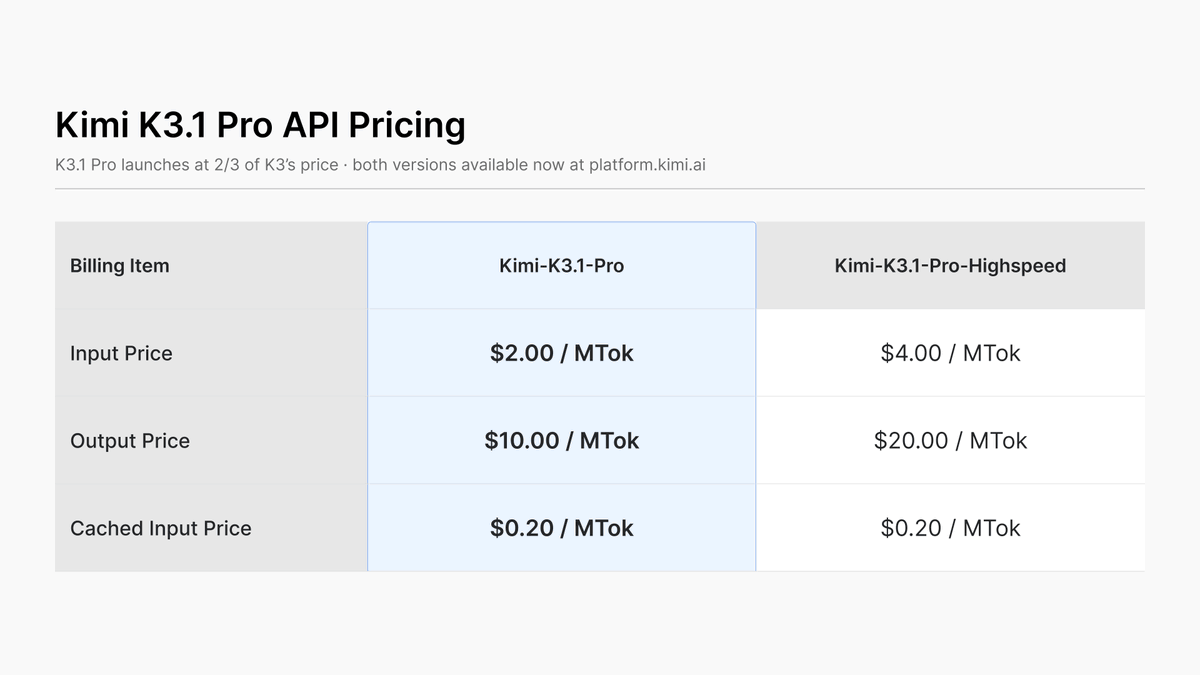
The API is pay as you go, with no subscription, and prices exclude tax.
| Model | Input / 1M | Output / 1M | Cached input / 1M |
|---|---|---|---|
kimi-k3.1-pro |
$2.00 | $10.00 | $0.20 |
kimi-k3.1-pro-highspeed |
$4.00 | $20.00 | $0.20 |
kimi-k3 |
$3.00 | $15.00 | $0.30 |
K3.1 Pro is a third cheaper than K3 on input and output. Caching is automatic for repeated prefixes, with a 5-minute default TTL, and cache hits bill at $0.20. Highspeed runs 2-3x faster at double the price.
Your $1 minimum top-up buys about 500K input tokens or 100K output tokens. When your cumulative top-ups reach $5, you get a $5 voucher, but vouchers don’t count toward cumulative recharge, and whether they apply to K3.1 Pro isn’t stated [VERIFY]. A $1 account starts in Tier0 on the limits page: 1 concurrent request, 3 RPM and 1.5M tokens per day. Tier1 at $10 cumulative lifts that to 100 RPM.
FAQ
Is Kimi K3.1 Pro open weight?
Not yet. Moonshot says the full model weights will be released by November 4, 2026. The license hasn’t been stated.
What’s the difference between K3.1 Pro and K3.1 Pro Highspeed?
Same model family, different speed and price. Highspeed runs 2-3x faster and costs $4/$20 per million tokens against $2/$10. In Kimi Code it needs the Pro plan and uses about 2x quota.
Can I turn off thinking in Kimi K3.1 Pro?
No. Thinking is always on. Set reasoning_effort to "low" to cut reasoning tokens and latency.
Why does my multi-turn conversation break?
You’re probably sending back only the assistant’s content. Append the complete assistant message object to your history, as Moonshot’s docs require for multi-turn chats and tool calls.
Is the Kimi API free?
No. K3.1 Pro unlocks after a $1 minimum top-up. Free chat on the Kimi app is the $0 option, covered in our free guide.
Does Kimi K3.1 Pro support a 1M context window?
Yes. The API supports 1,048,576 tokens. In Kimi Code, the full 1M context needs Allegretto (Pro) or above.