As of October 29, 2026, Google Genie 4 is Google DeepMind’s newest world model: it generates photorealistic, interactive worlds in real time, with sound, music and dialogue produced alongside the picture. It’s a research preview for trusted testers right now, and Google says it’s coming soon to Google AI Ultra subscribers in Project Genie and to early access partners of the Gemini API and Google AI Studio.
Google DeepMind’s Genie 4 was announced on October 27, 2026. This page covers what it does, how Gemini steers it, what changed since Genie 3, its limits, the waitlist, and what you can build with the Gemini API while you wait.
What is Google Genie 4?
Google Genie 4 is a world model: an AI system that simulates an environment and how it reacts, frame by frame, while you move through it. You navigate with a keyboard, steer the scene with text prompts, and Genie 4 renders what happens next, including how the world sounds and how the people in it move, react and speak.
Google calls it “our new world model” and describes it as natively multimodal: ambient noise, music and interactive dialogue are generated at the same time as the world. It builds on the Gemini family. In Google’s words, Gemini Omni “anchors the simulations in real-world appearance and behavior,” while other Gemini models handle the reasoning that keeps a simulation coherent. Google lists two uses: training environments for robots and agents, and new interactive experiences.
Google Genie 4 facts at a glance
Every row comes from Google’s announcement.
| Item | Detail | Source |
|---|---|---|
| Announced | October 27, 2026 | Google DeepMind |
| Type | Real-time interactive world model | Google DeepMind |
| Modalities | Video plus native audio: ambient sound, music, dialogue | Google DeepMind |
| Built on | Gemini Omni for real-world appearance; other Gemini models for coherence | Google DeepMind |
| Controls | Keyboard for navigation and camera, text prompts to steer, reference image as first frame | Google DeepMind |
| Agent in the loop | Gemini 3.8 Flash plans, watches frames and verifies each step | Google DeepMind |
| Current access | Research preview for trusted testers | Google DeepMind |
| Next access | “Coming soon” to Google AI Ultra in Project Genie and to Gemini API and AI Studio early access partners | Google DeepMind |
| Watermark | SynthID on all video and audio | Google DeepMind |
| Release date, price, model ID, resolution, frame rate, session length | Not published | Not stated by Google |
What can Genie 4 do? The four capabilities
Google groups the model’s progress into four capabilities, each shown in real-time recordings.
1. Steer the world in real time with text
You type a change and the world follows: switch the weather, move the camera, add a person or object. Gemini adapts your prompt to the scene, and between inputs it keeps the world moving.
Demo prompt, paraphrased: “Start from this photo of a man playing saxophone on a floating platform in a misty lake, then let the camera glide freely over the water.”
2. Realistic physics and people
Genie 4 simulates aerodynamics, collisions and other physical events. Google calls its handling of people “the most dramatic leap”: characters move naturally, respond to their surroundings and can be steered in real time.
Demo prompt, paraphrased: “A maple seed falls from a tree into the grass, filmed in macro.”
3. Native sound and live dialogue
Google says Genie 4 is “our first real-time world model to generate audio natively.” Every world carries its own ambient sound, and characters hold conversations that react to your inputs and to events in the scene.
Demo prompt, paraphrased: “A first-person ride on a black dragon through a racing course, with thunderous wingbeats and roaring wind.”
4. Complex, multi-step events with Gemini
Pairing Gemini with Genie 4 lets a simulation follow a multi-step plan. The next section covers how.
Demo prompt, paraphrased: “A robot arm holds a pipette and drips liquid into a lab plate, which throws off tiny sparks.”
How Gemini runs inside the loop
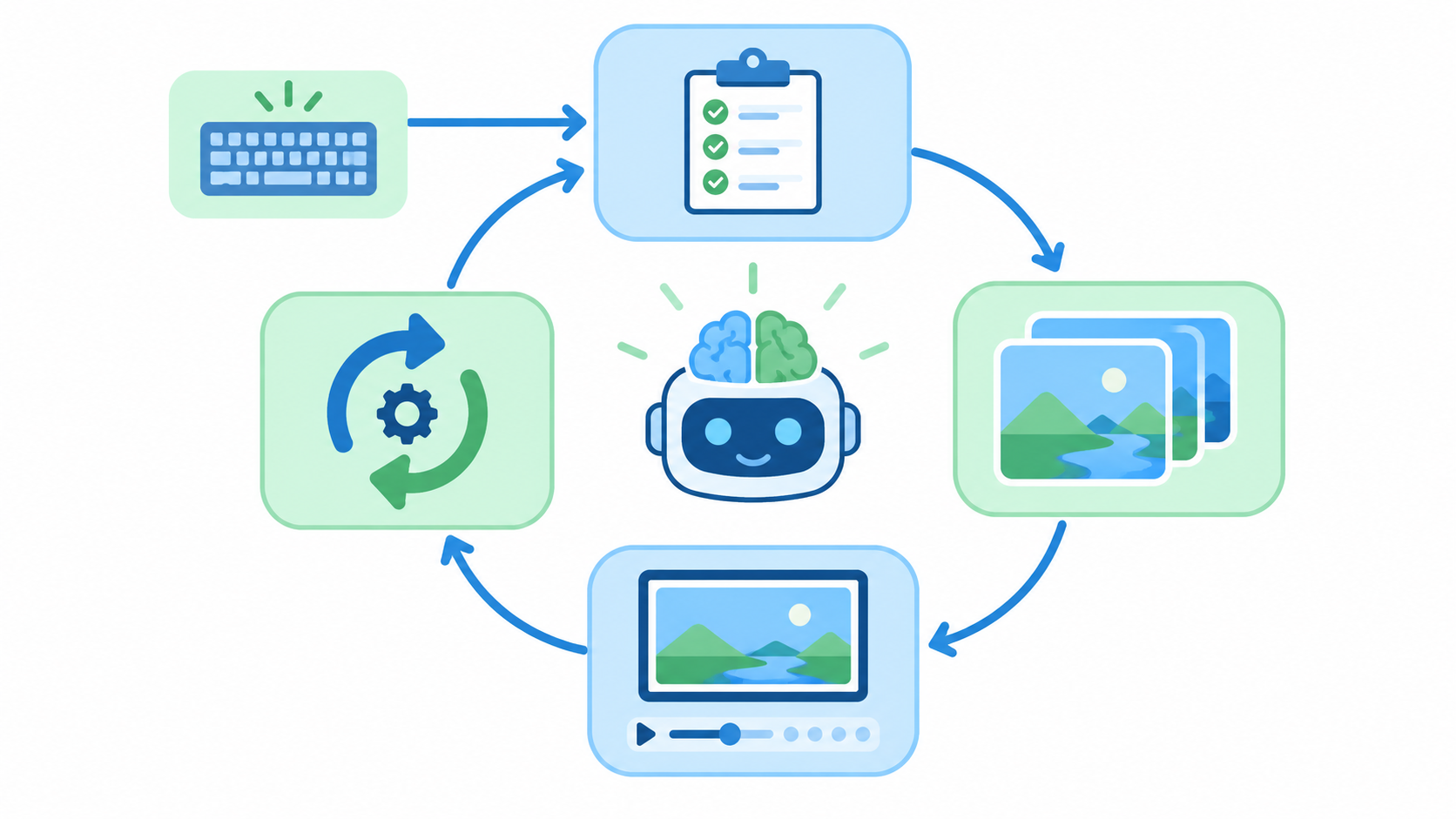
Gemini 3.8 Flash acts as what Google calls “a guiding agent in the loop.” While Genie 4 generates the world, Gemini:
- Watches the scene continuously.
- Breaks your goal into a sequence of steps.
- Reviews the incoming frames to check that each step actually happened.
- Changes its plan on the spot when the world shifts or you intervene.
If you build agents, the pattern is familiar: plan, act, observe, verify, re-plan. More on the planner in our Gemini 3.8 Flash API guide.
Google also paired Gemini 4 Argon with Genie 4 and Gemini Robotics. In that demo, Argon splits a user’s task into steps and feeds them to Genie 4 as text captions while the simulation renders. The result is a simulated Apptronik Apollo humanoid playing a game of checkers, one step at a time.
Genie 3 vs Genie 4: what changed
Google announced Genie 3 on August 5, 2025. This comparison uses only what Google’s two announcement posts state.
| Genie 3 (Aug 2025) | Genie 4 (Oct 2026) | |
|---|---|---|
| Real-time interaction | Yes, Google’s first real-time world model | Yes |
| Published specs | 24 fps, 720p, consistent for “a few minutes” | None published |
| Text steering | “Promptable world events”: weather, objects, characters | Real-time text steering, adapted to the scene by Gemini |
| Audio | Not mentioned in the post | Native ambient sound, music and dialogue |
| Gemini integration | Not described | Gemini Omni for realism, Gemini 3.8 Flash as agent in the loop |
| People | Multi-agent interaction listed as a limitation | Characters move, react and speak in real time |
| Access at launch | Limited research preview for academics and creators | Research preview for trusted testers |
Genie 3 later reached users through Project Genie, a Google Labs app; our guide to using Google Genie 3 covers that path.
Genie 4 limitations, in Google’s words
Google is direct about what doesn’t work yet. Genie 4 “remains an early, evolving area of research,” and the post lists these limits:
- Short-session coherence. Environments stay coherent over short sessions, but visual details and object permanence “can still shift or drift over time.”
- Drift triggers. Drift is worse as a simulation runs longer, after several complex prompt edits, and while you navigate through the scene.
- Open problems. Complex physical interactions, real-time audio accuracy, legible text, spatial accuracy and long-term consistency are all “active areas of ongoing research.”
On safety, Google says Genie 4 has guardrails matching its other models, passed internal safety evaluations and went to trusted testers first. All its video and audio carries SynthID, Google’s invisible watermark.
Who is testing Genie 4 today?
Trusted testers come from creative industries, journalism, education, gaming and engineering. Filmmakers use it as a “draft mode” for pre-visualization, photojournalists turn an archival photo into an explorable scene, and game developers go “from an initial idea to an explorable prototype in seconds.”
How to join the Genie 4 waitlist
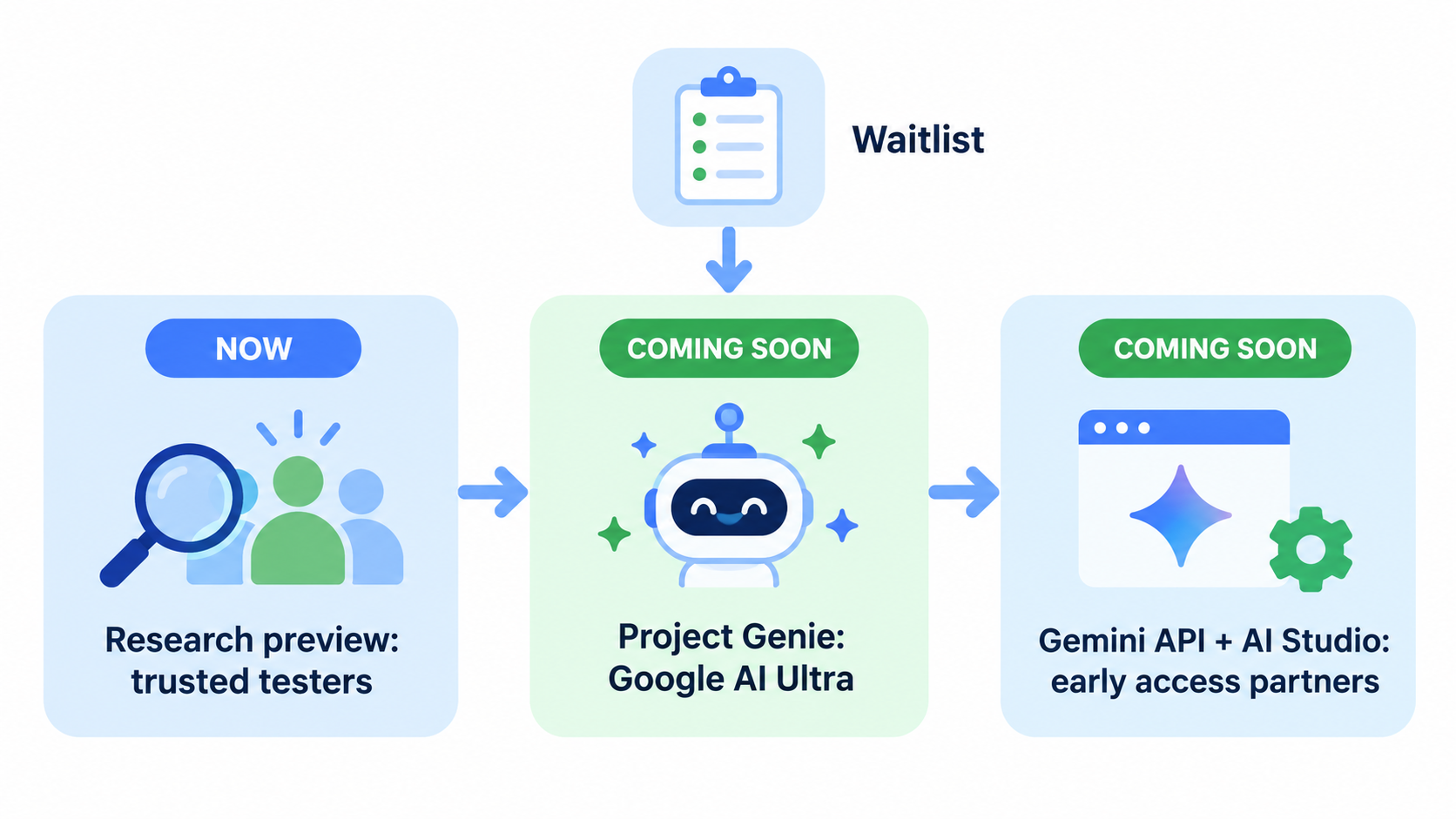
Google runs one public waitlist, for Genie 4 in Project Genie.
- Open Google DeepMind’s Genie 4 post.
- Click Join the Genie 4 waitlist at the top, or the “here” link in the “Next steps” section. Both open Google’s Genie 4 waitlist form.
- Fill in the form, titled “Apply for Genie 4 access in Project Genie”.
- Watch Project Genie for the rollout. Google names Google AI Ultra subscribers as the first consumer group.
Developer access is a separate track with no published application process yet; see our Genie 4 API early access guide.
Is Project Genie free? Google hasn’t announced a free tier for Genie 4. We break down cost and every $0 option in Is Project Genie free?, and list other world models you can try now in Project Genie alternatives.
What developers can build with the Gemini API today
There’s no Genie 4 endpoint yet, but the Gemini half of the loop is public. gemini-3.8-flash is on the Gemini API models page, so you can build the plan-and-verify step against your own frames: send an image and a goal, get back steps and a verdict.
A minimal request to the generateContent endpoint looks like this:
curl "https://generativelanguage.googleapis.com/v1beta/models/gemini-3.8-flash:generateContent" \
  -H "x-goog-api-key: $GEMINI_API_KEY" \
  -H "Content-Type: application/json" \
  -d '{
    "contents": [{
      "parts": [
        {"text": "Goal: the character opens the door. Plan the steps as JSON, then say if this frame shows step 1 done."},
        {"inline_data": {"mime_type": "image/png", "data": "<BASE64_FRAME>"}}
      ]
    }],
    "generationConfig": {"responseMimeType": "application/json"}
  }'
When Genie 4 opens to API partners, your supervisor layer is already tested.
Let your coding agent test it with Apidog CLI
A verifier that changes its JSON shape breaks your loop quietly. Let your coding agent run Apidog CLI against the Gemini endpoint on every change.
npm install -g apidog-cli@latest
apidog login --with-token <YOUR_TOKEN>
npx -y skills add https://apidog.com   # pick your agent when prompted
Then give Claude Code, Codex or Cursor one prompt:
In Apidog project <id>, create a test case for POST
/v1beta/models/gemini-3.8-flash:generateContent that sends a sample frame and a goal,
asserts status 200, asserts the response text parses as JSON with a "steps" array and a
"verified" boolean, then run it against the gemini environment and summarize any failures.
The agent reads the payload schema, validates its file, creates the case and runs it:
apidog cli-schema get test-case-create
apidog cli-schema validate test-case-create --file case.json
apidog test-case create --project <id> --file case.json
apidog run --test-case <caseId> --project <id> -e <envId> -r cli,json
Swap -r cli,json for -r junit and the same run fits a CI job; our Apidog CLI CI/CD guide shows the setup, and Apidog CLI in Claude Code covers the agent side. Apidog’s Free plan covers up to 4 users.
FAQ
When will Google Genie 4 be released? Google hasn’t given a date. As of October 29, 2026, Genie 4 is a research preview for trusted testers, and Google says it’s “coming soon” to Google AI Ultra subscribers in Project Genie and to Gemini API and Google AI Studio early access partners.
Is Genie 4 available in the Gemini API? Not publicly. Google lists early access partners of the Gemini API and Google AI Studio as a next step but hasn’t published a model ID, docs or pricing.
What’s the difference between Genie 4 and Project Genie? Genie 4 is the model. Project Genie is the Google Labs app where consumers use Google’s world models. Google’s waitlist is for Genie 4 inside Project Genie.
Does Genie 4 generate sound? Yes. Google calls it its first real-time world model to generate audio natively: ambient sound, music and interactive dialogue are produced with the world.
How long can a Genie 4 session stay consistent? Google doesn’t give a number. It says environments stay coherent over short sessions, with details and object permanence drifting over longer runs, after many prompt edits, or while you navigate.