Static webpages are no longer enough to retain users on a website - they love dynamic and interactive experiences. Therefore, to create such websites, developers need to familiarize themselves with frontend API integrations.
Introducing to you Apidog, a one-stop solution to all your API problems. With Apidog, building, testing, mocking, and documenting APIs can be done in a single application!
If you wish to experience developing an API with a simple and intuitive user interface, try Apidog for free today by clicking the button below!

Frontend API integration involves leveraging APIs (Application Programming Interfaces), the messengers between user actions and backend services for delivering real-time data and tailor experiences to user input. However, what exactly does frontend mean?
In the term "frontend API integration", frontend refers to the part of a website or application that users directly interact with. This includes all the visual elements you see, such as buttons, menus, texts, and images.
What is Frontend API Integration?
Frontend API integration is the process of connecting this user interface with APIs to make the website dynamic and functional. The frontend code fetches data and sends user actions through the API to the backend, which handles the actual processing and data storage. This allows the frontend to display real-time information and respond to user input, creating a more engaging user experience.
Benefits for Frontend API Integration
- Enhanced Functionality: APIs allow you to tap into pre-built features and functionalities offered by external services or your own backend. This saves development time and resources compared to building everything from scratch. Imagine integrating a payment gateway or a social media login using their APIs – instant functionality without reinventing the wheel.
- Dynamic and Rich User Experiences: Static websites are a thing of the past. Frontend API integration allows you to fetch and display real-time data, personalize content based on user input, and create interactive elements. This keeps users engaged and coming back for more.
- Improved Scalability: Frontend and backend can be scaled independently. The frontend can handle more users without needing changes to the backend if the API is designed well. This flexibility is crucial for applications that experience fluctuating traffic.
- Faster Development Cycles: By leveraging pre-built functionalities and reusing code, developers can focus on building the core features and logic of the application. This leads to faster development cycles and quicker time to market.
- Easier Maintenance: Frontend code is cleaner and more focused when it retrieves data and handles user actions through APIs. This separation of concerns makes it easier to maintain and update the codebase in the long run.
Frontend API Integration Code Examples
The example below shows how to fetch data from a public API and display it on the webpage using JavaScript and the Fetch API.
 David Demir
<div id="posts-container"></div>
const container = document.getElementById('posts-container');

function getPosts() {
  fetch('https://example.com/api/posts')
    .then(response => response.json())  // Parse JSON response
    .then(data => {
      const postList = document.createElement('ul');
      data.forEach(post => {
        const listItem = document.createElement('li');
        listItem.textContent = post.title;
        postList.appendChild(listItem);
      });
      container.appendChild(postList);
    })
    .catch(error => {
      console.error('Error fetching posts:', error);
      container.textContent = 'Error retrieving posts.';
    });
}

getPosts();
Code Explanation:
- HTML: We define a container element (
div) where we'll display the fetched post data.
JavaScript:
- We get a reference to the container element using
document.getElementById. - The
getPostsfunction fetches data from the API usingfetch. fetchreturns a promise, so we chain.thenmethods to handle the response.- The first
.thenparses the JSON response usingresponse.json(). - The second
.theniterates through the retrieved data (data) and creates a list element (li) for each post title. - We build an unordered list (
ul) and append the list items. Finally, we append the list to the container element. - An error handling
.catchblock logs any errors and displays an error message in the container. - We call
getPoststo initiate the data fetching process.
Below this caption is another code example that demonstrates frontend API integration using the Axios library for a more concise API call.
Ashley Innocent
const axios = require('axios'); // Assuming Axios is installed

const container = document.getElementById('posts-container');

async function getPosts() {
  try {
    const response = await axios.get('https://example.com/api/posts');
    const postList = document.createElement('ul');
    response.data.forEach(post => {
      const listItem = document.createElement('li');
      listItem.textContent = post.title;
      postList.appendChild(listItem);
    });
    container.appendChild(postList);
  } catch (error) {
    console.error('Error fetching posts:', error);
    container.textContent = 'Error retrieving posts.';
  }
}

getPosts();
Code Explanation:
- We import Axios using
require(assuming a module bundler is used). - The
getPostsfunction usesasync/awaitsyntax for a cleaner approach. - We use
axios.getto make the API call and store the response in a variable. - The
.dataproperty of the response object contains the parsed JSON data. - The rest of the code remains similar to the previous example.
Apidog - Generating Code Examples for Fast Frontend Development
Frontend code development can get rapidly complicated when you wish to have a more dynamic website. Luckily, there is an API development tool called Apidog that allows you to create APIs and code from your API and application development concurrently!

Generating Frontend Code Using Apidog
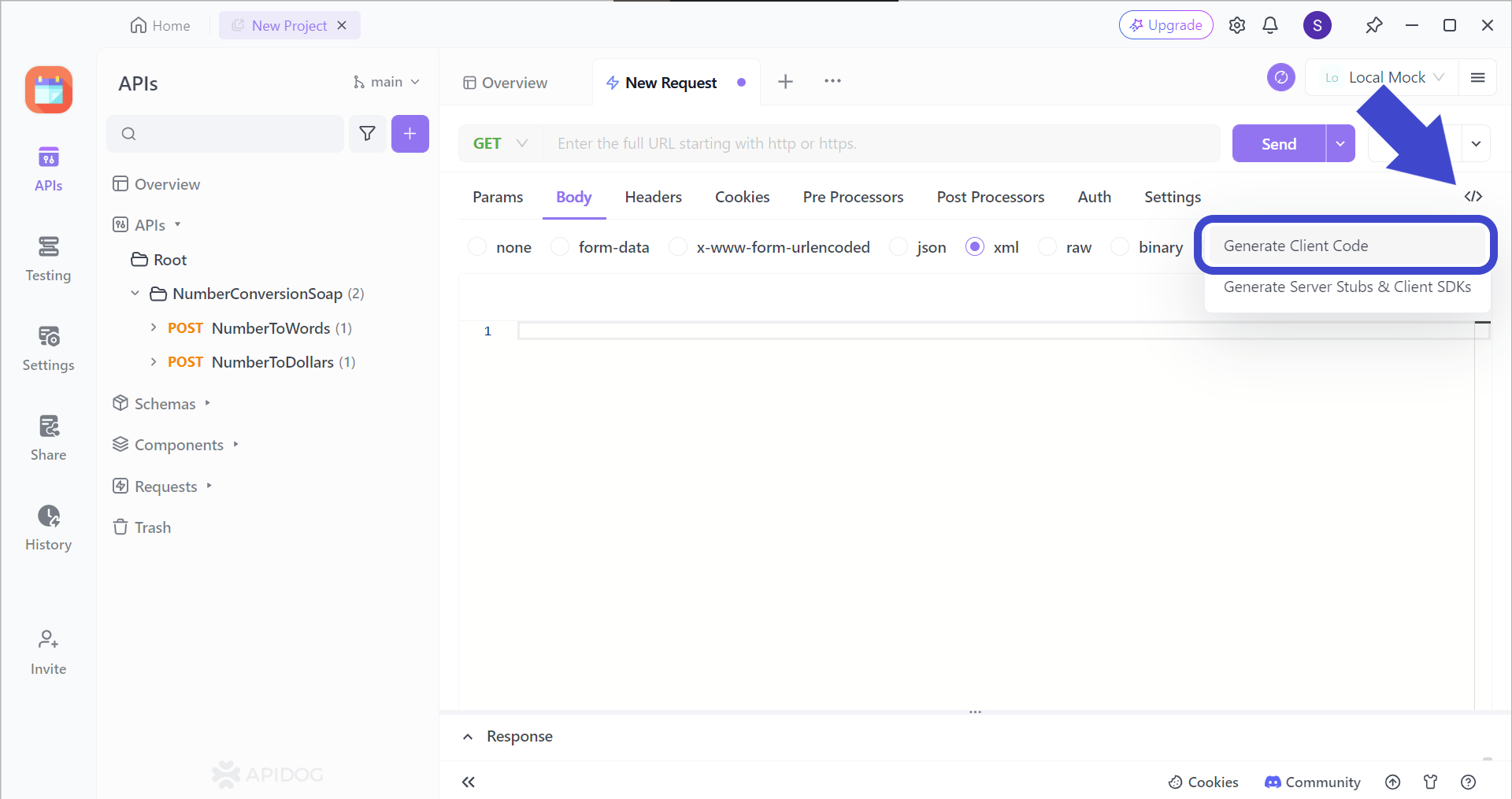
To utilize Apidog's code generation feature, begin by clicking the </> button found on the top right corner of the Apidog window, and press Generate Client Code.
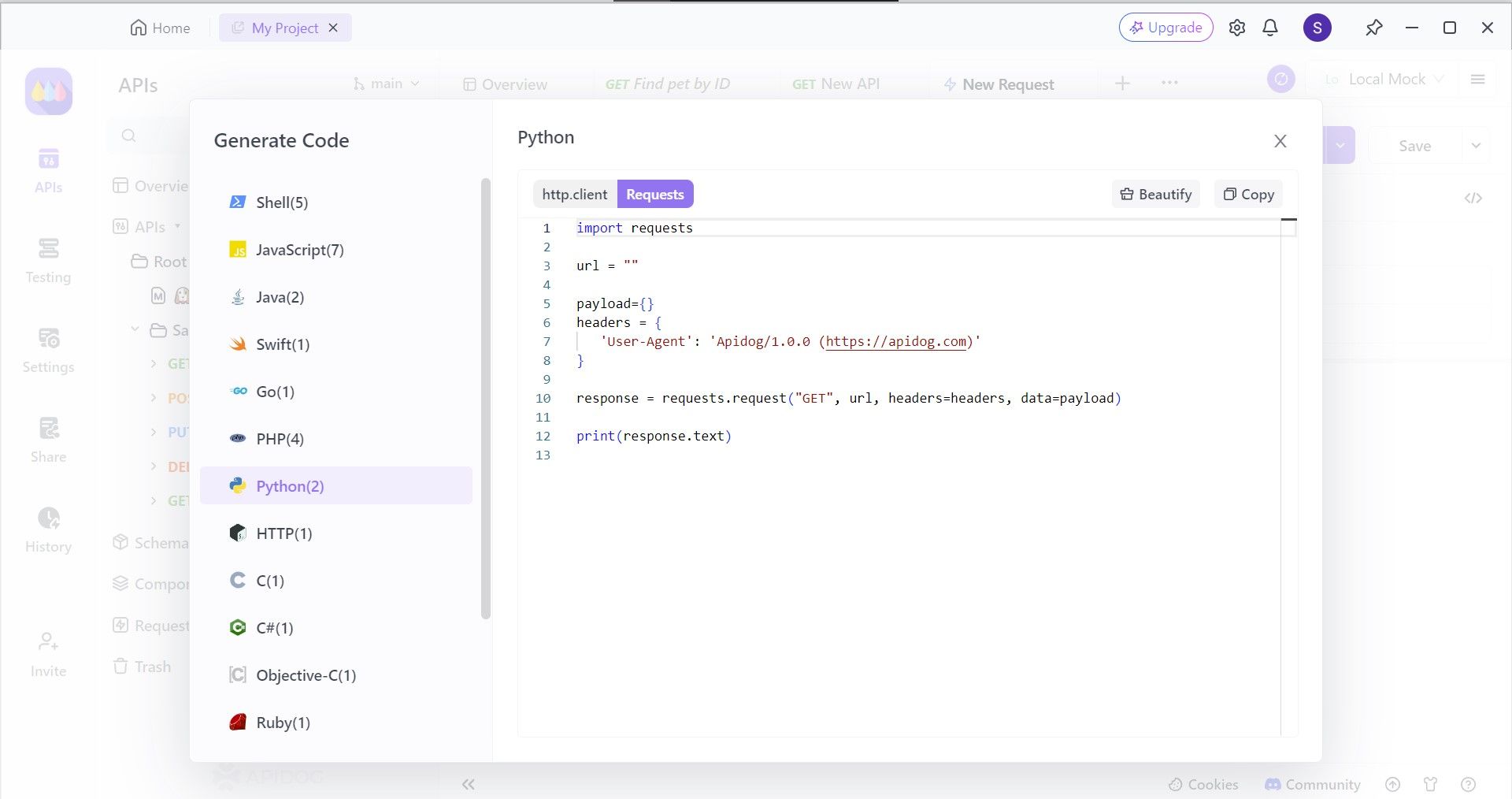
Next, select the programming language you wish to generate code. You should be able to find different frameworks for the JavaScript language. In this step, select Requests, and copy the code to your IDE!
Using Apidog to Ensure APIs Run As Intended
With Apidog, you can test API endpoints individually. These can be preliminary tests to ensure that your APIs are running as how you intend them to.
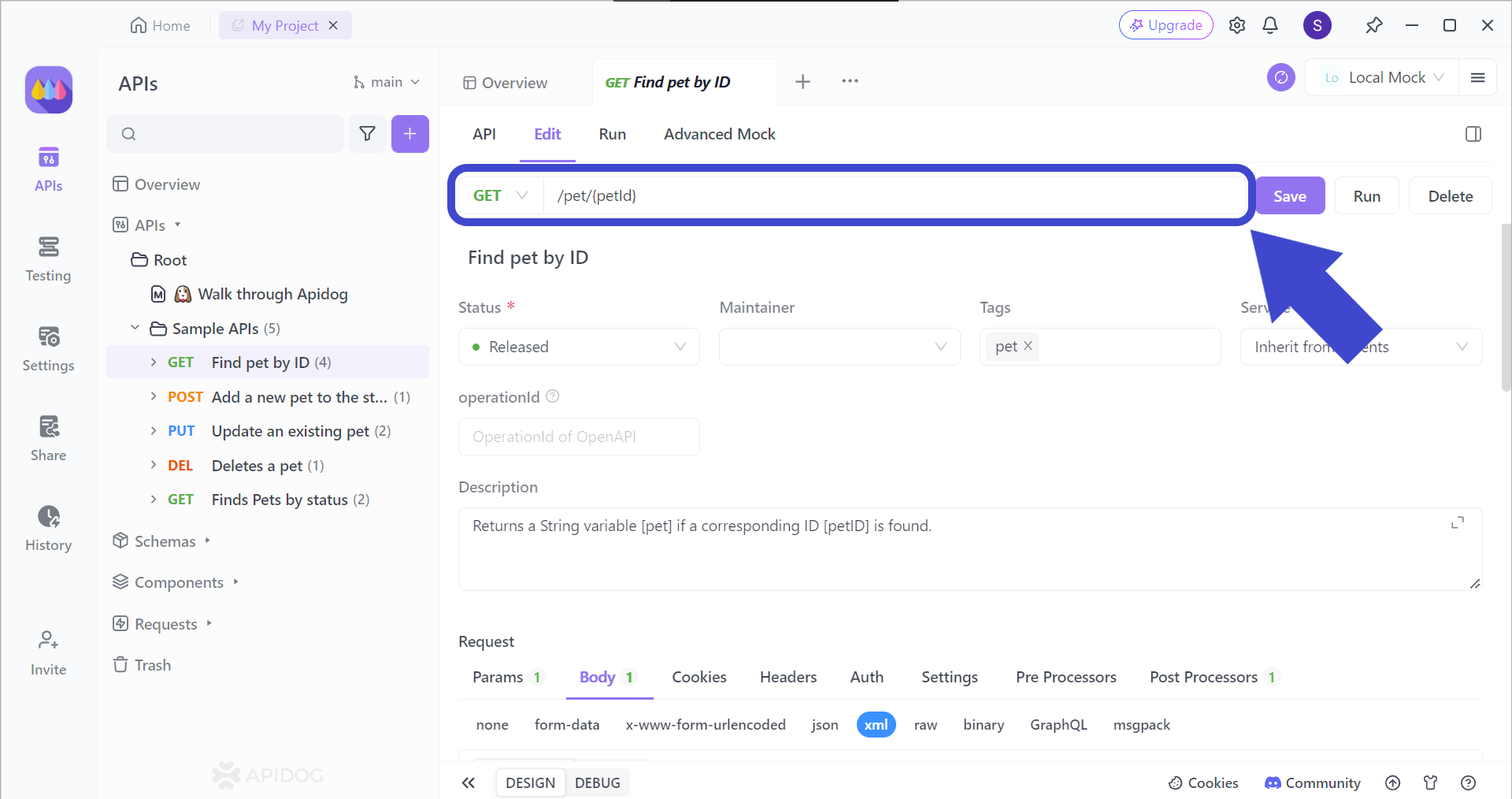
To target the correct API endpoint, you first have to insert the corresponding API endpoint that you want to test. Once you have included the intended API URL, include the parameters that you want to use for the endpoint (if relevant).
Conclusion
Frontend API integration has become an essential tool in the modern web developer's arsenal. By leveraging APIs, developers can craft dynamic and feature-rich user experiences that keep users engaged. This approach streamlines development by allowing access to pre-built functionalities and enables real-time data manipulation, fostering a more interactive environment.
As web applications continue to evolve, mastering frontend API integration will be key to building robust and captivating experiences that stand out in the ever-growing digital landscape. You should also remember to update your API tools to one like Apidog. With the most modern and powerful functionalities, you can streamline your API development for free today!