

Hey there, API enthusiasts! We all know Postman is a game-changer when it comes to streamlining API development and testing workflows. But what if you could inject even more functionality into your Postman environment? Enter the magic of external libraries!
Adding external libraries to Postman unlocks a treasure trove of possibilities. Imagine seamlessly integrating powerful tools like Moment.js for date manipulation, Lodash for data transformations, or even custom libraries tailored to your specific needs. This post will be your comprehensive guide to harnessing the potential of external libraries in Postman, making your API testing experience smoother and more efficient than ever before.
Why Use External Libraries in Postman?
Before we dive into the nitty-gritty, let's explore the compelling reasons to leverage external libraries:
- Enhanced Functionality: Libraries often provide pre-written code for common tasks, saving you precious time and effort. Need to format dates, parse JSON, or perform string manipulations? External libraries have you covered.
- Code Reusability: Say goodbye to repetitive code snippets. Libraries allow you to define functions and variables once and reuse them throughout your Postman collections, promoting cleaner and more maintainable code.
- Reduced Development Time: By utilizing readily available libraries, you can focus on the core logic of your API tests rather than reinventing the wheel for common functionalities.
- Improved Collaboration: Sharing libraries within your team fosters consistency and ensures everyone is working with the same set of tools, streamlining collaboration and knowledge sharing.
Importing External Libraries: Two Powerful Methods
Postman offers two primary methods for incorporating external libraries:
1. Fetching from a CDN (Content Delivery Network):
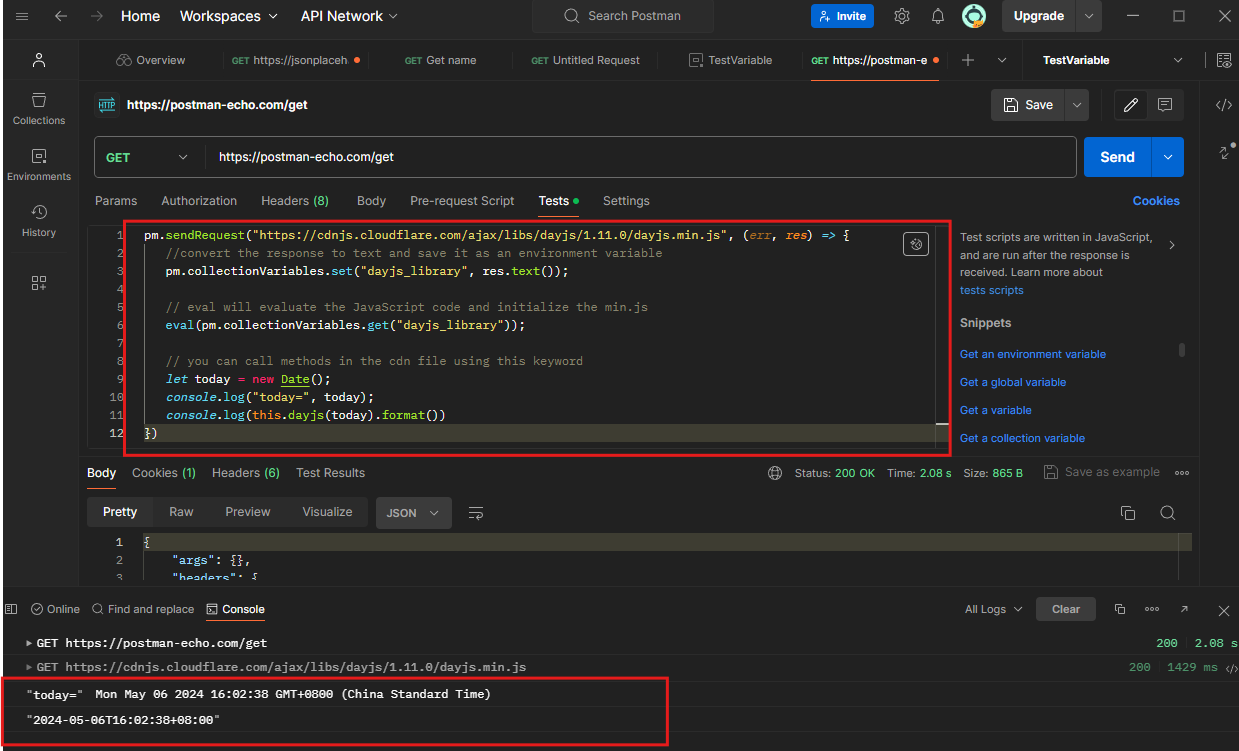
Many libraries have CDN versions hosted on platforms like jsDelivr or cdnjs. This allows you to directly import the library code into Postman using the pm.sendRequest function. Here's how:
- Locate the CDN URL: Find the CDN link for your chosen library (usually provided on its documentation page).
- Craft a Pre-request Script: Within your request's "Pre-request Script" tab, use
pm.sendRequestto fetch the library code from the CDN URL. - Store and Evaluate: Save the fetched response as a collection variable and use the
evalfunction to execute the library code, making its functions accessible within your Postman environment.
2. Loading from a Collection Variable:
If you prefer to avoid making an API request each time, you can directly store the library code within a collection variable. Here's the process:
- Copy and Paste the Code: Locate the library's JavaScript code (often found on its GitHub repository).
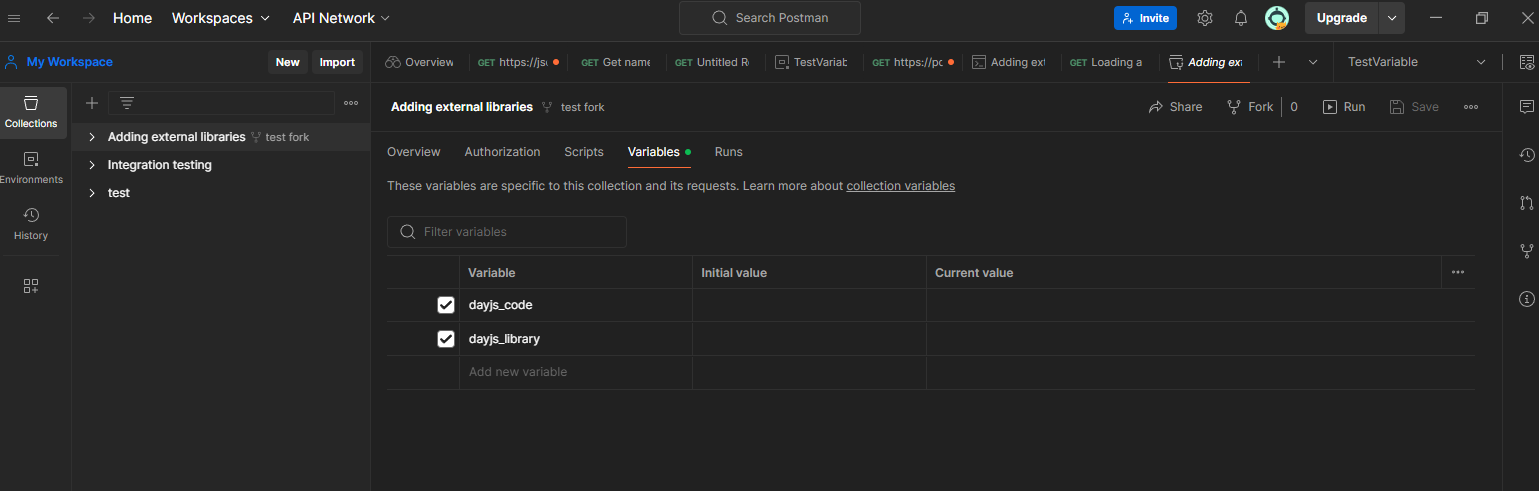
- Create a Collection Variable: Within your collection, create a new variable and paste the library code into it.
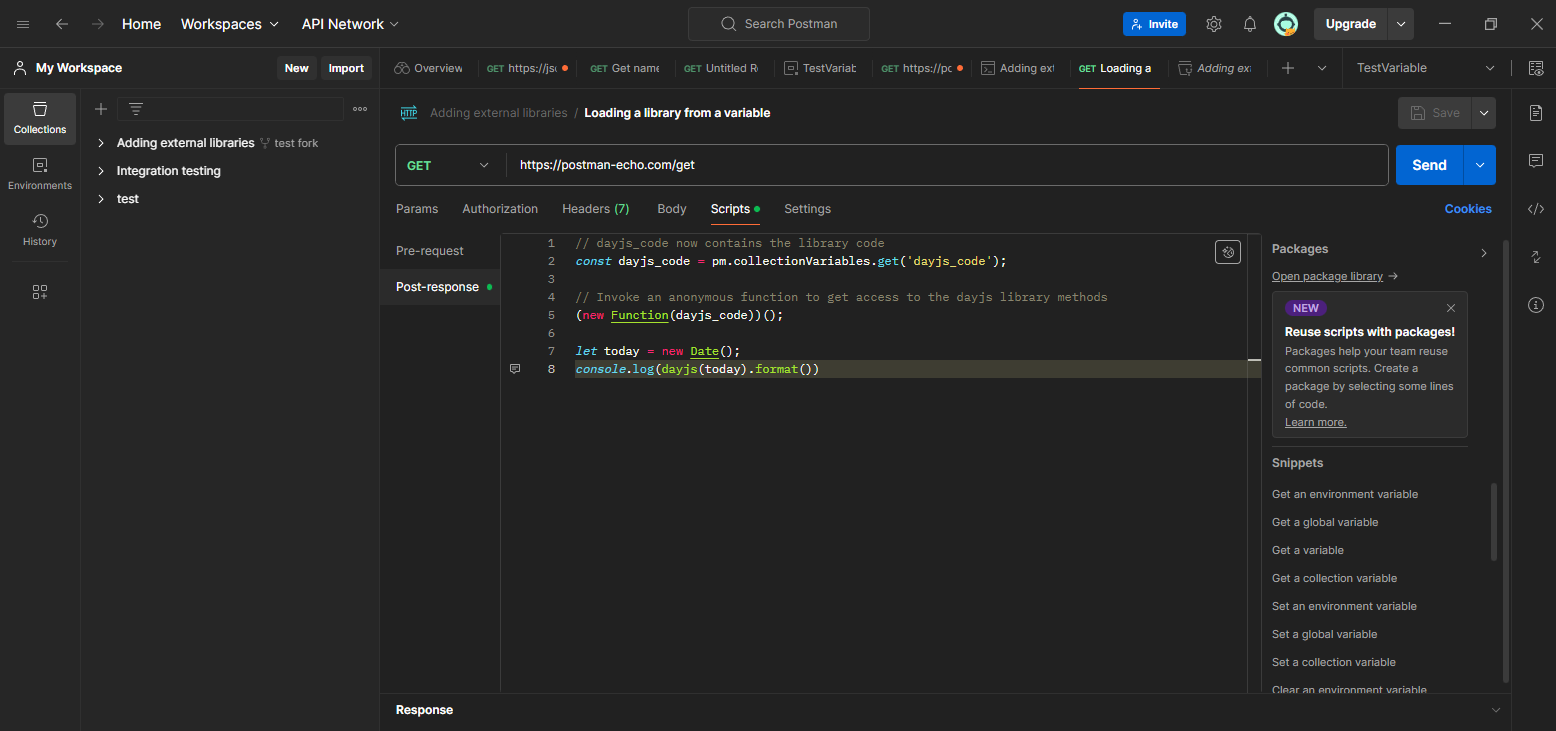
- Utilize an IIFE (Immediately Invoked Function Expression): In your Postman scripts, use an IIFE to wrap the library code, making its methods available within the Postman sandbox.
Remember, both methods have their advantages. Fetching from a CDN keeps your collection code clean, while loading from a variable eliminates the need for additional API requests. Choose the approach that best suits your workflow!
How to Import External Libraries in Apidog
Apidog is an integrated collaboration platform designed to streamline the API lifecycle. It combines the functionalities of several tools such as Postman, Swagger, Mock, and JMeter into a single platform.
Apidog contains a Javascript-based scripting engine. You can use scripts (JavaScript code snippets) to add dynamic behavior to API requests or collection tests.
To import libraries that are not built-in but have been made available on npm dynamically using the $$.liveRequire function. Only pure js libraries are supported, preferably libraries with the word browser written to support browser-side operation. Libraries containing language extensions such as C/C++ are not supported for loading and will run out of time or exceptions.
Below is an example of using a non-built-in JS class library.
// Get a single npm library: camelcase
$$.liveRequire("camelcase", (camelCase) => {
  camelCase("foo-bar"); // => 'fooBar'
});

//Get a multiple npm libraries: camelcase
$$.liveRequire(["camelcase", "md5"], (camelCase, md5) => {
  camelCase("foo-bar"); // => 'fooBar'
  md5("message"); // => '78e731027d8fd50ed642340b7c9a63b3'
});
Apidog script syntax is 100% compatible with Postman script syntax. Postman scripts can be seamlessly migrated to Apidog.

- Use the postprocessor script to write your custom script to import the Libraries

2. Send the request and analyze the answer in the console tab

Popular External Libraries to Supercharge Your API Testing
Now that you know the how-to, let's explore some popular external libraries that can significantly enhance your Postman experience:
- Lodash: This versatile library provides a vast array of utility functions for data manipulation, making complex transformations a breeze.
- Moment.js: Working with dates and times? Moment.js offers an intuitive API for parsing, formatting, and performing calculations on dates, a lifesaver for date-heavy APIs.
- Chai.js: This assertion library empowers you to write clear and concise assertions for validating API responses, ensuring your tests are robust and reliable.
- Faker.js: Need realistic test data? Faker.js generates realistic data for names, addresses, emails, and more, perfect for creating comprehensive test scenarios.
These are just a few examples, and the world of external libraries is vast! Explore and experiment to find the tools that perfectly complement your API testing needs.
Examples in Action: Bringing Libraries to Life in apidog and Postman
To solidify our understanding, let's explore concrete examples of using popular libraries in Apidog Postman:
Moment.js for Date Manipulation: Imagine you're testing an API endpoint that requires date formatting. Moment.js comes to the rescue! You can import it using one of the methods mentioned above and then leverage its intuitive functions to format, parse, and perform calculations on dates within your Postman tests.
Lodash for Data Transformations: Working with complex JSON data structures? Lodash offers a vast array of utility functions for filtering, sorting, grouping, and transforming data. Integrate Lodash into your Postman environment to streamline your data handling tasks and write more concise and expressive tests.
Pro Tips for Seamless Library Integration
As you delve into the world of external libraries, keep these tips in mind:
- Version Compatibility: Ensure the library version you're using is compatible with your Postman environment to avoid unexpected issues.
- Code Organization: Maintain clean and organized code within your Postman scripts for better readability and maintainability.
- Community Resources: Leverage the wealth of online resources and communities dedicated to specific libraries. You'll often find valuable tutorials, examples, and troubleshooting guides.
Conclusion
Adding external libraries to Postman and Apidog is a straightforward process that can greatly enhance your API testing and development workflow. By incorporating these libraries, you can leverage additional functionalities, reduce redundancy, and increase the efficiency of your API calls. Remember, the key is to understand the documentation of the library you’re integrating and ensure it’s compatible with your current setup. Happy testing and developing!


