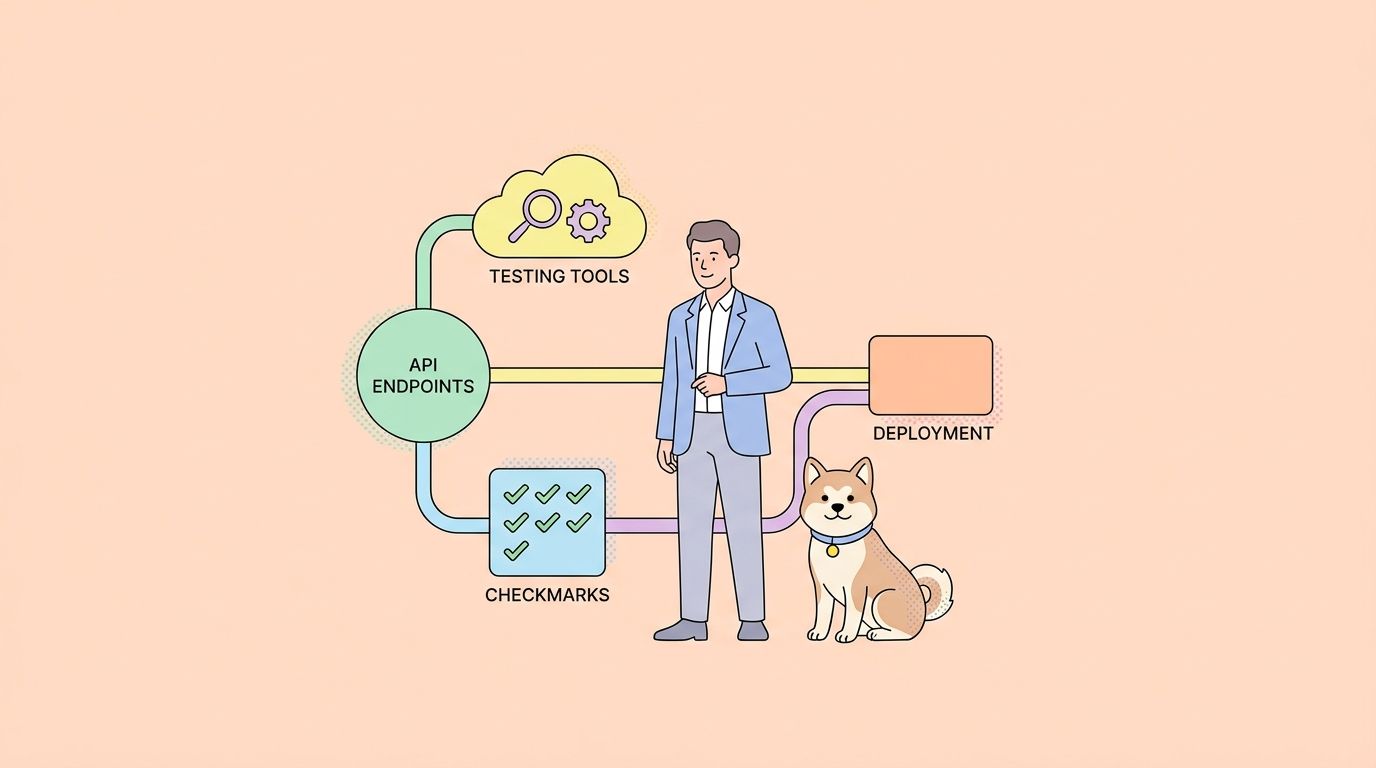
If you’re moving from Stoplight Studio or Stoplight Platform to Apidog, the first thing to know is that you don’t need to re-upload your OpenAPI specs. Apidog’s Spec-First Mode (currently in beta) connects directly to your existing GitHub or GitLab repo, so Git stays the source of truth and your commit history stays intact. This guide walks through every step: exporting your Stoplight config, mapping its directory conventions to Apidog’s expectations, and replacing .stoplight.json and toc.json with their Apidog equivalents.
Teams like those at the World Economic Forum already manage OpenAPI specs in Git alongside Stoplight for documentation. If that describes your setup, this guide is written for you. And if you’re still weighing options rather than committing to a migration, the top Stoplight Studio alternatives post covers the broader landscape.
What stays the same when you migrate
Your OpenAPI files, your Git repo, and your branch strategy don’t change. That’s the key premise. Stoplight stores specs as YAML or JSON files checked into source control. Apidog reads those same files when you connect a repo in Spec-First Mode.
What does change is everything layered on top: the documentation renderer, the mock server, the test runner, and the API client. Instead of Stoplight Platform serving docs and Postman handling tests as a separate tool, Apidog combines all of that in one workspace, synced against the same OpenAPI file your engineers are already committing.
The practical upshot: your migration is mostly a configuration swap, not a data migration.
Step 1: Export your Stoplight project assets
Before touching Apidog, capture everything Stoplight holds that isn’t already in Git.
If you use Stoplight Studio with a Git backend:
Your OpenAPI specs, JSON Schema models, and Markdown documentation are already committed. Run a git pull to make sure your local clone is current. Stoplight follows the OpenAPI Specification format, and those spec files work in Apidog without conversion. Your repo structure likely looks like this:
your-api-repo/
  .stoplight.json          # Project config (needs replacement)
  reference/
    petstore.yaml          # Your OpenAPI spec(s)
  models/
    error.json             # Shared JSON Schema models
  docs/
    introduction.md        # Markdown guide pages
    authentication.md
  toc.json                 # Table-of-contents order (needs replacement)
  assets/
    images/
      architecture.png
If you use Stoplight Platform (cloud-hosted, no Git backend):
Export your specs from the Stoplight UI: open each API project, go to “Export”, and download the OpenAPI YAML. For Markdown docs, copy them into a docs/ folder in a new Git repo. Stoplight doesn’t offer a bulk export for non-Git projects, so do this per API project.
Once your files are in a Git repo (GitHub or GitLab), proceed to the next step.
Step 2: Understand the config files you’re replacing
Two Stoplight-specific files drive project structure. Neither has a direct counterpart in Apidog, but understanding what they do tells you exactly what to configure in Apidog instead.
| Stoplight file | What it does | Apidog equivalent |
|---|---|---|
.stoplight.json |
Declares the project root, spec paths, docs paths, and which files are included in the project | Repo connection settings inside the Apidog project (configured via UI, not a file) |
toc.json |
Controls the order and grouping of pages in the Stoplight docs sidebar | Apidog reads directory structure; sidebar order is set in the Apidog docs editor, not a flat file |
reference/ convention |
Where Stoplight expects OpenAPI spec files | Configurable in Apidog Spec-First Mode; defaults to repo root, but you can point it at reference/ |
models/ convention |
JSON Schema files for shared components | Reference these from your OpenAPI spec’s components/schemas section; Apidog resolves $ref paths |
docs/ convention |
Markdown guide pages | Import as documentation pages in Apidog; directory hierarchy maps to sidebar sections |
The key insight: .stoplight.json and toc.json are Stoplight-proprietary. You can leave them in the repo (Apidog ignores unknown files), but they won’t drive anything in Apidog. You configure equivalent settings through the Apidog project UI.
Step 3: Connect your repo to Apidog Spec-First Mode
Apidog Spec-First Mode is how you link a GitHub or GitLab repo to an Apidog project so the OpenAPI spec is always read from Git, not from an internal Apidog database. This keeps Git as the authoritative source, and it means your engineers can keep submitting PRs to update the spec exactly as they do today.
Here’s the connection flow. You can also review GitHub’s docs on connecting third-party apps to repositories if you’re uncertain about the OAuth permission grant.
- In Apidog, create a new project Spec-First Mode
- Authenticate Apidog with your GitHub or GitLab account and select the repo.
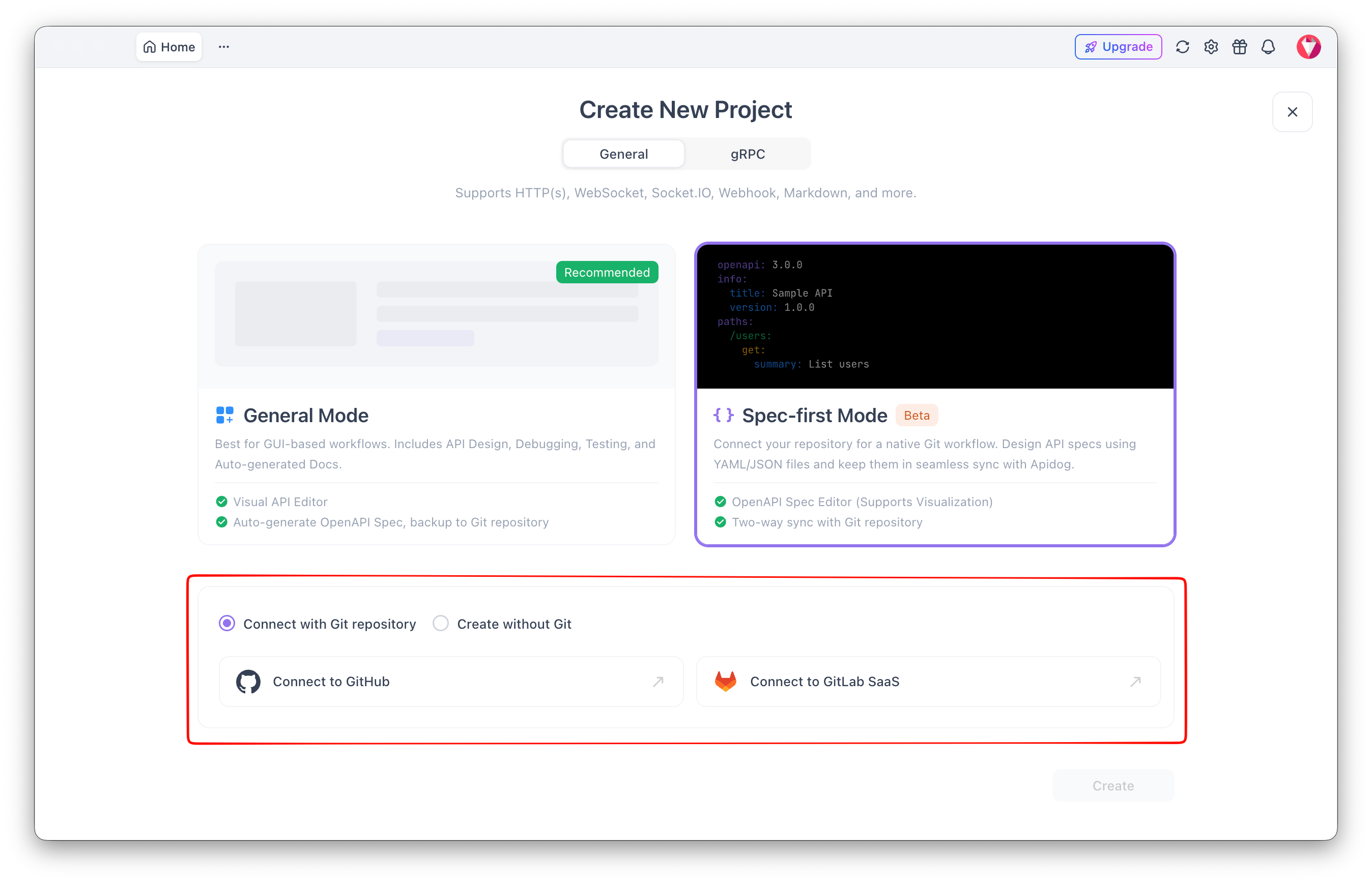
3.Set the branch: use your default branch (main or master) for production specs, or a feature branch during migration testing.
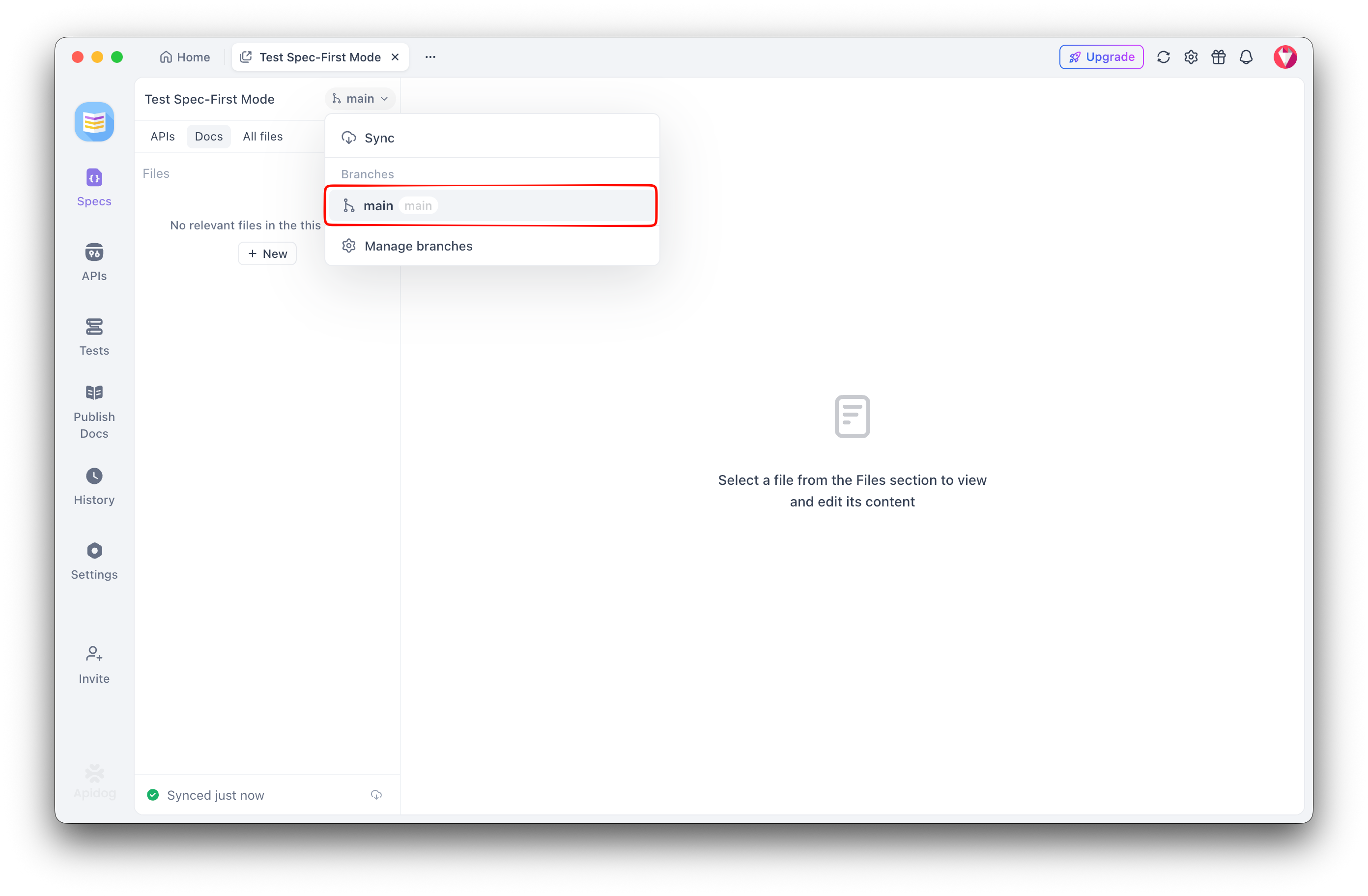
- Save. Apidog reads the spec and builds the interactive documentation, mock server endpoints, and test scaffolding from it.
If your spec uses $ref to pull in schemas from the models/ directory, Apidog resolves those references relative to the spec file’s location. No extra configuration is needed as long as the paths in your OpenAPI file are correct. For a deeper look at how this Git sync works, the sync OpenAPI spec to GitHub guide covers the mechanics in detail.
Step 4: Migrate your Markdown documentation
Stoplight lets you mix Markdown guide pages with API reference docs in a single sidebar. Apidog does the same through its documentation editor.
After connecting your repo, import your docs/ Markdown files:
- In the Apidog project, open the Docs section.
- Use Import > Markdown and upload your files, or paste content page by page.
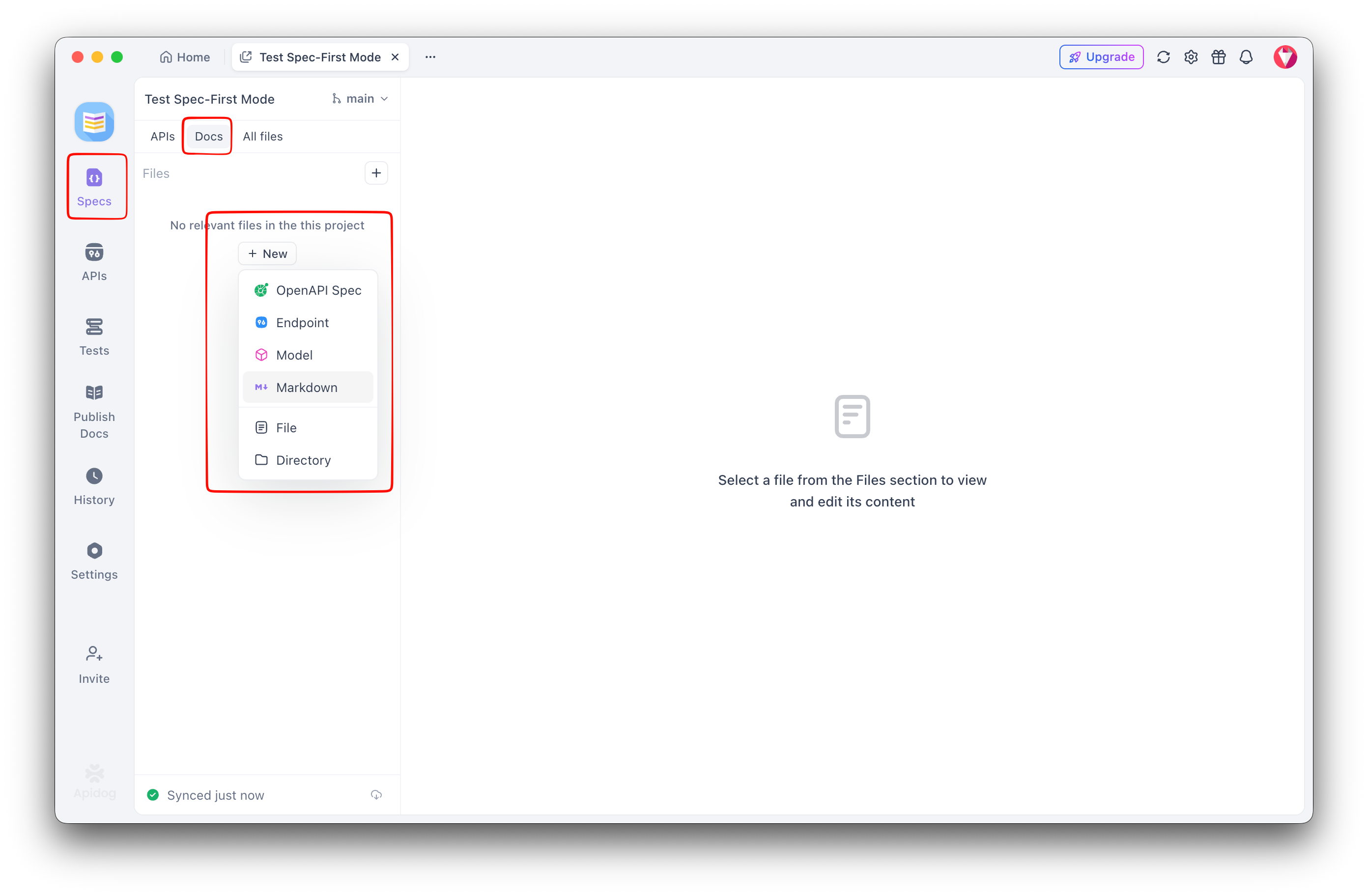
For image assets referenced in your Markdown (the assets/images/ folder in a typical Stoplight layout), upload them to Apidog’s file storage and update the  references in each page. If your images are already hosted on a CDN or a public URL, you don’t need to change anything.
Step 5: Replace Stoplight’s mock server
Stoplight Studio includes a local mock server that reads your OpenAPI spec and returns example responses. Apidog’s mock server does the same, but it’s cloud-hosted and accessible to your whole team without running a local process.
Once your spec is connected via Spec-First Mode, Apidog auto-generates mock endpoints for every operation defined in your OpenAPI file. Example responses come from the examples field in your spec, or from Apidog’s smart mock engine if no example is defined. You can override response rules per endpoint inside Apidog without touching the spec file.
For a team accustomed to running stoplight mock reference/your-api.yaml locally, the shift is that your QA engineers and frontend developers now hit a shared cloud URL instead. This is worth validating in a trial to confirm it fits your network access policies.
Step 6: Rebuild your test suites
If you used Stoplight’s contract testing or Spectral rules for linting, those need separate handling.
Spectral lint rules: Stoplight uses Spectral for OpenAPI linting, configured via a .spectral.yaml file. Apidog has its own built-in lint rules for OpenAPI compliance, but it doesn’t run Spectral directly. If you have custom Spectral rules your team relies on, keep running them in CI (GitHub Actions or GitLab CI) independently of Apidog. Apidog’s lint coverage and whether you can share custom lint rule sets across projects is worth verifying in a trial against your specific rule requirements.
API tests: Stoplight Platform includes scenario-based API testing. Apidog’s test runner lets you build test scenarios visually, chain requests, and run assertions against response body, headers, and status codes. You’ll rebuild these inside Apidog; there’s no automated import from Stoplight test projects. The git-native API workflow guide shows how to integrate Apidog test runs into a GitHub Actions pipeline.
A worked example: if your Stoplight test verified that POST /orders returns a 201 with a location header, here’s the equivalent Apidog test setup in a CI pipeline using the Apidog CLI:
# .github/workflows/api-tests.yml
name: API contract tests

on:
  pull_request:
    branches: [main]

jobs:
  test:
    runs-on: ubuntu-latest
    steps:
      - uses: actions/checkout@v4

      - name: Run Apidog tests
        run: |
          npx apidog-cli run \
            --project-id ${{ secrets.APIDOG_PROJECT_ID }} \
            --test-id ${{ secrets.APIDOG_TEST_SUITE_ID }} \
            --env production \
            --reporter junit \
            --output test-results.xml
        env:
          APIDOG_API_KEY: ${{ secrets.APIDOG_API_KEY }}

      - name: Publish test results
        uses: mikepenz/action-junit-report@v4
        if: always()
        with:
          report_paths: test-results.xml
This replaces a Stoplight test run in CI and keeps your existing GitHub Actions structure intact.
Evaluation checklist for enterprise teams
If you’re migrating for a larger team (the kind evaluating Stoplight Platform rather than Studio), there are specific capabilities worth verifying before committing. Apidog covers these areas, but the exact behavior depends on your plan and workspace configuration.
| Capability | What to verify in an Apidog trial |
|---|---|
| Private documentation access | Can you restrict doc pages to authenticated users or specific email domains? Check against your access-control requirements. |
| Schema/component reuse across projects | Can a shared components/schemas library be referenced from multiple Apidog projects without copy-pasting? Worth testing with your actual schema files. |
| Custom lint rule sharing | Can you distribute a shared lint profile (equivalent to a shared .spectral.yaml) across multiple Apidog projects in the same workspace? |
| SSO/SCIM provisioning | Does Apidog’s SSO support your identity provider? Confirm SCIM provisioning granularity fits your user lifecycle management process. |
| Audit logs | What events does the audit log capture, and in what format? Verify it meets your compliance or security review requirements. |
Frame these as evaluation tasks, not blockers. Most can be confirmed in a two-week trial with a representative project.
FAQ
Can I keep using Spectral with Apidog?
Yes. Run Spectral in your CI pipeline independently of Apidog. Your .spectral.yaml file stays in the repo, and your CI job (GitHub Actions, GitLab CI) lints the OpenAPI file on every PR. Apidog handles documentation, mocking, and testing; Spectral handles linting. They don’t conflict. See Spectral’s documentation for CI integration options.
Will my $ref paths break when I connect the repo to Apidog?
Not if your paths are correct in the spec file. Apidog resolves $ref relative to the location of the root OpenAPI file. If your spec says $ref: '../models/error.json' and the models/ folder is one level up from reference/, Apidog follows that relative path in the repo. Test with a spec that uses external refs first.
Does Apidog Spec-First Mode support GitLab as well as GitHub?
Yes, both GitHub and GitLab are supported. The connection flow is the same; you authenticate with your GitLab account and select the repo and branch. For more on version control options, the OpenAPI version control with Git guide covers branch strategies in detail.
What happens to my existing Stoplight docs URL after migration?
Stoplight-hosted documentation URLs (docs.stoplight.io/your-org/your-api) stop working once you cancel your Stoplight subscription. Apidog gives your docs a new URL on a subdomain you configure. Set up redirects at the DNS or CDN layer if you have external links pointing to your Stoplight docs pages.
Do I need to delete .stoplight.json and toc.json from the repo?
No. Apidog ignores files it doesn’t recognize. Leave them in place if removing them would cause merge conflicts or confusion. Once the team is fully on Apidog, you can delete them in a cleanup PR, but it’s not required for the migration to work.
Conclusion
Migrating from Stoplight to Apidog doesn’t mean starting from scratch. Your OpenAPI specs stay in Git, your branch workflow stays intact, and your reference/, models/, and docs/ directory structure maps cleanly to what Apidog expects. The migration is a configuration swap: replace .stoplight.json and toc.json with Apidog project settings, connect your repo through Spec-First Mode, and rebuild your test scenarios inside Apidog’s test runner.
Start your Stoplight migration by connecting Apidog Spec-First Mode to your existing GitHub or GitLab OpenAPI repo. No re-upload, no lock-in, same Git history. Download Apidog to begin, and use a representative API project for your trial to work through the evaluation checklist above with your actual data.